Solved Using Customizer God to change system icons


Yes it's available by default for Copilot+ PCs, but you can enable it for any PC running Windows 11 24H2 or 25H2. I just don't remember how.
 

My Computers

System One System Two

  • OS
    Windows 11 Pro 23H2 (5699), 25H2 (8457)
    Computer type
    Laptop
    Manufacturer/Model
    Acer Extensa 5630EZ
    CPU
    Mobile DualCore Intel Core 2 Duo T7250, 2000 MHz
    Motherboard
    Acer Extensa 5630
    Memory
    4GB
    Graphics Card(s)
    Mobile Intel(R) GMA 4500M (Mobile 4 series)
    Sound Card
    Realtek ALC268 @ Intel 82801IB ICH9 - High Definition Audio Controller
    Monitor(s) Displays
    1
    Screen Resolution
    1280x800
    Hard Drives
    Samsung SSD 850 EVO 250GB SATA Device (250 GB, SATA-III)
    Internet Speed
    VDSL 50 Mbps
    Browser
    MICROSOFT EDGE
    Antivirus
    WINDOWS DEFENDER
    Other Info
    Legacy MBR installation, no TPM, no Secure Boot, no WDDM 2.0 graphics drivers, no SSE4.2, cannot get more unsupported ;) This is only my test laptop. I had installed Windows 11 here before upgrading my main PC. For my main PC I use everyday see my 2nd system specs.
  • Operating System
    Windows 11 Pro v25H2 (build 26200.8457)
    Computer type
    PC/Desktop
    Manufacturer/Model
    Custom-built PC
    CPU
    Intel Core-i7 3770 3.40GHz s1155 (3rd generation)
    Motherboard
    Asus P8H61 s1155 ATX
    Memory
    2x Kingston Hyper-X Blu 8GB DDR3-1600
    Graphics card(s)
    GIGABYTE GeForce RTX 3050 WINDFORCE OC V2 6GB (GV-N3050WF2OCV2-6GD)
    Sound Card
    Realtek HD audio (ALC887)
    Monitor(s) Displays
    Sony Bravia KDL-19L4000 19" LCD TV via VGA
    Screen Resolution
    1440x900 32-bit 60Hz
    Hard Drives
    WD Blue SA510 2.5 1000GB SSD as system disk, Western Digital Caviar Purple 4TB SATA III (WD40PURZ) as second
    PSU
    Thermaltake Litepower RGB 550W Full Wired
    Case
    SUPERCASE MIDI-TOWER
    Cooling
    Deepcool Gamma Archer CPU cooler, 1x 8cm fan at the back
    Keyboard
    Mitsumi 101-key PS/2
    Mouse
    Sunnyline OptiEye PS/2
    Internet Speed
    100Mbps
    Browser
    Microsoft Edge, Mozilla Firefox
    Antivirus
    Microsoft Windows Defender
    Other Info
    Legacy BIOS (MBR) installation, no TPM, no Secure Boot, WDDM 3.0 graphics drivers, WEI score 7.4
Yes it's available by default for Copilot+ PCs, but you can enable it for any PC running Windows 11 24H2 or 25H2. I just don't remember how.
pretty easy, just buy it off google
 

My Computers

System One System Two

  • OS
    Windows 1125h2
    Computer type
    Laptop
    Manufacturer/Model
    HP
    CPU
    Intel(R) Pentium(R) Silver N5030 CPU @ 1.10GHz
    Motherboard
    HP 864D PCI express
    Memory
    4GB
    Graphics Card(s)
    Intel (UHD) Graphics 605
    Screen Resolution
    1920x1080
    Hard Drives
    2, A:, C:, D: (Note that A is not a hard disk)
    Cooling
    Hot
    Keyboard
    UK Keyboard layout
    Mouse
    No Mouse, compatble laptop
    Internet Speed
    500Kbps
    Browser
    Chrome
    Antivirus
    Windows Defender, Microsoft Defender
    Other Info
    Main PC
    I have 5 computers
  • Operating System
    Windows 11 24h2
    Computer type
    Laptop
    Manufacturer/Model
    DELL
    CPU
    Intel i5 processer
    Screen Resolution
    Random Screen resolution
    Hard Drives
    1 C:, cuz others are banned
    Cooling
    Fine
    Keyboard
    UK Keyboard layout
    Mouse
    Laptop mouse
    Internet Speed
    0.5Kbps
    Browser
    Edge
    Antivirus
    Windows Defender
    Other Info
    School Teacher PC
I just modify the C:\Program Files\Explorer Patcher\pnidui.dll file for the network icons and the
C:\Windows\SystemResources\SndVolSSO.dll.mun file for the sound icons with Customizer God.

This is how they look like in my system:

View attachment 158636

I just remind everyone that I must select "Windows 10 (ExplorerPatcher)" style for the taskbar, or these custom icons are ignored and I see the ugly flat defaults.
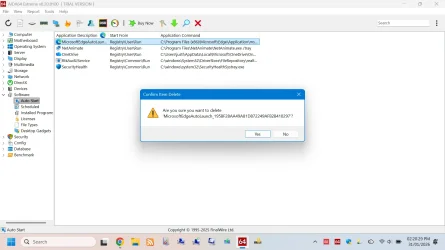
oh ye, i want windows 11 icons on programs too like aida64
1769869236256.webp

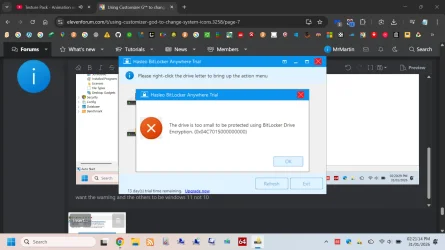
want the warning and the others to be windows 11 not 10
just like this on haleso bitlocer
1769869284967.webp
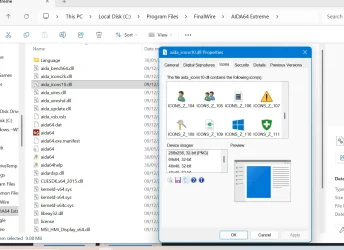
i got the dll here
1769869353044.webp

also want to do the same with office
want to do it in all my programs
 

My Computers

System One System Two

  • OS
    Windows 1125h2
    Computer type
    Laptop
    Manufacturer/Model
    HP
    CPU
    Intel(R) Pentium(R) Silver N5030 CPU @ 1.10GHz
    Motherboard
    HP 864D PCI express
    Memory
    4GB
    Graphics Card(s)
    Intel (UHD) Graphics 605
    Screen Resolution
    1920x1080
    Hard Drives
    2, A:, C:, D: (Note that A is not a hard disk)
    Cooling
    Hot
    Keyboard
    UK Keyboard layout
    Mouse
    No Mouse, compatble laptop
    Internet Speed
    500Kbps
    Browser
    Chrome
    Antivirus
    Windows Defender, Microsoft Defender
    Other Info
    Main PC
    I have 5 computers
  • Operating System
    Windows 11 24h2
    Computer type
    Laptop
    Manufacturer/Model
    DELL
    CPU
    Intel i5 processer
    Screen Resolution
    Random Screen resolution
    Hard Drives
    1 C:, cuz others are banned
    Cooling
    Fine
    Keyboard
    UK Keyboard layout
    Mouse
    Laptop mouse
    Internet Speed
    0.5Kbps
    Browser
    Edge
    Antivirus
    Windows Defender
    Other Info
    School Teacher PC

My Computers

System One System Two

  • OS
    Windows 11 Enterprise 25H2 26200 7462
    Computer type
    PC/Desktop
    Manufacturer/Model
    Custom Build
    CPU
    Intel XEON E5-2699 v3
    Motherboard
    ASUS X99-A
    Memory
    64GB Teamgroup UD4-3600
    Graphics Card(s)
    NVIDIA GeForce GTX 1080 Ti
    Sound Card
    Integrated
    Monitor(s) Displays
    ACER X34 Predator
    Screen Resolution
    3440 x 1440
    Hard Drives
    Crucial CT1000P 3P SSD8 1TB
    Crucial CT1000 BX500 SSD 1TB
    PSU
    GameMax Pro
    Case
    Fractal Design
    Cooling
    Corsair H110iGT + 6 140mm Fans
    Keyboard
    Corsair K4
    Mouse
    G-Skill G502
    Internet Speed
    300MBs
    Browser
    Chrome
    Antivirus
    OEM
    Other Info
    ASUS RT-AC87U Router
  • Operating System
    25H2 26200.5074
    Computer type
    Laptop
    Manufacturer/Model
    ASUS X555LA
    Memory
    8GB
    Browser
    Chrome
    Antivirus
    OEM

My Computers

System One System Two

  • OS
    Windows 1125h2
    Computer type
    Laptop
    Manufacturer/Model
    HP
    CPU
    Intel(R) Pentium(R) Silver N5030 CPU @ 1.10GHz
    Motherboard
    HP 864D PCI express
    Memory
    4GB
    Graphics Card(s)
    Intel (UHD) Graphics 605
    Screen Resolution
    1920x1080
    Hard Drives
    2, A:, C:, D: (Note that A is not a hard disk)
    Cooling
    Hot
    Keyboard
    UK Keyboard layout
    Mouse
    No Mouse, compatble laptop
    Internet Speed
    500Kbps
    Browser
    Chrome
    Antivirus
    Windows Defender, Microsoft Defender
    Other Info
    Main PC
    I have 5 computers
  • Operating System
    Windows 11 24h2
    Computer type
    Laptop
    Manufacturer/Model
    DELL
    CPU
    Intel i5 processer
    Screen Resolution
    Random Screen resolution
    Hard Drives
    1 C:, cuz others are banned
    Cooling
    Fine
    Keyboard
    UK Keyboard layout
    Mouse
    Laptop mouse
    Internet Speed
    0.5Kbps
    Browser
    Edge
    Antivirus
    Windows Defender
    Other Info
    School Teacher PC
Back
Top Bottom