- Local time
- 6:28 AM
- Posts
- 4,003
- OS
- Windows 11 Home 25H2
I have a 500gb ssd with my previous windows set up and files on. I had upgraded to a 1tb ssd a couple of years ago, clean installed (on a different laptop).
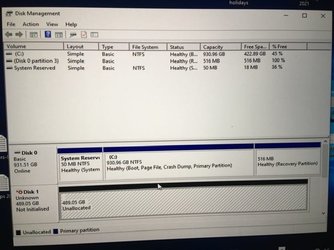
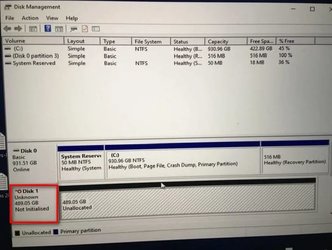
Kept the old 500gb one as additional file back ups. I now want to wipe the 500gb and use it as an external storage drive in a case. But it is not being recognised by windows. Other drives work in the case but not this one. At first I thought it was a dead drive, Bht just wondering if it’s something else (ie it has windows on from another computer). Any way I can check if it’s working and access contents? Don’t need the contents as I’m planning on wiping it but do need access to it to reformat it.
Kept the old 500gb one as additional file back ups. I now want to wipe the 500gb and use it as an external storage drive in a case. But it is not being recognised by windows. Other drives work in the case but not this one. At first I thought it was a dead drive, Bht just wondering if it’s something else (ie it has windows on from another computer). Any way I can check if it’s working and access contents? Don’t need the contents as I’m planning on wiping it but do need access to it to reformat it.
My Computers
-
At a glance
Windows 11 Home 25H2Core i5-1035G132gb- OS
- Windows 11 Home 25H2
- Computer type
- Laptop
- Manufacturer/Model
- HP Pavilion 14-ce3606sa
- CPU
- Core i5-1035G1
- Memory
- 32gb
- Hard Drives
- Samsung 870 evo sata ssd
- Cooling
- Could be better
- Internet Speed
- 50 mbps Starlink
- Browser
- Firefox
- Other Info
- Originally came installed with a 500gb H10 Optane ssd
-
At a glance
Windows 11 HomeIntel Core i5-1035G116gb- Operating System
- Windows 11 Home
- Computer type
- Laptop
- Manufacturer/Model
- HP Pavilion ce3606sa
- CPU
- Intel Core i5-1035G1
- Memory
- 16gb
- Hard Drives
- Hynix Gold P31 2TB
- Internet Speed
- 200mbps Starlink
- Browser
- Firefox
- Antivirus
- Defender