

amrmorsy
Member
- Local time
- 3:54 AM
- Posts
- 2
- OS
- Windows 11 Pro
Hi everyone,
I appreciate your help in advance.
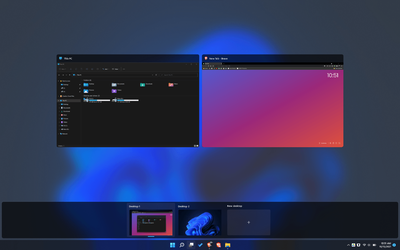
I am experiencing a weird bug or issue on my desktop (and this is completely aesthetic), when I press Tab + Windows Key, to get my open apps and virtual desktops, the app previews have extra blurred background real estate to the right of the app preview (please see screen shots below from my desktop versus my laptop).
Not sure how to fix this, its very annoying but I can Definity live with it if there is no fix.
I appreciate your help in advance.
I am experiencing a weird bug or issue on my desktop (and this is completely aesthetic), when I press Tab + Windows Key, to get my open apps and virtual desktops, the app previews have extra blurred background real estate to the right of the app preview (please see screen shots below from my desktop versus my laptop).
Not sure how to fix this, its very annoying but I can Definity live with it if there is no fix.
- Windows Build/Version
- Windows 11 Pro (21H2)
Attachments

My Computer
At a glance
Windows 11 Proi7-8700KG.Skill Trident Z (64GB - 3200Mhz)Asus ROG Strix GTX 1080 Ti
- OS
- Windows 11 Pro
- Computer type
- PC/Desktop
- Manufacturer/Model
- Custom Built
- CPU
- i7-8700K
- Motherboard
- Asus ROG Maximus X Hero (WiFi AC)
- Memory
- G.Skill Trident Z (64GB - 3200Mhz)
- Graphics Card(s)
- Asus ROG Strix GTX 1080 Ti
- Sound Card
- M-Audio 192|4
- Monitor(s) Displays
- LG 38 Curved Ultrawide
- Screen Resolution
- 3840x1600
- PSU
- Corsair RM850x
- Case
- Fractal Design - Meshify C
- Cooling
- Cryorig R1 Ultimate
- Keyboard
- Logitech G610
- Mouse
- Logitech MX Master 2s
- Internet Speed
- Gigabit Connection
- Browser
- Brave
- Antivirus
- Bitdefender






