

Oxygenolic
Member
- Local time
- 10:03 AM
- Posts
- 5
- OS
- Windows 11
Hello.
I don't know if anyone have experienced the same problem as me but overtime my Windows 11 volume UI stops working until I reboot my machine. The case goes like this:
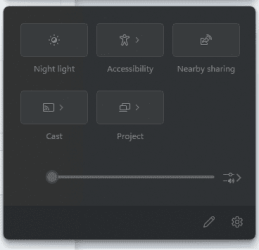
Here is the picture of the greyed out volume UI: (even the setting cog itself gets greyed out)
Thank you.
I don't know if anyone have experienced the same problem as me but overtime my Windows 11 volume UI stops working until I reboot my machine. The case goes like this:
- I have two different speakers, one is on my monitor and second is a headphone.
- Randomly, usually after my machine has not been rebooted for >1 week, when I try to switch between speaker using the volume UI from the tray, the UI gets unresponsive and I can't click on anything.
- If I click somewhere else that is not the UI, it will eventually closed and I can't even open it anymore using the tray icon.
- If I restart explorer.exe, I could open it again but this time every settings in there like night light, accessibility, cast, and the volume slider greyed out. The volume itself still works though, I just can't switch my speaker.
- Currently in order to fix this I just need to reboot my machine.
Here is the picture of the greyed out volume UI: (even the setting cog itself gets greyed out)
Thank you.
- Windows Build/Version
- 23H2 - 22631.3447
My Computer
At a glance
Windows 11Intel Core i5-9600K32GB GEIL DDR4 EVO X II PC24000Nvidia GeForce RTX 2060 Super
- OS
- Windows 11
- Computer type
- PC/Desktop
- Manufacturer/Model
- MSI
- CPU
- Intel Core i5-9600K
- Motherboard
- MSI Z390 Gaming Plus
- Memory
- 32GB GEIL DDR4 EVO X II PC24000
- Graphics Card(s)
- Nvidia GeForce RTX 2060 Super
- Monitor(s) Displays
- AIRO AIO27X
- Screen Resolution
- 2560 x 1440
- Hard Drives
- ADATA SX8200PRO 512GB
- PSU
- Seasonic Core Gold GC-650
- Case
- be quiet! Gaming Case PURE BASE 500 White
- Cooling
- CRYORIG H5 Universal
- Keyboard
- Akko 3098 EVA-01
- Mouse
- Fantech
- Internet Speed
- 300 Mpbs
- Browser
- Firefox
- Antivirus
- Win Defender






