Solved W11 Pro Upgraded from my W10


sparker01915

Well-known member
Local time
7:48 AM
Posts
30
OS
Windows 11 Pto
So as the title suggests. I upgraded my device awhile back from W10 Pro to W11 Pro using my existing W10 license. Everything seemed fine at the time, until recently I got a message that said W11 was not activated. I went into the activation part of Windows and it says it's activated. I look on the Desktop and now notice I have a Windows 11 Pro stamp there that was never there beforehand. Does this mean anything? Lately I've also been having random issues with my machine happen, such as when running a game on my gaming rig I am being told to check for enough memory?

I am not sure if there's an issue with the desktop but I am half tempted to roll back and re-install Windows 10 at this point. Not a good experience lately.

Thanks
 

My Computer My Computer

At a glance

Windows 11 Ptoi7 875016GB
OS
Windows 11 Pto
Computer type
Laptop
Manufacturer/Model
Dell Dimension G3 3779
CPU
i7 8750
Memory
16GB

My Computer My Computer

At a glance

Windows 10
OS
Windows 10
That 'stamp' is a watermark placed on the Desktop to show there may be limited usage until the activation issue is resolved.
 

My Computers My Computers

  • At a glance

    Win11 Pro RTM Version 24H2 Build 26100.4202Intel Core i5 11th Gen. 2.40GHz12GB
    OS
    Win11 Pro RTM Version 24H2 Build 26100.4202
    Computer type
    Laptop
    Manufacturer/Model
    Dell Vostro 3400
    CPU
    Intel Core i5 11th Gen. 2.40GHz
    Memory
    12GB
    Hard Drives
    256GB SSD NVMe M.2
  • At a glance

    Win11 Pro RTM Version 24H2 Build 26100.4202Intel Core i5 10th Gen. 2.90GHz16GBOnboard, no VGA, using a DisplayPort-to-VGA a...
    Operating System
    Win11 Pro RTM Version 24H2 Build 26100.4202
    Computer type
    PC/Desktop
    Manufacturer/Model
    Dell Vostro 5890
    CPU
    Intel Core i5 10th Gen. 2.90GHz
    Memory
    16GB
    Graphics card(s)
    Onboard, no VGA, using a DisplayPort-to-VGA adapter
    Monitor(s) Displays
    24" Dell
    Hard Drives
    512GB SSD NVMe, 4TB Seagate HDD
    Browser
    Firefox, Edge
    Antivirus
    Windows Defender/Microsoft Security

My Computers My Computers

  • At a glance

    Windows 11 Pro 25H2 26200.9457i9-10900 10 core 20 threads32 gbnone-Intel UHD Graphics 630
    OS
    Windows 11 Pro 25H2 26200.9457
    Computer type
    PC/Desktop
    Manufacturer/Model
    Dell Optiplex 7080
    CPU
    i9-10900 10 core 20 threads
    Motherboard
    DELL 0J37VM
    Memory
    32 gb
    Graphics Card(s)
    none-Intel UHD Graphics 630
    Sound Card
    Integrated Realtek
    Monitor(s) Displays
    Benq 27
    Screen Resolution
    2560x1440
    Hard Drives
    2x1tb Solidigm m.2 nvme /External drives 512gb Samsung m.2 sata+2tb Kingston m2.nvme
    PSU
    500w
    Case
    MT
    Cooling
    Dell Premium
    Keyboard
    Logitech wired
    Mouse
    Logitech wireless
    Internet Speed
    so slow I'm too embarrassed to tell
    Browser
    #1 Edge #2 Firefox
    Antivirus
    Defender+MWB Premium
  • At a glance

    Windows 11 Pro 24H2 26200.9457AMD Ryzen 7 6800U32 gbintegrated
    Operating System
    Windows 11 Pro 24H2 26200.9457
    Computer type
    PC/Desktop
    Manufacturer/Model
    Beelink Mini PC SER5
    CPU
    AMD Ryzen 7 6800U
    Memory
    32 gb
    Graphics card(s)
    integrated
    Sound Card
    integrated
    Monitor(s) Displays
    Benq 27
    Screen Resolution
    2560x1440
    Hard Drives
    1TB Crucial nvme
    Keyboard
    Logitech wired
    Mouse
    Logitech wireless
    Internet Speed
    still too embarrassed to tell
    Browser
    Firefox
    Antivirus
    Defender
  • System 3 is non compliant Dell 9020 i7-4770/24gb ram Win11 PRO 26200.9457
That 'stamp' is a watermark placed on the Desktop to show there may be limited usage until the activation issue is resolved.
This is not the case. There have not been activation watermarks for several years.

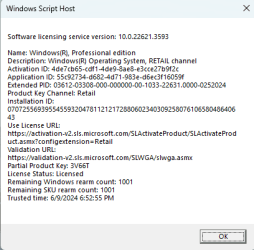
There is something else wrong. OP should run

slmgr /dlv

from an admin command prompt and tell us what it says after

product retail channel:
 

My Computer My Computer

At a glance

Windows 11 Pro + Win11 Canary VM.I9 13th gen i9-13900H 2.60 GHZ16 GB solderedIntegrated Intel Iris XE
OS
Windows 11 Pro + Win11 Canary VM.
Computer type
Laptop
Manufacturer/Model
ASUS Zenbook 14
CPU
I9 13th gen i9-13900H 2.60 GHZ
Motherboard
Yep, Laptop has one.
Memory
16 GB soldered
Graphics Card(s)
Integrated Intel Iris XE
Sound Card
Realtek built in
Monitor(s) Displays
laptop OLED screen
Screen Resolution
2880x1800 touchscreen
Hard Drives
1 TB NVME SSD (only weakness is only one slot)
PSU
Internal + 65W thunderbolt USB4 charger
Case
Yep, got one
Cooling
Stella Artois (UK pint cans - 568 ml) - extra cost.
Keyboard
Built in UK keybd
Mouse
Bluetooth , wireless dongled, wired
Internet Speed
900 mbs (ethernet), wifi 6 typical 350-450 mb/s both up and down
Browser
Edge
Antivirus
Defender
Other Info
TPM 2.0, 2xUSB4 thunderbolt, 1xUsb3 (usb a), 1xUsb-c, hdmi out, 3.5 mm audio out/in combo, ASUS backlit trackpad (inc. switchable number pad)

Macrium Reflect Home V8
Office 365 Family (6 users each 1TB onedrive space)
Hyper-V (a vm runs almost as fast as my older laptop)
This is not the case. There have not been activation watermarks for several years.

There is something else wrong. OP should run

slmgr /dlv

from an admin command prompt and tell us what it says after

product retail channel:
Screenshot 2024-06-09 185457.png
 

My Computer My Computer

At a glance

Windows 11 Ptoi7 875016GB
OS
Windows 11 Pto
Computer type
Laptop
Manufacturer/Model
Dell Dimension G3 3779
CPU
i7 8750
Memory
16GB
What is the result of Winver?

Screenshot 2024-06-09 181324.png
 

My Computers My Computers

  • At a glance

    Windows 11AMD Ryzen 7 3800XT32GBEVGA GeForce GTX 1080 Ti
    OS
    Windows 11
    Computer type
    PC/Desktop
    Manufacturer/Model
    Homebuilt
    CPU
    AMD Ryzen 7 3800XT
    Motherboard
    ASUS ROG Crosshair VII Hero (WiFi)
    Memory
    32GB
    Graphics Card(s)
    EVGA GeForce GTX 1080 Ti
  • At a glance

    Windows 11 EducationIntel i7-8550U32GBNvidia Geforce MX150
    Operating System
    Windows 11 Education
    Computer type
    Laptop
    Manufacturer/Model
    Dell Inspiron 7773
    CPU
    Intel i7-8550U
    Memory
    32GB
    Graphics card(s)
    Nvidia Geforce MX150
    Sound Card
    Realtek
    Monitor(s) Displays
    17"
    Screen Resolution
    1920 x 1080
    Hard Drives
    Toshiba 512GB NVMe SSD
    SK Hynix 512GB SATA SSD
    Internet Speed
    Fast!
I ended up just resetting my PC most of the things remained where they should and I just had to reinstall a few other apps. I did post another thread if you all want to assist on that thread

Thanks
 

My Computer My Computer

At a glance

Windows 11 Ptoi7 875016GB
OS
Windows 11 Pto
Computer type
Laptop
Manufacturer/Model
Dell Dimension G3 3779
CPU
i7 8750
Memory
16GB
Back
Top Bottom