Wanting to upgrade to AM5


GetTheClicker

Well-known member
Member
Local time
7:43 AM
Posts
122
OS
Windows 11
My AM4 build is starting to become nothing but issues lately. I am solving them left and right but it feels like I'm putting bandaids over a bullet hole. Like a car that got t-boned hard and repaired. Just doesn't drive the same. Y'know?

Anywho, I'm running a 5950x paired with an Aorus Master X570S.
64gigs neo trident Z 4000mhz xmp enabled.
7900xtx reference model.
4 NvMe drives
2 SSD drives.
Thermaltake 1050 watt.

What I need to know is what would be the AM5 equivalent when it comes to performance? What motherboard has 4 M.2 slots?
 
Last edited:

My Computer My Computer

At a glance

Windows 11AMD 5950X64gigs DDR4 4000mhz Neo TridentZRadeon 7900XTX
OS
Windows 11
Computer type
PC/Desktop
Manufacturer/Model
Aorus
CPU
AMD 5950X
Motherboard
Aorus X570S Master
Memory
64gigs DDR4 4000mhz Neo TridentZ
Graphics Card(s)
Radeon 7900XTX
Monitor(s) Displays
Dual 42" Insignia 1080p 55" TCL 6 series
Screen Resolution
3200x1800 / 3840x2160
Hard Drives
1 500gb NvMe Operating System Drive
3x 2TB NvMe
1 2tb SSD
1 500gb SSD
PSU
Lian Li Edge Serie - 1000W
Cooling
ARCTIC Liquid Freezer II 360
Browser
Chrome
Hi @GetTheClicker

What do you use your computer for? Is it general usage? What apps do you typically use and are you a gamer? If so which games do you run on the PC?
 

My Computers My Computers

  • At a glance

    Windows 11 Pro 26H2Intel Core i9 13900KCorsair Dominator Platinum 64gb 5600MT/s DDR5...Sapphire NITRO+ AMD Radeon RX 7900 XTX Vapor-...
    OS
    Windows 11 Pro 26H2
    Computer type
    PC/Desktop
    Manufacturer/Model
    Homebuilt
    CPU
    Intel Core i9 13900K
    Motherboard
    Asus ProArt Z790 Creator WiFi - Bios 3202
    Memory
    Corsair Dominator Platinum 64gb 5600MT/s DDR5 Dual Channel
    Graphics Card(s)
    Sapphire NITRO+ AMD Radeon RX 7900 XTX Vapor-X 24GB
    Sound Card
    External DAC: Cambridge Audio DACMagic200M - Headphone Amps: Topping L70 & SMSL H400
    Monitor(s) Displays
    Samsung S95F OLED 55" TV
    Screen Resolution
    3840 x 2160 120hz
    Hard Drives
    Samsung 980 Pro 2TB (OS)
    Samsung 980 Pro 1TB (Files)
    Lexar NZ790 4TB
    LaCie d2 Professional 6TB external - USB 3.1
    Seagate Expansion 16TB external - USB 3.2
    Seagate One Touch 18TB external HD - USB 3.0
    PSU
    Corsair RM1200x Shift
    Case
    Corsair RGB Smart Case 5000x (white)
    Cooling
    NAUTILUS 360 RS Liquid CPU Cooler
    Keyboard
    Incase Ergonomic USB (Microsoft clone)
    Mouse
    Logitech MX Master 3S
    Internet Speed
    Fibre 900/500 Mbps
    Browser
    Microsoft Edge Chromium
    Antivirus
    Bitdefender Total Security
    Other Info
    AMD Radeon Software & Drivers
    Hasleo Backup Suite
    Dashlane password manager
    Kensington Verimark fingerprint reader
    Logitech Brio 4K webcam
    Orico 10-port powered USB 3.0 hub
  • At a glance

    Windows 11 Pro 25H2Intel® Core™ i9-13900H32GB DDR4-3200 Dual channel*Intel Iris Xᵉ Graphics G7
    Operating System
    Windows 11 Pro 25H2
    Computer type
    Laptop
    Manufacturer/Model
    Asus Vivobook X1605VA
    CPU
    Intel® Core™ i9-13900H
    Motherboard
    Asus X1605VA bios 309
    Memory
    32GB DDR4-3200 Dual channel
    Graphics card(s)
    *Intel Iris Xᵉ Graphics G7
    Sound Card
    Realtek | Intel SST Bluetooth & USB
    Monitor(s) Displays
    16.0-inch, WUXGA 16:10 aspect ratio, IPS-level Panel
    Screen Resolution
    1920 x 1200 60hz
    Hard Drives
    512GB M.2 NVMe™ PCIe® 3.0 SSD
    Mouse
    Logitech MX Ergo Trackball
    Antivirus
    Bitdefender Total Security
    Other Info
    720p Webcam
    WiFi & USB to ethernet
Hi @GetTheClicker

What do you use your computer for? Is it general usage? What apps do you typically use and are you a gamer? If so which games do you run on the PC?
On a typical day I am running 3 screens all day.
One screen I watch movies or tv shows.
2nd screen I'm playing a game, typically Once Human or Stalker 2.
On the 3rd screen I'm monitoring temps or watching YouTube videos about where to find a secret weapon or car in the game im playing.

I do not stream or make content.
I tried to run a rereleased 5800x3d and the system kept crashing. It couldn't handle me and my habits I guess 😂
 

My Computer My Computer

At a glance

Windows 11AMD 5950X64gigs DDR4 4000mhz Neo TridentZRadeon 7900XTX
OS
Windows 11
Computer type
PC/Desktop
Manufacturer/Model
Aorus
CPU
AMD 5950X
Motherboard
Aorus X570S Master
Memory
64gigs DDR4 4000mhz Neo TridentZ
Graphics Card(s)
Radeon 7900XTX
Monitor(s) Displays
Dual 42" Insignia 1080p 55" TCL 6 series
Screen Resolution
3200x1800 / 3840x2160
Hard Drives
1 500gb NvMe Operating System Drive
3x 2TB NvMe
1 2tb SSD
1 500gb SSD
PSU
Lian Li Edge Serie - 1000W
Cooling
ARCTIC Liquid Freezer II 360
Browser
Chrome
I feel your pain, had a really dreadful year in 2026 with my desktop computer, had a major spectacular component failure. Lots of issues with Windows as well.

:(
 

My Computers My Computers

  • At a glance

    Windows 11 Pro 26H2Intel Core i9 13900KCorsair Dominator Platinum 64gb 5600MT/s DDR5...Sapphire NITRO+ AMD Radeon RX 7900 XTX Vapor-...
    OS
    Windows 11 Pro 26H2
    Computer type
    PC/Desktop
    Manufacturer/Model
    Homebuilt
    CPU
    Intel Core i9 13900K
    Motherboard
    Asus ProArt Z790 Creator WiFi - Bios 3202
    Memory
    Corsair Dominator Platinum 64gb 5600MT/s DDR5 Dual Channel
    Graphics Card(s)
    Sapphire NITRO+ AMD Radeon RX 7900 XTX Vapor-X 24GB
    Sound Card
    External DAC: Cambridge Audio DACMagic200M - Headphone Amps: Topping L70 & SMSL H400
    Monitor(s) Displays
    Samsung S95F OLED 55" TV
    Screen Resolution
    3840 x 2160 120hz
    Hard Drives
    Samsung 980 Pro 2TB (OS)
    Samsung 980 Pro 1TB (Files)
    Lexar NZ790 4TB
    LaCie d2 Professional 6TB external - USB 3.1
    Seagate Expansion 16TB external - USB 3.2
    Seagate One Touch 18TB external HD - USB 3.0
    PSU
    Corsair RM1200x Shift
    Case
    Corsair RGB Smart Case 5000x (white)
    Cooling
    NAUTILUS 360 RS Liquid CPU Cooler
    Keyboard
    Incase Ergonomic USB (Microsoft clone)
    Mouse
    Logitech MX Master 3S
    Internet Speed
    Fibre 900/500 Mbps
    Browser
    Microsoft Edge Chromium
    Antivirus
    Bitdefender Total Security
    Other Info
    AMD Radeon Software & Drivers
    Hasleo Backup Suite
    Dashlane password manager
    Kensington Verimark fingerprint reader
    Logitech Brio 4K webcam
    Orico 10-port powered USB 3.0 hub
  • At a glance

    Windows 11 Pro 25H2Intel® Core™ i9-13900H32GB DDR4-3200 Dual channel*Intel Iris Xᵉ Graphics G7
    Operating System
    Windows 11 Pro 25H2
    Computer type
    Laptop
    Manufacturer/Model
    Asus Vivobook X1605VA
    CPU
    Intel® Core™ i9-13900H
    Motherboard
    Asus X1605VA bios 309
    Memory
    32GB DDR4-3200 Dual channel
    Graphics card(s)
    *Intel Iris Xᵉ Graphics G7
    Sound Card
    Realtek | Intel SST Bluetooth & USB
    Monitor(s) Displays
    16.0-inch, WUXGA 16:10 aspect ratio, IPS-level Panel
    Screen Resolution
    1920 x 1200 60hz
    Hard Drives
    512GB M.2 NVMe™ PCIe® 3.0 SSD
    Mouse
    Logitech MX Ergo Trackball
    Antivirus
    Bitdefender Total Security
    Other Info
    720p Webcam
    WiFi & USB to ethernet
I feel your pain, had a really dreadful year in 2026 with my desktop computer, had a major spectacular component failure. Lots of issues with Windows as well.

:(
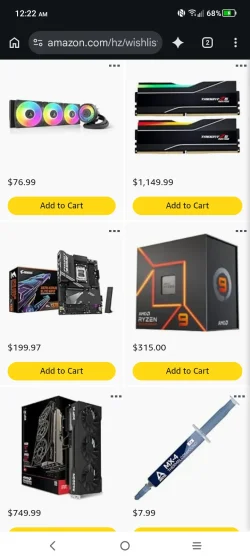
I was window shopping on Amazon and I was getting pretty excited about the upgrade until I saw the price of ram. I knew it was going to be high but not $1,200 high!
 

Attachments

  • Screenshot_20260825-002239.webp
    Screenshot_20260825-002239.webp
    63.9 KB · Views: 6

My Computer My Computer

At a glance

Windows 11AMD 5950X64gigs DDR4 4000mhz Neo TridentZRadeon 7900XTX
OS
Windows 11
Computer type
PC/Desktop
Manufacturer/Model
Aorus
CPU
AMD 5950X
Motherboard
Aorus X570S Master
Memory
64gigs DDR4 4000mhz Neo TridentZ
Graphics Card(s)
Radeon 7900XTX
Monitor(s) Displays
Dual 42" Insignia 1080p 55" TCL 6 series
Screen Resolution
3200x1800 / 3840x2160
Hard Drives
1 500gb NvMe Operating System Drive
3x 2TB NvMe
1 2tb SSD
1 500gb SSD
PSU
Lian Li Edge Serie - 1000W
Cooling
ARCTIC Liquid Freezer II 360
Browser
Chrome
You did not say how much of you old hardware you wanted to reuse in the new build. I'm not a hardware guru but from what I found, AM5 does not run the same CPUs or RAM as AM4. Per co-pilot,
  • AM4 supports Ryzen 1000 → 5000 series CPUs
  • Uses PGA (pins on the CPU)
  • AM5 supports Ryzen 7000, 9000, and newer CPUs
  • Uses LGA1718 (pins in the socket), so AM5 CPUs physically cannot fit in AM4 boards
Regarding ram, RAM is also completely incompatible between the two platforms.
  • AM4 = DDR4 only
  • AM5 = DDR5 only (no DDR4 support at all)
CPU coolers. AM5 keeps the same mounting hole spacing as AM4, so most AM4 coolers work on AM5 without new brackets.

So from what I can see, to go to AM5, the only hardware you can carry over would be GPU, NVMEs, PSU, and cooler. Many X670E boards have 4 M.2 slots, which matches your current Aorus Master X570S.

What I need to know is what would be the AM5 equivalent when it comes to performance? What motherboard has 4 M.2 slots? I would upgrade the CPU later down the road.
No you would have to upgrade the CPU for a rebuild to AM5.

Ryzen 9 7900​

This is the closest AM5 equivalent to your 5950X in real‑world workloads.

Why the 7900 is the “same performance” match​

  • 16 cores / 32 threads — same core count as your 5950X
  • Similar multi‑threaded throughput (within ~5–10%)
  • Better single‑thread performance due to Zen 4 IPC
  • Lower power draw than the 7950X
  • Much cheaper than the 7950X or 7950X3D
  • No gaming uplift needed because your 7900 XTX already maxes out GPU‑bound workloads

If you want “same performance,” the 7900 is the correct target.If you want “better,” then we move up to 7950X or 9950X — but that’s not what you asked.
 

My Computers My Computers

  • At a glance

    Windows 11 Pro 26H2 26300.9457i9-10900 10 core 20 threads32 gbnone-Intel UHD Graphics 630
    OS
    Windows 11 Pro 26H2 26300.9457
    Computer type
    PC/Desktop
    Manufacturer/Model
    Dell Optiplex 7080
    CPU
    i9-10900 10 core 20 threads
    Motherboard
    DELL 0J37VM
    Memory
    32 gb
    Graphics Card(s)
    none-Intel UHD Graphics 630
    Sound Card
    Integrated Realtek
    Monitor(s) Displays
    Benq 27
    Screen Resolution
    2560x1440
    Hard Drives
    2x1tb Solidigm m.2 nvme /External drives 512gb Samsung m.2 sata+2tb Kingston m2.nvme
    PSU
    500w
    Case
    MT
    Cooling
    Dell Premium
    Keyboard
    Logitech wired
    Mouse
    Logitech wireless
    Internet Speed
    so slow I'm too embarrassed to tell
    Browser
    #1 Edge #2 Firefox
    Antivirus
    Defender+MWB Premium
  • At a glance

    Windows 11 Pro 24H2 26200.9457AMD Ryzen 7 6800U32 gbintegrated
    Operating System
    Windows 11 Pro 24H2 26200.9457
    Computer type
    PC/Desktop
    Manufacturer/Model
    Beelink Mini PC SER5
    CPU
    AMD Ryzen 7 6800U
    Memory
    32 gb
    Graphics card(s)
    integrated
    Sound Card
    integrated
    Monitor(s) Displays
    Benq 27
    Screen Resolution
    2560x1440
    Hard Drives
    1TB Crucial nvme
    Keyboard
    Logitech wired
    Mouse
    Logitech wireless
    Internet Speed
    still too embarrassed to tell
    Browser
    Firefox
    Antivirus
    Defender
  • System 3 is non compliant Dell 9020 i7-4770/24gb ram Win11 PRO 26200.9457
The best overall AMD CPU is the AMD Ryzen 9 9950X3D for top-tier performance combining gaming and productivity, while the Ryzen 7 9800X3D is the best choice for pure gaming.

Ryzen 7 7800X3D remains a massive favorite in the community for offering near top-tier gaming performance at a reduced cost compared to newer generations.
 

My Computer My Computer

At a glance

Windows 11AMD Ryzen 7 5700GMicron Technology DDR4-3200 16GBNVIDIA GeForce RTX 3060
OS
Windows 11
Computer type
PC/Desktop
Manufacturer/Model
HP Pavilion
CPU
AMD Ryzen 7 5700G
Motherboard
Erica6
Memory
Micron Technology DDR4-3200 16GB
Graphics Card(s)
NVIDIA GeForce RTX 3060
Sound Card
Realtek ALC671
Monitor(s) Displays
Samsung SyncMaster U28E590
Screen Resolution
3840 x 2160
Hard Drives
SAMSUNG MZVLQ1T0HALB-000H1
You did not say how much of you old hardware you wanted to reuse in the new build. I'm not a hardware guru but from what I found, AM5 does not run the same CPUs or RAM as AM4. Per co-pilot,
  • AM4 supports Ryzen 1000 → 5000 series CPUs
  • Uses PGA (pins on the CPU)
  • AM5 supports Ryzen 7000, 9000, and newer CPUs
  • Uses LGA1718 (pins in the socket), so AM5 CPUs physically cannot fit in AM4 boards
Regarding ram, RAM is also completely incompatible between the two platforms.
  • AM4 = DDR4 only
  • AM5 = DDR5 only (no DDR4 support at all)
CPU coolers. AM5 keeps the same mounting hole spacing as AM4, so most AM4 coolers work on AM5 without new brackets.

So from what I can see, to go to AM5, the only hardware you can carry over would be GPU, NVMEs, PSU, and cooler. Many X670E boards have 4 M.2 slots, which matches your current Aorus Master X570S.


No you would have to upgrade the CPU for a rebuild to AM5.

Ryzen 9 7900​

This is the closest AM5 equivalent to your 5950X in real‑world workloads.

Why the 7900 is the “same performance” match​

  • 16 cores / 32 threads — same core count as your 5950X
  • Similar multi‑threaded throughput (within ~5–10%)
  • Better single‑thread performance due to Zen 4 IPC
  • Lower power draw than the 7950X
  • Much cheaper than the 7950X or 7950X3D
  • No gaming uplift needed because your 7900 XTX already maxes out GPU‑bound workloads

If you want “same performance,” the 7900 is the correct target.If you want “better,” then we move up to 7950X or 9950X — but that’s not what you asked.
I didn't word that correctly 😂 my fault. I know the CPUs are different I meant if I go AM5 I'd get a 5950x equivalent such as the 7900 but then later down the road upgrade to a 9950. I know the ram also isn't compatible, wish it was though. $1200 for ram is insane!

I was going to swap over my 7900xtx, storage drives, power supply, and Arctic II AIO.

In my shopping list up there I was looking at a 9070xt to have a backup GPU as suspect it might be time to have my 7900xtx serviced. I don't want my PC to be down while it is out.
 
Last edited:

My Computer My Computer

At a glance

Windows 11AMD 5950X64gigs DDR4 4000mhz Neo TridentZRadeon 7900XTX
OS
Windows 11
Computer type
PC/Desktop
Manufacturer/Model
Aorus
CPU
AMD 5950X
Motherboard
Aorus X570S Master
Memory
64gigs DDR4 4000mhz Neo TridentZ
Graphics Card(s)
Radeon 7900XTX
Monitor(s) Displays
Dual 42" Insignia 1080p 55" TCL 6 series
Screen Resolution
3200x1800 / 3840x2160
Hard Drives
1 500gb NvMe Operating System Drive
3x 2TB NvMe
1 2tb SSD
1 500gb SSD
PSU
Lian Li Edge Serie - 1000W
Cooling
ARCTIC Liquid Freezer II 360
Browser
Chrome
I was window shopping on Amazon and I was getting pretty excited about the upgrade until I saw the price of ram. I knew it was going to be high but not $1,200 high!
It's likely that you will be disappointed by an upgrade. The 5950X is a good processor, and the potential performance gains of DDR5 with high clock rates may not be much for many purposes.

It's possible that RAM prices will remain high for years, rather than months. But you can try for sympathy from an AI companion. :confused:
 

My Computers My Computers

  • At a glance

    Windows 11 26300.9278Amd Threadripper 7970X128GB (4 X 32) G.Skill DDR5 6400 (RDIMM)Gigabyte RTX 4090 OC
    OS
    Windows 11 26300.9278
    Computer type
    PC/Desktop
    Manufacturer/Model
    homebuilt
    CPU
    Amd Threadripper 7970X
    Motherboard
    Gigabyte TRX50 Aero D Rev. 1.0
    Memory
    128GB (4 X 32) G.Skill DDR5 6400 (RDIMM)
    Graphics Card(s)
    Gigabyte RTX 4090 OC
    Sound Card
    none (USB to speakers), Realtek
    Monitor(s) Displays
    Innocn 32" OLED
    Screen Resolution
    3840 X 2160 @ 60Hz
    Hard Drives
    Crucial T700 2TB M.2 NVME SSD
    WD 4TB Blue SATA SSD
    Seagate 18TB IronWolf Pro
    PSU
    BeQuiet! Straight Power 12 1500W
    Case
    Lian Li 011 Dynamic Evo XL
    Cooling
    SilverStone Technology XE360-TR5, with 3 Phanteks T30 fans
    Keyboard
    Cherry KC 500 MX LP (mechanical)
    Mouse
    Logitech M500s (wired)
    Internet Speed
    2000/250 Mbps (down/up)
    Other Info
    xFinity gateway
  • At a glance

    windows 11 26300.9278Intel I9-13900K64GB G.Skill DDR5-6000Gigabyte RTX 3090 ti
    Operating System
    windows 11 26300.9278
    Computer type
    PC/Desktop
    Manufacturer/Model
    homebuilt
    CPU
    Intel I9-13900K
    Motherboard
    Asus RoG Strix Z690-E
    Memory
    64GB G.Skill DDR5-6000
    Graphics card(s)
    Gigabyte RTX 3090 ti
    Sound Card
    built in Realtek
    Monitor(s) Displays
    Philips 27E1N8900 27" OLED
    Screen Resolution
    3840 X 2160 @60Hz
    Hard Drives
    WDC SN850 1TB
    8TB Seagate Ironwolf
    4TB Seagate Ironwolf
    PSU
    eVGA SuperNOVA 1300 GT
    Case
    Lian Li 011 Dynamic Evo
    Cooling
    Corsair iCUE H150i ELITE CAPELLIX Liquid CPU Cooler
    Keyboard
    Cherry Streaming (wired)
    Mouse
    Logitech M500s (wired)
I was window shopping on Amazon and I was getting pretty excited about the upgrade until I saw the price of ram. I knew it was going to be high but not $1,200 high!
Yeah, the prices are making computer upgrades a no-go for me. Lot's of people I think are re-thinking how much RAM they need. For awhile, people were over speccing on RAM because it was relatively cheap and they always wanted more than they had before. But like you noticed, $1,200 for 64GB of RAM is pretty eye-watering. Heck, you probably even though, well maybe I'll just bump up to 128GB, why not...especially if you hadn't been paying attention to price.

I think lots of people are now like, well the faster CPU and faster GPU will noticeably increase my game performance, maybe I can just stick with 32GB of RAM.
 

My Computers My Computers

  • At a glance

    Windows 11 ProIntel Core i5-8279u32GB DDR4 2666MhzIntel Iris Plus 655
    OS
    Windows 11 Pro
    Computer type
    PC/Desktop
    Manufacturer/Model
    Beelink SEI8
    CPU
    Intel Core i5-8279u
    Motherboard
    AZW SEI
    Memory
    32GB DDR4 2666Mhz
    Graphics Card(s)
    Intel Iris Plus 655
    Sound Card
    Intel SST
    Monitor(s) Displays
    Asus ProArt PA278QV
    Screen Resolution
    2560x1440
    Hard Drives
    512GB NVMe
    PSU
    NA
    Case
    NA
    Cooling
    NA
    Keyboard
    NA
    Mouse
    NA
    Internet Speed
    500/50
    Browser
    Edge
    Antivirus
    Defender
    Other Info
    Mini PC used for testing Windows 11.
  • At a glance

    Windows 10 ProRyzen 9 5900x64GB DDR4-3600EVGA GeForce 3080 FT3 Ultra
    Operating System
    Windows 10 Pro
    Computer type
    PC/Desktop
    Manufacturer/Model
    Custom
    CPU
    Ryzen 9 5900x
    Motherboard
    Asus Rog Strix X570-E Gaming
    Memory
    64GB DDR4-3600
    Graphics card(s)
    EVGA GeForce 3080 FT3 Ultra
    Sound Card
    Onboard
    Monitor(s) Displays
    ASUS TUF Gaming VG27AQ. ASUS ProArt Display PA278QV 27” WQHD
    Screen Resolution
    2560x1440
    Hard Drives
    2TB WD SN850 PCI-E Gen 4 NVMe
    2TB Sandisk Ultra 2.5" SATA SSD
    PSU
    Seasonic Focus 850
    Case
    Fractal Meshify S2 in White
    Cooling
    Dark Rock Pro CPU cooler, 3 x 140mm case fans
    Keyboard
    Corsiar K65 RGB Lux
    Mouse
    Logitech G9 Laser Mouse
    Internet Speed
    500/50
    Browser
    Chrome
    Antivirus
    Defender.
Yeah, the prices are making computer upgrades a no-go for me. Lot's of people I think are re-thinking how much RAM they need. For awhile, people were over speccing on RAM because it was relatively cheap and they always wanted more than they had before. But like you noticed, $1,200 for 64GB of RAM is pretty eye-watering. Heck, you probably even though, well maybe I'll just bump up to 128GB, why not...especially if you hadn't been paying attention to price.

I think lots of people are now like, well the faster CPU and faster GPU will noticeably increase my game performance, maybe I can just stick with 32GB of RAM.
On a typical day I'm already using 30-40% of my 64gb. I'm afraid if I drop down to 32gb I won't have near as much headroom. I could afford the CPU and Motherboard on a good pay day but that ram, holy crap, that's like tax income season. Might have to have the wife pop out another kid for the extra income credit bump. :lmao:
 

My Computer My Computer

At a glance

Windows 11AMD 5950X64gigs DDR4 4000mhz Neo TridentZRadeon 7900XTX
OS
Windows 11
Computer type
PC/Desktop
Manufacturer/Model
Aorus
CPU
AMD 5950X
Motherboard
Aorus X570S Master
Memory
64gigs DDR4 4000mhz Neo TridentZ
Graphics Card(s)
Radeon 7900XTX
Monitor(s) Displays
Dual 42" Insignia 1080p 55" TCL 6 series
Screen Resolution
3200x1800 / 3840x2160
Hard Drives
1 500gb NvMe Operating System Drive
3x 2TB NvMe
1 2tb SSD
1 500gb SSD
PSU
Lian Li Edge Serie - 1000W
Cooling
ARCTIC Liquid Freezer II 360
Browser
Chrome
On a typical day I'm already using 30-40% of my 64gb. I'm afraid if I drop down to 32gb I won't have near as much headroom. I could afford the CPU and Motherboard on a good pay day but that ram, holy crap, that's like tax income season. Might have to have the wife pop out another kid for the extra income credit bump. :lmao:
Well, keep in mind that if memory is available, Windows is going to try to use it. I have 64GB on my work laptop and i'm sitting at 42% utilization just running a few small tasks. It's in your best interest to have as much in RAM as possible and ready to go. But Windows will free up that RAM in the event that something else really needs it..

In the case of my setup, it shows 25.4GB of memory in use. However, 16.4GB of that is cached. Anything cached is proactively read off the data drive and put into memory as Windows thinks it may be needed and it will be way faster from RAM than any storage drive you may have. And Windows will free that cached RAM instantly in the event that something comes along with actually needs it. Therefore, I am really only using 9GB of my 64GB of RAM. That's only 14% used.

So, a casual glance at my system might indicate that I am also using 40%+ of my RAM. But in actuality, it's really closer to 15%.
 

My Computers My Computers

  • At a glance

    Windows 11 ProIntel Core i5-8279u32GB DDR4 2666MhzIntel Iris Plus 655
    OS
    Windows 11 Pro
    Computer type
    PC/Desktop
    Manufacturer/Model
    Beelink SEI8
    CPU
    Intel Core i5-8279u
    Motherboard
    AZW SEI
    Memory
    32GB DDR4 2666Mhz
    Graphics Card(s)
    Intel Iris Plus 655
    Sound Card
    Intel SST
    Monitor(s) Displays
    Asus ProArt PA278QV
    Screen Resolution
    2560x1440
    Hard Drives
    512GB NVMe
    PSU
    NA
    Case
    NA
    Cooling
    NA
    Keyboard
    NA
    Mouse
    NA
    Internet Speed
    500/50
    Browser
    Edge
    Antivirus
    Defender
    Other Info
    Mini PC used for testing Windows 11.
  • At a glance

    Windows 10 ProRyzen 9 5900x64GB DDR4-3600EVGA GeForce 3080 FT3 Ultra
    Operating System
    Windows 10 Pro
    Computer type
    PC/Desktop
    Manufacturer/Model
    Custom
    CPU
    Ryzen 9 5900x
    Motherboard
    Asus Rog Strix X570-E Gaming
    Memory
    64GB DDR4-3600
    Graphics card(s)
    EVGA GeForce 3080 FT3 Ultra
    Sound Card
    Onboard
    Monitor(s) Displays
    ASUS TUF Gaming VG27AQ. ASUS ProArt Display PA278QV 27” WQHD
    Screen Resolution
    2560x1440
    Hard Drives
    2TB WD SN850 PCI-E Gen 4 NVMe
    2TB Sandisk Ultra 2.5" SATA SSD
    PSU
    Seasonic Focus 850
    Case
    Fractal Meshify S2 in White
    Cooling
    Dark Rock Pro CPU cooler, 3 x 140mm case fans
    Keyboard
    Corsiar K65 RGB Lux
    Mouse
    Logitech G9 Laser Mouse
    Internet Speed
    500/50
    Browser
    Chrome
    Antivirus
    Defender.
I tried to run a rereleased 5800x3d and the system kept crashing. It couldn't handle me and my habits I guess 😂
Thats a very strong cpu still, and the 5700 equivalent I am running is as well.

It should have definitely handled what your doing just fine. Something else is going on there. You dont need an upgrade to AM5.

You need to figure out whats wrong with your system. I am guessing a failing nvme or something.

What resolution are you playing at?

When it was crashing what was happening? How was it crashing?
 

My Computers My Computers

  • At a glance

    Windows 11 ProRyzen 7 5700 X3D64 GB DDR4 3600mhz Gskill Ripjaws VRTX 4070 Super , 12GB VRAM Asus EVO Overclock
    OS
    Windows 11 Pro
    Computer type
    PC/Desktop
    Manufacturer/Model
    Custom Built
    CPU
    Ryzen 7 5700 X3D
    Motherboard
    MSI MPG B550 GAMING PLUS
    Memory
    64 GB DDR4 3600mhz Gskill Ripjaws V
    Graphics Card(s)
    RTX 4070 Super , 12GB VRAM Asus EVO Overclock
    Monitor(s) Displays
    Gigabyte M27Q (rev. 2.0) 2560 x 1440 @ 170hz HDR
    Hard Drives
    2TB Samsung nvme ssd
    4TB Western Digital nvme ssd
    PSU
    CORSAIR RMx SHIFT Series™ RM750x 80 PLUS Gold Fully Modular ATX Power Supply
    Case
    CORSAIR 3500X ARGB Mid-Tower ATX PC Case – Black
    Cooling
    ID-COOLING FROSTFLOW X 240 CPU Water Cooler
    Keyboard
    Logitech G213
    Mouse
    Logitech G203
    Internet Speed
    1.2gbps Fiber 😎
  • At a glance

    Chrome OSIntel Pentium Quad Core4GB LPDDR4
    Operating System
    Chrome OS
    Computer type
    Laptop
    Manufacturer/Model
    HP Chromebook
    CPU
    Intel Pentium Quad Core
    Memory
    4GB LPDDR4
    Monitor(s) Displays
    14 Inch HD SVA anti glare micro edge display
    Hard Drives
    64 GB emmc
Thats a very strong cpu still, and the 5700 equivalent I am running is as well.

It should have definitely handled what your doing just fine. Something else is going on there. You dont need an upgrade to AM5.

You need to figure out whats wrong with your system. I am guessing a failing nvme or something.

What resolution are you playing at?

When it was crashing what was happening? How was it crashing?
Audio pops at random which I thought I solved but only managed to make them a lot less frequent tweaking with power settings within windows and the bios.

I run 2 screens at 3200x1800 60hz with the main 3rd screen at 3840x2160 144hz. Games are set at 3840 x 2160 144hz.

If I set my min/max processor power to 100% I will get hard reboots at idle with event viewer showing hardware errors on different cores. Most commonly 0, 1, and 2. Setting min/max to 99% and I'm good. Right now I'm testing 5% min / 100% max with Processor Boost mode set to Efficient Enabled. It seems to be running stable. Scratch that, it hard rebooted again. WHEA Fatal Hardware Error Cache Heirarchy Error Processor APIC ID: 1. Dialing it back to 99% max.

My 7900xtx is having trouble running some games even with fresh drivers. It's bad with Stalker 2. Kernell and NTLL errors.
Once Human has become very stuttery and lags hard when you first start the game. It never used to do that.
The most concerning issue is my gpu temps run in the 80's but the hotspot will reach 105c at the same time causing the card to throttle down. I can solve that by setting the default fan curve to a more aggressive scale. Temps will now be 78c gpu and 98c hotspot. Memory temps are around 96c sometimes 100c. If the computer crashes or the GPU crashes those fan settings revert to default and I have to reload my custom fan curve.

Crystal Disk says all my drives are good with my C: Drive at 86% with 11,583 hours on it while D, E, F, G, and H are 96% and above.

I just replaced the PSU because it was dropping power to my GPU, it was only 8 months old. LianLi Edge 1000 Gold. That took a minute to solve.
A few months ago my original 5950x died, it wasn't giving me the same problems this replacement 5950x is. It worked flawlessy until one day it didn't work at all. Pretty sure this one didn't win the silicon lottery.

The worst thing about all of this is I can't get any of these remaining issues to fail on command. It's 100% random now.
I normally upgrade every 3 years. Never had this kind of trouble but here I am in year 4 with the same hardware.
 
Last edited:

My Computer My Computer

At a glance

Windows 11AMD 5950X64gigs DDR4 4000mhz Neo TridentZRadeon 7900XTX
OS
Windows 11
Computer type
PC/Desktop
Manufacturer/Model
Aorus
CPU
AMD 5950X
Motherboard
Aorus X570S Master
Memory
64gigs DDR4 4000mhz Neo TridentZ
Graphics Card(s)
Radeon 7900XTX
Monitor(s) Displays
Dual 42" Insignia 1080p 55" TCL 6 series
Screen Resolution
3200x1800 / 3840x2160
Hard Drives
1 500gb NvMe Operating System Drive
3x 2TB NvMe
1 2tb SSD
1 500gb SSD
PSU
Lian Li Edge Serie - 1000W
Cooling
ARCTIC Liquid Freezer II 360
Browser
Chrome

Latest Support Threads

Back
Top Bottom