Solved Was hoping to figure this out myself but no joy!!!.........


rdburke

Well-known member
VIP
Local time
7:29 PM
Posts
114
Location
Boiling Springs, South Carolina USA
OS
Windows 11 Pro 26H1 (Build 28000.2269)
I leave my desktop on 24/7, just turn off the monitor when I leave it. For quite some time I have had the issue of random restarts......I say restarts but all I know is the Login Screen is there. I log in, no problem. I have all the settings in Windows turned off or on that prevent Hibernation, Sleep, or Automatic Restart. I am positive. I have checked the Event Logs in Event Viewer but can't seem to find the culprit. Can anyone help me find out what is causing this? It happens on all Insider Builds and Release Builds as well so I am guessing it may be hardware related????? Thank you in advance......😊
 
Windows Build/Version
22H2 Build 22621.755

My Computers My Computers

  • At a glance

    Windows 11 Pro 26H1 (Build 28000.2269)AMD FX 8350 8 Core Processor, 4400 Mhz (Overc...24.0 GBAMD Radeon HD 7570 2GB
    OS
    Windows 11 Pro 26H1 (Build 28000.2269)
    Computer type
    PC/Desktop
    Manufacturer/Model
    ASUS Case
    CPU
    AMD FX 8350 8 Core Processor, 4400 Mhz (Overclocked)
    Motherboard
    M5A78L-M/USB3
    Memory
    24.0 GB
    Graphics Card(s)
    AMD Radeon HD 7570 2GB
    Sound Card
    AMD High Definition Audio Device
    Monitor(s) Displays
    Acer 27" SA240Y LED
    Screen Resolution
    1920x1080 Resolution
    Hard Drives
    Samsung SSD 860 EVO 500GB ATA Device
    WD My Book 25EE 4TB USB
    Toshiba External 3.0 TB USB
    PSU
    Corsair RM750x
    Case
    Custom Spider 6000S
    Cooling
    Modded
    Keyboard
    Logitech K360
    Mouse
    Logitech M325
    Internet Speed
    AT&T 1GB Fiber
    Browser
    MS Edge
    Antivirus
    MS Windows Security
  • At a glance

    Windows 11 Pro 22H2 (Build 22631.3810)AMD A6 Vision8GB
    Operating System
    Windows 11 Pro 22H2 (Build 22631.3810)
    Computer type
    Laptop
    Manufacturer/Model
    Toshiba Satellite Pro
    CPU
    AMD A6 Vision
    Memory
    8GB
    Sound Card
    AMD High Definition Audio Device
    Monitor(s) Displays
    Built In
    Hard Drives
    Samsung SSD 860 EVO 500GB ATA Device
    Internet Speed
    AT&T Gigabit Fiber
    Browser
    Google Chrome
    Antivirus
    Windows Defender
I leave my desktop on 24/7, just turn off the monitor when I leave it. For quite some time I have had the issue of random restarts......I say restarts but all I know is the Login Screen is there. I log in, no problem. I have all the settings in Windows turned off or on that prevent Hibernation, Sleep, or Automatic Restart. I am positive. I have checked the Event Logs in Event Viewer but can't seem to find the culprit. Can anyone help me find out what is causing this? It happens on all Insider Builds and Release Builds as well so I am guessing it may be hardware related????? Thank you in advance......😊


I have my computer set to turn off the display after 5 minutes.
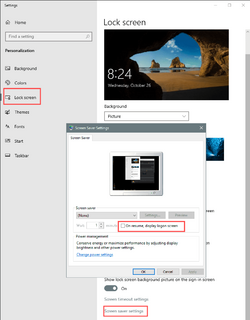
I also, for security reasons, would have this box check marked in the screen saver settings.

It might be that you have the box checked... if so, uncheck it.

This is a Win 10 pic... bit Win 11 has this as well...

Image1.png


There's also this. It has two options. Turn off Display or Turn off display and lock computer.
It may be something concerning this...


My Computers My Computers

  • At a glance

    Win 11 Home ♦♦♦26200.8655 ♦♦♦♦♦♦♦25H2AMD Ryzen 7 3700XG.Skill (F4-3200C14D-16GTZKW)EVGA RTX 2070 (08G-P4-2171-KR)
    OS
    Win 11 Home ♦♦♦26200.8655 ♦♦♦♦♦♦♦25H2
    Computer type
    PC/Desktop
    Manufacturer/Model
    Built by Ghot® [May 2020]
    CPU
    AMD Ryzen 7 3700X
    Motherboard
    Asus Pro WS X570-ACE (BIOS 5302)
    Memory
    G.Skill (F4-3200C14D-16GTZKW)
    Graphics Card(s)
    EVGA RTX 2070 (08G-P4-2171-KR)
    Sound Card
    Realtek ALC1220P / ALC S1220A
    Monitor(s) Displays
    Dell U3011 30"
    Screen Resolution
    2560 x 1600
    Hard Drives
    2x Samsung 860 EVO 500GB,
    WD 4TB Black FZBX - SATA III,
    WD 8TB Black FZBX - SATA III,
    DRW-24B1ST CD/DVD Burner
    PSU
    PC Power & Cooling 750W Quad EPS12V
    Case
    Cooler Master ATCS 840 Tower
    Cooling
    CM Hyper 212 EVO (push/pull)
    Keyboard
    Ducky DK9008 Shine II Blue LED
    Mouse
    Logitech Optical M-100
    Internet Speed
    300/300
    Browser
    Firefox (latest)
    Antivirus
    Bitdefender Total Security
    Other Info
    Speakers: Klipsch Pro Media 2.1
  • At a glance

    Windows XP Pro 32bit w/SP3AMD Athlon 64 X2 5000+ (OC'd @ 3.2Ghz)TWIN2X2048-6400C4DHX (2 x 1GB, DDR2 800)EVGA 256-P2-N758-TR GeForce 8600GT SSC
    Operating System
    Windows XP Pro 32bit w/SP3
    Computer type
    PC/Desktop
    Manufacturer/Model
    Built by Ghot® (not in use)
    CPU
    AMD Athlon 64 X2 5000+ (OC'd @ 3.2Ghz)
    Motherboard
    ASUS M2N32-SLI Deluxe Wireless Edition
    Memory
    TWIN2X2048-6400C4DHX (2 x 1GB, DDR2 800)
    Graphics card(s)
    EVGA 256-P2-N758-TR GeForce 8600GT SSC
    Sound Card
    Onboard
    Monitor(s) Displays
    ViewSonic G90FB Black 19" Professional (CRT)
    Screen Resolution
    up to 2048 x 1536
    Hard Drives
    WD 36GB 10,000rpm Raptor SATA
    Seagate 80GB 7200rpm SATA
    Lite-On LTR-52246S CD/RW
    Lite-On LH-18A1P CD/DVD Burner
    PSU
    PC Power & Cooling Silencer 750 Quad EPS12V
    Case
    Generic Beige case, 80mm fans
    Cooling
    ZALMAN 9500A 92mm CPU Cooler
    Keyboard
    Logitech Classic Keybooard 200
    Mouse
    Logitech Optical M-BT96a
    Internet Speed
    300/300
    Browser
    Firefox 3.x ??
    Antivirus
    Symantec (Norton)
    Other Info
    Still assembled, still runs. Haven't turned it on for 15 years?
There may be one more setting involved, I'd look in the BIOS for the Wake on LAN and Disable it. Could be something coming in from the Internet or Router doing it.
 

My Computers My Computers

  • At a glance

    Win11 Pro RTM Version 24H2 Build 26100.4202Intel Core i5 11th Gen. 2.40GHz12GB
    OS
    Win11 Pro RTM Version 24H2 Build 26100.4202
    Computer type
    Laptop
    Manufacturer/Model
    Dell Vostro 3400
    CPU
    Intel Core i5 11th Gen. 2.40GHz
    Memory
    12GB
    Hard Drives
    256GB SSD NVMe M.2
  • At a glance

    Win11 Pro RTM Version 24H2 Build 26100.4202Intel Core i5 10th Gen. 2.90GHz16GBOnboard, no VGA, using a DisplayPort-to-VGA a...
    Operating System
    Win11 Pro RTM Version 24H2 Build 26100.4202
    Computer type
    PC/Desktop
    Manufacturer/Model
    Dell Vostro 5890
    CPU
    Intel Core i5 10th Gen. 2.90GHz
    Memory
    16GB
    Graphics card(s)
    Onboard, no VGA, using a DisplayPort-to-VGA adapter
    Monitor(s) Displays
    24" Dell
    Hard Drives
    512GB SSD NVMe, 4TB Seagate HDD
    Browser
    Firefox, Edge
    Antivirus
    Windows Defender/Microsoft Security
There may be one more setting involved, I'd look in the BIOS for the Wake on LAN and Disable it. Could be something coming in from the Internet or Router doing it.
I have checked and double checked the settings and I have everything set to stay on, No Wake on LAN, do not go to sleep, Hibernate or Suspend. My screen is set to stay on and no screensaver.
 

My Computers My Computers

  • At a glance

    Windows 11 Pro 26H1 (Build 28000.2269)AMD FX 8350 8 Core Processor, 4400 Mhz (Overc...24.0 GBAMD Radeon HD 7570 2GB
    OS
    Windows 11 Pro 26H1 (Build 28000.2269)
    Computer type
    PC/Desktop
    Manufacturer/Model
    ASUS Case
    CPU
    AMD FX 8350 8 Core Processor, 4400 Mhz (Overclocked)
    Motherboard
    M5A78L-M/USB3
    Memory
    24.0 GB
    Graphics Card(s)
    AMD Radeon HD 7570 2GB
    Sound Card
    AMD High Definition Audio Device
    Monitor(s) Displays
    Acer 27" SA240Y LED
    Screen Resolution
    1920x1080 Resolution
    Hard Drives
    Samsung SSD 860 EVO 500GB ATA Device
    WD My Book 25EE 4TB USB
    Toshiba External 3.0 TB USB
    PSU
    Corsair RM750x
    Case
    Custom Spider 6000S
    Cooling
    Modded
    Keyboard
    Logitech K360
    Mouse
    Logitech M325
    Internet Speed
    AT&T 1GB Fiber
    Browser
    MS Edge
    Antivirus
    MS Windows Security
  • At a glance

    Windows 11 Pro 22H2 (Build 22631.3810)AMD A6 Vision8GB
    Operating System
    Windows 11 Pro 22H2 (Build 22631.3810)
    Computer type
    Laptop
    Manufacturer/Model
    Toshiba Satellite Pro
    CPU
    AMD A6 Vision
    Memory
    8GB
    Sound Card
    AMD High Definition Audio Device
    Monitor(s) Displays
    Built In
    Hard Drives
    Samsung SSD 860 EVO 500GB ATA Device
    Internet Speed
    AT&T Gigabit Fiber
    Browser
    Google Chrome
    Antivirus
    Windows Defender
Try running this from the command line and see what your system uptime is like

systeminfo |findstr "Time"
 

My Computers My Computers

  • At a glance

    Windows 11 ProIntel Core i5-8279u32GB DDR4 2666MhzIntel Iris Plus 655
    OS
    Windows 11 Pro
    Computer type
    PC/Desktop
    Manufacturer/Model
    Beelink SEI8
    CPU
    Intel Core i5-8279u
    Motherboard
    AZW SEI
    Memory
    32GB DDR4 2666Mhz
    Graphics Card(s)
    Intel Iris Plus 655
    Sound Card
    Intel SST
    Monitor(s) Displays
    Asus ProArt PA278QV
    Screen Resolution
    2560x1440
    Hard Drives
    512GB NVMe
    PSU
    NA
    Case
    NA
    Cooling
    NA
    Keyboard
    NA
    Mouse
    NA
    Internet Speed
    500/50
    Browser
    Edge
    Antivirus
    Defender
    Other Info
    Mini PC used for testing Windows 11.
  • At a glance

    Windows 10 ProRyzen 9 5900x64GB DDR4-3600EVGA GeForce 3080 FT3 Ultra
    Operating System
    Windows 10 Pro
    Computer type
    PC/Desktop
    Manufacturer/Model
    Custom
    CPU
    Ryzen 9 5900x
    Motherboard
    Asus Rog Strix X570-E Gaming
    Memory
    64GB DDR4-3600
    Graphics card(s)
    EVGA GeForce 3080 FT3 Ultra
    Sound Card
    Onboard
    Monitor(s) Displays
    ASUS TUF Gaming VG27AQ. ASUS ProArt Display PA278QV 27” WQHD
    Screen Resolution
    2560x1440
    Hard Drives
    2TB WD SN850 PCI-E Gen 4 NVMe
    2TB Sandisk Ultra 2.5" SATA SSD
    PSU
    Seasonic Focus 850
    Case
    Fractal Meshify S2 in White
    Cooling
    Dark Rock Pro CPU cooler, 3 x 140mm case fans
    Keyboard
    Corsiar K65 RGB Lux
    Mouse
    Logitech G9 Laser Mouse
    Internet Speed
    500/50
    Browser
    Chrome
    Antivirus
    Defender.
Windows update rebooting to install updates?
 

My Computer My Computer

At a glance

Windows 11Ryzen 9 5900X16GB DDR4RTX 3070
OS
Windows 11
Computer type
PC/Desktop
Manufacturer/Model
Stormforce Prism RTX 3070
CPU
Ryzen 9 5900X
Motherboard
Asus AMD TUF Gaming X570-Plus ATX Motherboard – Aura Sync RGB
Memory
16GB DDR4
Graphics Card(s)
RTX 3070
Monitor(s) Displays
2 x Samsung U32H850UMU 32 inch 4K
Screen Resolution
3840x2160
Hard Drives
1 x M2.2
1x M2.1
5 x HDD
Cooling
Cooler Master 120L AIO Watercooler
Keyboard
Rii wireless
Mouse
Generic cable
Internet Speed
320Mbps
Browser
Firefox & Chrome
Antivirus
Norton

My Computers My Computers

  • At a glance

    Windows 11 Pro 26H1 (Build 28000.2269)AMD FX 8350 8 Core Processor, 4400 Mhz (Overc...24.0 GBAMD Radeon HD 7570 2GB
    OS
    Windows 11 Pro 26H1 (Build 28000.2269)
    Computer type
    PC/Desktop
    Manufacturer/Model
    ASUS Case
    CPU
    AMD FX 8350 8 Core Processor, 4400 Mhz (Overclocked)
    Motherboard
    M5A78L-M/USB3
    Memory
    24.0 GB
    Graphics Card(s)
    AMD Radeon HD 7570 2GB
    Sound Card
    AMD High Definition Audio Device
    Monitor(s) Displays
    Acer 27" SA240Y LED
    Screen Resolution
    1920x1080 Resolution
    Hard Drives
    Samsung SSD 860 EVO 500GB ATA Device
    WD My Book 25EE 4TB USB
    Toshiba External 3.0 TB USB
    PSU
    Corsair RM750x
    Case
    Custom Spider 6000S
    Cooling
    Modded
    Keyboard
    Logitech K360
    Mouse
    Logitech M325
    Internet Speed
    AT&T 1GB Fiber
    Browser
    MS Edge
    Antivirus
    MS Windows Security
  • At a glance

    Windows 11 Pro 22H2 (Build 22631.3810)AMD A6 Vision8GB
    Operating System
    Windows 11 Pro 22H2 (Build 22631.3810)
    Computer type
    Laptop
    Manufacturer/Model
    Toshiba Satellite Pro
    CPU
    AMD A6 Vision
    Memory
    8GB
    Sound Card
    AMD High Definition Audio Device
    Monitor(s) Displays
    Built In
    Hard Drives
    Samsung SSD 860 EVO 500GB ATA Device
    Internet Speed
    AT&T Gigabit Fiber
    Browser
    Google Chrome
    Antivirus
    Windows Defender
Try running this from the command line and see what your system uptime is like

systeminfo |findstr "Time"
Thanks but that only tells me when it was restarted, not what caused it.........
 

My Computers My Computers

  • At a glance

    Windows 11 Pro 26H1 (Build 28000.2269)AMD FX 8350 8 Core Processor, 4400 Mhz (Overc...24.0 GBAMD Radeon HD 7570 2GB
    OS
    Windows 11 Pro 26H1 (Build 28000.2269)
    Computer type
    PC/Desktop
    Manufacturer/Model
    ASUS Case
    CPU
    AMD FX 8350 8 Core Processor, 4400 Mhz (Overclocked)
    Motherboard
    M5A78L-M/USB3
    Memory
    24.0 GB
    Graphics Card(s)
    AMD Radeon HD 7570 2GB
    Sound Card
    AMD High Definition Audio Device
    Monitor(s) Displays
    Acer 27" SA240Y LED
    Screen Resolution
    1920x1080 Resolution
    Hard Drives
    Samsung SSD 860 EVO 500GB ATA Device
    WD My Book 25EE 4TB USB
    Toshiba External 3.0 TB USB
    PSU
    Corsair RM750x
    Case
    Custom Spider 6000S
    Cooling
    Modded
    Keyboard
    Logitech K360
    Mouse
    Logitech M325
    Internet Speed
    AT&T 1GB Fiber
    Browser
    MS Edge
    Antivirus
    MS Windows Security
  • At a glance

    Windows 11 Pro 22H2 (Build 22631.3810)AMD A6 Vision8GB
    Operating System
    Windows 11 Pro 22H2 (Build 22631.3810)
    Computer type
    Laptop
    Manufacturer/Model
    Toshiba Satellite Pro
    CPU
    AMD A6 Vision
    Memory
    8GB
    Sound Card
    AMD High Definition Audio Device
    Monitor(s) Displays
    Built In
    Hard Drives
    Samsung SSD 860 EVO 500GB ATA Device
    Internet Speed
    AT&T Gigabit Fiber
    Browser
    Google Chrome
    Antivirus
    Windows Defender
If you know when happens, check system logs to find out any issue. Right-click on the This PC icon, select Manage to open Computer Management. Then go to the logs section. Most probably Windows Update. If you go to Settings, Windows Update, Advanced, there is a switch to notify you when a restart is needed. Independently of this, Windows Update will restart anyway after work hours. All you have to do is extend work hours so you are back home to see it before it happens. I also leave my PC on, so I know.
 

My Computers My Computers

  • At a glance

    Windows 11 Pro 23H2 (5699), 25H2 (8655)Mobile DualCore Intel Core 2 Duo T7250, 2000 MHz4GBMobile Intel(R) GMA 4500M (Mobile 4 series)
    OS
    Windows 11 Pro 23H2 (5699), 25H2 (8655)
    Computer type
    Laptop
    Manufacturer/Model
    Acer Extensa 5630EZ
    CPU
    Mobile DualCore Intel Core 2 Duo T7250, 2000 MHz
    Motherboard
    Acer Extensa 5630
    Memory
    4GB
    Graphics Card(s)
    Mobile Intel(R) GMA 4500M (Mobile 4 series)
    Sound Card
    Realtek ALC268 @ Intel 82801IB ICH9 - High Definition Audio Controller
    Monitor(s) Displays
    1
    Screen Resolution
    1280x800
    Hard Drives
    Samsung SSD 850 EVO 250GB SATA Device (250 GB, SATA-III)
    Internet Speed
    VDSL 50 Mbps
    Browser
    MICROSOFT EDGE
    Antivirus
    WINDOWS DEFENDER
    Other Info
    Legacy MBR installation, no TPM, no Secure Boot, no WDDM 2.0 graphics drivers, no SSE4.2, cannot get more unsupported ;) This is only my test laptop. I had installed Windows 11 here before upgrading my main PC. For my main PC I use everyday see my 2nd system specs.
  • At a glance

    Windows 11 Pro v25H2 (build 26200.8655)Intel Core-i7 3770 3.40GHz s1155 (3rd generat...2x Kingston Hyper-X Blu 8GB DDR3-1600GIGABYTE GeForce RTX 3050 WINDFORCE OC V2 6GB...
    Operating System
    Windows 11 Pro v25H2 (build 26200.8655)
    Computer type
    PC/Desktop
    Manufacturer/Model
    Custom-built PC
    CPU
    Intel Core-i7 3770 3.40GHz s1155 (3rd generation)
    Motherboard
    Asus P8H61 s1155 ATX
    Memory
    2x Kingston Hyper-X Blu 8GB DDR3-1600
    Graphics card(s)
    GIGABYTE GeForce RTX 3050 WINDFORCE OC V2 6GB (GV-N3050WF2OCV2-6GD)
    Sound Card
    Realtek HD audio (ALC887)
    Monitor(s) Displays
    Sony Bravia KDL-19L4000 19" LCD TV via VGA
    Screen Resolution
    1440x900 32-bit 60Hz
    Hard Drives
    WD Blue SA510 2.5 1000GB SSD as system disk, Western Digital Caviar Purple 4TB SATA III (WD40PURZ) as second
    PSU
    Thermaltake Litepower RGB 550W Full Wired
    Case
    SUPERCASE MIDI-TOWER
    Cooling
    Deepcool Gamma Archer CPU cooler, 1x 8cm fan at the back
    Keyboard
    Mitsumi 101-key PS/2
    Mouse
    Sunnyline OptiEye PS/2
    Internet Speed
    100Mbps
    Browser
    Microsoft Edge, Mozilla Firefox
    Antivirus
    Microsoft Windows Defender
    Other Info
    Legacy BIOS (MBR) installation, no TPM, no Secure Boot, WDDM 3.0 graphics drivers, WEI score 7.4
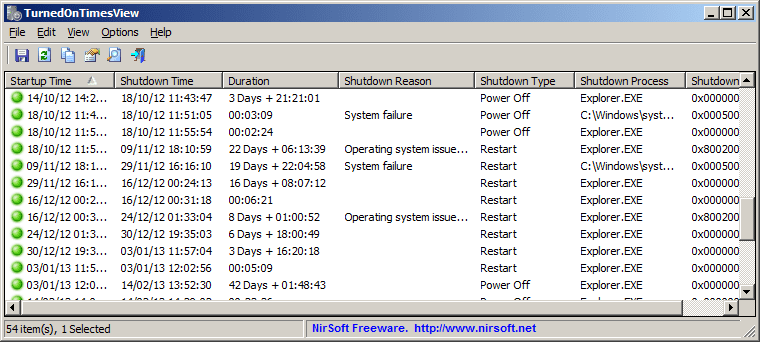
NirSoft's TurnedOnTimesView tool can summarize if your PC was really restarted, or just waking after a sleep period.

turnedontimesview.png
 

My Computer My Computer

At a glance

Windows 7
OS
Windows 7
If there is an update and designated work time expires, Windows will restart automatically to install the update, even if you have switched on the warning that a restart is needed. It doesn't ask. By default, work hours are from 8:00 to 17:00 (if I remember correctly). I changed that from 7:00 to 0:00 to make sure I get notified in advance before an automatic restart.
 

My Computers My Computers

  • At a glance

    Windows 11 Pro 23H2 (5699), 25H2 (8655)Mobile DualCore Intel Core 2 Duo T7250, 2000 MHz4GBMobile Intel(R) GMA 4500M (Mobile 4 series)
    OS
    Windows 11 Pro 23H2 (5699), 25H2 (8655)
    Computer type
    Laptop
    Manufacturer/Model
    Acer Extensa 5630EZ
    CPU
    Mobile DualCore Intel Core 2 Duo T7250, 2000 MHz
    Motherboard
    Acer Extensa 5630
    Memory
    4GB
    Graphics Card(s)
    Mobile Intel(R) GMA 4500M (Mobile 4 series)
    Sound Card
    Realtek ALC268 @ Intel 82801IB ICH9 - High Definition Audio Controller
    Monitor(s) Displays
    1
    Screen Resolution
    1280x800
    Hard Drives
    Samsung SSD 850 EVO 250GB SATA Device (250 GB, SATA-III)
    Internet Speed
    VDSL 50 Mbps
    Browser
    MICROSOFT EDGE
    Antivirus
    WINDOWS DEFENDER
    Other Info
    Legacy MBR installation, no TPM, no Secure Boot, no WDDM 2.0 graphics drivers, no SSE4.2, cannot get more unsupported ;) This is only my test laptop. I had installed Windows 11 here before upgrading my main PC. For my main PC I use everyday see my 2nd system specs.
  • At a glance

    Windows 11 Pro v25H2 (build 26200.8655)Intel Core-i7 3770 3.40GHz s1155 (3rd generat...2x Kingston Hyper-X Blu 8GB DDR3-1600GIGABYTE GeForce RTX 3050 WINDFORCE OC V2 6GB...
    Operating System
    Windows 11 Pro v25H2 (build 26200.8655)
    Computer type
    PC/Desktop
    Manufacturer/Model
    Custom-built PC
    CPU
    Intel Core-i7 3770 3.40GHz s1155 (3rd generation)
    Motherboard
    Asus P8H61 s1155 ATX
    Memory
    2x Kingston Hyper-X Blu 8GB DDR3-1600
    Graphics card(s)
    GIGABYTE GeForce RTX 3050 WINDFORCE OC V2 6GB (GV-N3050WF2OCV2-6GD)
    Sound Card
    Realtek HD audio (ALC887)
    Monitor(s) Displays
    Sony Bravia KDL-19L4000 19" LCD TV via VGA
    Screen Resolution
    1440x900 32-bit 60Hz
    Hard Drives
    WD Blue SA510 2.5 1000GB SSD as system disk, Western Digital Caviar Purple 4TB SATA III (WD40PURZ) as second
    PSU
    Thermaltake Litepower RGB 550W Full Wired
    Case
    SUPERCASE MIDI-TOWER
    Cooling
    Deepcool Gamma Archer CPU cooler, 1x 8cm fan at the back
    Keyboard
    Mitsumi 101-key PS/2
    Mouse
    Sunnyline OptiEye PS/2
    Internet Speed
    100Mbps
    Browser
    Microsoft Edge, Mozilla Firefox
    Antivirus
    Microsoft Windows Defender
    Other Info
    Legacy BIOS (MBR) installation, no TPM, no Secure Boot, WDDM 3.0 graphics drivers, WEI score 7.4
Back
Top Bottom