Solved Web Browser Issues. Web Browsers not working but internet is working.


JessBethE

Member
Local time
11:41 AM
Posts
8
OS
Windows 11
When i put my computer to sleep and come back later my web browers are not working. I usually get the error message "connection inturupted". My internet is working though and the connection is strong. i can use other apps like Teams, just not to web browsers.(edge, chrome, firefox all not working). i have to restart my computer multiple times before it works. I have been dealing with ASUS all day but they dont seem to know up from down. I am a student and not having working browsers has been very detrimental to me.
I have an ASUS VivoBook and its only a couple years old.

I am not great with computer stuff but can follow directions good.

Please help me.
 
Windows Build/Version
windows 11/Version 24H2 (OS Build 26100.2314)

My Computer My Computer

At a glance

Windows 11AMD Ryzen 7 5700U qith Radeon Graphics8.0 GB
OS
Windows 11
Computer type
Laptop
Manufacturer/Model
ASUS
CPU
AMD Ryzen 7 5700U qith Radeon Graphics
Motherboard
TP420UA. Version 1.0 Manufacturer ASUSTeK Computer INC.
Memory
8.0 GB
Hi JessBethE
Please download AdwCleaner by Xplode and save to your Desktop.
  • Right click on AdwCleaner.exe to run as Administrator.
  • Click on the Scan button.
  • After the scan has finished, click on the Report button...a logfile (AdwCleaner[R#].txt) will open in Notepad for review (where the largest value of # represents the most recent report).
  • The contents of the log file may be confusing. Unless you see a program name that you know should not be removed, don't worry about it. If you see an entry you want to keep, let me know about it.
  • Copy and paste the contents of that logfile in your next reply.
  • A copy of all logfiles are saved in the C:\AdwCleaner folder which was created when running the tool.
 

My Computers My Computers

  • At a glance

    Windows 11 Home 25H2 26200.8655AMD Ryzen 3 5300G8gbRadeon Graphics 4.00GHZ
    OS
    Windows 11 Home 25H2 26200.8655
    Computer type
    PC/Desktop
    Manufacturer/Model
    HP Pavilion TP01-2xxx
    CPU
    AMD Ryzen 3 5300G
    Memory
    8gb
    Graphics Card(s)
    Radeon Graphics 4.00GHZ
    Monitor(s) Displays
    ViewSonic
    Keyboard
    HP
    Mouse
    wireless Microsoft
    Browser
    FireFox
    Antivirus
    Avira
  • At a glance

    Updated Windows 10 to 11 25H2 26200.8655Intel Core i3 8100 @3.60 GHz8.GBIntel UHD 360 (HP)
    Operating System
    Updated Windows 10 to 11 25H2 26200.8655
    Computer type
    PC/Desktop
    Manufacturer/Model
    HP
    CPU
    Intel Core i3 8100 @3.60 GHz
    Motherboard
    HP 8653 (U3E1)
    Memory
    8.GB
    Graphics card(s)
    Intel UHD 360 (HP)
    Sound Card
    Realtek High Def
    Monitor(s) Displays
    ViewSonic
    Other Info
    #3 System: HP laptop Windows 25H2 11Pro 26200.8524
please check in settings > network and internet > WiFi (if a wireless connection) 'or' > Ethernet (if a ethernet connection)
then
click manage known networks > click 'your network that is connected'
then
within this window at the bottom is
DNS assignment .. click this

click the drop down menu and set to manual
enable IPv4 and try these settings

Preferred DNS
1.1.1.1

Alternative DNS
1.0.0.1

click save settings at the bottom and then try your internet connection.

best of luck, Steve ..
 

My Computers My Computers

  • At a glance

    Debian 13 KDE .. Windows 11 HomeRyzen 7 5825u64GB DDR4 3200Ryzen 7 5825u
    OS
    Debian 13 KDE .. Windows 11 Home
    Computer type
    PC/Desktop
    Manufacturer/Model
    HP 24" AiO
    CPU
    Ryzen 7 5825u
    Motherboard
    HP
    Memory
    64GB DDR4 3200
    Graphics Card(s)
    Ryzen 7 5825u
    Sound Card
    RealTek
    Monitor(s) Displays
    24" HP AiO
    Screen Resolution
    1920 x 1080 @60 Hz
    Hard Drives
    1TB WD Blue SN580 M2 SSD Partitioned.
    2x 1TB USB HDD External Backup/Storage.
    PSU
    90W external power brick
    Case
    24" All in One
    Cooling
    Default Air Cooling
    Keyboard
    HP WiFi UK extended
    Mouse
    HP WiFi 3 Button
    Internet Speed
    1GB full fibre
    Browser
    Edge & Firefox
    Antivirus
    AVG Internet Security/Windows Defender
    Other Info
    Mainly Open Source Software
  • At a glance

    Ubuntu 22.04.5 LTSi5 7200u16GB DDR4Intel
    Operating System
    Ubuntu 22.04.5 LTS
    Computer type
    Laptop
    Manufacturer/Model
    Dell 13" Latitude 2017
    CPU
    i5 7200u
    Motherboard
    Dell
    Memory
    16GB DDR4
    Graphics card(s)
    Intel
    Sound Card
    Intel
    Monitor(s) Displays
    13" Dell Laptop
    Hard Drives
    250GB Crucial 2.5" SSD
    Mouse
    Generic WiFi 3 button
    Internet Speed
    WiFi only
    Browser
    Firefox
    Antivirus
    ClamAV TK
    Other Info
    Mainly Open Source Software
@JessBethE
I have a similar VivoBook..., I'm going to try a few things.
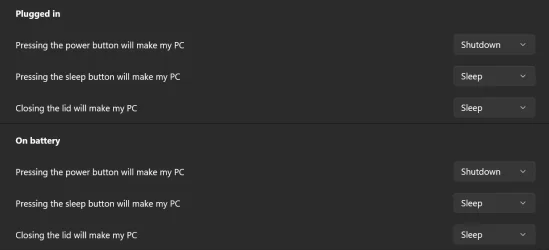
How are you putting the machine to sleep, with a button, closing the lid, or other?
 

My Computers My Computers

  • At a glance

    Windows 11 Pro
    OS
    Windows 11 Pro
    Computer type
    PC/Desktop
    Manufacturer/Model
    ASUS ROG Strix
  • At a glance

    Windows 11 Pro
    Operating System
    Windows 11 Pro
    Computer type
    Laptop
    Manufacturer/Model
    ASUS VivoBook
  • ASUS VivoBook 'Lite' ~ Windows 11 Home
@XxXxX This seemed to help right now. I was unable to download what @Jacee recomended but after your suggestion I was able to. @Jacee it is downloading now.
@Edwin, I hold the window icon key and hit L on my keyboard. Then close my laptop
 

My Computer My Computer

At a glance

Windows 11AMD Ryzen 7 5700U qith Radeon Graphics8.0 GB
OS
Windows 11
Computer type
Laptop
Manufacturer/Model
ASUS
CPU
AMD Ryzen 7 5700U qith Radeon Graphics
Motherboard
TP420UA. Version 1.0 Manufacturer ASUSTeK Computer INC.
Memory
8.0 GB
@Jacee I dont get a note with that name. What I get is AdwCleaner[S01].txt. It says I should do a Basic Repair?
1736379982710.webp
 

My Computer My Computer

At a glance

Windows 11AMD Ryzen 7 5700U qith Radeon Graphics8.0 GB
OS
Windows 11
Computer type
Laptop
Manufacturer/Model
ASUS
CPU
AMD Ryzen 7 5700U qith Radeon Graphics
Motherboard
TP420UA. Version 1.0 Manufacturer ASUSTeK Computer INC.
Memory
8.0 GB

My Computers My Computers

  • At a glance

    Windows 11 Pro
    OS
    Windows 11 Pro
    Computer type
    PC/Desktop
    Manufacturer/Model
    ASUS ROG Strix
  • At a glance

    Windows 11 Pro
    Operating System
    Windows 11 Pro
    Computer type
    Laptop
    Manufacturer/Model
    ASUS VivoBook
  • ASUS VivoBook 'Lite' ~ Windows 11 Home

My Computer My Computer

At a glance

Windows 11AMD Ryzen 7 5700U qith Radeon Graphics8.0 GB
OS
Windows 11
Computer type
Laptop
Manufacturer/Model
ASUS
CPU
AMD Ryzen 7 5700U qith Radeon Graphics
Motherboard
TP420UA. Version 1.0 Manufacturer ASUSTeK Computer INC.
Memory
8.0 GB
You could try and flush your DNS cache to refresh settings to see if it helps?


My Computers My Computers

  • At a glance

    Windows 11 Pro 25H2 Build 26200.8655Intel(R) Core(TM) i7-4770K CPU @ 3.50GHz32.0 GB of I forget and the box is in storage.Gigabyte nVidia GeForce GTX 1660 Super OC 6GB
    OS
    Windows 11 Pro 25H2 Build 26200.8655
    Computer type
    PC/Desktop
    Manufacturer/Model
    Sin-built 2013
    CPU
    Intel(R) Core(TM) i7-4770K CPU @ 3.50GHz
    Motherboard
    ASUS ROG Maximus VI Formula
    Memory
    32.0 GB of I forget and the box is in storage.
    Graphics Card(s)
    Gigabyte nVidia GeForce GTX 1660 Super OC 6GB
    Sound Card
    ROG SupremeFX Formula 8-Channel High Definition Audio
    Monitor(s) Displays
    5 x LG 25MS500-B - 1 x 24MK430H-B - 1 x Wacom Pro 22" Touch Screen Tablet
    Screen Resolution
    All over the place
    Hard Drives
    Too many to list. OS on Samsung 1TB 870 QVO SATA
    PSU
    Silverstone 1500
    Case
    NZXT Phantom 820 Full-Tower Case
    Cooling
    Noctua NH-D15 Elite Class Dual Tower CPU Cooler / 6 x EziDIY 120mm / 2 x Corsair 140mm somethings / 1 x 140mm Thermaltake something / 2 x 200mm Corsair.
    Keyboard
    Corsair K95 / Logitech diNovo Edge Wireless
    Mouse
    Logitech: G402 / G502 / Mx Masters / Mx Air Cordless
    Internet Speed
    2000/500Mbps
    Browser
    All sorts
    Antivirus
    Kaspersky Premium
    Other Info
    ㅤㅤㅤㅤㅤㅤㅤㅤㅤㅤㅤㅤㅤㅤㅤㅤㅤㅤㅤㅤㅤㅤㅤㅤㅤㅤㅤㅤㅤㅤㅤㅤㅤㅤㅤㅤㅤㅤㅤㅤ⠀⠀⠀⠀⠀⠀⠀⠀⠀⠀
    TP-Link BE9300 WiFi 7 Bluetooth 5.4 (Archer TBE550E)
    TP-Link TX201 V1 2.5GB Lan

    Grandstream HT812 - VoIP
    ASUS DSL-AX82U - Mesh
    ASUS RT-AC68U - Mesh
    ASUS RT-BE88U Router

    Brother MFC-L2880DW Printer

    I’m on a horse.
  • At a glance

    Windows 11 Pro 25H2 Build 26200.8655 (Wifes)13th Generation Intel® Core™ i5-1340P Process...16GB LPDDR5-52001x Intel® Iris® Xe Graphics
    Operating System
    Windows 11 Pro 25H2 Build 26200.8655 (Wifes)
    Computer type
    Laptop
    Manufacturer/Model
    LENOVO Yoga 7 14IRL8 - Type 82YL
    CPU
    13th Generation Intel® Core™ i5-1340P Processor(Core™ i5-1340P)
    Memory
    16GB LPDDR5-5200
    Graphics card(s)
    1x Intel® Iris® Xe Graphics
    Sound Card
    Optimized with Dolby Atmos®
    Screen Resolution
    QHD 2880 x 1800 OLED
    Hard Drives
    M.2 512 GB SSD PCIe
    Mouse
    Logiteck MX Master 3S
    Internet Speed
    2000/500
    Antivirus
    Defender / Malwarebytes
    Other Info
    …still on a horse.


    Wireless Network: Wi-Fi 6E 2x2 AX; Bluetooth® 5.1 or above
    Ports: 1x 1 Novo button; 2 in 1 Audio Combo jack; Micro SD Card Reader; HDMI 1.4b; 2 x USB Type-C (TBT4)
    USB 3.2 Gen 2 DP 1.4a
    PD 3.0); 1 x USB 3.2 Gen1 Type A
    Camera
    1x 1080P FHD IR/RGB Hybrid with Privacy Shutter and Dual Array Microphone
    Graphics
    1x Intel® Iris® Xe Graphics
    Monitor
    14" WUXGA
    Form Factor
    Convertible Notebook
  • Windows 11 Pro 25H2 Build 26200.8655 (Wifes)

    Yoga 7 2-in-1 14IML9 - Type 83DJ

    Processor: Intel® Core™ Ultra 7 155H Processor(Core™ Ultra 7 155H)

    Memory: 32GB LPD5X-7467

    Hard Drive: 1 TB SSD PCIe

    Wireless Network: 1x Wi-Fi 6E 2x2 AX; Bluetooth® 5.1 or above

    Ports: 1 x HDMI 2.1 TMDS; 1 x Novo Button; 1 x Combo Audio Jack
    2 x USB-C (USB 4.0)
    1 x USB-A 3.2 Gen 1

    Camera: 1080P FHD IR Hybrid with Dual Microphone

    Graphics: Intel® Arc™ Graphics

    Monitor: 14" 2.8K

    ...Where's my horse?
@Edwin Go to sleep
I'm trying to, but you keep bugging me!!! :zany:

Just kiddin!!! :-)

I tried a bunch of scenarios with the power settings/lid, etc..., I didn't notice anything strange.
Probably not a VivoBook thing..., maybe a browser issue, or Windows security, or maybe even a bios thing! 🤷‍♂️
Sorry I couldn't be of any help..., I'll keep an eye on the thread though...
 

My Computers My Computers

  • At a glance

    Windows 11 Pro
    OS
    Windows 11 Pro
    Computer type
    PC/Desktop
    Manufacturer/Model
    ASUS ROG Strix
  • At a glance

    Windows 11 Pro
    Operating System
    Windows 11 Pro
    Computer type
    Laptop
    Manufacturer/Model
    ASUS VivoBook
  • ASUS VivoBook 'Lite' ~ Windows 11 Home

My Computers My Computers

  • At a glance

    Windows 11 Home 25H2 26200.8655AMD Ryzen 3 5300G8gbRadeon Graphics 4.00GHZ
    OS
    Windows 11 Home 25H2 26200.8655
    Computer type
    PC/Desktop
    Manufacturer/Model
    HP Pavilion TP01-2xxx
    CPU
    AMD Ryzen 3 5300G
    Memory
    8gb
    Graphics Card(s)
    Radeon Graphics 4.00GHZ
    Monitor(s) Displays
    ViewSonic
    Keyboard
    HP
    Mouse
    wireless Microsoft
    Browser
    FireFox
    Antivirus
    Avira
  • At a glance

    Updated Windows 10 to 11 25H2 26200.8655Intel Core i3 8100 @3.60 GHz8.GBIntel UHD 360 (HP)
    Operating System
    Updated Windows 10 to 11 25H2 26200.8655
    Computer type
    PC/Desktop
    Manufacturer/Model
    HP
    CPU
    Intel Core i3 8100 @3.60 GHz
    Motherboard
    HP 8653 (U3E1)
    Memory
    8.GB
    Graphics card(s)
    Intel UHD 360 (HP)
    Sound Card
    Realtek High Def
    Monitor(s) Displays
    ViewSonic
    Other Info
    #3 System: HP laptop Windows 25H2 11Pro 26200.8524
@XxXxX This seemed to help right now. I was unable to download what @Jacee recomended but after your suggestion I was able to. @Jacee it is downloading now.
@Edwin, I hold the window icon key and hit L on my keyboard. Then close my laptop
using the same above you can also set IPv6 to manual as well using these DNS addressing

Preferred DNS
2606:4700:4700::1111

Alternative DNS
2606:4700:4700::1001

windows will auto convert IPv6 to IPv4 if and when required

just as an aside.
i use an installed DNS proxy resolving and caching server for my systems.

set to do all DNS requests using DoH (DNS over HTTPS) for cloudflare DNS servers.
best of luck, Steve ..
 

My Computers My Computers

  • At a glance

    Debian 13 KDE .. Windows 11 HomeRyzen 7 5825u64GB DDR4 3200Ryzen 7 5825u
    OS
    Debian 13 KDE .. Windows 11 Home
    Computer type
    PC/Desktop
    Manufacturer/Model
    HP 24" AiO
    CPU
    Ryzen 7 5825u
    Motherboard
    HP
    Memory
    64GB DDR4 3200
    Graphics Card(s)
    Ryzen 7 5825u
    Sound Card
    RealTek
    Monitor(s) Displays
    24" HP AiO
    Screen Resolution
    1920 x 1080 @60 Hz
    Hard Drives
    1TB WD Blue SN580 M2 SSD Partitioned.
    2x 1TB USB HDD External Backup/Storage.
    PSU
    90W external power brick
    Case
    24" All in One
    Cooling
    Default Air Cooling
    Keyboard
    HP WiFi UK extended
    Mouse
    HP WiFi 3 Button
    Internet Speed
    1GB full fibre
    Browser
    Edge & Firefox
    Antivirus
    AVG Internet Security/Windows Defender
    Other Info
    Mainly Open Source Software
  • At a glance

    Ubuntu 22.04.5 LTSi5 7200u16GB DDR4Intel
    Operating System
    Ubuntu 22.04.5 LTS
    Computer type
    Laptop
    Manufacturer/Model
    Dell 13" Latitude 2017
    CPU
    i5 7200u
    Motherboard
    Dell
    Memory
    16GB DDR4
    Graphics card(s)
    Intel
    Sound Card
    Intel
    Monitor(s) Displays
    13" Dell Laptop
    Hard Drives
    250GB Crucial 2.5" SSD
    Mouse
    Generic WiFi 3 button
    Internet Speed
    WiFi only
    Browser
    Firefox
    Antivirus
    ClamAV TK
    Other Info
    Mainly Open Source Software
Did your PC ship with any pre-installed security software that wasn't provided by Microsoft (McAfee, Norton, Kaspersky, etc.)? "Connection interrupted" sounds like a security app intercepting your web sessions (regardless of browser), and blocking them. It might have a different rule which allows Teams, OneDrive and non-browsers to access the Internet.

If you've been working with ASUS support, ask them how to disable the security software so that MS Defender is the only product running. Some other security apps sometimes get "twitchy" and block access when they shouldn't.
 

My Computer My Computer

At a glance

Windows 7
OS
Windows 7
Your laptop does not sleep. It goes into modern standby. I think your issue has something to do with modern standby transitions.
Quote:
The user scenarios that require network connectivity in Modern Standby are Wake on Remote Desktop and receiving notifications from UWP apps. To maintain connectivity for these scenarios, the system will allow network activity during sleep if the user has enabled Remote Desktop or enabled any UWP app that has background tasks requiring network to always run in the background. Otherwise the system will quiesce network activity during sleep, while providing instant connectivity upon resume.

reference Modern standby- network connectivity

Here's another one
 

My Computers My Computers

  • At a glance

    Windows 11 Pro 25H2 26200.8655i9-10900 10 core 20 threads32 gbnone-Intel UHD Graphics 630
    OS
    Windows 11 Pro 25H2 26200.8655
    Computer type
    PC/Desktop
    Manufacturer/Model
    Dell Optiplex 7080
    CPU
    i9-10900 10 core 20 threads
    Motherboard
    DELL 0J37VM
    Memory
    32 gb
    Graphics Card(s)
    none-Intel UHD Graphics 630
    Sound Card
    Integrated Realtek
    Monitor(s) Displays
    Benq 27
    Screen Resolution
    2560x1440
    Hard Drives
    2x1tb Solidigm m.2 nvme /External drives 512gb Samsung m.2 sata+2tb Kingston m2.nvme
    PSU
    500w
    Case
    MT
    Cooling
    Dell Premium
    Keyboard
    Logitech wired
    Mouse
    Logitech wireless
    Internet Speed
    so slow I'm too embarrassed to tell
    Browser
    #1 Edge #2 Firefox
    Antivirus
    Defender+MWB Premium
  • At a glance

    Windows 11 Pro 24H2 26200.8457AMD Ryzen 7 6800U32 gbintegrated
    Operating System
    Windows 11 Pro 24H2 26200.8457
    Computer type
    PC/Desktop
    Manufacturer/Model
    Beelink Mini PC SER5
    CPU
    AMD Ryzen 7 6800U
    Memory
    32 gb
    Graphics card(s)
    integrated
    Sound Card
    integrated
    Monitor(s) Displays
    Benq 27
    Screen Resolution
    2560x1440
    Hard Drives
    1TB Crucial nvme
    Keyboard
    Logitech wired
    Mouse
    Logitech wireless
    Internet Speed
    still too embarrassed to tell
    Browser
    Firefox
    Antivirus
    Defender
    Other Info
    System 3 is non compliant Dell 9020 i7-4770/24gb ram Win11 PRO 26200.8457
@Jacee I ran the basic repair but my browsers are still having issues.

@XxXxX I have changed IPv6 now. I have no idea wht a DNS proxy is. Would it be beneficial for me to install that?

@garlin Yes, it has McAfee on it. I have a subscription until Oct 2025. I am no longer working with ASUS. They were not helpful at all and had no idea what to do. Should I get rid of McAfee?

@glasskuter I tried to read the info on that link but I don’t understand any of it. Is there a way for me to check this or fix it?
 

My Computer My Computer

At a glance

Windows 11AMD Ryzen 7 5700U qith Radeon Graphics8.0 GB
OS
Windows 11
Computer type
Laptop
Manufacturer/Model
ASUS
CPU
AMD Ryzen 7 5700U qith Radeon Graphics
Motherboard
TP420UA. Version 1.0 Manufacturer ASUSTeK Computer INC.
Memory
8.0 GB
@garlin Yes, it has McAfee on it. I have a subscription until Oct 2025. I am no longer working with ASUS. They were not helpful at all and had no idea what to do. Should I get rid of McAfee?
You have two options, since you have a subscription. I don't know if you paid for the subscription, or it was a bundled trial version which expires in October.

1. Ask McAfee support to tell you how to unblock web traffic. If they can't make it work, then ask them how to disable McAfee web protection.
2. If you're really not invested in McAfee, then just ask McAfee support for the correct way to uninstall their product. This will allow Windows Defender to take over responsibility.

3rd-party security vendors like to say their products are better than Defender (which comes with Windows). That may be, but if it prevents you from your using Windows, then it's not a benefit. My recommendation is give McAfee support a fair shot, and if they can't fix for you, then disable or remove it.
 

My Computer My Computer

At a glance

Windows 7
OS
Windows 7
@Jacee I ran the basic repair but my browsers are still having issues.

@XxXxX I have changed IPv6 now. I have no idea wht a DNS proxy is. Would it be beneficial for me to install that?

@garlin Yes, it has McAfee on it. I have a subscription until Oct 2025. I am no longer working with ASUS. They were not helpful at all and had no idea what to do. Should I get rid of McAfee?

@glasskuter I tried to read the info on that link but I don’t understand any of it. Is there a way for me to check this or fix it?
just set the proxy to auto and leave it at that. windows will do what’s needed automatically or ignore it if its not required.

have you tried a different browser such as FireFox.

i have FireFox as my default browser and Edge as my backup browser.
its worth a try if all else is failing.
best of luck, Steve ..
 

My Computers My Computers

  • At a glance

    Debian 13 KDE .. Windows 11 HomeRyzen 7 5825u64GB DDR4 3200Ryzen 7 5825u
    OS
    Debian 13 KDE .. Windows 11 Home
    Computer type
    PC/Desktop
    Manufacturer/Model
    HP 24" AiO
    CPU
    Ryzen 7 5825u
    Motherboard
    HP
    Memory
    64GB DDR4 3200
    Graphics Card(s)
    Ryzen 7 5825u
    Sound Card
    RealTek
    Monitor(s) Displays
    24" HP AiO
    Screen Resolution
    1920 x 1080 @60 Hz
    Hard Drives
    1TB WD Blue SN580 M2 SSD Partitioned.
    2x 1TB USB HDD External Backup/Storage.
    PSU
    90W external power brick
    Case
    24" All in One
    Cooling
    Default Air Cooling
    Keyboard
    HP WiFi UK extended
    Mouse
    HP WiFi 3 Button
    Internet Speed
    1GB full fibre
    Browser
    Edge & Firefox
    Antivirus
    AVG Internet Security/Windows Defender
    Other Info
    Mainly Open Source Software
  • At a glance

    Ubuntu 22.04.5 LTSi5 7200u16GB DDR4Intel
    Operating System
    Ubuntu 22.04.5 LTS
    Computer type
    Laptop
    Manufacturer/Model
    Dell 13" Latitude 2017
    CPU
    i5 7200u
    Motherboard
    Dell
    Memory
    16GB DDR4
    Graphics card(s)
    Intel
    Sound Card
    Intel
    Monitor(s) Displays
    13" Dell Laptop
    Hard Drives
    250GB Crucial 2.5" SSD
    Mouse
    Generic WiFi 3 button
    Internet Speed
    WiFi only
    Browser
    Firefox
    Antivirus
    ClamAV TK
    Other Info
    Mainly Open Source Software
What issues are all browsers having? Are you being re-directed to other sites or just what problems?
 

My Computers My Computers

  • At a glance

    Windows 11 Home 25H2 26200.8655AMD Ryzen 3 5300G8gbRadeon Graphics 4.00GHZ
    OS
    Windows 11 Home 25H2 26200.8655
    Computer type
    PC/Desktop
    Manufacturer/Model
    HP Pavilion TP01-2xxx
    CPU
    AMD Ryzen 3 5300G
    Memory
    8gb
    Graphics Card(s)
    Radeon Graphics 4.00GHZ
    Monitor(s) Displays
    ViewSonic
    Keyboard
    HP
    Mouse
    wireless Microsoft
    Browser
    FireFox
    Antivirus
    Avira
  • At a glance

    Updated Windows 10 to 11 25H2 26200.8655Intel Core i3 8100 @3.60 GHz8.GBIntel UHD 360 (HP)
    Operating System
    Updated Windows 10 to 11 25H2 26200.8655
    Computer type
    PC/Desktop
    Manufacturer/Model
    HP
    CPU
    Intel Core i3 8100 @3.60 GHz
    Motherboard
    HP 8653 (U3E1)
    Memory
    8.GB
    Graphics card(s)
    Intel UHD 360 (HP)
    Sound Card
    Realtek High Def
    Monitor(s) Displays
    ViewSonic
    Other Info
    #3 System: HP laptop Windows 25H2 11Pro 26200.8524
@Jacee they justtry to load then i get a message saying conenction inturrupted or connection timed out. When I do the troubleshoot thing it says im connected and the connection is strong. I just have to keep restarting my computer until the browser works.

@XxXxX This is happening with Edge, Firefox, and Chrome
 

My Computer My Computer

At a glance

Windows 11AMD Ryzen 7 5700U qith Radeon Graphics8.0 GB
OS
Windows 11
Computer type
Laptop
Manufacturer/Model
ASUS
CPU
AMD Ryzen 7 5700U qith Radeon Graphics
Motherboard
TP420UA. Version 1.0 Manufacturer ASUSTeK Computer INC.
Memory
8.0 GB
@Jacee they justtry to load then i get a message saying conenction inturrupted or connection timed out. When I do the troubleshoot thing it says im connected and the connection is strong. I just have to keep restarting my computer until the browser works.

@XxXxX This is happening with Edge, Firefox, and Chrome
Do you have any other issues with internet on any other devices? Have you tried restarting your modem and router?
 

My Computers My Computers

  • At a glance

    Windows 11 ProRyzen 7 5700 X3D64 GB DDR4 3600mhz Gskill Ripjaws VRTX 4070 Super , 12GB VRAM Asus EVO Overclock
    OS
    Windows 11 Pro
    Computer type
    PC/Desktop
    Manufacturer/Model
    Custom Built
    CPU
    Ryzen 7 5700 X3D
    Motherboard
    MSI MPG B550 GAMING PLUS
    Memory
    64 GB DDR4 3600mhz Gskill Ripjaws V
    Graphics Card(s)
    RTX 4070 Super , 12GB VRAM Asus EVO Overclock
    Monitor(s) Displays
    Gigabyte M27Q (rev. 2.0) 2560 x 1440 @ 170hz HDR
    Hard Drives
    2TB Samsung nvme ssd
    4TB Western Digital nvme ssd
    PSU
    CORSAIR RMx SHIFT Series™ RM750x 80 PLUS Gold Fully Modular ATX Power Supply
    Case
    CORSAIR 3500X ARGB Mid-Tower ATX PC Case – Black
    Cooling
    ID-COOLING FROSTFLOW X 240 CPU Water Cooler
    Keyboard
    Logitech G213
    Mouse
    Logitech G203
    Internet Speed
    1.2gbps Fiber 😎
  • At a glance

    Chrome OSIntel Pentium Quad Core4GB LPDDR4
    Operating System
    Chrome OS
    Computer type
    Laptop
    Manufacturer/Model
    HP Chromebook
    CPU
    Intel Pentium Quad Core
    Memory
    4GB LPDDR4
    Monitor(s) Displays
    14 Inch HD SVA anti glare micro edge display
    Hard Drives
    64 GB emmc

Latest Support Threads

Back
Top Bottom