
What is the best way to install laptop drivers after clean windows installation?


MartinX2

Active member
Local time
1:24 PM
Posts
27
OS
Windows 11
What about drivers? especially on OEM pc's and laptops.
What is the best way to install laptop drivers after clean windows installation?
Nowadays windows install all drivers automatically during or right after the windows installation or first boot up (when laptop/pc is connected to internet).
So there is two ways to install laptop manufacturer drivers and I want to make sure which one is the best.

1. Disconnect internet connection before windows setup to prevent automatic driver installation by windows.
So after the first boot up there will be no drivers and I can manually install manufacturer drivers from USB. After that connect to the internet and update rest of the drivers through windows update.

2. Install windows with internet connection, after the first boot up let windows do the work (let windows install all the drivers and updates) and after that download all manufacturer drivers and install them on top of already installed drivers.
 

My Computer My Computer

At a glance

Windows 11AMD Ryzen 5 4600HNVIDIA GeForce GTX 1650 Ti GDDR6 4GB
OS
Windows 11
Computer type
Laptop
Manufacturer/Model
ASUS TUF A15
CPU
AMD Ryzen 5 4600H
Graphics Card(s)
NVIDIA GeForce GTX 1650 Ti GDDR6 4GB
It's not possible to generalize for all laptops as each manufacturer may offer different software.

For example it's easy to install drivers on HP laptops by using HP software.

It will find drivers and BIOS and perform upgrades making it very easy for the end user.

In contrast Asus and Acer may have no software and have to upgrade each driver manually.


The best tested drivers are displayed on the ASUS website.

After you've installed all applicable drivers on the ASUS website you can perform Windows updates.

In addition you can open the component manufacturer websites to find updates.


A Windows 10 iso may not just have Microsoft default drivers for installation.

When a clean install is performed without connecting to the internet you may find that a third party driver is already installed.

These drivers are then updated as needed with the drivers on the motherboard or component manufacturer websites.
 
Last edited:

My Computer My Computer

At a glance

Windows 10Intel(R) Core(TM) i7-4800MQ CPU @ 2.70GHz16 GB Total: Manufacturer : Samsung MemoryTyp...NVIDIA Quadro K3100M; Intel(R) HD Graphics 4600
OS
Windows 10
Computer type
Laptop
Manufacturer/Model
HP
CPU
Intel(R) Core(TM) i7-4800MQ CPU @ 2.70GHz
Motherboard
Product : 190A Version : KBC Version 94.56
Memory
16 GB Total: Manufacturer : Samsung MemoryType : DDR3 FormFactor : SODIMM Capacity : 8GB Speed : 1600
Graphics Card(s)
NVIDIA Quadro K3100M; Intel(R) HD Graphics 4600
Sound Card
IDT High Definition Audio CODEC; PNP Device ID HDAUDIO\FUNC_01&VEN_111D&DEV_76E0
Hard Drives
Model Hitachi HTS727575A9E364
Antivirus
Microsoft Defender
Other Info
Mobile Workstation
You might want to create images/backups of your OS at points, before, after and take notes along the way.
 

My Computer My Computer

At a glance

windows 11AMD Ryzen R7-1700 8-Core 3.0GHz16gbNVIDIA GeForce GTX1070
OS
windows 11
Manufacturer/Model
HP Omen 880-030
CPU
AMD Ryzen R7-1700 8-Core 3.0GHz
Memory
16gb
Graphics Card(s)
NVIDIA GeForce GTX1070
Hard Drives
ssd + ssd +HD
Internet Speed
100/100
Browser
Edge
Other Info
Macrium Reflect
What about drivers? especially on OEM pc's and laptops.
What is the best way to install laptop drivers after clean windows installation?
Nowadays windows install all drivers automatically during or right after the windows installation or first boot up (when laptop/pc is connected to internet).
So there is two ways to install laptop manufacturer drivers and I want to make sure which one is the best.

1. Disconnect internet connection before windows setup to prevent automatic driver installation by windows.
So after the first boot up there will be no drivers and I can manually install manufacturer drivers from USB. After that connect to the internet and update rest of the drivers through windows update.

2. Install windows with internet connection, after the first boot up let windows do the work (let windows install all the drivers and updates) and after that download all manufacturer drivers and install them on top of already installed drivers.
I never want Windows update installing their generic drivers. I infact disable driver updates through Windows updates.

I install the OS, login with an offline account, do all my tweaks. The install the drivers one by one rebooting after each driver install even if not prompted.

Here is my driver installation list for my Dell XPS 13, the concept should be similar to other manufacturers in terms of the driver installtion order.

2022-04-02_040523.png
 

My Computers My Computers

  • At a glance

    Windows 11 ProIntel Core Ultra 9 275HXSK Hynix 64GB DDR5-5600MHz RAMGeForce RTX 5090 24 GB GDDR7 VRAM
    OS
    Windows 11 Pro
    Computer type
    Laptop
    Manufacturer/Model
    ASUS ROG Strix SCAR 16 G635LX
    CPU
    Intel Core Ultra 9 275HX
    Motherboard
    ASUS
    Memory
    SK Hynix 64GB DDR5-5600MHz RAM
    Graphics Card(s)
    GeForce RTX 5090 24 GB GDDR7 VRAM
    Sound Card
    Dolby Atmos-powered speakers - 2 tweeters and 3 downward firing woofers
    Monitor(s) Displays
    ASUS ROG Strix OLED XG27AQWMG QHD 280 Hz 27" Monitor
    Screen Resolution
    QHD (2560x1440)
    Hard Drives
    2x WD_BLACK SN850X 8TB SSDs (RAID 0)
    PSU
    380W AC Power Adapter
    Cooling
    Thermal Grizzly Conductonaut + IETS GT600 Cooling Pad
    Keyboard
    ROG Strix Scope II 96 RX Wireless
    Mouse
    ROG Chakram X Origin
    Internet Speed
    1 GBPS Down / 882 MBPS Up
    Browser
    Google Chrome
    Antivirus
    Microsoft Defender
  • At a glance

    Windows 11 ProIntel i7-10875HKingston FURY Impact 64 GB 3200 MHz DDR4 RAMnVIDIA GeForce GTX 1650 Ti Max-Q w/ 4 GB GDDR6
    Operating System
    Windows 11 Pro
    Computer type
    Laptop
    Manufacturer/Model
    Dell XPS 15 9500
    CPU
    Intel i7-10875H
    Memory
    Kingston FURY Impact 64 GB 3200 MHz DDR4 RAM
    Graphics card(s)
    nVIDIA GeForce GTX 1650 Ti Max-Q w/ 4 GB GDDR6
    Sound Card
    Realtek
    Monitor(s) Displays
    15.6 UHD+ Touch, InfinityEdge, 500-nits, Anti-Reflecitve
    Screen Resolution
    3840 x 2400
    Hard Drives
    Samsung 990 PRO 2TB + 4TB SSDs
    PSU
    Dell 130W Laptop Charger USB C Type C AC Adapter
    Cooling
    Noctua NT-H2 Thermal Paste on CPU + GPU
    Mouse
    Logitech MX Anywhere 3
    Internet Speed
    1 GBPS Down / 875 MBPS Up
    Browser
    Google Chrome
    Antivirus
    AVG Free Antivirus
go to the manufacturer's website, specify your laptop model and download the latest drivers and install them.
 

My Computers My Computers

  • At a glance

    Windows 11 ProAMD Ryzen 7 9800X3D32GB DDR5 CL30 Kingston FuryASUS Prime Radeon RX 9060 XT OC Edition 16GB
    OS
    Windows 11 Pro
    Computer type
    PC/Desktop
    CPU
    AMD Ryzen 7 9800X3D
    Motherboard
    MSI PRO B850-P Wifi
    Memory
    32GB DDR5 CL30 Kingston Fury
    Graphics Card(s)
    ASUS Prime Radeon RX 9060 XT OC Edition 16GB
    Monitor(s) Displays
    LG Ultrawide 34" + LG 27" 1080p
    Screen Resolution
    3440x1440
    Hard Drives
    Main Boot Drive : 512GB Adata XPG RGB Gen3x4 NVMe M.2 SSD
    PSU
    EVGA 750 Watts 80+ Gold
    Case
    Deepcool Genome II
    Cooling
    Thermalright Burst Assassin 120
    Internet Speed
    1Gbps
    Browser
    Chrome
    Antivirus
    "Moderna"
  • At a glance

    Windows 11 Proi7-4790K16GB Corsair Vengeance ProMSI R9 290
    Operating System
    Windows 11 Pro
    Computer type
    PC/Desktop
    CPU
    i7-4790K
    Motherboard
    ASRock Xtreme6 Z97
    Memory
    16GB Corsair Vengeance Pro
    Graphics card(s)
    MSI R9 290
    Monitor(s) Displays
    LG Ultrawide 34"
    Screen Resolution
    3440x1440
    Hard Drives
    500GB Adata SSD (OS Only)
    PSU
    Thermaltake 475 Watts 80 Bronze
    Case
    Thermaltake Commander I Snow Edition
    Cooling
    Deep Cool Archer Air Cooler
    Keyboard
    Armageddon MKA-5R RGB-Hornet
    Mouse
    Logitech G402
    Internet Speed
    1Gbps
    Browser
    Chrome
    Antivirus
    Moderna :)
I let Windows install the drivers on a clean install as I know it'll load the basic to get the system up and running, I then disable driver updates in GPedit and then go to either manufacturer and get their drivers, but for graphics and network I go to (in my case) Nvidia, AMD and Intel
 

My Computer My Computer

At a glance

Windows 11 Pro Beta, 11 Dev, W11 CanaryAMD Ryzen™ 9 5900HX32GBNVIDIA® GeForce RTX™ 3070 8GB GDDR6
OS
Windows 11 Pro Beta, 11 Dev, W11 Canary
Computer type
Laptop
Manufacturer/Model
Dell Alienware M15 Ryzen Edition R6
CPU
AMD Ryzen™ 9 5900HX
Memory
32GB
Graphics Card(s)
NVIDIA® GeForce RTX™ 3070 8GB GDDR6
Hard Drives
1 x Samsung 980 Pro 1TB
1 x Samsung 970 Evo Plus 1TB
It's not possible to generalize for all laptops as each manufacturer may offer different software.

For example it's easy to install drivers on HP laptops by using HP software.

It will find drivers and BIOS and perform upgrades making it very easy for the end user.

In contrast Asus and Acer may have no software and have to upgrade each driver manually.


The best tested drivers are displayed on the ASUS website.

After you've installed all applicable drivers on the ASUS website you can perform Windows updates.

In addition you can open the component manufacturer websites to find updates.


A Windows 10 iso may not just have Microsoft default drivers for installation.

When a clean install is performed without connecting to the internet you may find that a third party driver is already installed.

These drivers are then updated as needed with the drivers on the motherboard or component manufacturer websites.
So should I let windows install all the drivers after the first boot up and then download drivers from laptop manufacturer?
 

My Computer My Computer

At a glance

Windows 11AMD Ryzen 5 4600HNVIDIA GeForce GTX 1650 Ti GDDR6 4GB
OS
Windows 11
Computer type
Laptop
Manufacturer/Model
ASUS TUF A15
CPU
AMD Ryzen 5 4600H
Graphics Card(s)
NVIDIA GeForce GTX 1650 Ti GDDR6 4GB
You might want to create images/backups of your OS at points, before, after and take notes along the way.
go to the manufacturer's website, specify your laptop model and download the latest drivers and install them.
Thanks but this is not answers to this topic
 

My Computer My Computer

At a glance

Windows 11AMD Ryzen 5 4600HNVIDIA GeForce GTX 1650 Ti GDDR6 4GB
OS
Windows 11
Computer type
Laptop
Manufacturer/Model
ASUS TUF A15
CPU
AMD Ryzen 5 4600H
Graphics Card(s)
NVIDIA GeForce GTX 1650 Ti GDDR6 4GB
I never want Windows update installing their generic drivers. I infact disable driver updates through Windows updates.

I install the OS, login with an offline account, do all my tweaks. The install the drivers one by one rebooting after each driver install even if not prompted.

Here is my driver installation list for my Dell XPS 13, the concept should be similar to other manufacturers in terms of the driver installtion order.

View attachment 25925
I appreciate picture with installation order.
So you are using method 1.
I let Windows install the drivers on a clean install as I know it'll load the basic to get the system up and running, I then disable driver updates in GPedit and then go to either manufacturer and get their drivers, but for graphics and network I go to (in my case) Nvidia, AMD and Intel
Method 2.

Thank you guys
 

My Computer My Computer

At a glance

Windows 11AMD Ryzen 5 4600HNVIDIA GeForce GTX 1650 Ti GDDR6 4GB
OS
Windows 11
Computer type
Laptop
Manufacturer/Model
ASUS TUF A15
CPU
AMD Ryzen 5 4600H
Graphics Card(s)
NVIDIA GeForce GTX 1650 Ti GDDR6 4GB

Thanks but this is not answers to this topic
Just install windows, boot up and it will run with Windows default drivers. Windows will not install specific OEM drivers for your hardware. Go to manufacturer's website, download all the latest driver and install them to update all your drivers. You can't make it any simpler than that if your bottom line is to update to latest drivers.
 
Last edited:

My Computers My Computers

  • At a glance

    Windows 11 ProAMD Ryzen 7 9800X3D32GB DDR5 CL30 Kingston FuryASUS Prime Radeon RX 9060 XT OC Edition 16GB
    OS
    Windows 11 Pro
    Computer type
    PC/Desktop
    CPU
    AMD Ryzen 7 9800X3D
    Motherboard
    MSI PRO B850-P Wifi
    Memory
    32GB DDR5 CL30 Kingston Fury
    Graphics Card(s)
    ASUS Prime Radeon RX 9060 XT OC Edition 16GB
    Monitor(s) Displays
    LG Ultrawide 34" + LG 27" 1080p
    Screen Resolution
    3440x1440
    Hard Drives
    Main Boot Drive : 512GB Adata XPG RGB Gen3x4 NVMe M.2 SSD
    PSU
    EVGA 750 Watts 80+ Gold
    Case
    Deepcool Genome II
    Cooling
    Thermalright Burst Assassin 120
    Internet Speed
    1Gbps
    Browser
    Chrome
    Antivirus
    "Moderna"
  • At a glance

    Windows 11 Proi7-4790K16GB Corsair Vengeance ProMSI R9 290
    Operating System
    Windows 11 Pro
    Computer type
    PC/Desktop
    CPU
    i7-4790K
    Motherboard
    ASRock Xtreme6 Z97
    Memory
    16GB Corsair Vengeance Pro
    Graphics card(s)
    MSI R9 290
    Monitor(s) Displays
    LG Ultrawide 34"
    Screen Resolution
    3440x1440
    Hard Drives
    500GB Adata SSD (OS Only)
    PSU
    Thermaltake 475 Watts 80 Bronze
    Case
    Thermaltake Commander I Snow Edition
    Cooling
    Deep Cool Archer Air Cooler
    Keyboard
    Armageddon MKA-5R RGB-Hornet
    Mouse
    Logitech G402
    Internet Speed
    1Gbps
    Browser
    Chrome
    Antivirus
    Moderna :)
So should I let windows install all the drivers after the first boot up and then download drivers from laptop manufacturer?

Yes, allow Windows to install any driver after a clean install.
Then go to the computer or motherboard manufacturer website.
Install the best tested drivers.
Having Windows install default drivers during the clean install or immediately after should not matter unless your troubleshooting a malfunctioning hardware component.
Then perform Windows updates.
Component manufacturer updates can be performed as needed.
Intel, AMD, Nvidia, etc. have autodetect software that can be used as needed.
Drivers can be obtained from the Microsoft catalog as needed.
 

My Computer My Computer

At a glance

Windows 10Intel(R) Core(TM) i7-4800MQ CPU @ 2.70GHz16 GB Total: Manufacturer : Samsung MemoryTyp...NVIDIA Quadro K3100M; Intel(R) HD Graphics 4600
OS
Windows 10
Computer type
Laptop
Manufacturer/Model
HP
CPU
Intel(R) Core(TM) i7-4800MQ CPU @ 2.70GHz
Motherboard
Product : 190A Version : KBC Version 94.56
Memory
16 GB Total: Manufacturer : Samsung MemoryType : DDR3 FormFactor : SODIMM Capacity : 8GB Speed : 1600
Graphics Card(s)
NVIDIA Quadro K3100M; Intel(R) HD Graphics 4600
Sound Card
IDT High Definition Audio CODEC; PNP Device ID HDAUDIO\FUNC_01&VEN_111D&DEV_76E0
Hard Drives
Model Hitachi HTS727575A9E364
Antivirus
Microsoft Defender
Other Info
Mobile Workstation
For those reading the thread that have Dell laptops, simply use Dell's Support Assist app. If you don't have it, download it from Dell Support. The installation of all drivers, app updates, and BIOS updates for your computer is all fully automated and correctly executed.
 

My Computers My Computers

  • At a glance

    Windows 11 ProIntel Series 3 Core Ultra X9 388H64GB LPDDR5x 9600 MT/sIntel Arc graphics B390 Panther Lake
    OS
    Windows 11 Pro
    Computer type
    Laptop
    Manufacturer/Model
    Dell XPS 16 DA16260
    CPU
    Intel Series 3 Core Ultra X9 388H
    Memory
    64GB LPDDR5x 9600 MT/s
    Graphics Card(s)
    Intel Arc graphics B390 Panther Lake
    Monitor(s) Displays
    16" 3.2K Tandem OLED Infinity Edge
    Screen Resolution
    3200 x 2000 16:10 236 PPI
    Hard Drives
    1 Terabyte M.2 PCIe NVMe SSD
    Case
    Black Anodized Aluminum
    Cooling
    Vapor Chamber Cooling
    Mouse
    None
    Internet Speed
    942 Mbps Netgear Mesh + 2 Satellites
    Browser
    Microsoft Edge (Chromium)
    Antivirus
    Windows Security (Defender)
    Other Info
    NPU delivering 67 TOPS
    Microsoft 365 subscription
    Microsoft Office 365
    Microsoft OneDrive 1TB Cloud
    Microsoft Visual Studio
    Microsoft Visual Studio Code
    Microsoft Sysinternals Suite
    Microsoft BitLocker
    Microsoft Copilot
    Dell Support Assist
    Dell Command | Update
    Macrium Reflect X subscription
    1Password Password Manager
    Amazon Kindle for PC
    Lightroom/Photoshop subscription
    Interactive Brokers Trader Workstation
  • At a glance

    Windows 11 ProSnapdragon® X Elite (12 Core) with Hexagon NP...32GB LPDDR5x 8448 MT/sIntegrated Adreno GPU
    Operating System
    Windows 11 Pro
    Computer type
    Laptop
    Manufacturer/Model
    Microsoft Surface Laptop 7
    CPU
    Snapdragon® X Elite (12 Core) with Hexagon NPU delivering 45 TOPS
    Memory
    32GB LPDDR5x 8448 MT/s
    Graphics card(s)
    Integrated Adreno GPU
    Sound Card
    Omnisonic speakers with Dolby Atmos spatial sound
    Monitor(s) Displays
    13.8″ PixelSense Flow touchscreen 120 Hz 600 NIT
    Screen Resolution
    2304 × 1536 (201 PPI), 3:2 aspect ratio
    Hard Drives
    1 TB PCIe NVMe Gen 4 SSD
    Case
    Black Anodized Aluminum
    Cooling
    Vapor Chamber Cooling
    Mouse
    None
    Internet Speed
    942 Mbps Netgear Mesh + 2 Satellites
    Browser
    Microsoft Edge (Chromium)
    Antivirus
    Windows Security (Defender)
    Other Info
    Microsoft 365 subscription (Office)
    Microsoft Office 365
    Microsoft OneDrive 1TB Cloud
    Microsoft Visual Studio 2026
    Microsoft Visual Studio Code
    Interactive Brokers Trader Workstation
    Lightroom/Photoshop subscription
    1Password Password Manager
    Microsoft Sysinternals
    Amazon Kindle for PC
    Microsoft BitLocker
    Microsoft Copilot
Just install windows, boot up and it will run with Windows default drivers. Windows will not install specific OEM drivers for your hardware. Go to manufacturer's website, download all the latest driver and install them to update all your drivers. You can't make it any simpler than that if your bottom line is to update to latest drivers.
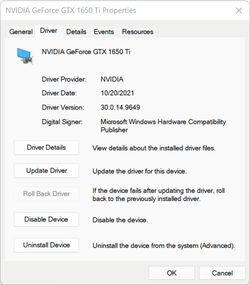
Not true. Right after first boot up windows is searching for OEM drivers and automatically install them. Otherwise I would not start this topic.
For example this driver was installed few seconds after the first boot up:
 

Attachments

  • oem 2.png
    oem 2.png
    24.7 KB · Views: 6

My Computer My Computer

At a glance

Windows 11AMD Ryzen 5 4600HNVIDIA GeForce GTX 1650 Ti GDDR6 4GB
OS
Windows 11
Computer type
Laptop
Manufacturer/Model
ASUS TUF A15
CPU
AMD Ryzen 5 4600H
Graphics Card(s)
NVIDIA GeForce GTX 1650 Ti GDDR6 4GB
Right after first boot up windows is searching for OEM drivers and automatically install them.
Windows installs the latest tested and compatible drivers, not the latest drivers.
 

My Computer My Computer

At a glance

Home26H2CanAMD Ryzen 5 8600G (07/24)2x32GB Kingston FURY DDR5 5600 MHz CL36 @5200...ASROCK Radeon RX 6600 Challenger D 8G @48FPS ...
OS
Home26H2Can
Computer type
PC/Desktop
CPU
AMD Ryzen 5 8600G (07/24)
Motherboard
ASROCK B650M-HDV/M.2 (07/24) BIOS 4.21 AGESA ComboAM5 1.3.0.1 (04/26)
Memory
2x32GB Kingston FURY DDR5 5600 MHz CL36 @5200 CL36 (07/24)
Graphics Card(s)
ASROCK Radeon RX 6600 Challenger D 8G @48FPS (08/24)
Sound Card
Creative Sound BlasterX AE-5 Plus (05/24)
Monitor(s) Displays
24" Philips 24M1N3200ZS/00 (05/24)
Screen Resolution
1920×1080@165Hz via DP1.4
Hard Drives
Kingston KC3000 NVMe 2TB (05/24)
ADATA XPG GAMMIX S11 Pro 512GB (07/19)
PSU
Seasonic Core GM 550 Gold (04/24)
Case
Fractal Design Define 7 Mini with 3x Noctua NF-P14s/12@555rpm (04/24)
Cooling
Noctua NH-U12S with Noctua NF-P12 (04/24)
Keyboard
HP Pavilion Wired Keyboard 300 (07/24) + Rabalux 76017 Parker (01/24)
Mouse
Logitech M330 Silent Plus (01/26)
Internet Speed
500/100 Mbps via RouterOS (05/21) & TCP Optimizer
Browser
Edge, Brave for YouTube, LibreWolf for FB
Antivirus
NextDNS blocking 1/3 Traffic
Other Info
Phone: Motorola Moto G86 (02/26)
Backup: Hasleo Backup Suite (PreOS)
Headphones: Sennheiser RS170 (09/10)
Chair: Huzaro Force 4.4 Grey Mesh (05/24)
Notifier: Xiaomi Mi Band 9 Milanese (10/24)
FlexCore USB-C 3.2 Gen 1 (M) to LAN (F) (08/25)
Yes, allow Windows to install any driver after a clean install.
Then go to the computer or motherboard manufacturer website.
Install the best tested drivers.
Having Windows install default drivers during the clean install or immediately after should not matter unless your troubleshooting a malfunctioning hardware component.
Then perform Windows updates.
Component manufacturer updates can be performed as needed.
Intel, AMD, Nvidia, etc. have autodetect software that can be used as needed.
Drivers can be obtained from the Microsoft catalog as needed.
The problem is that default windows drivers are replaced by OEM drivers automatically downloaded by windows right after the first boot up. These drivers are usually not the same ones provided by laptop manufacturer.
Two examples:
Realtek sound driver downloaded by windows had low microphone volume with every headphones I tried even if everything was maxed out.
AMD graphic driver downloaded by windows came with old control panel from Microsoft Store (AMD setting lite) not the full version.

This is why I'm asking if it's better to install windows without internet connection or let windows do all the downloads and updates and then manually install laptop manufacturer drivers on top of that.
 

My Computer My Computer

At a glance

Windows 11AMD Ryzen 5 4600HNVIDIA GeForce GTX 1650 Ti GDDR6 4GB
OS
Windows 11
Computer type
Laptop
Manufacturer/Model
ASUS TUF A15
CPU
AMD Ryzen 5 4600H
Graphics Card(s)
NVIDIA GeForce GTX 1650 Ti GDDR6 4GB
Windows installs the latest tested and compatible drivers, not the latest drivers.
That is true and usually windows have newer drivers than device manufacturers but even Nvidia recommends to use laptop manufacturer drivers.
 

Attachments

  • laptop.png
    laptop.png
    29.1 KB · Views: 3

My Computer My Computer

At a glance

Windows 11AMD Ryzen 5 4600HNVIDIA GeForce GTX 1650 Ti GDDR6 4GB
OS
Windows 11
Computer type
Laptop
Manufacturer/Model
ASUS TUF A15
CPU
AMD Ryzen 5 4600H
Graphics Card(s)
NVIDIA GeForce GTX 1650 Ti GDDR6 4GB
I have found that upon completion of a clean install, as soon as I connect to the internet Windows Update does a great job with all third party drivers.
Just as a precaution, I go to the Manufacturer's support site for my machine and check the drivers that the manufacturer recommends and compare them against the installed by Windows Update drivers using Driver Store Explorer [RAPR].
Very rarely the Manufacturer has a newer driver and these usually are Audio, Video or Network drivers.
 

My Computer My Computer

At a glance

Windows 11 Pro x64Intel® Core™ i7-1165G7 (Tiger Lake)SK Hynix 16GB DDR4 3200MHz SDRAMintel® iRIS® Xe Graphics / NVIDIA T500 2GB GD...
OS
Windows 11 Pro x64
Computer type
Laptop
Manufacturer/Model
DELL Precision 3560
CPU
Intel® Core™ i7-1165G7 (Tiger Lake)
Motherboard
DELL 004N73 / UEFI Ver. 1.18.1
Memory
SK Hynix 16GB DDR4 3200MHz SDRAM
Graphics Card(s)
intel® iRIS® Xe Graphics / NVIDIA T500 2GB GDDR6 SDRAM
Sound Card
Realtek HD Audio
Monitor(s) Displays
15.6"
Screen Resolution
1920x1080 IPS
Hard Drives
Internal: KIOXIA BG4 Series 512 GB PCIe® NVMe™ M.2 SSD
External: 2 x WD Passport 2TB USB 3.0, 1 x Toshiba 500GB USB 3.0
Keyboard
Standard laptop backlit keyboard with numeric keypad
Mouse
hp wheel mouse
Browser
MS Edge Chromium
Antivirus
MS Windows Defender
Other Info
DELL USB slim Optical Drive DW316
Macrium Reflect v8 (backup and.... lifesaver)
Years ago I was working with Microsoft engineers in India on a problem with Windows.
They asked me to perform the testing.
A clean install was performed without internet access.
Windows driver verifier was then turned on and there was an immediate BSOD.
In the process I learned that during a clean install a Windows 10 iso may have third party drivers
In this case it had the Nvidia GPU drivers.
So when a clean install is performed it may have default GPU or other drivers that are not default Windows drivers.

After a clean install you can install any driver.
Some of the newest drivers may cause problems.
The best tested drivers are always displayed on the computer or motherboard manufacturer websites.

Windows updates of non-Microsoft drivers can be turned on or off.

Each end user must decide whether they want the best tested or newest or older drivers.

In most cases the Microsoft catalog drivers are the most up to date drivers.
This is simply by volume.
The most up to date drivers after typically displayed on the AMD, Nvidia, and Intel websites.
The software tools on the respective websites can be used as needed.
 
Last edited:

My Computer My Computer

At a glance

Windows 10Intel(R) Core(TM) i7-4800MQ CPU @ 2.70GHz16 GB Total: Manufacturer : Samsung MemoryTyp...NVIDIA Quadro K3100M; Intel(R) HD Graphics 4600
OS
Windows 10
Computer type
Laptop
Manufacturer/Model
HP
CPU
Intel(R) Core(TM) i7-4800MQ CPU @ 2.70GHz
Motherboard
Product : 190A Version : KBC Version 94.56
Memory
16 GB Total: Manufacturer : Samsung MemoryType : DDR3 FormFactor : SODIMM Capacity : 8GB Speed : 1600
Graphics Card(s)
NVIDIA Quadro K3100M; Intel(R) HD Graphics 4600
Sound Card
IDT High Definition Audio CODEC; PNP Device ID HDAUDIO\FUNC_01&VEN_111D&DEV_76E0
Hard Drives
Model Hitachi HTS727575A9E364
Antivirus
Microsoft Defender
Other Info
Mobile Workstation
I think the easiest way is the best way.

Let Windows do its job and if everything turns out OK, end of story.

On the rare occasion that Windows does not do its job, let the OEM Support App (like the Dell Support Assist App that was mentioned earlier) do its job, again end of story.

On the very rare occasion that there is still an issue > ask the forum for help :cool:
 

My Computer My Computer

At a glance

Windows 10 Pro
OS
Windows 10 Pro

My Computer My Computer

At a glance

Windows 10 Pro 64-bit 22H2 19045.4046Intel i7-3770 @ 3.40GHz8 GBAMD 7500 Radeon HD Series
OS
Windows 10 Pro 64-bit 22H2 19045.4046
Computer type
PC/Desktop
Manufacturer/Model
Dell/Vostro 470 (Year 2012)
CPU
Intel i7-3770 @ 3.40GHz
Memory
8 GB
Graphics Card(s)
AMD 7500 Radeon HD Series
Sound Card
Realtek Hi-Def Audio
Monitor(s) Displays
Dell U2412M
Hard Drives
1 TB 7200 HDD
Keyboard
Dell/USB
Mouse
Dell/USB
Internet Speed
100/10
Browser
Edge
Antivirus
Windows Security/MalwareBytes Premium

Latest Support Threads

Back
Top Bottom




