
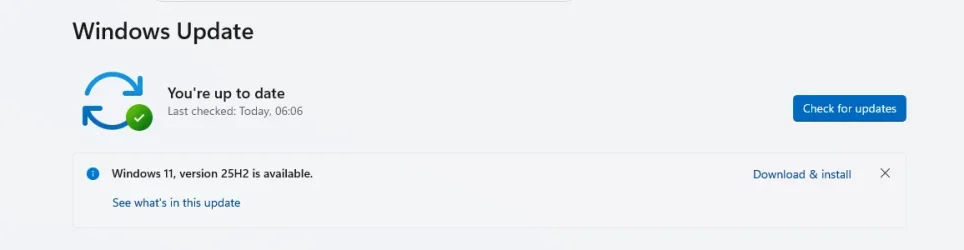
Solved What is this update?


IanMosley

Windows Insider
Power User
VIP
Local time
9:53 AM
Posts
1,228
Location
UK
OS
Windows 11 Pro 25H2 (Build 26200.8728)
0.webp
1.webp
 

My Computer My Computer

At a glance

Windows 11 Pro 25H2 (Build 26200.8728)Intel Core Ultra 9 285 5.6 GHz32.00 GBIntel Integrated Graphics (128 MB)
OS
Windows 11 Pro 25H2 (Build 26200.8728)
Computer type
PC/Desktop
Manufacturer/Model
Dell Pro Max Tower T2 FCT2250
CPU
Intel Core Ultra 9 285 5.6 GHz
Motherboard
64-bit operating system, x64-based processor
Memory
32.00 GB
Graphics Card(s)
Intel Integrated Graphics (128 MB)
Sound Card
Realtek Audio
Monitor(s) Displays
Dell P2714H Monitor
Screen Resolution
1920 x 1080
Hard Drives
1 x 512GB M.2 XG10d SED KIOXIA PCIe solid state drive (Internal)
1 x 2TB Seagate ST2000DM008-2UB102 HDD (Internal)
1 x 1TB Seagate STGX4000400 External HDD
1 x 4TB Seagate STGX4000400 External HDD
1 x 6TB WD Elements AE 2689 External HDD
PSU
500 Watts
Cooling
Air
Keyboard
Microsoft Wired Keyboard 600
Mouse
Microsoft USB Basic Optical Mouse v2.0
Browser
Firefox
Antivirus
Windows Defender + Malwarebytes Premium
Other Info
BaseBoard Manufacturer Dell Inc.
BaseBoard Product 022RY57
BaseBoard Version A01

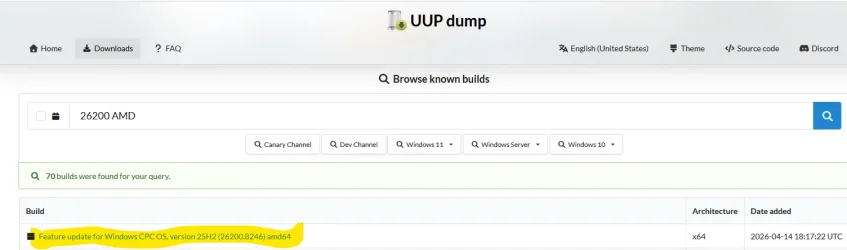
You want this version: Windows 11, version 25H2 (26200.8246) amd64

CPC or (Cloud PC) is a slightly different Windows exclusively provided to Cloud PC users. Sometimes UUP dump captures stuff MS isn't supposed to show, because of internal MS errors. You want to stick the normal looking version names.

If you have a cloud PC, you can remove some HW features because it's always running in a VM.
 

My Computer My Computer

At a glance

Windows 7
OS
Windows 7
Last edited:

My Computer My Computer

At a glance

Windows 11 Pro 25H2 (Build 26200.8728)Intel Core Ultra 9 285 5.6 GHz32.00 GBIntel Integrated Graphics (128 MB)
OS
Windows 11 Pro 25H2 (Build 26200.8728)
Computer type
PC/Desktop
Manufacturer/Model
Dell Pro Max Tower T2 FCT2250
CPU
Intel Core Ultra 9 285 5.6 GHz
Motherboard
64-bit operating system, x64-based processor
Memory
32.00 GB
Graphics Card(s)
Intel Integrated Graphics (128 MB)
Sound Card
Realtek Audio
Monitor(s) Displays
Dell P2714H Monitor
Screen Resolution
1920 x 1080
Hard Drives
1 x 512GB M.2 XG10d SED KIOXIA PCIe solid state drive (Internal)
1 x 2TB Seagate ST2000DM008-2UB102 HDD (Internal)
1 x 1TB Seagate STGX4000400 External HDD
1 x 4TB Seagate STGX4000400 External HDD
1 x 6TB WD Elements AE 2689 External HDD
PSU
500 Watts
Cooling
Air
Keyboard
Microsoft Wired Keyboard 600
Mouse
Microsoft USB Basic Optical Mouse v2.0
Browser
Firefox
Antivirus
Windows Defender + Malwarebytes Premium
Other Info
BaseBoard Manufacturer Dell Inc.
BaseBoard Product 022RY57
BaseBoard Version A01
Forgive the obvious question: what do you see if you click on 'See what's in this update'?
 

My Computer My Computer

At a glance

Windows 11 Proi7-8650U16GBIntel UHD 620
OS
Windows 11 Pro
Computer type
Laptop
Manufacturer/Model
Lenovo t480s
CPU
i7-8650U
Memory
16GB
Graphics Card(s)
Intel UHD 620
Screen Resolution
1920x1080
Hard Drives
C SN810 SDCPNRY-512G-1006
Browser
Edge, Firefox
Antivirus
Defender
Forgive the obvious question: what do you see if you click on 'See what's in this update'?
Yes I did.

As per is title, said that an 'Update to Windows 11 25H2 is Available' as an 'Optional Update'

See here
 

My Computer My Computer

At a glance

Windows 11 Pro 25H2 (Build 26200.8728)Intel Core Ultra 9 285 5.6 GHz32.00 GBIntel Integrated Graphics (128 MB)
OS
Windows 11 Pro 25H2 (Build 26200.8728)
Computer type
PC/Desktop
Manufacturer/Model
Dell Pro Max Tower T2 FCT2250
CPU
Intel Core Ultra 9 285 5.6 GHz
Motherboard
64-bit operating system, x64-based processor
Memory
32.00 GB
Graphics Card(s)
Intel Integrated Graphics (128 MB)
Sound Card
Realtek Audio
Monitor(s) Displays
Dell P2714H Monitor
Screen Resolution
1920 x 1080
Hard Drives
1 x 512GB M.2 XG10d SED KIOXIA PCIe solid state drive (Internal)
1 x 2TB Seagate ST2000DM008-2UB102 HDD (Internal)
1 x 1TB Seagate STGX4000400 External HDD
1 x 4TB Seagate STGX4000400 External HDD
1 x 6TB WD Elements AE 2689 External HDD
PSU
500 Watts
Cooling
Air
Keyboard
Microsoft Wired Keyboard 600
Mouse
Microsoft USB Basic Optical Mouse v2.0
Browser
Firefox
Antivirus
Windows Defender + Malwarebytes Premium
Other Info
BaseBoard Manufacturer Dell Inc.
BaseBoard Product 022RY57
BaseBoard Version A01
A rather similar situation recently arose on Win 10 for some, where it was deemed 'cosmetic'. A registry fix was found to hide it, though I think there may have been concern that could have repercussions. Whether this is similar... maybe others will report this.

But considering it is shown as you say as an Optional Update, have you actually looked at the Optional Update section in Settings? Windows Update, Advanced Options

I just found a driver update there of no particular interest, but there was, in this case, no indication on the Windows Update page
 

My Computer My Computer

At a glance

Windows 11 Proi7-8650U16GBIntel UHD 620
OS
Windows 11 Pro
Computer type
Laptop
Manufacturer/Model
Lenovo t480s
CPU
i7-8650U
Memory
16GB
Graphics Card(s)
Intel UHD 620
Screen Resolution
1920x1080
Hard Drives
C SN810 SDCPNRY-512G-1006
Browser
Edge, Firefox
Antivirus
Defender
But considering it is shown as you say as an Optional Update, have you actually looked at the Optional Update section in Settings? Windows Update, Advanced Options
Yes & it's there

1.webp
 

My Computer My Computer

At a glance

Windows 11 Pro 25H2 (Build 26200.8728)Intel Core Ultra 9 285 5.6 GHz32.00 GBIntel Integrated Graphics (128 MB)
OS
Windows 11 Pro 25H2 (Build 26200.8728)
Computer type
PC/Desktop
Manufacturer/Model
Dell Pro Max Tower T2 FCT2250
CPU
Intel Core Ultra 9 285 5.6 GHz
Motherboard
64-bit operating system, x64-based processor
Memory
32.00 GB
Graphics Card(s)
Intel Integrated Graphics (128 MB)
Sound Card
Realtek Audio
Monitor(s) Displays
Dell P2714H Monitor
Screen Resolution
1920 x 1080
Hard Drives
1 x 512GB M.2 XG10d SED KIOXIA PCIe solid state drive (Internal)
1 x 2TB Seagate ST2000DM008-2UB102 HDD (Internal)
1 x 1TB Seagate STGX4000400 External HDD
1 x 4TB Seagate STGX4000400 External HDD
1 x 6TB WD Elements AE 2689 External HDD
PSU
500 Watts
Cooling
Air
Keyboard
Microsoft Wired Keyboard 600
Mouse
Microsoft USB Basic Optical Mouse v2.0
Browser
Firefox
Antivirus
Windows Defender + Malwarebytes Premium
Other Info
BaseBoard Manufacturer Dell Inc.
BaseBoard Product 022RY57
BaseBoard Version A01
AI suggests:
If Windows 11 shows you are already on 25H2 but keeps offering the same update (often failing), it is likely a bug in the Windows Update service or a false-positive detection of an older sub-version of 25H2. To fix it, restart your PC while connected to the internet, run the Windows Update Troubleshooter, or clear the SoftwareDistribution folder.

Key Solutions for the 25H2 Update Loop:

  • Restart & Update Network: A, new update (KB5085516) or later, or simply restarting with active internet connectivity, may fix this connectivity-induced loop.
  • Clear Component Store (SoftwareDistribution): Open Services, stop the "Windows Update" service, delete the contents of C:\Windows\SoftwareDistribution, and restart the service.
  • Run Troubleshooting: Go to Settings > System > Troubleshoot > Other troubleshooters and run the Windows Update tool.
  • Use the "Show or Hide" Tool: If the update fails, download the "Show or hide updates" troubleshooter from Microsoft to temporarily hide the redundant 25H2 offer
  • This issue is likely a "false positive" where the system sees a slightly older enablement package version.
Wait for Phased Rollout: Microsoft sends 25H2 in waves, so a redundant offer might appear.
--------------------
I searched for
windows 11 on 25H2 but offered 25H2
- relevant videos follow, apparently with ideas on this.


Also found this suggestion:
Update Loop Issues: If 25H2 offers itself again after installation, some users solved this by removing specific cumulative updates (e.g., KB5070311).
 

My Computer My Computer

At a glance

Windows 11 Proi7-8650U16GBIntel UHD 620
OS
Windows 11 Pro
Computer type
Laptop
Manufacturer/Model
Lenovo t480s
CPU
i7-8650U
Memory
16GB
Graphics Card(s)
Intel UHD 620
Screen Resolution
1920x1080
Hard Drives
C SN810 SDCPNRY-512G-1006
Browser
Edge, Firefox
Antivirus
Defender
You want this version: Windows 11, version 25H2 (26200.8246) amd64

CPC or (Cloud PC) is a slightly different Windows exclusively provided to Cloud PC users. Sometimes UUP dump captures stuff MS isn't supposed to show, because of internal MS errors. You want to stick the normal looking version names.

If you have a cloud PC, you can remove some HW features because it's always running in a VM.
Hi - I need this ISO to try and repair the install tion. When I attemot to download the compiled ISO from UUP, it stalls at 8KB. What can I do?
 

My Computer My Computer

At a glance

Windows 11Ryzen 9 5600X20GBGTX 1660Ti
OS
Windows 11
Computer type
PC/Desktop
Manufacturer/Model
Custom
CPU
Ryzen 9 5600X
Motherboard
Asus ROG Strix Gaming II
Memory
20GB
Graphics Card(s)
GTX 1660Ti
Sound Card
onboard
Monitor(s) Displays
Acer 22"
Screen Resolution
1080
Hard Drives
Sandosk 256GB SSD
5x Seagate 500GB HDD
PSU
Corsair CX 600W

Latest Support Threads

Back
Top Bottom




