What would you like see or changed in Windows 11

  • Thread starter Thread starter /\8
  • Start date Start date

I'd like to see it change back to Windows 7. I mean modernized, but, old control panel, start menu, spyware free, bloat free, etc,etc.
 

My Computer My Computer

At a glance

Windows 10 22H2Ryzen 7 5800XT4x8=32 GB DDR4 3200Radeon RX 6750 XT
OS
Windows 10 22H2
Computer type
PC/Desktop
Manufacturer/Model
Custom
CPU
Ryzen 7 5800XT
Motherboard
Asrock B550 Pro4
Memory
4x8=32 GB DDR4 3200
Graphics Card(s)
Radeon RX 6750 XT
Sound Card
Syba Sonic DAC SD-DAC63118
Screen Resolution
2560x1080
Hard Drives
2 NVME M.2, 1 SATA SSD
PSU
XPG Core Reactor 750w
Case
Phanteks Enthoo Pro
Cooling
Air
Antivirus
nope
New Snipping Tool coming soon...

0001237.png
 

My Computers My Computers

  • At a glance

    Windows 11 Pro
    OS
    Windows 11 Pro
    Computer type
    PC/Desktop
    Manufacturer/Model
    ASUS ROG Strix
  • At a glance

    Windows 11 Pro
    Operating System
    Windows 11 Pro
    Computer type
    Laptop
    Manufacturer/Model
    ASUS VivoBook
  • ASUS VivoBook 'Lite' ~ Windows 11 Home
Explorers simplicity of win 98.
Today we have 500 buttons, where only one is necessary.
Productivity have become an endless search for rescue, when searcing for a folder, where relevant data is stored.
Can you install a clean new windows, when you have directed your document folder in advance, to another hard drive, for ease of comfort?
No! Your idea of being bright, have moved the complexicity, to a locked personal User folder, from being moved, so we are in control.
 

My Computer My Computer

At a glance

Windows 11Intel Core i7-7700KDDR4-2998 / PC4-23900 DDR4 SDRAM UDIMMASUS TURBO RTX 2080 8G
OS
Windows 11
Computer type
PC/Desktop
Manufacturer/Model
Self build
CPU
Intel Core i7-7700K
Motherboard
ASUS STRIX Z270E GAMING
Memory
DDR4-2998 / PC4-23900 DDR4 SDRAM UDIMM
Graphics Card(s)
ASUS TURBO RTX 2080 8G
Sound Card
Asus Essence STX II
Monitor(s) Displays
LG 27GL850
Screen Resolution
2560X1440
Hard Drives
Samsung SSD 850 PRO 128 GB Main. 3 more for storage
PSU
Corsair RM 850
Case
Corsair Series™ 780T White Full-Tower
Cooling
Corsair water
Keyboard
Corsair waterproof red mechanical
Mouse
Razer Deathadder V2
Internet Speed
300/300
Browser
Crome
Antivirus
MS
I'd really like to see the ability to enable or disable the microphone from the taskbar and I'd like to see an icon that shows green for the microphone being enabled and red for being disabled. (Perhaps this can already be done but I haven't figured out how to do it.) In addition to "system wide" enabling of the mic, there are several "apps" that can gain control of the mic (i.e. Teams/Skype, Zoom etc.) and unless the user navigates down into the relevant app to see if it has control of the mic the user would never know. It would be nice to hover over the icon and have it show what app has enabled and is using the mic. This is a security feature I have been campaigning for with Microsoft for some time but I haven't seen this capability come along yet.
 

My Computers My Computers

  • At a glance

    Host: Windows 11 Pro 24H2AMD Ryzen 9 7945HX2X 16GB DDR5-5200MTs (32GB)AMD Radeon Pro WX5100 Workstation
    OS
    Host: Windows 11 Pro 24H2
    Computer type
    PC/Desktop
    Manufacturer/Model
    Custom User Build
    CPU
    AMD Ryzen 9 7945HX
    Motherboard
    Minisforum BD795i SE
    Memory
    2X 16GB DDR5-5200MTs (32GB)
    Graphics Card(s)
    AMD Radeon Pro WX5100 Workstation
    Sound Card
    Integrated AMD High Definition Audio CODEC
    Monitor(s) Displays
    2X LG 32UN880-A
    Screen Resolution
    3840x2160
    Hard Drives
    2X NVMe 1TB SSDs
    PSU
    Corsair SF450
    Case
    Fractal Design Terra
    Cooling
    Noctua FS-A12
    Keyboard
    Logitech K270 KB/Mouse Combo
    Mouse
    Logitech K270 KB/Mouse Combo
    Internet Speed
    800Mb
    Browser
    Firefox, Edge, Edge Chromium
    Antivirus
    MalwareBytes, MS Defender
    Other Info
    2x Seagate 2TB external USB HDD, 1x 5TB external USB WD Passport HDD, 1x externql USB WD SATA 1TB Green SATA SSD
  • At a glance

    Windows 11 HomeRyzen 7 4700U @ 2GHz-->4.2GHz Boost16GB LPD DDR4XAMD Radeon (Renoir) Vega
    Operating System
    Windows 11 Home
    Computer type
    Laptop
    Manufacturer/Model
    Acer Swift 3 SF314-42 R3U5
    CPU
    Ryzen 7 4700U @ 2GHz-->4.2GHz Boost
    Motherboard
    RO Kona_RN
    Memory
    16GB LPD DDR4X
    Graphics card(s)
    AMD Radeon (Renoir) Vega
    Sound Card
    ATI/AMD Renoir/Van Gough/Cezanne/Rembrandt HD Audio Controller
    Monitor(s) Displays
    IPS LCD Integrated Chi Mei CMN14D4
    Screen Resolution
    1920x1080
    Hard Drives
    Hynix 512GB NVMe (PCIe 4.0)
    PSU
    Ext 19v
    Case
    Integrated Magnesium
    Cooling
    Therm internal fan
    Keyboard
    Integrated
    Mouse
    Jellycomb
    Internet Speed
    800MB
    Browser
    Firefox, Edge Chromium
    Antivirus
    Malwarebytes, MS Defender
    Other Info
    External USB-C 1Gb Ethernet connection
I want them to actually finish multi desktops so it remembers what programs were on desktop when I shut PC down. At least you can set different wallpapers now but it still doesn't remember what was running on there.
Entire time I used 10 I wanted them to finish it, I am still waiting :)
 

My Computer My Computer

At a glance

Windows 11AMD Ryzen 5 3600XT32gb Corsair RGB ProPowercolor Red Devil RX 7900 XT
OS
Windows 11
Computer type
PC/Desktop
Manufacturer/Model
Owner built
CPU
AMD Ryzen 5 3600XT
Motherboard
Gigabyte Aorus X570 Elite Wifi
Memory
32gb Corsair RGB Pro
Graphics Card(s)
Powercolor Red Devil RX 7900 XT
Sound Card
N/A
Monitor(s) Displays
LG 32GK650F-B 32.0" 144 Hz
Screen Resolution
2560x1440
Hard Drives
1tb Samsung Evo Plus NVME
3th WD Blue HDD
PSU
Corsair RM1000X
Case
Fractal Design Meshify S2
Cooling
Corsair H100i RGB Platinum 75 CFM Liquid CPU Cooler
Keyboard
Corsair K70 Mk2 RGB
Mouse
Steelseries Rival 600
Internet Speed
120mb/s
Browser
Chrome
Antivirus
Bitdefender
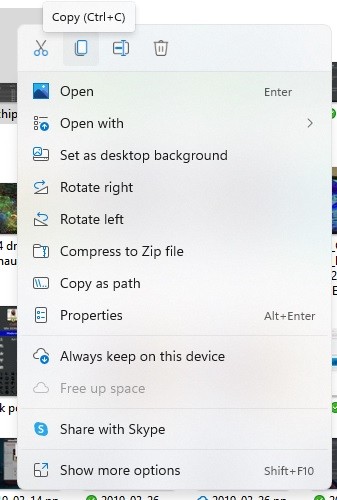
When I right click on a file, I want to see a full list of what I can do including "Copy to" and "Move to." I have to click "Show more options" even to see Delete, which is what I most often want to do when I right click on a file.
 

My Computer My Computer

At a glance

Windows 11 ProIntel Core Ultra 265KTeamGroup T-Force Vulcan DDR5 6400MHz 32GBMSI GeForce RTX 3050
OS
Windows 11 Pro
Computer type
PC/Desktop
Manufacturer/Model
Self Build
CPU
Intel Core Ultra 265K
Motherboard
Gigabyte Z890 AOROS Elite
Memory
TeamGroup T-Force Vulcan DDR5 6400MHz 32GB
Graphics Card(s)
MSI GeForce RTX 3050
Sound Card
GPU NVIDIA High Definition Audio via HDMI to Denon AVR-S670BT Receiver
Monitor(s) Displays
LG 32UN650 32" 4k
Screen Resolution
3840x2160 @ 60Hz (175% scaling)
Hard Drives
Samsung 980 Pro NVMe 1TB x2
PSU
Corsair RM850x
Case
be quiet! Pure Base 600
Cooling
Thermalright Phantom Spirit 120SE & be quiet! Silent Wings Pro x3 case fans
Keyboard
Arteck Backlit USB Wired
Mouse
Logitech M510
Internet Speed
500Mb down/12Mb up
Browser
Firefox & Edge
Antivirus
Windows Defender & Free MBAM
Other Info
Main PC
When I right click on a file, I want to see a full list of what I can do including "Copy to" and "Move to." I have to click "Show more options" even to see Delete, which is what I most often want to do when I right click on a file.
A most used or pinned area at top showing the things you want would be best.

and then I looked
H8I2PcU.jpg

and they already do have shortcuts at top for Cut/Copy/rename & delete (not sure if it was there before?)

While I think of it, be really nice if the task manager/Performance/CPU tab actually showed the right speed for my CPU. It always sees it running at 4.11ghz when it reality its not even close and Average effective clock shows 200mhz. Can Microsoft stop counting the speed wrong? Only HWINFO and Ryzen Master are even close.
 
Last edited:

My Computer My Computer

At a glance

Windows 11AMD Ryzen 5 3600XT32gb Corsair RGB ProPowercolor Red Devil RX 7900 XT
OS
Windows 11
Computer type
PC/Desktop
Manufacturer/Model
Owner built
CPU
AMD Ryzen 5 3600XT
Motherboard
Gigabyte Aorus X570 Elite Wifi
Memory
32gb Corsair RGB Pro
Graphics Card(s)
Powercolor Red Devil RX 7900 XT
Sound Card
N/A
Monitor(s) Displays
LG 32GK650F-B 32.0" 144 Hz
Screen Resolution
2560x1440
Hard Drives
1tb Samsung Evo Plus NVME
3th WD Blue HDD
PSU
Corsair RM1000X
Case
Fractal Design Meshify S2
Cooling
Corsair H100i RGB Platinum 75 CFM Liquid CPU Cooler
Keyboard
Corsair K70 Mk2 RGB
Mouse
Steelseries Rival 600
Internet Speed
120mb/s
Browser
Chrome
Antivirus
Bitdefender
Oops! I didn't even look at those tiny icons at the top, but only the list. But still no "Copy to" and "Move to." They're not even present under Show more options unless you run the .reg file somebody came up with to add those functions.
 

My Computer My Computer

At a glance

Windows 11 ProIntel Core Ultra 265KTeamGroup T-Force Vulcan DDR5 6400MHz 32GBMSI GeForce RTX 3050
OS
Windows 11 Pro
Computer type
PC/Desktop
Manufacturer/Model
Self Build
CPU
Intel Core Ultra 265K
Motherboard
Gigabyte Z890 AOROS Elite
Memory
TeamGroup T-Force Vulcan DDR5 6400MHz 32GB
Graphics Card(s)
MSI GeForce RTX 3050
Sound Card
GPU NVIDIA High Definition Audio via HDMI to Denon AVR-S670BT Receiver
Monitor(s) Displays
LG 32UN650 32" 4k
Screen Resolution
3840x2160 @ 60Hz (175% scaling)
Hard Drives
Samsung 980 Pro NVMe 1TB x2
PSU
Corsair RM850x
Case
be quiet! Pure Base 600
Cooling
Thermalright Phantom Spirit 120SE & be quiet! Silent Wings Pro x3 case fans
Keyboard
Arteck Backlit USB Wired
Mouse
Logitech M510
Internet Speed
500Mb down/12Mb up
Browser
Firefox & Edge
Antivirus
Windows Defender & Free MBAM
Other Info
Main PC
A most used or pinned area at top showing the things you want would be best.

and then I looked
H8I2PcU.jpg

and they already do have shortcuts at top for Cut/Copy/rename & delete (not sure if it was there before?)

While I think of it, be really nice if the task manager/Performance/CPU tab actually showed the right speed for my CPU. It always sees it running at 4.11ghz when it reality its not even close and Average effective clock shows 200mhz. Can Microsoft stop counting the speed wrong? Only HWINFO and Ryzen Master are even close.

Yeah, been there for a few builds, but the context menu is task-sensitive. So, if you right click on an empty spot on teh desktop, they should not appear, only when you right click on something that can actually be copied / renamed / deleted will they show up.

Oops! I didn't even look at those tiny icons at the top, but only the list. But still no "Copy to" and "Move to." They're not even present under Show more options unless you run the .reg file somebody came up with to add those functions.

Not surprising as this is not a native function in Windows 10 to begin with, that it isn't showing automatically in Windows 11. I used those shortcuts a lot, particularly in Win 7, IIRC, until I started using a different file manager altogether.
 

My Computers My Computers

  • At a glance

    Windows 11 23H2 Current buildAMD Ryzen 9 3950X4 * 32 GB - Corsair Vengeance 3600 MHzEVGA GeForce RTX 3080 Ti XC3 ULTRA GAMING (12...
    OS
    Windows 11 23H2 Current build
    Computer type
    PC/Desktop
    Manufacturer/Model
    HomeBrew
    CPU
    AMD Ryzen 9 3950X
    Motherboard
    MSI MEG X570 GODLIKE
    Memory
    4 * 32 GB - Corsair Vengeance 3600 MHz
    Graphics Card(s)
    EVGA GeForce RTX 3080 Ti XC3 ULTRA GAMING (12G-P5-3955-KR)
    Sound Card
    Realtek® ALC1220 Codec
    Monitor(s) Displays
    2x Eve Spectrum ES07D03 4K Gaming Monitor (Matte) | Eve Spectrum ES07DC9 4K Gaming Monitor (Glossy)
    Screen Resolution
    3x 3840 x 2160
    Hard Drives
    3x Samsung 980 Pro NVMe PCIe 4 M.2 2 TB SSD (MZ-V8P2T0B/AM) } 3x Sabrent Rocket NVMe 4.0 1 TB SSD (USB)
    PSU
    PC Power & Cooling’s Silencer Series 1050 Watt, 80 Plus Platinum
    Case
    Fractal Design Define 7 XL Dark ATX Full Tower Case
    Cooling
    Arctic Liquid Freezer III 420 RGB + Air 3x 140mm case fans (pull front) + 1x 120 mm (push back) and 1 x 120 mm (pull bottom)
    Keyboard
    SteelSeries Apex Pro Wired Gaming Keyboard
    Mouse
    Logitech MX Master 3S | MX Master 3 for Business
    Internet Speed
    AT&T LightSpeed Gigabit Duplex Ftth
    Browser
    Nightly (default) + Firefox (stable), Chrome, Edge , Arc
    Antivirus
    Defender + MB 5 Beta
  • At a glance

    ChromeOS Flex Dev Channel (current)Intel(R) Core(TM) i5-6300U CPU @ 2.40GHz, 250...16 GBIntel(R) HD Graphics 520
    Operating System
    ChromeOS Flex Dev Channel (current)
    Computer type
    Laptop
    Manufacturer/Model
    Dell Latitude E5470
    CPU
    Intel(R) Core(TM) i5-6300U CPU @ 2.40GHz, 2501 Mhz, 2 Core(s), 4 Logical Processor(s)
    Motherboard
    Dell
    Memory
    16 GB
    Graphics card(s)
    Intel(R) HD Graphics 520
    Sound Card
    Intel(R) HD Graphics 520 + RealTek Audio
    Monitor(s) Displays
    Dell laptop display 15"
    Screen Resolution
    1920 * 1080
    Hard Drives
    Toshiba 128GB M.2 22300 drive
    INTEL Cherryville 520 Series SSDSC2CW180A 180 GB SATA III SSD
    PSU
    Dell
    Case
    Dell
    Cooling
    Dell
    Keyboard
    Dell
    Mouse
    Logitech MX Master 3S (shared w. Sys 1) | Dell TouchPad
    Internet Speed
    AT&T LightSpeed Gigabit Duplex Ftth
I can't wait to see what they replace the ribbon with as right now, File explorer is not very helpful. It doesn't support the search feature as well as win 10 does. I noticed when i tried to find the menu today.

One problem I have is with the removal of toolbars from taskbar. I don't show my icons on desktop and now, I can't access them at all. Up until 11 I had used a desktop toolbar to access them. Now? they might as well not exist. Not sure how I am going to get around that one.
 

My Computer My Computer

At a glance

Windows 11AMD Ryzen 5 3600XT32gb Corsair RGB ProPowercolor Red Devil RX 7900 XT
OS
Windows 11
Computer type
PC/Desktop
Manufacturer/Model
Owner built
CPU
AMD Ryzen 5 3600XT
Motherboard
Gigabyte Aorus X570 Elite Wifi
Memory
32gb Corsair RGB Pro
Graphics Card(s)
Powercolor Red Devil RX 7900 XT
Sound Card
N/A
Monitor(s) Displays
LG 32GK650F-B 32.0" 144 Hz
Screen Resolution
2560x1440
Hard Drives
1tb Samsung Evo Plus NVME
3th WD Blue HDD
PSU
Corsair RM1000X
Case
Fractal Design Meshify S2
Cooling
Corsair H100i RGB Platinum 75 CFM Liquid CPU Cooler
Keyboard
Corsair K70 Mk2 RGB
Mouse
Steelseries Rival 600
Internet Speed
120mb/s
Browser
Chrome
Antivirus
Bitdefender
Stop dumbing down start menu, file explorer etc.

Make the OS suitable for grown ups not children.
I also agree. The style is great but just let the user do what they want. Maybe have an unlock button (like developer) that lets you make full use of the OS. I like to put what I want on the taskbar or add another bar or move it or enlarge it or colour it etc. Well that's why apps like Stardock exist I guess. ;)
 

My Computer My Computer

At a glance

Windows 11 EducationIntel® Core™ i9-13900K Desktop Processor 16 (...G.Skill Ripjaws V Series 32gb (2x16gb) DDR4 3...Asus Dual Geforce Rtx™ 3060 TI Edition 8gb Gddr6
OS
Windows 11 Education
Computer type
PC/Desktop
CPU
Intel® Core™ i9-13900K Desktop Processor 16 (8P+8E)
Motherboard
Asus TUF Gaming Z790-PLUS WIFI D4
Memory
G.Skill Ripjaws V Series 32gb (2x16gb) DDR4 3600mhz
Graphics Card(s)
Asus Dual Geforce Rtx™ 3060 TI Edition 8gb Gddr6
Monitor(s) Displays
BenQ EW3270U 31.5” 3840x2160 UHD 16:9 HDR LED 4K LG 27UK850-W 27'' 4K UHD IPS LED Monitor with HDR10
Screen Resolution
3840x2160
Hard Drives
Samsung 990 with heatsink PRO PCIe 4.0 Gen 4 NVMe® SSD 1TB
WD_BLACK SN850X NVMe M.2 2280 1TB PCI-Express 4.0
Crucial T500 2TB Gen4
Samsung 970 Evo M.2 2280 2tb Pcie Gen3. X4
PSU
Corsair AXi Series AX860i Digital 860W 80 PLUS PSU
Case
Fractal Meshify C ATX Mid Tower Case
Keyboard
Logi MX Keys
Mouse
Logi M705
Internet Speed
400 mbs
Browser
Firefox
Antivirus
Eset NOD32
Other Info
Love fast boots
I would like to see EDGE be made an optional choice, but I know it will never happen.
 

My Computers My Computers

  • At a glance

    Windows11 Pro 26200.8973Intel Core i9 14900F (24 -Core, 68 MB Total C...32GB DDR5RTX 4080 Super w/610.74
    OS
    Windows11 Pro 26200.8973
    Computer type
    PC/Desktop
    Manufacturer/Model
    Dell Alienware Aurora R16
    CPU
    Intel Core i9 14900F (24 -Core, 68 MB Total Cache)
    Motherboard
    Dell Alienware
    Memory
    32GB DDR5
    Graphics Card(s)
    RTX 4080 Super w/610.74
    Sound Card
    Realtec
    Monitor(s) Displays
    Corsair XENEON 32QHD165
    Screen Resolution
    2560 X 1440
    Hard Drives
    1-2TB Samsung 990 Pro PCIe NVMe M2 SSD
    1-4TB Samsung 990 Pro PCIe NVMe M2 SSD
    PSU
    1000 Watt Platinum Dell
    Case
    Alienware
    Cooling
    Liquid Closed Loop
    Keyboard
    Corsair Strafe RGB
    Mouse
    Logitech MK270 Wireless
    Internet Speed
    100Gb's Down-20 Up
    Browser
    Firefox 153.0.1
    Antivirus
    Defender
    Other Info
    Very Quiet And Fast
    CyberPower UPS CP1500PFCLCD
  • At a glance

    PClinuxOS Mate (2025.7)13th Gen Inter(R) Core(TM) i3-1315U64 GB DDR4 @3200 MHz.Internal
    Operating System
    PClinuxOS Mate (2025.7)
    Computer type
    PC/Desktop
    Manufacturer/Model
    Intel
    CPU
    13th Gen Inter(R) Core(TM) i3-1315U
    Motherboard
    Intel
    Memory
    64 GB DDR4 @3200 MHz.
    Graphics card(s)
    Internal
    Sound Card
    None
    Monitor(s) Displays
    Dell 2419HGCF
    Screen Resolution
    1920 X 1080
    Hard Drives
    SAMSUNG 980 PRO SSD 2TB, PCIe 4.0 M.2 2280
    PSU
    Chicony 30 Watt
    Case
    Small
    Keyboard
    Dell
    Mouse
    Razor
    Internet Speed
    1GB
    Browser
    Slimjet
1. See the day of the week, it is actually more important than the date.
2. Show hidden taskbar when pointing a mouse on it, on systray (time).
3. Show the correct 24 time on the login screen, not 12 without am/pm.
4. Allow customizable transparency, even CMD has it for crying out loud.
5. Allow full transparency for windows explorer, it can be useful at times.
 

My Computer My Computer

At a glance

Home2FH2CanAMD Ryzen 5 8600G (07/24)2x32GB Kingston FURY DDR5 5600 MHz CL36 @5200...ASROCK Radeon RX 6600 Challenger D 8G @48FPS ...
OS
Home2FH2Can
Computer type
PC/Desktop
CPU
AMD Ryzen 5 8600G (07/24)
Motherboard
ASROCK B650M-HDV/M.2 (07/24) BIOS 4.43 AGESA ComboAM5 1.3.0.1b Patch A (07/26)
Memory
2x32GB Kingston FURY DDR5 5600 MHz CL36 @5200 CL36 (07/24)
Graphics Card(s)
ASROCK Radeon RX 6600 Challenger D 8G @48FPS (08/24)
Sound Card
Creative Sound BlasterX AE-5 Plus (05/24)
Monitor(s) Displays
24" Philips 24M1N3200ZS/00 (05/24)
Screen Resolution
1920×1080@165Hz via DP1.4
Hard Drives
Kingston KC3000 NVMe 2TB (05/24)
ADATA XPG GAMMIX S11 Pro 512GB (07/19)
PSU
Seasonic Core GM 550 Gold (04/24)
Case
Fractal Design Define 7 Mini with 3x Noctua NF-P14s/12@555rpm (04/24)
Cooling
Noctua NH-U12S with Noctua NF-P12 (04/24)
Keyboard
HP Pavilion Wired Keyboard 300 (07/24) + Rabalux 76017 Parker (01/24)
Mouse
Logitech M330 Silent Plus (07/26)
Internet Speed
500/100 Mbps via RouterOS (05/21) & TCP Optimizer
Browser
Edge, Brave for YouTube, LibreWolf for FB
Antivirus
NextDNS blocking 1/3 Traffic
Other Info
Phone: Motorola Moto G86 (02/26)
Backup: Hasleo Backup Suite (PreOS)
Headphones: Sennheiser RS170 (09/10)
Chair: Huzaro Force 4.4 Grey Mesh (05/24)
Notifier: Xiaomi Mi Band 9 Milanese (10/24)
FlexCore USB-C 3.2 Gen 1 (M) to LAN (F) (08/25)
I would like for you to fix small icons issues.Clock and date arte still croped
 

My Computer My Computer

At a glance

Windows 11Intel Core i5 - 86002x 8GB DDR4 Kingston Hyper X 2400MHzNVIDIA GeForce GTX 1050 Ti (4 GB)
OS
Windows 11
Computer type
PC/Desktop
CPU
Intel Core i5 - 8600
Motherboard
Asus TUF B360- Plus Gaming
Memory
2x 8GB DDR4 Kingston Hyper X 2400MHz
Graphics Card(s)
NVIDIA GeForce GTX 1050 Ti (4 GB)
Monitor(s) Displays
2x Dell P2419H [24" IPS LCD] 1 x HP 27w [27" IPS LCD]
Screen Resolution
Dell 1920x1080 ,HP 2560x1440
Hard Drives
1x HDD Hitachi (500 GB, 7200 RPM, SATA-II), 1x KINGSTON SSD (240 GB, SATA-III), 1x KINGSTON SSD (240 GB, SATA-III)
PSU
Seasonic FOCUS Plus 550 Gold SSR-550FX 550W 80+
Case
Raidmax Viper II
Cooling
LC Power
Internet Speed
300 Mbit/s
Browser
Edge
Antivirus
Nod 32
I would like the ability to truly center my Start button on the taskbar.

taskbar.jpg
 

My Computer My Computer

At a glance

Windows 11Intel Core i7-10710U 4.7G32 GB: Samsung DDR4 2666 MHzIntel UHD
OS
Windows 11
Computer type
PC/Desktop
Manufacturer/Model
Intel NUC10i7FNH
CPU
Intel Core i7-10710U 4.7G
Memory
32 GB: Samsung DDR4 2666 MHz
Graphics Card(s)
Intel UHD
Monitor(s) Displays
Dual HP Z24nf G2 23.8" IPS
Hard Drives
WD Black 500GB with additional 24TB on Windows Server 2016
Keyboard
daskeyboard
Internet Speed
Gigabit Fiber
Browser
Firefox

My Computers My Computers

  • At a glance

    Windows 11 ProIntel Core i9-10900XCorsair 64 GB (4 x 16 GB) CMW64GX4M4C3000C15 ...GIGABYTE GeForce GTX 1660 Super Mini ITX 6 GB OC
    OS
    Windows 11 Pro
    Computer type
    PC/Desktop
    Manufacturer/Model
    Stigg's Build
    CPU
    Intel Core i9-10900X
    Motherboard
    GIGABYTE X299X DESIGNARE 10G
    Memory
    Corsair 64 GB (4 x 16 GB) CMW64GX4M4C3000C15 Vengeance RGB Pro 3000Mhz DDR4
    Graphics Card(s)
    GIGABYTE GeForce GTX 1660 Super Mini ITX 6 GB OC
    Sound Card
    Realtek ALC1220
    Monitor(s) Displays
    Samsung 27" FHD LED FreeSync Gaming Monitor (LS27F350FHEXXY)
    Screen Resolution
    1920 x 1080
    Hard Drives
    Samsung 970 Pro Series 1TB M.2 2280 NVMe SSD
    Western Digital Red Pro WD8003FFBX-68B9AN0 8 TB, 7200 RPM, SATA-III
    Western Digital Red Pro WD8003FFBX-68B9AN0 8 TB, 7200 RPM, SATA-III
    PSU
    Corsair HX1200 1200W 80 Plus Platinum
    Case
    Fractal Design Define 7 Black Solid Case
    Cooling
    Noctua NH-D15 Chromax Black
    Keyboard
    Razer Ornata V2
    Mouse
    Razer DeathAdder Essential
    Internet Speed
    FTTN 100Mbps / 40Mbps
    Browser
    Mozilla Firefox
    Antivirus
    N/A
    Other Info
    Logitech BRIO 4k Ultra HD USB-C Webcam
  • At a glance

    Windows 10 ProCore i7-8750HSK Hynix 32 GB (2 x 16 GB) HMA82GS6CJR8N-VK 1...NVIDIA GeForce GTX 1070
    Operating System
    Windows 10 Pro
    Computer type
    Laptop
    Manufacturer/Model
    ASUS ROG Zephyrus M GM501GS
    CPU
    Core i7-8750H
    Motherboard
    Zephyrus M GM501GS
    Memory
    SK Hynix 32 GB (2 x 16 GB) HMA82GS6CJR8N-VK 16 GB DDR4-2666 DDR4 SDRAM
    Graphics card(s)
    NVIDIA GeForce GTX 1070
    Sound Card
    Realtek ALC294
    Monitor(s) Displays
    AU Optronics B156HAN07.1 [15.6" LCD]
    Screen Resolution
    1920 x 1080
    Hard Drives
    Samsung MZVKW512HMJP-00000 512 GB, PCI-E 3.0 x4
    Samsung SSD 860 QVO 4TB 4 TB, SATA-III
    PSU
    N/A
    Case
    N/A
    Cooling
    N/A
    Keyboard
    PC/AT Enhanced PS2 Keyboard (101/102-Key)
    Mouse
    Razer DeathAdder Essential
    Internet Speed
    FTTN 100Mbps / 40Mbps
    Browser
    Mozilla Firefox
    Antivirus
    N/A
    Other Info
    USB2.0 HD UVC Webcam
Yes, the current centered start button is just a waste of Taskbar space.
That's why I moved mine back to the left.

With two 23.8" monitors and the Start button in the left corner of the right-hand monitor, I currently have it about in the center of the extended workspace. But I'm thinking about replacing them with a single ultrawide monitor which means that bottom left corner could get to be a long way away! I want Start permanently anchored dead center, and not slowly marching west as I add taskbar icons.
 

My Computer My Computer

At a glance

Windows 11Intel Core i7-10710U 4.7G32 GB: Samsung DDR4 2666 MHzIntel UHD
OS
Windows 11
Computer type
PC/Desktop
Manufacturer/Model
Intel NUC10i7FNH
CPU
Intel Core i7-10710U 4.7G
Memory
32 GB: Samsung DDR4 2666 MHz
Graphics Card(s)
Intel UHD
Monitor(s) Displays
Dual HP Z24nf G2 23.8" IPS
Hard Drives
WD Black 500GB with additional 24TB on Windows Server 2016
Keyboard
daskeyboard
Internet Speed
Gigabit Fiber
Browser
Firefox
I want Start permanently anchored dead center, and not slowly marching west as I add taskbar icons.
Exactly. The way it is now, it can be moving. You never know where it's gonna be next. It messes with your motor skills.
I don't know who at Microsoft headquarters thought it was a good idea.
 

My Computers My Computers

  • At a glance

    Windows 11 ProIntel Core i9-10900XCorsair 64 GB (4 x 16 GB) CMW64GX4M4C3000C15 ...GIGABYTE GeForce GTX 1660 Super Mini ITX 6 GB OC
    OS
    Windows 11 Pro
    Computer type
    PC/Desktop
    Manufacturer/Model
    Stigg's Build
    CPU
    Intel Core i9-10900X
    Motherboard
    GIGABYTE X299X DESIGNARE 10G
    Memory
    Corsair 64 GB (4 x 16 GB) CMW64GX4M4C3000C15 Vengeance RGB Pro 3000Mhz DDR4
    Graphics Card(s)
    GIGABYTE GeForce GTX 1660 Super Mini ITX 6 GB OC
    Sound Card
    Realtek ALC1220
    Monitor(s) Displays
    Samsung 27" FHD LED FreeSync Gaming Monitor (LS27F350FHEXXY)
    Screen Resolution
    1920 x 1080
    Hard Drives
    Samsung 970 Pro Series 1TB M.2 2280 NVMe SSD
    Western Digital Red Pro WD8003FFBX-68B9AN0 8 TB, 7200 RPM, SATA-III
    Western Digital Red Pro WD8003FFBX-68B9AN0 8 TB, 7200 RPM, SATA-III
    PSU
    Corsair HX1200 1200W 80 Plus Platinum
    Case
    Fractal Design Define 7 Black Solid Case
    Cooling
    Noctua NH-D15 Chromax Black
    Keyboard
    Razer Ornata V2
    Mouse
    Razer DeathAdder Essential
    Internet Speed
    FTTN 100Mbps / 40Mbps
    Browser
    Mozilla Firefox
    Antivirus
    N/A
    Other Info
    Logitech BRIO 4k Ultra HD USB-C Webcam
  • At a glance

    Windows 10 ProCore i7-8750HSK Hynix 32 GB (2 x 16 GB) HMA82GS6CJR8N-VK 1...NVIDIA GeForce GTX 1070
    Operating System
    Windows 10 Pro
    Computer type
    Laptop
    Manufacturer/Model
    ASUS ROG Zephyrus M GM501GS
    CPU
    Core i7-8750H
    Motherboard
    Zephyrus M GM501GS
    Memory
    SK Hynix 32 GB (2 x 16 GB) HMA82GS6CJR8N-VK 16 GB DDR4-2666 DDR4 SDRAM
    Graphics card(s)
    NVIDIA GeForce GTX 1070
    Sound Card
    Realtek ALC294
    Monitor(s) Displays
    AU Optronics B156HAN07.1 [15.6" LCD]
    Screen Resolution
    1920 x 1080
    Hard Drives
    Samsung MZVKW512HMJP-00000 512 GB, PCI-E 3.0 x4
    Samsung SSD 860 QVO 4TB 4 TB, SATA-III
    PSU
    N/A
    Case
    N/A
    Cooling
    N/A
    Keyboard
    PC/AT Enhanced PS2 Keyboard (101/102-Key)
    Mouse
    Razer DeathAdder Essential
    Internet Speed
    FTTN 100Mbps / 40Mbps
    Browser
    Mozilla Firefox
    Antivirus
    N/A
    Other Info
    USB2.0 HD UVC Webcam
My opinion is that Windows 11 is one step forward and three steps back.
I won't be installing it on my other computers.

I have a theory about Microsoft operating systems.
Every so often, Microsoft decides to release a messy operating system so they have something to improve with the following release.
You only have to have a look at Windows release history. :winkt:
 

My Computers My Computers

  • At a glance

    Windows 11 ProIntel Core i9-10900XCorsair 64 GB (4 x 16 GB) CMW64GX4M4C3000C15 ...GIGABYTE GeForce GTX 1660 Super Mini ITX 6 GB OC
    OS
    Windows 11 Pro
    Computer type
    PC/Desktop
    Manufacturer/Model
    Stigg's Build
    CPU
    Intel Core i9-10900X
    Motherboard
    GIGABYTE X299X DESIGNARE 10G
    Memory
    Corsair 64 GB (4 x 16 GB) CMW64GX4M4C3000C15 Vengeance RGB Pro 3000Mhz DDR4
    Graphics Card(s)
    GIGABYTE GeForce GTX 1660 Super Mini ITX 6 GB OC
    Sound Card
    Realtek ALC1220
    Monitor(s) Displays
    Samsung 27" FHD LED FreeSync Gaming Monitor (LS27F350FHEXXY)
    Screen Resolution
    1920 x 1080
    Hard Drives
    Samsung 970 Pro Series 1TB M.2 2280 NVMe SSD
    Western Digital Red Pro WD8003FFBX-68B9AN0 8 TB, 7200 RPM, SATA-III
    Western Digital Red Pro WD8003FFBX-68B9AN0 8 TB, 7200 RPM, SATA-III
    PSU
    Corsair HX1200 1200W 80 Plus Platinum
    Case
    Fractal Design Define 7 Black Solid Case
    Cooling
    Noctua NH-D15 Chromax Black
    Keyboard
    Razer Ornata V2
    Mouse
    Razer DeathAdder Essential
    Internet Speed
    FTTN 100Mbps / 40Mbps
    Browser
    Mozilla Firefox
    Antivirus
    N/A
    Other Info
    Logitech BRIO 4k Ultra HD USB-C Webcam
  • At a glance

    Windows 10 ProCore i7-8750HSK Hynix 32 GB (2 x 16 GB) HMA82GS6CJR8N-VK 1...NVIDIA GeForce GTX 1070
    Operating System
    Windows 10 Pro
    Computer type
    Laptop
    Manufacturer/Model
    ASUS ROG Zephyrus M GM501GS
    CPU
    Core i7-8750H
    Motherboard
    Zephyrus M GM501GS
    Memory
    SK Hynix 32 GB (2 x 16 GB) HMA82GS6CJR8N-VK 16 GB DDR4-2666 DDR4 SDRAM
    Graphics card(s)
    NVIDIA GeForce GTX 1070
    Sound Card
    Realtek ALC294
    Monitor(s) Displays
    AU Optronics B156HAN07.1 [15.6" LCD]
    Screen Resolution
    1920 x 1080
    Hard Drives
    Samsung MZVKW512HMJP-00000 512 GB, PCI-E 3.0 x4
    Samsung SSD 860 QVO 4TB 4 TB, SATA-III
    PSU
    N/A
    Case
    N/A
    Cooling
    N/A
    Keyboard
    PC/AT Enhanced PS2 Keyboard (101/102-Key)
    Mouse
    Razer DeathAdder Essential
    Internet Speed
    FTTN 100Mbps / 40Mbps
    Browser
    Mozilla Firefox
    Antivirus
    N/A
    Other Info
    USB2.0 HD UVC Webcam
My opinion is that Windows 11 is one step forward and three steps back.
I won't be installing it on my other computers.
I have installed Beta on my laptop and I'm underwhelmed so far. I increased the rollback period to 60 days so I have a bit more time before lockin. I disabled the TPM on my desktop as a Win 11 install blocker. I'm now looking to do the same on my Intel NUC.
 

My Computers My Computers

  • At a glance

    Windows 11 Pro 22H2Intel i7-13700KF @ 5.4GHzG-Skill F4-3200C16-16GVK x 2 (32GB total)GeForce RTX 3060 Ti Ventus 2X 8G OCV1 LHR
    OS
    Windows 11 Pro 22H2
    Computer type
    PC/Desktop
    Manufacturer/Model
    Bob the Builder
    CPU
    Intel i7-13700KF @ 5.4GHz
    Motherboard
    MSI MPG Z790 Edge WiFi DDR4
    Memory
    G-Skill F4-3200C16-16GVK x 2 (32GB total)
    Graphics Card(s)
    GeForce RTX 3060 Ti Ventus 2X 8G OCV1 LHR
    Sound Card
    Realtek® ALC4080 (mobo chipset)
    Monitor(s) Displays
    Philips 28 inch Display 288E2UAE
    Screen Resolution
    3840 x 2160 (16 x 9)
    Hard Drives
    Samsung 980 Pro NVMe M2 500GB, Samsung 980 NVMe M2 500GB, Samsung 2.5" SSD 1TB, Seagate 2.5" ST5000 5TB, Seagate Barracuda NVMe M2 1TB, Samsung MZVL2512HCJQ OEM NVMe M2 1TB
    PSU
    MSI MPG R850GF PSU (850W)
    Case
    Fractal Design Define 7 Compact ATX
    Cooling
    CoolerMaster MA610P
    Keyboard
    HAVIT mechanical keyboard HV-KB390L TKL
    Mouse
    Logitech M350 Pebble Mouse BT + wireless
    Internet Speed
    50 x 20 megabits / second fibre
    Browser
    Microsoft Edge
    Antivirus
    Microsoft
    Other Info
    Intel Ethernet 1226-V 2.5GHz @ 1GHz
    Intel Wi-Fi 6E AX210
    ASUS router RT-AX86U with Wi-Fi 6
    Logitech BRIO webcam
    Macrium Reflect 8.1 paid for backups etc.
  • At a glance

    Win 11 Pro 22H2Intel i7-1195G716 GBIris Xe graphics
    Operating System
    Win 11 Pro 22H2
    Computer type
    Laptop
    Manufacturer/Model
    MSI SUMMIT E16 FLIP EVO A11MT-013AU
    CPU
    Intel i7-1195G7
    Memory
    16 GB
    Graphics card(s)
    Iris Xe graphics
    Sound Card
    Realtek High Definition Audio
    Monitor(s) Displays
    16" 120Hz Pen Touch panel
    Screen Resolution
    2560 x 1600 (16 x 10)
    Hard Drives
    Samsung NVMe 980 Pro 1TB
    PSU
    Delta Electronics ADP-65SD B, HP 1HE08AA
    Keyboard
    Full Keyboard
    Mouse
    Logitech M350 Pebble Mouse BT + wireless
    Internet Speed
    50 x 20 megabits / second fibre
    Browser
    Firefox
    Antivirus
    Microsoft
    Other Info
    Killer Wi-Fi 6E 1675x (210NGW)
    MSI Pen
    Web Cam with Windows Hello Face
    Fingerprint Reader
    ASUS router RT-AX86U with Wi-Fi 6
    Macrium Reflect 8 paid for backups etc.
Hey /\8,

Showing gratitude is important in online communities. Use the "like" button to appreciate helpful content. This motivates people to keep sharing knowledge. A "like" gives 1 point, "Helpful" gives 5 points, and "Great support" gives 10 points for exceptional help.

Latest Support Threads

Back
Top Bottom