Solved When I set my PC to sleep it immediately wakes back up


SJMaye

Member
Member
Local time
6:44 AM
Posts
79
OS
Windows 11 Pro
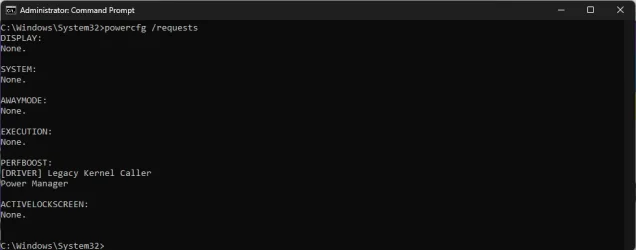
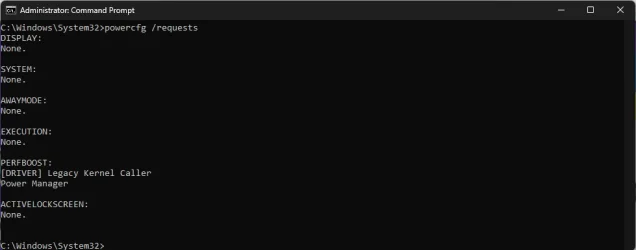
My Win11 PC will not sleep no matter what I do. If I START>POWER>SLEEP it tries to go to sleep, but immediately wakes back up. I ran CMD powercfg /requests immediately after it waking up from a SLEEP attempt
powercfg requests.webp

I also ran a powercfg /energy. I have attached the report if it would help diagnose this. There a many errors and findings. The thing that caught my eye was my Logitech G935 headset.

I have never run into this with any other version of Windows. Can someone point me in the right direction?
 
Windows Build/Version
Version 25H2 (OS Build 26200.8037)

Attachments

My Computer My Computer

At a glance

Windows 11 ProAMD Ryzen 7 9800X3D32GB DDR5AMD Radeon 9070 XT
OS
Windows 11 Pro
Computer type
PC/Desktop
Manufacturer/Model
Custom
CPU
AMD Ryzen 7 9800X3D
Motherboard
Gigabyte X870 Aorus Elite WIFI7
Memory
32GB DDR5
Graphics Card(s)
AMD Radeon 9070 XT
Monitor(s) Displays
Acer Predator 27"
Screen Resolution
1080P
PSU
Corsair HX1000
Case
Cooler Master HAF-X
Cooling
ID-Cooling A620
Disable Away Mode: If your system is in Away Mode, it may unable to sleep. To fix:

Only edit the registry if you are confident and careful: -

In registry navigate to: HKEY_LOCAL_MACHINE\SYSTEM\CurrentControlSet\Control\Power\PowerSettings\238C9FA8-0AAD-41ED-83F4-97BE242C8F20\25DFA149-5DD1-4736-B5AB-E8A37B5B8187

In the right panel, right-click Attributes > Modify, and change the value from 1 to 2.

Restart your PC.

This allowed my GMKtec to enter Sleep but it still signed me out. To avoid having to sign-in again: -

Settings>Accounts>Sign-in options>If you’ve been away… needs to be set to ‘Never’.

To re-enable the need to sign-in again choose the ‘Every time’ option.
 

My Computers My Computers

  • At a glance

    Windows 11 ProAMD Ryzen 9 8945HS32GB DDR5 SO-DIMMIntegrated AMD Radeon 780M (4.00 GHz)
    OS
    Windows 11 Pro
    Computer type
    PC/Desktop
    Manufacturer/Model
    GMKtec K11
    CPU
    AMD Ryzen 9 8945HS
    Memory
    32GB DDR5 SO-DIMM
    Graphics Card(s)
    Integrated AMD Radeon 780M (4.00 GHz)
    Monitor(s) Displays
    Benq 2250HM
    Screen Resolution
    1920 x 1080
    Hard Drives
    1 TB PCIe 4.0 NVMe M.2 SSD
  • At a glance

    Windows 11 HomeIntel® Core™ Ultra 7 - 255H processor16 GB LPDDR5 SDRAMIntel Arc 140T onboard graphics
    Operating System
    Windows 11 Home
    Computer type
    Laptop
    Manufacturer/Model
    ASUS Zenbook 14 OLED 14" Laptop - UX3405CA-QL192W
    CPU
    Intel® Core™ Ultra 7 - 255H processor
    Memory
    16 GB LPDDR5 SDRAM
    Graphics card(s)
    Intel Arc 140T onboard graphics
    Screen Resolution
    1920 x 1200 (16:10 WUXGA resolution) OLED Touchscreen
    Hard Drives
    1TB SSD
I had issues with a computer which waked up itself, the command powercfg /lastwake gave me the right direction (it was network controller in my case).
 

My Computer My Computer

At a glance

Windows 11
OS
Windows 11
Disable Away Mode: If your system is in Away Mode, it may unable to sleep. To fix:

Only edit the registry if you are confident and careful: -

In registry navigate to: HKEY_LOCAL_MACHINE\SYSTEM\CurrentControlSet\Control\Power\PowerSettings\238C9FA8-0AAD-41ED-83F4-97BE242C8F20\25DFA149-5DD1-4736-B5AB-E8A37B5B8187

In the right panel, right-click Attributes > Modify, and change the value from 1 to 2.

Restart your PC.

This allowed my GMKtec to enter Sleep but it still signed me out. To avoid having to sign-in again: -

Settings>Accounts>Sign-in options>If you’ve been away… needs to be set to ‘Never’.

To re-enable the need to sign-in again choose the ‘Every time’ option.
I tried the registry change, but it did not affect my problem. Thank you for the suggestion, though.
 

My Computer My Computer

At a glance

Windows 11 ProAMD Ryzen 7 9800X3D32GB DDR5AMD Radeon 9070 XT
OS
Windows 11 Pro
Computer type
PC/Desktop
Manufacturer/Model
Custom
CPU
AMD Ryzen 7 9800X3D
Motherboard
Gigabyte X870 Aorus Elite WIFI7
Memory
32GB DDR5
Graphics Card(s)
AMD Radeon 9070 XT
Monitor(s) Displays
Acer Predator 27"
Screen Resolution
1080P
PSU
Corsair HX1000
Case
Cooler Master HAF-X
Cooling
ID-Cooling A620
I had issues with a computer which waked up itself, the command powercfg /lastwake gave me the right direction (it was network controller in my case).
That was the direction I was taking. /lastwake just told me I had 1 wake event. Powercfg /requests gave me this

powercfg requests.webp

I have repeated attempted to go into sleep mode via Start>Power>Sleep and then checked powercfg /requests. Each time I get this same result above.It looks like a driver "[DRIVER] Legacy Kernal Caller Power Manager" is the source, but where do I go from there?


To clarify what the machine is doing, I click Start>Power>Sleep. The PC appears to be entering sleep, then it wakes right back up. Something seems to be triggering it.
 

My Computer My Computer

At a glance

Windows 11 ProAMD Ryzen 7 9800X3D32GB DDR5AMD Radeon 9070 XT
OS
Windows 11 Pro
Computer type
PC/Desktop
Manufacturer/Model
Custom
CPU
AMD Ryzen 7 9800X3D
Motherboard
Gigabyte X870 Aorus Elite WIFI7
Memory
32GB DDR5
Graphics Card(s)
AMD Radeon 9070 XT
Monitor(s) Displays
Acer Predator 27"
Screen Resolution
1080P
PSU
Corsair HX1000
Case
Cooler Master HAF-X
Cooling
ID-Cooling A620
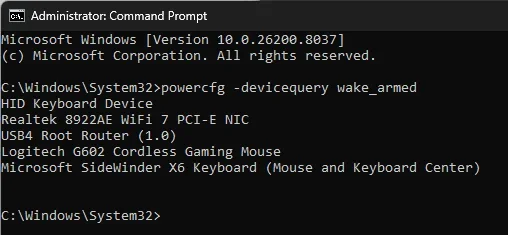
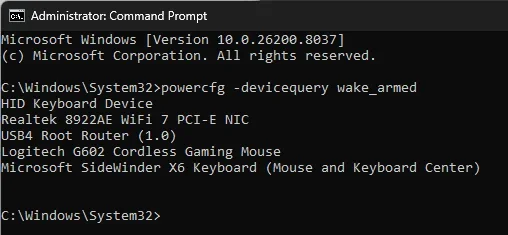
What does the command powercfg -devicequery wake_armed return?
 

My Computer My Computer

At a glance

Windows 11
OS
Windows 11

My Computer My Computer

At a glance

Windows 11 ProAMD Ryzen 7 9800X3D32GB DDR5AMD Radeon 9070 XT
OS
Windows 11 Pro
Computer type
PC/Desktop
Manufacturer/Model
Custom
CPU
AMD Ryzen 7 9800X3D
Motherboard
Gigabyte X870 Aorus Elite WIFI7
Memory
32GB DDR5
Graphics Card(s)
AMD Radeon 9070 XT
Monitor(s) Displays
Acer Predator 27"
Screen Resolution
1080P
PSU
Corsair HX1000
Case
Cooler Master HAF-X
Cooling
ID-Cooling A620

My Computer My Computer

At a glance

Windows 11 ProAMD Ryzen 7 9800X3D32GB DDR5AMD Radeon 9070 XT
OS
Windows 11 Pro
Computer type
PC/Desktop
Manufacturer/Model
Custom
CPU
AMD Ryzen 7 9800X3D
Motherboard
Gigabyte X870 Aorus Elite WIFI7
Memory
32GB DDR5
Graphics Card(s)
AMD Radeon 9070 XT
Monitor(s) Displays
Acer Predator 27"
Screen Resolution
1080P
PSU
Corsair HX1000
Case
Cooler Master HAF-X
Cooling
ID-Cooling A620
on NIC

55167833135_12e9d3d906_w.jpg
 

My Computer My Computer

At a glance

Windows 11 Iot Enterprise 21h2 22000.3260xeon E5-2697v232gb 8x4gb ddr3 1333 mhzgtx 570 poit of view
OS
Windows 11 Iot Enterprise 21h2 22000.3260
Computer type
PC/Desktop
Manufacturer/Model
Asus
CPU
xeon E5-2697v2
Motherboard
rampage iv extreme
Memory
32gb 8x4gb ddr3 1333 mhz
Graphics Card(s)
gtx 570 poit of view
Sound Card
realtek HD (ALC898)
Monitor(s) Displays
samsung b2030
Screen Resolution
1600x900
Hard Drives
2tb hd 5400 rpm
3tb hd 5400 rpm
1tb nvme pcie 3.0
PSU
hx850w
Keyboard
mtek
Internet Speed
500/250 gpon
Browser
r3dfox 146.0
Antivirus
none
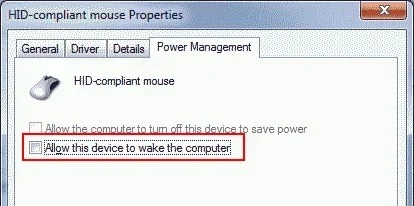
For each of them in Device Manager, one by one, open Properties, uncheck this, and try sleep.

View attachment 166765
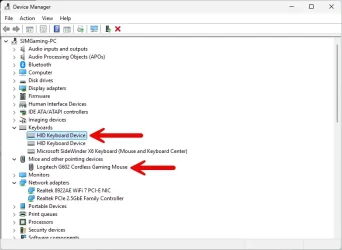
You are on to something. I tried disabling the setting individually and as a group of all the devices. I was able to narrow this down to these two. The G602 mouse I have had forever. I am not sure why it started doing this. I don't recognize the HID keyboard device. I have looked at its details, but didn't help.

I can disable that setting on both of these and everything is fine, but it would be helpful to understand why.

Sleep.webp
 

My Computer My Computer

At a glance

Windows 11 ProAMD Ryzen 7 9800X3D32GB DDR5AMD Radeon 9070 XT
OS
Windows 11 Pro
Computer type
PC/Desktop
Manufacturer/Model
Custom
CPU
AMD Ryzen 7 9800X3D
Motherboard
Gigabyte X870 Aorus Elite WIFI7
Memory
32GB DDR5
Graphics Card(s)
AMD Radeon 9070 XT
Monitor(s) Displays
Acer Predator 27"
Screen Resolution
1080P
PSU
Corsair HX1000
Case
Cooler Master HAF-X
Cooling
ID-Cooling A620
For each of them in Device Manager, one by one, open Properties, uncheck this, and try sleep.

View attachment 166765
This is exactly what I've done with my mouse and keyboard. Otherwise the cat will jump on the desk or knock it enough for the mouse to move
 

My Computer My Computer

At a glance

Windows 11 Pro 25H2 (RP channel)AMD Ryzen 7 9800X3D 8-core64GB Corsair Titanium 6000/CL30MSI Suprim 5080 SOC
OS
Windows 11 Pro 25H2 (RP channel)
Computer type
PC/Desktop
Manufacturer/Model
MSI
CPU
AMD Ryzen 7 9800X3D 8-core
Motherboard
MEG X870E Godlike
Memory
64GB Corsair Titanium 6000/CL30
Graphics Card(s)
MSI Suprim 5080 SOC
Sound Card
Soundblaster AE-9
Monitor(s) Displays
ASUS TUF Gaming VG289Q
Screen Resolution
3840x2160
Hard Drives
Samsung 9100 Pro 4TB (gen 5 x4, system drive/games)
Samsung 990 Pro 2TB
Samsung 980 Pro 2TB
Samsung 870 Evo 4TB
Samsung 870 Evo 2TB
Samsung T9 4TB
PSU
Seasonic PX-2200
Case
Bequiet! Dark Base Pro 901
Cooling
Noctua NH-D15S Chromax black
Keyboard
Logitech G915 X (wired)
Mouse
Logitech G903 with PowerPlay charger
Internet Speed
900Mb/sec
Browser
Microsoft Edge
Antivirus
Windows Defender
In View menu > Devices by connection
Sorry for the delay replying back. I was at the hospital with the wife most of the day.

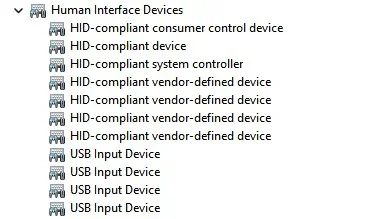
Still doesn't help. My only keyboard is clearly listed in Device Manager as Microsoft SideWinder X6. The other two I don't recognize.
Keyboards.webp

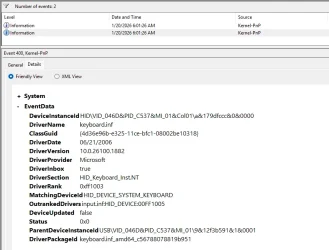
When I try to get more information I don't see anything that is a clue. Can devices like a USB hub be classified under this somehow?
HID Keyboard.webp
 

My Computer My Computer

At a glance

Windows 11 ProAMD Ryzen 7 9800X3D32GB DDR5AMD Radeon 9070 XT
OS
Windows 11 Pro
Computer type
PC/Desktop
Manufacturer/Model
Custom
CPU
AMD Ryzen 7 9800X3D
Motherboard
Gigabyte X870 Aorus Elite WIFI7
Memory
32GB DDR5
Graphics Card(s)
AMD Radeon 9070 XT
Monitor(s) Displays
Acer Predator 27"
Screen Resolution
1080P
PSU
Corsair HX1000
Case
Cooler Master HAF-X
Cooling
ID-Cooling A620
From the start, I would have pulled all USB devices and disconnected or turned off all Bluetooth devices. Then plug in a different USB mouse. Put it to sleep and see if it stays. If it does, then it's an external device. Could be as simple as a signal produced by your mouse caused by a piece of dust on your wheel sensor. One by one add them back. If a peripheral or input device is found to be the culprit, consider replacing it or if it is your mouse, blow it out with canned air. If no settings were purposefully changed before that caused this and you chalk it up to a malfunctioning device... the settings you changed to try to fix it - put those settings back to where they were.
 

My Computers My Computers

  • At a glance

    Windows 11 25H2Intel Core™ i7-1165G7 (4C / 8T, 2.8 / 4.7GHz,...12GB Soldered DDR4-3200Integrated Intel® Iris® Xe Graphics
    OS
    Windows 11 25H2
    Computer type
    Laptop
    Manufacturer/Model
    Lenovo Yoga 7 14ITL5 (82BH00DLUS)
    CPU
    Intel Core™ i7-1165G7 (4C / 8T, 2.8 / 4.7GHz, 12MB)
    Memory
    12GB Soldered DDR4-3200
    Graphics Card(s)
    Integrated Intel® Iris® Xe Graphics
    Monitor(s) Displays
    14" FHD (1920x1080) IPS 300nits Glossy, 72% NTSC, AGC Dragontrail™ Glass, Touch
    Screen Resolution
    1920x1080
    Hard Drives
    500 GB SSD
    Case
    Aluminum
    Cooling
    Single-fan
    Keyboard
    Backlit, internal
    Mouse
    Logitech M535
    Internet Speed
    With this laptop I usually test around 200/200 connected to UniFi UAP-AC-PRO ceiling units.
    Browser
    Chrome
    Antivirus
    Windows Security and my brain.
    Other Info
    I use this laptop mainly from my recliner. It's purpose is scheduling computer and TV services, closing TV work orders, remote customer support, research and recreation.

    Printers in the office room on my main floor were both acquired from business customers who upgraded equipment, had me handle the upgrade and then haul away the replaced hardware. I have not purchased a printer for myself in 15 years.

    Main: HP LaserJet P3010 (black & white, hardwired, networked)
    Aux: HP Color LaserJet MFP M281fdw (color laser, fax, hardwired, networked)

    Internet in my house is routed through a TP-Link AC3200 with radios disabled. Wireless access points are two (2) strategically-located UniFi UAP-AC-PRO ceiling units which cover my whole house including basement and front/back yards. Netgear gigabit switches and CAT6 cabling are used for wired purposes.
  • At a glance

    Windows 10 22H2Intel(R) Core(TM) i5-3470 CPU @ 3.20GHz 3.20 GHz16 GB DDR3Intel(R) HD Graphics 2500
    Operating System
    Windows 10 22H2
    Computer type
    PC/Desktop
    Manufacturer/Model
    Dell Optiplex 3010
    CPU
    Intel(R) Core(TM) i5-3470 CPU @ 3.20GHz 3.20 GHz
    Memory
    16 GB DDR3
    Graphics card(s)
    Intel(R) HD Graphics 2500
    Sound Card
    Onboard
    Monitor(s) Displays
    ACER KG271 (x2)
    Screen Resolution
    1920x1080
    Hard Drives
    WD 500GB SSD
    Keyboard
    Old Dell wireless
    Mouse
    Old Dell wired
    Internet Speed
    500/500
    Browser
    Chrome
    Antivirus
    Windows Security and my brain
    Other Info
    This computer was acquired from a customer who cleaned out her office. I upgraded it and now use it in my downstairs computer-repair office.

    My home office printer is an old HP LaserJet 3015. I acquired this after a customer passed away and his wife sold their house and downsized. She gave me all his equipment. I still help her with her tech issues.
From the start, I would have pulled all USB devices and disconnected or turned off all Bluetooth devices. Then plug in a different USB mouse. Put it to sleep and see if it stays. If it does, then it's an external device. Could be as simple as a signal produced by your mouse caused by a piece of dust on your wheel sensor. One by one add them back. If a peripheral or input device is found to be the culprit, consider replacing it or if it is your mouse, blow it out with canned air. If no settings were purposefully changed before that caused this and you chalk it up to a malfunctioning device... the settings you changed to try to fix it - put those settings back to where they were.
I sort of did that in a way. I disabled the "wake from sleep" function for each device listed below one-by-one. This did not work. Then I disabled the wake from sleep for all the devices, attempted to sleep and it went to sleep! I then re-enabled the wake from sleep function one at a time. Each time attempting sleep. This narrowed it down to the HID Keyboard Device and the Logitech G602 mouse. I am still searching for what the HID keyboard device is, but I have had the G602 mouse for years without having the issue and the driver for it is an old Microsoft one.

Errant devices.webp
 

My Computer My Computer

At a glance

Windows 11 ProAMD Ryzen 7 9800X3D32GB DDR5AMD Radeon 9070 XT
OS
Windows 11 Pro
Computer type
PC/Desktop
Manufacturer/Model
Custom
CPU
AMD Ryzen 7 9800X3D
Motherboard
Gigabyte X870 Aorus Elite WIFI7
Memory
32GB DDR5
Graphics Card(s)
AMD Radeon 9070 XT
Monitor(s) Displays
Acer Predator 27"
Screen Resolution
1080P
PSU
Corsair HX1000
Case
Cooler Master HAF-X
Cooling
ID-Cooling A620
This will display what device last woke up the computer.

powercfg -lastwake

Also need to disable these power management wake entries if they have one.

Screenshot 2026-03-26 105212.webp
 

My Computer My Computer

At a glance

Windows 11 Pro
OS
Windows 11 Pro
If I do not turn OFF the switch located on my Bluetooth mouse my computer will also not stay in Sleep mode even if the mouse is not moved.
 

My Computer My Computer

At a glance

Win 11 Pro 25H2 ARM64 (Parallels VM) _ 26200....Apple Silicon M1 / 3.20 GHz (4 processors)16 GB
OS
Win 11 Pro 25H2 ARM64 (Parallels VM) _ 26200.8875
Computer type
Laptop
Manufacturer/Model
MacBook Pro (13-inch, M1, 2020)
CPU
Apple Silicon M1 / 3.20 GHz (4 processors)
Memory
16 GB
Monitor(s) Displays
13.3-inch (2560 × 1600)
Antivirus
N360 for Mac / Win / Win Defender
Other Info
Parallels Pro 26.4.0/ macOS Tahoe 26.5.2
powercfg -devicedisablewake "HID Keyboard Device"

The HID Keyboard Device is for the extra mouse buttons that the system interprets as keyboard commands.
 

My Computers My Computers

  • At a glance

    11 Homei7 13650HX16GB DDR5GeForce RTX 4060 Mobile
    OS
    11 Home
    Computer type
    Laptop
    Manufacturer/Model
    Asus TUF Gaming F16 (2024)
    CPU
    i7 13650HX
    Memory
    16GB DDR5
    Graphics Card(s)
    GeForce RTX 4060 Mobile
    Sound Card
    Eastern Electric MiniMax DAC Supreme; Emotiva UMC-200; Astell & Kern AK240
    Monitor(s) Displays
    Sony Bravia XR-55X90J
    Screen Resolution
    3840×2160
    Hard Drives
    512GB SSD internal
    37TB external
    PSU
    Li-ion
    Cooling
    2× Arc Flow Fans, 4× exhaust vents, 5× heatpipes
    Keyboard
    Logitech K800
    Mouse
    Logitech G402
    Internet Speed
    30Mbit/s up, 500Mbit/s down
    Browser
    FF
    Antivirus
    What's an antivirus?
  • At a glance

    11 Homei5 1135G716GB DDR4Intel Iris Xe
    Operating System
    11 Home
    Computer type
    Laptop
    Manufacturer/Model
    Medion S15450
    CPU
    i5 1135G7
    Memory
    16GB DDR4
    Graphics card(s)
    Intel Iris Xe
    Sound Card
    Eastern Electric MiniMax DAC Supreme; Emotiva UMC-200; Astell & Kern AK240
    Monitor(s) Displays
    Sony Bravia XR-55X90J
    Screen Resolution
    3840×2160
    Hard Drives
    2TB SSD internal
    37TB external
    PSU
    Li-ion
    Keyboard
    Logitech K800
    Mouse
    Logitech G402
    Internet Speed
    30Mbit/s up, 500Mbit/s down
    Browser
    FF
Back
Top Bottom