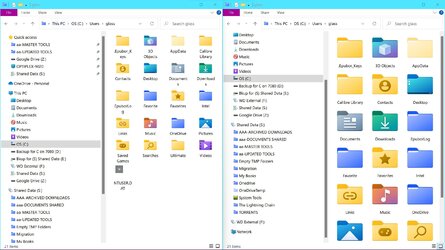
Where are these folder icons located?


JohnnyGui

Well-known member
Member
VIP
Local time
3:44 AM
Posts
228
OS
Windows Pro 11 23H2 Build 22631.3737
Some folders in my personal folder are just shown as empty folders but when selected, the details tab shows a fitting folder icon.
Schermafbeelding 2022-04-28 231113.png
I have searched in the imageres.dll and shell32.dll directories for these specific iconised folders but I can't find them

Does someone know what their locations are and whether they can be chosen to customize folders in the first place?
 

My Computer My Computer

At a glance

Windows Pro 11 23H2 Build 22631.3737i5-12600KTranscend 16GBZotac 4070Ti Trinity
OS
Windows Pro 11 23H2 Build 22631.3737
Computer type
PC/Desktop
Manufacturer/Model
Custom built
CPU
i5-12600K
Motherboard
Gigabyte Z690 UD DDR4
Memory
Transcend 16GB
Graphics Card(s)
Zotac 4070Ti Trinity
Sound Card
Internal: Realtek® ALC892 codec
Monitor(s) Displays
Asus VZ239-H
Screen Resolution
1080p
Hard Drives
Kingston 500GB nVME
Case
Fractal Focus 2 RGB White
Cooling
Xilence LQ240PRO Watercooling
Browser
Edge Chromium
Yes, that is the way it works. When the personal folder is viewed in list or details, it's just a small vanilla looking folder (default). When viewed in medium or large icons, it changes to a system folder icon located somewhere in Windows. No you can not use the system folder icons elsewhere, but you can change the icons to customized icons of your own if you so choose.
In case anyone wants to know that is his 'saved games' folder.
@JohnnyGui when you post screenshots, it would be helpful if you could provide the English translation as it is the language used by most folks here.
 

My Computers My Computers

  • At a glance

    Windows 11 Pro 25H2 26200.9168i9-10900 10 core 20 threads32 gbnone-Intel UHD Graphics 630
    OS
    Windows 11 Pro 25H2 26200.9168
    Computer type
    PC/Desktop
    Manufacturer/Model
    Dell Optiplex 7080
    CPU
    i9-10900 10 core 20 threads
    Motherboard
    DELL 0J37VM
    Memory
    32 gb
    Graphics Card(s)
    none-Intel UHD Graphics 630
    Sound Card
    Integrated Realtek
    Monitor(s) Displays
    Benq 27
    Screen Resolution
    2560x1440
    Hard Drives
    2x1tb Solidigm m.2 nvme /External drives 512gb Samsung m.2 sata+2tb Kingston m2.nvme
    PSU
    500w
    Case
    MT
    Cooling
    Dell Premium
    Keyboard
    Logitech wired
    Mouse
    Logitech wireless
    Internet Speed
    so slow I'm too embarrassed to tell
    Browser
    #1 Edge #2 Firefox
    Antivirus
    Defender+MWB Premium
  • At a glance

    Windows 11 Pro 24H2 26200.9168AMD Ryzen 7 6800U32 gbintegrated
    Operating System
    Windows 11 Pro 24H2 26200.9168
    Computer type
    PC/Desktop
    Manufacturer/Model
    Beelink Mini PC SER5
    CPU
    AMD Ryzen 7 6800U
    Memory
    32 gb
    Graphics card(s)
    integrated
    Sound Card
    integrated
    Monitor(s) Displays
    Benq 27
    Screen Resolution
    2560x1440
    Hard Drives
    1TB Crucial nvme
    Keyboard
    Logitech wired
    Mouse
    Logitech wireless
    Internet Speed
    still too embarrassed to tell
    Browser
    Firefox
    Antivirus
    Defender
  • System 3 is non compliant Dell 9020 i7-4770/24gb ram Win11 PRO 26200.9168
Yes, that is the way it works. When the personal folder is viewed in list or details, it's just a small vanilla looking folder (default). When viewed in medium or large icons, it changes to a system folder icon located somewhere in Windows. No you can not use the system folder icons elsewhere, but you can change the icons to customized icons of your own if you so choose.
In case anyone wants to know that is his 'saved games' folder.
@JohnnyGui when you post screenshots, it would be helpful if you could provide the English translation as it is the language used by most folks here.

Thanks for the reply. I noticed it only shows these icon folders when the icons are set to Large. Medium sized icons do not show them. Is it the same in your case?

Didn't think of translating the screenshot because the question is about the icons in the Personal folders as mentioned which seems enough to understand the issue at hand.
 

My Computer My Computer

At a glance

Windows Pro 11 23H2 Build 22631.3737i5-12600KTranscend 16GBZotac 4070Ti Trinity
OS
Windows Pro 11 23H2 Build 22631.3737
Computer type
PC/Desktop
Manufacturer/Model
Custom built
CPU
i5-12600K
Motherboard
Gigabyte Z690 UD DDR4
Memory
Transcend 16GB
Graphics Card(s)
Zotac 4070Ti Trinity
Sound Card
Internal: Realtek® ALC892 codec
Monitor(s) Displays
Asus VZ239-H
Screen Resolution
1080p
Hard Drives
Kingston 500GB nVME
Case
Fractal Focus 2 RGB White
Cooling
Xilence LQ240PRO Watercooling
Browser
Edge Chromium
In mine, those different system icons show both in medium or large icons. It may (notice I say may, because it's speculation on my part) be that resolution plays a part in how they appear on any particular device. I've never really noticed it before since I view everything in details. Hopefully someone who is using a laptop will see this post and answer that for you.
 

My Computers My Computers

  • At a glance

    Windows 11 Pro 25H2 26200.9168i9-10900 10 core 20 threads32 gbnone-Intel UHD Graphics 630
    OS
    Windows 11 Pro 25H2 26200.9168
    Computer type
    PC/Desktop
    Manufacturer/Model
    Dell Optiplex 7080
    CPU
    i9-10900 10 core 20 threads
    Motherboard
    DELL 0J37VM
    Memory
    32 gb
    Graphics Card(s)
    none-Intel UHD Graphics 630
    Sound Card
    Integrated Realtek
    Monitor(s) Displays
    Benq 27
    Screen Resolution
    2560x1440
    Hard Drives
    2x1tb Solidigm m.2 nvme /External drives 512gb Samsung m.2 sata+2tb Kingston m2.nvme
    PSU
    500w
    Case
    MT
    Cooling
    Dell Premium
    Keyboard
    Logitech wired
    Mouse
    Logitech wireless
    Internet Speed
    so slow I'm too embarrassed to tell
    Browser
    #1 Edge #2 Firefox
    Antivirus
    Defender+MWB Premium
  • At a glance

    Windows 11 Pro 24H2 26200.9168AMD Ryzen 7 6800U32 gbintegrated
    Operating System
    Windows 11 Pro 24H2 26200.9168
    Computer type
    PC/Desktop
    Manufacturer/Model
    Beelink Mini PC SER5
    CPU
    AMD Ryzen 7 6800U
    Memory
    32 gb
    Graphics card(s)
    integrated
    Sound Card
    integrated
    Monitor(s) Displays
    Benq 27
    Screen Resolution
    2560x1440
    Hard Drives
    1TB Crucial nvme
    Keyboard
    Logitech wired
    Mouse
    Logitech wireless
    Internet Speed
    still too embarrassed to tell
    Browser
    Firefox
    Antivirus
    Defender
  • System 3 is non compliant Dell 9020 i7-4770/24gb ram Win11 PRO 26200.9168
In mine, those different system icons show both in medium or large icons. It may (notice I say may, because it's speculation on my part) be that resolution plays a part in how they appear on any particular device. I've never really noticed it before since I view everything in details. Hopefully someone who is using a laptop will see this post and answer that for you.
That seems very peculiar to be dependant on the resolution. Could you please make a screenshot of the icons in medium size that shows this?
 

My Computer My Computer

At a glance

Windows Pro 11 23H2 Build 22631.3737i5-12600KTranscend 16GBZotac 4070Ti Trinity
OS
Windows Pro 11 23H2 Build 22631.3737
Computer type
PC/Desktop
Manufacturer/Model
Custom built
CPU
i5-12600K
Motherboard
Gigabyte Z690 UD DDR4
Memory
Transcend 16GB
Graphics Card(s)
Zotac 4070Ti Trinity
Sound Card
Internal: Realtek® ALC892 codec
Monitor(s) Displays
Asus VZ239-H
Screen Resolution
1080p
Hard Drives
Kingston 500GB nVME
Case
Fractal Focus 2 RGB White
Cooling
Xilence LQ240PRO Watercooling
Browser
Edge Chromium
medium on left, large on right. I'm at 2560x1440 175% scale
 

Attachments

  • Screenshot 2022-05-03 083045.jpg
    Screenshot 2022-05-03 083045.jpg
    258.8 KB · Views: 7

My Computers My Computers

  • At a glance

    Windows 11 Pro 25H2 26200.9168i9-10900 10 core 20 threads32 gbnone-Intel UHD Graphics 630
    OS
    Windows 11 Pro 25H2 26200.9168
    Computer type
    PC/Desktop
    Manufacturer/Model
    Dell Optiplex 7080
    CPU
    i9-10900 10 core 20 threads
    Motherboard
    DELL 0J37VM
    Memory
    32 gb
    Graphics Card(s)
    none-Intel UHD Graphics 630
    Sound Card
    Integrated Realtek
    Monitor(s) Displays
    Benq 27
    Screen Resolution
    2560x1440
    Hard Drives
    2x1tb Solidigm m.2 nvme /External drives 512gb Samsung m.2 sata+2tb Kingston m2.nvme
    PSU
    500w
    Case
    MT
    Cooling
    Dell Premium
    Keyboard
    Logitech wired
    Mouse
    Logitech wireless
    Internet Speed
    so slow I'm too embarrassed to tell
    Browser
    #1 Edge #2 Firefox
    Antivirus
    Defender+MWB Premium
  • At a glance

    Windows 11 Pro 24H2 26200.9168AMD Ryzen 7 6800U32 gbintegrated
    Operating System
    Windows 11 Pro 24H2 26200.9168
    Computer type
    PC/Desktop
    Manufacturer/Model
    Beelink Mini PC SER5
    CPU
    AMD Ryzen 7 6800U
    Memory
    32 gb
    Graphics card(s)
    integrated
    Sound Card
    integrated
    Monitor(s) Displays
    Benq 27
    Screen Resolution
    2560x1440
    Hard Drives
    1TB Crucial nvme
    Keyboard
    Logitech wired
    Mouse
    Logitech wireless
    Internet Speed
    still too embarrassed to tell
    Browser
    Firefox
    Antivirus
    Defender
  • System 3 is non compliant Dell 9020 i7-4770/24gb ram Win11 PRO 26200.9168
medium on left, large on right. I'm at 2560x1440 175% scale

Thanks a lot for the effort. You're right, it might have something to do with the resolution and/or the scaling.

Perhaps someone else who could verify how it looks like on 1920x1080 resolution?
 

My Computer My Computer

At a glance

Windows Pro 11 23H2 Build 22631.3737i5-12600KTranscend 16GBZotac 4070Ti Trinity
OS
Windows Pro 11 23H2 Build 22631.3737
Computer type
PC/Desktop
Manufacturer/Model
Custom built
CPU
i5-12600K
Motherboard
Gigabyte Z690 UD DDR4
Memory
Transcend 16GB
Graphics Card(s)
Zotac 4070Ti Trinity
Sound Card
Internal: Realtek® ALC892 codec
Monitor(s) Displays
Asus VZ239-H
Screen Resolution
1080p
Hard Drives
Kingston 500GB nVME
Case
Fractal Focus 2 RGB White
Cooling
Xilence LQ240PRO Watercooling
Browser
Edge Chromium

Latest Support Threads

Back
Top Bottom