Solved Where is the Bluetooth on/off switch Windows 11 Pro


transmaster

Active member
Member
Local time
7:33 AM
Posts
88
OS
Window 11 pro
I cannot find the on/off toggle for Bluetooth on my GMKtec K11. It is not where it is supposed to be, according to the YouTube postings. I am running Windows 11 Pro as the administrator. Everything was working just fine with my Bluetooth KeyChron Q3 and the Logitech Bluetooth trackball. I switch them between my Mac Studio and this NUC PC. I have no idea what happened. The Keyboard and the trackball pair normally with the Mac. I did a repair reload of Windows 11, and that made no difference. One other detail in the Bluetooth device page I am unablle to get it to forget a device so I can start a new pairing.


Edition Windows 11 Pro
Version 24H2
Installed on ‎5/‎7/‎2025
OS build 26100.3915
Experience Windows Feature Experience Pack 1000.26100.83.0
 

My Computers My Computers

  • At a glance

    Window 11 proMD Ryzen 9 8945HS32 GB DDR4Radeon 780M Graphics 4.00 GHz
    OS
    Window 11 pro
    Computer type
    PC/Desktop
    Manufacturer/Model
    GMKtec NUC Box K11
    CPU
    MD Ryzen 9 8945HS
    Motherboard
    unknown
    Memory
    32 GB DDR4
    Graphics Card(s)
    Radeon 780M Graphics 4.00 GHz
    Sound Card
    integrated
    Monitor(s) Displays
    Samsung
    Screen Resolution
    1080P
    Hard Drives
    2TB internal,
    PSU
    external
    Case
    What came with
    Cooling
    air
    Keyboard
    Keychron Q3
    Mouse
    Logitech Ero track ball.
    Internet Speed
    12 mbps wired if I am lucky. I have G5wmm available at 300 mbps if I pair the Mac Studio with my iPhone
    Browser
    usually Chrome
    Antivirus
    Windows built in.
  • At a glance

    Ryzen 7 7735HS32GB DDR5integrated Radeon 680M
    Computer type
    PC/Desktop
    Manufacturer/Model
    Kamrui AMD8PRO mini PC
    CPU
    Ryzen 7 7735HS
    Motherboard
    Unknown
    Memory
    32GB DDR5
    Graphics card(s)
    integrated Radeon 680M
    Sound Card
    integrated
    Monitor(s) Displays
    Samsung
    Screen Resolution
    1080P
    Hard Drives
    internal 512 gb SSD
    PSU
    internal
    Case
    Kamuri
    Cooling
    air twin fans
    Keyboard
    Q1
    Mouse
    Ergo wireless
    Internet Speed
    12 mbps on a good day
    Browser
    Chrome
    Antivirus
    Windows Defender

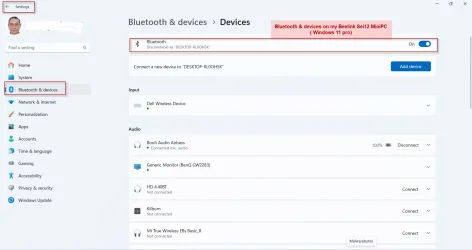
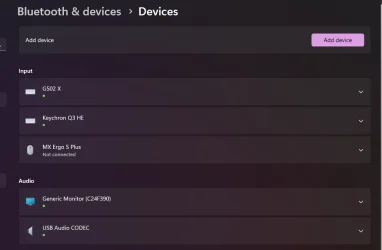
A photo would help help but here is what I see on my devices so are you saying the On Off toggle is not showing on your device? Does your device even have Bluetooth installed?

Bluetooth On Off switch.webp
 

My Computers My Computers

  • At a glance

    Windows 11 ProAMD Ryzen 9 8945HS32GB DDR5 SO-DIMMIntegrated AMD Radeon 780M (4.00 GHz)
    OS
    Windows 11 Pro
    Computer type
    PC/Desktop
    Manufacturer/Model
    GMKtec K11
    CPU
    AMD Ryzen 9 8945HS
    Memory
    32GB DDR5 SO-DIMM
    Graphics Card(s)
    Integrated AMD Radeon 780M (4.00 GHz)
    Monitor(s) Displays
    Benq 2250HM
    Screen Resolution
    1920 x 1080
    Hard Drives
    1 TB PCIe 4.0 NVMe M.2 SSD
  • At a glance

    Windows 11 HomeIntel® Core™ Ultra 7 - 255H processor16 GB LPDDR5 SDRAMIntel Arc 140T onboard graphics
    Operating System
    Windows 11 Home
    Computer type
    Laptop
    Manufacturer/Model
    ASUS Zenbook 14 OLED 14" Laptop - UX3405CA-QL192W
    CPU
    Intel® Core™ Ultra 7 - 255H processor
    Memory
    16 GB LPDDR5 SDRAM
    Graphics card(s)
    Intel Arc 140T onboard graphics
    Screen Resolution
    1920 x 1200 (16:10 WUXGA resolution) OLED Touchscreen
    Hard Drives
    1TB SSD
Bluetooth & devices on my Beelink Sei12 MiniPC ( Windows 11 Pro)08-05-2025 19-31-06.webp
 

My Computers My Computers

  • At a glance

    Windows 11 Pro Version:25H2 OS Build: 26200.889412th Gen Intel core i5-1235U(Alder16*2 (32 GB) DDR 4-3200(1600MHz) Crucial Tech...Intel Iris Xe Graphics (Internal)
    OS
    Windows 11 Pro Version:25H2 OS Build: 26200.8894
    Computer type
    PC/Desktop
    Manufacturer/Model
    Beelink Mini PC Model: SEi12
    CPU
    12th Gen Intel core i5-1235U(Alder
    Motherboard
    SEi (manufactured by AZW)
    Memory
    16*2 (32 GB) DDR 4-3200(1600MHz) Crucial Technology
    Graphics Card(s)
    Intel Iris Xe Graphics (Internal)
    Sound Card
    Internal
    Monitor(s) Displays
    BenQ GW2283
    Screen Resolution
    1920*1080
    Hard Drives
    500GB NVME (Kingston SNV2S500G)
    1TB (Crucial CT1000BX500SSD1)
    PSU
    Power Brick 19V-6.32A , 120.08W
    Keyboard
    Dell KB3322Wi (Wireless)
    Mouse
    Dell WM118t (Wireless)
    Internet Speed
    4G/5G
    Browser
    MS Edge, Chrome
    Antivirus
    Malwarebytes Premium - Subscription
  • At a glance

    Windows 11 Home Version 25H2 Build 26200.8894Intel Core i3 8145UIntel Optane 16GB module + DDR 4 16GB (Optane...Intel UHD Graphics 620
    Operating System
    Windows 11 Home Version 25H2 Build 26200.8894
    Computer type
    PC/Desktop
    Manufacturer/Model
    Dell Inspiron 3280 AIO 22"
    CPU
    Intel Core i3 8145U
    Motherboard
    Dell inc. 027W48
    Memory
    Intel Optane 16GB module + DDR 4 16GB (Optane disabled.)
    Graphics card(s)
    Intel UHD Graphics 620
    Sound Card
    Internal
    Monitor(s) Displays
    Dell Monitor 22"
    Screen Resolution
    1920x1080
    Hard Drives
    Crucial CT1000BX500SSD1 ; 1000,2 GB
    PSU
    Power Brick
    Case
    All-in one
    Keyboard
    Dell Wireless KM636
    Mouse
    Dell Wireless KM 636
    Internet Speed
    4G
    Browser
    Edge, Chrome
    Antivirus
    Malwarebytes
    Other Info
    Upgraded from Windows 10 Home to Windows 11 Home on 28 Oct 2023
I reloaded the Intel Bluetooth drivers, and there was an update. I do not have anything above the "Add device" line. I also noticed I had not completed the reload of Windows 11. I moved to macOS 3 years ago after 30-plus years of Windows. Windows 11 is actually not too bad. It is amazing how much of my Windows "chops" have disappeared in those 3 years. I still need a PC to operate my amatuer radio station this GMKtech NUC has been very good.
 

My Computers My Computers

  • At a glance

    Window 11 proMD Ryzen 9 8945HS32 GB DDR4Radeon 780M Graphics 4.00 GHz
    OS
    Window 11 pro
    Computer type
    PC/Desktop
    Manufacturer/Model
    GMKtec NUC Box K11
    CPU
    MD Ryzen 9 8945HS
    Motherboard
    unknown
    Memory
    32 GB DDR4
    Graphics Card(s)
    Radeon 780M Graphics 4.00 GHz
    Sound Card
    integrated
    Monitor(s) Displays
    Samsung
    Screen Resolution
    1080P
    Hard Drives
    2TB internal,
    PSU
    external
    Case
    What came with
    Cooling
    air
    Keyboard
    Keychron Q3
    Mouse
    Logitech Ero track ball.
    Internet Speed
    12 mbps wired if I am lucky. I have G5wmm available at 300 mbps if I pair the Mac Studio with my iPhone
    Browser
    usually Chrome
    Antivirus
    Windows built in.
  • At a glance

    Ryzen 7 7735HS32GB DDR5integrated Radeon 680M
    Computer type
    PC/Desktop
    Manufacturer/Model
    Kamrui AMD8PRO mini PC
    CPU
    Ryzen 7 7735HS
    Motherboard
    Unknown
    Memory
    32GB DDR5
    Graphics card(s)
    integrated Radeon 680M
    Sound Card
    integrated
    Monitor(s) Displays
    Samsung
    Screen Resolution
    1080P
    Hard Drives
    internal 512 gb SSD
    PSU
    internal
    Case
    Kamuri
    Cooling
    air twin fans
    Keyboard
    Q1
    Mouse
    Ergo wireless
    Internet Speed
    12 mbps on a good day
    Browser
    Chrome
    Antivirus
    Windows Defender

 

My Computers My Computers

  • At a glance

    Windows 11 Pro 25H2 Build 26200.8894Intel(R) Core(TM) i7-4770K CPU @ 3.50GHz32.0 GB of I forget and the box is in storage.Gigabyte nVidia GeForce GTX 1660 Super OC 6GB
    OS
    Windows 11 Pro 25H2 Build 26200.8894
    Computer type
    PC/Desktop
    Manufacturer/Model
    Sin-built 2013
    CPU
    Intel(R) Core(TM) i7-4770K CPU @ 3.50GHz
    Motherboard
    ASUS ROG Maximus VI Formula
    Memory
    32.0 GB of I forget and the box is in storage.
    Graphics Card(s)
    Gigabyte nVidia GeForce GTX 1660 Super OC 6GB
    Sound Card
    ROG SupremeFX Formula 8-Channel High Definition Audio
    Monitor(s) Displays
    5 x LG 25MS500-B - 1 x 24MK430H-B - 1 x Wacom Pro 22" Touch Screen Tablet
    Screen Resolution
    All over the place
    Hard Drives
    Too many to list. OS on Samsung 1TB 870 QVO SATA
    PSU
    Silverstone 1500
    Case
    NZXT Phantom 820 Full-Tower Case
    Cooling
    Noctua NH-D15 Elite Class Dual Tower CPU Cooler / 6 x EziDIY 120mm / 2 x Corsair 140mm somethings / 1 x 140mm Thermaltake something / 2 x 200mm Corsair.
    Keyboard
    Corsair K95 / Logitech diNovo Edge Wireless
    Mouse
    Logitech: G402 / G502 / Mx Masters / Mx Air Cordless
    Internet Speed
    2000/500Mbps
    Browser
    All sorts
    Antivirus
    Kaspersky Premium
    Other Info
    ㅤㅤㅤㅤㅤㅤㅤㅤㅤㅤㅤㅤㅤㅤㅤㅤㅤㅤㅤㅤㅤㅤㅤㅤㅤㅤㅤㅤㅤㅤㅤㅤㅤㅤㅤㅤㅤㅤㅤㅤ⠀⠀⠀⠀⠀⠀⠀⠀⠀⠀
    TP-Link BE9300 WiFi 7 Bluetooth 5.4 (Archer TBE550E)
    TP-Link TX201 V1 2.5GB Lan

    Grandstream HT812 - VoIP
    ASUS DSL-AX82U - Mesh
    ASUS RT-AC68U - Mesh
    ASUS RT-BE88U Router

    Brother MFC-L2880DW Printer

    I’m on a horse.
  • At a glance

    Windows 11 Pro 25H2 Build 26200.8894 (Wifes)13th Generation Intel® Core™ i5-1340P Process...16GB LPDDR5-52001x Intel® Iris® Xe Graphics
    Operating System
    Windows 11 Pro 25H2 Build 26200.8894 (Wifes)
    Computer type
    Laptop
    Manufacturer/Model
    LENOVO Yoga 7 14IRL8 - Type 82YL
    CPU
    13th Generation Intel® Core™ i5-1340P Processor(Core™ i5-1340P)
    Memory
    16GB LPDDR5-5200
    Graphics card(s)
    1x Intel® Iris® Xe Graphics
    Sound Card
    Optimized with Dolby Atmos®
    Screen Resolution
    QHD 2880 x 1800 OLED
    Hard Drives
    M.2 512 GB SSD PCIe
    Mouse
    Logiteck MX Master 3S
    Internet Speed
    2000/500
    Antivirus
    Defender / Malwarebytes
    Other Info
    …still on a horse.


    Wireless Network: Wi-Fi 6E 2x2 AX; Bluetooth® 5.1 or above
    Ports: 1x 1 Novo button; 2 in 1 Audio Combo jack; Micro SD Card Reader; HDMI 1.4b; 2 x USB Type-C (TBT4)
    USB 3.2 Gen 2 DP 1.4a
    PD 3.0); 1 x USB 3.2 Gen1 Type A
    Camera
    1x 1080P FHD IR/RGB Hybrid with Privacy Shutter and Dual Array Microphone
    Graphics
    1x Intel® Iris® Xe Graphics
    Monitor
    14" WUXGA
    Form Factor
    Convertible Notebook
  • Windows 11 Pro 25H2 Build 26200.8894 (Wifes)

    Yoga 7 2-in-1 14IML9 - Type 83DJ

    Processor: Intel® Core™ Ultra 7 155H Processor(Core™ Ultra 7 155H)

    Memory: 32GB LPD5X-7467

    Hard Drive: 1 TB SSD PCIe

    Wireless Network: 1x Wi-Fi 6E 2x2 AX; Bluetooth® 5.1 or above

    Ports: 1 x HDMI 2.1 TMDS; 1 x Novo Button; 1 x Combo Audio Jack
    2 x USB-C (USB 4.0)
    1 x USB-A 3.2 Gen 1

    Camera: 1080P FHD IR Hybrid with Dual Microphone

    Graphics: Intel® Arc™ Graphics

    Monitor: 14" 2.8K

    ...Where's my horse?
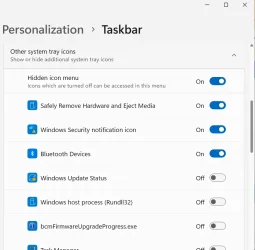
When I want things not showing in the Notification Area [formerly System Tray] I turn them off, right-click of the Taskbar then click Taskbar Settings.

1746722006047.webpT
 

My Computers My Computers

  • At a glance

    Win11 Pro RTM Version 24H2 Build 26100.4202Intel Core i5 11th Gen. 2.40GHz12GB
    OS
    Win11 Pro RTM Version 24H2 Build 26100.4202
    Computer type
    Laptop
    Manufacturer/Model
    Dell Vostro 3400
    CPU
    Intel Core i5 11th Gen. 2.40GHz
    Memory
    12GB
    Hard Drives
    256GB SSD NVMe M.2
  • At a glance

    Win11 Pro RTM Version 24H2 Build 26100.4202Intel Core i5 10th Gen. 2.90GHz16GBOnboard, no VGA, using a DisplayPort-to-VGA a...
    Operating System
    Win11 Pro RTM Version 24H2 Build 26100.4202
    Computer type
    PC/Desktop
    Manufacturer/Model
    Dell Vostro 5890
    CPU
    Intel Core i5 10th Gen. 2.90GHz
    Memory
    16GB
    Graphics card(s)
    Onboard, no VGA, using a DisplayPort-to-VGA adapter
    Monitor(s) Displays
    24" Dell
    Hard Drives
    512GB SSD NVMe, 4TB Seagate HDD
    Browser
    Firefox, Edge
    Antivirus
    Windows Defender/Microsoft Security
How does hiding a system tray icon turn off Bluetooth? I think the answer is, it doesn’t.
 

My Computers My Computers

  • At a glance

    Windows 11 Pro 25H2 Build 26200.8894Intel(R) Core(TM) i7-4770K CPU @ 3.50GHz32.0 GB of I forget and the box is in storage.Gigabyte nVidia GeForce GTX 1660 Super OC 6GB
    OS
    Windows 11 Pro 25H2 Build 26200.8894
    Computer type
    PC/Desktop
    Manufacturer/Model
    Sin-built 2013
    CPU
    Intel(R) Core(TM) i7-4770K CPU @ 3.50GHz
    Motherboard
    ASUS ROG Maximus VI Formula
    Memory
    32.0 GB of I forget and the box is in storage.
    Graphics Card(s)
    Gigabyte nVidia GeForce GTX 1660 Super OC 6GB
    Sound Card
    ROG SupremeFX Formula 8-Channel High Definition Audio
    Monitor(s) Displays
    5 x LG 25MS500-B - 1 x 24MK430H-B - 1 x Wacom Pro 22" Touch Screen Tablet
    Screen Resolution
    All over the place
    Hard Drives
    Too many to list. OS on Samsung 1TB 870 QVO SATA
    PSU
    Silverstone 1500
    Case
    NZXT Phantom 820 Full-Tower Case
    Cooling
    Noctua NH-D15 Elite Class Dual Tower CPU Cooler / 6 x EziDIY 120mm / 2 x Corsair 140mm somethings / 1 x 140mm Thermaltake something / 2 x 200mm Corsair.
    Keyboard
    Corsair K95 / Logitech diNovo Edge Wireless
    Mouse
    Logitech: G402 / G502 / Mx Masters / Mx Air Cordless
    Internet Speed
    2000/500Mbps
    Browser
    All sorts
    Antivirus
    Kaspersky Premium
    Other Info
    ㅤㅤㅤㅤㅤㅤㅤㅤㅤㅤㅤㅤㅤㅤㅤㅤㅤㅤㅤㅤㅤㅤㅤㅤㅤㅤㅤㅤㅤㅤㅤㅤㅤㅤㅤㅤㅤㅤㅤㅤ⠀⠀⠀⠀⠀⠀⠀⠀⠀⠀
    TP-Link BE9300 WiFi 7 Bluetooth 5.4 (Archer TBE550E)
    TP-Link TX201 V1 2.5GB Lan

    Grandstream HT812 - VoIP
    ASUS DSL-AX82U - Mesh
    ASUS RT-AC68U - Mesh
    ASUS RT-BE88U Router

    Brother MFC-L2880DW Printer

    I’m on a horse.
  • At a glance

    Windows 11 Pro 25H2 Build 26200.8894 (Wifes)13th Generation Intel® Core™ i5-1340P Process...16GB LPDDR5-52001x Intel® Iris® Xe Graphics
    Operating System
    Windows 11 Pro 25H2 Build 26200.8894 (Wifes)
    Computer type
    Laptop
    Manufacturer/Model
    LENOVO Yoga 7 14IRL8 - Type 82YL
    CPU
    13th Generation Intel® Core™ i5-1340P Processor(Core™ i5-1340P)
    Memory
    16GB LPDDR5-5200
    Graphics card(s)
    1x Intel® Iris® Xe Graphics
    Sound Card
    Optimized with Dolby Atmos®
    Screen Resolution
    QHD 2880 x 1800 OLED
    Hard Drives
    M.2 512 GB SSD PCIe
    Mouse
    Logiteck MX Master 3S
    Internet Speed
    2000/500
    Antivirus
    Defender / Malwarebytes
    Other Info
    …still on a horse.


    Wireless Network: Wi-Fi 6E 2x2 AX; Bluetooth® 5.1 or above
    Ports: 1x 1 Novo button; 2 in 1 Audio Combo jack; Micro SD Card Reader; HDMI 1.4b; 2 x USB Type-C (TBT4)
    USB 3.2 Gen 2 DP 1.4a
    PD 3.0); 1 x USB 3.2 Gen1 Type A
    Camera
    1x 1080P FHD IR/RGB Hybrid with Privacy Shutter and Dual Array Microphone
    Graphics
    1x Intel® Iris® Xe Graphics
    Monitor
    14" WUXGA
    Form Factor
    Convertible Notebook
  • Windows 11 Pro 25H2 Build 26200.8894 (Wifes)

    Yoga 7 2-in-1 14IML9 - Type 83DJ

    Processor: Intel® Core™ Ultra 7 155H Processor(Core™ Ultra 7 155H)

    Memory: 32GB LPD5X-7467

    Hard Drive: 1 TB SSD PCIe

    Wireless Network: 1x Wi-Fi 6E 2x2 AX; Bluetooth® 5.1 or above

    Ports: 1 x HDMI 2.1 TMDS; 1 x Novo Button; 1 x Combo Audio Jack
    2 x USB-C (USB 4.0)
    1 x USB-A 3.2 Gen 1

    Camera: 1080P FHD IR Hybrid with Dual Microphone

    Graphics: Intel® Arc™ Graphics

    Monitor: 14" 2.8K

    ...Where's my horse?
A whole sentence didn't post in my response, after hiding it I then turn Bluetooth off/disable in Device Manager. I have to be careful as Bluetooth is part of the Wireless adapter and can inadvertently get that turned off also. Some Notebooks also have an Fx key or Fn + Fx for disabling the Wireless adapter. It's been some time since I worked on a Notebook with a switch for it on the edge of the case.
 

My Computers My Computers

  • At a glance

    Win11 Pro RTM Version 24H2 Build 26100.4202Intel Core i5 11th Gen. 2.40GHz12GB
    OS
    Win11 Pro RTM Version 24H2 Build 26100.4202
    Computer type
    Laptop
    Manufacturer/Model
    Dell Vostro 3400
    CPU
    Intel Core i5 11th Gen. 2.40GHz
    Memory
    12GB
    Hard Drives
    256GB SSD NVMe M.2
  • At a glance

    Win11 Pro RTM Version 24H2 Build 26100.4202Intel Core i5 10th Gen. 2.90GHz16GBOnboard, no VGA, using a DisplayPort-to-VGA a...
    Operating System
    Win11 Pro RTM Version 24H2 Build 26100.4202
    Computer type
    PC/Desktop
    Manufacturer/Model
    Dell Vostro 5890
    CPU
    Intel Core i5 10th Gen. 2.90GHz
    Memory
    16GB
    Graphics card(s)
    Onboard, no VGA, using a DisplayPort-to-VGA adapter
    Monitor(s) Displays
    24" Dell
    Hard Drives
    512GB SSD NVMe, 4TB Seagate HDD
    Browser
    Firefox, Edge
    Antivirus
    Windows Defender/Microsoft Security
Looks like the Bluetooth has failed on the GMKtech mini PC. Even after loading the Intel Bluetooth drivers, I have nothing.
 

My Computers My Computers

  • At a glance

    Window 11 proMD Ryzen 9 8945HS32 GB DDR4Radeon 780M Graphics 4.00 GHz
    OS
    Window 11 pro
    Computer type
    PC/Desktop
    Manufacturer/Model
    GMKtec NUC Box K11
    CPU
    MD Ryzen 9 8945HS
    Motherboard
    unknown
    Memory
    32 GB DDR4
    Graphics Card(s)
    Radeon 780M Graphics 4.00 GHz
    Sound Card
    integrated
    Monitor(s) Displays
    Samsung
    Screen Resolution
    1080P
    Hard Drives
    2TB internal,
    PSU
    external
    Case
    What came with
    Cooling
    air
    Keyboard
    Keychron Q3
    Mouse
    Logitech Ero track ball.
    Internet Speed
    12 mbps wired if I am lucky. I have G5wmm available at 300 mbps if I pair the Mac Studio with my iPhone
    Browser
    usually Chrome
    Antivirus
    Windows built in.
  • At a glance

    Ryzen 7 7735HS32GB DDR5integrated Radeon 680M
    Computer type
    PC/Desktop
    Manufacturer/Model
    Kamrui AMD8PRO mini PC
    CPU
    Ryzen 7 7735HS
    Motherboard
    Unknown
    Memory
    32GB DDR5
    Graphics card(s)
    integrated Radeon 680M
    Sound Card
    integrated
    Monitor(s) Displays
    Samsung
    Screen Resolution
    1080P
    Hard Drives
    internal 512 gb SSD
    PSU
    internal
    Case
    Kamuri
    Cooling
    air twin fans
    Keyboard
    Q1
    Mouse
    Ergo wireless
    Internet Speed
    12 mbps on a good day
    Browser
    Chrome
    Antivirus
    Windows Defender

Looks like the Bluetooth has failed on the GMKtech mini PC. Even after loading the Intel Bluetooth drivers, I have nothing.
Check your BIOS/UEFI settings to make sure Bluetooth is activated.
 

My Computers My Computers

  • At a glance

    Windows 11 Pro 25H2Ryzen 5 3500U8GBVega 8
    OS
    Windows 11 Pro 25H2
    Computer type
    Laptop
    Manufacturer/Model
    Huawei MateBook D15
    CPU
    Ryzen 5 3500U
    Memory
    8GB
    Graphics Card(s)
    Vega 8
    Screen Resolution
    FHD
    Hard Drives
    256GB Samsung SSD + 1TB HDD
    Browser
    Microsoft Edge
    Antivirus
    ESET Smart Security Premium
  • At a glance

    Windows 10 Enterprise LTSC 21H2intel core i7 6700HQ16GBNvidia Geforce GTX1060 (6GB)
    Operating System
    Windows 10 Enterprise LTSC 21H2
    Computer type
    Laptop
    Manufacturer/Model
    MSI GS73 6RF Stealth Pro
    CPU
    intel core i7 6700HQ
    Memory
    16GB
    Graphics card(s)
    Nvidia Geforce GTX1060 (6GB)
    Screen Resolution
    FHD
    Hard Drives
    128GB SSD + 1TB HDD
    Browser
    Microsoft Edge
    Antivirus
    Windows Defender

Also, I keep a USB device like this on hand for testing Wireless and Bluetooth whether an issue with the onboard device:
 

My Computers My Computers

  • At a glance

    Win11 Pro RTM Version 24H2 Build 26100.4202Intel Core i5 11th Gen. 2.40GHz12GB
    OS
    Win11 Pro RTM Version 24H2 Build 26100.4202
    Computer type
    Laptop
    Manufacturer/Model
    Dell Vostro 3400
    CPU
    Intel Core i5 11th Gen. 2.40GHz
    Memory
    12GB
    Hard Drives
    256GB SSD NVMe M.2
  • At a glance

    Win11 Pro RTM Version 24H2 Build 26100.4202Intel Core i5 10th Gen. 2.90GHz16GBOnboard, no VGA, using a DisplayPort-to-VGA a...
    Operating System
    Win11 Pro RTM Version 24H2 Build 26100.4202
    Computer type
    PC/Desktop
    Manufacturer/Model
    Dell Vostro 5890
    CPU
    Intel Core i5 10th Gen. 2.90GHz
    Memory
    16GB
    Graphics card(s)
    Onboard, no VGA, using a DisplayPort-to-VGA adapter
    Monitor(s) Displays
    24" Dell
    Hard Drives
    512GB SSD NVMe, 4TB Seagate HDD
    Browser
    Firefox, Edge
    Antivirus
    Windows Defender/Microsoft Security
Looked through the BIOS and found nothing Bluetooth. Checked on the GMKTech form and Bluetooth failure is not that uncommon with these little machines.

Berton I am taking your advice and am purchasing an external Bluetooth radio. This one, I had enough credits at Amazon and got it for free. Bluetooth 5.4 and extended range. A Trick with these adapters is to purchase a USB extender cable. Plug the cable into your computer, then the adapter into the other end, and elevate it above your desk. This greatly increases its usable coverage area.

Screenshot 2025-05-08 120045.webp
 

My Computers My Computers

  • At a glance

    Window 11 proMD Ryzen 9 8945HS32 GB DDR4Radeon 780M Graphics 4.00 GHz
    OS
    Window 11 pro
    Computer type
    PC/Desktop
    Manufacturer/Model
    GMKtec NUC Box K11
    CPU
    MD Ryzen 9 8945HS
    Motherboard
    unknown
    Memory
    32 GB DDR4
    Graphics Card(s)
    Radeon 780M Graphics 4.00 GHz
    Sound Card
    integrated
    Monitor(s) Displays
    Samsung
    Screen Resolution
    1080P
    Hard Drives
    2TB internal,
    PSU
    external
    Case
    What came with
    Cooling
    air
    Keyboard
    Keychron Q3
    Mouse
    Logitech Ero track ball.
    Internet Speed
    12 mbps wired if I am lucky. I have G5wmm available at 300 mbps if I pair the Mac Studio with my iPhone
    Browser
    usually Chrome
    Antivirus
    Windows built in.
  • At a glance

    Ryzen 7 7735HS32GB DDR5integrated Radeon 680M
    Computer type
    PC/Desktop
    Manufacturer/Model
    Kamrui AMD8PRO mini PC
    CPU
    Ryzen 7 7735HS
    Motherboard
    Unknown
    Memory
    32GB DDR5
    Graphics card(s)
    integrated Radeon 680M
    Sound Card
    integrated
    Monitor(s) Displays
    Samsung
    Screen Resolution
    1080P
    Hard Drives
    internal 512 gb SSD
    PSU
    internal
    Case
    Kamuri
    Cooling
    air twin fans
    Keyboard
    Q1
    Mouse
    Ergo wireless
    Internet Speed
    12 mbps on a good day
    Browser
    Chrome
    Antivirus
    Windows Defender
(y)

I have a dongle on an old Dell Inspiron N7010 17" Notebook from 2010 that had Win7, couldn't install Win10 [free no longer available and didn't want to spend much on it] so is now running Linux Mint just fine. The internal wireless adapter does not have 2G so use the dongle to get 5G with the bonus being a newer version of Bluetooth.
 
Last edited:

My Computers My Computers

  • At a glance

    Win11 Pro RTM Version 24H2 Build 26100.4202Intel Core i5 11th Gen. 2.40GHz12GB
    OS
    Win11 Pro RTM Version 24H2 Build 26100.4202
    Computer type
    Laptop
    Manufacturer/Model
    Dell Vostro 3400
    CPU
    Intel Core i5 11th Gen. 2.40GHz
    Memory
    12GB
    Hard Drives
    256GB SSD NVMe M.2
  • At a glance

    Win11 Pro RTM Version 24H2 Build 26100.4202Intel Core i5 10th Gen. 2.90GHz16GBOnboard, no VGA, using a DisplayPort-to-VGA a...
    Operating System
    Win11 Pro RTM Version 24H2 Build 26100.4202
    Computer type
    PC/Desktop
    Manufacturer/Model
    Dell Vostro 5890
    CPU
    Intel Core i5 10th Gen. 2.90GHz
    Memory
    16GB
    Graphics card(s)
    Onboard, no VGA, using a DisplayPort-to-VGA adapter
    Monitor(s) Displays
    24" Dell
    Hard Drives
    512GB SSD NVMe, 4TB Seagate HDD
    Browser
    Firefox, Edge
    Antivirus
    Windows Defender/Microsoft Security
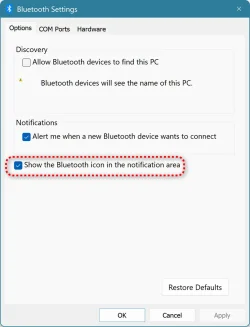
1. Settings->Bluetooth & Devices ->View more devices
2. Scroll down -> More Bluetooth Settings
3. Put a tick mark as shown

The bluetooth icon should appear in the system tray, Click on it to turn on/off
 

Attachments

  • p2.webp
    p2.webp
    40.6 KB · Views: 2

My Computers My Computers

  • At a glance

    Windows 11 Pro 25H2, Linux Mint 21.3Intel Core i9-14900K @5.8GHZ64GB (2XG Skill F5-6400J3239G32G) @6800Radeon (TM) RX 480 Graphics (8 GB)
    OS
    Windows 11 Pro 25H2, Linux Mint 21.3
    Computer type
    PC/Desktop
    Manufacturer/Model
    Self Build Feb.2024
    CPU
    Intel Core i9-14900K @5.8GHZ
    Motherboard
    MSI MAG Z790 Tomahawk Max WiFi 7
    Memory
    64GB (2XG Skill F5-6400J3239G32G) @6800
    Graphics Card(s)
    Radeon (TM) RX 480 Graphics (8 GB)
    Sound Card
    Intergrated Realtek
    Monitor(s) Displays
    Samsung
    Screen Resolution
    3840x2160
    Hard Drives
    1 - Crucial 705 1TB GEN5
    1 - Crucial 705 2TB GEN5
    2 - Crucial T500 2TB Gen4
    PSU
    750W EVGA-G3
    Case
    Antec NX410
    Cooling
    H2O Thermalright
    Keyboard
    Logitech K800
    Mouse
    Logitech Master 2S
    Internet Speed
    600 Mbps
    Browser
    Chrome
    Antivirus
    WD
  • At a glance

    Windows 11 Pro & Linux Mint X64Intel(R) Core(TM) i7-3770K CPU @ 4.20 GHz32.0GB Dual-Channel CMY16GX3M2A1600C9NVIDIA GeForce GT 740
    Operating System
    Windows 11 Pro & Linux Mint X64
    Computer type
    PC/Desktop
    Manufacturer/Model
    MSI Z77 MPower (MS-7751)
    CPU
    Intel(R) Core(TM) i7-3770K CPU @ 4.20 GHz
    Motherboard
    Z77 MPower (MS-7751)
    Memory
    32.0GB Dual-Channel CMY16GX3M2A1600C9
    Graphics card(s)
    NVIDIA GeForce GT 740
    Monitor(s) Displays
    40" Samsung
    Screen Resolution
    1920X1080
    Hard Drives
    WIN10 - 111GB Samsung SSD 840 Series
    WIN11 - 223GB Crucial CT240BX500SSD
    2X931GB Crucial CT1000BX500SSD1
    PSU
    Antec 850W
    Case
    Antec 900
    Cooling
    H20
    Keyboard
    Logitech K800 Wireless
    Mouse
    Logitech MX Master 2S
    Internet Speed
    100 Mbps
    Browser
    Chrome
    Antivirus
    Windows Defender
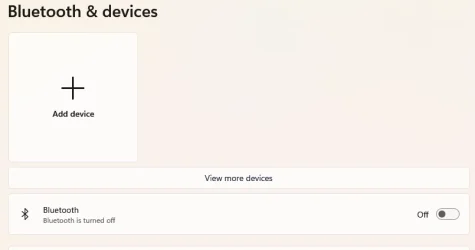
This is what I have in the settings. The on/off switch is not there, The Add Device tab just tells me to turn on Bluetooth. The mouse and keyboard I plugged in via USB. The MX Ergo is there, but I cannot pair it.

Screenshot 2025-05-08 101734.webp
 

My Computers My Computers

  • At a glance

    Window 11 proMD Ryzen 9 8945HS32 GB DDR4Radeon 780M Graphics 4.00 GHz
    OS
    Window 11 pro
    Computer type
    PC/Desktop
    Manufacturer/Model
    GMKtec NUC Box K11
    CPU
    MD Ryzen 9 8945HS
    Motherboard
    unknown
    Memory
    32 GB DDR4
    Graphics Card(s)
    Radeon 780M Graphics 4.00 GHz
    Sound Card
    integrated
    Monitor(s) Displays
    Samsung
    Screen Resolution
    1080P
    Hard Drives
    2TB internal,
    PSU
    external
    Case
    What came with
    Cooling
    air
    Keyboard
    Keychron Q3
    Mouse
    Logitech Ero track ball.
    Internet Speed
    12 mbps wired if I am lucky. I have G5wmm available at 300 mbps if I pair the Mac Studio with my iPhone
    Browser
    usually Chrome
    Antivirus
    Windows built in.
  • At a glance

    Ryzen 7 7735HS32GB DDR5integrated Radeon 680M
    Computer type
    PC/Desktop
    Manufacturer/Model
    Kamrui AMD8PRO mini PC
    CPU
    Ryzen 7 7735HS
    Motherboard
    Unknown
    Memory
    32GB DDR5
    Graphics card(s)
    integrated Radeon 680M
    Sound Card
    integrated
    Monitor(s) Displays
    Samsung
    Screen Resolution
    1080P
    Hard Drives
    internal 512 gb SSD
    PSU
    internal
    Case
    Kamuri
    Cooling
    air twin fans
    Keyboard
    Q1
    Mouse
    Ergo wireless
    Internet Speed
    12 mbps on a good day
    Browser
    Chrome
    Antivirus
    Windows Defender
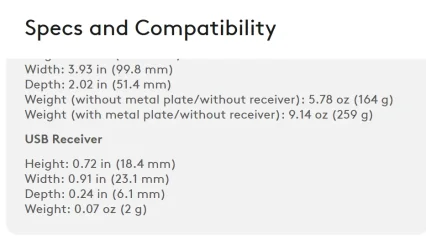
What I see for that Trackball on Logitech MX ERGO Advanced Wireless Trackball Mouse is that it uses a USB receiver [dongle], Bluetooth not mentioned

1746729802181.webpSome Logitech/LOGI sets of mouse and keyboard use a Unifying transceiver, only 1 USB device to run both, maybe an issue there?
 

My Computers My Computers

  • At a glance

    Win11 Pro RTM Version 24H2 Build 26100.4202Intel Core i5 11th Gen. 2.40GHz12GB
    OS
    Win11 Pro RTM Version 24H2 Build 26100.4202
    Computer type
    Laptop
    Manufacturer/Model
    Dell Vostro 3400
    CPU
    Intel Core i5 11th Gen. 2.40GHz
    Memory
    12GB
    Hard Drives
    256GB SSD NVMe M.2
  • At a glance

    Win11 Pro RTM Version 24H2 Build 26100.4202Intel Core i5 10th Gen. 2.90GHz16GBOnboard, no VGA, using a DisplayPort-to-VGA a...
    Operating System
    Win11 Pro RTM Version 24H2 Build 26100.4202
    Computer type
    PC/Desktop
    Manufacturer/Model
    Dell Vostro 5890
    CPU
    Intel Core i5 10th Gen. 2.90GHz
    Memory
    16GB
    Graphics card(s)
    Onboard, no VGA, using a DisplayPort-to-VGA adapter
    Monitor(s) Displays
    24" Dell
    Hard Drives
    512GB SSD NVMe, 4TB Seagate HDD
    Browser
    Firefox, Edge
    Antivirus
    Windows Defender/Microsoft Security
System Requirements

  • USB Receiver; Required : Available USB port, Windows 10, 11 or later , macOS 10.15 or later , ChromeOS, Linux
  • Bluetooth; Bluetooth Low Energy , Windows 10, 11 or later, macOS 10.15 or later, iPadOS 13.4 or later, ChromeOS,, Linux
  • internet; access required to download optional customization app Logi Options.
 

My Computers My Computers

  • At a glance

    Window 11 proMD Ryzen 9 8945HS32 GB DDR4Radeon 780M Graphics 4.00 GHz
    OS
    Window 11 pro
    Computer type
    PC/Desktop
    Manufacturer/Model
    GMKtec NUC Box K11
    CPU
    MD Ryzen 9 8945HS
    Motherboard
    unknown
    Memory
    32 GB DDR4
    Graphics Card(s)
    Radeon 780M Graphics 4.00 GHz
    Sound Card
    integrated
    Monitor(s) Displays
    Samsung
    Screen Resolution
    1080P
    Hard Drives
    2TB internal,
    PSU
    external
    Case
    What came with
    Cooling
    air
    Keyboard
    Keychron Q3
    Mouse
    Logitech Ero track ball.
    Internet Speed
    12 mbps wired if I am lucky. I have G5wmm available at 300 mbps if I pair the Mac Studio with my iPhone
    Browser
    usually Chrome
    Antivirus
    Windows built in.
  • At a glance

    Ryzen 7 7735HS32GB DDR5integrated Radeon 680M
    Computer type
    PC/Desktop
    Manufacturer/Model
    Kamrui AMD8PRO mini PC
    CPU
    Ryzen 7 7735HS
    Motherboard
    Unknown
    Memory
    32GB DDR5
    Graphics card(s)
    integrated Radeon 680M
    Sound Card
    integrated
    Monitor(s) Displays
    Samsung
    Screen Resolution
    1080P
    Hard Drives
    internal 512 gb SSD
    PSU
    internal
    Case
    Kamuri
    Cooling
    air twin fans
    Keyboard
    Q1
    Mouse
    Ergo wireless
    Internet Speed
    12 mbps on a good day
    Browser
    Chrome
    Antivirus
    Windows Defender
This is what I have in the settings. The on/off switch is not there, The Add Device tab just tells me to turn on Bluetooth. The mouse and keyboard I plugged in via USB. The MX Ergo is there, but I cannot pair it.
You obviously had bluetooth working at one time to have paired it in the first place. It's stopped working now though.

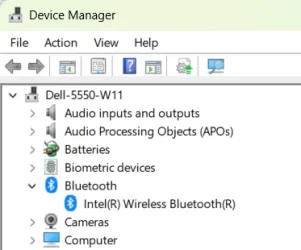
What do you see in Device Manager? Anything with a yellow warning triangle? If northing, what about if you 'show hidden devices'?

1746733783010.webp
 

My Computers My Computers

  • At a glance

    Windows 11 HomeAMD Athlon Silver 3050U8GBRadeon Graphics
    OS
    Windows 11 Home
    Computer type
    Laptop
    Manufacturer/Model
    Acer Aspire 3 A315-23-R9VY
    CPU
    AMD Athlon Silver 3050U
    Memory
    8GB
    Graphics Card(s)
    Radeon Graphics
    Monitor(s) Displays
    laptop screen
    Screen Resolution
    1366x768 native resolution, up to 2560x1440 with Radeon Virtual Super Resolution
    Hard Drives
    1TB Samsung EVO 870 SSD (from April 2026: 250GB EVO 850)
    Internet Speed
    150 Mbps
    Browser
    Edge, Firefox
    Antivirus
    Defender
    Other Info
    fully 'Windows 11 ready' laptop. Windows 10 C: partition migrated from my old unsupported 'main machine' then upgraded to 11. A test migration ran Insider builds for 2 months. When 11 was released on 5th October 2021 it was re-imaged back to 10 and was offered the upgrade in Windows Update on 20th October. Windows Update offered the 22H2 Feature Update on 20th September 2022. It got the 23H2 Feature Update on 4th November 2023 through Windows Update, 24H2 on 3rd October 2024 through Windows Update by setting the Target Release Version for 24H2, and 25H2 on 30th September 2025 through Windows Update by setting the Target Release Version for 25H2.

    UPDATE - 11 April 2026: due to mechanical deterioration this PC has been retired from active duty. The OS with all software and files has been migrated to my System Seven in 'Other systems' to carry on as my general purpose 'main machine'.

    I've now clean installed 25H2 and used Garlin's scripts to update Secure Boot to CA 2023 and revoke the PCA 2011 certificates. It's new role is to test secure boot issues.
  • At a glance

    Windows 11 ProIntel® Core™ i5-520M8GB(integrated graphics) Intel HD Graphics
    Operating System
    Windows 11 Pro
    Computer type
    Laptop
    Manufacturer/Model
    Dell Latitude E4310
    CPU
    Intel® Core™ i5-520M
    Motherboard
    0T6M8G
    Memory
    8GB
    Graphics card(s)
    (integrated graphics) Intel HD Graphics
    Screen Resolution
    1366x768
    Hard Drives
    500GB Crucial MX500 SSD
    Browser
    Firefox, Edge
    Antivirus
    Defender
    Other Info
    unsupported machine: Legacy bios, MBR, TPM 1.2, upgraded from W10 to W11 using W10/W11 hybrid install media workaround.

    In-place upgrade to 22H2 using ISO and a workaround.
    Feature Update to 23H2 by manually installing the Enablement Package.
    In-place upgrade to 24H2 using hybrid 23H2/24H2 install media.
    Upgraded to 25H2 by Enablement Package.

    Also running Insider Dev, and Canary builds and Windows 10 as native boot .vhdx.
  • My SYSTEM THREE is a Dell Latitude 5410, i7-10610U, 32GB RAM, 512GB NVMe ssd, supported device running Windows 11 Pro.

    My SYSTEM FOUR is a 2-in-1 convertible Lenovo Yoga 11e 20DA, Celeron N2930, 8GB RAM, 256GB ssd. Unsupported device: currently running Win10 Pro, plus Win11 Pro RTM and Insider Dev, Beta, and RP 24H2 as native boot vhdx.

    My SYSTEM FIVE is a Dell Latitude 3190 2-in-1, Pentium Silver N5030, 8GB RAM, 1TB NVMe ssd, supported device running Windows 11 Pro, plus Insider Beta, Dev, and Canary builds (and a few others) as a native boot .vhdx.

    My SYSTEM SIX is a Dell Latitude 5550, Core Ultra 7 165H, 64GB RAM, 1TB NVMe SSD, supported device, Windows 11 Pro 24H2, Hyper-V host machine. Updated to 25H2 on 30th September 2025.

    My SYSTEM SEVEN is a Lenovo Thinkpad T580, Intel Core i7-8650U, 16GB RAM, 512GB NVMe SSD + 2nd 512GB NVMe SSD, a supported device for Windows 11. This is my current general purpose 'main machine'. The installed Windows 11 Home from my System One has been migrated to this machine.
You obviously had bluetooth working at one time to have paired it in the first place. It's stopped working now though.

What do you see in Device Manager? Anything with a yellow warning triangle? If northing, what about if you 'show hidden devices'?

View attachment 133519
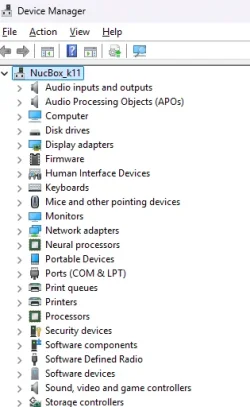
I looked at this and the Bluetooth catatagory is missing. Even though I loaded Intel Wireless Bluetooth it does not show up where it should.

1746735659481.webp
 

My Computers My Computers

  • At a glance

    Window 11 proMD Ryzen 9 8945HS32 GB DDR4Radeon 780M Graphics 4.00 GHz
    OS
    Window 11 pro
    Computer type
    PC/Desktop
    Manufacturer/Model
    GMKtec NUC Box K11
    CPU
    MD Ryzen 9 8945HS
    Motherboard
    unknown
    Memory
    32 GB DDR4
    Graphics Card(s)
    Radeon 780M Graphics 4.00 GHz
    Sound Card
    integrated
    Monitor(s) Displays
    Samsung
    Screen Resolution
    1080P
    Hard Drives
    2TB internal,
    PSU
    external
    Case
    What came with
    Cooling
    air
    Keyboard
    Keychron Q3
    Mouse
    Logitech Ero track ball.
    Internet Speed
    12 mbps wired if I am lucky. I have G5wmm available at 300 mbps if I pair the Mac Studio with my iPhone
    Browser
    usually Chrome
    Antivirus
    Windows built in.
  • At a glance

    Ryzen 7 7735HS32GB DDR5integrated Radeon 680M
    Computer type
    PC/Desktop
    Manufacturer/Model
    Kamrui AMD8PRO mini PC
    CPU
    Ryzen 7 7735HS
    Motherboard
    Unknown
    Memory
    32GB DDR5
    Graphics card(s)
    integrated Radeon 680M
    Sound Card
    integrated
    Monitor(s) Displays
    Samsung
    Screen Resolution
    1080P
    Hard Drives
    internal 512 gb SSD
    PSU
    internal
    Case
    Kamuri
    Cooling
    air twin fans
    Keyboard
    Q1
    Mouse
    Ergo wireless
    Internet Speed
    12 mbps on a good day
    Browser
    Chrome
    Antivirus
    Windows Defender
I looked at this and the Bluetooth catatagory is missing.
If you had bluetooth previously then it should show with 'View > Show hidden devices'. If so, the it means that the device is now not being recognised as attached to the system. This could be a loose cable, or hardware failure.
 

My Computers My Computers

  • At a glance

    Windows 11 HomeAMD Athlon Silver 3050U8GBRadeon Graphics
    OS
    Windows 11 Home
    Computer type
    Laptop
    Manufacturer/Model
    Acer Aspire 3 A315-23-R9VY
    CPU
    AMD Athlon Silver 3050U
    Memory
    8GB
    Graphics Card(s)
    Radeon Graphics
    Monitor(s) Displays
    laptop screen
    Screen Resolution
    1366x768 native resolution, up to 2560x1440 with Radeon Virtual Super Resolution
    Hard Drives
    1TB Samsung EVO 870 SSD (from April 2026: 250GB EVO 850)
    Internet Speed
    150 Mbps
    Browser
    Edge, Firefox
    Antivirus
    Defender
    Other Info
    fully 'Windows 11 ready' laptop. Windows 10 C: partition migrated from my old unsupported 'main machine' then upgraded to 11. A test migration ran Insider builds for 2 months. When 11 was released on 5th October 2021 it was re-imaged back to 10 and was offered the upgrade in Windows Update on 20th October. Windows Update offered the 22H2 Feature Update on 20th September 2022. It got the 23H2 Feature Update on 4th November 2023 through Windows Update, 24H2 on 3rd October 2024 through Windows Update by setting the Target Release Version for 24H2, and 25H2 on 30th September 2025 through Windows Update by setting the Target Release Version for 25H2.

    UPDATE - 11 April 2026: due to mechanical deterioration this PC has been retired from active duty. The OS with all software and files has been migrated to my System Seven in 'Other systems' to carry on as my general purpose 'main machine'.

    I've now clean installed 25H2 and used Garlin's scripts to update Secure Boot to CA 2023 and revoke the PCA 2011 certificates. It's new role is to test secure boot issues.
  • At a glance

    Windows 11 ProIntel® Core™ i5-520M8GB(integrated graphics) Intel HD Graphics
    Operating System
    Windows 11 Pro
    Computer type
    Laptop
    Manufacturer/Model
    Dell Latitude E4310
    CPU
    Intel® Core™ i5-520M
    Motherboard
    0T6M8G
    Memory
    8GB
    Graphics card(s)
    (integrated graphics) Intel HD Graphics
    Screen Resolution
    1366x768
    Hard Drives
    500GB Crucial MX500 SSD
    Browser
    Firefox, Edge
    Antivirus
    Defender
    Other Info
    unsupported machine: Legacy bios, MBR, TPM 1.2, upgraded from W10 to W11 using W10/W11 hybrid install media workaround.

    In-place upgrade to 22H2 using ISO and a workaround.
    Feature Update to 23H2 by manually installing the Enablement Package.
    In-place upgrade to 24H2 using hybrid 23H2/24H2 install media.
    Upgraded to 25H2 by Enablement Package.

    Also running Insider Dev, and Canary builds and Windows 10 as native boot .vhdx.
  • My SYSTEM THREE is a Dell Latitude 5410, i7-10610U, 32GB RAM, 512GB NVMe ssd, supported device running Windows 11 Pro.

    My SYSTEM FOUR is a 2-in-1 convertible Lenovo Yoga 11e 20DA, Celeron N2930, 8GB RAM, 256GB ssd. Unsupported device: currently running Win10 Pro, plus Win11 Pro RTM and Insider Dev, Beta, and RP 24H2 as native boot vhdx.

    My SYSTEM FIVE is a Dell Latitude 3190 2-in-1, Pentium Silver N5030, 8GB RAM, 1TB NVMe ssd, supported device running Windows 11 Pro, plus Insider Beta, Dev, and Canary builds (and a few others) as a native boot .vhdx.

    My SYSTEM SIX is a Dell Latitude 5550, Core Ultra 7 165H, 64GB RAM, 1TB NVMe SSD, supported device, Windows 11 Pro 24H2, Hyper-V host machine. Updated to 25H2 on 30th September 2025.

    My SYSTEM SEVEN is a Lenovo Thinkpad T580, Intel Core i7-8650U, 16GB RAM, 512GB NVMe SSD + 2nd 512GB NVMe SSD, a supported device for Windows 11. This is my current general purpose 'main machine'. The installed Windows 11 Home from my System One has been migrated to this machine.
Back
Top Bottom