Hi.
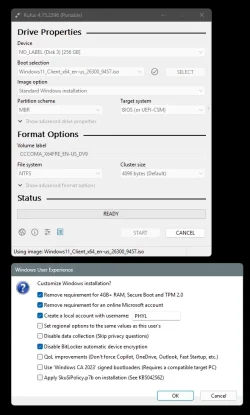
Why ms put so many restrictions to install windows 11 26h2 to an old pc?
For example:
tpm2.0
secure boot
online account
????
Why?
I believe you can pass all these with rufus but at future maybe don't let you install win11 to old pc like for example to really old cpu's without sse4.2 you can't install win11 and you can't buypass this with any way.
The why is easy, they are trying to help force security features through hardware, rather than relying on a person enabling an optional feature. Too many compromised systems over the years. Too many people fleeing the system to other things like Apple's MacOS because they keep hearing how much more secure it is and how it just "works". No doubt, since the old days of Windows 95/98/XP things have improved substantially. Back then people ran as administrator 24x7 and systems were compromised within minutes of attaching to the Internet.
With respect to the online account, it comes down to a few things, but mostly security and business strategy. By signing in with the MS account, you automatically connect to a variety of MS services, like OneDrive, Store, Microsoft 365, etc. With being signed in, it can help with device backup and recovery by backing up settings, syncing passwords and storing bitlocker keys. You can also use MFA with these online accounts and it gives you more options for password recovery than local accounts. It also gives MS telemetry data and helps them to ad target you and sell you more stuff.
I kind of wish they did this more like Apple does though. You sign on locally, and then you have a single location where you also sign in with your Microsoft account.
While the stated aim may be to increase security, never forget MS is a marketing organisation aiming to make a profit.. although these days Windows isn't such a major revenue stream.
3 things to note with a default Win 11 installation
a. it pretty much insists you use a MS account
b. Bitlocker is enabled by default- no user consent or notification. Guaranteed to create problems for ordinary consumers.
c. Onedrive is embedded and enabled.
Thereafter removing Onedrive (recommended!) has to be done extremely carefully to ensure personal data is not lost.
Not really sure that Bitlocker is guaranteed to cause people problems. People lose their devices, laptops get stolen, etc. People freak out over the thought of putting their data in the cloud because "somebody might gain access to it", but then when it comes to their own computer, they are like....nah bro...i don't want to encrypt my hard drive because i could have to provide a recovery key. This isn't really that hard. If you bitlocker encrypt your drive, you will be given a recovery key. Print it out on a piece of paper, but it in a file folder with other information about your PC and store it somewhere safe. And IF you use a Microsoft account, you can just go to
https://aka.ms/myrecoverykey and your key will be available to you via the web.
With respect to OneDrive, i don't see it as a universally bad thing and recommend it's removal. For many people, it servers as an automatic second copy of their data outside of their local hard drive. Thus, if they have 2 computers, or if they have a single computer and the hard drive fails, their data is magically still available to them without them having to have performed their own backups...which many of them would not have done.
Sure, it can be viewed a revenue stream for MS. You store enough data in OneDrive and you have to pay for more storage. If storing that data in the cloud and having the second automatic backup of your data is important to you, or you like to access your data from 2 computers, or you want to get to your data from your phone, or tablet, or office, or from your dad's house while on the internet, whatever your reasons, maybe that small amount of money is worth it to you. If it's not worth it to you, there is no requirement to store your data in the OneDrive folder. Create a folder called C:\MyData and store your stuff in there. It won't go to OneDrive and it won't cause you have to buy more space from OneDrive.
As far as being extremely careful to ensure personal data is not lost when you disable OneDrive, I feel this is way blown out of proportion. Microsoft puts links in your local directories when it moves files around and while you may NOT see the files still on the local drive, they are safely stored in your OneDrive cloud account. You simply log into the site via the web, and hit the button to download them, and viola....they are back. Data was never lost, (from a standpoint of being destroyed or deleted), but apparently some people just couldn't find it again.
Bitlocker is not enabled by default on any of my numerous installations of Windows 11 Pro?
Yeah, you are probably setting up with a local account, like I do, and I have never had Bitlocker automatically enabled either.