Why Microsoft put so many restrictions?


Gregory

Well-known member
Local time
1:34 AM
Posts
294
OS
Windows 7 and 11 and 12
Hi.
Why ms put so many restrictions to install windows 11 26h2 to an old pc?

For example:
tpm2.0
secure boot
online account

????

Why?

I believe you can pass all these with rufus but at future maybe don't let you install win11 to old pc like for example to really old cpu's without sse4.2 you can't install win11 and you can't buypass this with any way.
 

My Computer My Computer

At a glance

Windows 7 and 11 and 12
OS
Windows 7 and 11 and 12
Computer type
PC/Desktop
Browser
Firefox
Hi.
Why ms put so many restrictions to install windows 11 26h2 to an old pc?

For example:
tpm2.0
secure boot
online account

????

Why?

I believe you can pass all these with rufus but at future maybe don't let you install win11 to old pc like for example to really old cpu's without sse4.2 you can't install win11 and you can't buypass this with any way.
You can install without internet or an online account. TPM and secure boot are for increased security is the basic why of it.
 

My Computer My Computer

At a glance

Windows 11 25H2Broadwell-e 6850K 4.5ghz @1.36v32GB Corsair LPM 3600 C16EVGA RTX 3080Ti FTW
OS
Windows 11 25H2
Computer type
PC/Desktop
Manufacturer/Model
EVGA home brew
CPU
Broadwell-e 6850K 4.5ghz @1.36v
Motherboard
EVGA X99 FTW K
Memory
32GB Corsair LPM 3600 C16
Graphics Card(s)
EVGA RTX 3080Ti FTW
Sound Card
Asus Centurion true 7.1 headset. (5 speakers in each earpeice)
Monitor(s) Displays
LG C4 55"
Screen Resolution
4K 144hz
Hard Drives
Various models of SSDs ~10TB No HDDs installed.
PSU
be quiet! BN516 Straight Power 12-1000w 80 Plus Platinum
Case
Corsair 780T modified to dual 200mm intake fans
Cooling
Corsair H110i
Keyboard
Corsair K95 Platinum
Mouse
Corsair M65 RGB Elite
Internet Speed
50Mbs
While the stated aim may be to increase security, never forget MS is a marketing organisation aiming to make a profit.. although these days Windows isn't such a major revenue stream.

3 things to note with a default Win 11 installation
a. it pretty much insists you use a MS account
b. Bitlocker is enabled by default- no user consent or notification. Guaranteed to create problems for ordinary consumers.
c. Onedrive is embedded and enabled.

Thereafter removing Onedrive (recommended!) has to be done extremely carefully to ensure personal data is not lost.

As Onedrive provides in general 5GB free storage, exceeding that leads to being pestered with prompts to subscribe for more.

Apparently too the new Photos app is linked to OneDrive too.

Rufus has been progressively updated so as to provide a clean installation free of the above and more, and as you say supports installation on older PCs.

However, when a major build update (feature update) occurs, on an 'incompatible' PC you can only do that with an in-place upgrade, not via Windows Update. I suppose at some point MS could block that.

As for SSE4.2 see:

1.webp
 

My Computer My Computer

At a glance

Windows 11 Proi7-8650U16GBIntel UHD 620
OS
Windows 11 Pro
Computer type
Laptop
Manufacturer/Model
Lenovo t480s
CPU
i7-8650U
Memory
16GB
Graphics Card(s)
Intel UHD 620
Screen Resolution
1920x1080
Hard Drives
C SN810 SDCPNRY-512G-1006
Browser
Edge, Firefox
Antivirus
Defender
Bitlocker is not enabled by default on any of my numerous installations of Windows 11 Pro?
 

My Computers My Computers

  • At a glance

    Windows 11 Pro 26H2 26300.9711AMD Ryzen 7 5825U with Radeon Graphics16GB
    OS
    Windows 11 Pro 26H2 26300.9711
    Computer type
    Laptop
    Manufacturer/Model
    Acemagic LX15PRO
    CPU
    AMD Ryzen 7 5825U with Radeon Graphics
    Motherboard
    BIOS CT_BI_AMI_LX15PRO_AB8139_A-004
    Memory
    16GB
    Screen Resolution
    1920 x 1080
    Hard Drives
    SSD 2TB
    Internet Speed
    30 Mbps
    Browser
    Brave
    Antivirus
    Webroot SecureAnywhere Complete beta
  • At a glance

    Windows 11 Pro 23H2 22631.2506Atom N450 1.66GHz2GB
    Operating System
    Windows 11 Pro 23H2 22631.2506
    Computer type
    Laptop
    Manufacturer/Model
    HP Mini 210-1090NR PC (bought in late 2009!)
    CPU
    Atom N450 1.66GHz
    Memory
    2GB
    Browser
    Brave
    Antivirus
    Webroot
  • Acer Swift SF114-34 laptop
    OS Windows 11 Pro 26200.8894
    CPU Pentium Silver N6000
    RAM 4GB
    BIOS v1.17
    SSD Samsung 970 EVO Plus SSD 2TB (an upgrade)
That's what I found to be so on mine... and watching a youtube video recently on MS vs Rufus, the presenter also stated that to be so.

My friend who'd recently bought a laptop with Win 11 Pro also found it to be enabled.
 

My Computer My Computer

At a glance

Windows 11 Proi7-8650U16GBIntel UHD 620
OS
Windows 11 Pro
Computer type
Laptop
Manufacturer/Model
Lenovo t480s
CPU
i7-8650U
Memory
16GB
Graphics Card(s)
Intel UHD 620
Screen Resolution
1920x1080
Hard Drives
C SN810 SDCPNRY-512G-1006
Browser
Edge, Firefox
Antivirus
Defender
Bitlocker is not enabled by default on any of my numerous installations of Windows 11 Pro?
Indeed. I do not use Bitlocker and it is set to off. I've never set it to off, if I want it on, I just enable it using the slider.

The main one for me, is and always has been, Edge. I've stated in enough posts, I don't like it and I don't want it. Uninstalling it the correct way, whilst it was a bit of a faff doing effectively a reinstall and selecting a EU Country, hasn't broken anything for me, but then I probably don't use my PC/laptop in the same way as many of the enthusiasts here do.
 

My Computers My Computers

  • At a glance

    W11 Pro 26H2 26300.9711 W.F.E 1000.26100.372.0Intel i5 10400x2 8gb Corsair Vengeance LPX 3600Intel(R) UHD Graphics 630
    OS
    W11 Pro 26H2 26300.9711 W.F.E 1000.26100.372.0
    Computer type
    PC/Desktop
    Manufacturer/Model
    MSI
    CPU
    Intel i5 10400
    Motherboard
    B560M PRO-VDH WiFi BIOS 1.A1
    Memory
    x2 8gb Corsair Vengeance LPX 3600
    Graphics Card(s)
    Intel(R) UHD Graphics 630
    Sound Card
    Realtek onboard AL897
    Monitor(s) Displays
    MSI MAG Artymis 242C
    Screen Resolution
    1920 x 1080
    Hard Drives
    Samsung 970 Evo Plus 500gb
    PSU
    EVGA SuperNova 650w G3
    Case
    Gaming case
    Keyboard
    MSI GK20
    Mouse
    MSI Versa 300
    Internet Speed
    500mbps
    Browser
    Brave
    Antivirus
    Bitdefender
    Other Info
    MSI Herald BE9400 WiFi PCIe
    Printer - Brother MFC-L2750DW
  • At a glance

    Windows 11 Home 25H2 26300.955012th Gen Intel(R) Core(TM) i3-1215U8GBIntel(R) UHD Graphics (128 MB)
    Operating System
    Windows 11 Home 25H2 26300.9550
    Computer type
    Laptop
    Manufacturer/Model
    MSI Modern 14 C12M 637UK
    CPU
    12th Gen Intel(R) Core(TM) i3-1215U
    Motherboard
    Micro-Star International Co., Ltd. MS-14J1 (U3E1)
    Memory
    8GB
    Graphics card(s)
    Intel(R) UHD Graphics (128 MB)
    Sound Card
    Intel Smart Sound Technology for Bluetooth Audio
    Internet Speed
    500mbps
    Browser
    Brave
    Antivirus
    BitDefender
Bitlocker is not enabled by default on any of my numerous installations of Windows 11 Pro?

If you use Rufus, you can disable it beforehand.

If you do it the standard MS way, then all the ones I've encountered had Bitlocker enabled by default. It's one of the first things I check.
 

My Computers My Computers

  • At a glance

    Windows 11 Pro 25H2 build: (26200.7623)32GB
    OS
    Windows 11 Pro 25H2 build: (26200.7623)
    Computer type
    Laptop
    Manufacturer/Model
    Microsoft Surface Pro
    Memory
    32GB
  • At a glance

    Microsoft 25H2 ProIntel Core Ultra 764GBIntel Integrated Graphics
    Operating System
    Microsoft 25H2 Pro
    Computer type
    Laptop
    Manufacturer/Model
    Dell Pro 14 - PC14250
    CPU
    Intel Core Ultra 7
    Memory
    64GB
    Graphics card(s)
    Intel Integrated Graphics
    Hard Drives
    Micron 1TB SSD
Hi.
Why ms put so many restrictions to install windows 11 26h2 to an old pc?

For example:
tpm2.0
secure boot
online account

????

Why?

I believe you can pass all these with rufus but at future maybe don't let you install win11 to old pc like for example to really old cpu's without sse4.2 you can't install win11 and you can't buypass this with any way.
Well for someone that promotes the green alliance Gates messed up. Now people are tossing their old PCs because they don't know how to or that you can install Windows 11 on old hardware. There should be an option at the start of the install to put it on and older PC! Duhh..
 

My Computer My Computer

At a glance

Windows 11 Pro 23H2Intel(R) Core(TM) i9-12900HK32gbIntel(R) Iris(R) Xe Graphics
OS
Windows 11 Pro 23H2
Computer type
PC/Desktop
Manufacturer/Model
MinisForum
CPU
Intel(R) Core(TM) i9-12900HK
Memory
32gb
Graphics Card(s)
Intel(R) Iris(R) Xe Graphics
Sound Card
Realtek 888
Monitor(s) Displays
Acer
Screen Resolution
1920x1080
Hard Drives
1TB SSD
Keyboard
Logitech
Mouse
Logitech MX Master 2X
Internet Speed
1GB
Browser
Firefox
Antivirus
Windows Defender
I think this clarifies the point about Bitlocker:
BitLocker (device encryption) is enabled by default on clean installations starting from Windows 11 version 24H2. [1]

Key Details
  • Setup Requirement: It automatically activates during setup when you sign in with a Microsoft account, work, or school account. [1, 2]
  • Local Accounts: If you choose to set up Windows with an offline local account, automatic BitLocker encryption is bypassed during initial setup

Thus if you installed Win 11 Pro as an older build or with a local account it would not have been.

- which unexpectedly refers to Bitlocker being available from that build in Home? Should that be device encryption?
 

My Computer My Computer

At a glance

Windows 11 Proi7-8650U16GBIntel UHD 620
OS
Windows 11 Pro
Computer type
Laptop
Manufacturer/Model
Lenovo t480s
CPU
i7-8650U
Memory
16GB
Graphics Card(s)
Intel UHD 620
Screen Resolution
1920x1080
Hard Drives
C SN810 SDCPNRY-512G-1006
Browser
Edge, Firefox
Antivirus
Defender
Bitlocker is enabled by default- no user consent or notification. Guaranteed to create problems for ordinary consumers.
Bitlocker is not enabled by default on any of my numerous installations of Windows 11 Pro?
Technically bitlocker is not enabled by default, what is enabled by default in a clean install is device encryption. This has been the case since Windows 10 if the device met certain strict minimum requirements, for Windows 11 those requirement have been relaxed and it's seen more often.


Device encryption is the first step on the way to full bitlocker, but it does not lock the drive. It is left open and there is no bitlocker key (yet). If you use a Microsoft account at OOBE then then full bitlocker will be turned on, with your bitlocker key stored in your Microsoft account.

FeatureDevice EncryptionBitLocker Drive Encryption
Underlying technologyUses BitLocker encryptionUses BitLocker encryption
Windows availabilityAvailable on a wider range of eligible devices, including Windows HomeAvailable on Windows Pro, Enterprise, and Education
SetupOften enabled automaticallyUsually enabled and configured manually or through IT policies
ManagementSimple on-and-off settingAdvanced configuration and policy controls
Operating system driveSupportedSupported
Fixed internal drivesSupportedSupported
Removable USB drivesNot includedSupported through BitLocker To Go
Recovery keyUsually backed up automatically to an accountStorage method can be selected or managed by IT
Best suited forPersonal users and straightforward protectionBusinesses and users requiring greater control
 

My Computers My Computers

  • At a glance

    Windows 11 HomeAMD Athlon Silver 3050U8GBRadeon Graphics
    OS
    Windows 11 Home
    Computer type
    Laptop
    Manufacturer/Model
    Acer Aspire 3 A315-23-R9VY
    CPU
    AMD Athlon Silver 3050U
    Memory
    8GB
    Graphics Card(s)
    Radeon Graphics
    Monitor(s) Displays
    laptop screen
    Screen Resolution
    1366x768 native resolution, up to 2560x1440 with Radeon Virtual Super Resolution
    Hard Drives
    1TB Samsung EVO 870 SSD (from April 2026: 250GB EVO 850)
    Internet Speed
    150 Mbps
    Browser
    Edge, Firefox
    Antivirus
    Defender
    Other Info
    UPDATE - 11 April 2026: due to lid hinges starting to break up this laptop has been retired from active duty. The OS with all software and files has been migrated to my System Seven in 'Other systems' to carry on as my general purpose 'main machine'.

    I've now clean installed 25H2 and used Garlin's scripts to update Secure Boot to CA 2023 and revoke the PCA 2011 certificates. It's new role is to test secure boot issues.

    Info for 2021-2026:
    fully 'Windows 11 ready' laptop. Windows 10 C: partition migrated from my old unsupported 'main machine' then upgraded to 11. A test migration ran Insider builds for 2 months. When 11 was released on 5th October 2021 it was re-imaged back to 10 and was offered the upgrade in Windows Update on 20th October. Windows Update offered the 22H2 Feature Update on 20th September 2022. It got the 23H2 Feature Update on 4th November 2023 through Windows Update, 24H2 on 3rd October 2024 through Windows Update by setting the Target Release Version for 24H2, and 25H2 on 30th September 2025 through Windows Update by setting the Target Release Version for 25H2.
  • At a glance

    Windows 11 ProIntel® Core™ i5-520M8GB(integrated graphics) Intel HD Graphics
    Operating System
    Windows 11 Pro
    Computer type
    Laptop
    Manufacturer/Model
    Dell Latitude E4310
    CPU
    Intel® Core™ i5-520M
    Motherboard
    0T6M8G
    Memory
    8GB
    Graphics card(s)
    (integrated graphics) Intel HD Graphics
    Screen Resolution
    1366x768
    Hard Drives
    500GB Crucial MX500 SSD
    Browser
    Firefox, Edge
    Antivirus
    Defender
    Other Info
    unsupported machine: Legacy bios, MBR, TPM 1.2, upgraded from W10 to W11 using W10/W11 hybrid install media workaround.

    In-place upgrade to 22H2 using ISO and a workaround.
    Feature Update to 23H2 by manually installing the Enablement Package.
    In-place upgrade to 24H2 using hybrid 23H2/24H2 install media.
    Upgraded to 25H2 by Enablement Package.
    Upgraded to 26H2 by Enablement Package.

    Also running Insider Experimental 263xx and 29xxx builds and Windows 10 as native boot .vhdx.
  • My SYSTEM THREE is a Dell Latitude 5410, i7-10610U, 32GB RAM, 512GB NVMe ssd, supported device running Windows 11 Pro.

    My SYSTEM FOUR was a 2-in-1 convertible Lenovo Yoga 11e (1st gen) type 20DA, Celeron N2930, 8GB RAM, 256GB ssd. Unsupported device. This has now been sold. It has been replaced by my System Eight.

    My SYSTEM FIVE is a Dell Latitude 3190 2-in-1, Pentium Silver N5030, 8GB RAM, 1TB NVMe ssd, supported device running Windows 11 Pro, plus Insider Beta, Experimental 263xx and 29xxx builds (and a few others) as a native boot .vhdx.

    My SYSTEM SIX is a Dell Latitude 5550, Core Ultra 7 165H, 64GB RAM, 1TB NVMe SSD, supported device, Windows 11 Pro, Hyper-V host machine. Updated to 25H2 on 30th September 2025.

    My SYSTEM SEVEN is a Lenovo Thinkpad T580, 1920x1080 touchscreen, Intel Core i7-8650U, 16GB RAM, 512GB NVMe SSD + 2nd 512GB NVMe SSD, a supported device for Windows 11. This is my current general purpose 'main machine'. The installed Windows 11 Home from my System One has been migrated to this machine. As its new home has an existing digital licence for Pro I've been able to upgrade the migrated OS from Home to Pro.
    29 Sept. 2026 Feature Update to 26H2 through Windows Update.

    My SYSTEM EIGHT is a 2-in-1 convertible Lenovo Yoga 11e (5th gen) type 20LN, Celeron N4120, 8GB RAM, 512GB NVMe ssd, a supported device for Windows 11. Currently running Windows 11 Pro, plus Insider Beta, Experimental 263xx and 29xxx builds as native boot vhdx.
@Gregory


Just use RUFUS

Do not use MCT.
Download the ISO direct form MS and use Rufus to create the bootable media.
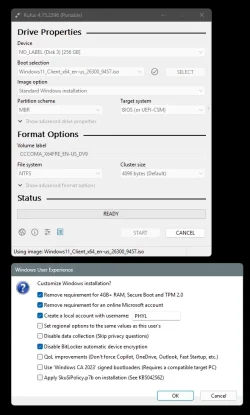
Choose the USB stick, choose the ISO, choose GPT or MBR disk... then...

...in Rufus when you click START, you'll be given options to create a Local account, disable Bitlocker and disregard the TPM, RAM, etc., requirements.


For example, I just installed Win 11 on a laptop about a week ago. For some reason it wanted MBR rather than GPT.
So I set Rufus as follows...

Image1.webp

The really strange part was that after Win 11 was installed, it said the disk was GPT.
But everything worked fine. ??
 

My Computers My Computers

  • At a glance

    Win 11 Home 26H2 26300.9711AMD Ryzen 7 3700XG.Skill (F4-3200C14D-16GTZKW)EVGA RTX 2070 (08G-P4-2171-KR)
    OS
    Win 11 Home 26H2 26300.9711
    Computer type
    PC/Desktop
    Manufacturer/Model
    Built by Ghot® [May 2020]
    CPU
    AMD Ryzen 7 3700X
    Motherboard
    Asus Pro WS X570-ACE (BIOS 5302)
    Memory
    G.Skill (F4-3200C14D-16GTZKW)
    Graphics Card(s)
    EVGA RTX 2070 (08G-P4-2171-KR)
    Sound Card
    Realtek ALC1220P / ALC S1220A
    Monitor(s) Displays
    Dell U3011 30"
    Screen Resolution
    2560 x 1600
    Hard Drives
    2x Samsung 860 EVO 500GB,
    WD 4TB Black FZBX - SATA III,
    WD 8TB Black FZBX - SATA III,
    DRW-24B1ST CD/DVD Burner
    PSU
    PC Power & Cooling 750W Quad EPS12V
    Case
    Cooler Master ATCS 840 Tower
    Cooling
    CM Hyper 212 EVO (push/pull)
    Keyboard
    Ducky DK9008 Shine II Blue LED
    Mouse
    Logitech Optical M-100
    Internet Speed
    300/300
    Browser
    Firefox (latest)
    Antivirus
    Bitdefender Total Security
    Other Info
    Speakers: Klipsch Pro Media 2.1
  • At a glance

    Windows XP Pro 32bit w/SP3AMD Athlon 64 X2 5000+ (OC'd @ 3.2Ghz)TWIN2X2048-6400C4DHX (2 x 1GB, DDR2 800)EVGA 256-P2-N758-TR GeForce 8600GT SSC
    Operating System
    Windows XP Pro 32bit w/SP3
    Computer type
    PC/Desktop
    Manufacturer/Model
    Built by Ghot® (not in use)
    CPU
    AMD Athlon 64 X2 5000+ (OC'd @ 3.2Ghz)
    Motherboard
    ASUS M2N32-SLI Deluxe Wireless Edition
    Memory
    TWIN2X2048-6400C4DHX (2 x 1GB, DDR2 800)
    Graphics card(s)
    EVGA 256-P2-N758-TR GeForce 8600GT SSC
    Sound Card
    Onboard
    Monitor(s) Displays
    ViewSonic G90FB Black 19" Professional (CRT)
    Screen Resolution
    up to 2048 x 1536
    Hard Drives
    WD 36GB 10,000rpm Raptor SATA
    Seagate 80GB 7200rpm SATA
    Lite-On LTR-52246S CD/RW
    Lite-On LH-18A1P CD/DVD Burner
    PSU
    PC Power & Cooling Silencer 750 Quad EPS12V
    Case
    Generic Beige case, 80mm fans
    Cooling
    ZALMAN 9500A 92mm CPU Cooler
    Keyboard
    Logitech Classic Keybooard 200
    Mouse
    Logitech Optical M-BT96a
    Internet Speed
    300/300
    Browser
    Firefox 3.x ??
    Antivirus
    Symantec (Norton)
    Other Info
    Still assembled, still runs. Haven't turned it on for 15 years?
Hi.
Why ms put so many restrictions to install windows 11 26h2 to an old pc?

For example:
tpm2.0
secure boot
online account

????

Why?

I believe you can pass all these with rufus but at future maybe don't let you install win11 to old pc like for example to really old cpu's without sse4.2 you can't install win11 and you can't buypass this with any way.
The why is easy, they are trying to help force security features through hardware, rather than relying on a person enabling an optional feature. Too many compromised systems over the years. Too many people fleeing the system to other things like Apple's MacOS because they keep hearing how much more secure it is and how it just "works". No doubt, since the old days of Windows 95/98/XP things have improved substantially. Back then people ran as administrator 24x7 and systems were compromised within minutes of attaching to the Internet.

With respect to the online account, it comes down to a few things, but mostly security and business strategy. By signing in with the MS account, you automatically connect to a variety of MS services, like OneDrive, Store, Microsoft 365, etc. With being signed in, it can help with device backup and recovery by backing up settings, syncing passwords and storing bitlocker keys. You can also use MFA with these online accounts and it gives you more options for password recovery than local accounts. It also gives MS telemetry data and helps them to ad target you and sell you more stuff.

I kind of wish they did this more like Apple does though. You sign on locally, and then you have a single location where you also sign in with your Microsoft account.

While the stated aim may be to increase security, never forget MS is a marketing organisation aiming to make a profit.. although these days Windows isn't such a major revenue stream.

3 things to note with a default Win 11 installation
a. it pretty much insists you use a MS account
b. Bitlocker is enabled by default- no user consent or notification. Guaranteed to create problems for ordinary consumers.
c. Onedrive is embedded and enabled.

Thereafter removing Onedrive (recommended!) has to be done extremely carefully to ensure personal data is not lost.
Not really sure that Bitlocker is guaranteed to cause people problems. People lose their devices, laptops get stolen, etc. People freak out over the thought of putting their data in the cloud because "somebody might gain access to it", but then when it comes to their own computer, they are like....nah bro...i don't want to encrypt my hard drive because i could have to provide a recovery key. This isn't really that hard. If you bitlocker encrypt your drive, you will be given a recovery key. Print it out on a piece of paper, but it in a file folder with other information about your PC and store it somewhere safe. And IF you use a Microsoft account, you can just go to https://aka.ms/myrecoverykey and your key will be available to you via the web.

With respect to OneDrive, i don't see it as a universally bad thing and recommend it's removal. For many people, it servers as an automatic second copy of their data outside of their local hard drive. Thus, if they have 2 computers, or if they have a single computer and the hard drive fails, their data is magically still available to them without them having to have performed their own backups...which many of them would not have done.

Sure, it can be viewed a revenue stream for MS. You store enough data in OneDrive and you have to pay for more storage. If storing that data in the cloud and having the second automatic backup of your data is important to you, or you like to access your data from 2 computers, or you want to get to your data from your phone, or tablet, or office, or from your dad's house while on the internet, whatever your reasons, maybe that small amount of money is worth it to you. If it's not worth it to you, there is no requirement to store your data in the OneDrive folder. Create a folder called C:\MyData and store your stuff in there. It won't go to OneDrive and it won't cause you have to buy more space from OneDrive.

As far as being extremely careful to ensure personal data is not lost when you disable OneDrive, I feel this is way blown out of proportion. Microsoft puts links in your local directories when it moves files around and while you may NOT see the files still on the local drive, they are safely stored in your OneDrive cloud account. You simply log into the site via the web, and hit the button to download them, and viola....they are back. Data was never lost, (from a standpoint of being destroyed or deleted), but apparently some people just couldn't find it again.
Bitlocker is not enabled by default on any of my numerous installations of Windows 11 Pro?
Yeah, you are probably setting up with a local account, like I do, and I have never had Bitlocker automatically enabled either.

 

My Computers My Computers

  • At a glance

    Windows 11 ProIntel Core i5-8279u32GB DDR4 2666MhzIntel Iris Plus 655
    OS
    Windows 11 Pro
    Computer type
    PC/Desktop
    Manufacturer/Model
    Beelink SEI8
    CPU
    Intel Core i5-8279u
    Motherboard
    AZW SEI
    Memory
    32GB DDR4 2666Mhz
    Graphics Card(s)
    Intel Iris Plus 655
    Sound Card
    Intel SST
    Monitor(s) Displays
    Asus ProArt PA278QV
    Screen Resolution
    2560x1440
    Hard Drives
    512GB NVMe
    PSU
    NA
    Case
    NA
    Cooling
    NA
    Keyboard
    NA
    Mouse
    NA
    Internet Speed
    500/50
    Browser
    Edge
    Antivirus
    Defender
    Other Info
    Mini PC used for testing Windows 11.
  • At a glance

    Windows 10 ProRyzen 9 5900x64GB DDR4-3600EVGA GeForce 3080 FT3 Ultra
    Operating System
    Windows 10 Pro
    Computer type
    PC/Desktop
    Manufacturer/Model
    Custom
    CPU
    Ryzen 9 5900x
    Motherboard
    Asus Rog Strix X570-E Gaming
    Memory
    64GB DDR4-3600
    Graphics card(s)
    EVGA GeForce 3080 FT3 Ultra
    Sound Card
    Onboard
    Monitor(s) Displays
    ASUS TUF Gaming VG27AQ. ASUS ProArt Display PA278QV 27” WQHD
    Screen Resolution
    2560x1440
    Hard Drives
    2TB WD SN850 PCI-E Gen 4 NVMe
    2TB Sandisk Ultra 2.5" SATA SSD
    PSU
    Seasonic Focus 850
    Case
    Fractal Meshify S2 in White
    Cooling
    Dark Rock Pro CPU cooler, 3 x 140mm case fans
    Keyboard
    Corsiar K65 RGB Lux
    Mouse
    Logitech G9 Laser Mouse
    Internet Speed
    500/50
    Browser
    Chrome
    Antivirus
    Defender.
One of the most important changes that affects Windows and compatibility with older devices is the changes Microsoft have made working with the major OEM's re the evolution of device drivers and their development over the last couple of years.
 

My Computers My Computers

  • At a glance

    Windows 11 Pro 26H2Intel Core i9 13900KCorsair Dominator Platinum 64gb 5600MT/s DDR5...Sapphire NITRO+ AMD Radeon RX 7900 XTX Vapor-...
    OS
    Windows 11 Pro 26H2
    Computer type
    PC/Desktop
    Manufacturer/Model
    Homebuilt
    CPU
    Intel Core i9 13900K
    Motherboard
    Asus ProArt Z790 Creator WiFi - Bios 3202
    Memory
    Corsair Dominator Platinum 64gb 5600MT/s DDR5 Dual Channel
    Graphics Card(s)
    Sapphire NITRO+ AMD Radeon RX 7900 XTX Vapor-X 24GB
    Sound Card
    External DAC: Cambridge Audio DACMagic200M - Headphone Amps: Topping L70 & SMSL H400
    Monitor(s) Displays
    Samsung S95F OLED 55" TV
    Screen Resolution
    3840 x 2160 120hz
    Hard Drives
    Samsung 980 Pro 2TB (OS)
    Samsung 980 Pro 1TB (Files)
    Lexar NZ790 4TB
    LaCie d2 Professional 6TB external - USB 3.1
    Seagate Expansion 16TB external - USB 3.2
    Seagate One Touch 18TB external HD - USB 3.0
    PSU
    Corsair RM1200x Shift
    Case
    Corsair RGB Smart Case 5000x (white)
    Cooling
    NAUTILUS 360 RS Liquid CPU Cooler
    Keyboard
    Incase Ergonomic USB (Microsoft clone)
    Mouse
    Logitech MX Master 3S
    Internet Speed
    Fibre 900/500 Mbps
    Browser
    Microsoft Edge Chromium
    Antivirus
    Bitdefender Total Security
    Other Info
    AMD Radeon Software & Drivers
    Hasleo Backup Suite
    Dashlane password manager
    Kensington Verimark fingerprint reader
    Logitech Brio 4K webcam
    Orico 10-port powered USB 3.0 hub
  • At a glance

    Windows 11 Pro 25H2Intel® Core™ i9-13900H32GB DDR4-3200 Dual channel*Intel Iris Xᵉ Graphics G7
    Operating System
    Windows 11 Pro 25H2
    Computer type
    Laptop
    Manufacturer/Model
    Asus Vivobook X1605VA
    CPU
    Intel® Core™ i9-13900H
    Motherboard
    Asus X1605VA bios 309
    Memory
    32GB DDR4-3200 Dual channel
    Graphics card(s)
    *Intel Iris Xᵉ Graphics G7
    Sound Card
    Realtek | Intel SST Bluetooth & USB
    Monitor(s) Displays
    16.0-inch, WUXGA 16:10 aspect ratio, IPS-level Panel
    Screen Resolution
    1920 x 1200 60hz
    Hard Drives
    512GB M.2 NVMe™ PCIe® 3.0 SSD
    Mouse
    Logitech MX Ergo Trackball
    Antivirus
    Bitdefender Total Security
    Other Info
    720p Webcam
    WiFi & USB to ethernet
A few months ago, I use Rufus to install Windows 11 Pro on a 12 year old system that had incompatible everything, no problem at all. It also upgraded without a whimper to 26H2 from WU.
 

My Computers My Computers

  • At a glance

    Win 11 Pro 26H2, Build 26300.9711Intel Core i5 14500, 14th Generation64GB DDR4GeForce RTX 4060
    OS
    Win 11 Pro 26H2, Build 26300.9711
    Computer type
    PC/Desktop
    Manufacturer/Model
    Home Brew
    CPU
    Intel Core i5 14500, 14th Generation
    Motherboard
    Gigabyte B760M G P WIFI
    Memory
    64GB DDR4
    Graphics Card(s)
    GeForce RTX 4060
    Sound Card
    Chipset Realtek
    Monitor(s) Displays
    LG 45" Ultragear & Acer 24" 1080p
    Screen Resolution
    5120x1440 & 1920x1080
    Hard Drives
    Crucial P310 2TB 2280 PCIe Gen4 3D NAND NVMe M.2 SSD (O/S)
    Silicon Power 2TB US75 NVMe PCIe Gen4 M.2 2280 SSD (backup)
    Crucial BX500 2TB 3D NAND (2nd backup)
    Seagate 4TB Ironwolf, rotating HDD secondary backup
    External off-line backup Drives: 2 NVMe 4TB drives in external enclosures
    PSU
    Thermaltake Toughpower GF3 750W
    Case
    LIAN LI LANCOOL 216 E-ATX PC Case
    Cooling
    Lots of fans!
    Keyboard
    Microsoft Comfort Curve 2000
    Mouse
    Logitech G305
    Internet Speed
    Verizon FiOS 1GB
    Browser
    Firefox
    Antivirus
    MalwareBytes & Windows Defender Security
  • At a glance

    Win 11 Pro 25H2, Build 26300.9550Intel Core i5 1440032GB DDR5Intel 700 Embedded GPU
    Operating System
    Win 11 Pro 25H2, Build 26300.9550
    Computer type
    PC/Desktop
    Manufacturer/Model
    Home Brew
    CPU
    Intel Core i5 14400
    Motherboard
    Gigabyte B760M DS3H AX
    Memory
    32GB DDR5
    Graphics card(s)
    Intel 700 Embedded GPU
    Sound Card
    Realtek Embedded
    Monitor(s) Displays
    27" HP 1080p
    Screen Resolution
    1920x1080
    Hard Drives
    Crucial P310 2TB NVMe Gen4 SSD
    Samsung EVO 990 2TB NVMe Gen4 SSD
    Samsung 2TB SATA SSD
    Seagate 4TB Ironwolf, rotating HDD secondary backup
    PSU
    Thermaltake Smart BM3 650W
    Case
    Okinos Micro ATX Case
    Cooling
    Fans
    Keyboard
    Microsoft Comfort Curve 2000
    Mouse
    Logitech G305
    Internet Speed
    Verizon FiOS 1GB
    Browser
    Firefox
    Antivirus
    Malware Bytes & Windows Defender Security
  • Nimo N171 17" Laptop, (Intel i3-1215U, 16GB RAM, 2TB NVMe, Win11 Pro)
    Acemagic Vista Mini PC V1 (Intel N150, 16GB RAM, 1TB NVMe, Win11 Pro)
    HP ENVY h8-1540t, (24GB RAM, 2TB SSD, 2TB HDD, Win11 Pro)
Hi,

Automatique encryption only happen if Secure boot PCR#7 register is active and Microsoft Account for both Home & Pro I believe.

And sometime stay on pause after install

Thank You
 

My Computers My Computers

  • At a glance

    Windows 11 Professionnel 26H2 26300.9539 previewAMD Ryzen 5600G2 x 16 GB DDR4 3600
    OS
    Windows 11 Professionnel 26H2 26300.9539 preview
    Computer type
    PC/Desktop
    Manufacturer/Model
    MSI
    CPU
    AMD Ryzen 5600G
    Motherboard
    PRO B550M-VC WIFI , BIOS: 7C95vHFE0
    Memory
    2 x 16 GB DDR4 3600
    Sound Card
    Built motherboard Realtek
    Monitor(s) Displays
    Asus VP228
    Screen Resolution
    1920x1080
    Hard Drives
    WD Black SN850X 1TB
    PSU
    180 watts
    Keyboard
    Corded standard Logitech
    Mouse
    RZ Microstock PX-H9
    Internet Speed
    Bell Fibe 500 Mbit/s Up and Down
    Browser
    Edge
    Antivirus
    Microsoft
  • Computer type
    PC/Desktop
Why ms put so many restrictions to install windows 11 26h2 to an old pc
People asked the same question when Windows 95 was released.
It was not a valid question then either.
When you design any software, you have to make decisions about which hardware to design it for. You can choose to design it for what you regard as 'modern' hardware or you can choose to forego some capabilities by designing it for older hardware.


Denis
 

My Computer My Computer

At a glance

Windows 11 Home x64 Version 26H2 Build 26300....
OS
Windows 11 Home x64 Version 26H2 Build 26300.9457

Latest Support Threads

Latest Tutorials

Back
Top Bottom