WiFi connection cutting out - network adapter problem


barryman

Member
Member
Local time
9:52 AM
Posts
59
OS
Windows 11 Home build 10.0.22631
I have a problem with my internet dropping out frequently. The only way I can reconnect is to run the network diagnostics and choose " restart network adapter" or to go into command prompt and type "netsh winsock reset". This resolves the problem but then at any time after doing this my connection disappears again for no reason. I have already run sfc /scannow and DISM but they both find nothing.

My question is how do I fix this problem permanently and sort out my network adapter so it doesn't need restarting ???

Thanks in advance for any advice
 
Windows Build/Version
Windows 11 home 10.0.22631

My Computer My Computer

At a glance

Windows 11 Home build 10.0.2263116gbbuilt-in
OS
Windows 11 Home build 10.0.22631
Computer type
PC/Desktop
Manufacturer/Model
HP 290 G1 SFF Business PC
Motherboard
HP 843F 00
Memory
16gb
Graphics Card(s)
built-in
Browser
chrome
Here's a little flow chart of things I try when I have a network connection problem. You;ve already done some of it. Usually I jump right to the last one first to prove that the problem is not a flakey wireless adapter, Doing this has saved me ton of time because wireless adapter are usually the major cause..


This issue could be either hardware or software related. The first thing is to make sure you have the latest driver. Otherwise, from a software standpoint, here are things to try.
Try to connect wirelessly after each step. (In your case, verify you can stay connected) If you can connect after any step, you can stop.

1. Powercycle your router. Restart computer. (Make sure other wireless devices can connect to your network)

2. Run network troubleshooter. Settings>System>troubleshoot>other troubleshooters>Network & Internet>-RUN

3. Reset network adapters Reset Network Adapters in Windows 11 Tutorial

4. Attached is @FreeBooter .bat file which resets network components. RIGHT click on the .bat file and select run as administrator.

5. Check for file system corruption. Open a command prompt as administrator and type
sfc /scannow
After system file checker completes, make note of whether it found and corrected any problems. If found and corrected, restart
If it found problems it could not correct, in command window type

dism /online /cleanup-image /restorehealth
Restart

6. Change power settings for wireless adapter in Power Options. Control Panel-power options-Balanced should be checked
Next to balanced, click change plan settings
Click Change Advanced Power Settings
Expand Wireless Adapter Settings
Expand Power Saving Mode
Under Setting change it to Maximum Performance

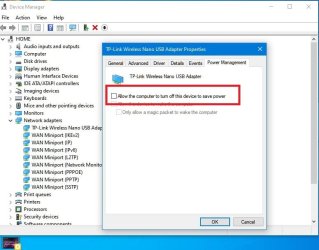
7. Open Control Panel-device manager
Expand Network Adapters
Right click on your wireless adapter and select properties
In Power Management tab- Uncheck 'allow the computer to turn off this device to save power'
Note: Changing these power settings uses more power, thereby affecting your battery if you use the device on battery power.

8. Repair Install Windows 11 Repair Install Windows 11 with an In-place Upgrade Tutorial

9. If none of that works one has to assume the wireless adapter is faulty. USB wireless adapters are cheap where I live. I keep one around to test with in just such cases. Like this, Amazon.com

Hope one of these suggestions help

 

Attachments

My Computers My Computers

  • At a glance

    Windows 11 Pro 25H2 26200.8875i9-10900 10 core 20 threads32 gbnone-Intel UHD Graphics 630
    OS
    Windows 11 Pro 25H2 26200.8875
    Computer type
    PC/Desktop
    Manufacturer/Model
    Dell Optiplex 7080
    CPU
    i9-10900 10 core 20 threads
    Motherboard
    DELL 0J37VM
    Memory
    32 gb
    Graphics Card(s)
    none-Intel UHD Graphics 630
    Sound Card
    Integrated Realtek
    Monitor(s) Displays
    Benq 27
    Screen Resolution
    2560x1440
    Hard Drives
    2x1tb Solidigm m.2 nvme /External drives 512gb Samsung m.2 sata+2tb Kingston m2.nvme
    PSU
    500w
    Case
    MT
    Cooling
    Dell Premium
    Keyboard
    Logitech wired
    Mouse
    Logitech wireless
    Internet Speed
    so slow I'm too embarrassed to tell
    Browser
    #1 Edge #2 Firefox
    Antivirus
    Defender+MWB Premium
  • At a glance

    Windows 11 Pro 24H2 26200.8875AMD Ryzen 7 6800U32 gbintegrated
    Operating System
    Windows 11 Pro 24H2 26200.8875
    Computer type
    PC/Desktop
    Manufacturer/Model
    Beelink Mini PC SER5
    CPU
    AMD Ryzen 7 6800U
    Memory
    32 gb
    Graphics card(s)
    integrated
    Sound Card
    integrated
    Monitor(s) Displays
    Benq 27
    Screen Resolution
    2560x1440
    Hard Drives
    1TB Crucial nvme
    Keyboard
    Logitech wired
    Mouse
    Logitech wireless
    Internet Speed
    still too embarrassed to tell
    Browser
    Firefox
    Antivirus
    Defender
    Other Info
    System 3 is non compliant Dell 9020 i7-4770/24gb ram Win11 PRO 26200.8875
Thanks for help so far.
1) I have got as far as the network settings but cannot see any option to change to Balanced Settings.
On changing adapter settings the popup properties box shows all items as ticked EXCEPT "Internet protocol version 4". Should this be ticked as well?
2) On advanced settings I cannot see any link to "expand wireless adaptor settings" unless the option that is showing 128 bit encryption with the option to change it to "40-56 bit connection. Is that it??? Also, on the properties box the only item unticked is "Microsoft network adapter multiplexor protocol TC/IPv4". Should that box be ticked ??
 

My Computer My Computer

At a glance

Windows 11 Home build 10.0.2263116gbbuilt-in
OS
Windows 11 Home build 10.0.22631
Computer type
PC/Desktop
Manufacturer/Model
HP 290 G1 SFF Business PC
Motherboard
HP 843F 00
Memory
16gb
Graphics Card(s)
built-in
Browser
chrome
Further to previous message I have discovered in my compute bits box a couple of adapters. You'll gather that I am not exactly a pc techie so, in case I end up suspecting the existing adapter being somewhat faulty, are either of these adaptors in attached photo network adapters that I could test as substitutes for the Realtek RTL8192EE Wireless LAN 802.11n PCI-E NIC adapter that I currently have connected on my PC ???IMG_20241112_101121.jpg
 

My Computer My Computer

At a glance

Windows 11 Home build 10.0.2263116gbbuilt-in
OS
Windows 11 Home build 10.0.22631
Computer type
PC/Desktop
Manufacturer/Model
HP 290 G1 SFF Business PC
Motherboard
HP 843F 00
Memory
16gb
Graphics Card(s)
built-in
Browser
chrome
I have got as far as the network settings but cannot see any option to change to Balanced Settings.
On changing adapter settings the popup properties box shows all items as ticked EXCEPT "Internet protocol version 4". Should this be ticked as well?
2) On advanced settings I cannot see any link to "expand wireless adaptor settings" unless the option that is showing 128 bit encryption with the option to change it to "40-56 bit connection. Is that it??? Also, on the properties box the only item unticked is "Microsoft network adapter multiplexor protocol TC/IPv4". Should that box be ticked ??
I believe you went to the wrong place. Step 6 -The Balanced setting is in your power plan. Control Panel. Read that step again. I believe I got it written correctly. One thing I did forget to say is Click SAVE to save any changes.
Is that the step above you were not able to do? If you are going to test with the USB adapters, you shouldn't need to change anything in that step if the new adapter works correctly. Remember, I said to try the usb wireless first. Simply using another wireless adapter may fix all your problems without you having to do anything else.

Yes, I can't see the fine print but either one of those should be good to test with. Do this.
First, disable your existing wireless adapter. Go to control panel>device manager>expand the network adapter category by clicking the
little > sign to the left.
RIGHT click on your existing wireless adapter and select DISABLE, If you don't recognize your wireless adapter, post a screenshot of device manager and we call tell you which one it is.

Insert one of the usb wireless adapters WIndows SHOULD recognize it and load its driver. If it doesn't, restart and see if it will find the driver.
IF it doesn't load driver, try the other one (report back if neither adapter is recognized.)
 

My Computers My Computers

  • At a glance

    Windows 11 Pro 25H2 26200.8875i9-10900 10 core 20 threads32 gbnone-Intel UHD Graphics 630
    OS
    Windows 11 Pro 25H2 26200.8875
    Computer type
    PC/Desktop
    Manufacturer/Model
    Dell Optiplex 7080
    CPU
    i9-10900 10 core 20 threads
    Motherboard
    DELL 0J37VM
    Memory
    32 gb
    Graphics Card(s)
    none-Intel UHD Graphics 630
    Sound Card
    Integrated Realtek
    Monitor(s) Displays
    Benq 27
    Screen Resolution
    2560x1440
    Hard Drives
    2x1tb Solidigm m.2 nvme /External drives 512gb Samsung m.2 sata+2tb Kingston m2.nvme
    PSU
    500w
    Case
    MT
    Cooling
    Dell Premium
    Keyboard
    Logitech wired
    Mouse
    Logitech wireless
    Internet Speed
    so slow I'm too embarrassed to tell
    Browser
    #1 Edge #2 Firefox
    Antivirus
    Defender+MWB Premium
  • At a glance

    Windows 11 Pro 24H2 26200.8875AMD Ryzen 7 6800U32 gbintegrated
    Operating System
    Windows 11 Pro 24H2 26200.8875
    Computer type
    PC/Desktop
    Manufacturer/Model
    Beelink Mini PC SER5
    CPU
    AMD Ryzen 7 6800U
    Memory
    32 gb
    Graphics card(s)
    integrated
    Sound Card
    integrated
    Monitor(s) Displays
    Benq 27
    Screen Resolution
    2560x1440
    Hard Drives
    1TB Crucial nvme
    Keyboard
    Logitech wired
    Mouse
    Logitech wireless
    Internet Speed
    still too embarrassed to tell
    Browser
    Firefox
    Antivirus
    Defender
    Other Info
    System 3 is non compliant Dell 9020 i7-4770/24gb ram Win11 PRO 26200.8875
Disable power saving of the adapter in Device Manager
 

Attachments

  • Screenshot 2024-11-12 154037.jpg
    Screenshot 2024-11-12 154037.jpg
    56 KB · Views: 3

My Computer My Computer

At a glance

WIN 11i58 GBGT 710
OS
WIN 11
Computer type
PC/Desktop
Manufacturer/Model
HP
CPU
i5
Motherboard
HP
Memory
8 GB
Graphics Card(s)
GT 710
Sound Card
Realtek
Monitor(s) Displays
LG
Screen Resolution
1366*768
Hard Drives
Samsung 870EVO
Internet Speed
100MB
Browser
Firefox, Chrome, Edge
Antivirus
Malwarebytes Premium
You could also run Ubuntu off a bootable USB. This would eliminate any hardware problems. If. your wifi is stable in Ubuntu, you know it's a Windows problem.
 

My Computers My Computers

  • At a glance

    Windows 11 Pro 25H2 26200.8894AMD Ryzen 7 5825U with Radeon Graphics16GB
    OS
    Windows 11 Pro 25H2 26200.8894
    Computer type
    Laptop
    Manufacturer/Model
    Acemagic LX15PRO
    CPU
    AMD Ryzen 7 5825U with Radeon Graphics
    Motherboard
    BIOS CT_BI_AMI_LX15PRO_AB8139_A-004
    Memory
    16GB
    Screen Resolution
    1920 x 1080
    Hard Drives
    SSD 2TB
    Internet Speed
    30 Mbps
    Browser
    Brave
    Antivirus
    Webroot SecureAnywhere Complete beta
  • At a glance

    Windows 11 Pro 23H2 22631.2506Atom N450 1.66GHz2GB
    Operating System
    Windows 11 Pro 23H2 22631.2506
    Computer type
    Laptop
    Manufacturer/Model
    HP Mini 210-1090NR PC (bought in late 2009!)
    CPU
    Atom N450 1.66GHz
    Memory
    2GB
    Browser
    Brave
    Antivirus
    Webroot
  • Acer Swift SF114-34 laptop
    OS Windows 11 Pro 26200.8894
    CPU Pentium Silver N6000
    RAM 4GB
    BIOS v1.17
    SSD Samsung 970 EVO Plus SSD 2TB (an upgrade)
I have a Notebook with the 802.11AC 2G/5G Wireless adapter, works fine on 2G but after several minutes running on 5G will drop the Internet speed to a third of what 2G gives so I have disabled the onboard adapter for both Wireless and Bluetooth, use an EdiMAX USB dongle with 802.11AC and Bluetooth, no issue.
 

My Computers My Computers

  • At a glance

    Win11 Pro RTM Version 24H2 Build 26100.4202Intel Core i5 11th Gen. 2.40GHz12GB
    OS
    Win11 Pro RTM Version 24H2 Build 26100.4202
    Computer type
    Laptop
    Manufacturer/Model
    Dell Vostro 3400
    CPU
    Intel Core i5 11th Gen. 2.40GHz
    Memory
    12GB
    Hard Drives
    256GB SSD NVMe M.2
  • At a glance

    Win11 Pro RTM Version 24H2 Build 26100.4202Intel Core i5 10th Gen. 2.90GHz16GBOnboard, no VGA, using a DisplayPort-to-VGA a...
    Operating System
    Win11 Pro RTM Version 24H2 Build 26100.4202
    Computer type
    PC/Desktop
    Manufacturer/Model
    Dell Vostro 5890
    CPU
    Intel Core i5 10th Gen. 2.90GHz
    Memory
    16GB
    Graphics card(s)
    Onboard, no VGA, using a DisplayPort-to-VGA adapter
    Monitor(s) Displays
    24" Dell
    Hard Drives
    512GB SSD NVMe, 4TB Seagate HDD
    Browser
    Firefox, Edge
    Antivirus
    Windows Defender/Microsoft Security
These problems can affect certain models of Laptops. It is the internal design and construction i.e. WiFi card shielding, placement, proximity to other components, arial placement etc.

The only permanent fix is to buy another Laptop of a different brand and/or different model range and design. Assuming an external USB WiFi Adapter is not acceptable.
A Laptop should have all it's functionality working in a reasonable manner out of the box.

In the UK you can say it is not fit for purpose and get a refund.

I have bought laptops in the past with poor internal WiFi performance like frequent drop outs and lowered speeds. No amount of fiddling with drivers and fault finding gets anywhere. I found out eventually it affected several similar models in a range.
 

My Computer My Computer

At a glance

Windows 11
OS
Windows 11
I have bought laptops in the past with poor internal WiFi performance like frequent drop outs and lowered speeds. No amount of fiddling with drivers and fault finding gets anywhere. I found out eventually it affected several similar models in a range.
Almost any laptop issue can be fixed by buying a new laptop but there are cheaper methods! On my laptop, I have to open it up occasionally and reseat the WiFi card. Unless OP has had this problem from new, it's probably a solvable item.

Which brand are you talking about?
 

My Computers My Computers

  • At a glance

    Windows 11 Pro 25H2 26200.8894AMD Ryzen 7 5825U with Radeon Graphics16GB
    OS
    Windows 11 Pro 25H2 26200.8894
    Computer type
    Laptop
    Manufacturer/Model
    Acemagic LX15PRO
    CPU
    AMD Ryzen 7 5825U with Radeon Graphics
    Motherboard
    BIOS CT_BI_AMI_LX15PRO_AB8139_A-004
    Memory
    16GB
    Screen Resolution
    1920 x 1080
    Hard Drives
    SSD 2TB
    Internet Speed
    30 Mbps
    Browser
    Brave
    Antivirus
    Webroot SecureAnywhere Complete beta
  • At a glance

    Windows 11 Pro 23H2 22631.2506Atom N450 1.66GHz2GB
    Operating System
    Windows 11 Pro 23H2 22631.2506
    Computer type
    Laptop
    Manufacturer/Model
    HP Mini 210-1090NR PC (bought in late 2009!)
    CPU
    Atom N450 1.66GHz
    Memory
    2GB
    Browser
    Brave
    Antivirus
    Webroot
  • Acer Swift SF114-34 laptop
    OS Windows 11 Pro 26200.8894
    CPU Pentium Silver N6000
    RAM 4GB
    BIOS v1.17
    SSD Samsung 970 EVO Plus SSD 2TB (an upgrade)
There's a link here for a driver for the RTL8188EE 802.11 bgn Wi-Fi Adapter: dated Sep 4, 2020. You could try that if more recent than the one you have. See the accepted solution.
 

My Computers My Computers

  • At a glance

    Win 11 ProAMD Ryzen™ 7 7730U24GB Dual-Channel DDR4 @ 1596MHz (22-22-22-52)512MB ATI AMD Radeon Graphics (ASUStek Comput...
    OS
    Win 11 Pro
    Computer type
    Laptop
    Manufacturer/Model
    ASUS Vivobook
    CPU
    AMD Ryzen™ 7 7730U
    Motherboard
    M1605YA
    Memory
    24GB Dual-Channel DDR4 @ 1596MHz (22-22-22-52)
    Graphics Card(s)
    512MB ATI AMD Radeon Graphics (ASUStek Computer Inc)
    Monitor(s) Displays
    Generic PnP Monitor (1920x1200@60Hz) - P1 PLUS (1920x1080@59Hz)
    Screen Resolution
    1920 X 1200
    Hard Drives
    953GB Western Digital WD
    PSU
    45 Watts
    Mouse
    Lenovo Bluetooth.
    Internet Speed
    500 Mbps
    Browser
    Edge
    Antivirus
    Defender
  • At a glance

    Windows 11AMD Ryzen 7 5800H / 3.2 GHz32 GB DDR4 SDRAM 3200 MHzNVIDIA GeForce RTX 3060 6 GB GDDR6 SDRAM
    Operating System
    Windows 11
    Computer type
    Laptop
    Manufacturer/Model
    ACER NITRO
    CPU
    AMD Ryzen 7 5800H / 3.2 GHz
    Motherboard
    CZ Scala_CAS (FP6)
    Memory
    32 GB DDR4 SDRAM 3200 MHz
    Graphics card(s)
    NVIDIA GeForce RTX 3060 6 GB GDDR6 SDRAM
    Sound Card
    Realtek Audio. NVIDIA High Definition Audio
    Monitor(s) Displays
    15.6" LED backlight 1920 x 1080 (Full HD) 144 Hz
    Screen Resolution
    1920 x 1080 (Full HD)
    Hard Drives
    Samsung 970 Evo Plus 2TB NVMe M.2
    PSU
    180 Watt, 19.5 V
    Mouse
    Lenovo Bluetooth
    Internet Speed
    500 Mbps
    Browser
    Edge
    Antivirus
    Defender
@barryman I'm curious if you have solved your problem.
 

My Computers My Computers

  • At a glance

    Windows 11 Pro 25H2 26200.8875i9-10900 10 core 20 threads32 gbnone-Intel UHD Graphics 630
    OS
    Windows 11 Pro 25H2 26200.8875
    Computer type
    PC/Desktop
    Manufacturer/Model
    Dell Optiplex 7080
    CPU
    i9-10900 10 core 20 threads
    Motherboard
    DELL 0J37VM
    Memory
    32 gb
    Graphics Card(s)
    none-Intel UHD Graphics 630
    Sound Card
    Integrated Realtek
    Monitor(s) Displays
    Benq 27
    Screen Resolution
    2560x1440
    Hard Drives
    2x1tb Solidigm m.2 nvme /External drives 512gb Samsung m.2 sata+2tb Kingston m2.nvme
    PSU
    500w
    Case
    MT
    Cooling
    Dell Premium
    Keyboard
    Logitech wired
    Mouse
    Logitech wireless
    Internet Speed
    so slow I'm too embarrassed to tell
    Browser
    #1 Edge #2 Firefox
    Antivirus
    Defender+MWB Premium
  • At a glance

    Windows 11 Pro 24H2 26200.8875AMD Ryzen 7 6800U32 gbintegrated
    Operating System
    Windows 11 Pro 24H2 26200.8875
    Computer type
    PC/Desktop
    Manufacturer/Model
    Beelink Mini PC SER5
    CPU
    AMD Ryzen 7 6800U
    Memory
    32 gb
    Graphics card(s)
    integrated
    Sound Card
    integrated
    Monitor(s) Displays
    Benq 27
    Screen Resolution
    2560x1440
    Hard Drives
    1TB Crucial nvme
    Keyboard
    Logitech wired
    Mouse
    Logitech wireless
    Internet Speed
    still too embarrassed to tell
    Browser
    Firefox
    Antivirus
    Defender
    Other Info
    System 3 is non compliant Dell 9020 i7-4770/24gb ram Win11 PRO 26200.8875
thanks for ResetNetworkComponents
 

My Computer My Computer

At a glance

windows 11i516gbintel iris xe
OS
windows 11
Computer type
Laptop
Manufacturer/Model
Asus tuf f15
CPU
i5
Motherboard
asus
Memory
16gb
Graphics Card(s)
intel iris xe
Sound Card
dobly atmos
Monitor(s) Displays
15.6 inch
Screen Resolution
1920x1080
Hard Drives
ssd micron 2400
Antivirus
windows defender
Back
Top Bottom