Win 10 Taskbar on Win 11?


Pocah

Well-known member
Member
Local time
12:22 AM
Posts
131
OS
Win 11
Those tiny icons in the bottom right of the Taskbar next to the clock?

The problem I have is that I use dual screens, and with Win11 those are absent on the second screen. This is a real nuisance. I often have an app on the primary screen that I is difficult to interrupt so I can't access those icons. I really need them on the second screen. Window 10 used to have them there. In other words, it completely duplicated the Taskbar on the second screen. Is there any app that does that?
 

My Computer My Computer

At a glance

Win 111270032gb3070ti
OS
Win 11
Computer type
PC/Desktop
CPU
12700
Memory
32gb
Graphics Card(s)
3070ti
Sound Card
-
Screen Resolution
3840x1600, 2560x1080

Here's what I was able to find out. Basically, the taskbar may be enabled on all monitors, at the same time, for the 'notification area', it will only appear to the primary display.
 

My Computer My Computer

At a glance

Windows 11 Homei7-13700k(2 x 16 GB) 32 GBNVIDIA FOUNDERS EDITION GEFORCE RTX 4060-Ti
OS
Windows 11 Home
Computer type
PC/Desktop
Manufacturer/Model
DELL XPS 8960
CPU
i7-13700k
Motherboard
GENUINE DELL XPS 8960 DESKTOP MOTHERBOARD INTEL SOCKET LGA1700 XD433
Memory
(2 x 16 GB) 32 GB
Graphics Card(s)
NVIDIA FOUNDERS EDITION GEFORCE RTX 4060-Ti
Sound Card
ON BOARD 7.1 CHANNEL AUDIO
Monitor(s) Displays
DELL 27 MONITOR - P2722H
Screen Resolution
FULL HD (1080p) 1920 x 1080 at 60 Hz
Hard Drives
512 GB, M.2, PCIe NVMe, SSD (boot) + 1 TB, 7200 RPM, SATA, HDD (storage)
PSU
750W
Case
DELL
Cooling
DELL PERFORMANCE CPU LIQUID COOLING
Keyboard
AZIO
Mouse
LOGITECH M650
Internet Speed
INTERNET SPEED 100 MBPS
Browser
MICROSOFT EDGE AND GOOGLE CHROME
Antivirus
NORTON 360
Other Info
ALTEC LANSING SPEAKERS
@Pocah

Apparently, MS decided that the System tray will "only" show on the primary monitor.

If it was me, I would make shortcuts for whatever was in the System Tray that I would need on the 2nd monitor.


This may or may not be helpful for you...


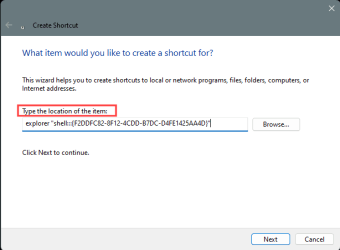
If you right click on your Desktop and choose: New > Shortcut ...and paste one of these CLSID key shortcuts in there...
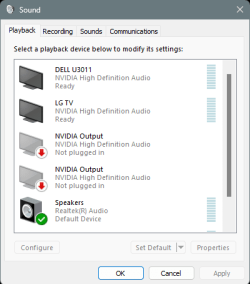
Then give it it's common name. It will create a shortcut to that item, like so....

Sound ----> explorer "shell:::{F2DDFC82-8F12-4CDD-B7DC-D4FE1425AA4D}"

Image1.png

Image2.png


And it... works. :-)
Image3.png


With a little creative shortcut-ing, you should be able to generate shortcuts for "Windows" things in the System tray.
Obviously creating shortcuts for 3rd party things is a lot easier.
 
Last edited:

My Computers My Computers

  • At a glance

    Win 11 Home ♦♦♦26300.9278 ♦♦♦♦♦♦♦26H2AMD Ryzen 7 3700XG.Skill (F4-3200C14D-16GTZKW)EVGA RTX 2070 (08G-P4-2171-KR)
    OS
    Win 11 Home ♦♦♦26300.9278 ♦♦♦♦♦♦♦26H2
    Computer type
    PC/Desktop
    Manufacturer/Model
    Built by Ghot® [May 2020]
    CPU
    AMD Ryzen 7 3700X
    Motherboard
    Asus Pro WS X570-ACE (BIOS 5302)
    Memory
    G.Skill (F4-3200C14D-16GTZKW)
    Graphics Card(s)
    EVGA RTX 2070 (08G-P4-2171-KR)
    Sound Card
    Realtek ALC1220P / ALC S1220A
    Monitor(s) Displays
    Dell U3011 30"
    Screen Resolution
    2560 x 1600
    Hard Drives
    2x Samsung 860 EVO 500GB,
    WD 4TB Black FZBX - SATA III,
    WD 8TB Black FZBX - SATA III,
    DRW-24B1ST CD/DVD Burner
    PSU
    PC Power & Cooling 750W Quad EPS12V
    Case
    Cooler Master ATCS 840 Tower
    Cooling
    CM Hyper 212 EVO (push/pull)
    Keyboard
    Ducky DK9008 Shine II Blue LED
    Mouse
    Logitech Optical M-100
    Internet Speed
    300/300
    Browser
    Firefox (latest)
    Antivirus
    Bitdefender Total Security
    Other Info
    Speakers: Klipsch Pro Media 2.1
  • At a glance

    Windows XP Pro 32bit w/SP3AMD Athlon 64 X2 5000+ (OC'd @ 3.2Ghz)TWIN2X2048-6400C4DHX (2 x 1GB, DDR2 800)EVGA 256-P2-N758-TR GeForce 8600GT SSC
    Operating System
    Windows XP Pro 32bit w/SP3
    Computer type
    PC/Desktop
    Manufacturer/Model
    Built by Ghot® (not in use)
    CPU
    AMD Athlon 64 X2 5000+ (OC'd @ 3.2Ghz)
    Motherboard
    ASUS M2N32-SLI Deluxe Wireless Edition
    Memory
    TWIN2X2048-6400C4DHX (2 x 1GB, DDR2 800)
    Graphics card(s)
    EVGA 256-P2-N758-TR GeForce 8600GT SSC
    Sound Card
    Onboard
    Monitor(s) Displays
    ViewSonic G90FB Black 19" Professional (CRT)
    Screen Resolution
    up to 2048 x 1536
    Hard Drives
    WD 36GB 10,000rpm Raptor SATA
    Seagate 80GB 7200rpm SATA
    Lite-On LTR-52246S CD/RW
    Lite-On LH-18A1P CD/DVD Burner
    PSU
    PC Power & Cooling Silencer 750 Quad EPS12V
    Case
    Generic Beige case, 80mm fans
    Cooling
    ZALMAN 9500A 92mm CPU Cooler
    Keyboard
    Logitech Classic Keybooard 200
    Mouse
    Logitech Optical M-BT96a
    Internet Speed
    300/300
    Browser
    Firefox 3.x ??
    Antivirus
    Symantec (Norton)
    Other Info
    Still assembled, still runs. Haven't turned it on for 15 years?
Win 10 Taskbar on Win 11?
with Win11 those are absent on the second screen

It was the same in Windows 10.
Extended display - Cleaned.jpg


All the best,
Denis
 
Last edited:

My Computer My Computer

At a glance

Windows 11 Home x64 Version 25H2 Build 26200....
OS
Windows 11 Home x64 Version 25H2 Build 26200.9168

My Computer My Computer

At a glance

Win 111270032gb3070ti
OS
Win 11
Computer type
PC/Desktop
CPU
12700
Memory
32gb
Graphics Card(s)
3070ti
Sound Card
-
Screen Resolution
3840x1600, 2560x1080

@Pocah

Apparently, MS decided that the System tray will "only" show on the primary monitor.

If it was me, I would make shortcuts for whatever was in the System Tray that I would need on the 2nd monitor.


This may or may not be helpful for you...


If you right click on your Desktop and choose: New > Shortcut ...and paste one of these CLSID key shortcuts in there...
Then give it it's common name. It will create a shortcut to that item, like so....

Sound ----> explorer "shell:::{F2DDFC82-8F12-4CDD-B7DC-D4FE1425AA4D}"

View attachment 91415

View attachment 91416


And it... works. :-)
View attachment 91417


With a little creative shortcut-ing, you should be able to generate shortcuts for "Windows" things in the System tray.
Obviously creating shortcuts for 3rd party things is a lot easier.

I am looking in to that, but I am not sure that it can do it. The problem is that it is an application, minimized in the notification area. I am not sure there is any way to "get at it" without actually clicking on the icon on the taskbar.
 

My Computer My Computer

At a glance

Win 111270032gb3070ti
OS
Win 11
Computer type
PC/Desktop
CPU
12700
Memory
32gb
Graphics Card(s)
3070ti
Sound Card
-
Screen Resolution
3840x1600, 2560x1080

I am looking in to that, but I am not sure that it can do it. The problem is that it is an application, minimized in the notification area. I am not sure there is any way to "get at it" without actually clicking on the icon on the taskbar.


Which app are we talking about? It kind of hard to... guess.
If we knew what the app was, we may be able to offer other suggestions. :-)


For example, I use TranslucentTB (to make my Taskbar clear), but it installs direct from the MS Store.
And MS doesn't mention, where it installed it.
It also runs minimized in the System Tray overflow area.
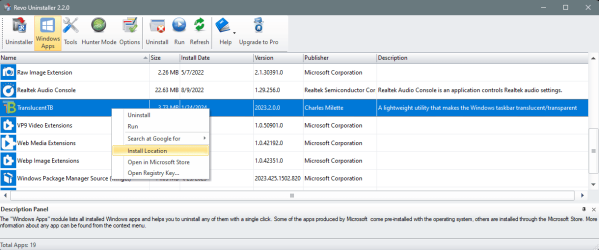
But REVO Uninstaller (free) has an option to show the "Install location"

And that information allows me to find the executable file, and create a shortcut from there...

Image1.png

Image1.png


Try StartAllBack as @Edwin mentioned.
If that doesn't do what you want... you can always use the "shortcut method". :-)
 
Last edited:

My Computers My Computers

  • At a glance

    Win 11 Home ♦♦♦26300.9278 ♦♦♦♦♦♦♦26H2AMD Ryzen 7 3700XG.Skill (F4-3200C14D-16GTZKW)EVGA RTX 2070 (08G-P4-2171-KR)
    OS
    Win 11 Home ♦♦♦26300.9278 ♦♦♦♦♦♦♦26H2
    Computer type
    PC/Desktop
    Manufacturer/Model
    Built by Ghot® [May 2020]
    CPU
    AMD Ryzen 7 3700X
    Motherboard
    Asus Pro WS X570-ACE (BIOS 5302)
    Memory
    G.Skill (F4-3200C14D-16GTZKW)
    Graphics Card(s)
    EVGA RTX 2070 (08G-P4-2171-KR)
    Sound Card
    Realtek ALC1220P / ALC S1220A
    Monitor(s) Displays
    Dell U3011 30"
    Screen Resolution
    2560 x 1600
    Hard Drives
    2x Samsung 860 EVO 500GB,
    WD 4TB Black FZBX - SATA III,
    WD 8TB Black FZBX - SATA III,
    DRW-24B1ST CD/DVD Burner
    PSU
    PC Power & Cooling 750W Quad EPS12V
    Case
    Cooler Master ATCS 840 Tower
    Cooling
    CM Hyper 212 EVO (push/pull)
    Keyboard
    Ducky DK9008 Shine II Blue LED
    Mouse
    Logitech Optical M-100
    Internet Speed
    300/300
    Browser
    Firefox (latest)
    Antivirus
    Bitdefender Total Security
    Other Info
    Speakers: Klipsch Pro Media 2.1
  • At a glance

    Windows XP Pro 32bit w/SP3AMD Athlon 64 X2 5000+ (OC'd @ 3.2Ghz)TWIN2X2048-6400C4DHX (2 x 1GB, DDR2 800)EVGA 256-P2-N758-TR GeForce 8600GT SSC
    Operating System
    Windows XP Pro 32bit w/SP3
    Computer type
    PC/Desktop
    Manufacturer/Model
    Built by Ghot® (not in use)
    CPU
    AMD Athlon 64 X2 5000+ (OC'd @ 3.2Ghz)
    Motherboard
    ASUS M2N32-SLI Deluxe Wireless Edition
    Memory
    TWIN2X2048-6400C4DHX (2 x 1GB, DDR2 800)
    Graphics card(s)
    EVGA 256-P2-N758-TR GeForce 8600GT SSC
    Sound Card
    Onboard
    Monitor(s) Displays
    ViewSonic G90FB Black 19" Professional (CRT)
    Screen Resolution
    up to 2048 x 1536
    Hard Drives
    WD 36GB 10,000rpm Raptor SATA
    Seagate 80GB 7200rpm SATA
    Lite-On LTR-52246S CD/RW
    Lite-On LH-18A1P CD/DVD Burner
    PSU
    PC Power & Cooling Silencer 750 Quad EPS12V
    Case
    Generic Beige case, 80mm fans
    Cooling
    ZALMAN 9500A 92mm CPU Cooler
    Keyboard
    Logitech Classic Keybooard 200
    Mouse
    Logitech Optical M-BT96a
    Internet Speed
    300/300
    Browser
    Firefox 3.x ??
    Antivirus
    Symantec (Norton)
    Other Info
    Still assembled, still runs. Haven't turned it on for 15 years?
No, it wasn't.
I posted a Windows 10 screenshot so you could see that the system tray was only shown on the main display in Windows 10.

I suggest you follow Edwin's advice in post #4 if that utility achieves what you want. Perhaps you used that utility in Windows 10 as well.

Denis
 
Last edited:

My Computer My Computer

At a glance

Windows 11 Home x64 Version 25H2 Build 26200....
OS
Windows 11 Home x64 Version 25H2 Build 26200.9168

My Computer My Computer

At a glance

Windows 11 Homei7-13700k(2 x 16 GB) 32 GBNVIDIA FOUNDERS EDITION GEFORCE RTX 4060-Ti
OS
Windows 11 Home
Computer type
PC/Desktop
Manufacturer/Model
DELL XPS 8960
CPU
i7-13700k
Motherboard
GENUINE DELL XPS 8960 DESKTOP MOTHERBOARD INTEL SOCKET LGA1700 XD433
Memory
(2 x 16 GB) 32 GB
Graphics Card(s)
NVIDIA FOUNDERS EDITION GEFORCE RTX 4060-Ti
Sound Card
ON BOARD 7.1 CHANNEL AUDIO
Monitor(s) Displays
DELL 27 MONITOR - P2722H
Screen Resolution
FULL HD (1080p) 1920 x 1080 at 60 Hz
Hard Drives
512 GB, M.2, PCIe NVMe, SSD (boot) + 1 TB, 7200 RPM, SATA, HDD (storage)
PSU
750W
Case
DELL
Cooling
DELL PERFORMANCE CPU LIQUID COOLING
Keyboard
AZIO
Mouse
LOGITECH M650
Internet Speed
INTERNET SPEED 100 MBPS
Browser
MICROSOFT EDGE AND GOOGLE CHROME
Antivirus
NORTON 360
Other Info
ALTEC LANSING SPEAKERS
I will have a look, thanks guys..
 

My Computer My Computer

At a glance

Win 111270032gb3070ti
OS
Win 11
Computer type
PC/Desktop
CPU
12700
Memory
32gb
Graphics Card(s)
3070ti
Sound Card
-
Screen Resolution
3840x1600, 2560x1080

Back
Top Bottom