Solved Win 11 - Ethernet and Wifi disappeared


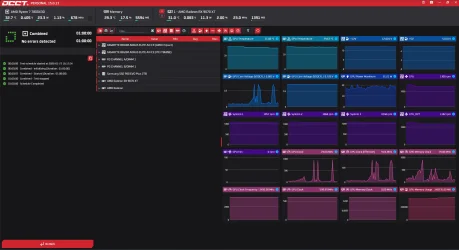
Please complete all OCCT tests > take pictures > post images or share links


After completing all OCCT tests and with all passes > make free or pay backup images


When available please update the progress with the above steps.
Hello mate,

I did complete all OCCT tests but forgot to take pictures.

I did my own backup and completed a full clean win 11 installs.

I will try to complete another OCCT test tonight and post pictures.
 

My Computer

System One

  • OS
    Window 11
    Computer type
    PC/Desktop
    CPU
    AMD Ryzen 7 7800X3D
    Motherboard
    B650M AORUS ELITE AX ICE
    Memory
    DDR5 32 GB
    Graphics Card(s)
    Sapphire AMD Radeon RX 9070XT
Please complete all OCCT tests > take pictures > post images or share links


After completing all OCCT tests and with all passes > make free or pay backup images


When available please update the progress with the above steps.
1769534658999.webp
 

My Computer

System One

  • OS
    Window 11
    Computer type
    PC/Desktop
    CPU
    AMD Ryzen 7 7800X3D
    Motherboard
    B650M AORUS ELITE AX ICE
    Memory
    DDR5 32 GB
    Graphics Card(s)
    Sapphire AMD Radeon RX 9070XT

1) Please post a new V2 share link into the newest post.


2) Run administrative command prompt: > post share links

wevtutil epl Application %userprofile%\Desktop\application.evtx

wevtutil epl System %userprofile%\Desktop\system.evtx
 

My Computer

System One

  • OS
    Windows 10
    Computer type
    Laptop
    Manufacturer/Model
    HP
    CPU
    Intel(R) Core(TM) i7-4800MQ CPU @ 2.70GHz
    Motherboard
    Product : 190A Version : KBC Version 94.56
    Memory
    16 GB Total: Manufacturer : Samsung MemoryType : DDR3 FormFactor : SODIMM Capacity : 8GB Speed : 1600
    Graphics Card(s)
    NVIDIA Quadro K3100M; Intel(R) HD Graphics 4600
    Sound Card
    IDT High Definition Audio CODEC; PNP Device ID HDAUDIO\FUNC_01&VEN_111D&DEV_76E0
    Hard Drives
    Model Hitachi HTS727575A9E364
    Antivirus
    Microsoft Defender
    Other Info
    Mobile Workstation
1) Please post a new V2 share link into the newest post.


2) Run administrative command prompt: > post share links

wevtutil epl Application %userprofile%\Desktop\application.evtx

wevtutil epl System %userprofile%\Desktop\system.evtx


Attachments

My Computer

System One

  • OS
    Window 11
    Computer type
    PC/Desktop
    CPU
    AMD Ryzen 7 7800X3D
    Motherboard
    B650M AORUS ELITE AX ICE
    Memory
    DDR5 32 GB
    Graphics Card(s)
    Sapphire AMD Radeon RX 9070XT
Whenever you perform a clean install please perform these steps: (1 - 5)


1) Add WMIC:

Code:
DISM /Online /Add-Capability /CapabilityName:WMIC~~~~


2) Run Tuneup plus > post a share link into the newest post


3) Turn off Windows fast startup:


4) Enable regback:


5) Create a new restore point:


6) The BIOS Version/Date American Megatrends International, LLC. F38, 20/11/2025

Upgrade the BIOS: F38 > F40


7) Please check to see if F5-6000J3038F16G is or is not on the memory QVL. If found please post images or share links


Code:
Event[1747]
  Log Name: System
  Source: Microsoft-Windows-Kernel-Power
  Date: 2026-01-27T17:43:24.6800000Z
  Event ID: 41
  Task: N/A
  Level: Critical
  Opcode: Info
  Keyword: N/A
  User: S-1-5-18
  User Name: NT AUTHORITY\SYSTEM
  Computer: DESKTOP-5D4E9E1
  Description:
The system has rebooted without cleanly shutting down first. This error could be caused if the system stopped responding, crashed, or lost power unexpectedly.


Code:
Event[1732]
  Log Name: System
  Source: EventLog
  Date: 2026-01-27T17:43:30.8830000Z
  Event ID: 6008
  Task: None
  Level: Error
  Opcode: N/A
  Keyword: Classic,
  User: N/A
  User Name: N/A
  Computer: DESKTOP-5D4E9E1
  Description:
The previous system shutdown at 16:50:50 on ?27/?01/?2026 was unexpected.


Code:
Event[1717]
  Log Name: System
  Source: Microsoft-Windows-Kernel-Boot
  Date: 2026-01-27T17:43:22.8550000Z
  Event ID: 29
  Task: N/A
  Level: Error
  Opcode: Info
  Keyword: N/A
  User: S-1-5-18
  User Name: NT AUTHORITY\SYSTEM
  Computer: DESKTOP-5D4E9E1
  Description:
Windows failed fast startup with error status 0xC00000D4.


Code:
Event[1675]
  Log Name: System
  Source: Microsoft-Windows-TPM-WMI
  Date: 2026-01-27T16:15:55.0960000Z
  Event ID: 1801
  Task: N/A
  Level: Error
  Opcode: Info
  Keyword: N/A
  User: S-1-5-18
  User Name: NT AUTHORITY\SYSTEM
  Computer: DESKTOP-5D4E9E1
  Description:
Updated Secure Boot certificates are available on this device but have not yet been applied to the firmware. Review the published guidance to complete the update and maintain full protection. This device signature information is included here.
DeviceAttributes: BaseBoardManufacturer:Gigabyte Technology Co., Ltd.;FirmwareManufacturer:American Megatrends International, LLC.;FirmwareVersion:F38;OEMModelNumber:B650M AORUS ELITE AX ICE;OEMModelBaseBoard:B650M AORUS ELITE AX ICE;OEMModelSystemFamily:B650 MB;OEMManufacturerName:Gigabyte Technology Co., Ltd.;OEMModelSKU:Default string;OSArchitecture:amd64;
BucketId: cc7c35ba49db3ac83956a4ef295b09060bc9c2b33034a24aaa0b41e609f657ea
BucketConfidenceLevel:
UpdateType:
For more information, please see https://go.microsoft.com/fwlink/?linkid=2301018.


Code:
Event[1581]
  Log Name: System
  Source: Microsoft-Windows-Kernel-Power
  Date: 2026-01-27T16:10:41.2200000Z
  Event ID: 41
  Task: N/A
  Level: Critical
  Opcode: Info
  Keyword: N/A
  User: S-1-5-18
  User Name: NT AUTHORITY\SYSTEM
  Computer: DESKTOP-5D4E9E1
  Description:
The system has rebooted without cleanly shutting down first. This error could be caused if the system stopped responding, crashed, or lost power unexpectedly.


Code:
Event[1567]
  Log Name: System
  Source: EventLog
  Date: 2026-01-27T16:10:50.1980000Z
  Event ID: 6008
  Task: None
  Level: Error
  Opcode: N/A
  Keyword: Classic,
  User: N/A
  User Name: N/A
  Computer: DESKTOP-5D4E9E1
  Description:
The previous system shutdown at 20:46:43 on ?26/?01/?2026 was unexpected.


Code:
Event[1009]
  Log Name: System
  Source: Microsoft-Windows-TPM-WMI
  Date: 2026-01-26T19:08:56.3940000Z
  Event ID: 1796
  Task: N/A
  Level: Error
  Opcode: Info 
  Keyword: N/A
  User: S-1-5-18
  User Name: NT AUTHORITY\SYSTEM
  Computer: DESKTOP-5D4E9E1
  Description:
The Secure Boot update failed to update a Secure Boot variable with error Secure Boot is not enabled on this machine.. For more information, please see https://go.microsoft.com/fwlink/?linkid=2169931
 
Last edited:

My Computer

System One

  • OS
    Windows 10
    Computer type
    Laptop
    Manufacturer/Model
    HP
    CPU
    Intel(R) Core(TM) i7-4800MQ CPU @ 2.70GHz
    Motherboard
    Product : 190A Version : KBC Version 94.56
    Memory
    16 GB Total: Manufacturer : Samsung MemoryType : DDR3 FormFactor : SODIMM Capacity : 8GB Speed : 1600
    Graphics Card(s)
    NVIDIA Quadro K3100M; Intel(R) HD Graphics 4600
    Sound Card
    IDT High Definition Audio CODEC; PNP Device ID HDAUDIO\FUNC_01&VEN_111D&DEV_76E0
    Hard Drives
    Model Hitachi HTS727575A9E364
    Antivirus
    Microsoft Defender
    Other Info
    Mobile Workstation
I am back from work finally.

Have an update on this whole saga and sadly it was the motherboard. I did not get time to post in the past week or so but I managed to contact the seller and initiated RMA, thinking that I will get the board looked at by some professional and get it fixed before my return back home from work in about 2-3 weeks. Behold, I got an email today and they could not fix it either and have given me a full refund.

I feel relieved in a way that I got a full refund but damn I spend soooo long on trying to fix this board and at point I was so stressed.

I would really like to thanks the community here and especially @zbook. Bro you are amazing.

Now I am back to looking at Mobo again since now we have whole new lineup of 850/870s. I am NOT buying Gigabyte again. MSI B850m Mortar WiFi is looking noice.

Many thanks all. Cheerios
 

My Computer

System One

  • OS
    Window 11
    Computer type
    PC/Desktop
    CPU
    AMD Ryzen 7 7800X3D
    Motherboard
    B650M AORUS ELITE AX ICE
    Memory
    DDR5 32 GB
    Graphics Card(s)
    Sapphire AMD Radeon RX 9070XT
I managed to contact the seller and initiated RMA..........I got an email today and they could not fix it either and have given me a full refund.

I would really like to thanks the community here and especially @zbook. Bro you are amazing.

Now I am back to looking at Mobo again


I'm glad to read that you got a RMA and can get a new motherboard.

You're welcome.


This link may be useful:


My Computer

System One

  • OS
    Windows 10
    Computer type
    Laptop
    Manufacturer/Model
    HP
    CPU
    Intel(R) Core(TM) i7-4800MQ CPU @ 2.70GHz
    Motherboard
    Product : 190A Version : KBC Version 94.56
    Memory
    16 GB Total: Manufacturer : Samsung MemoryType : DDR3 FormFactor : SODIMM Capacity : 8GB Speed : 1600
    Graphics Card(s)
    NVIDIA Quadro K3100M; Intel(R) HD Graphics 4600
    Sound Card
    IDT High Definition Audio CODEC; PNP Device ID HDAUDIO\FUNC_01&VEN_111D&DEV_76E0
    Hard Drives
    Model Hitachi HTS727575A9E364
    Antivirus
    Microsoft Defender
    Other Info
    Mobile Workstation
Back
Top Bottom