Win 11 Pro, upgrade from 10, constant explorer.exe crash


GSXR007

Member
Local time
9:51 PM
Posts
3
OS
Win11,Win10, Win7, Ubuntu, Fedora, etc...
Memory exception and Guard Page exception
Crash and task bar disappears, reloads sometimes
Most of the time no taskbar
 
Windows Build/Version
21H2 Build 22000.593

My Computer My Computer

At a glance

Win11,Win10, Win7, Ubuntu, Fedora, etc...AMD Ryzen 9 3950XG.Skill F4-3600C18-32GVK DDR4 x 2AMD Radeon RX 5700XT
OS
Win11,Win10, Win7, Ubuntu, Fedora, etc...
Computer type
PC/Desktop
Manufacturer/Model
Me
CPU
AMD Ryzen 9 3950X
Motherboard
MEG X570 GODLIKE
Memory
G.Skill F4-3600C18-32GVK DDR4 x 2
Graphics Card(s)
AMD Radeon RX 5700XT
Monitor(s) Displays
MSI
Screen Resolution
3840x2160
Hard Drives
WDC WDS200TB0B-00YS70
ST80000DM004-2CX188
Samsung 970 EVO 500GB
PSU
Seasonic PX1300
Case
lian li
Cooling
NZXT
Keyboard
Logitech G213
Mouse
Logitech G602
Internet Speed
1G
Browser
Brave
Welcome to Eleven Forum

Run SFC /ScanNow to check for and fix possible system corruption.


If it finds problems it cannot fix, use DISM to repair the component store, then run SFC again.


My Computers My Computers

  • At a glance

    Windows 11 HomeAMD Athlon Silver 3050U8GBRadeon Graphics
    OS
    Windows 11 Home
    Computer type
    Laptop
    Manufacturer/Model
    Acer Aspire 3 A315-23-R9VY
    CPU
    AMD Athlon Silver 3050U
    Memory
    8GB
    Graphics Card(s)
    Radeon Graphics
    Monitor(s) Displays
    laptop screen
    Screen Resolution
    1366x768 native resolution, up to 2560x1440 with Radeon Virtual Super Resolution
    Hard Drives
    1TB Samsung EVO 870 SSD (from April 2026: 250GB EVO 850)
    Internet Speed
    150 Mbps
    Browser
    Edge, Firefox
    Antivirus
    Defender
    Other Info
    fully 'Windows 11 ready' laptop. Windows 10 C: partition migrated from my old unsupported 'main machine' then upgraded to 11. A test migration ran Insider builds for 2 months. When 11 was released on 5th October 2021 it was re-imaged back to 10 and was offered the upgrade in Windows Update on 20th October. Windows Update offered the 22H2 Feature Update on 20th September 2022. It got the 23H2 Feature Update on 4th November 2023 through Windows Update, 24H2 on 3rd October 2024 through Windows Update by setting the Target Release Version for 24H2, and 25H2 on 30th September 2025 through Windows Update by setting the Target Release Version for 25H2.

    UPDATE - 11 April 2026: due to mechanical deterioration this PC has been retired from active duty. The OS with all software and files has been migrated to my System Seven in 'Other systems' to carry on as my general purpose 'main machine'.

    I've now clean installed 25H2 and used Garlin's scripts to update Secure Boot to CA 2023 and revoke the PCA 2011 certificates. It's new role is to test secure boot issues.
  • At a glance

    Windows 11 ProIntel® Core™ i5-520M8GB(integrated graphics) Intel HD Graphics
    Operating System
    Windows 11 Pro
    Computer type
    Laptop
    Manufacturer/Model
    Dell Latitude E4310
    CPU
    Intel® Core™ i5-520M
    Motherboard
    0T6M8G
    Memory
    8GB
    Graphics card(s)
    (integrated graphics) Intel HD Graphics
    Screen Resolution
    1366x768
    Hard Drives
    500GB Crucial MX500 SSD
    Browser
    Firefox, Edge
    Antivirus
    Defender
    Other Info
    unsupported machine: Legacy bios, MBR, TPM 1.2, upgraded from W10 to W11 using W10/W11 hybrid install media workaround.

    In-place upgrade to 22H2 using ISO and a workaround.
    Feature Update to 23H2 by manually installing the Enablement Package.
    In-place upgrade to 24H2 using hybrid 23H2/24H2 install media.
    Upgraded to 25H2 by Enablement Package.

    Also running Insider Dev, and Canary builds and Windows 10 as native boot .vhdx.
  • My SYSTEM THREE is a Dell Latitude 5410, i7-10610U, 32GB RAM, 512GB NVMe ssd, supported device running Windows 11 Pro.

    My SYSTEM FOUR is a 2-in-1 convertible Lenovo Yoga 11e 20DA, Celeron N2930, 8GB RAM, 256GB ssd. Unsupported device: currently running Win10 Pro, plus Win11 Pro RTM and Insider Dev, Beta, and RP 24H2 as native boot vhdx.

    My SYSTEM FIVE is a Dell Latitude 3190 2-in-1, Pentium Silver N5030, 8GB RAM, 1TB NVMe ssd, supported device running Windows 11 Pro, plus Insider Beta, Dev, and Canary builds (and a few others) as a native boot .vhdx.

    My SYSTEM SIX is a Dell Latitude 5550, Core Ultra 7 165H, 64GB RAM, 1TB NVMe SSD, supported device, Windows 11 Pro 24H2, Hyper-V host machine. Updated to 25H2 on 30th September 2025.

    My SYSTEM SEVEN is a Lenovo Thinkpad T580, Intel Core i7-8650U, 16GB RAM, 512GB NVMe SSD + 2nd 512GB NVMe SSD, a supported device for Windows 11. This is my current general purpose 'main machine'. The installed Windows 11 Home from my System One has been migrated to this machine.

My Computer My Computer

At a glance

Windows 11AMD Ryzen 7 5700GMicron Technology DDR4-3200 16GBNVIDIA GeForce RTX 3060
OS
Windows 11
Computer type
PC/Desktop
Manufacturer/Model
HP Pavilion
CPU
AMD Ryzen 7 5700G
Motherboard
Erica6
Memory
Micron Technology DDR4-3200 16GB
Graphics Card(s)
NVIDIA GeForce RTX 3060
Sound Card
Realtek ALC671
Monitor(s) Displays
Samsung SyncMaster U28E590
Screen Resolution
3840 x 2160
Hard Drives
SAMSUNG MZVLQ1T0HALB-000H1
C:\WINDOWS\system32>SFC /ScanNow

Beginning system scan. This process will take some time.

Beginning verification phase of system scan.
Verification 100% complete.

Windows Resource Protection did not find any integrity violations.

C:\WINDOWS\system32>Dism /Online /Cleanup-Image /CheckHealth

Deployment Image Servicing and Management tool
Version: 10.0.22000.1

Image Version: 10.0.22000.593

No component store corruption detected.
The operation completed successfully.
 

My Computer My Computer

At a glance

Win11,Win10, Win7, Ubuntu, Fedora, etc...AMD Ryzen 9 3950XG.Skill F4-3600C18-32GVK DDR4 x 2AMD Radeon RX 5700XT
OS
Win11,Win10, Win7, Ubuntu, Fedora, etc...
Computer type
PC/Desktop
Manufacturer/Model
Me
CPU
AMD Ryzen 9 3950X
Motherboard
MEG X570 GODLIKE
Memory
G.Skill F4-3600C18-32GVK DDR4 x 2
Graphics Card(s)
AMD Radeon RX 5700XT
Monitor(s) Displays
MSI
Screen Resolution
3840x2160
Hard Drives
WDC WDS200TB0B-00YS70
ST80000DM004-2CX188
Samsung 970 EVO 500GB
PSU
Seasonic PX1300
Case
lian li
Cooling
NZXT
Keyboard
Logitech G213
Mouse
Logitech G602
Internet Speed
1G
Browser
Brave
If it were me and SFC and Dism both worked fine, I'd download a fresh ISO, create a brand new USB drive and do an in-place upgrade to see if that worked and if not, do a fresh install again with that new USB.
 

My Computers My Computers

  • At a glance

    Windows 11 Pro βIntel® Core™ i7-1165G732 GB DDR4-3200 SDRAMIntel® Iris® Xᵉ Graphics
    OS
    Windows 11 Pro β
    Computer type
    Laptop
    Manufacturer/Model
    HP Pavilion Laptop 15-eg0070wm
    CPU
    Intel® Core™ i7-1165G7
    Memory
    32 GB DDR4-3200 SDRAM
    Graphics Card(s)
    Intel® Iris® Xᵉ Graphics
    Screen Resolution
    1920x1080
    Hard Drives
    2TB PCIe® NVMe™ M.2 SSD
  • At a glance

    macOS Ventura3.4 GHz Quad-Core Intel Core i540 GB 2400 MHz DDR4Radeon Pro 570 4 GB
    Operating System
    macOS Ventura
    Computer type
    PC/Desktop
    Manufacturer/Model
    Apple iMac 27" 5K (2017)
    CPU
    3.4 GHz Quad-Core Intel Core i5
    Memory
    40 GB 2400 MHz DDR4
    Graphics card(s)
    Radeon Pro 570 4 GB
    Monitor(s) Displays
    27" 5K, 34" UW
    Screen Resolution
    Mon 1: 5120 × 2880 Mon 2: 2560 x 1080
    Hard Drives
    32GB NVME, 1TB SSD
In my opinion, the biggest problem with an upgrade is junk carried over from the old OS into the new one. All of us are guilty of using third party software and much of this junk is from these third party apps that may be incompatible with the new OS and can cause unexplained results in the new OS. There is more junk that accumulates over time that we don't even know is there. While I agree that in some cases doing a repair install (which is nothing more than another inplace upgrade) can resolve issues, I'm of the old school mentality that in the long run, the only way to know that any new OS is clean is to start clean. When I change OS, I always bite the bullet and clean install to make sure nothing will come back to bite me in the butt. Once I have a known good baseline, I make a system image and go from there, imaging along the way until the next new OS comes around the bend. But that's just me and it's worked out well for me so far.
 

My Computers My Computers

  • At a glance

    Windows 11 Pro 25H2 26200.8875i9-10900 10 core 20 threads32 gbnone-Intel UHD Graphics 630
    OS
    Windows 11 Pro 25H2 26200.8875
    Computer type
    PC/Desktop
    Manufacturer/Model
    Dell Optiplex 7080
    CPU
    i9-10900 10 core 20 threads
    Motherboard
    DELL 0J37VM
    Memory
    32 gb
    Graphics Card(s)
    none-Intel UHD Graphics 630
    Sound Card
    Integrated Realtek
    Monitor(s) Displays
    Benq 27
    Screen Resolution
    2560x1440
    Hard Drives
    2x1tb Solidigm m.2 nvme /External drives 512gb Samsung m.2 sata+2tb Kingston m2.nvme
    PSU
    500w
    Case
    MT
    Cooling
    Dell Premium
    Keyboard
    Logitech wired
    Mouse
    Logitech wireless
    Internet Speed
    so slow I'm too embarrassed to tell
    Browser
    #1 Edge #2 Firefox
    Antivirus
    Defender+MWB Premium
  • At a glance

    Windows 11 Pro 24H2 26200.8875AMD Ryzen 7 6800U32 gbintegrated
    Operating System
    Windows 11 Pro 24H2 26200.8875
    Computer type
    PC/Desktop
    Manufacturer/Model
    Beelink Mini PC SER5
    CPU
    AMD Ryzen 7 6800U
    Memory
    32 gb
    Graphics card(s)
    integrated
    Sound Card
    integrated
    Monitor(s) Displays
    Benq 27
    Screen Resolution
    2560x1440
    Hard Drives
    1TB Crucial nvme
    Keyboard
    Logitech wired
    Mouse
    Logitech wireless
    Internet Speed
    still too embarrassed to tell
    Browser
    Firefox
    Antivirus
    Defender
    Other Info
    System 3 is non compliant Dell 9020 i7-4770/24gb ram Win11 PRO 26200.8875
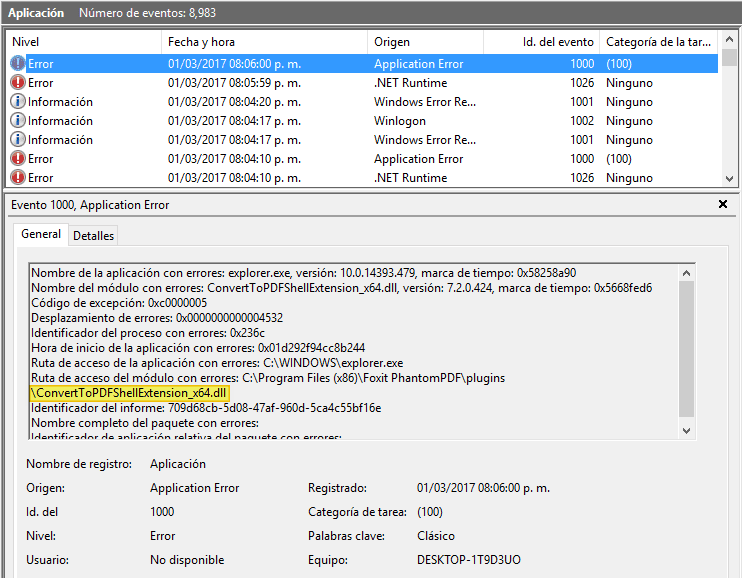
The 2 errors:
Screenshot 2022-04-05 152016.png

Screenshot 2022-04-05 153636.png
 

My Computer My Computer

At a glance

Win11,Win10, Win7, Ubuntu, Fedora, etc...AMD Ryzen 9 3950XG.Skill F4-3600C18-32GVK DDR4 x 2AMD Radeon RX 5700XT
OS
Win11,Win10, Win7, Ubuntu, Fedora, etc...
Computer type
PC/Desktop
Manufacturer/Model
Me
CPU
AMD Ryzen 9 3950X
Motherboard
MEG X570 GODLIKE
Memory
G.Skill F4-3600C18-32GVK DDR4 x 2
Graphics Card(s)
AMD Radeon RX 5700XT
Monitor(s) Displays
MSI
Screen Resolution
3840x2160
Hard Drives
WDC WDS200TB0B-00YS70
ST80000DM004-2CX188
Samsung 970 EVO 500GB
PSU
Seasonic PX1300
Case
lian li
Cooling
NZXT
Keyboard
Logitech G213
Mouse
Logitech G602
Internet Speed
1G
Browser
Brave
From my own personal experience, upgrading from Windows 10 seems to cause issues, however when I do a clean install on the same hardware Windows 11 works just fine; it seems like upgrading to Windows 11 causes unforeseen issues. I'd recommend backing up your data and then doing a clean install.
 

My Computer My Computer

At a glance

Windows 11 EnterpriseIntel Xeon E5-269032 GB DDR3Nvidia Quadro K2200
OS
Windows 11 Enterprise
Computer type
PC/Desktop
Manufacturer/Model
Dell
CPU
Intel Xeon E5-2690
Motherboard
Dell Inc. 08HPGT
Memory
32 GB DDR3
Graphics Card(s)
Nvidia Quadro K2200
Sound Card
Integrated
Monitor(s) Displays
ASUS
Screen Resolution
1600x900 60Hz
Antivirus
Windows Security, Malwarebytes Premium
In my opinion, the biggest problem with an upgrade is junk carried over from the old OS into the new one.
From my own personal experience, upgrading from Windows 10 seems to cause issues, however when I do a clean install on the same hardware Windows 11 works just fine; it seems like upgrading to Windows 11 causes unforeseen issues.
Some of us have no option, we have software that cannot be reinstalled. If we want to keep using it we can only upgrade from one OS to the next.

My System One below can trace it's history back though 15 upgrades, from Windows 11 now, back through every version of Windows 10, to an original OEM install of Windows 7 which got the free upgrade to 10 on 29th July 2015. Along the way the installed OS and all my software was migrated from my old 'main machine' to a new 'Windows 11 compatible' PC in readiness for the upgrade to 11. So far I have had no 'unforeseen issues' and Windows 11 is running perfectly.


System One upgrade history.jpg
 
Last edited:

My Computers My Computers

  • At a glance

    Windows 11 HomeAMD Athlon Silver 3050U8GBRadeon Graphics
    OS
    Windows 11 Home
    Computer type
    Laptop
    Manufacturer/Model
    Acer Aspire 3 A315-23-R9VY
    CPU
    AMD Athlon Silver 3050U
    Memory
    8GB
    Graphics Card(s)
    Radeon Graphics
    Monitor(s) Displays
    laptop screen
    Screen Resolution
    1366x768 native resolution, up to 2560x1440 with Radeon Virtual Super Resolution
    Hard Drives
    1TB Samsung EVO 870 SSD (from April 2026: 250GB EVO 850)
    Internet Speed
    150 Mbps
    Browser
    Edge, Firefox
    Antivirus
    Defender
    Other Info
    fully 'Windows 11 ready' laptop. Windows 10 C: partition migrated from my old unsupported 'main machine' then upgraded to 11. A test migration ran Insider builds for 2 months. When 11 was released on 5th October 2021 it was re-imaged back to 10 and was offered the upgrade in Windows Update on 20th October. Windows Update offered the 22H2 Feature Update on 20th September 2022. It got the 23H2 Feature Update on 4th November 2023 through Windows Update, 24H2 on 3rd October 2024 through Windows Update by setting the Target Release Version for 24H2, and 25H2 on 30th September 2025 through Windows Update by setting the Target Release Version for 25H2.

    UPDATE - 11 April 2026: due to mechanical deterioration this PC has been retired from active duty. The OS with all software and files has been migrated to my System Seven in 'Other systems' to carry on as my general purpose 'main machine'.

    I've now clean installed 25H2 and used Garlin's scripts to update Secure Boot to CA 2023 and revoke the PCA 2011 certificates. It's new role is to test secure boot issues.
  • At a glance

    Windows 11 ProIntel® Core™ i5-520M8GB(integrated graphics) Intel HD Graphics
    Operating System
    Windows 11 Pro
    Computer type
    Laptop
    Manufacturer/Model
    Dell Latitude E4310
    CPU
    Intel® Core™ i5-520M
    Motherboard
    0T6M8G
    Memory
    8GB
    Graphics card(s)
    (integrated graphics) Intel HD Graphics
    Screen Resolution
    1366x768
    Hard Drives
    500GB Crucial MX500 SSD
    Browser
    Firefox, Edge
    Antivirus
    Defender
    Other Info
    unsupported machine: Legacy bios, MBR, TPM 1.2, upgraded from W10 to W11 using W10/W11 hybrid install media workaround.

    In-place upgrade to 22H2 using ISO and a workaround.
    Feature Update to 23H2 by manually installing the Enablement Package.
    In-place upgrade to 24H2 using hybrid 23H2/24H2 install media.
    Upgraded to 25H2 by Enablement Package.

    Also running Insider Dev, and Canary builds and Windows 10 as native boot .vhdx.
  • My SYSTEM THREE is a Dell Latitude 5410, i7-10610U, 32GB RAM, 512GB NVMe ssd, supported device running Windows 11 Pro.

    My SYSTEM FOUR is a 2-in-1 convertible Lenovo Yoga 11e 20DA, Celeron N2930, 8GB RAM, 256GB ssd. Unsupported device: currently running Win10 Pro, plus Win11 Pro RTM and Insider Dev, Beta, and RP 24H2 as native boot vhdx.

    My SYSTEM FIVE is a Dell Latitude 3190 2-in-1, Pentium Silver N5030, 8GB RAM, 1TB NVMe ssd, supported device running Windows 11 Pro, plus Insider Beta, Dev, and Canary builds (and a few others) as a native boot .vhdx.

    My SYSTEM SIX is a Dell Latitude 5550, Core Ultra 7 165H, 64GB RAM, 1TB NVMe SSD, supported device, Windows 11 Pro 24H2, Hyper-V host machine. Updated to 25H2 on 30th September 2025.

    My SYSTEM SEVEN is a Lenovo Thinkpad T580, Intel Core i7-8650U, 16GB RAM, 512GB NVMe SSD + 2nd 512GB NVMe SSD, a supported device for Windows 11. This is my current general purpose 'main machine'. The installed Windows 11 Home from my System One has been migrated to this machine.
The 2 errors:
Those do look serious. An in-place repair upgrade as @Archigos suggested will reinstall Windows, while keeping all installed aps and user files.


My Computers My Computers

  • At a glance

    Windows 11 HomeAMD Athlon Silver 3050U8GBRadeon Graphics
    OS
    Windows 11 Home
    Computer type
    Laptop
    Manufacturer/Model
    Acer Aspire 3 A315-23-R9VY
    CPU
    AMD Athlon Silver 3050U
    Memory
    8GB
    Graphics Card(s)
    Radeon Graphics
    Monitor(s) Displays
    laptop screen
    Screen Resolution
    1366x768 native resolution, up to 2560x1440 with Radeon Virtual Super Resolution
    Hard Drives
    1TB Samsung EVO 870 SSD (from April 2026: 250GB EVO 850)
    Internet Speed
    150 Mbps
    Browser
    Edge, Firefox
    Antivirus
    Defender
    Other Info
    fully 'Windows 11 ready' laptop. Windows 10 C: partition migrated from my old unsupported 'main machine' then upgraded to 11. A test migration ran Insider builds for 2 months. When 11 was released on 5th October 2021 it was re-imaged back to 10 and was offered the upgrade in Windows Update on 20th October. Windows Update offered the 22H2 Feature Update on 20th September 2022. It got the 23H2 Feature Update on 4th November 2023 through Windows Update, 24H2 on 3rd October 2024 through Windows Update by setting the Target Release Version for 24H2, and 25H2 on 30th September 2025 through Windows Update by setting the Target Release Version for 25H2.

    UPDATE - 11 April 2026: due to mechanical deterioration this PC has been retired from active duty. The OS with all software and files has been migrated to my System Seven in 'Other systems' to carry on as my general purpose 'main machine'.

    I've now clean installed 25H2 and used Garlin's scripts to update Secure Boot to CA 2023 and revoke the PCA 2011 certificates. It's new role is to test secure boot issues.
  • At a glance

    Windows 11 ProIntel® Core™ i5-520M8GB(integrated graphics) Intel HD Graphics
    Operating System
    Windows 11 Pro
    Computer type
    Laptop
    Manufacturer/Model
    Dell Latitude E4310
    CPU
    Intel® Core™ i5-520M
    Motherboard
    0T6M8G
    Memory
    8GB
    Graphics card(s)
    (integrated graphics) Intel HD Graphics
    Screen Resolution
    1366x768
    Hard Drives
    500GB Crucial MX500 SSD
    Browser
    Firefox, Edge
    Antivirus
    Defender
    Other Info
    unsupported machine: Legacy bios, MBR, TPM 1.2, upgraded from W10 to W11 using W10/W11 hybrid install media workaround.

    In-place upgrade to 22H2 using ISO and a workaround.
    Feature Update to 23H2 by manually installing the Enablement Package.
    In-place upgrade to 24H2 using hybrid 23H2/24H2 install media.
    Upgraded to 25H2 by Enablement Package.

    Also running Insider Dev, and Canary builds and Windows 10 as native boot .vhdx.
  • My SYSTEM THREE is a Dell Latitude 5410, i7-10610U, 32GB RAM, 512GB NVMe ssd, supported device running Windows 11 Pro.

    My SYSTEM FOUR is a 2-in-1 convertible Lenovo Yoga 11e 20DA, Celeron N2930, 8GB RAM, 256GB ssd. Unsupported device: currently running Win10 Pro, plus Win11 Pro RTM and Insider Dev, Beta, and RP 24H2 as native boot vhdx.

    My SYSTEM FIVE is a Dell Latitude 3190 2-in-1, Pentium Silver N5030, 8GB RAM, 1TB NVMe ssd, supported device running Windows 11 Pro, plus Insider Beta, Dev, and Canary builds (and a few others) as a native boot .vhdx.

    My SYSTEM SIX is a Dell Latitude 5550, Core Ultra 7 165H, 64GB RAM, 1TB NVMe SSD, supported device, Windows 11 Pro 24H2, Hyper-V host machine. Updated to 25H2 on 30th September 2025.

    My SYSTEM SEVEN is a Lenovo Thinkpad T580, Intel Core i7-8650U, 16GB RAM, 512GB NVMe SSD + 2nd 512GB NVMe SSD, a supported device for Windows 11. This is my current general purpose 'main machine'. The installed Windows 11 Home from my System One has been migrated to this machine.
An in-place repair upgrade
But in his case would it be advisable? From what I gather those errors are caused by registry files containing broken links because of software that was either never properly installed, apps that weren't fully uninstalled, and apps that were installed over another app of a different version. A repair install would not get rid of them, because as you say, it would keep his apps.

If anything he might could try a clean boot. Perform a Clean Boot in Windows 11 to Troubleshoot Software Conflicts Tutorial
 
Last edited:

My Computers My Computers

  • At a glance

    Windows 11 Pro 25H2 26200.8875i9-10900 10 core 20 threads32 gbnone-Intel UHD Graphics 630
    OS
    Windows 11 Pro 25H2 26200.8875
    Computer type
    PC/Desktop
    Manufacturer/Model
    Dell Optiplex 7080
    CPU
    i9-10900 10 core 20 threads
    Motherboard
    DELL 0J37VM
    Memory
    32 gb
    Graphics Card(s)
    none-Intel UHD Graphics 630
    Sound Card
    Integrated Realtek
    Monitor(s) Displays
    Benq 27
    Screen Resolution
    2560x1440
    Hard Drives
    2x1tb Solidigm m.2 nvme /External drives 512gb Samsung m.2 sata+2tb Kingston m2.nvme
    PSU
    500w
    Case
    MT
    Cooling
    Dell Premium
    Keyboard
    Logitech wired
    Mouse
    Logitech wireless
    Internet Speed
    so slow I'm too embarrassed to tell
    Browser
    #1 Edge #2 Firefox
    Antivirus
    Defender+MWB Premium
  • At a glance

    Windows 11 Pro 24H2 26200.8875AMD Ryzen 7 6800U32 gbintegrated
    Operating System
    Windows 11 Pro 24H2 26200.8875
    Computer type
    PC/Desktop
    Manufacturer/Model
    Beelink Mini PC SER5
    CPU
    AMD Ryzen 7 6800U
    Memory
    32 gb
    Graphics card(s)
    integrated
    Sound Card
    integrated
    Monitor(s) Displays
    Benq 27
    Screen Resolution
    2560x1440
    Hard Drives
    1TB Crucial nvme
    Keyboard
    Logitech wired
    Mouse
    Logitech wireless
    Internet Speed
    still too embarrassed to tell
    Browser
    Firefox
    Antivirus
    Defender
    Other Info
    System 3 is non compliant Dell 9020 i7-4770/24gb ram Win11 PRO 26200.8875

Latest Support Threads

Back
Top Bottom