Win10 to Win11: Both 'PC Health Check' & 'WhyNotWin11' say my PC is compatible, but Windows Update says it is not


Paulywalnuts

Member
Local time
4:37 PM
Posts
1
OS
Windows 10
Another first-time poster here, so I apologize if this is the incorrect format/forum.

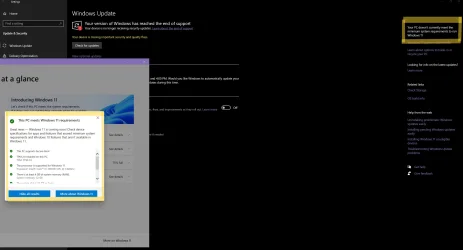
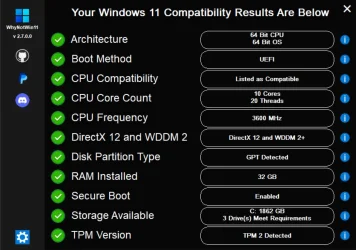
My issue is that both Windows' PC Health Check and WhyNotWin11 say my PC is compatible with Windows 11, but Windows' actual Update settings say it is still not compatible (both pictured below).

Upon crawling some threads, I found some advice on a previous one from @Bree that fixed this 'internal check' issue by deleting the GE24H2 and GE25H2 keys in the Registry via:
Computer\HKEY_LOCAL_MACHINE\SOFTWARE\Microsoft\Windows NT\CurrentVersion\AppCompatFlags\TargetVersionUpgradeExperienceIndicators

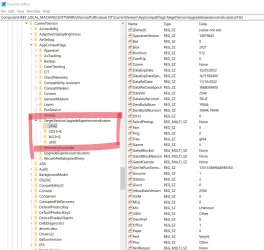
However, the 'GE24H2' and 'GE25H2' keys do not actually present in my registry. (also pictured below)
I am sure this is a silly user issue, but I can really use the advice of someone who knows better than I do.

This is the link to that previous thread who had a similar issue: Win 10 to Win 11 - Win 11 Health Check says PC is compatible, Windows Update says it is not

Thank you
 
Windows Build/Version
Windows 10 Version 22H2

Attachments

  • Win10toWin11Help.webp
    Win10toWin11Help.webp
    185.2 KB · Views: 1
  • Win10toWin11Help2.webp
    Win10toWin11Help2.webp
    90.5 KB · Views: 1
  • Win10toWin11Help3.webp
    Win10toWin11Help3.webp
    201.2 KB · Views: 1

My Computer My Computer

At a glance

Windows 10Intel Core i9-10850K 3.60GHz32 G DDR4-3600NVIDIA GeForce RTX 3080 Ti (12 GB)
OS
Windows 10
Computer type
PC/Desktop
Manufacturer/Model
Home Built
CPU
Intel Core i9-10850K 3.60GHz
Motherboard
MSI MPG Z490 GAMING EDGE WIFI ATX LGA1200
Memory
32 G DDR4-3600
Graphics Card(s)
NVIDIA GeForce RTX 3080 Ti (12 GB)
What happens when you upgrade using Windows 11 setup.exe from ISO image or using Windows 11 Media Creation Tool?
 

My Computer My Computer

At a glance

Windows 11AMD Ryzen 7 5700GMicron Technology DDR4-3200 16GBNVIDIA GeForce RTX 3060
OS
Windows 11
Computer type
PC/Desktop
Manufacturer/Model
HP Pavilion
CPU
AMD Ryzen 7 5700G
Motherboard
Erica6
Memory
Micron Technology DDR4-3200 16GB
Graphics Card(s)
NVIDIA GeForce RTX 3060
Sound Card
Realtek ALC671
Monitor(s) Displays
Samsung SyncMaster U28E590
Screen Resolution
3840 x 2160
Hard Drives
SAMSUNG MZVLQ1T0HALB-000H1
Please run > post share links using drop box or google drive


1) upgrade_failure_info


2) tuneup_plus


3) V2 log collector


4)

Code:
reg query HKLM\SOFTWARE\Microsoft\Windows NT\CurrentVersion\AppCompatFlags\TargetVersionUpgradeExperienceIndicators /s

reg query "HKLM\SOFTWARE\Microsoft\Windows NT\CurrentVersion\AppCompatFlags\TargetVersionUpgradeExperienceIndicators" /s

reg query "HKLM\SOFTWARE\Microsoft\WindowsSelfHost\Applicability" /s

reg query "HKLM\SOFTWARE\Policies\Microsoft\Windows\WindowsUpdate" /s

reg query "HKLM\SOFTWARE\Microsoft\PolicyManager\current\device\Update" /s

reg query "HKLM\SOFTWARE\Microsoft\Windows NT\CurrentVersion"

powershell "Confirm-SecureBootUEFI"

powershell "Get-Tpm"

reg query "HKLM\SOFTWARE\Microsoft\WindowsUpdate\UpdatePolicy" /s

dir "C:\$WINDOWS.~BT\Sources\Panther\CompatData*.xml"

dir "%SystemDrive%\Users\%USERNAME%\Desktop\SetupDiag*"

dir "C:\$WINDOWS.~BT\Sources\Panther\SetupDiagResults.log"
 
Last edited:

My Computer My Computer

At a glance

Windows 10Intel(R) Core(TM) i7-4800MQ CPU @ 2.70GHz16 GB Total: Manufacturer : Samsung MemoryTyp...NVIDIA Quadro K3100M; Intel(R) HD Graphics 4600
OS
Windows 10
Computer type
Laptop
Manufacturer/Model
HP
CPU
Intel(R) Core(TM) i7-4800MQ CPU @ 2.70GHz
Motherboard
Product : 190A Version : KBC Version 94.56
Memory
16 GB Total: Manufacturer : Samsung MemoryType : DDR3 FormFactor : SODIMM Capacity : 8GB Speed : 1600
Graphics Card(s)
NVIDIA Quadro K3100M; Intel(R) HD Graphics 4600
Sound Card
IDT High Definition Audio CODEC; PNP Device ID HDAUDIO\FUNC_01&VEN_111D&DEV_76E0
Hard Drives
Model Hitachi HTS727575A9E364
Antivirus
Microsoft Defender
Other Info
Mobile Workstation
My issue is that both Windows' PC Health Check and WhyNotWin11 say my PC is compatible with Windows 11, but Windows' actual Update settings say it is still not compatible (both pictured below).

Upon crawling some threads, I found some advice on a previous one from @Bree that fixed this 'internal check' issue by deleting the GE24H2 and GE25H2 keys in the Registry via:
Computer\HKEY_LOCAL_MACHINE\SOFTWARE\Microsoft\Windows NT\CurrentVersion\AppCompatFlags\TargetVersionUpgradeExperienceIndicators

However, the 'GE24H2' and 'GE25H2' keys do not actually present in my registry.
Welcome to Eleven Forum.


You will not be offered the upgrade to 25H2 until the compatibility appraiser task has run and populated that missing key. This scheduled task should run automatically, but for some reason yours hasn't. Have you made any tweaks to block MS telemetry, perhaps?

Or maybe you have set the Target Release version to your current Windows 10 22H2? If so, then you can undo this with Option Two, Step 3.
Specify Target Feature Update Version in Windows 11

You can run the appraiser manually yourself.

Manually running the scheduled task
Navigate to the start menu > type “task scheduler” and open the task scheduler > navigate to Microsoft > Windows > Application Experience > Microsoft Compatibility Appraiser Exp> right click > Run.

Running the appraiser at the command line
The task above runs a command which you can also execute manually.......
Compattelrunner.exe -m:appraiser.dll -f:DoScheduledTelemetryRun

Both methods will trigger Microsoft Compatibility Appraiser to report the required telemetry data and update the Windows update reports.
Windows 11 Pro will not update to 24H2 - Microsoft Q&A

Once you have created a 24H2 and/or 25H2 key, if it has found the PC to be compatible it should says 'none' for GatedBlockID, GatedBlockReason, and RedReason.

Open Regedit and go to the key:
HKEY_LOCAL_MACHINE\SOFTWARE\Microsoft\Windows NT\CurrentVersion\AppCompatFlags\TargetVersionUpgradeExperienceIndicators Look for the GE24H2 sub-key. The significant values to look at are GatedBlockID/GatedBlockReason which will tell you if there is a Compatibility Hold due to your particular hardware or software. A list of current issues, and which ones have compatibility holds is here: Windows 11, version 24H2 known issues and notifications

The RedReason lists items that do not meet W11 minimum requirements.
Windows 11, 24H2 update, doesn't appear (despite global launch in early October)! - post #42

If you have successfully created a 24H2 or 25H2 key and it declares the PC to be compatible then you should be offered the Feature Update shortly. Clicking Check for updates in Windows Update may hasten the process.
 

My Computers My Computers

  • At a glance

    Windows 11 HomeAMD Athlon Silver 3050U8GBRadeon Graphics
    OS
    Windows 11 Home
    Computer type
    Laptop
    Manufacturer/Model
    Acer Aspire 3 A315-23-R9VY
    CPU
    AMD Athlon Silver 3050U
    Memory
    8GB
    Graphics Card(s)
    Radeon Graphics
    Monitor(s) Displays
    laptop screen
    Screen Resolution
    1366x768 native resolution, up to 2560x1440 with Radeon Virtual Super Resolution
    Hard Drives
    1TB Samsung EVO 870 SSD (from April 2026: 250GB EVO 850)
    Internet Speed
    150 Mbps
    Browser
    Edge, Firefox
    Antivirus
    Defender
    Other Info
    fully 'Windows 11 ready' laptop. Windows 10 C: partition migrated from my old unsupported 'main machine' then upgraded to 11. A test migration ran Insider builds for 2 months. When 11 was released on 5th October 2021 it was re-imaged back to 10 and was offered the upgrade in Windows Update on 20th October. Windows Update offered the 22H2 Feature Update on 20th September 2022. It got the 23H2 Feature Update on 4th November 2023 through Windows Update, 24H2 on 3rd October 2024 through Windows Update by setting the Target Release Version for 24H2, and 25H2 on 30th September 2025 through Windows Update by setting the Target Release Version for 25H2.

    UPDATE - 11 April 2026: due to mechanical deterioration this PC has been retired from active duty. The OS with all software and files has been migrated to my System Seven in 'Other systems' to carry on as my general purpose 'main machine'.

    I've now clean installed 25H2 and used Garlin's scripts to update Secure Boot to CA 2023 and revoke the PCA 2011 certificates. It's new role is to test secure boot issues.
  • At a glance

    Windows 11 ProIntel® Core™ i5-520M8GB(integrated graphics) Intel HD Graphics
    Operating System
    Windows 11 Pro
    Computer type
    Laptop
    Manufacturer/Model
    Dell Latitude E4310
    CPU
    Intel® Core™ i5-520M
    Motherboard
    0T6M8G
    Memory
    8GB
    Graphics card(s)
    (integrated graphics) Intel HD Graphics
    Screen Resolution
    1366x768
    Hard Drives
    500GB Crucial MX500 SSD
    Browser
    Firefox, Edge
    Antivirus
    Defender
    Other Info
    unsupported machine: Legacy bios, MBR, TPM 1.2, upgraded from W10 to W11 using W10/W11 hybrid install media workaround.

    In-place upgrade to 22H2 using ISO and a workaround.
    Feature Update to 23H2 by manually installing the Enablement Package.
    In-place upgrade to 24H2 using hybrid 23H2/24H2 install media.
    Upgraded to 25H2 by Enablement Package.

    Also running Insider Dev, and Canary builds and Windows 10 as native boot .vhdx.
  • My SYSTEM THREE is a Dell Latitude 5410, i7-10610U, 32GB RAM, 512GB NVMe ssd, supported device running Windows 11 Pro.

    My SYSTEM FOUR is a 2-in-1 convertible Lenovo Yoga 11e 20DA, Celeron N2930, 8GB RAM, 256GB ssd. Unsupported device: currently running Win10 Pro, plus Win11 Pro RTM and Insider Dev, Beta, and RP 24H2 as native boot vhdx.

    My SYSTEM FIVE is a Dell Latitude 3190 2-in-1, Pentium Silver N5030, 8GB RAM, 1TB NVMe ssd, supported device running Windows 11 Pro, plus Insider Beta, Dev, and Canary builds (and a few others) as a native boot .vhdx.

    My SYSTEM SIX is a Dell Latitude 5550, Core Ultra 7 165H, 64GB RAM, 1TB NVMe SSD, supported device, Windows 11 Pro 24H2, Hyper-V host machine. Updated to 25H2 on 30th September 2025.

    My SYSTEM SEVEN is a Lenovo Thinkpad T580, Intel Core i7-8650U, 16GB RAM, 512GB NVMe SSD + 2nd 512GB NVMe SSD, a supported device for Windows 11. This is my current general purpose 'main machine'. The installed Windows 11 Home from my System One has been migrated to this machine.

Latest Support Threads

Back
Top Bottom