Win11: I can only use 75% of my 32Gb memory, on Win10 I could use all 100% of it.


Firefox can be demanding if you have enough tabs open.
You got that right! Good thing Firefox invokes Lazy Loading by default!
Better hope for no memory leaks!

13660.webp
 

My Computers My Computers

  • At a glance

    Windows 11 Pro
    OS
    Windows 11 Pro
    Computer type
    PC/Desktop
    Manufacturer/Model
    ASUS ROG Strix
  • At a glance

    Windows 11 Pro
    Operating System
    Windows 11 Pro
    Computer type
    Laptop
    Manufacturer/Model
    ASUS VivoBook
  • ASUS VivoBook 'Lite' ~ Windows 11 Home
I don't know why you are complaining. My two main computers with Windows 11 use 30-40% RAM even when at idle! I can't even remember the last time one of my computers had a low memory warning. That is true even for the computers I play games on.

You first need to look at the Task manager > Memory to see what is using so much memory. Then look at Task manager > Startup apps to see if something that is starting with Windows that doesn't need to. Finally, look at the system tray to see what is running at startup.

I think it is a lot to have 10-15 tabs open at one time. If you insist on having 100 open and run programs that demand a lot of memory then your only option is to add more RAM. Another stick of 32GB of RAM might help you.

Below is the Task Manager > Memory for my laptop and desktop with Windows 11. Each has 32GB RAM.

Task Manager.webp

Task Manager.webp
 

My Computers My Computers

  • At a glance

    Windows 11 Pro 25H2 (26200.6901)AMD Ryzen 7 6800H with Radeon 680M GPU (486MB...Crucial DDR5-4800 (2400MHz) 32GB (2 x 16GB)NVIDIA RTX 3060 Laptop (6GB RAM)
    OS
    Windows 11 Pro 25H2 (26200.6901)
    Computer type
    Laptop
    Manufacturer/Model
    ASUS TUF Gaming A15 (2022)
    CPU
    AMD Ryzen 7 6800H with Radeon 680M GPU (486MB RAM)
    Memory
    Crucial DDR5-4800 (2400MHz) 32GB (2 x 16GB)
    Graphics Card(s)
    NVIDIA RTX 3060 Laptop (6GB RAM)
    Sound Card
    n/a
    Monitor(s) Displays
    15.6-inch
    Screen Resolution
    1920x1080 300Hz
    Hard Drives
    2 x Samsung 990 Evo Plus (2TB M.2 NVME SSD)
    PSU
    n/a
    Mouse
    Wireless Mouse M510
    Internet Speed
    2100Mbps/300Mbps
    Browser
    Firefox
    Antivirus
    Malwarebytes
  • At a glance

    Windows 11 Pro 25H2 (26200.8246)AMD Ryzen 7 5700X3DG.SKILL Flare X 32GB (2x16GB) DDR4ASUS ROG-STRIX-RTX3060TI-08G-V2-GAMING (RTX 3...
    Operating System
    Windows 11 Pro 25H2 (26200.8246)
    Computer type
    PC/Desktop
    Manufacturer/Model
    Custom build
    CPU
    AMD Ryzen 7 5700X3D
    Motherboard
    ASUS ROG Strix B550-F Gaming WiFi II
    Memory
    G.SKILL Flare X 32GB (2x16GB) DDR4
    Graphics card(s)
    ASUS ROG-STRIX-RTX3060TI-08G-V2-GAMING (RTX 3060-Ti, 8GB RAM)
    Monitor(s) Displays
    Samsung G50D IPS 27"
    Screen Resolution
    1440p/180Hz
    Hard Drives
    SAMSUNG 990 EVO Plus (2TB] M.2 NVME SSD
    SAMSUNG 990 EVO Plus (4TB) M.2 NVME SSD
    PSU
    Corsair RM750x (750 watts)
    Case
    Cooler Master MasterCase 5
    Cooling
    Scythe Mugen 6
    Keyboard
    Logitech K520 (MK540 keyboard/mouse combo)
    Mouse
    Logitech M310 (MK540 keyboard/mouse combo)
    Internet Speed
    2100 Mbps down / 300 Mbps up
    Browser
    Firefox, Edge, Chrome
    Antivirus
    Malwarebytes (Premium)
    Other Info
    ASUS Blu-ray Burner BW-16D1HT (SATA) || Western Digital Easystore 20TB USB 3.0 external hard drive used with Acronis True Image 2025 backup software || HP OfficeJet Pro 6975 Printer/Scanner
Yes, I have integrated graphics, but I never play games or do anything demanding.
Erm... if you don't do anything demanding, why are you demanding 100% usage of your memory. 🤷‍♂️ It makes no sense to me that you would intentionally want to exhaust your physical memory just because it is there. Windows needs some free physical memory to operate correctly.
 

My Computer My Computer

At a glance

Windows 11 25H2Broadwell-e 6850K 4.5ghz @1.36v32GB Corsair LPM 3600 C16EVGA RTX 3080Ti FTW
OS
Windows 11 25H2
Computer type
PC/Desktop
Manufacturer/Model
EVGA home brew
CPU
Broadwell-e 6850K 4.5ghz @1.36v
Motherboard
EVGA X99 FTW K
Memory
32GB Corsair LPM 3600 C16
Graphics Card(s)
EVGA RTX 3080Ti FTW
Sound Card
Asus Centurion true 7.1 headset. (5 speakers in each earpeice)
Monitor(s) Displays
LG C4 55"
Screen Resolution
4K 144hz
Hard Drives
Various models of SSDs ~10TB No HDDs installed.
PSU
be quiet! BN516 Straight Power 12-1000w 80 Plus Platinum
Case
Corsair 780T modified to dual 200mm intake fans
Cooling
Corsair H110i
Keyboard
Corsair K95 Platinum
Mouse
Corsair M65 RGB Elite
Internet Speed
50Mbs
Thanks! I've gone through this many times, learned about commit memory etc. I know which app is using which amount of memory. I am ok with these apps, I just want them to use ALL memory I have paid for. Isn't it silly to have a 4-room house and be able to use 3 rooms only? :)
I understand your frustration and your point as i abuse ram and memory-paging/swap on daily bases :-)
Right now i have 95% ram usage and 12GB memory paging/swap

So win11 protest but not win10.. Interesting i wonder what they have changed. :think:

I have not used(abused) win11.. But what size do you have on your memory paging file?
if it is small or inactivated.... test to set it as big as installed Ram (or more) and see if the warnings stops and you become allowed to abuse the memory to 100% so you even can make the screen freeze...... or use all memory sounds nicer. 😁 but i like abuse. *LOL*
 

My Computers My Computers

  • At a glance

    Linux: Debian, Kali-linux, Alma, Win:7,10IoT,...i3, i5 and i7 From 2gen to 9th gen... Server ...
    OS
    Linux: Debian, Kali-linux, Alma, Win:7,10IoT,2012R
    Manufacturer/Model
    HP Elitebook 840, AsusX53, Aspire E1-572. AsusUX32A, HP Pro3130mt+3010mt, HP Proliant ML150, 3xCustom-PC, i3, i5, i7
    CPU
    i3, i5 and i7 From 2gen to 9th gen... Server dual Xenon
    Hard Drives
    Sata, M.2, SAS
  • At a glance

    Retro: 2003server.XPpro, Win2000, Win98SE, Wi...Oldest intel 8088 up to P4 dual core
    Operating System
    Retro: 2003server.XPpro, Win2000, Win98SE, Win95, Win3.11, MS-DOS, IBM-DOS
    Manufacturer/Model
    Commodore, AST, Fujitsu, Compaq, etc etc. etc Around 15 desktops and 20 laptops in the collection
    CPU
    Oldest intel 8088 up to P4 dual core
    Hard Drives
    MFM, IDE, SCSI
100 tabs???
Don't you use bookmarks?

Even when I'm comparing a bunch of items on Amazon and other stores... I rarely get more than 20-25 tabs open.
I can hire you to do research for me so you can experience chaos😛.. on my research computer right now, i have 21 firefox windows open and around 40 to 60 tabs in each window.
I love the firefox tab in the left corner Firefox overview, so i easy can switch between tabs and search for names
 

My Computers My Computers

  • At a glance

    Linux: Debian, Kali-linux, Alma, Win:7,10IoT,...i3, i5 and i7 From 2gen to 9th gen... Server ...
    OS
    Linux: Debian, Kali-linux, Alma, Win:7,10IoT,2012R
    Manufacturer/Model
    HP Elitebook 840, AsusX53, Aspire E1-572. AsusUX32A, HP Pro3130mt+3010mt, HP Proliant ML150, 3xCustom-PC, i3, i5, i7
    CPU
    i3, i5 and i7 From 2gen to 9th gen... Server dual Xenon
    Hard Drives
    Sata, M.2, SAS
  • At a glance

    Retro: 2003server.XPpro, Win2000, Win98SE, Wi...Oldest intel 8088 up to P4 dual core
    Operating System
    Retro: 2003server.XPpro, Win2000, Win98SE, Win95, Win3.11, MS-DOS, IBM-DOS
    Manufacturer/Model
    Commodore, AST, Fujitsu, Compaq, etc etc. etc Around 15 desktops and 20 laptops in the collection
    CPU
    Oldest intel 8088 up to P4 dual core
    Hard Drives
    MFM, IDE, SCSI
I can hire you to do research for me so you can experience chaos😛.. on my research computer right now, i have 21 firefox windows open and around 40 to 60 tabs in each window.
I love the firefox tab in the left corner Firefox overview, so i easy can switch between tabs and search for names
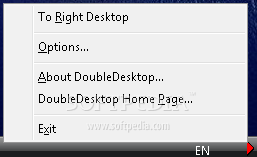
thats why i have a little program called double desktop
2 desk on Windows at a flick of a little switch
with 2 browsers running with multiply windows and tabs.

works wonders on Windows.
best of luck Steve ..
 

My Computers My Computers

  • At a glance

    Windows 11 HomeRyzen 7 5825u64GB DDR4 3200Ryzen 7 5825u
    OS
    Windows 11 Home
    Computer type
    PC/Desktop
    Manufacturer/Model
    HP 24" AiO
    CPU
    Ryzen 7 5825u
    Motherboard
    HP
    Memory
    64GB DDR4 3200
    Graphics Card(s)
    Ryzen 7 5825u
    Sound Card
    RealTek
    Monitor(s) Displays
    24" HP AiO
    Screen Resolution
    1920 x 1080 @60 Hz
    Hard Drives
    1TB WD Blue SN580 M2 SSD Partitioned.
    2x 1TB USB HDD External Backup/Storage.
    PSU
    90W external power brick
    Case
    24" All in One
    Cooling
    Default Air Cooling
    Keyboard
    HP WiFi UK extended
    Mouse
    HP WiFi 3 Button
    Internet Speed
    1GB full fibre
    Browser
    Edge & Firefox
    Antivirus
    AVG Internet Security/Windows Defender
    Other Info
    Mainly Open Source Software
  • At a glance

    Ubuntu 22.04.5 LTSi5 7200u16GB DDR4Intel
    Operating System
    Ubuntu 22.04.5 LTS
    Computer type
    Laptop
    Manufacturer/Model
    Dell 13" Latitude 2017
    CPU
    i5 7200u
    Motherboard
    Dell
    Memory
    16GB DDR4
    Graphics card(s)
    Intel
    Sound Card
    Intel
    Monitor(s) Displays
    13" Dell Laptop
    Hard Drives
    250GB Crucial 2.5" SSD
    Mouse
    Generic WiFi 3 button
    Internet Speed
    WiFi only
    Browser
    Firefox
    Antivirus
    ClamAV TK
    Other Info
    Mainly Open Source Software
Hi Steve and thank you for answer! My system says I cannot change it due to SecureBoot feature... Windows help says that this setting cannot increase my memory usage, though, it is used for system diagnostics... Thank you for helping!

Q.
what memory type are you using DDR4 or DDR5

if its DDR5 Windows will use the stick you have installed and create a Double Data Rate setup with the one stick of Ram.
so in essence its is dividing your memory stick into two, which maybe the reason you are getting, or what looks like, high Ram usage.

the way around that is to add a second stick of Ram in another slot.

edit.
you can also disable SysMain in the service menu which will stop Windows preloading apps and other software to RAM
Windows tools > services

in the services windows look for SysMain
right click the SysMain service then click properties

in this window STOP the service then on the dropdown menu click 'disable'
save settings then close all windows and restart the system please.
best of luck Steve ..
 
Last edited:

My Computers My Computers

  • At a glance

    Windows 11 HomeRyzen 7 5825u64GB DDR4 3200Ryzen 7 5825u
    OS
    Windows 11 Home
    Computer type
    PC/Desktop
    Manufacturer/Model
    HP 24" AiO
    CPU
    Ryzen 7 5825u
    Motherboard
    HP
    Memory
    64GB DDR4 3200
    Graphics Card(s)
    Ryzen 7 5825u
    Sound Card
    RealTek
    Monitor(s) Displays
    24" HP AiO
    Screen Resolution
    1920 x 1080 @60 Hz
    Hard Drives
    1TB WD Blue SN580 M2 SSD Partitioned.
    2x 1TB USB HDD External Backup/Storage.
    PSU
    90W external power brick
    Case
    24" All in One
    Cooling
    Default Air Cooling
    Keyboard
    HP WiFi UK extended
    Mouse
    HP WiFi 3 Button
    Internet Speed
    1GB full fibre
    Browser
    Edge & Firefox
    Antivirus
    AVG Internet Security/Windows Defender
    Other Info
    Mainly Open Source Software
  • At a glance

    Ubuntu 22.04.5 LTSi5 7200u16GB DDR4Intel
    Operating System
    Ubuntu 22.04.5 LTS
    Computer type
    Laptop
    Manufacturer/Model
    Dell 13" Latitude 2017
    CPU
    i5 7200u
    Motherboard
    Dell
    Memory
    16GB DDR4
    Graphics card(s)
    Intel
    Sound Card
    Intel
    Monitor(s) Displays
    13" Dell Laptop
    Hard Drives
    250GB Crucial 2.5" SSD
    Mouse
    Generic WiFi 3 button
    Internet Speed
    WiFi only
    Browser
    Firefox
    Antivirus
    ClamAV TK
    Other Info
    Mainly Open Source Software
Q.
what memory type are you using DDR4 or DDR5

if its DDR5 Windows will use the stick you have installed and create a Double Data Rate setup with the one stick of Ram.
so in essence its is dividing your memory stick into two, which maybe the reason you are getting, or what looks like, high Ram usage.

the way around that is to add a second stick of Ram in another slot.
best of luck Steve ..
Hmm... I've never heard of this where Windows creates another memory channel with a single stick of memory, regardless of the memory type. Memory channels are controlled by the IMC in the CPU. Prior generations it was controlled by a separate chipset.
 

My Computer My Computer

At a glance

Windows 11 25H2Broadwell-e 6850K 4.5ghz @1.36v32GB Corsair LPM 3600 C16EVGA RTX 3080Ti FTW
OS
Windows 11 25H2
Computer type
PC/Desktop
Manufacturer/Model
EVGA home brew
CPU
Broadwell-e 6850K 4.5ghz @1.36v
Motherboard
EVGA X99 FTW K
Memory
32GB Corsair LPM 3600 C16
Graphics Card(s)
EVGA RTX 3080Ti FTW
Sound Card
Asus Centurion true 7.1 headset. (5 speakers in each earpeice)
Monitor(s) Displays
LG C4 55"
Screen Resolution
4K 144hz
Hard Drives
Various models of SSDs ~10TB No HDDs installed.
PSU
be quiet! BN516 Straight Power 12-1000w 80 Plus Platinum
Case
Corsair 780T modified to dual 200mm intake fans
Cooling
Corsair H110i
Keyboard
Corsair K95 Platinum
Mouse
Corsair M65 RGB Elite
Internet Speed
50Mbs
I have a PowerShell script that consumes RAM usage to prove that Windows 11 has no upper limit preventing use of ALL of your RAM.
The fact is that Windows 11 is much better at resource usage than Windows 10 was, so comparing them is not the same. thing.

There are tools to help. You can use Resource Monitor by running resmon.exe
Sort the columns under Memory

You can use RAMMap from Microsoft to dig into how memory is being allocated on your system.


My system test using PowerShell to consume memory

PHYSICAL MEMORY CONSUMPTION TEST

Total visible memory : 65,220 MB
Currently in use : 13,843 MB
Currently available : 51,377 MB
Safety reserve : 2,048 MB
Hold duration : 30 seconds

Target allocation : approximately 49,329 MB

Allocating and touching physical memory...

Allocated: 49,329 MB | In use: 61,011 MB | Available: 4,209 MB

Allocated by test : 49,329 MB
Physical memory in use: 61,011 MB
Physical memory usage : 93.5%
Physical available : 4,209 MB

Holding memory for 30 seconds. Watch Task Manager now.

Releasing memory in 1 seconds...

Releasing allocated memory...
Memory currently in use: 11,602 MB
Memory now available : 53,618 MB
Test complete.


1785823761200.webp

1785823817723.webp
 

My Computer My Computer

At a glance

Windows 11 Pro build 25H2 x64Intel i9-13900K64GBNvidia GeForce RTX-3090 Ti
OS
Windows 11 Pro build 25H2 x64
Computer type
PC/Desktop
Manufacturer/Model
ASUS Custom build
CPU
Intel i9-13900K
Motherboard
Asus ROG STRIX Z790 E GAMING WIFI 11
Memory
64GB
Graphics Card(s)
Nvidia GeForce RTX-3090 Ti
Internet Speed
1 Gbps
Browser
Firefox
Antivirus
Malwarebytes
Hmm... I've never heard of this where Windows creates another memory channel with a single stick of memory, regardless of the memory type. Memory channels are controlled by the IMC in the CPU. Prior generations it was controlled by a separate chipset.

have a look at this please. virtual dual channel only works with DDR5 when you have a single stick installed

its one of the new features of DDR5 memory in Windows 11.
best of luck Steve ..
 

My Computers My Computers

  • At a glance

    Windows 11 HomeRyzen 7 5825u64GB DDR4 3200Ryzen 7 5825u
    OS
    Windows 11 Home
    Computer type
    PC/Desktop
    Manufacturer/Model
    HP 24" AiO
    CPU
    Ryzen 7 5825u
    Motherboard
    HP
    Memory
    64GB DDR4 3200
    Graphics Card(s)
    Ryzen 7 5825u
    Sound Card
    RealTek
    Monitor(s) Displays
    24" HP AiO
    Screen Resolution
    1920 x 1080 @60 Hz
    Hard Drives
    1TB WD Blue SN580 M2 SSD Partitioned.
    2x 1TB USB HDD External Backup/Storage.
    PSU
    90W external power brick
    Case
    24" All in One
    Cooling
    Default Air Cooling
    Keyboard
    HP WiFi UK extended
    Mouse
    HP WiFi 3 Button
    Internet Speed
    1GB full fibre
    Browser
    Edge & Firefox
    Antivirus
    AVG Internet Security/Windows Defender
    Other Info
    Mainly Open Source Software
  • At a glance

    Ubuntu 22.04.5 LTSi5 7200u16GB DDR4Intel
    Operating System
    Ubuntu 22.04.5 LTS
    Computer type
    Laptop
    Manufacturer/Model
    Dell 13" Latitude 2017
    CPU
    i5 7200u
    Motherboard
    Dell
    Memory
    16GB DDR4
    Graphics card(s)
    Intel
    Sound Card
    Intel
    Monitor(s) Displays
    13" Dell Laptop
    Hard Drives
    250GB Crucial 2.5" SSD
    Mouse
    Generic WiFi 3 button
    Internet Speed
    WiFi only
    Browser
    Firefox
    Antivirus
    ClamAV TK
    Other Info
    Mainly Open Source Software
100 or 500 Firefox tabs consume 0 KB unless you go to them. Last out of memory errors I had (years ago and not in W11 or 10) was for going to news sites and opening 10-20 new tabs before starting reading and closing them one by one (the real cause of the problem was limited C: free space that could not host the necessary pagefile). The 20-40 idle ones I use to have don't count.

Idk well the "sigle module double channel" feature of DDR5, but it's 2x32 bit wide. One "traditional" module (DDR1-4) is 64 bit wide. It seems a hw/sw trick that can accelerate things. It recalls me the ganged/unganged setting of some AMDs dual channels in the DDR2/3 age. The default setting was "unganged" (2x64 bit channels). I tried "ganged" (1x128 bit channel) and performance was noticeably worse, although a small percentage of users used "ganged" what required going to the BIOS. Those chips had poor memory performance in practice or in benchmarks but they were decent performers for the age.

Memory usage is composed of several amounts. The "commited" one is the important and what can cause out of memory errors against physical RAM + free C: space (depending on the pagefile settings). I'm not saying Windows gets to do the best possible management in all possible system usages, but MS takes into account performance/experience and stability. It may not or cannot come with "I strictly use only RAM until I need pagefile" b/c of features like prefetch, keep in RAM/pagefile just in case, etc, "soft" uses of RAM/pagefile intended to increase performance. Windows may alert sooner or later of a real shortage, but it will discard "optional" RAM/pagefile contents if it needs that space for the committed.
 

My Computer My Computer

At a glance

Windows 11Celeron J4125 (10th gen)8GB DDR4
OS
Windows 11
Manufacturer/Model
MeLE Quieter 2Q (fanless miniPC)
CPU
Celeron J4125 (10th gen)
Memory
8GB DDR4
Monitor(s) Displays
Samsung SyncMaster T260
Screen Resolution
1920x1200
Hard Drives
256GB eMMC (Windows)
2TB USB3 HDD Toshiba (Data)
thats why i have a little program called double desktop
2 desk on Windows at a flick of a little switch
with 2 browsers running with multiply windows and tabs.

works wonders on Windows.
best of luck Steve ..
I use Linux on that one. I have six virtual desktops over two screens on that computer and i can add more virtual desktops if needed.
But thanks for the tip if i need it to windows. :-)
 

My Computers My Computers

  • At a glance

    Linux: Debian, Kali-linux, Alma, Win:7,10IoT,...i3, i5 and i7 From 2gen to 9th gen... Server ...
    OS
    Linux: Debian, Kali-linux, Alma, Win:7,10IoT,2012R
    Manufacturer/Model
    HP Elitebook 840, AsusX53, Aspire E1-572. AsusUX32A, HP Pro3130mt+3010mt, HP Proliant ML150, 3xCustom-PC, i3, i5, i7
    CPU
    i3, i5 and i7 From 2gen to 9th gen... Server dual Xenon
    Hard Drives
    Sata, M.2, SAS
  • At a glance

    Retro: 2003server.XPpro, Win2000, Win98SE, Wi...Oldest intel 8088 up to P4 dual core
    Operating System
    Retro: 2003server.XPpro, Win2000, Win98SE, Win95, Win3.11, MS-DOS, IBM-DOS
    Manufacturer/Model
    Commodore, AST, Fujitsu, Compaq, etc etc. etc Around 15 desktops and 20 laptops in the collection
    CPU
    Oldest intel 8088 up to P4 dual core
    Hard Drives
    MFM, IDE, SCSI
Windows 11 has a Multiple Desktops feature built in, similar to what's available with Linux distros, so I'm not clear why a third party app would be necessary, unless it provides some easier creation/switching methods.

Windows 11 Multiple Desktops
 

My Computers My Computers

  • At a glance

    macOS 14.x (plus Windows 11, Debian, FreeBSD ...Apple M1 Max (T6001) - 8 performance 2 effici...32GB LPDDR5Apple M1 Max (32-core)
    OS
    macOS 14.x (plus Windows 11, Debian, FreeBSD for ARM64)
    Computer type
    Laptop
    Manufacturer/Model
    MacBook Pro M1 MAX
    CPU
    Apple M1 Max (T6001) - 8 performance 2 efficiency cores
    Memory
    32GB LPDDR5
    Graphics Card(s)
    Apple M1 Max (32-core)
    Hard Drives
    a) 1TB SSD + + 1TB SD Card + external SSD Drives
    Browser
    1. Safari 2. DuckDuckGo
    Antivirus
    -
  • At a glance

    Windows 11 Pro, plus VirtualBox VMs: various ...i732GB
    Operating System
    Windows 11 Pro, plus VirtualBox VMs: various Windows & Linux
    Computer type
    Laptop
    Manufacturer/Model
    Microsoft Surface Laptop Studio
    CPU
    i7
    Memory
    32GB
    Hard Drives
    1TB SSD, plus external SSDs for Virtual Machines etc.
    Browser
    1. MS Edge 2. DuckDuckGo
    Antivirus
    Defender
100 tabs???
Don't you use bookmarks?

Even when I'm comparing a bunch of items on Amazon and other stores... I rarely get more than 20-25 tabs open.


View attachment 178466 View attachment 178468


I don't use System managed page file.

View attachment 178469


I only have 16GB of RAM and I never get low memory.


In Task Manager on the "Processes" tab, if you click at the top of the Memory column, it will sort with the things using the most memory, at the top...


View attachment 178470
Thanks for answer. Yes, I have more than 100 tabs and right now my Firefox eats about 13Gb of memory. But this is not the questions of my tabs, Firefox etc. It is an issue of Win11 managing memory and not letting me use 100% of it. I think it is just not wise and fair.
 

My Computer My Computer

At a glance

Win11
OS
Win11
Computer type
PC/Desktop
Manufacturer/Model
Dell
100 tabs???
Don't you use bookmarks?

Even when I'm comparing a bunch of items on Amazon and other stores... I rarely get more than 20-25 tabs open.


View attachment 178466 View attachment 178468


I don't use System managed page file.

View attachment 178469


I only have 16GB of RAM and I never get low memory.


In Task Manager on the "Processes" tab, if you click at the top of the Memory column, it will sort with the things using the most memory, at the top...


View attachment 178470
I also have a manually set 50gb of page file.
 

My Computer My Computer

At a glance

Win11
OS
Win11
Computer type
PC/Desktop
Manufacturer/Model
Dell
I don't know why you are complaining. My two main computers with Windows 11 use 30-40% RAM even when at idle! I can't even remember the last time one of my computers had a low memory warning. That is true even for the computers I play games on.

You first need to look at the Task manager > Memory to see what is using so much memory. Then look at Task manager > Startup apps to see if something that is starting with Windows that doesn't need to. Finally, look at the system tray to see what is running at startup.

I think it is a lot to have 10-15 tabs open at one time. If you insist on having 100 open and run programs that demand a lot of memory then your only option is to add more RAM. Another stick of 32GB of RAM might help you.

Below is the Task Manager > Memory for my laptop and desktop with Windows 11. Each has 32GB RAM.

View attachment 178476

View attachment 178477
Thanks for answer! Right now my Firefox uses about 13Gb of memory. An advice to buy another 32Gb having only 25gb out of 32gb is not a thing I would like to do. I have 32 and i want to use it all. it is like having a house with 4 rooms, using only 3 and needing to buy a new house because I need to use 4.
 

My Computer My Computer

At a glance

Win11
OS
Win11
Computer type
PC/Desktop
Manufacturer/Model
Dell
Erm... if you don't do anything demanding, why are you demanding 100% usage of your memory. 🤷‍♂️ It makes no sense to me that you would intentionally want to exhaust your physical memory just because it is there. Windows needs some free physical memory to operate correctly.
Thanks for answer! My win95, win98, winMe etc. and up to Win10 always used up to 100% of memory. Now on Win11 I can use only 75-77% and get out of memory. Why? What if on Win12 they will tell you that it will only use 50% of memory and tell you that they need to do it this way?
 

My Computer My Computer

At a glance

Win11
OS
Win11
Computer type
PC/Desktop
Manufacturer/Model
Dell
Q.
what memory type are you using DDR4 or DDR5

if its DDR5 Windows will use the stick you have installed and create a Double Data Rate setup with the one stick of Ram.
so in essence its is dividing your memory stick into two, which maybe the reason you are getting, or what looks like, high Ram usage.

the way around that is to add a second stick of Ram in another slot.

edit.
you can also disable SysMain in the service menu which will stop Windows preloading apps and other software to RAM
Windows tools > services

in the services windows look for SysMain
right click the SysMain service then click properties

in this window STOP the service then on the dropdown menu click 'disable'
save settings then close all windows and restart the system please.
best of luck Steve ..
Hi and thanks for answer! I have DDR4. And I am not sure that DDR5 would make a real difference, though.
 

My Computer My Computer

At a glance

Win11
OS
Win11
Computer type
PC/Desktop
Manufacturer/Model
Dell
I have a PowerShell script that consumes RAM usage to prove that Windows 11 has no upper limit preventing use of ALL of your RAM.
The fact is that Windows 11 is much better at resource usage than Windows 10 was, so comparing them is not the same. thing.

There are tools to help. You can use Resource Monitor by running resmon.exe
Sort the columns under Memory

You can use RAMMap from Microsoft to dig into how memory is being allocated on your system.


My system test using PowerShell to consume memory

PHYSICAL MEMORY CONSUMPTION TEST

Total visible memory : 65,220 MB
Currently in use : 13,843 MB
Currently available : 51,377 MB
Safety reserve : 2,048 MB
Hold duration : 30 seconds

Target allocation : approximately 49,329 MB

Allocating and touching physical memory...

Allocated: 49,329 MB | In use: 61,011 MB | Available: 4,209 MB

Allocated by test : 49,329 MB
Physical memory in use: 61,011 MB
Physical memory usage : 93.5%
Physical available : 4,209 MB

Holding memory for 30 seconds. Watch Task Manager now.

Releasing memory in 1 seconds...

Releasing allocated memory...
Memory currently in use: 11,602 MB
Memory now available : 53,618 MB
Test complete.


View attachment 178508

View attachment 178509

Hi and thanks for answer! YOu are correct! I did same thing several days ago through PowerShell and I was able to fill all 100% of memory. However, using regular software I never reach above 77%.
 

My Computer My Computer

At a glance

Win11
OS
Win11
Computer type
PC/Desktop
Manufacturer/Model
Dell
Thanks for answer. Yes, I have more than 100 tabs and right now my Firefox eats about 13Gb of memory. But this is not the questions of my tabs, Firefox etc. It is an issue of Win11 managing memory and not letting me use 100% of it. I think it is just not wise and fair.
OK, inquiring minds want to know. What's the rational for having 100 tabs open?
 

My Computers My Computers

  • At a glance

    Win 11 Pro 25H2, Build 26200.8973Intel Core i5 1450064GB DDR4GeForce RTX 4060
    OS
    Win 11 Pro 25H2, Build 26200.8973
    Computer type
    PC/Desktop
    Manufacturer/Model
    Home Brew
    CPU
    Intel Core i5 14500
    Motherboard
    Gigabyte B760M G P WIFI
    Memory
    64GB DDR4
    Graphics Card(s)
    GeForce RTX 4060
    Sound Card
    Chipset Realtek
    Monitor(s) Displays
    LG 45" Ultragear, Acer 24" 1080p
    Screen Resolution
    5120x1440, 1920x1080
    Hard Drives
    Crucial P310 2TB 2280 PCIe Gen4 3D NAND NVMe M.2 SSD (O/S)
    Silicon Power 2TB US75 NVMe PCIe Gen4 M.2 2280 SSD (backup)
    Crucial BX500 2TB 3D NAND (2nd backup)
    Seagate 4TB Ironwolf, rotating HDD archive files
    External off-line backup Drives: 2 NVMe 4TB drives in external enclosures
    PSU
    Thermaltake Toughpower GF3 750W
    Case
    LIAN LI LANCOOL 216 E-ATX PC Case
    Cooling
    Lots of fans!
    Keyboard
    Microsoft Comfort Curve 2000
    Mouse
    Logitech G305
    Internet Speed
    Verizon FiOS 1GB
    Browser
    Firefox
    Antivirus
    Malware Bytes & Windows Defender Security
  • At a glance

    Win 11 Pro 25H2, Build 26200.8973Intel Core i5 1440032GB DDR5Intel 700 Embedded GPU
    Operating System
    Win 11 Pro 25H2, Build 26200.8973
    Computer type
    PC/Desktop
    Manufacturer/Model
    Home Brew
    CPU
    Intel Core i5 14400
    Motherboard
    Gigabyte B760M DS3H AX
    Memory
    32GB DDR5
    Graphics card(s)
    Intel 700 Embedded GPU
    Sound Card
    Realtek Embedded
    Monitor(s) Displays
    27" HP 1080p
    Screen Resolution
    1920x1080
    Hard Drives
    Crucial P310 2TB 2280 PCIe Gen4 eD NAND PCIe SSD
    Samsung EVO 990 2TB NVMe Gen4 SSD
    Samsung 2TB SATA SSD
    PSU
    Thermaltake Smart BM3 650W
    Case
    Okinos Micro ATX Case
    Cooling
    Fans
    Keyboard
    Microsoft Comfort Curve 2000
    Mouse
    Logitech G305
    Internet Speed
    Verizon FiOS 1GB
    Browser
    Firefox
    Antivirus
    Malware Bytes & Windows Defender Security
  • Nimo N171 17" Laptop, (Intel i3-1215U, 16GB RAM, 2TB NVMe, Win11 Pro)
    Acemagic Vista Mini PC V1 (Intel N150, 16GB RAM, 1TB NVMe, Win11 Pro)
    HP ENVY h8-1540t, (24GB RAM, 2TB SSD, 2TB HDD, Win11 Pro)
Back
Top Bottom