JavaScript is disabled. For a better experience, please enable JavaScript in your browser before proceeding.
You are using an out of date browser. It may not display this or other websites correctly.
You should upgrade or use an
alternative browser .
Windhawk Mods (Official Topic - Please Post All Here)
Well-known member
Pro User
VIP
After the latest Windows 11 update, (KB5089573) Windows 11 Start Menu Styler 1.5.2 Windhawk does not work
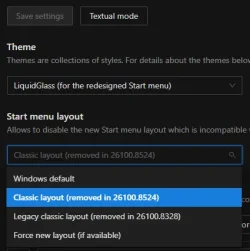
Were you trying to use it on the old Start menu? They disabled it for the old start menu cause the old start menu causes the start menu to crash or fail to open. It works great for me on the new menu with the latest Beta and RP builds.
OS
Windows 11 25H2
Computer type
Laptop
Manufacturer/Model
Alienware 18 Area-51
CPU
Intel Core Ultra 9 275HX (24-Core)
Motherboard
Alienware
Memory
64GB DDR5 6400MT/s
Graphics Card(s)
NVIDIA GeForce RTX 5080 and Intel UHD Graphics
Sound Card
Onboard, Realtek high-performance Audio chips (ALC3329 & ALC1708))
Monitor(s) Displays
300HZ 18-inch QHD 500 nit Comfort View+
Screen Resolution
2560 x 1600
Hard Drives
2TB NVMe M.2 PCIe Gen 5 SSD
Case
Magnesium Alloy
Cooling
Advanced Cryo-Tech Quad-Fan Cooling system & large vapor chamber
Keyboard
Cherry MX ultra low profile mechanical keyboard with per key AlienFX RGB lighting
Mouse
Logitech MX Master 4
Browser
Vivaldi (main), Firefox, Chrome, Edge
Antivirus
MS Defender and Malwarebytes Free
Operating System
Windows 11 25H2
Computer type
Laptop
Manufacturer/Model
Microsoft Surface Laptop 7
CPU
Qualcomm Snapdragon X Elite (12 Core) ARM based CPU
Motherboard
Microsoft Corp.
Memory
16GB LPDDR5
Graphics card(s)
Qualcomm Adreno X1-85
Sound Card
Omnisonic speakers with Dolby Atmos spatial sound
Monitor(s) Displays
120 Hz 13.8-inch 600 nit PixelSense Flow touchscreen
Screen Resolution
2304x1536
Hard Drives
1TB NVMe Gen 4 SSD
Case
Anodized Aluminum
Cooling
Traditional active cooling fan system
Keyboard
Mechanical QWERTY, backlit when in use
Mouse
Logitech MX Master 4 and Surface Arc Mouse
Browser
Vivaldi (main), Firefox, Chrome, Edge
Antivirus
MS Defender and Malwarebytes Free
Well-known member
Guru
VIP
Thread Starter
you can just turn it back on...
Well-known member
Power User
VIP
The Styler will not work if you have Explorer Patcher Windows 10 set as default. It only works with Windows 11.
OS
Windows 11 Education For 25H2
Computer type
Laptop
Manufacturer/Model
HP ZBook G2
CPU
Intel® Core i7 5500u
Motherboard
HP
Memory
8 GB
Graphics Card(s)
Intel HD Family Graphics 5500 AMD Firepro 4150M
Sound Card
Realtek High Audio
Hard Drives
1 TB SSD
Mouse
HP USB Mouse
Antivirus
Windows Defender
Operating System
Windows 11 Pro For Workstations 25H2
Computer type
Laptop
Manufacturer/Model
HP Zbook G4
CPU
Xeon 1535m v6
Motherboard
HP
Memory
32 GB
Graphics card(s)
AMD Quadro Pro 4100
Sound Card
Bang and Olufson Audio
Hard Drives
1TB SSD
Mouse
HP USB Mouse
Antivirus
Windows Defender
Jack of all trades – master of none
Pro User
VIP
The Styler will not work if you have Explorer Patcher Windows 10 set as default. It only works with Windows 11.
Hence the mod is titled Windows 11 Start Menu Styler, not Windows 10 Start Menu Styler.
OS
11 Home
Computer type
Laptop
Manufacturer/Model
Asus TUF Gaming F16 (2024)
CPU
i7 13650HX
Memory
16GB DDR5
Graphics Card(s)
GeForce RTX 4060 Mobile
Sound Card
Eastern Electric MiniMax DAC Supreme; Emotiva UMC-200; Astell & Kern AK240
Monitor(s) Displays
Sony Bravia XR-55X90J
Screen Resolution
3840×2160
Hard Drives
512GB SSD internal
37TB external
PSU
Li-ion
Cooling
2× Arc Flow Fans, 4× exhaust vents, 5× heatpipes
Keyboard
Logitech K800
Mouse
Logitech G402
Internet Speed
30Mbit/s up, 500Mbit/s down
Browser
FF
Antivirus
What's an antivirus?
Operating System
11 Home
Computer type
Laptop
Manufacturer/Model
Medion S15450
CPU
i5 1135G7
Memory
16GB DDR4
Graphics card(s)
Intel Iris Xe
Sound Card
Eastern Electric MiniMax DAC Supreme; Emotiva UMC-200; Astell & Kern AK240
Monitor(s) Displays
Sony Bravia XR-55X90J
Screen Resolution
3840×2160
Hard Drives
2TB SSD internal
37TB external
PSU
Li-ion
Keyboard
Logitech K800
Mouse
Logitech G402
Internet Speed
30Mbit/s up, 500Mbit/s down
Browser
FF
Will the start menu styler conflict with Open Shell?
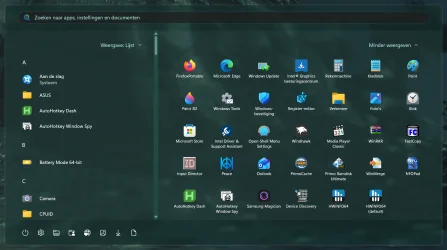
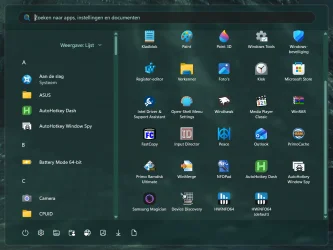
I like the Open Shell style of my main menu, but despise the look of the newly modified Windows key menu.
OS
Windows 11
Computer type
Laptop
Manufacturer/Model
Alienware A51M R2
CPU
Intel(R) Core(TM) i9-10900K CPU @ 3.70GHz
Memory
32,0 GB
Graphics Card(s)
Nvidia GeForce RTX2080 Super
Sound Card
Realtek
Screen Resolution
4K
Hard Drives
2TB (2x 1TB PCle M.2 SSD) RAID 0 [Boot] + 2TB (2x 1TB
PCle M.2 SSD) Non-Raid [Storage]
Well-known member
Power User
VIP
I like the Open Shell style of my main menu, but despise the look of the newly modified Windows key menu.
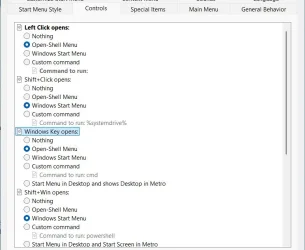
In the settings of OpenShell you can change the function of the Windows key, so that it will open the OpenShell menu too.
You can set the shift function of both click Start button and Windows Key to start the Windows menu.
That's how I have it:
Will the start menu styler conflict with Open Shell?
Some time ago I tested the menu styler: it did not conflict with Open Shell.
But as I am content with the option to have setting like described, I don't need to change the Windows menu at all, I seldom use it.
OS
Windows 11 Pro 25H2 26200.8457
Computer type
PC/Desktop
Manufacturer/Model
Build by vendor to my specs
CPU
AMD Ryzen 7 5700G
Motherboard
MSI PRO B550M-P Gen3
Memory
Kingston FURY Beast 2x16GB DIMM DDR4 2666 CL16
Graphics Card(s)
MSI GeForce GT 730 2GB LP V1
Sound Card
Creative Sound Blaster Audigy FX
Monitor(s) Displays
Samsung S24E450F 24"
Screen Resolution
1920 x 1080
Hard Drives
1. SSD Crucial P5 Plus 500GB PCIe M.2
2. SSD-SATA Crucial MX500-2TB
PSU
Corsair CV650W
Case
Cooler Master Silencio S400
Cooling
Cooler Master Hyper H412R with Be Quiet Pure Wings 2 PWM BL038 fan
Keyboard
Cherry Stream (wired, scissor keys)
Mouse
Asus WT465 (wireless)
Internet Speed
70 Mbps down / 80 Mbps up
Browser
Firefox 130.0
Antivirus
F-Secure (Internetprovider version)
Other Info
Router: FRITZBox 7490
Oracle VirtualBox 7 for testing software on Win 10 or 11
I use both. I think I will err on the side of caution. Thanks for your reply anyway.
OS
Windows 11
Computer type
Laptop
Manufacturer/Model
Alienware A51M R2
CPU
Intel(R) Core(TM) i9-10900K CPU @ 3.70GHz
Memory
32,0 GB
Graphics Card(s)
Nvidia GeForce RTX2080 Super
Sound Card
Realtek
Screen Resolution
4K
Hard Drives
2TB (2x 1TB PCle M.2 SSD) RAID 0 [Boot] + 2TB (2x 1TB
PCle M.2 SSD) Non-Raid [Storage]
Jack of all trades – master of none
Pro User
VIP
Will the start menu styler conflict with Open Shell?
No, not as far as I can see.
OS
11 Home
Computer type
Laptop
Manufacturer/Model
Asus TUF Gaming F16 (2024)
CPU
i7 13650HX
Memory
16GB DDR5
Graphics Card(s)
GeForce RTX 4060 Mobile
Sound Card
Eastern Electric MiniMax DAC Supreme; Emotiva UMC-200; Astell & Kern AK240
Monitor(s) Displays
Sony Bravia XR-55X90J
Screen Resolution
3840×2160
Hard Drives
512GB SSD internal
37TB external
PSU
Li-ion
Cooling
2× Arc Flow Fans, 4× exhaust vents, 5× heatpipes
Keyboard
Logitech K800
Mouse
Logitech G402
Internet Speed
30Mbit/s up, 500Mbit/s down
Browser
FF
Antivirus
What's an antivirus?
Operating System
11 Home
Computer type
Laptop
Manufacturer/Model
Medion S15450
CPU
i5 1135G7
Memory
16GB DDR4
Graphics card(s)
Intel Iris Xe
Sound Card
Eastern Electric MiniMax DAC Supreme; Emotiva UMC-200; Astell & Kern AK240
Monitor(s) Displays
Sony Bravia XR-55X90J
Screen Resolution
3840×2160
Hard Drives
2TB SSD internal
37TB external
PSU
Li-ion
Keyboard
Logitech K800
Mouse
Logitech G402
Internet Speed
30Mbit/s up, 500Mbit/s down
Browser
FF
No, not as far as I can see.
Thanks. Will it get rid of the new styled menu? Ideally, I would like to have a Win 10 style menu.
OS
Windows 11
Computer type
Laptop
Manufacturer/Model
Alienware A51M R2
CPU
Intel(R) Core(TM) i9-10900K CPU @ 3.70GHz
Memory
32,0 GB
Graphics Card(s)
Nvidia GeForce RTX2080 Super
Sound Card
Realtek
Screen Resolution
4K
Hard Drives
2TB (2x 1TB PCle M.2 SSD) RAID 0 [Boot] + 2TB (2x 1TB
PCle M.2 SSD) Non-Raid [Storage]
Well-known member
Power User
VIP
Thanks. Will it get rid of the new styled menu? Ideally, I would like to have a Win 10 style menu.
Get Explorer Patcher and drop it to Windows 10. If you want a start menu, you can install OpenShell, and set it to Windows XP or Windows 7 start menu.
OS
Windows 11 Education For 25H2
Computer type
Laptop
Manufacturer/Model
HP ZBook G2
CPU
Intel® Core i7 5500u
Motherboard
HP
Memory
8 GB
Graphics Card(s)
Intel HD Family Graphics 5500 AMD Firepro 4150M
Sound Card
Realtek High Audio
Hard Drives
1 TB SSD
Mouse
HP USB Mouse
Antivirus
Windows Defender
Operating System
Windows 11 Pro For Workstations 25H2
Computer type
Laptop
Manufacturer/Model
HP Zbook G4
CPU
Xeon 1535m v6
Motherboard
HP
Memory
32 GB
Graphics card(s)
AMD Quadro Pro 4100
Sound Card
Bang and Olufson Audio
Hard Drives
1TB SSD
Mouse
HP USB Mouse
Antivirus
Windows Defender
Well-known member
Guru
VIP
Thread Starter
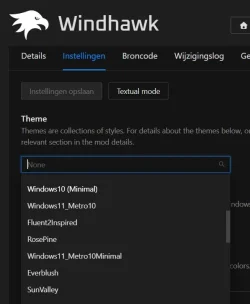
Windhawk has a win10 start menu style in its default startmenustyler choices
I have installed it but can't see how to get it to work. How do I find the app and open its settings, please?
OS
Windows 11
Computer type
Laptop
Manufacturer/Model
Alienware A51M R2
CPU
Intel(R) Core(TM) i9-10900K CPU @ 3.70GHz
Memory
32,0 GB
Graphics Card(s)
Nvidia GeForce RTX2080 Super
Sound Card
Realtek
Screen Resolution
4K
Hard Drives
2TB (2x 1TB PCle M.2 SSD) RAID 0 [Boot] + 2TB (2x 1TB
PCle M.2 SSD) Non-Raid [Storage]
Well-known member
Power User
VIP
- Install the Windhawk mod
Windows 11 Start Menu Styler
- Click Settings
- Choose Theme Windows 10 (minimal)
Did that for the test and at my system it does function rightaway.
Took it off immediately after that, because in my opinion the Windows 10 menu is much worse than the Eleven one, but in practice I am using the OpenShell Windows 7 menu with some own tweaking (which is possible in Open Shell).
Last edited: Today at 3:28 PM
OS
Windows 11 Pro 25H2 26200.8457
Computer type
PC/Desktop
Manufacturer/Model
Build by vendor to my specs
CPU
AMD Ryzen 7 5700G
Motherboard
MSI PRO B550M-P Gen3
Memory
Kingston FURY Beast 2x16GB DIMM DDR4 2666 CL16
Graphics Card(s)
MSI GeForce GT 730 2GB LP V1
Sound Card
Creative Sound Blaster Audigy FX
Monitor(s) Displays
Samsung S24E450F 24"
Screen Resolution
1920 x 1080
Hard Drives
1. SSD Crucial P5 Plus 500GB PCIe M.2
2. SSD-SATA Crucial MX500-2TB
PSU
Corsair CV650W
Case
Cooler Master Silencio S400
Cooling
Cooler Master Hyper H412R with Be Quiet Pure Wings 2 PWM BL038 fan
Keyboard
Cherry Stream (wired, scissor keys)
Mouse
Asus WT465 (wireless)
Internet Speed
70 Mbps down / 80 Mbps up
Browser
Firefox 130.0
Antivirus
F-Secure (Internetprovider version)
Other Info
Router: FRITZBox 7490
Oracle VirtualBox 7 for testing software on Win 10 or 11