windows 10 to windows 11 partitions question


cokedude

Active member
Member
Local time
1:58 PM
Posts
74
OS
10 and 11
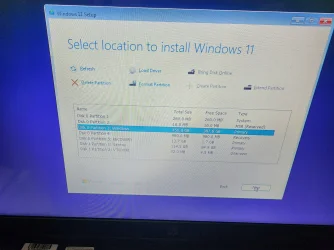
I am upgrading a computer from windows 10 to 11. On this particular computer there are 5 partitions. Why is that? I have never seen this many partitions on a windows 10 computer. Should I just install on the windows partition? Should I delete all the partitions? Something else? Disk 0 is the computer. Disk 1 is my flash drive.


<a href="20260904_020443.jpg - PiXhost"><img src="https://t3.pixhost.to/thumbs/5451/766018865_20260904_020443.jpg" alt="20260904_020443.jpg" width="200" height="150" decoding="async"></a>
 

My Computer My Computer

At a glance

10 and 11
OS
10 and 11
Computer type
Laptop
Delete all partitions you don't use and install Windows 11 on unallocated space.
 

My Computer My Computer

At a glance

Windows 11AMD Ryzen 7 5700GMicron Technology DDR4-3200 16GBNVIDIA GeForce RTX 3060
OS
Windows 11
Computer type
PC/Desktop
Manufacturer/Model
HP Pavilion
CPU
AMD Ryzen 7 5700G
Motherboard
Erica6
Memory
Micron Technology DDR4-3200 16GB
Graphics Card(s)
NVIDIA GeForce RTX 3060
Sound Card
Realtek ALC671
Monitor(s) Displays
Samsung SyncMaster U28E590
Screen Resolution
3840 x 2160
Hard Drives
SAMSUNG MZVLQ1T0HALB-000H1
Delete all partitions you don't use and install Windows 11 on unallocated space.

How do I look at what is on the partitions? None of them were viewable in explorer?
 

My Computer My Computer

At a glance

10 and 11
OS
10 and 11
Computer type
Laptop
I am upgrading a computer from windows 10 to 11. On this particular computer there are 5 partitions. Why is that? I have never seen this many partitions on a windows 10 computer. Should I just install on the windows partition? Should I delete all the partitions? Something else? Disk 0 is the computer. Disk 1 is my flash drive.


<a href="20260904_020443.jpg - PiXhost"><img src="https://t3.pixhost.to/thumbs/5451/766018865_20260904_020443.jpg" alt="20260904_020443.jpg" width="200" height="150" decoding="async"></a>
To reply to your question, by default in Windows 10 22H2 and Windows 11 the hard disk follows the GPT partition scheme which supports larger than 2TB disks and also has additional small system partitions. The old MBR partition scheme only had a single system partition but it is limited to 2TB. Every hard disk larger than 2TB is configured in GPT partition scheme by default so the owner can create a single NTFS partition covering the whole disk. If it was MBR he would have to create two or more partitions due to the 2GB limit.

What do you want to do?

Option 1: Wipe all your data and clean install Windows 11. In this case you have to click on each one partition and delete it until the whole disk is unallocated. Then click Next to start installing Windows 11. Setup will create the appropriate partitions for you with the rest space taken by the Windows partitions.

Option 2: Install Windows 11 on the Windows partition (larger) without formatting so you can then copy your data. Setup will warn you that there is already a Windows installation and it will be copied to folder C:\Windows.old before installing Windows 11 again. That's exactly what we want. After installation you can copy your data from C:\Windows.old\Users\yourusername folder. You can even copy application data from the C:\Windows.old\Program Files or C:\Windows.old\Program Files (x86) and C:\Windows.old\ProgramData folders. In fact if you copy all the Mozilla folder from C:\Windows.old to their respective folders in the new Windows 11 installation and then install Firefox you have all your settings, bookmarks, themes, add-ons. Not sure if you have your passwords as well.

Option 3: Upgrade from Windows 10 to Windows 11. In that case you must load Windows 11 and run Setup from there. Make sure you have the same language ISO as your Windows 10 otherwise it won't let you keep both your data and apps.
 

My Computers My Computers

  • At a glance

    Windows 11 Pro 23H2 (7582), 25H2 (9445)Mobile DualCore Intel Core 2 Duo T7250, 2000 MHz4GBMobile Intel(R) GMA 4500M (Mobile 4 series)
    OS
    Windows 11 Pro 23H2 (7582), 25H2 (9445)
    Computer type
    Laptop
    Manufacturer/Model
    Acer Extensa 5630EZ
    CPU
    Mobile DualCore Intel Core 2 Duo T7250, 2000 MHz
    Motherboard
    Acer Extensa 5630
    Memory
    4GB
    Graphics Card(s)
    Mobile Intel(R) GMA 4500M (Mobile 4 series)
    Sound Card
    Realtek ALC268 @ Intel 82801IB ICH9 - High Definition Audio Controller
    Monitor(s) Displays
    1
    Screen Resolution
    1280x800
    Hard Drives
    Samsung SSD 850 EVO 250GB SATA Device (250 GB, SATA-III)
    Internet Speed
    802.11g wireless 54 Mbps
    Browser
    MICROSOFT EDGE
    Antivirus
    WINDOWS DEFENDER
    Other Info
    Legacy MBR installation, no TPM, no Secure Boot, no WDDM 2.0 graphics drivers, no SSE4.2, cannot get more unsupported ;) This is only my test laptop. I had installed Windows 11 here before upgrading my main PC. For my main PC I use everyday see my 2nd system specs.
  • At a glance

    Windows 11 Pro v25H2 (build 26200.9445)Intel Core-i7 3770 3.40GHz s1155 (3rd generat...2x Kingston Hyper-X Blu 8GB DDR3-1600GIGABYTE GeForce RTX 3050 WINDFORCE OC V2 6GB...
    Operating System
    Windows 11 Pro v25H2 (build 26200.9445)
    Computer type
    PC/Desktop
    Manufacturer/Model
    Custom-built PC
    CPU
    Intel Core-i7 3770 3.40GHz s1155 (3rd generation)
    Motherboard
    Asus P8H61 s1155 ATX
    Memory
    2x Kingston Hyper-X Blu 8GB DDR3-1600
    Graphics card(s)
    GIGABYTE GeForce RTX 3050 WINDFORCE OC V2 6GB (GV-N3050WF2OCV2-6GD)
    Sound Card
    Realtek HD audio (ALC887)
    Monitor(s) Displays
    Sony Bravia KDL-19L4000 19" LCD TV via VGA
    Screen Resolution
    1440x900 32-bit 60Hz
    Hard Drives
    WD Blue SA510 2.5 1000GB SSD as system disk, Western Digital Caviar Purple 4TB SATA III (WD40PURZ) as second
    PSU
    Thermaltake Litepower RGB 550W Full Wired
    Case
    SUPERCASE MIDI-TOWER
    Cooling
    Deepcool Gamma Archer CPU cooler, 1x 8cm fan at the back
    Keyboard
    Mitsumi 101-key PS/2
    Mouse
    Microsoft Compact Optical Mouse
    Internet Speed
    802.11ac 5GHz wireless 260Mpbs
    Browser
    Microsoft Edge, Mozilla Firefox
    Antivirus
    Microsoft Windows Defender
    Other Info
    Legacy BIOS (MBR) installation, no TPM, no Secure Boot, WDDM 3.0 graphics drivers, WEI score 7.4
How do I look at what is on the partitions? None of them were viewable in explorer?
Press SHIFT+F10 to open a Command Prompt window. Type explorer and press ENTER to load File Explorer and browse the partitions. All you care about is the Windows partition (larger) where your files are, not the small system partitions.
 

My Computers My Computers

  • At a glance

    Windows 11 Pro 23H2 (7582), 25H2 (9445)Mobile DualCore Intel Core 2 Duo T7250, 2000 MHz4GBMobile Intel(R) GMA 4500M (Mobile 4 series)
    OS
    Windows 11 Pro 23H2 (7582), 25H2 (9445)
    Computer type
    Laptop
    Manufacturer/Model
    Acer Extensa 5630EZ
    CPU
    Mobile DualCore Intel Core 2 Duo T7250, 2000 MHz
    Motherboard
    Acer Extensa 5630
    Memory
    4GB
    Graphics Card(s)
    Mobile Intel(R) GMA 4500M (Mobile 4 series)
    Sound Card
    Realtek ALC268 @ Intel 82801IB ICH9 - High Definition Audio Controller
    Monitor(s) Displays
    1
    Screen Resolution
    1280x800
    Hard Drives
    Samsung SSD 850 EVO 250GB SATA Device (250 GB, SATA-III)
    Internet Speed
    802.11g wireless 54 Mbps
    Browser
    MICROSOFT EDGE
    Antivirus
    WINDOWS DEFENDER
    Other Info
    Legacy MBR installation, no TPM, no Secure Boot, no WDDM 2.0 graphics drivers, no SSE4.2, cannot get more unsupported ;) This is only my test laptop. I had installed Windows 11 here before upgrading my main PC. For my main PC I use everyday see my 2nd system specs.
  • At a glance

    Windows 11 Pro v25H2 (build 26200.9445)Intel Core-i7 3770 3.40GHz s1155 (3rd generat...2x Kingston Hyper-X Blu 8GB DDR3-1600GIGABYTE GeForce RTX 3050 WINDFORCE OC V2 6GB...
    Operating System
    Windows 11 Pro v25H2 (build 26200.9445)
    Computer type
    PC/Desktop
    Manufacturer/Model
    Custom-built PC
    CPU
    Intel Core-i7 3770 3.40GHz s1155 (3rd generation)
    Motherboard
    Asus P8H61 s1155 ATX
    Memory
    2x Kingston Hyper-X Blu 8GB DDR3-1600
    Graphics card(s)
    GIGABYTE GeForce RTX 3050 WINDFORCE OC V2 6GB (GV-N3050WF2OCV2-6GD)
    Sound Card
    Realtek HD audio (ALC887)
    Monitor(s) Displays
    Sony Bravia KDL-19L4000 19" LCD TV via VGA
    Screen Resolution
    1440x900 32-bit 60Hz
    Hard Drives
    WD Blue SA510 2.5 1000GB SSD as system disk, Western Digital Caviar Purple 4TB SATA III (WD40PURZ) as second
    PSU
    Thermaltake Litepower RGB 550W Full Wired
    Case
    SUPERCASE MIDI-TOWER
    Cooling
    Deepcool Gamma Archer CPU cooler, 1x 8cm fan at the back
    Keyboard
    Mitsumi 101-key PS/2
    Mouse
    Microsoft Compact Optical Mouse
    Internet Speed
    802.11ac 5GHz wireless 260Mpbs
    Browser
    Microsoft Edge, Mozilla Firefox
    Antivirus
    Microsoft Windows Defender
    Other Info
    Legacy BIOS (MBR) installation, no TPM, no Secure Boot, WDDM 3.0 graphics drivers, WEI score 7.4
What you're showing is not an "upgrade" but a clean install that will delete all data. Is that what you want, or do you really want to upgrade and keep the user's data?
 

My Computer My Computer

At a glance

Windows 11
OS
Windows 11
What you're showing is not an "upgrade" but a clean install that will delete all data. Is that what you want, or do you really want to upgrade and keep the user's data?
To upgrade from Windows 10 to Windows 11 keeping all your data and apps see Option 3 on my first post.

PS: If your laptop doesn't meet the official system requirements (8th generation Intel Core-i3 or higher or 2nd generation AMD Ryzen or higher CPU, 4GB RAM, 64GB hard disk space, TMP 2.0 enabled, Secure Boot present (doesn't have to be enabled), UEFI boot mode, WDDM 3.0 or newer graphics drivers), then you have to bypass compatibility check. To install latest Windows 11 25H2 or 26H2 (coming soon) you need a CPU with SSE4.2 instructions support. This is at least 1st generation Intel Core-i3 and equivalent AMD. Contemporary Intel Pentium or Atom CPUs might not support SSE4.2 instructions, verify with CPU-Z utility. If your CPU doesn't support SSE4.2, you can either stay in Windows 10 or upgrade to Windows 11 23H2. If it was my choice I would upgrade to Windows 11 23H2 to have as modern version of Windows as possible for compatibility reasons with current hardware and applications/games.

First of all download the Windows 11 ISO. For an unsupported computer the upgrade must be done offline, so disconnect from the internet. Mount the ISO (aka Open with -> File Explorer) and see which drive letter the virtual drive takes, say D. To bypass compatibility press WIN+R to open a Run box and execute this command: D:\setup /product server /compat ignorewarning /migratedrivers all The first parameter fools Setup it is going to install a Server version of Windows for which never checks compatibility. The second parameter ignores minor warnings without stopping the installation and the third parameter forces Setup to leave your perfectly working drivers alone and don't try to replace them. It cannot replace them anyway since you are disconnected from the internet but I would add the parameter to make sure it won't replace any driver from the internal database.
 
Last edited:

My Computers My Computers

  • At a glance

    Windows 11 Pro 23H2 (7582), 25H2 (9445)Mobile DualCore Intel Core 2 Duo T7250, 2000 MHz4GBMobile Intel(R) GMA 4500M (Mobile 4 series)
    OS
    Windows 11 Pro 23H2 (7582), 25H2 (9445)
    Computer type
    Laptop
    Manufacturer/Model
    Acer Extensa 5630EZ
    CPU
    Mobile DualCore Intel Core 2 Duo T7250, 2000 MHz
    Motherboard
    Acer Extensa 5630
    Memory
    4GB
    Graphics Card(s)
    Mobile Intel(R) GMA 4500M (Mobile 4 series)
    Sound Card
    Realtek ALC268 @ Intel 82801IB ICH9 - High Definition Audio Controller
    Monitor(s) Displays
    1
    Screen Resolution
    1280x800
    Hard Drives
    Samsung SSD 850 EVO 250GB SATA Device (250 GB, SATA-III)
    Internet Speed
    802.11g wireless 54 Mbps
    Browser
    MICROSOFT EDGE
    Antivirus
    WINDOWS DEFENDER
    Other Info
    Legacy MBR installation, no TPM, no Secure Boot, no WDDM 2.0 graphics drivers, no SSE4.2, cannot get more unsupported ;) This is only my test laptop. I had installed Windows 11 here before upgrading my main PC. For my main PC I use everyday see my 2nd system specs.
  • At a glance

    Windows 11 Pro v25H2 (build 26200.9445)Intel Core-i7 3770 3.40GHz s1155 (3rd generat...2x Kingston Hyper-X Blu 8GB DDR3-1600GIGABYTE GeForce RTX 3050 WINDFORCE OC V2 6GB...
    Operating System
    Windows 11 Pro v25H2 (build 26200.9445)
    Computer type
    PC/Desktop
    Manufacturer/Model
    Custom-built PC
    CPU
    Intel Core-i7 3770 3.40GHz s1155 (3rd generation)
    Motherboard
    Asus P8H61 s1155 ATX
    Memory
    2x Kingston Hyper-X Blu 8GB DDR3-1600
    Graphics card(s)
    GIGABYTE GeForce RTX 3050 WINDFORCE OC V2 6GB (GV-N3050WF2OCV2-6GD)
    Sound Card
    Realtek HD audio (ALC887)
    Monitor(s) Displays
    Sony Bravia KDL-19L4000 19" LCD TV via VGA
    Screen Resolution
    1440x900 32-bit 60Hz
    Hard Drives
    WD Blue SA510 2.5 1000GB SSD as system disk, Western Digital Caviar Purple 4TB SATA III (WD40PURZ) as second
    PSU
    Thermaltake Litepower RGB 550W Full Wired
    Case
    SUPERCASE MIDI-TOWER
    Cooling
    Deepcool Gamma Archer CPU cooler, 1x 8cm fan at the back
    Keyboard
    Mitsumi 101-key PS/2
    Mouse
    Microsoft Compact Optical Mouse
    Internet Speed
    802.11ac 5GHz wireless 260Mpbs
    Browser
    Microsoft Edge, Mozilla Firefox
    Antivirus
    Microsoft Windows Defender
    Other Info
    Legacy BIOS (MBR) installation, no TPM, no Secure Boot, WDDM 3.0 graphics drivers, WEI score 7.4
How do I look at what is on the partitions? None of them were viewable in explorer?
Minitool Partition Wizard and/or AOMEI Partition Assistant (both freeware versions). Even under Windows 10 that drive's partitions looks like a dog's breakfast, and you're liable to exacerbate problems if you try to do an in situ upgrade

So most certainly, continue with the clean install option you're doing (which is NOT an UPGRADE of Windows 10)

Just make sure you've backed up all your personal data, and you know all software licenses and logon/passwords because the clean install is just that, a clean blank drive on which to install Windows 11
 

My Computers My Computers

  • At a glance

    Windows 11 2xH2 (latest update ... forever anal)Intel i5-124008GBNVIDIA GeForce GT730
    OS
    Windows 11 2xH2 (latest update ... forever anal)
    Computer type
    PC/Desktop
    Manufacturer/Model
    HP Slim S01
    CPU
    Intel i5-12400
    Memory
    8GB
    Graphics Card(s)
    NVIDIA GeForce GT730
    Sound Card
    OOBE
    Monitor(s) Displays
    Acer 32"
    Screen Resolution
    1920x1080
    Hard Drives
    512GB KIOXIA NVMe
    1TB SATA SSD
    PSU
    OOBE
    Case
    OOBE
    Cooling
    OOBE
    Keyboard
    BT
    Mouse
    BT
    Browser
    Brave FFox Chrome Opera
    Antivirus
    KIS
  • At a glance

    Windows 11 Pro 2xH2 (latest update ... 4ever ...i7-1165G7 @ 2.80GHzIntel Iris Xe Graphics
    Operating System
    Windows 11 Pro 2xH2 (latest update ... 4ever anal)
    Computer type
    Laptop
    Manufacturer/Model
    HP Pavillion 15
    CPU
    i7-1165G7 @ 2.80GHz
    Graphics card(s)
    Intel Iris Xe Graphics
    Hard Drives
    Samsung NVMe 512GB
    + numerous/multiple SSD Type C USB enclosures
    Internet Speed
    NBN FTTN 50
    Browser
    Brave
    Antivirus
    KIS
How do I look at what is on the partitions? None of them were viewable in explorer?

If they haven't got drive letters they won't show in explorer

diskgenius free edition. Under the FILES tab. It also allows access including copying.


In this example ESP(0) is selected in the left pane

click the FILES tab

rt click any file/folder to get the context menu

dg-files2.webp
 

My Computers My Computers

  • At a glance

    Win7,Win11i7-97002x16gb 3600mhz
    OS
    Win7,Win11
    Computer type
    PC/Desktop
    CPU
    i7-9700
    Motherboard
    gigabyte b365m ds3h
    Memory
    2x16gb 3600mhz
    Monitor(s) Displays
    benq gw2480
    PSU
    bequiet pure power 11 400CM
    Cooling
    cryorig m9i
  • At a glance

    win7,win11i5-84002x8gb 3200
    Operating System
    win7,win11
    Computer type
    PC/Desktop
    CPU
    i5-8400
    Motherboard
    gigabyte b365m ds3h
    Memory
    2x8gb 3200
    PSU
    xfx pro 450
The image displays 5 partitions on disk 0.

The extra partition #5 is the laptop's factory recovery partition.


Do you want to upgrade or clean install?
 

My Computer My Computer

At a glance

Windows 10Intel(R) Core(TM) i7-4800MQ CPU @ 2.70GHz16 GB Total: Manufacturer : Samsung MemoryTyp...NVIDIA Quadro K3100M; Intel(R) HD Graphics 4600
OS
Windows 10
Computer type
Laptop
Manufacturer/Model
HP
CPU
Intel(R) Core(TM) i7-4800MQ CPU @ 2.70GHz
Motherboard
Product : 190A Version : KBC Version 94.56
Memory
16 GB Total: Manufacturer : Samsung MemoryType : DDR3 FormFactor : SODIMM Capacity : 8GB Speed : 1600
Graphics Card(s)
NVIDIA Quadro K3100M; Intel(R) HD Graphics 4600
Sound Card
IDT High Definition Audio CODEC; PNP Device ID HDAUDIO\FUNC_01&VEN_111D&DEV_76E0
Hard Drives
Model Hitachi HTS727575A9E364
Antivirus
Microsoft Defender
Other Info
Mobile Workstation
Minitool Partition Wizard and/or AOMEI Partition Assistant (both freeware versions). Even under Windows 10 that drive's partitions looks like a dog's breakfast, and you're liable to exacerbate problems if you try to do an in situ upgrade

So most certainly, continue with the clean install option you're doing (which is NOT an UPGRADE of Windows 10)

Just make sure you've backed up all your personal data, and you know all software licenses and logon/passwords because the clean install is just that, a clean blank drive on which to install Windows 11
Like I have said a million times in this Forum a clean installation is not the best option for everyone. For a computer with up to 10 applications, such as a typical work PC, a clean installation would take 2-3 hours to reinstall, reconfigure all apps and restore your backup. But for a typical home PC with tons of data to backup/restore and tens of applications and games to reinstall and reconfigure it can take a couple of days, assuming you have all the installers and a lot of free time. For persons with limited free time it can easily take a week. Why go through all this trouble if you have a perfectly working Windows 10 computer and all you want is upgrade to Windows 11? Doing an upgrade will take less than 2-3 hours even on an old computer with limited RAM. Clean installation is not Panacea that's why I hesitate to suggest it without knowing the target system. You remind me of teenagers that when they have any issue they just format and reinstall Windows without proper troubleshooting. And after doing some formats they brag that they are "experienced" computer technicians. Real experience is to troubleshoot and learn, not just give up and format.
 
Last edited:

My Computers My Computers

  • At a glance

    Windows 11 Pro 23H2 (7582), 25H2 (9445)Mobile DualCore Intel Core 2 Duo T7250, 2000 MHz4GBMobile Intel(R) GMA 4500M (Mobile 4 series)
    OS
    Windows 11 Pro 23H2 (7582), 25H2 (9445)
    Computer type
    Laptop
    Manufacturer/Model
    Acer Extensa 5630EZ
    CPU
    Mobile DualCore Intel Core 2 Duo T7250, 2000 MHz
    Motherboard
    Acer Extensa 5630
    Memory
    4GB
    Graphics Card(s)
    Mobile Intel(R) GMA 4500M (Mobile 4 series)
    Sound Card
    Realtek ALC268 @ Intel 82801IB ICH9 - High Definition Audio Controller
    Monitor(s) Displays
    1
    Screen Resolution
    1280x800
    Hard Drives
    Samsung SSD 850 EVO 250GB SATA Device (250 GB, SATA-III)
    Internet Speed
    802.11g wireless 54 Mbps
    Browser
    MICROSOFT EDGE
    Antivirus
    WINDOWS DEFENDER
    Other Info
    Legacy MBR installation, no TPM, no Secure Boot, no WDDM 2.0 graphics drivers, no SSE4.2, cannot get more unsupported ;) This is only my test laptop. I had installed Windows 11 here before upgrading my main PC. For my main PC I use everyday see my 2nd system specs.
  • At a glance

    Windows 11 Pro v25H2 (build 26200.9445)Intel Core-i7 3770 3.40GHz s1155 (3rd generat...2x Kingston Hyper-X Blu 8GB DDR3-1600GIGABYTE GeForce RTX 3050 WINDFORCE OC V2 6GB...
    Operating System
    Windows 11 Pro v25H2 (build 26200.9445)
    Computer type
    PC/Desktop
    Manufacturer/Model
    Custom-built PC
    CPU
    Intel Core-i7 3770 3.40GHz s1155 (3rd generation)
    Motherboard
    Asus P8H61 s1155 ATX
    Memory
    2x Kingston Hyper-X Blu 8GB DDR3-1600
    Graphics card(s)
    GIGABYTE GeForce RTX 3050 WINDFORCE OC V2 6GB (GV-N3050WF2OCV2-6GD)
    Sound Card
    Realtek HD audio (ALC887)
    Monitor(s) Displays
    Sony Bravia KDL-19L4000 19" LCD TV via VGA
    Screen Resolution
    1440x900 32-bit 60Hz
    Hard Drives
    WD Blue SA510 2.5 1000GB SSD as system disk, Western Digital Caviar Purple 4TB SATA III (WD40PURZ) as second
    PSU
    Thermaltake Litepower RGB 550W Full Wired
    Case
    SUPERCASE MIDI-TOWER
    Cooling
    Deepcool Gamma Archer CPU cooler, 1x 8cm fan at the back
    Keyboard
    Mitsumi 101-key PS/2
    Mouse
    Microsoft Compact Optical Mouse
    Internet Speed
    802.11ac 5GHz wireless 260Mpbs
    Browser
    Microsoft Edge, Mozilla Firefox
    Antivirus
    Microsoft Windows Defender
    Other Info
    Legacy BIOS (MBR) installation, no TPM, no Secure Boot, WDDM 3.0 graphics drivers, WEI score 7.4
To reply to your question, by default in Windows 10 22H2 and Windows 11 the hard disk follows the GPT partition scheme which supports larger than 2TB disks and also has additional small system partitions. The old MBR partition scheme only had a single system partition but it is limited to 2TB. Every hard disk larger than 2TB is configured in GPT partition scheme by default so the owner can create a single NTFS partition covering the whole disk. If it was MBR he would have to create two or more partitions due to the 2GB limit.

What do you want to do?

Option 1: Wipe all your data and clean install Windows 11. In this case you have to click on each one partition and delete it until the whole disk is unallocated. Then click Next to start installing Windows 11. Setup will create the appropriate partitions for you with the rest space taken by the Windows partitions.

Option 2: Install Windows 11 on the Windows partition (larger) without formatting so you can then copy your data. Setup will warn you that there is already a Windows installation and it will be copied to folder C:\Windows.old before installing Windows 11 again. That's exactly what we want. After installation you can copy your data from C:\Windows.old\Users\yourusername folder. You can even copy application data from the C:\Windows.old\Program Files or C:\Windows.old\Program Files (x86) and C:\Windows.old\ProgramData folders. In fact if you copy all the Mozilla folder from C:\Windows.old to their respective folders in the new Windows 11 installation and then install Firefox you have all your settings, bookmarks, themes, add-ons. Not sure if you have your passwords as well.

Option 3: Upgrade from Windows 10 to Windows 11. In that case you must load Windows 11 and run Setup from there. Make sure you have the same language ISO as your Windows 10 otherwise it won't let you keep both your data and apps.

There is nothing important on the computer so I prefer option 1.

What you're showing is not an "upgrade" but a clean install that will delete all data. Is that what you want, or do you really want to upgrade and keep the user's data?

Yes. There is nothing important on the computer.

To upgrade from Windows 10 to Windows 11 keeping all your data and apps see Option 3 on my first post.

PS: If your laptop doesn't meet the official system requirements (8th generation Intel Core-i3 or higher or 2nd generation AMD Ryzen or higher CPU, 4GB RAM, 64GB hard disk space, TMP 2.0 enabled, Secure Boot present (doesn't have to be enabled), UEFI boot mode, WDDM 3.0 or newer graphics drivers), then you have to bypass compatibility check. To install latest Windows 11 25H2 or 26H2 (coming soon) you need a CPU with SSE4.2 instructions support. This is at least 1st generation Intel Core-i3 and equivalent AMD. Contemporary Intel Pentium or Atom CPUs might not support SSE4.2 instructions, verify with CPU-Z utility. If your CPU doesn't support SSE4.2, you can either stay in Windows 10 or upgrade to Windows 11 23H2. If it was my choice I would upgrade to Windows 11 23H2 to have as modern version of Windows as possible for compatibility reasons with current hardware and applications/games.

First of all download the Windows 11 ISO. For an unsupported computer the upgrade must be done offline, so disconnect from the internet. Mount the ISO (aka Open with -> File Explorer) and see which drive letter the virtual drive takes, say D. To bypass compatibility press WIN+R to open a Run box and execute this command: D:\setup /product server /compat ignorewarning /migratedrivers all The first parameter fools Setup it is going to install a Server version of Windows for which never checks compatibility. The second parameter ignores minor warnings without stopping the installation and the third parameter forces Setup to leave your perfectly working drivers alone and don't try to replace them. It cannot replace them anyway since you are disconnected from the internet but I would add the parameter to make sure it won't replace any driver from the internal database.

It is a pretty old computer. I doubt it is compatible with windows 11. It is a hp 15-ba014nr. I do not see any windows 11 drivers on HP's website.

I was planning on using ventoy to bypass the check. Am I better off using the command you mentioned above so I keep my drivers?
WIN+R to open a Run box and execute this command: D:\setup /product server /compat ignorewarning /migratedrivers all

Minitool Partition Wizard and/or AOMEI Partition Assistant (both freeware versions). Even under Windows 10 that drive's partitions looks like a dog's breakfast, and you're liable to exacerbate problems if you try to do an in situ upgrade

So most certainly, continue with the clean install option you're doing (which is NOT an UPGRADE of Windows 10)

Just make sure you've backed up all your personal data, and you know all software licenses and logon/passwords because the clean install is just that, a clean blank drive on which to install Windows 11

There is nothing important on the computer.

The image displays 5 partitions on disk 0.

The extra partition #5 is the laptop's factory recovery partition.


Do you want to upgrade or clean install?

I believe I want to do a clean install since there is nothing important on it.

Like I have said a million times in this Forum a clean installation is not the best option for everyone. For a computer with up to 10 applications, such as a typical work PC, a clean installation would take 2-3 hours to reinstall, reconfigure all apps and restore your backup. But for a typical home PC with tons of data to backup/restore and tens of applications and games to reinstall and reconfigure it can take a couple of days, assuming you have all the installers and a lot of free time. For persons with limited free time it can easily take a week. Why go through all this trouble if you have a perfectly working Windows 10 computer and all you want is upgrade to Windows 11? Doing an upgrade will take less than 2-3 hours even on an old computer with limited RAM. Clean installation is not Panacea that's why I hesitate to suggest it without knowing the target system. You remind me of teenagers that when they have any issue they just format and reinstall Windows without proper troubleshooting. And after doing some formats they brag that they are "experienced" computer technicians. Real experience is to troubleshoot and learn, not just give up and format.

It is a work computer with nothing important on it. We back up everything to the server. Some software I need is no longer compatible with windows 10. That is why I need to go to windows 11. Will doing an upgrade instead of a clean install help avoid driver issues?
 

My Computer My Computer

At a glance

10 and 11
OS
10 and 11
Computer type
Laptop
Don't worry. Thanks to backwards compatibility, if there are no Windows 10 64-bit or Windows 11 drivers you can use older 64-bit drivers, down to Vista 64-bit. Of course the newer the better. The known exception is Intel graphics drivers for Windows 7 64-bit which are deliberately locked to prevent installation on Windows 8 or higher. This is Intel's attempt to force us upgrade our perfectly working old computers. For some specific Intel graphics cards there are third-party patched Intel graphics drivers for Windows 7 that bypass the version check and install on Windows 8 and higher including Windows 11. Otherwise you can let Windows Update install the generic Intel graphics drivers but not have access to Intel Graphics Properties application.
 

My Computers My Computers

  • At a glance

    Windows 11 Pro 23H2 (7582), 25H2 (9445)Mobile DualCore Intel Core 2 Duo T7250, 2000 MHz4GBMobile Intel(R) GMA 4500M (Mobile 4 series)
    OS
    Windows 11 Pro 23H2 (7582), 25H2 (9445)
    Computer type
    Laptop
    Manufacturer/Model
    Acer Extensa 5630EZ
    CPU
    Mobile DualCore Intel Core 2 Duo T7250, 2000 MHz
    Motherboard
    Acer Extensa 5630
    Memory
    4GB
    Graphics Card(s)
    Mobile Intel(R) GMA 4500M (Mobile 4 series)
    Sound Card
    Realtek ALC268 @ Intel 82801IB ICH9 - High Definition Audio Controller
    Monitor(s) Displays
    1
    Screen Resolution
    1280x800
    Hard Drives
    Samsung SSD 850 EVO 250GB SATA Device (250 GB, SATA-III)
    Internet Speed
    802.11g wireless 54 Mbps
    Browser
    MICROSOFT EDGE
    Antivirus
    WINDOWS DEFENDER
    Other Info
    Legacy MBR installation, no TPM, no Secure Boot, no WDDM 2.0 graphics drivers, no SSE4.2, cannot get more unsupported ;) This is only my test laptop. I had installed Windows 11 here before upgrading my main PC. For my main PC I use everyday see my 2nd system specs.
  • At a glance

    Windows 11 Pro v25H2 (build 26200.9445)Intel Core-i7 3770 3.40GHz s1155 (3rd generat...2x Kingston Hyper-X Blu 8GB DDR3-1600GIGABYTE GeForce RTX 3050 WINDFORCE OC V2 6GB...
    Operating System
    Windows 11 Pro v25H2 (build 26200.9445)
    Computer type
    PC/Desktop
    Manufacturer/Model
    Custom-built PC
    CPU
    Intel Core-i7 3770 3.40GHz s1155 (3rd generation)
    Motherboard
    Asus P8H61 s1155 ATX
    Memory
    2x Kingston Hyper-X Blu 8GB DDR3-1600
    Graphics card(s)
    GIGABYTE GeForce RTX 3050 WINDFORCE OC V2 6GB (GV-N3050WF2OCV2-6GD)
    Sound Card
    Realtek HD audio (ALC887)
    Monitor(s) Displays
    Sony Bravia KDL-19L4000 19" LCD TV via VGA
    Screen Resolution
    1440x900 32-bit 60Hz
    Hard Drives
    WD Blue SA510 2.5 1000GB SSD as system disk, Western Digital Caviar Purple 4TB SATA III (WD40PURZ) as second
    PSU
    Thermaltake Litepower RGB 550W Full Wired
    Case
    SUPERCASE MIDI-TOWER
    Cooling
    Deepcool Gamma Archer CPU cooler, 1x 8cm fan at the back
    Keyboard
    Mitsumi 101-key PS/2
    Mouse
    Microsoft Compact Optical Mouse
    Internet Speed
    802.11ac 5GHz wireless 260Mpbs
    Browser
    Microsoft Edge, Mozilla Firefox
    Antivirus
    Microsoft Windows Defender
    Other Info
    Legacy BIOS (MBR) installation, no TPM, no Secure Boot, WDDM 3.0 graphics drivers, WEI score 7.4
On this particular computer there are 5 partitions. Why is that? I have never seen this many partitions on a windows 10 computer. Should I just install on the windows partition? Should I delete all the partitions? Something else? Disk 0 is the computer. Disk 1 is my flash drive.
I am unable to give you any answers, because your image is unavailable in the UK. All I see is....

1788562804819.webp

Now if you'd uploaded the image to the forum, well that would be different.


My Computers My Computers

  • At a glance

    Windows 11 HomeAMD Athlon Silver 3050U8GBRadeon Graphics
    OS
    Windows 11 Home
    Computer type
    Laptop
    Manufacturer/Model
    Acer Aspire 3 A315-23-R9VY
    CPU
    AMD Athlon Silver 3050U
    Memory
    8GB
    Graphics Card(s)
    Radeon Graphics
    Monitor(s) Displays
    laptop screen
    Screen Resolution
    1366x768 native resolution, up to 2560x1440 with Radeon Virtual Super Resolution
    Hard Drives
    1TB Samsung EVO 870 SSD (from April 2026: 250GB EVO 850)
    Internet Speed
    150 Mbps
    Browser
    Edge, Firefox
    Antivirus
    Defender
    Other Info
    UPDATE - 11 April 2026: due to lid hinges starting to break up this laptop has been retired from active duty. The OS with all software and files has been migrated to my System Seven in 'Other systems' to carry on as my general purpose 'main machine'.

    I've now clean installed 25H2 and used Garlin's scripts to update Secure Boot to CA 2023 and revoke the PCA 2011 certificates. It's new role is to test secure boot issues.

    Info for 2021-2026:
    fully 'Windows 11 ready' laptop. Windows 10 C: partition migrated from my old unsupported 'main machine' then upgraded to 11. A test migration ran Insider builds for 2 months. When 11 was released on 5th October 2021 it was re-imaged back to 10 and was offered the upgrade in Windows Update on 20th October. Windows Update offered the 22H2 Feature Update on 20th September 2022. It got the 23H2 Feature Update on 4th November 2023 through Windows Update, 24H2 on 3rd October 2024 through Windows Update by setting the Target Release Version for 24H2, and 25H2 on 30th September 2025 through Windows Update by setting the Target Release Version for 25H2.
  • At a glance

    Windows 11 ProIntel® Core™ i5-520M8GB(integrated graphics) Intel HD Graphics
    Operating System
    Windows 11 Pro
    Computer type
    Laptop
    Manufacturer/Model
    Dell Latitude E4310
    CPU
    Intel® Core™ i5-520M
    Motherboard
    0T6M8G
    Memory
    8GB
    Graphics card(s)
    (integrated graphics) Intel HD Graphics
    Screen Resolution
    1366x768
    Hard Drives
    500GB Crucial MX500 SSD
    Browser
    Firefox, Edge
    Antivirus
    Defender
    Other Info
    unsupported machine: Legacy bios, MBR, TPM 1.2, upgraded from W10 to W11 using W10/W11 hybrid install media workaround.

    In-place upgrade to 22H2 using ISO and a workaround.
    Feature Update to 23H2 by manually installing the Enablement Package.
    In-place upgrade to 24H2 using hybrid 23H2/24H2 install media.
    Upgraded to 25H2 by Enablement Package.

    Also running Insider Experimental 263xx and 29xxx builds and Windows 10 as native boot .vhdx.
  • My SYSTEM THREE is a Dell Latitude 5410, i7-10610U, 32GB RAM, 512GB NVMe ssd, supported device running Windows 11 Pro.

    My SYSTEM FOUR was a 2-in-1 convertible Lenovo Yoga 11e (1st gen) type 20DA, Celeron N2930, 8GB RAM, 256GB ssd. Unsupported device. This has now been sold. It has been replaced by my System Eight.

    My SYSTEM FIVE is a Dell Latitude 3190 2-in-1, Pentium Silver N5030, 8GB RAM, 1TB NVMe ssd, supported device running Windows 11 Pro, plus Insider Beta, Experimental 263xx and 29xxx builds (and a few others) as a native boot .vhdx.

    My SYSTEM SIX is a Dell Latitude 5550, Core Ultra 7 165H, 64GB RAM, 1TB NVMe SSD, supported device, Windows 11 Pro, Hyper-V host machine. Updated to 25H2 on 30th September 2025.

    My SYSTEM SEVEN is a Lenovo Thinkpad T580, 1920x1080 touchscreen, Intel Core i7-8650U, 16GB RAM, 512GB NVMe SSD + 2nd 512GB NVMe SSD, a supported device for Windows 11. This is my current general purpose 'main machine'. The installed Windows 11 Home from my System One has been migrated to this machine. As its new home has an existing digital licence for Pro I've been able to upgrade the migrated OS from Home to Pro.

    My SYSTEM EIGHT is a 2-in-1 convertible Lenovo Yoga 11e (5th gen) type 20LN, Celeron N4120, 8GB RAM, 512GB NVMe ssd, a supported device for Windows 11. Currently running Windows 11 Pro, plus Insider Beta, Experimental 263xx and 29xxx builds as native boot vhdx.
Don't worry. Thanks to backwards compatibility, if there are no Windows 10 64-bit or Windows 11 drivers you can use older 64-bit drivers, down to Vista 64-bit. Of course the newer the better. The known exception is Intel graphics drivers for Windows 7 64-bit which are deliberately locked to prevent installation on Windows 8 or higher. This is Intel's attempt to force us upgrade our perfectly working old computers. For some specific Intel graphics cards there are third-party patched Intel graphics drivers for Windows 7 that bypass the version check and install on Windows 8 and higher including Windows 11. Otherwise you can let Windows Update install the generic Intel graphics drivers but not have access to Intel Graphics Properties application.

Thank you for that information. I will delete the partitions then do a clean install.
 

My Computer My Computer

At a glance

10 and 11
OS
10 and 11
Computer type
Laptop
I am unable to give you any answers, because your image is unavailable in the UK. All I see is....

View attachment 181748

Now if you'd uploaded the image to the forum, well that would be different.


Sorry about that. Did not know the UK was blocked. How long has the uk been blocked? I saw this when reading about it.


Have you tried the firefox vpn? I saw a few people recommend when I was reading about the block.

I have also used tor browser many times to get around blocks.

What file hosts work in the UK?
 

Attachments

  • 20260904_020443.webp
    20260904_020443.webp
    1.3 MB · Views: 1

My Computer My Computer

At a glance

10 and 11
OS
10 and 11
Computer type
Laptop
What file hosts work in the UK?
Until now I had thought that Imgur was the only one that blocked UK access...
Imgur access in the United Kingdom

...apparently they chose not to comply with the UK Online Safety Act.
Some Imgur users and reports speculated as to whether Imgur moved to block UK users from its services, rather than comply with child safety duties recently imposed on some platforms under the Online Safety Act.
Imgur blocks access to UK users after proposed regulatory fine

Flikr is OK, so is postimg. But the best option is to not use a host at all, but upload images direct to the forum.

Upload and Attach Images and Files in Post at ElevenForum.com
 

My Computers My Computers

  • At a glance

    Windows 11 HomeAMD Athlon Silver 3050U8GBRadeon Graphics
    OS
    Windows 11 Home
    Computer type
    Laptop
    Manufacturer/Model
    Acer Aspire 3 A315-23-R9VY
    CPU
    AMD Athlon Silver 3050U
    Memory
    8GB
    Graphics Card(s)
    Radeon Graphics
    Monitor(s) Displays
    laptop screen
    Screen Resolution
    1366x768 native resolution, up to 2560x1440 with Radeon Virtual Super Resolution
    Hard Drives
    1TB Samsung EVO 870 SSD (from April 2026: 250GB EVO 850)
    Internet Speed
    150 Mbps
    Browser
    Edge, Firefox
    Antivirus
    Defender
    Other Info
    UPDATE - 11 April 2026: due to lid hinges starting to break up this laptop has been retired from active duty. The OS with all software and files has been migrated to my System Seven in 'Other systems' to carry on as my general purpose 'main machine'.

    I've now clean installed 25H2 and used Garlin's scripts to update Secure Boot to CA 2023 and revoke the PCA 2011 certificates. It's new role is to test secure boot issues.

    Info for 2021-2026:
    fully 'Windows 11 ready' laptop. Windows 10 C: partition migrated from my old unsupported 'main machine' then upgraded to 11. A test migration ran Insider builds for 2 months. When 11 was released on 5th October 2021 it was re-imaged back to 10 and was offered the upgrade in Windows Update on 20th October. Windows Update offered the 22H2 Feature Update on 20th September 2022. It got the 23H2 Feature Update on 4th November 2023 through Windows Update, 24H2 on 3rd October 2024 through Windows Update by setting the Target Release Version for 24H2, and 25H2 on 30th September 2025 through Windows Update by setting the Target Release Version for 25H2.
  • At a glance

    Windows 11 ProIntel® Core™ i5-520M8GB(integrated graphics) Intel HD Graphics
    Operating System
    Windows 11 Pro
    Computer type
    Laptop
    Manufacturer/Model
    Dell Latitude E4310
    CPU
    Intel® Core™ i5-520M
    Motherboard
    0T6M8G
    Memory
    8GB
    Graphics card(s)
    (integrated graphics) Intel HD Graphics
    Screen Resolution
    1366x768
    Hard Drives
    500GB Crucial MX500 SSD
    Browser
    Firefox, Edge
    Antivirus
    Defender
    Other Info
    unsupported machine: Legacy bios, MBR, TPM 1.2, upgraded from W10 to W11 using W10/W11 hybrid install media workaround.

    In-place upgrade to 22H2 using ISO and a workaround.
    Feature Update to 23H2 by manually installing the Enablement Package.
    In-place upgrade to 24H2 using hybrid 23H2/24H2 install media.
    Upgraded to 25H2 by Enablement Package.

    Also running Insider Experimental 263xx and 29xxx builds and Windows 10 as native boot .vhdx.
  • My SYSTEM THREE is a Dell Latitude 5410, i7-10610U, 32GB RAM, 512GB NVMe ssd, supported device running Windows 11 Pro.

    My SYSTEM FOUR was a 2-in-1 convertible Lenovo Yoga 11e (1st gen) type 20DA, Celeron N2930, 8GB RAM, 256GB ssd. Unsupported device. This has now been sold. It has been replaced by my System Eight.

    My SYSTEM FIVE is a Dell Latitude 3190 2-in-1, Pentium Silver N5030, 8GB RAM, 1TB NVMe ssd, supported device running Windows 11 Pro, plus Insider Beta, Experimental 263xx and 29xxx builds (and a few others) as a native boot .vhdx.

    My SYSTEM SIX is a Dell Latitude 5550, Core Ultra 7 165H, 64GB RAM, 1TB NVMe SSD, supported device, Windows 11 Pro, Hyper-V host machine. Updated to 25H2 on 30th September 2025.

    My SYSTEM SEVEN is a Lenovo Thinkpad T580, 1920x1080 touchscreen, Intel Core i7-8650U, 16GB RAM, 512GB NVMe SSD + 2nd 512GB NVMe SSD, a supported device for Windows 11. This is my current general purpose 'main machine'. The installed Windows 11 Home from my System One has been migrated to this machine. As its new home has an existing digital licence for Pro I've been able to upgrade the migrated OS from Home to Pro.

    My SYSTEM EIGHT is a 2-in-1 convertible Lenovo Yoga 11e (5th gen) type 20LN, Celeron N4120, 8GB RAM, 512GB NVMe ssd, a supported device for Windows 11. Currently running Windows 11 Pro, plus Insider Beta, Experimental 263xx and 29xxx builds as native boot vhdx.
I will delete the partitions then do a clean install.
The Rufus option
 

My Computers My Computers

  • At a glance

    Windows 11 2xH2 (latest update ... forever anal)Intel i5-124008GBNVIDIA GeForce GT730
    OS
    Windows 11 2xH2 (latest update ... forever anal)
    Computer type
    PC/Desktop
    Manufacturer/Model
    HP Slim S01
    CPU
    Intel i5-12400
    Memory
    8GB
    Graphics Card(s)
    NVIDIA GeForce GT730
    Sound Card
    OOBE
    Monitor(s) Displays
    Acer 32"
    Screen Resolution
    1920x1080
    Hard Drives
    512GB KIOXIA NVMe
    1TB SATA SSD
    PSU
    OOBE
    Case
    OOBE
    Cooling
    OOBE
    Keyboard
    BT
    Mouse
    BT
    Browser
    Brave FFox Chrome Opera
    Antivirus
    KIS
  • At a glance

    Windows 11 Pro 2xH2 (latest update ... 4ever ...i7-1165G7 @ 2.80GHzIntel Iris Xe Graphics
    Operating System
    Windows 11 Pro 2xH2 (latest update ... 4ever anal)
    Computer type
    Laptop
    Manufacturer/Model
    HP Pavillion 15
    CPU
    i7-1165G7 @ 2.80GHz
    Graphics card(s)
    Intel Iris Xe Graphics
    Hard Drives
    Samsung NVMe 512GB
    + numerous/multiple SSD Type C USB enclosures
    Internet Speed
    NBN FTTN 50
    Browser
    Brave
    Antivirus
    KIS

Latest Support Threads

Back
Top Bottom