Solved Windows 10 to Windows 11 upgrade. BSOD with FLTMGR.sys system tread exception not handled.


pokemeintheye

Member
Local time
12:57 PM
Posts
6
OS
Windows 10
So I’m trying to preform an in place upgrade from Win 10 to Win 11. But no matter what method I try I get the BSOD mentioned in the title and it rolls back to Win 10. Anyone else figured out how to get passed this?
 
Windows Build/Version
Win 10 22H2 Build 19045.6093

Attachments

  • IMG_1812.webp
    IMG_1812.webp
    263.5 KB · Views: 2

My Computer

System One

  • OS
    Windows 10
    Computer type
    PC/Desktop
    Manufacturer/Model
    Dell
    CPU
    Intel(R) Core(TM) Ultra 5 235
    Motherboard
    Dell Inc. 0FHTFV
    Memory
    16 GB
    Graphics Card(s)
    Intel(R) Graphics Family
    Sound Card
    Realtek Audio
    Screen Resolution
    1920 x 1080 x 32 bits (4294967296 colors) @ 60 Hz
    Hard Drives
    2500 Micron 512GB
    Antivirus
    Trend Micro
You give no specs for the system on which you are attempting to upgrade, IE: model, cpu, ram drives
 

My Computers

System One System Two

  • OS
    Windows 11 Pro 25H2
    Computer type
    PC/Desktop
    Manufacturer/Model
    Dell Optiplex 7080
    CPU
    i9-10900 10 core 20 threads
    Motherboard
    DELL 0J37VM
    Memory
    32 gb
    Graphics Card(s)
    none-Intel UHD Graphics 630
    Sound Card
    Integrated Realtek
    Monitor(s) Displays
    Benq 27
    Screen Resolution
    2560x1440
    Hard Drives
    2x1tb Solidigm m.2 nvme /External drives 512gb Samsung m.2 sata+2tb Kingston m2.nvme
    PSU
    500w
    Case
    MT
    Cooling
    Dell Premium
    Keyboard
    Logitech wired
    Mouse
    Logitech wireless
    Internet Speed
    so slow I'm too embarrassed to tell
    Browser
    #1 Edge #2 Firefox
    Antivirus
    Defender+MWB Premium
  • Operating System
    Windows 11 Pro 24H2 26200.8457
    Computer type
    PC/Desktop
    Manufacturer/Model
    Beelink Mini PC SER5
    CPU
    AMD Ryzen 7 6800U
    Memory
    32 gb
    Graphics card(s)
    integrated
    Sound Card
    integrated
    Monitor(s) Displays
    Benq 27
    Screen Resolution
    2560x1440
    Hard Drives
    1TB Crucial nvme
    Keyboard
    Logitech wired
    Mouse
    Logitech wireless
    Internet Speed
    still too embarrassed to tell
    Browser
    Firefox
    Antivirus
    Defender
    Other Info
    System 3 is non compliant Dell 9020 i7-4770/24gb ram Win11 PRO 26200.8457
Welcome to the Forum

Please edit your profile with ALL your hardware specs. It will help us to help you

Let's do the basic
Open a CMD window as administrator and type:
chkdsk c: /f
It will say your disk is in use and ask if you want to schedule to next start = yes
Restart

Back to Windows, open a CMD window as administrator and type:
sfc /scannow

If it finds any corrupted files, fixing or not, reboot and run again

Then run
Dism /Online /Cleanup-Image /ScanHealth
and
Dism /Online /Cleanup-Image /RestoreHealth

A successful win 10 to win 11 upgrade also depends on the type of the drive initialization (MBR or GPT)
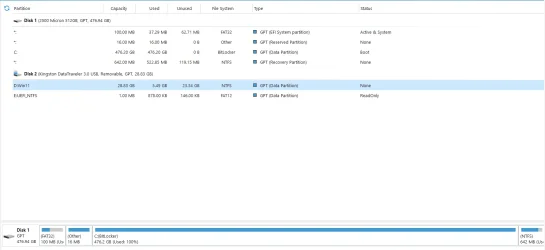
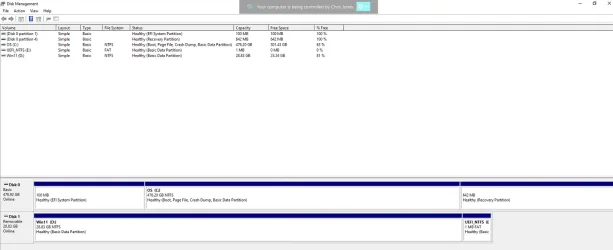
Please post a whole window Disk Manager image of ALL your drives. Don't forget to expand the columns so we can read them. How to Post a Screenshot of Disk Management
If you have a MiniTool or AOMEI Partition use it instead or Windows disk manager.

 
Last edited:

My Computers

System One System Two

  • OS
    Windows 11 Pro - Windows 7 HP 64 - Lubuntu
    Computer type
    PC/Desktop
    Manufacturer/Model
    custom build
    CPU
    i5 6600K - 800MHz to 4400MHz
    Motherboard
    GA-Z170-HD3P
    Memory
    4+4G GSkill DDR4 3000
    Graphics Card(s)
    IG - Intel 530
    Monitor(s) Displays
    Samsung 226BW
    Screen Resolution
    1680x1050
    Hard Drives
    (1) -1 SM951 – 128GB M.2 AHCI PCIe SSD drive for Win 11
    (2) -1 WD SATA 3 - 1T for Data
    (3) -1 WD SATA 3 - 1T for backup
    (4) -1 BX500 SSD - 256G for Windows 7 and Lubuntu
    PSU
    Thermaltake 450W TR2 gold
    Keyboard
    Old and good Chicony mechanical keyboard
    Mouse
    Logitech mX performance - 9 buttons (had to disable some)
    Internet Speed
    500 Mb/s
    Browser
    Firefox 64
  • Operating System
    Windows 11 Pro
    Computer type
    Laptop
    Manufacturer/Model
    Asus Q550LF
    CPU
    i7-4500U 800- 3000MHz
    Motherboard
    Asus Q550LF
    Memory
    (4+4)G DDR3 1600
    Graphics card(s)
    IG intel 4400 + NVIDIA GeForce GT 745M
    Sound Card
    Realtek
    Monitor(s) Displays
    LG Display LP156WF4-SPH1
    Screen Resolution
    1920 x 1080
    Hard Drives
    BX500 120G SSD for Windows and programs
    & 1T HDD for data
    Internet Speed
    500 Mb/s
    Browser
    Firefox 64
I have some strong XP computers. and tested OS install of W7 (x86, x64), W10 (x86, x64), and W11. running W7 (x64) and W11, often got same BSOD. W7 (x86), W10 (x86, x64) were ok. I was thinking W10 x64 should be crashing too.

Anyway, I let them staying with W10 (x86 or x64. no matter). more stable and compatible comparing to W11 or W7.
 

My Computer

System One

  • OS
    Windows 7/11
    Computer type
    PC/Desktop
    Manufacturer/Model
    HP/Lenovo/Asus
    CPU
    Intel i7-11800H
    Motherboard
    Lenovo Legion 5i Pro Gen 6
    Memory
    32GB DDR4 3200MHz
    Graphics Card(s)
    NVIDIA GeForce RTX 3070
    Monitor(s) Displays
    LG 35WN65C-B
    Screen Resolution
    3440 x 1440
    Hard Drives
    1TB PCIe SSD
    Other Info
    Edition Windows 11 Pro
    Version 25H2
    Installed on ‎12/‎12/‎2025
    OS build 26200.7462
I've updated the system specs and I've posted a screen shot of my drives. I've also run the commands in

Megahertz post.​


Attachments

  • 2025-08-08 16_17_33-DESKTOP-0MIA5UB - VERSA ScreenConnect - Connected.webp
    2025-08-08 16_17_33-DESKTOP-0MIA5UB - VERSA ScreenConnect - Connected.webp
    39 KB · Views: 4

My Computer

System One

  • OS
    Windows 10
    Computer type
    PC/Desktop
    Manufacturer/Model
    Dell
    CPU
    Intel(R) Core(TM) Ultra 5 235
    Motherboard
    Dell Inc. 0FHTFV
    Memory
    16 GB
    Graphics Card(s)
    Intel(R) Graphics Family
    Sound Card
    Realtek Audio
    Screen Resolution
    1920 x 1080 x 32 bits (4294967296 colors) @ 60 Hz
    Hard Drives
    2500 Micron 512GB
    Antivirus
    Trend Micro
Your specs say that the processor is a Intel(R) Core(TM) Ultra 5 235, which is the latest generation released Q1 2025. Yet your Windows level is Win 10 22H2 Build 19045.6093. Is this a self-build or a Dell supplied machine? If the latter, I would have thought it came with W11 pre-installed.

Also your disk information shows the C drive to be 100% full.

Perhaps a clean-install of Windows 11 might be a better option?
 

My Computers

System One System Two

  • OS
    Windows 11 Home 24H2 RP
    Computer type
    PC/Desktop
    Manufacturer/Model
    Self-build
    CPU
    Intel I3-10100
    Motherboard
    MSI H410M-PRO
    Memory
    16 GB
    Graphics Card(s)
    Nvidia GT 1030
    Sound Card
    Motherboard default
    Monitor(s) Displays
    Philips 27 inch
    Screen Resolution
    1920x1080
    Hard Drives
    Samsung EVO 970 NVMe SSD 256 Gb
    Samsung QVO 870 SATA SSD 2 Tb
    PSU
    ATX 450W
    Keyboard
    Logitech
    Mouse
    Logitech Wireless
    Internet Speed
    930 Mb down / 120 Mb up
    Browser
    Edge
    Antivirus
    Windows Defender
    Other Info
    Microsoft Office 2021 Plus
  • Operating System
    Windows 11 Home
    Computer type
    PC/Desktop
    Manufacturer/Model
    Self-build
    CPU
    Intel i3-8100
    Motherboard
    Gigabyte Z370 D3
    Memory
    16 Gb
    Graphics card(s)
    Nvidia GT 720
    Sound Card
    Motherboard default
    Monitor(s) Displays
    Philips 27-inch
    Screen Resolution
    1920x1080
    Hard Drives
    Samsung 960 NVMe SSD 256 Gb
    Seagate 2 Tb HDD
    PSU
    ATX 450W
    Keyboard
    Microsoft
    Mouse
    Logitech Wireless
    Internet Speed
    930 Mb down / 120 Mb up
    Browser
    Edge
    Antivirus
    Windows Defender
Your specs say that the processor is a Intel(R) Core(TM) Ultra 5 235, which is the latest generation released Q1 2025. Yet your Windows level is Win 10 22H2 Build 19045.6093. Is this a self-build or a Dell supplied machine? If the latter, I would have thought it came with W11 pre-installed.

Also your disk information shows the C drive to be 100% full.

Perhaps a clean-install of Windows 11 might be a better option?
Yes you are right, this Dell PC did come preloaded with Windows 11. I Syspreped a Windows 10 PC and moved the image over to this PC so I could capture all the data and applications. Now I'm trying to upgrade it to Windows 11 and I'm running into issues. The C drive is not full. Must have been bitlocker being enabled that was not showing the correct usage. I know I could do a clean install but I was hoping someone on this forum has possibly run into this problem and could offer assistance.
 

Attachments

  • 2025-08-08 18_10_35-DESKTOP-0MIA5UB - VERSA ScreenConnect - Connected.webp
    2025-08-08 18_10_35-DESKTOP-0MIA5UB - VERSA ScreenConnect - Connected.webp
    32.8 KB · Views: 2

My Computer

System One

  • OS
    Windows 10
    Computer type
    PC/Desktop
    Manufacturer/Model
    Dell
    CPU
    Intel(R) Core(TM) Ultra 5 235
    Motherboard
    Dell Inc. 0FHTFV
    Memory
    16 GB
    Graphics Card(s)
    Intel(R) Graphics Family
    Sound Card
    Realtek Audio
    Screen Resolution
    1920 x 1080 x 32 bits (4294967296 colors) @ 60 Hz
    Hard Drives
    2500 Micron 512GB
    Antivirus
    Trend Micro
To find what is causing the upgrade failure, you have to look at the logs. Different logs are generated at each phase of the upgrade.
Posssibly, something will jump out at the time of the rollback. They are in Microsoft speak so I can't say if everything can be interpreted.
When I was upgrading 23h2 to 24h2, Mine kept rolling back so I found my particular error in the last 2 logs. It indicated there was some issue with my user account but I could not decipher what the issue was so I ended up clean installing. Hopefully you will have better luck. These instructions came from MS.

  • WIINDOWS UPGRADE FAILURES
If no error message occurs, the following log files are created when an upgrade fails during installation before the computer restarts for the second time. You have to look at these logs to get an idea of what's causing the failure.

C:\$Windows.~BT\Sources\panther\setupact.log

C:\$Windows.~BT\Sources\panther\miglog.xml

C:\Windows\setupapi.log

[Windows 10:] C:\Windows\Logs\MoSetup\BlueBox.log

C:\Windows\inf\setupapi.app.log

C:\Windows\inf\setupapi.dev.log

C:\Windows\panther\PreGatherPnPList.log

C:\Windows\panther\PostApplyPnPList.log

C:\Windows\memory.dmp


The following log files are created when an upgrade fails, and then you restore the desktop:

C:\$Windows.~BT\Sources\panther\setupact.log

C:\$Windows.~BT\Sources\panther\miglog.xml

C:\$Windows.~BT\sources\panther\setupapi\setupapi.dev.log

C:\$Windows.~BT\sources\panther\setupapi\setupapi.app.log

C:\Windows\memory.dmp


The following log files are created when an upgrade fails, and the installation rollback is initiated:

C:\$Windows.~BT\Sources\Rollback\setupact.log

C:\$Windows.~BT\Sources\Rollback\setupact.err


If logfiles do not direct you to what caused the error, I advise anyone to not waste his time. Either stay where you are or bite the bullet. back up your data, and do a clean install. Upgrade failures will have you chasing your tail for days.

 

My Computers

System One System Two

  • OS
    Windows 11 Pro 25H2
    Computer type
    PC/Desktop
    Manufacturer/Model
    Dell Optiplex 7080
    CPU
    i9-10900 10 core 20 threads
    Motherboard
    DELL 0J37VM
    Memory
    32 gb
    Graphics Card(s)
    none-Intel UHD Graphics 630
    Sound Card
    Integrated Realtek
    Monitor(s) Displays
    Benq 27
    Screen Resolution
    2560x1440
    Hard Drives
    2x1tb Solidigm m.2 nvme /External drives 512gb Samsung m.2 sata+2tb Kingston m2.nvme
    PSU
    500w
    Case
    MT
    Cooling
    Dell Premium
    Keyboard
    Logitech wired
    Mouse
    Logitech wireless
    Internet Speed
    so slow I'm too embarrassed to tell
    Browser
    #1 Edge #2 Firefox
    Antivirus
    Defender+MWB Premium
  • Operating System
    Windows 11 Pro 24H2 26200.8457
    Computer type
    PC/Desktop
    Manufacturer/Model
    Beelink Mini PC SER5
    CPU
    AMD Ryzen 7 6800U
    Memory
    32 gb
    Graphics card(s)
    integrated
    Sound Card
    integrated
    Monitor(s) Displays
    Benq 27
    Screen Resolution
    2560x1440
    Hard Drives
    1TB Crucial nvme
    Keyboard
    Logitech wired
    Mouse
    Logitech wireless
    Internet Speed
    still too embarrassed to tell
    Browser
    Firefox
    Antivirus
    Defender
    Other Info
    System 3 is non compliant Dell 9020 i7-4770/24gb ram Win11 PRO 26200.8457
Please run: > post share links

a) V2:


b) tuneup_plus

c) upgrade_failure_info


d) Open administrative command prompt and copy and paste:

fltmc

schtasks.exe /Run /TN "\Microsoft\Windows\Application Experience\Microsoft Compatibility Appraiser"

reg query "HKLM\SOFTWARE\Microsoft\Windows NT\CurrentVersion\AppCompatFlags\TargetVersionUpgradeExperienceIndicators" /s

dism /online /get-drivers /format:table >c:\drivers.txt

Post share links.
 

My Computer

System One

  • OS
    Windows 10
    Computer type
    Laptop
    Manufacturer/Model
    HP
    CPU
    Intel(R) Core(TM) i7-4800MQ CPU @ 2.70GHz
    Motherboard
    Product : 190A Version : KBC Version 94.56
    Memory
    16 GB Total: Manufacturer : Samsung MemoryType : DDR3 FormFactor : SODIMM Capacity : 8GB Speed : 1600
    Graphics Card(s)
    NVIDIA Quadro K3100M; Intel(R) HD Graphics 4600
    Sound Card
    IDT High Definition Audio CODEC; PNP Device ID HDAUDIO\FUNC_01&VEN_111D&DEV_76E0
    Hard Drives
    Model Hitachi HTS727575A9E364
    Antivirus
    Microsoft Defender
    Other Info
    Mobile Workstation
So drive 0 with Win 11 came from another computer.
Open Device manager. Is there any yellow alerts of missing drivers?
 
Last edited:

My Computers

System One System Two

  • OS
    Windows 11 Pro - Windows 7 HP 64 - Lubuntu
    Computer type
    PC/Desktop
    Manufacturer/Model
    custom build
    CPU
    i5 6600K - 800MHz to 4400MHz
    Motherboard
    GA-Z170-HD3P
    Memory
    4+4G GSkill DDR4 3000
    Graphics Card(s)
    IG - Intel 530
    Monitor(s) Displays
    Samsung 226BW
    Screen Resolution
    1680x1050
    Hard Drives
    (1) -1 SM951 – 128GB M.2 AHCI PCIe SSD drive for Win 11
    (2) -1 WD SATA 3 - 1T for Data
    (3) -1 WD SATA 3 - 1T for backup
    (4) -1 BX500 SSD - 256G for Windows 7 and Lubuntu
    PSU
    Thermaltake 450W TR2 gold
    Keyboard
    Old and good Chicony mechanical keyboard
    Mouse
    Logitech mX performance - 9 buttons (had to disable some)
    Internet Speed
    500 Mb/s
    Browser
    Firefox 64
  • Operating System
    Windows 11 Pro
    Computer type
    Laptop
    Manufacturer/Model
    Asus Q550LF
    CPU
    i7-4500U 800- 3000MHz
    Motherboard
    Asus Q550LF
    Memory
    (4+4)G DDR3 1600
    Graphics card(s)
    IG intel 4400 + NVIDIA GeForce GT 745M
    Sound Card
    Realtek
    Monitor(s) Displays
    LG Display LP156WF4-SPH1
    Screen Resolution
    1920 x 1080
    Hard Drives
    BX500 120G SSD for Windows and programs
    & 1T HDD for data
    Internet Speed
    500 Mb/s
    Browser
    Firefox 64
Please run: > post share links

a) V2:


b) tuneup_plus

c) upgrade_failure_info


d) Open administrative command prompt and copy and paste:

fltmc

schtasks.exe /Run /TN "\Microsoft\Windows\Application Experience\Microsoft Compatibility Appraiser"

reg query "HKLM\SOFTWARE\Microsoft\Windows NT\CurrentVersion\AppCompatFlags\TargetVersionUpgradeExperienceIndicators" /s

dism /online /get-drivers /format:table >c:\drivers.txt

Post share links.
Here are the files that were generated. The upgrade_failure info batch ran but never produced a zip file.
 

Attachments

My Computer

System One

  • OS
    Windows 10
    Computer type
    PC/Desktop
    Manufacturer/Model
    Dell
    CPU
    Intel(R) Core(TM) Ultra 5 235
    Motherboard
    Dell Inc. 0FHTFV
    Memory
    16 GB
    Graphics Card(s)
    Intel(R) Graphics Family
    Sound Card
    Realtek Audio
    Screen Resolution
    1920 x 1080 x 32 bits (4294967296 colors) @ 60 Hz
    Hard Drives
    2500 Micron 512GB
    Antivirus
    Trend Micro
When was Windows 10 installed in this computer?


Some from the earlier post:

d) Open administrative command prompt and copy and paste:

fltmc

reagentc /info

reagentc /enable

reagentc /info

schtasks.exe /Run /TN "\Microsoft\Windows\Application Experience\Microsoft Compatibility Appraiser"

reg query "HKLM\SOFTWARE\Microsoft\Windows NT\CurrentVersion\AppCompatFlags\TargetVersionUpgradeExperienceIndicators" /s

Post share links.


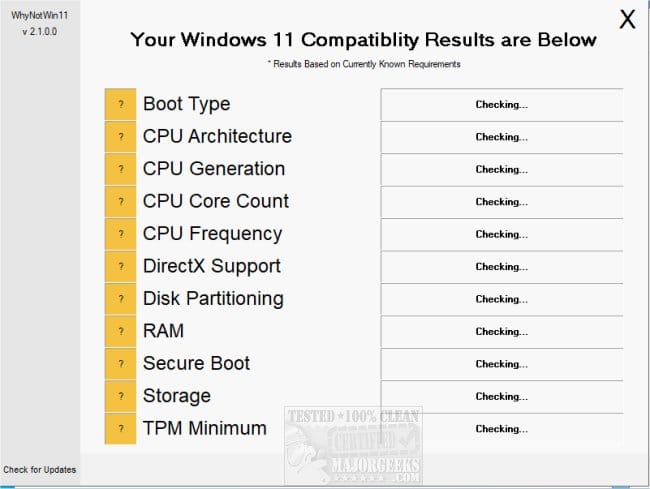
Please perform the following steps: (after posting results for d))


1) Run the Trend Micro uninstall tool


2) Run the Malwarebytes uninstall tool


3) Perform defender updates


4) Open disk management > widen rows and columns > post images or share links


5) Run HD Sentinel > post share links
Overview
Temperature
SMART


6) Run > diskparinfo > post share links


7) Run > upgrade_failure_info > post share links


8) Run > whynotwin11 > post share links


Code:
Event[1190]:
  Log Name: System
  Source: disk
  Date: 2025-08-08T16:49:44.9620000Z
  Event ID: 11
  Task: N/A
  Level: Error
  Opcode: N/A
  Keyword: Classic
  User: N/A
  User Name: N/A
  Computer: DESKTOP-0MIA5UB
  Description:
The driver detected a controller error on \Device\Harddisk1\DR1.


Code:
Event[1081]:
  Log Name: System
  Source: disk
  Date: 2025-08-08T16:25:28.6160000Z
  Event ID: 11
  Task: N/A
  Level: Error
  Opcode: N/A
  Keyword: Classic
  User: N/A
  User Name: N/A
  Computer: DESKTOP-0MIA5UB
  Description:
The driver detected a controller error on \Device\Harddisk1\DR1.


Code:
Event[960]:
  Log Name: System
  Source: Service Control Manager
  Date: 2025-08-06T22:52:53.4580000Z
  Event ID: 7031
  Task: N/A
  Level: Error
  Opcode: N/A
  Keyword: Classic
  User: N/A
  User Name: N/A
  Computer: DESKTOP-0MIA5UB
  Description:
The Trend Micro Common Client Solution Framework service terminated unexpectedly.  It has done this 1 time(s).  The following corrective action will be taken in 60000 milliseconds: Restart the service.


Code:
    Windows RE status:         Disabled


Code:
Event[1177]:
  Log Name: System
  Source: Microsoft-Windows-WindowsUpdateClient
  Date: 2025-08-08T16:41:08.6820000Z
  Event ID: 19
  Task: Windows Update Agent
  Level: Information
  Opcode: Installation
  Keyword: Installation,Success
  User: S-1-5-18
  User Name: NT AUTHORITY\SYSTEM
  Computer: DESKTOP-0MIA5UB
  Description:
Installation Successful: Windows successfully installed the following update: 2025-07 Cumulative Update Preview for Windows 10 Version 22H2 for x64-based Systems (KB5062649)


Code:
Event[1033]:
  Log Name: System
  Source: Microsoft-Windows-WinREAgent
  Date: 2025-08-08T12:39:28.3600000Z
  Event ID: 4502
  Task: N/A
  Level: Critical
  Opcode: Info
  Keyword: N/A
  User: S-1-5-18
  User Name: NT AUTHORITY\SYSTEM
  Computer: DESKTOP-0MIA5UB
  Description:
Windows Recovery Environment servicing failed.


Code:
Event[450]:
  Log Name: System
  Source: Microsoft-Windows-WindowsUpdateClient
  Date: 2025-08-04T09:03:27.0760000Z
  Event ID: 20
  Task: Windows Update Agent
  Level: Error
  Opcode: Installation
  Keyword: Installation,Failure
  User: S-1-5-18
  User Name: NT AUTHORITY\SYSTEM
  Computer: DESKTOP-0MIA5UB
  Description:
Installation Failure: Windows failed to install the following update with error 0x8024200B: 2022-11 Update for Windows 10 Version 22H2 for x64-based Systems (KB5020683).


08/08
Code:
Correcting errors in the Volume Bitmap.

Windows has made corrections to the file system.
 
Last edited:

My Computer

System One

  • OS
    Windows 10
    Computer type
    Laptop
    Manufacturer/Model
    HP
    CPU
    Intel(R) Core(TM) i7-4800MQ CPU @ 2.70GHz
    Motherboard
    Product : 190A Version : KBC Version 94.56
    Memory
    16 GB Total: Manufacturer : Samsung MemoryType : DDR3 FormFactor : SODIMM Capacity : 8GB Speed : 1600
    Graphics Card(s)
    NVIDIA Quadro K3100M; Intel(R) HD Graphics 4600
    Sound Card
    IDT High Definition Audio CODEC; PNP Device ID HDAUDIO\FUNC_01&VEN_111D&DEV_76E0
    Hard Drives
    Model Hitachi HTS727575A9E364
    Antivirus
    Microsoft Defender
    Other Info
    Mobile Workstation
Results for D:

C:\WINDOWS\system32>fltmc

Filter Name Num Instances Altitude Frame
------------------------------ ------------- ------------ -----
bindflt 1 409800 0
UCPD 7 385250.5 0
tmeyes 7 328520 0
tmevtmgr 7 328510 0
TmPreFilter 7 328500 0
storqosflt 0 244000 0
wcifs 1 189900 0
CldFlt 0 180451 0
CmgPassThrough 6 145120.7 0
CmgShieldFFE 4 145120.3 0
FileCrypt 0 141100 0
luafv 1 135000 0
npsvctrig 1 46000 0
Wof 4 40700 0
FileInfo 7 40500 0

C:\WINDOWS\system32>
C:\WINDOWS\system32>reagentc /info
Windows Recovery Environment (Windows RE) and system reset configuration
Information:

Windows RE status: Disabled
Windows RE location:
Boot Configuration Data (BCD) identifier: aabd8c5e-cdcf-11ed-bda5-d190f978c88d
Recovery image location:
Recovery image index: 0
Custom image location:
Custom image index: 0

REAGENTC.EXE: Operation Successful.


C:\WINDOWS\system32>
C:\WINDOWS\system32>reagentc /enable
REAGENTC.EXE: The Windows RE image was not found.


C:\WINDOWS\system32>
C:\WINDOWS\system32>reagentc /info
Windows Recovery Environment (Windows RE) and system reset configuration
Information:

Windows RE status: Disabled
Windows RE location:
Boot Configuration Data (BCD) identifier: aabd8c5e-cdcf-11ed-bda5-d190f978c88d
Recovery image location:
Recovery image index: 0
Custom image location:
Custom image index: 0

REAGENTC.EXE: Operation Successful.


C:\WINDOWS\system32>
C:\WINDOWS\system32>schtasks.exe /Run /TN "\Microsoft\Windows\Application Experience\Microsoft Compatibility Appraiser"
SUCCESS: Attempted to run the scheduled task "\Microsoft\Windows\Application Experience\Microsoft Compatibility Appraiser".

C:\WINDOWS\system32>
C:\WINDOWS\system32>reg query "HKLM\SOFTWARE\Microsoft\Windows NT\CurrentVersion\AppCompatFlags\TargetVersionUpgradeExperienceIndicators" /s
ERROR: The system was unable to find the specified registry key or value.

C:\WINDOWS\system32>
 

My Computer

System One

  • OS
    Windows 10
    Computer type
    PC/Desktop
    Manufacturer/Model
    Dell
    CPU
    Intel(R) Core(TM) Ultra 5 235
    Motherboard
    Dell Inc. 0FHTFV
    Memory
    16 GB
    Graphics Card(s)
    Intel(R) Graphics Family
    Sound Card
    Realtek Audio
    Screen Resolution
    1920 x 1080 x 32 bits (4294967296 colors) @ 60 Hz
    Hard Drives
    2500 Micron 512GB
    Antivirus
    Trend Micro
Thanks for all your help but in the end I ran out of time and just did a clean install.
 

My Computer

System One

  • OS
    Windows 10
    Computer type
    PC/Desktop
    Manufacturer/Model
    Dell
    CPU
    Intel(R) Core(TM) Ultra 5 235
    Motherboard
    Dell Inc. 0FHTFV
    Memory
    16 GB
    Graphics Card(s)
    Intel(R) Graphics Family
    Sound Card
    Realtek Audio
    Screen Resolution
    1920 x 1080 x 32 bits (4294967296 colors) @ 60 Hz
    Hard Drives
    2500 Micron 512GB
    Antivirus
    Trend Micro
Post clean install please consider the following steps:


1) Add WMIC


2) Run Tuneup plus


3) Add Regback


4) Create a new restore point


My Computer

System One

  • OS
    Windows 10
    Computer type
    Laptop
    Manufacturer/Model
    HP
    CPU
    Intel(R) Core(TM) i7-4800MQ CPU @ 2.70GHz
    Motherboard
    Product : 190A Version : KBC Version 94.56
    Memory
    16 GB Total: Manufacturer : Samsung MemoryType : DDR3 FormFactor : SODIMM Capacity : 8GB Speed : 1600
    Graphics Card(s)
    NVIDIA Quadro K3100M; Intel(R) HD Graphics 4600
    Sound Card
    IDT High Definition Audio CODEC; PNP Device ID HDAUDIO\FUNC_01&VEN_111D&DEV_76E0
    Hard Drives
    Model Hitachi HTS727575A9E364
    Antivirus
    Microsoft Defender
    Other Info
    Mobile Workstation

Latest Support Threads

Back
Top Bottom