Windows 10 Update checks for Windows 11 compatibility


ddelo

Active member
Member
VIP
Local time
12:30 AM
Posts
75
Location
Athens
OS
Windows 11 Pro x64
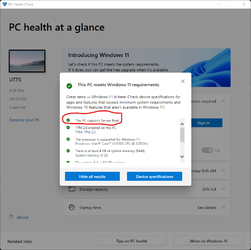
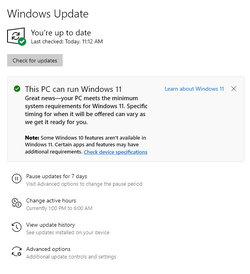
As 5-Oct-2021 is the official release date of Windows 11, when checked for updates, I got the following compatibility check confirmation

Windows 11 Compatibility 2021-10-05.png
 

My Computer My Computer

At a glance

Windows 11 Pro x64Intel® Core™ i7-1165G7 (Tiger Lake)SK Hynix 16GB DDR4 3200MHz SDRAMintel® iRIS® Xe Graphics / NVIDIA T500 2GB GD...
OS
Windows 11 Pro x64
Computer type
Laptop
Manufacturer/Model
DELL Precision 3560
CPU
Intel® Core™ i7-1165G7 (Tiger Lake)
Motherboard
DELL 004N73 / UEFI Ver. 1.18.1
Memory
SK Hynix 16GB DDR4 3200MHz SDRAM
Graphics Card(s)
intel® iRIS® Xe Graphics / NVIDIA T500 2GB GDDR6 SDRAM
Sound Card
Realtek HD Audio
Monitor(s) Displays
15.6"
Screen Resolution
1920x1080 IPS
Hard Drives
Internal: KIOXIA BG4 Series 512 GB PCIe® NVMe™ M.2 SSD
External: 2 x WD Passport 2TB USB 3.0, 1 x Toshiba 500GB USB 3.0
Keyboard
Standard laptop backlit keyboard with numeric keypad
Mouse
hp wheel mouse
Browser
MS Edge Chromium
Antivirus
MS Windows Defender
Other Info
DELL USB slim Optical Drive DW316
Macrium Reflect v8 (backup and.... lifesaver)
I have that also on my second pc, I have already enabled secure boot and the AMD fTPM 2.0. Now it will be up to Microsoft to get around to updating it, no great hurry, fortunately.
 

My Computers My Computers

  • At a glance

    W11 pro betaAthlon 3000G16Gb Crucial DDR4 2400onboard cpu
    OS
    W11 pro beta
    Computer type
    PC/Desktop
    Manufacturer/Model
    home built
    CPU
    Athlon 3000G
    Motherboard
    Asrock A320M-HDV r4.0
    Memory
    16Gb Crucial DDR4 2400
    Graphics Card(s)
    onboard cpu
    Sound Card
    onboard
    Monitor(s) Displays
    LG 22EA53
    Screen Resolution
    1920 x 1080
    Hard Drives
    WD black SN750 M2 500Gb
    PSU
    500W Seasonic core 80+gold non modular
    Case
    Fractal Design Define R2
    Cooling
    front 2 x 120mm rear 100mm stock psu
    Internet Speed
    135/20
    Browser
    Firefox and edge
    Antivirus
    Windows Security and free Malwarebytes
  • At a glance

    W11 pro 64 beta (from W10 pro system builder ...Ryzen 7 5700G4 x 8Gb Corsair Vengeance LPX 3000 DDR4onboard cpu
    Operating System
    W11 pro 64 beta (from W10 pro system builder pack)
    Computer type
    PC/Desktop
    Manufacturer/Model
    homebuilt
    CPU
    Ryzen 7 5700G
    Motherboard
    MSI B450 tomahawk max II
    Memory
    4 x 8Gb Corsair Vengeance LPX 3000 DDR4
    Graphics card(s)
    onboard cpu
    Sound Card
    motherboard
    Monitor(s) Displays
    AOC 27
    Screen Resolution
    2560 x 1440
    Hard Drives
    WD 1Tb Black M2 SN850X on Asus hyper M2 X16 max V2 card
    PSU
    Be Quiet 400 semi modular 80+gold
    Case
    Coolermaster Silencio 650
    Cooling
    140mm front, 120 rear Akasa Vegas Chroma AM
    Internet Speed
    135/20
    Browser
    edge/Firefox
    Antivirus
    WD plus Malwarebytes free
This has appeared on one of my Win10 PCs, which I have no intention of upgrading as it's a 6th gen CPU, wasn't there a few hours ago. I would imagine this may annoy those stuck on Win10. ;) But it may reduce the why can't I questions.

1633471234676.png
 

My Computers My Computers

  • At a glance

    Windows 11 22H2 OS Build 22623.1095AMD Ryzen 7 3800X16GB Corsair Vengeance LPX DDR4 @3000MhzASUS - GeForce RTX 3070 Ti 8 GB TUF GAMING OC
    OS
    Windows 11 22H2 OS Build 22623.1095
    Computer type
    PC/Desktop
    Manufacturer/Model
    Self Build
    CPU
    AMD Ryzen 7 3800X
    Motherboard
    Asus PRIME B350-PLUS
    Memory
    16GB Corsair Vengeance LPX DDR4 @3000Mhz
    Graphics Card(s)
    ASUS - GeForce RTX 3070 Ti 8 GB TUF GAMING OC
    Sound Card
    On Board Realtec
    Monitor(s) Displays
    Acer KA241
    Screen Resolution
    1920 x 1080 @60Hz
    Hard Drives
    240GB PNY CS900 SSD - OS
    2 x 1TB Crucial MX500 SSD
    1 x 500GB Crucial MX300 SSD
    2TB Seagate ST2000DM001-1ER164
    2TB Seagate ST2000DM008-2FR102
    PSU
    750 Watt Corsair TX750 Plus
    Case
    Cooler Master 690 III
    Cooling
    Akasa AK98 5 Case Fans
    Keyboard
    Logitech K270 - wireless
    Mouse
    Logitech - M185 wireless
    Internet Speed
    BT Fibre 75 Mbps
    Browser
    Firefox
    Antivirus
    Windows Defender
    Other Info
    Use hardware KVM to switch monitors on three PCs and software (input director) to use mouse and keyboard on all 4 PCs.
  • At a glance

    Windows 11 Pro 22H2 build 22621.900Intel i5 - 1040016GB of HyperX Fury @ 2133 MhzEVGA 6GB GTX 1060.
    Operating System
    Windows 11 Pro 22H2 build 22621.900
    Computer type
    PC/Desktop
    Manufacturer/Model
    Dell Inspiron 3881 - modified with SFX PSU fitted internally
    CPU
    Intel i5 - 10400
    Motherboard
    Dell 032w55 version A00
    Memory
    16GB of HyperX Fury @ 2133 Mhz
    Graphics card(s)
    EVGA 6GB GTX 1060.
    Sound Card
    Builtin
    Monitor(s) Displays
    ACER KA241
    Screen Resolution
    1920x 1080 @60Hz
    Hard Drives
    256GB SK hynix NVMe
    1TB Western Digital WD10EZEX-75WN4A1
    PSU
    Modular 450 Watt Corsair SF450 Platinum ( Mod to replace the Dell 265 Watt PSU)
    Case
    Inspiron Small Desktop
    Cooling
    Dell stock cooler
    Keyboard
    Dell
    Mouse
    Dell
    Internet Speed
    BT Fibre 75 Mbps
    Browser
    Firefox
    Antivirus
    Windows Defender
    Other Info
    Use hardware KVM to switch monitors on three PCs and software (input director) to use mouse and keyboard on all 4 PCs.

My Computers My Computers

  • At a glance

    Windows 11 ProAMD Ryzen 7 9800X3D32GB DDR5 CL30 Kingston FuryASUS Prime Radeon RX 9060 XT OC Edition 16GB
    OS
    Windows 11 Pro
    Computer type
    PC/Desktop
    CPU
    AMD Ryzen 7 9800X3D
    Motherboard
    MSI PRO B850-P Wifi
    Memory
    32GB DDR5 CL30 Kingston Fury
    Graphics Card(s)
    ASUS Prime Radeon RX 9060 XT OC Edition 16GB
    Monitor(s) Displays
    LG Ultrawide 34" 1440p+ MSI 27" 4K UHD
    Screen Resolution
    3440x1440
    Hard Drives
    Main Boot Drive : 512GB Adata XPG RGB Gen3x4 NVMe M.2 SSD
    PSU
    EVGA 750 Watts 80+ Gold
    Case
    Deepcool Genome II
    Cooling
    Thermalright Burst Assassin 120
    Internet Speed
    FTTH 3Gbps
    Browser
    Chrome
    Antivirus
    "Moderna"
  • At a glance

    Windows 11 Proi7-4790K16GB Corsair Vengeance ProMSI R9 290
    Operating System
    Windows 11 Pro
    Computer type
    PC/Desktop
    CPU
    i7-4790K
    Motherboard
    ASRock Xtreme6 Z97
    Memory
    16GB Corsair Vengeance Pro
    Graphics card(s)
    MSI R9 290
    Monitor(s) Displays
    LG Ultrawide 34"
    Screen Resolution
    3440x1440
    Hard Drives
    500GB Adata SSD (OS Only)
    PSU
    Thermaltake 475 Watts 80 Bronze
    Case
    Thermaltake Commander I Snow Edition
    Cooling
    Deep Cool Archer Air Cooler
    Keyboard
    Armageddon MKA-5R RGB-Hornet
    Mouse
    Logitech G402
    Internet Speed
    1Gbps
    Browser
    Chrome
    Antivirus
    Moderna :)

My Computer My Computer

At a glance

Windows 11 Pro x64Intel® Core™ i7-1165G7 (Tiger Lake)SK Hynix 16GB DDR4 3200MHz SDRAMintel® iRIS® Xe Graphics / NVIDIA T500 2GB GD...
OS
Windows 11 Pro x64
Computer type
Laptop
Manufacturer/Model
DELL Precision 3560
CPU
Intel® Core™ i7-1165G7 (Tiger Lake)
Motherboard
DELL 004N73 / UEFI Ver. 1.18.1
Memory
SK Hynix 16GB DDR4 3200MHz SDRAM
Graphics Card(s)
intel® iRIS® Xe Graphics / NVIDIA T500 2GB GDDR6 SDRAM
Sound Card
Realtek HD Audio
Monitor(s) Displays
15.6"
Screen Resolution
1920x1080 IPS
Hard Drives
Internal: KIOXIA BG4 Series 512 GB PCIe® NVMe™ M.2 SSD
External: 2 x WD Passport 2TB USB 3.0, 1 x Toshiba 500GB USB 3.0
Keyboard
Standard laptop backlit keyboard with numeric keypad
Mouse
hp wheel mouse
Browser
MS Edge Chromium
Antivirus
MS Windows Defender
Other Info
DELL USB slim Optical Drive DW316
Macrium Reflect v8 (backup and.... lifesaver)
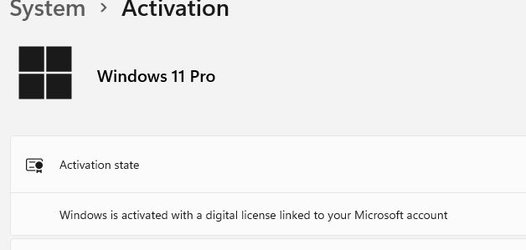
I just completed installing windows 11 on a pc that had failed the tests. When I look at the published lists of the min. req. my hp all in one exceeds all of the requirements except it is not on the list. also the windows 10 pro that I upgraded I was surprised to see by the insert that windows 11 is also set up as pro. I also have vmware workstation with 5 different linux distros and they are all there. took about 1 and half hours.
shipinomore
 

Attachments

  • activation.JPG
    activation.JPG
    12.6 KB · Views: 2

My Computers My Computers

  • At a glance

    Windows 11 ProAMD Ryzen 3 3250U with Radeon Graphics 2.60 Ghz8.00 GBNvidia
    OS
    Windows 11 Pro
    Computer type
    PC/Desktop
    Manufacturer/Model
    HP AIO 22 R3
    CPU
    AMD Ryzen 3 3250U with Radeon Graphics 2.60 Ghz
    Memory
    8.00 GB
    Graphics Card(s)
    Nvidia
    Sound Card
    RealTech
    Monitor(s) Displays
    23-Q2`14 All-in-One
    Screen Resolution
    1920/1080
    Hard Drives
    Each of my systems have a WD 1 terabyte drive for backups software apps/ etc.
    Keyboard
    logitech wireless
    Mouse
    wireless logitech
    Internet Speed
    100 megbytes Spectrum
    Browser
    Chrome
    Antivirus
    WebRoot from my Bank Windows Defender
    Other Info
    64-Bit OS, x64-based processor.
  • At a glance

    Windows 10 HomeAMD Ryzen 3 3250U 3.5 ghz.8 gig
    Operating System
    Windows 10 Home
    Manufacturer/Model
    HP 22 AIO R3 Touch 8GB/1TB Desktop ALL_IN_ONE have two of these Wife. Mine
    CPU
    AMD Ryzen 3 3250U 3.5 ghz.
    Memory
    8 gig
    Monitor(s) Displays
    All-In-One
    Screen Resolution
    1920/1080
    Hard Drives
    1 teribyte external WD used for backups etc
    Keyboard
    wireless Logitech
    Internet Speed
    100 meg. from Spectrum
    Browser
    Edge
    Antivirus
    webroot from my bank defender
Windows update will push you the update when it is ready that the manufacturer has given Windows update the drivers, and approval for the update. It is just saying it is ready since you meet all the specs, but you need to have all the drivers too.

Also to those who are on a unsupported, there is a chance you will get it soon ;0

Best

Shawn
 

My Computer My Computer

At a glance

Windows 10 21H1 19043.1266Intel® Core™ 7th i5-73004GBIntel® HD Graphics 620
OS
Windows 10 21H1 19043.1266
Computer type
Tablet
Manufacturer/Model
Microsoft Surface
CPU
Intel® Core™ 7th i5-7300
Motherboard
Intel
Memory
4GB
Graphics Card(s)
Intel® HD Graphics 620
Sound Card
Intel
Monitor(s) Displays
Surface Pro
Screen Resolution
2736 x 1824 (267 PPI)
Keyboard
Surface Type Cover
Browser
Microsoft Edge: 94.0.992.38
Antivirus
Windows Defender
Other Info
Windows Live, Microsoft 365, Edge, Bing, Zoom
Hi Shawn; thanks for the update. I did get several security updates right after the windows 11 came up.
just saw on Google on my iphone this note saying MS shows how to get around unsupported pc's.
they are talking tpm but end the instruction with CPU
regedit go to HKEY_LOCAL_MACHINE/system/setup/MoSetup
right click the main panel
create new Dword (32bit) Value Name of
AllowUpgradesWithUsupported TPMOrCPU Set Value to 1
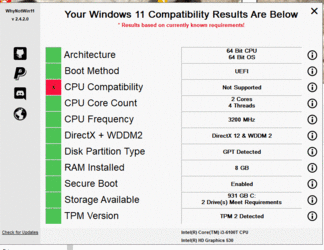
I am wondering if I could leave out the TPM and just have CPU if this would bypass the test?
Shipinomore
 

Attachments

  • Compatibility test.GIF
    Compatibility test.GIF
    152.1 KB · Views: 3

My Computers My Computers

  • At a glance

    Windows 11 ProAMD Ryzen 3 3250U with Radeon Graphics 2.60 Ghz8.00 GBNvidia
    OS
    Windows 11 Pro
    Computer type
    PC/Desktop
    Manufacturer/Model
    HP AIO 22 R3
    CPU
    AMD Ryzen 3 3250U with Radeon Graphics 2.60 Ghz
    Memory
    8.00 GB
    Graphics Card(s)
    Nvidia
    Sound Card
    RealTech
    Monitor(s) Displays
    23-Q2`14 All-in-One
    Screen Resolution
    1920/1080
    Hard Drives
    Each of my systems have a WD 1 terabyte drive for backups software apps/ etc.
    Keyboard
    logitech wireless
    Mouse
    wireless logitech
    Internet Speed
    100 megbytes Spectrum
    Browser
    Chrome
    Antivirus
    WebRoot from my Bank Windows Defender
    Other Info
    64-Bit OS, x64-based processor.
  • At a glance

    Windows 10 HomeAMD Ryzen 3 3250U 3.5 ghz.8 gig
    Operating System
    Windows 10 Home
    Manufacturer/Model
    HP 22 AIO R3 Touch 8GB/1TB Desktop ALL_IN_ONE have two of these Wife. Mine
    CPU
    AMD Ryzen 3 3250U 3.5 ghz.
    Memory
    8 gig
    Monitor(s) Displays
    All-In-One
    Screen Resolution
    1920/1080
    Hard Drives
    1 teribyte external WD used for backups etc
    Keyboard
    wireless Logitech
    Internet Speed
    100 meg. from Spectrum
    Browser
    Edge
    Antivirus
    webroot from my bank defender
Hi Shawn; thanks for the update. I did get several security updates right after the windows 11 came up.
just saw on Google on my iphone this note saying MS shows how to get around unsupported pc's.
they are talking tpm but end the instruction with CPU
regedit go to HKEY_LOCAL_MACHINE/system/setup/MoSetup
right click the main panel
create new Dword (32bit) Value Name of
AllowUpgradesWithUsupported TPMOrCPU Set Value to 1
I am wondering if I could leave out the TPM and just have CPU if this would bypass the test?
Shipinomore

The question, IMHO, is not to bypass it for installation only, but would you be able to receive updates for it?

I would suggest to wait a few days, as in my opinion, the unsupported CPUs issue will most likely be relaxed by MS, after all the complaints they receive.
 

My Computer My Computer

At a glance

Windows 11 Pro x64Intel® Core™ i7-1165G7 (Tiger Lake)SK Hynix 16GB DDR4 3200MHz SDRAMintel® iRIS® Xe Graphics / NVIDIA T500 2GB GD...
OS
Windows 11 Pro x64
Computer type
Laptop
Manufacturer/Model
DELL Precision 3560
CPU
Intel® Core™ i7-1165G7 (Tiger Lake)
Motherboard
DELL 004N73 / UEFI Ver. 1.18.1
Memory
SK Hynix 16GB DDR4 3200MHz SDRAM
Graphics Card(s)
intel® iRIS® Xe Graphics / NVIDIA T500 2GB GDDR6 SDRAM
Sound Card
Realtek HD Audio
Monitor(s) Displays
15.6"
Screen Resolution
1920x1080 IPS
Hard Drives
Internal: KIOXIA BG4 Series 512 GB PCIe® NVMe™ M.2 SSD
External: 2 x WD Passport 2TB USB 3.0, 1 x Toshiba 500GB USB 3.0
Keyboard
Standard laptop backlit keyboard with numeric keypad
Mouse
hp wheel mouse
Browser
MS Edge Chromium
Antivirus
MS Windows Defender
Other Info
DELL USB slim Optical Drive DW316
Macrium Reflect v8 (backup and.... lifesaver)
Hi Dimitri I did upgrade my windows 10 yesterday and other than some extra time installing all went well. I did not encounter any errors. during the install it loaded updates and after it was up and running I received several security updates and even this morning I got two security updates.
I am now back on windows 10 Pro and I did this to see how it would come out. I use Macrium Reflect.
shipinomore
 

My Computers My Computers

  • At a glance

    Windows 11 ProAMD Ryzen 3 3250U with Radeon Graphics 2.60 Ghz8.00 GBNvidia
    OS
    Windows 11 Pro
    Computer type
    PC/Desktop
    Manufacturer/Model
    HP AIO 22 R3
    CPU
    AMD Ryzen 3 3250U with Radeon Graphics 2.60 Ghz
    Memory
    8.00 GB
    Graphics Card(s)
    Nvidia
    Sound Card
    RealTech
    Monitor(s) Displays
    23-Q2`14 All-in-One
    Screen Resolution
    1920/1080
    Hard Drives
    Each of my systems have a WD 1 terabyte drive for backups software apps/ etc.
    Keyboard
    logitech wireless
    Mouse
    wireless logitech
    Internet Speed
    100 megbytes Spectrum
    Browser
    Chrome
    Antivirus
    WebRoot from my Bank Windows Defender
    Other Info
    64-Bit OS, x64-based processor.
  • At a glance

    Windows 10 HomeAMD Ryzen 3 3250U 3.5 ghz.8 gig
    Operating System
    Windows 10 Home
    Manufacturer/Model
    HP 22 AIO R3 Touch 8GB/1TB Desktop ALL_IN_ONE have two of these Wife. Mine
    CPU
    AMD Ryzen 3 3250U 3.5 ghz.
    Memory
    8 gig
    Monitor(s) Displays
    All-In-One
    Screen Resolution
    1920/1080
    Hard Drives
    1 teribyte external WD used for backups etc
    Keyboard
    wireless Logitech
    Internet Speed
    100 meg. from Spectrum
    Browser
    Edge
    Antivirus
    webroot from my bank defender
The fact that you did receive updates, is definitely a good sign.
Keep your MR image up to date and we'lll see what happens with MS upgrade requirements! :)
 

My Computer My Computer

At a glance

Windows 11 Pro x64Intel® Core™ i7-1165G7 (Tiger Lake)SK Hynix 16GB DDR4 3200MHz SDRAMintel® iRIS® Xe Graphics / NVIDIA T500 2GB GD...
OS
Windows 11 Pro x64
Computer type
Laptop
Manufacturer/Model
DELL Precision 3560
CPU
Intel® Core™ i7-1165G7 (Tiger Lake)
Motherboard
DELL 004N73 / UEFI Ver. 1.18.1
Memory
SK Hynix 16GB DDR4 3200MHz SDRAM
Graphics Card(s)
intel® iRIS® Xe Graphics / NVIDIA T500 2GB GDDR6 SDRAM
Sound Card
Realtek HD Audio
Monitor(s) Displays
15.6"
Screen Resolution
1920x1080 IPS
Hard Drives
Internal: KIOXIA BG4 Series 512 GB PCIe® NVMe™ M.2 SSD
External: 2 x WD Passport 2TB USB 3.0, 1 x Toshiba 500GB USB 3.0
Keyboard
Standard laptop backlit keyboard with numeric keypad
Mouse
hp wheel mouse
Browser
MS Edge Chromium
Antivirus
MS Windows Defender
Other Info
DELL USB slim Optical Drive DW316
Macrium Reflect v8 (backup and.... lifesaver)
Still working on enabling Secure Boot on Gigabyte BIOS. So far all method require expertise I lack.
W11 installed flawlessly without Secure Boot on.
Do I assume correctly that as my system support Secure boot I don't have to turn it On and I wont have any issue with updates and future upgrade
Heard it from the grapevine that I do not really need it.
 

Attachments

  • Secure boot.png
    Secure boot.png
    39 KB · Views: 1
Last edited:

My Computer My Computer

At a glance

Windows 11
OS
Windows 11
Computer type
PC/Desktop
Motherboard
Gigabyte
Once again I upgraded from windows 10 pro to windows 11 pro. all went fine. I was surprised when I checked winver that it was 22000.258
during the install it downloaded updates. I used that same usb that I created originally with Media Creation Tool. My system meets all the requirements except that my processor is not in the accepted list from MS. Now I see Rufus has a release to by pass some of the requirements.
I am going to keep doing this just to see what happens. I have two sets of image backups depending on which system I am on.
shipinomore
 

My Computers My Computers

  • At a glance

    Windows 11 ProAMD Ryzen 3 3250U with Radeon Graphics 2.60 Ghz8.00 GBNvidia
    OS
    Windows 11 Pro
    Computer type
    PC/Desktop
    Manufacturer/Model
    HP AIO 22 R3
    CPU
    AMD Ryzen 3 3250U with Radeon Graphics 2.60 Ghz
    Memory
    8.00 GB
    Graphics Card(s)
    Nvidia
    Sound Card
    RealTech
    Monitor(s) Displays
    23-Q2`14 All-in-One
    Screen Resolution
    1920/1080
    Hard Drives
    Each of my systems have a WD 1 terabyte drive for backups software apps/ etc.
    Keyboard
    logitech wireless
    Mouse
    wireless logitech
    Internet Speed
    100 megbytes Spectrum
    Browser
    Chrome
    Antivirus
    WebRoot from my Bank Windows Defender
    Other Info
    64-Bit OS, x64-based processor.
  • At a glance

    Windows 10 HomeAMD Ryzen 3 3250U 3.5 ghz.8 gig
    Operating System
    Windows 10 Home
    Manufacturer/Model
    HP 22 AIO R3 Touch 8GB/1TB Desktop ALL_IN_ONE have two of these Wife. Mine
    CPU
    AMD Ryzen 3 3250U 3.5 ghz.
    Memory
    8 gig
    Monitor(s) Displays
    All-In-One
    Screen Resolution
    1920/1080
    Hard Drives
    1 teribyte external WD used for backups etc
    Keyboard
    wireless Logitech
    Internet Speed
    100 meg. from Spectrum
    Browser
    Edge
    Antivirus
    webroot from my bank defender
Hey guys,
Just dropped back in to say thanks again, here's the new screen shot showing my PC is
finally W11 Approved and ready to go after downloading and applying Shawn's W10
Core Isolation Memory Integrity registry fixes.
It only took seconds to apply and it worked flawlessly.
It also fixed the drivers that were stopping me from getting the Core Isolation
to work in the first place.

Secure Boot and TPM are now all turned on and ready for W11 Upgrade.
Here are my PC and Windows Settings Pages showing everything all turned On
and Approved and ready for W11 Upgrade.

Thank you all so much, yr awesome and you have saved me so much time and frustration
as I was getting nowhere online until I found the W10 and W11 Forum.

WINDOW 10 UPDATE PAGE IN SETTINGS
Showing my PC is now Approved and Ready for W11 Upgrade
View attachment 9960
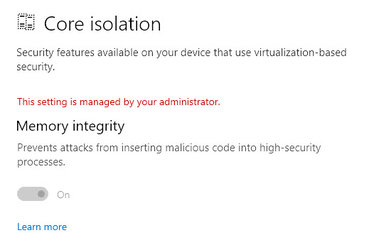
WINDOW 10 SECURITY PAGE
Showing Core Isolation is now turned On and ready for W11 Upgrade
View attachment 9961

WINDOW 10 DEVICE SECURITY PAGE
Showing all 3 Security Features required by Microsoft ready for W11 Upgrade
1- Core Isolation Turned On
2- TPM Trusted Platform Module Turned On
3- Secure Boot Turned On


WINDOWS 10 DEVICE SECURITY PAGE SHOWING ALL SECURITY OPTIONS ON AND WORKING READY FOR W11.jpg
Have a great day
Cheers Kev
 

Attachments

  • WINDOWS 10 UPDATE PAGE SHOWING W11 APPROVED AND READY TO GO.jpg
    WINDOWS 10 UPDATE PAGE SHOWING W11 APPROVED AND READY TO GO.jpg
    49.9 KB · Views: 2
  • WINDOWS 10 SECURITY PAGE SHOWING CORE ISOLATION TURNED ON READY TO GO FOR W11.jpg
    WINDOWS 10 SECURITY PAGE SHOWING CORE ISOLATION TURNED ON READY TO GO FOR W11.jpg
    21.9 KB · Views: 2

My Computer My Computer

At a glance

Windows 10 HomeINTEL Core X Series - i9 9900X 3.5Ghz 10c/20tCORSAIR Vengeance RGB Pro 64Gb-DDR4 3200 CL16...ASUS ROG STRIX Nvidia RTX2080-8G GeForce
OS
Windows 10 Home
Computer type
PC/Desktop
Manufacturer/Model
ASUS and INTEL
CPU
INTEL Core X Series - i9 9900X 3.5Ghz 10c/20t
Motherboard
ASUS ROG Rampage VI Extreme Intel X299 LGA2066
Memory
CORSAIR Vengeance RGB Pro 64Gb-DDR4 3200 CL16 4x16
Graphics Card(s)
ASUS ROG STRIX Nvidia RTX2080-8G GeForce
Sound Card
MICROSOFT Hi Definition Audio
Monitor(s) Displays
SONY 40" HD TV + HUION Kamvas Pro 16 (4k) Plus Pen Display
Screen Resolution
4K Ultra HD & HD
Hard Drives
1- Samsung 970 EVO 2TB M.2 NVMe SSD
2- Samsung 970 EVO Plus 1TB M.2 NVMe SSD
3- Intel 250GB M.2 NVMe SSD
4- Western Digital - Internal HDD 2TB
5- Western Digital - External USB HDD 4TB
6- Western Digital - External USB HDD 2TB
PSU
CORSAIR HX1000 1000W 80 Plus Platinum
Case
COOLERMASTER COSMOS C700P Full Tower Case
Cooling
NOCTUA NH-D15 Elite Class 6 Heat Pipe Dual Tower Cooler + Noctua NF- F12 PWM Black Chromax 120mm F
Keyboard
LOGITECH MK710 Wireless
Mouse
LOGITECH MX Master 3 Wireless
Internet Speed
Download 949 Mbps / UpLoad 456 Mbps
Browser
Firefox
Antivirus
AVG
Other Info
ASUS 12x Blu Ray Reader Writer Combo
On Post #12 for future generations eh eh.

Boot on BIOS, select BIOS>Secure Boot>Secure Boot Mode, select Custom>Secure Boot Enable select Enable> Save & Exit.
Done!

Credit where it is due though. I misread the suggestion but I ended up on my feet so to speak
:isay:
:eek:
 
Last edited:

My Computer My Computer

At a glance

Windows 11
OS
Windows 11
Computer type
PC/Desktop
Motherboard
Gigabyte
Back
Top Bottom