Windows 11 22H2 not in Windows Update


Daveo77

Well-known member
Local time
12:00 PM
Posts
9
Location
UK
OS
Windows 11 Pro 64bit 24H2
I've noticed that Windows Update is still not offering me 22H2 to upgrade to.

Have checked RegEdit for the key and it's not there. Does this mean that I'll never get 22H2 ?

I have an AMD Ryzen 7 2700X 3.6GHz (8c/16t) CPU with 32GB DDR RAM on an ASUS TUF B450+ Gaming Motherboard using a nVidia GeForce RTX 2060 12GB GFX card.

Running Windows 11 21H2 on an 250GB SSD with a 2nd 2TB SSD for Games and a 2TB HDD for Data/VirtualBox Guests.
 
Windows Build/Version
Windows 11 21H2 22000.1165

My Computer

System One

  • OS
    Windows 11 Pro 64bit 24H2
    Computer type
    PC/Desktop
    Manufacturer/Model
    Custom Build PC
    CPU
    AMD Ryzen 7 2700X 3.7GHz 8 Cores (16 Threads)
    Motherboard
    ASUS TUF B450+ Gaming
    Memory
    32GB DDR4 2133MHz
    Graphics Card(s)
    nVidia GeForce RTX 2060 12GB PCIe
    Sound Card
    RealTek Onboard
    Monitor(s) Displays
    MSI 24in Curved Gaming
    Screen Resolution
    1920x1080
    Hard Drives
    500GB NVMe
    2TB SSD
    2TB HDD
    PSU
    850w Fully-Modular
    Case
    Corsair Carbide Series™ 200R Compact ATX Case
    Cooling
    AIO CPU Fan & 6x 12in Case Fans
    Keyboard
    Logitech G910
    Mouse
    Logitech G502 LightSpeed
    Internet Speed
    900Mbps
    Browser
    Google Chrome
    Antivirus
    Norton 360
Probably just a matter of waiting. I believe MS are rolling it out first to those machines it considers most compatible. I see your machine is custom built so MS may be prioritising main manufacturing brands first? Such as DELL, HP etc.

I think you can force the upgrade but I'll leave it to others to advise you on doing that.

I have a DELL laptop and an HP desktop and both machines received 22H2 less than one month after release.

Just a thought.
 

My Computers

System One System Two

  • OS
    Windows 11 Pro
    Computer type
    PC/Desktop
    Manufacturer/Model
    GMKtec K11
    CPU
    AMD Ryzen 9 8945HS
    Memory
    32GB DDR5 SO-DIMM
    Graphics Card(s)
    Integrated AMD Radeon 780M (4.00 GHz)
    Monitor(s) Displays
    Benq 2250HM
    Screen Resolution
    1920 x 1080
    Hard Drives
    1 TB PCIe 4.0 NVMe M.2 SSD
  • Operating System
    Windows 11 Home
    Computer type
    Laptop
    Manufacturer/Model
    ASUS Zenbook 14 OLED 14" Laptop - UX3405CA-QL192W
    CPU
    Intel® Core™ Ultra 7 - 255H processor
    Memory
    16 GB LPDDR5 SDRAM
    Graphics card(s)
    Intel Arc 140T onboard graphics
    Screen Resolution
    1920 x 1200 (16:10 WUXGA resolution) OLED Touchscreen
    Hard Drives
    1TB SSD
I've not had a problem with Win11 [3 machines] and 22H2 but do have a few Win10 two of which didn't offer 22H2 so set them aside and did others then after 2 days did get the offer. So far there's been no issues. It does reinforce the idea that most things don't get to all the users at the same time. Patch Tuesday is a scheduled update so seems that goes smoother.
 

My Computers

System One System Two

  • OS
    Win11 Pro RTM Version 24H2 Build 26100.4202
    Computer type
    Laptop
    Manufacturer/Model
    Dell Vostro 3400
    CPU
    Intel Core i5 11th Gen. 2.40GHz
    Memory
    12GB
    Hard Drives
    256GB SSD NVMe M.2
  • Operating System
    Win11 Pro RTM Version 24H2 Build 26100.4202
    Computer type
    PC/Desktop
    Manufacturer/Model
    Dell Vostro 5890
    CPU
    Intel Core i5 10th Gen. 2.90GHz
    Memory
    16GB
    Graphics card(s)
    Onboard, no VGA, using a DisplayPort-to-VGA adapter
    Monitor(s) Displays
    24" Dell
    Hard Drives
    512GB SSD NVMe, 4TB Seagate HDD
    Browser
    Firefox, Edge
    Antivirus
    Windows Defender/Microsoft Security
One of my computers did not update the Windows 11 22H2. I used windows installer assistance tool which did up computer to 22H2.
Enclosed file has the http address for this
 

Attachments

My Computer

System One

  • OS
    Windows 11 Pro 64-bit
    Computer type
    PC/Desktop
    Manufacturer/Model
    Alienware Aurora R16
    CPU
    Intel Core i9-14900KF
    Motherboard
    Alienware 0RF96M (U3E1)
    Memory
    64 GB
    Graphics Card(s)
    4083MB NVIDIA GeForce RTX 4090
    Monitor(s) Displays
    ROG XG43UQ 43 inch monitor
    Screen Resolution
    (3840x2160@120Hz)
    Hard Drives
    Samsung SSD 870 EVO 2TB
    NVMe Samsung 2048GB
Thanks @timbobit , I finally got impatient lol and did this too on one PC that was still on 2000.1165. It updated first to 22621.674, updated the .NET FW, then updated to 22621.754.
 

My Computer

System One

  • OS
    Windows 11
    Computer type
    Laptop
    Manufacturer/Model
    Apple MacBook Pro 16" 2021
    CPU
    Apple M1 Max 10 core/4 CPU assigned to Parallels 17 VM
    Motherboard
    Apple Silicon M1 Max
    Memory
    64GB/24GB assigned to Parallels 17 VM
    Graphics Card(s)
    Apple 32 core GPU
    Sound Card
    Apple
    Monitor(s) Displays
    16.2" Liquid Retina XDR
    Screen Resolution
    3456-by-2234 native resolution at 254 psi
    Hard Drives
    4TB SSD
    PSU
    Apple
    Case
    Apple
    Cooling
    Apple
    Keyboard
    Apple
    Mouse
    N/A; Apple Trackpad
    Internet Speed
    1.2Gb/42Gb
    Browser
    Parallels 17 VM: MS Edge
    Antivirus
    Parallels 17 VM: MS Defender

My Computer

System One

  • OS
    Windows 11
    Computer type
    PC/Desktop
    Manufacturer/Model
    Frankienstein
    CPU
    Ryzen 3600x
    Motherboard
    Biostar B450MH
    Memory
    32 GB Crucial ddr4 2666
    Graphics Card(s)
    Radeon RX 580
    Monitor(s) Displays
    Samsung 28"
    Hard Drives
    Crucial 1tb SSD
    Toshiba 3 TB spinner
    PSU
    750 Watt
    Case
    Old I buy power case.
    Cooling
    All air!
    Keyboard
    ZERO 87 Key mechanical.
OK, so even tho it mentions for use upgrading Windows 10 to Windows 11, it can be used to update Windows 11 21H2 to Windows 11 22H2 ?
 

My Computer

System One

  • OS
    Windows 11 Pro 64bit 24H2
    Computer type
    PC/Desktop
    Manufacturer/Model
    Custom Build PC
    CPU
    AMD Ryzen 7 2700X 3.7GHz 8 Cores (16 Threads)
    Motherboard
    ASUS TUF B450+ Gaming
    Memory
    32GB DDR4 2133MHz
    Graphics Card(s)
    nVidia GeForce RTX 2060 12GB PCIe
    Sound Card
    RealTek Onboard
    Monitor(s) Displays
    MSI 24in Curved Gaming
    Screen Resolution
    1920x1080
    Hard Drives
    500GB NVMe
    2TB SSD
    2TB HDD
    PSU
    850w Fully-Modular
    Case
    Corsair Carbide Series™ 200R Compact ATX Case
    Cooling
    AIO CPU Fan & 6x 12in Case Fans
    Keyboard
    Logitech G910
    Mouse
    Logitech G502 LightSpeed
    Internet Speed
    900Mbps
    Browser
    Google Chrome
    Antivirus
    Norton 360
OK, so even tho it mentions for use upgrading Windows 10 to Windows 11, it can be used to update Windows 11 21H2 to Windows 11 22H2 ?
Correct - that's what I did! All settings preserved, no issues.
 

My Computer

System One

  • OS
    Windows 11
    Computer type
    Laptop
    Manufacturer/Model
    Apple MacBook Pro 16" 2021
    CPU
    Apple M1 Max 10 core/4 CPU assigned to Parallels 17 VM
    Motherboard
    Apple Silicon M1 Max
    Memory
    64GB/24GB assigned to Parallels 17 VM
    Graphics Card(s)
    Apple 32 core GPU
    Sound Card
    Apple
    Monitor(s) Displays
    16.2" Liquid Retina XDR
    Screen Resolution
    3456-by-2234 native resolution at 254 psi
    Hard Drives
    4TB SSD
    PSU
    Apple
    Case
    Apple
    Cooling
    Apple
    Keyboard
    Apple
    Mouse
    N/A; Apple Trackpad
    Internet Speed
    1.2Gb/42Gb
    Browser
    Parallels 17 VM: MS Edge
    Antivirus
    Parallels 17 VM: MS Defender
I've noticed that Windows Update is still not offering me 22H2 to upgrade to.

Have checked RegEdit for the key and it's not there. Does this mean that I'll never get 22H2 ?

I have an AMD Ryzen 7 2700X 3.6GHz (8c/16t) CPU with 32GB DDR RAM on an ASUS TUF B450+ Gaming Motherboard using a nVidia GeForce RTX 2060 12GB GFX card.

Running Windows 11 21H2 on an 250GB SSD with a 2nd 2TB SSD for Games and a 2TB HDD for Data/VirtualBox Guests.
Import this registry key and then it will be offered to you within 24 hours. In my case, I got it after 3 hours
 

Attachments

My Computers

System One System Two

  • OS
    Windows 11 Pro
    Computer type
    Laptop
    Manufacturer/Model
    ASUS ROG Strix SCAR 16 G635LX
    CPU
    Intel Core Ultra 9 275HX
    Motherboard
    ASUS
    Memory
    SK Hynix 64GB DDR5-5600MHz RAM
    Graphics Card(s)
    GeForce RTX 5090 24 GB GDDR7 VRAM
    Sound Card
    Dolby Atmos-powered speakers - 2 tweeters and 3 downward firing woofers
    Monitor(s) Displays
    ASUS ROG Strix OLED XG27AQWMG QHD 280 Hz 27" Monitor
    Screen Resolution
    QHD (2560x1440)
    Hard Drives
    2x WD_BLACK SN850X 8TB SSDs (RAID 0)
    PSU
    380W AC Power Adapter
    Cooling
    Thermal Grizzly Conductonaut + IETS GT600 Cooling Pad
    Keyboard
    ROG Strix Scope II 96 RX Wireless
    Mouse
    ROG Chakram X Origin
    Internet Speed
    1 GBPS Down / 882 MBPS Up
    Browser
    Google Chrome
    Antivirus
    Microsoft Defender
  • Operating System
    Windows 11 Pro
    Computer type
    Laptop
    Manufacturer/Model
    Dell XPS 15 9500
    CPU
    Intel i7-10875H
    Memory
    Kingston FURY Impact 64 GB 3200 MHz DDR4 RAM
    Graphics card(s)
    nVIDIA GeForce GTX 1650 Ti Max-Q w/ 4 GB GDDR6
    Sound Card
    Realtek
    Monitor(s) Displays
    15.6 UHD+ Touch, InfinityEdge, 500-nits, Anti-Reflecitve
    Screen Resolution
    3840 x 2400
    Hard Drives
    Samsung 990 PRO 2TB + 4TB SSDs
    PSU
    Dell 130W Laptop Charger USB C Type C AC Adapter
    Cooling
    Noctua NT-H2 Thermal Paste on CPU + GPU
    Mouse
    Logitech MX Anywhere 3
    Internet Speed
    1 GBPS Down / 875 MBPS Up
    Browser
    Google Chrome
    Antivirus
    AVG Free Antivirus
OK. I've looked at the reg file using Notepad++, what does disabling WUfB safeguards do ?

Just double checking, as I don't want to do something without knowing what it's doing, etc.
 

My Computer

System One

  • OS
    Windows 11 Pro 64bit 24H2
    Computer type
    PC/Desktop
    Manufacturer/Model
    Custom Build PC
    CPU
    AMD Ryzen 7 2700X 3.7GHz 8 Cores (16 Threads)
    Motherboard
    ASUS TUF B450+ Gaming
    Memory
    32GB DDR4 2133MHz
    Graphics Card(s)
    nVidia GeForce RTX 2060 12GB PCIe
    Sound Card
    RealTek Onboard
    Monitor(s) Displays
    MSI 24in Curved Gaming
    Screen Resolution
    1920x1080
    Hard Drives
    500GB NVMe
    2TB SSD
    2TB HDD
    PSU
    850w Fully-Modular
    Case
    Corsair Carbide Series™ 200R Compact ATX Case
    Cooling
    AIO CPU Fan & 6x 12in Case Fans
    Keyboard
    Logitech G910
    Mouse
    Logitech G502 LightSpeed
    Internet Speed
    900Mbps
    Browser
    Google Chrome
    Antivirus
    Norton 360
OK. I've looked at the reg file using Notepad++, what does disabling WUfB safeguards do ?

Just double checking, as I don't want to do something without knowing what it's doing, etc.
Nobody can really say. In majority of cases, upgrades work fine, but no guarantee.

In the end, you have two options:

1) Just wait until formally offered it.

2) Take a risk and upgrade anyway. As always, it is a always a good plan to make an image backup of current installation before upgrading.
 

My Computer

System One

  • OS
    Windows 11 Pro + Win11 Canary VM.
    Computer type
    Laptop
    Manufacturer/Model
    ASUS Zenbook 14
    CPU
    I9 13th gen i9-13900H 2.60 GHZ
    Motherboard
    Yep, Laptop has one.
    Memory
    16 GB soldered
    Graphics Card(s)
    Integrated Intel Iris XE
    Sound Card
    Realtek built in
    Monitor(s) Displays
    laptop OLED screen
    Screen Resolution
    2880x1800 touchscreen
    Hard Drives
    1 TB NVME SSD (only weakness is only one slot)
    PSU
    Internal + 65W thunderbolt USB4 charger
    Case
    Yep, got one
    Cooling
    Stella Artois (UK pint cans - 568 ml) - extra cost.
    Keyboard
    Built in UK keybd
    Mouse
    Bluetooth , wireless dongled, wired
    Internet Speed
    900 mbs (ethernet), wifi 6 typical 350-450 mb/s both up and down
    Browser
    Edge
    Antivirus
    Defender
    Other Info
    TPM 2.0, 2xUSB4 thunderbolt, 1xUsb3 (usb a), 1xUsb-c, hdmi out, 3.5 mm audio out/in combo, ASUS backlit trackpad (inc. switchable number pad)

    Macrium Reflect Home V8
    Office 365 Family (6 users each 1TB onedrive space)
    Hyper-V (a vm runs almost as fast as my older laptop)

My Computers

System One System Two

  • OS
    Windows 11 Pro
    Computer type
    PC/Desktop
    Manufacturer/Model
    Custom Built
    CPU
    Ryzen 7 5700 X3D
    Motherboard
    MSI MPG B550 GAMING PLUS
    Memory
    64 GB DDR4 3600mhz Gskill Ripjaws V
    Graphics Card(s)
    RTX 4070 Super , 12GB VRAM Asus EVO Overclock
    Monitor(s) Displays
    Gigabyte M27Q (rev. 2.0) 2560 x 1440 @ 170hz HDR
    Hard Drives
    2TB Samsung nvme ssd
    4TB Western Digital nvme ssd
    PSU
    CORSAIR RMx SHIFT Series™ RM750x 80 PLUS Gold Fully Modular ATX Power Supply
    Case
    CORSAIR 3500X ARGB Mid-Tower ATX PC Case – Black
    Cooling
    ID-COOLING FROSTFLOW X 240 CPU Water Cooler
    Keyboard
    Logitech G213
    Mouse
    Logitech G203
    Internet Speed
    1.2gbps Fiber 😎
  • Operating System
    Chrome OS
    Computer type
    Laptop
    Manufacturer/Model
    HP Chromebook
    CPU
    Intel Pentium Quad Core
    Memory
    4GB LPDDR4
    Monitor(s) Displays
    14 Inch HD SVA anti glare micro edge display
    Hard Drives
    64 GB emmc

Probably the easiest way (other than waiting on Windows Updates), to upgrade to 22H2 is this.
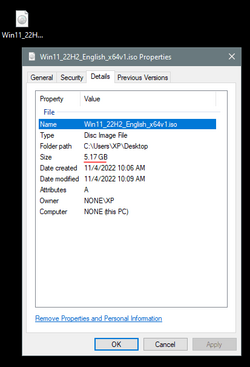
Use Option #2 (this link), to get the 22H2 ISO image, save it to your desktop.


Then use that ISO image to do an In-Place Upgrade to 22H2.


Here is the short version of the In-place upgrade tutorial...

DISABLE non-Microsoft:
a) antivirus software
b) firewall software
c) drive encryption software

Make a full OS backup with a program like Macrium Reflect (free)
Macrium Software | Macrium Reflect Free


Right click the ISO image and choose: MOUNT
Open File Explorer and you will see a new drive letter. It will "look" like a DVD optical drive.
Double click the new drive letter to open it.
Find setup.exe and double click it to start the in-place upgrade.

Choose the Keep personal files and apps option.

After it's all done... to UNmount the ISO image, right click the new drive letter and choose: EJECT.


The ONLY thing you will lose is some of your personalizations. Your programs and data will be intact.


After you've upgraded to Windows 11 22H2, run Windows Updates to get the latest version.
When that's done, make a fresh backup.

 
Last edited:

My Computers

System One System Two

  • OS
    Win 11 Home ♦♦♦26200.8457 ♦♦♦♦♦♦♦25H2
    Computer type
    PC/Desktop
    Manufacturer/Model
    Built by Ghot® [May 2020]
    CPU
    AMD Ryzen 7 3700X
    Motherboard
    Asus Pro WS X570-ACE (BIOS 5302)
    Memory
    G.Skill (F4-3200C14D-16GTZKW)
    Graphics Card(s)
    EVGA RTX 2070 (08G-P4-2171-KR)
    Sound Card
    Realtek ALC1220P / ALC S1220A
    Monitor(s) Displays
    Dell U3011 30"
    Screen Resolution
    2560 x 1600
    Hard Drives
    2x Samsung 860 EVO 500GB,
    WD 4TB Black FZBX - SATA III,
    WD 8TB Black FZBX - SATA III,
    DRW-24B1ST CD/DVD Burner
    PSU
    PC Power & Cooling 750W Quad EPS12V
    Case
    Cooler Master ATCS 840 Tower
    Cooling
    CM Hyper 212 EVO (push/pull)
    Keyboard
    Ducky DK9008 Shine II Blue LED
    Mouse
    Logitech Optical M-100
    Internet Speed
    300/300
    Browser
    Firefox (latest)
    Antivirus
    Bitdefender Total Security
    Other Info
    Speakers: Klipsch Pro Media 2.1
  • Operating System
    Windows XP Pro 32bit w/SP3
    Computer type
    PC/Desktop
    Manufacturer/Model
    Built by Ghot® (not in use)
    CPU
    AMD Athlon 64 X2 5000+ (OC'd @ 3.2Ghz)
    Motherboard
    ASUS M2N32-SLI Deluxe Wireless Edition
    Memory
    TWIN2X2048-6400C4DHX (2 x 1GB, DDR2 800)
    Graphics card(s)
    EVGA 256-P2-N758-TR GeForce 8600GT SSC
    Sound Card
    Onboard
    Monitor(s) Displays
    ViewSonic G90FB Black 19" Professional (CRT)
    Screen Resolution
    up to 2048 x 1536
    Hard Drives
    WD 36GB 10,000rpm Raptor SATA
    Seagate 80GB 7200rpm SATA
    Lite-On LTR-52246S CD/RW
    Lite-On LH-18A1P CD/DVD Burner
    PSU
    PC Power & Cooling Silencer 750 Quad EPS12V
    Case
    Generic Beige case, 80mm fans
    Cooling
    ZALMAN 9500A 92mm CPU Cooler
    Keyboard
    Logitech Classic Keybooard 200
    Mouse
    Logitech Optical M-BT96a
    Internet Speed
    300/300
    Browser
    Firefox 3.x ??
    Antivirus
    Symantec (Norton)
    Other Info
    Still assembled, still runs. Haven't turned it on for 15 years?
Last edited:

My Computers

System One System Two

  • OS
    Win 11 Home ♦♦♦26200.8457 ♦♦♦♦♦♦♦25H2
    Computer type
    PC/Desktop
    Manufacturer/Model
    Built by Ghot® [May 2020]
    CPU
    AMD Ryzen 7 3700X
    Motherboard
    Asus Pro WS X570-ACE (BIOS 5302)
    Memory
    G.Skill (F4-3200C14D-16GTZKW)
    Graphics Card(s)
    EVGA RTX 2070 (08G-P4-2171-KR)
    Sound Card
    Realtek ALC1220P / ALC S1220A
    Monitor(s) Displays
    Dell U3011 30"
    Screen Resolution
    2560 x 1600
    Hard Drives
    2x Samsung 860 EVO 500GB,
    WD 4TB Black FZBX - SATA III,
    WD 8TB Black FZBX - SATA III,
    DRW-24B1ST CD/DVD Burner
    PSU
    PC Power & Cooling 750W Quad EPS12V
    Case
    Cooler Master ATCS 840 Tower
    Cooling
    CM Hyper 212 EVO (push/pull)
    Keyboard
    Ducky DK9008 Shine II Blue LED
    Mouse
    Logitech Optical M-100
    Internet Speed
    300/300
    Browser
    Firefox (latest)
    Antivirus
    Bitdefender Total Security
    Other Info
    Speakers: Klipsch Pro Media 2.1
  • Operating System
    Windows XP Pro 32bit w/SP3
    Computer type
    PC/Desktop
    Manufacturer/Model
    Built by Ghot® (not in use)
    CPU
    AMD Athlon 64 X2 5000+ (OC'd @ 3.2Ghz)
    Motherboard
    ASUS M2N32-SLI Deluxe Wireless Edition
    Memory
    TWIN2X2048-6400C4DHX (2 x 1GB, DDR2 800)
    Graphics card(s)
    EVGA 256-P2-N758-TR GeForce 8600GT SSC
    Sound Card
    Onboard
    Monitor(s) Displays
    ViewSonic G90FB Black 19" Professional (CRT)
    Screen Resolution
    up to 2048 x 1536
    Hard Drives
    WD 36GB 10,000rpm Raptor SATA
    Seagate 80GB 7200rpm SATA
    Lite-On LTR-52246S CD/RW
    Lite-On LH-18A1P CD/DVD Burner
    PSU
    PC Power & Cooling Silencer 750 Quad EPS12V
    Case
    Generic Beige case, 80mm fans
    Cooling
    ZALMAN 9500A 92mm CPU Cooler
    Keyboard
    Logitech Classic Keybooard 200
    Mouse
    Logitech Optical M-BT96a
    Internet Speed
    300/300
    Browser
    Firefox 3.x ??
    Antivirus
    Symantec (Norton)
    Other Info
    Still assembled, still runs. Haven't turned it on for 15 years?
  • Like
Reactions: WAI
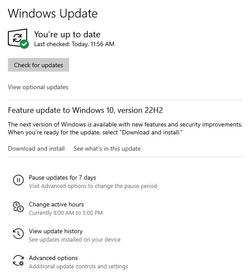
You aren't alone, I don't have the option yet on my gaming box either. I'm in pretty much no rush to move off from Windows 10 on this build, it's running perfectly fine and I don't really want to take the time to tinker with it. . (note: I run Windows 11 on a BeeLink mini-pc, and it's been solid for me on that box).

1667577473267.png
 

My Computers

System One System Two

  • OS
    Windows 11 Pro
    Computer type
    PC/Desktop
    Manufacturer/Model
    Beelink SEI8
    CPU
    Intel Core i5-8279u
    Motherboard
    AZW SEI
    Memory
    32GB DDR4 2666Mhz
    Graphics Card(s)
    Intel Iris Plus 655
    Sound Card
    Intel SST
    Monitor(s) Displays
    Asus ProArt PA278QV
    Screen Resolution
    2560x1440
    Hard Drives
    512GB NVMe
    PSU
    NA
    Case
    NA
    Cooling
    NA
    Keyboard
    NA
    Mouse
    NA
    Internet Speed
    500/50
    Browser
    Edge
    Antivirus
    Defender
    Other Info
    Mini PC used for testing Windows 11.
  • Operating System
    Windows 10 Pro
    Computer type
    PC/Desktop
    Manufacturer/Model
    Custom
    CPU
    Ryzen 9 5900x
    Motherboard
    Asus Rog Strix X570-E Gaming
    Memory
    64GB DDR4-3600
    Graphics card(s)
    EVGA GeForce 3080 FT3 Ultra
    Sound Card
    Onboard
    Monitor(s) Displays
    ASUS TUF Gaming VG27AQ. ASUS ProArt Display PA278QV 27” WQHD
    Screen Resolution
    2560x1440
    Hard Drives
    2TB WD SN850 PCI-E Gen 4 NVMe
    2TB Sandisk Ultra 2.5" SATA SSD
    PSU
    Seasonic Focus 850
    Case
    Fractal Meshify S2 in White
    Cooling
    Dark Rock Pro CPU cooler, 3 x 140mm case fans
    Keyboard
    Corsiar K65 RGB Lux
    Mouse
    Logitech G9 Laser Mouse
    Internet Speed
    500/50
    Browser
    Chrome
    Antivirus
    Defender.
@pparks1 OK, but your screenshot shows it is offering you the Windows 10 22H2 update tho, so you sort of have it being offered, but it's the Windows 10 variant.
 

My Computer

System One

  • OS
    Windows 11 Pro 64bit 24H2
    Computer type
    PC/Desktop
    Manufacturer/Model
    Custom Build PC
    CPU
    AMD Ryzen 7 2700X 3.7GHz 8 Cores (16 Threads)
    Motherboard
    ASUS TUF B450+ Gaming
    Memory
    32GB DDR4 2133MHz
    Graphics Card(s)
    nVidia GeForce RTX 2060 12GB PCIe
    Sound Card
    RealTek Onboard
    Monitor(s) Displays
    MSI 24in Curved Gaming
    Screen Resolution
    1920x1080
    Hard Drives
    500GB NVMe
    2TB SSD
    2TB HDD
    PSU
    850w Fully-Modular
    Case
    Corsair Carbide Series™ 200R Compact ATX Case
    Cooling
    AIO CPU Fan & 6x 12in Case Fans
    Keyboard
    Logitech G910
    Mouse
    Logitech G502 LightSpeed
    Internet Speed
    900Mbps
    Browser
    Google Chrome
    Antivirus
    Norton 360
I have now updated both my PCs to Windows 11 22H2 Build 22621.900, via Windows 22H2 ISO (using Rufus to stick it on a USB, then run setup.exe from that stick).
 

My Computer

System One

  • OS
    Windows 11 Pro 64bit 24H2
    Computer type
    PC/Desktop
    Manufacturer/Model
    Custom Build PC
    CPU
    AMD Ryzen 7 2700X 3.7GHz 8 Cores (16 Threads)
    Motherboard
    ASUS TUF B450+ Gaming
    Memory
    32GB DDR4 2133MHz
    Graphics Card(s)
    nVidia GeForce RTX 2060 12GB PCIe
    Sound Card
    RealTek Onboard
    Monitor(s) Displays
    MSI 24in Curved Gaming
    Screen Resolution
    1920x1080
    Hard Drives
    500GB NVMe
    2TB SSD
    2TB HDD
    PSU
    850w Fully-Modular
    Case
    Corsair Carbide Series™ 200R Compact ATX Case
    Cooling
    AIO CPU Fan & 6x 12in Case Fans
    Keyboard
    Logitech G910
    Mouse
    Logitech G502 LightSpeed
    Internet Speed
    900Mbps
    Browser
    Google Chrome
    Antivirus
    Norton 360
I've noticed that Windows Update is still not offering me 22H2 to upgrade to.

Have checked RegEdit for the key and it's not there. Does this mean that I'll never get 22H2 ?

I have an AMD Ryzen 7 2700X 3.6GHz (8c/16t) CPU with 32GB DDR RAM on an ASUS TUF B450+ Gaming Motherboard using a nVidia GeForce RTX 2060 12GB GFX card.

Running Windows 11 21H2 on an 250GB SSD with a 2nd 2TB SSD for Games and a 2TB HDD for Data/VirtualBox Guests.

You won't get a feature build through Windows Update if your PC is unsupported. You'll have to do a manual upgrade. You'll have to do that every fall when one is offered by Microsoft.
 

My Computers

System One System Two

  • OS
    Windows 11 Education For 25H2
    Computer type
    Laptop
    Manufacturer/Model
    HP ZBook G2
    CPU
    Intel® Core i7 5500u
    Motherboard
    HP
    Memory
    8 GB
    Graphics Card(s)
    Intel HD Family Graphics 5500 AMD Firepro 4150M
    Sound Card
    Realtek High Audio
    Hard Drives
    1 TB SSD
    Mouse
    HP USB Mouse
    Antivirus
    Windows Defender
  • Operating System
    Windows 11 Pro For Workstations 25H2
    Computer type
    Laptop
    Manufacturer/Model
    HP Zbook G4
    CPU
    Xeon 1535m v6
    Motherboard
    HP
    Memory
    32 GB
    Graphics card(s)
    AMD Quadro Pro 4100
    Sound Card
    Bang and Olufson Audio
    Hard Drives
    1TB SSD
    Mouse
    HP USB Mouse
    Antivirus
    Windows Defender
You won't get a feature build through Windows Update if your PC is unsupported. You'll have to do a manual upgrade. You'll have to do that every fall when one is offered by Microsoft.
Both my PCs fully support Windows 11, otherwises I would still be running both PCs on Windows 10.

Both have TPM 2.0 & Secure Boot enabled.
 

My Computer

System One

  • OS
    Windows 11 Pro 64bit 24H2
    Computer type
    PC/Desktop
    Manufacturer/Model
    Custom Build PC
    CPU
    AMD Ryzen 7 2700X 3.7GHz 8 Cores (16 Threads)
    Motherboard
    ASUS TUF B450+ Gaming
    Memory
    32GB DDR4 2133MHz
    Graphics Card(s)
    nVidia GeForce RTX 2060 12GB PCIe
    Sound Card
    RealTek Onboard
    Monitor(s) Displays
    MSI 24in Curved Gaming
    Screen Resolution
    1920x1080
    Hard Drives
    500GB NVMe
    2TB SSD
    2TB HDD
    PSU
    850w Fully-Modular
    Case
    Corsair Carbide Series™ 200R Compact ATX Case
    Cooling
    AIO CPU Fan & 6x 12in Case Fans
    Keyboard
    Logitech G910
    Mouse
    Logitech G502 LightSpeed
    Internet Speed
    900Mbps
    Browser
    Google Chrome
    Antivirus
    Norton 360
One of my computers did not update the Windows 11 22H2. I used windows installer assistance tool which did up computer to 22H2.
Enclosed file has the http address for this

I downloaded the assistant and it's not clear it will update my windows 11 (21h2). It says it will install from windows 10.

Will this assistant upgrade from 21h2 to 22h2 or will it reset my windows 11 with a fresh new install?

thank you.
 

My Computer

System One

  • OS
    windows 11
    Computer type
    Laptop
    Manufacturer/Model
    dell latitude 3320
    CPU
    i5
Back
Top Bottom