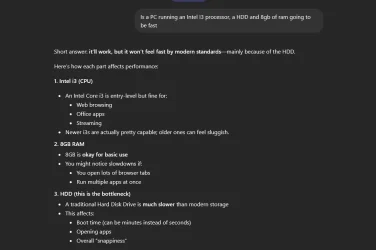
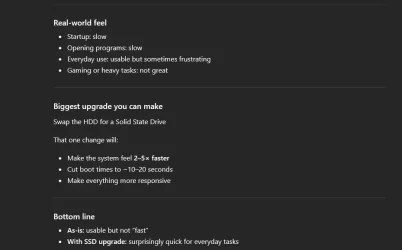
Windows 11 and an incredibly slow, new Dell desktop


And thanks for the detailed instructions. I wouldn't mind at all dropping $150 on a solid-state 1TB drive, but if it means re-installing all of my files, iTunes, song files, re-installing programs, etc... ugh. That would take me weeks, plus I'd have to find someone to install the new drive, because I certainly wouldn't want to open up the metal box.

But again, do you think that alone is the main reason for this problem, or is it file structure or Defender running amok?

It's been a long time since I heard of significant Defender issues. Not impossible.

More likely:

Dell crap running

One Drive running amok.

Undiagnosed and unnecessary processes running....probably fixable, but not by you alone.

Undiagnosed hardware issues; not sure what Dell service guys checked? RAM? This needs to be confirmed by Micro Center or whoever.

Virus/malware; unlikely if Defender is doing what it is supposed to do.

I suppose you could even have a CPU throttling issue due to heat. Don't know if Dell checked that.

If you ever get this thing sobered up, you should install "HWInfo64" a superb way to get an overview of hardware performance....temperatures, wattage, CPU speeds, fan speeds, etc. It's free.
 

My Computer

System One

  • OS
    Windows 11 Pro
    Computer type
    PC/Desktop
    Manufacturer/Model
    Fishmill Special
    CPU
    Intel 265K
    Motherboard
    MSI Pro Z890-A
    Memory
    G Skill DDR5 2 x 16 kit 6000/36
    Graphics Card(s)
    none
    Sound Card
    none
    Monitor(s) Displays
    Dell 2316H
    Screen Resolution
    1600 x 900
    Hard Drives
    WD SN770 NVME 500 GB boot; Intel 660p NVME 2 TB and WD Green 3 TB storage
    PSU
    Be Quiet 13M 750 ATX 3.1
    Case
    Lancool PC-K65
    Cooling
    Noctua U12S
    Keyboard
    Logitech K120 Wired
    Mouse
    Dell MS-116
    Browser
    Chrome
    Antivirus
    Microsoft Defender and Malwarebytes
If you ever get this thing sobered up, you should install "HWInfo64" a superb way to get an overview of hardware performance....temperatures, wattage, CPU speeds, fan speeds, etc. It's free.
Sorry, I just can't let this one pass... From everything you know about me from this thread, what possible benefit do you think I would get from knowing the temperature, wattage, CPU speed, etc. of the hardware? I'm guessing you're an engineer? (No offense, but I can barely change a light bulb, as you can see from my questions). Just kidding, of course! :-)
 

My Computer

System One

  • OS
    Windows 11 Home
    Computer type
    PC/Desktop
    Manufacturer/Model
    Dell Inspiron 3891
Would you trust them to do a decent job with that? And maybe replace my Desktop folder system with shortcuts to the Documents folder, if that makes the whole thing work better?

I would not want to vouch for anybody.

But it's not like you have 10 choices from which to pick...as far as I know. Given MC or Best Buy, I'd lean to the former, but you could have a bad experience from anyone. Take the risk or spin your wheels.

If you go to Micro Center, I'd print out a document of what you EXPLICITLY want. Don't be vague.

I'd want:

General diagnosis; have them find out why it's slow BEFORE doing anything else.

After they report back to you, then authorize whatever you then want.

Probably:

New SSD; not necessarily 1 TB if you don't need 1 TB; probably an NVME; generation 3 or 4, not 5. Western Digital, Samsung, Crucial brands OK.

Clean install of Windows alone, using your current Product Key; activated

May as well keep the 7200 rpm drive as an extra storage device, but have them confirm it is not defective.

Have them test your hardware generally, including RAM.

Have them confirm cooling is at least adequate, say various temps in the 40s to 70s when PC is working hard. Maybe splurge on a new cooler, but don't know if it will fit in that skinny Inspiron.

Don't know if you are capable of installing whatever software you use. If you are not, that becomes part of their job and you'd pay for it.

I wouldn't have them fiddle with your file structure/file system. That's highly personal and could confuse you. I assume you've been using defaults. That's OK.

Pretend they will lose ALL of your personal data when you walk in the building and know how you will recover from that after you take it home. If you don't know how, don't make a move toward a repair man.
 

My Computer

System One

  • OS
    Windows 11 Pro
    Computer type
    PC/Desktop
    Manufacturer/Model
    Fishmill Special
    CPU
    Intel 265K
    Motherboard
    MSI Pro Z890-A
    Memory
    G Skill DDR5 2 x 16 kit 6000/36
    Graphics Card(s)
    none
    Sound Card
    none
    Monitor(s) Displays
    Dell 2316H
    Screen Resolution
    1600 x 900
    Hard Drives
    WD SN770 NVME 500 GB boot; Intel 660p NVME 2 TB and WD Green 3 TB storage
    PSU
    Be Quiet 13M 750 ATX 3.1
    Case
    Lancool PC-K65
    Cooling
    Noctua U12S
    Keyboard
    Logitech K120 Wired
    Mouse
    Dell MS-116
    Browser
    Chrome
    Antivirus
    Microsoft Defender and Malwarebytes
Sorry, I just can't let this one pass... From everything you know about me from this thread, what possible benefit do you think I would get from knowing the temperature, wattage, CPU speed, etc. of the hardware? I'm guessing you're an engineer? (No offense, but I can barely change a light bulb, as you can see from my questions). Just kidding, of course! :-)

At a minimum, I'd want to know if my fans were spinning at all. You probably have 2 or 3 inside that thing. And the resultant temperatures if they were not. At a certain temp, your CPU will literally shut off by design.

For all either of us know, that is happening right now. Unlikely, but possible. That's one of the reasons I'd want a diagnosis, rather than merely "just gimme a new drive and a clean install". An engineer's curiosity if nothing else.
 

My Computer

System One

  • OS
    Windows 11 Pro
    Computer type
    PC/Desktop
    Manufacturer/Model
    Fishmill Special
    CPU
    Intel 265K
    Motherboard
    MSI Pro Z890-A
    Memory
    G Skill DDR5 2 x 16 kit 6000/36
    Graphics Card(s)
    none
    Sound Card
    none
    Monitor(s) Displays
    Dell 2316H
    Screen Resolution
    1600 x 900
    Hard Drives
    WD SN770 NVME 500 GB boot; Intel 660p NVME 2 TB and WD Green 3 TB storage
    PSU
    Be Quiet 13M 750 ATX 3.1
    Case
    Lancool PC-K65
    Cooling
    Noctua U12S
    Keyboard
    Logitech K120 Wired
    Mouse
    Dell MS-116
    Browser
    Chrome
    Antivirus
    Microsoft Defender and Malwarebytes
I would not want to vouch for anybody...

Pretend they will lose ALL of your personal data when you walk in the building and know how you will recover from that after you take it home. If you don't know how, don't make a move toward a repair man.
Very helpful, thanks.
 

My Computer

System One

  • OS
    Windows 11 Home
    Computer type
    PC/Desktop
    Manufacturer/Model
    Dell Inspiron 3891
At a minimum, I'd want to know if my fans were spinning at all. You probably have 2 or 3 inside that thing. And the resultant temperatures if they were not. At a certain temp, your CPU will literally shut off by design.

For all either of us know, that is happening right now. Unlikely, but possible. That's one of the reasons I'd want a diagnosis, rather than merely "just gimme a new drive and a clean install". An engineer's curiosity if nothing else.
First, I was only joking, of course, didn't mean to mock your recommendations. Self-deprecation.

But it turns out I know a thing or two about overheating, because that's what my 10-year old crappy ASUS work laptop does. At least 2-3 times a day when doing things like Norton updates. I can hear the fan ramp up louder, then poof, it's asleep, requiring a 30-second "work break" before I can boot up again. Fortunately it's not an actual crash, I don't lose anything, it just goes dark until I restart it and I'm right back in the middle of that email or webpage. Now when I hear the fan ramp up, I unplug it, moving it to battery power, which seems to reduce the auto-sleep mode.

Turns out it's a known ASUS fault on that model, but I can't go to the trouble to get it fixed and should just get a new laptop - but then back to the same copy-and-reinstall nightmare!

BUT THAT'S ANOTHER STORY THAT I WILL NOT BURDEN YOU WITH! :-) :-) :-) (Now you can see why I hate computers so much.)
 

My Computer

System One

  • OS
    Windows 11 Home
    Computer type
    PC/Desktop
    Manufacturer/Model
    Dell Inspiron 3891
Please run the V2 log collector > post a share link


Run Tuneup plus > post a share link


My Computer

System One

  • OS
    Windows 10
    Computer type
    Laptop
    Manufacturer/Model
    HP
    CPU
    Intel(R) Core(TM) i7-4800MQ CPU @ 2.70GHz
    Motherboard
    Product : 190A Version : KBC Version 94.56
    Memory
    16 GB Total: Manufacturer : Samsung MemoryType : DDR3 FormFactor : SODIMM Capacity : 8GB Speed : 1600
    Graphics Card(s)
    NVIDIA Quadro K3100M; Intel(R) HD Graphics 4600
    Sound Card
    IDT High Definition Audio CODEC; PNP Device ID HDAUDIO\FUNC_01&VEN_111D&DEV_76E0
    Hard Drives
    Model Hitachi HTS727575A9E364
    Antivirus
    Microsoft Defender
    Other Info
    Mobile Workstation
Hi all - just a quick update on this Dell desktop situation (I haven't had time to take it to Micro Center). The machine has been running for a week now without shutting it down (although it has gone into Sleep mode), and at times it runs better and I can scroll through photos, or open multiple webpages with the Edge browser. But today I started Edge and opened two or three tabs of news items from Yahoo.com. That's virtually all I was doing with the computer, not running iTunes or a single program (as far as I know). The whole thing froze up because I had four tabs open in the Edge browser! I couldn't go to a different tab, nothing lighted up when the cursor crossed it, it was simply frozen for several minutes. I couldn't switch tabs or close the browser either.

So I hit Ctrl-Alt-Delete to bring up Task Manager. That alone took 20-25 seconds to pop up. There were the usual hundreds of background processes on the list under Processes (Console Host, service host, etc), none of which I understand what they do, or whether they are supposed to be there or not. Across the top it said the CPU was at 3-8% (is that full or empty?), but Memory was showing like 90%. Does that mean that memory was 90% free, or 90% in use - while running the Edge browser with four tabs open??? Disk was showing between 6% and 57%.

So then I went down to the Performance tab in the Task Manager and took a photo of it. That showed the CPU graph at about 3% (2.14 GHz), but below it the memory graph was at 6.7/7.7GB (87%)! So does this mean that opening four tabs of Yahoo news in Edge - AND DOING NOTHING ELSE - is somehow consuming 87% of this computer's RAM or whatever it is? What the hell is running on this computer that is consuming all the resources, when I am doing NOTHING but opening a webpage? It can't be Norton Antivirus because I removed it, it's got to be some Windows process out of control, right?

Thanks.
 

My Computer

System One

  • OS
    Windows 11 Home
    Computer type
    PC/Desktop
    Manufacturer/Model
    Dell Inspiron 3891
So I hit Ctrl-Alt-Delete to bring up Task Manager. That alone took 20-25 seconds to pop up. There were the usual hundreds of background processes on the list under Processes (Console Host, service host, etc), none of which I understand what they do, or whether they are supposed to be there or not. Across the top it said the CPU was at 3-8% (is that full or empty?), but Memory was showing like 90%. Does that mean that memory was 90% free, or 90% in use - while running the Edge browser with four tabs open??? Disk was showing between 6% and 57%.
So then I went down to the Performance tab in the Task Manager and took a photo of it. That showed the CPU graph at about 3% (2.14 GHz), but below it the memory graph was at 6.7/7.7GB (87%)! So does this mean that opening four tabs of Yahoo news in Edge - AND DOING NOTHING ELSE - is somehow consuming 87% of this computer's RAM or whatever it is? What the hell is running on this computer that is consuming all the resources, when I am doing NOTHING but opening a webpage? It can't be Norton Antivirus because I removed it, it's got to be some Windows process out of control, right?

Thanks.
Bumping this - can anyone tell me what is going on based on the above Performance data under Task Manager? Is this relevant to the problem? Thanks.
 

My Computer

System One

  • OS
    Windows 11 Home
    Computer type
    PC/Desktop
    Manufacturer/Model
    Dell Inspiron 3891
Now I'm out of here to find that MicroCenter.

What was found at the Microcenter?

Please update the progress with posts #5 and #67.
 
Last edited:

My Computer

System One

  • OS
    Windows 10
    Computer type
    Laptop
    Manufacturer/Model
    HP
    CPU
    Intel(R) Core(TM) i7-4800MQ CPU @ 2.70GHz
    Motherboard
    Product : 190A Version : KBC Version 94.56
    Memory
    16 GB Total: Manufacturer : Samsung MemoryType : DDR3 FormFactor : SODIMM Capacity : 8GB Speed : 1600
    Graphics Card(s)
    NVIDIA Quadro K3100M; Intel(R) HD Graphics 4600
    Sound Card
    IDT High Definition Audio CODEC; PNP Device ID HDAUDIO\FUNC_01&VEN_111D&DEV_76E0
    Hard Drives
    Model Hitachi HTS727575A9E364
    Antivirus
    Microsoft Defender
    Other Info
    Mobile Workstation
Bumping this - can anyone tell me what is going on based on the above Performance data under Task Manager? Is this relevant to the problem? Thanks.


CPU and 3 to 8 percent means that is the load on the CPU at that moment, very low. Over 90 percent not used. Memory 90 percent means 90 percent in use; 10 remaining. Not surprising. Right now, my Windows 11 PC is under a very light load and I'm using 12 gb of memory out of 32 total. The more memory you have, the more Windows will tend to use. When I had Windows 10, my PC would typically use 5 of 8.

You say "and doing nothing else" other than 4 tabs of Edge. Not correct. You also state you have "hundreds" of processes running...much more than Edge alone.

You are using nearly 7 of 8 GB of your RAM and certainly could have some extraneous and unnecessary processes running every time you start. We don't know.

But the bigger point was made earlier in this thread...by your own admission you have very little knowledge and probably even less inclination to personally I say personally attempt to get under the hood of the PC.

Thus the recommendation for repair places such as Micro Center. Maybe you still can't find time for that?

We could attempt to dig into your processes and give you things to try, etc etc. But your earlier responses indicate there's not much point to that.

"I can barely change a light bulb". "I certainly wouldn't want to open up the metal box". "I don't have the time, skill, patience or interest to deal with it".
 

My Computer

System One

  • OS
    Windows 11 Pro
    Computer type
    PC/Desktop
    Manufacturer/Model
    Fishmill Special
    CPU
    Intel 265K
    Motherboard
    MSI Pro Z890-A
    Memory
    G Skill DDR5 2 x 16 kit 6000/36
    Graphics Card(s)
    none
    Sound Card
    none
    Monitor(s) Displays
    Dell 2316H
    Screen Resolution
    1600 x 900
    Hard Drives
    WD SN770 NVME 500 GB boot; Intel 660p NVME 2 TB and WD Green 3 TB storage
    PSU
    Be Quiet 13M 750 ATX 3.1
    Case
    Lancool PC-K65
    Cooling
    Noctua U12S
    Keyboard
    Logitech K120 Wired
    Mouse
    Dell MS-116
    Browser
    Chrome
    Antivirus
    Microsoft Defender and Malwarebytes
I loaded up all my old files on to the new computer, files and programs which consists of almost nothing but photos (more than 30,000 of them, about 100 GB), plus my old iTunes library, which I still use with my ancient but functional iPods. Plus a program called HAP which allowed me to load a few thousand CDs worth of music onto an external hard drive Sony player. That's it - a total of about 250GB of data on this brand-new 900GB machine. No gaming, no performance-hogging programs of any kind, not even Word or Excel on this computer.
From what I can tell no one has pointed out a glaring issue?

I'm betting you set it up using a Microsoft account which means all your personal folders (Desktop, Documents, Pictures, and Videos) are located in Onedrive, not on your system drive. You are given only 5gb of free onedrive storage. Yet you loaded 100 gb of photos onto it. That ain't gonna work. You will have to remedy that. The only way you can get enough Onedrive storage to accomodate that much data is to subscribe to Microsoft 365.

I know I'm going to regret giving my opinion, but here it is anyway.

With as much this and that you've done and been told to do I would reset the laptop to factory and start over. If you call Dell support, that's the first thing they will have you do, either before you start any troubleshooting with them OR before they will let you return the computer..

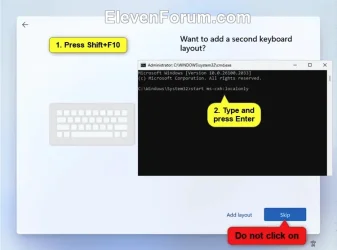
This time, set it up with a local account. To do this, when you boot up the machine after it's reset to factory condition, it will go through out of box OOBE.
When you get to the "Add a second keyboard" DO NOT SELECT SKIP.
Press the Shift + F10 keys to open a command prompt.
You may need to press the Shift + Fn + F10 keys on some devices instead.
At the command prompt, type start ms-cxh:localonly
1775885339985.webp

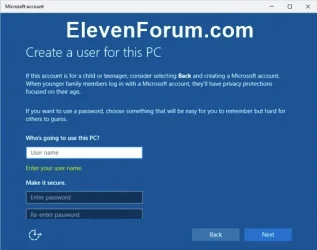
Enter a user name you want for this local account.
Enter and Re-enter to confirm a password you want for this local account.
Answer the security questions.
It will then go to add second keyboard which you can select SKIP. Setup will continue using a local account. When using a local account your personal folders are not attached to Onedrive. If you get any prompt to backup your files, decline it, If you get popups regarding Onedrive, DO NOT SIGN INTO ONEDRIVE.
1775885451649.webp

RUN IT A COUPLE OF DAYS AS IT CAME FROM THE FACTORY. DO NOT INSTALL ANY APPS OR MOVE YOUR FILES INTO THE NEW SETUP. If it runs as expected, you know there's nothing wrong with the computer. You can copy your files back into their respective folders which will be located on your system drive... If it does NOT run as expected, contact Dell support before moving files or installing apps..

You will also need to go to Onedrive on the web and delete all the files, because after so long your Microsoft account email will stop working since there is no Onedrive space for your Outlook emails to be stored because you are so far over your onedrive limit. https://www.microsoft.com/en-us/microsoft-365/onedrive/online-cloud-storage
 

My Computers

System One System Two

  • OS
    Windows 11 Pro 25H2 26200.8655
    Computer type
    PC/Desktop
    Manufacturer/Model
    Dell Optiplex 7080
    CPU
    i9-10900 10 core 20 threads
    Motherboard
    DELL 0J37VM
    Memory
    32 gb
    Graphics Card(s)
    none-Intel UHD Graphics 630
    Sound Card
    Integrated Realtek
    Monitor(s) Displays
    Benq 27
    Screen Resolution
    2560x1440
    Hard Drives
    2x1tb Solidigm m.2 nvme /External drives 512gb Samsung m.2 sata+2tb Kingston m2.nvme
    PSU
    500w
    Case
    MT
    Cooling
    Dell Premium
    Keyboard
    Logitech wired
    Mouse
    Logitech wireless
    Internet Speed
    so slow I'm too embarrassed to tell
    Browser
    #1 Edge #2 Firefox
    Antivirus
    Defender+MWB Premium
  • Operating System
    Windows 11 Pro 24H2 26200.8457
    Computer type
    PC/Desktop
    Manufacturer/Model
    Beelink Mini PC SER5
    CPU
    AMD Ryzen 7 6800U
    Memory
    32 gb
    Graphics card(s)
    integrated
    Sound Card
    integrated
    Monitor(s) Displays
    Benq 27
    Screen Resolution
    2560x1440
    Hard Drives
    1TB Crucial nvme
    Keyboard
    Logitech wired
    Mouse
    Logitech wireless
    Internet Speed
    still too embarrassed to tell
    Browser
    Firefox
    Antivirus
    Defender
    Other Info
    System 3 is non compliant Dell 9020 i7-4770/24gb ram Win11 PRO 26200.8457
CPU and 3 to 8 percent means that is the load on the CPU at that moment, very low. Over 90 percent not used. Memory 90 percent means 90 percent in use; 10 remaining. Not surprising. Right now, my Windows 11 PC is under a very light load and I'm using 12 gb of memory out of 32 total. The more memory you have, the more Windows will tend to use. When I had Windows 10, my PC would typically use 5 of 8.

You say "and doing nothing else" other than 4 tabs of Edge. Not correct. You also state you have "hundreds" of processes running...much more than Edge alone.

You are using nearly 7 of 8 GB of your RAM and certainly could have some extraneous and unnecessary processes running every time you start. We don't know.

But the bigger point was made earlier in this thread...by your own admission you have very little knowledge and probably even less inclination to personally I say personally attempt to get under the hood of the PC.

Thus the recommendation for repair places such as Micro Center. Maybe you still can't find time for that?

We could attempt to dig into your processes and give you things to try, etc etc. But your earlier responses indicate there's not much point to that.

"I can barely change a light bulb". "I certainly wouldn't want to open up the metal box". "I don't have the time, skill, patience or interest to deal with it".
Fair point - I just wondered if any of the performance data pointed to an obvious issue. Apparently it doesn’t, and we’re left with those hundreds of unidentified processes running that I can’t sift through. So it appears unplugging everything and hauling it to MicroCenter is the only solution. Thanks.
 

My Computer

System One

  • OS
    Windows 11 Home
    Computer type
    PC/Desktop
    Manufacturer/Model
    Dell Inspiron 3891
From what I can tell no one has pointed out a glaring issue?

I'm betting you set it up using a Microsoft account which means all your personal folders (Desktop, Documents, Pictures, and Videos) are located in Onedrive, not on your system drive. You are given only 5gb of free onedrive storage. Yet you loaded 100 gb of photos onto it. That ain't gonna work. You will have to remedy that. The only way you can get enough Onedrive storage to accomodate that much data is to subscribe to Microsoft 365.

I know I'm going to regret giving my opinion, but here it is anyway.

With as much this and that you've done and been told to do I would reset the laptop to factory and start over. If you call Dell support, that's the first thing they will have you do, either before you start any troubleshooting with them OR before they will let you return the computer..

This time, set it up with a local account. To do this, when you boot up the machine after it's reset to factory condition, it will go through out of box OOBE.
When you get to the "Add a second keyboard" DO NOT SELECT SKIP.
Press the Shift + F10 keys to open a command prompt.
You may need to press the Shift + Fn + F10 keys on some devices instead.
At the command prompt, type start ms-cxh:localonly
View attachment 168361

Enter a user name you want for this local account.
Enter and Re-enter to confirm a password you want for this local account.
Answer the security questions.
It will then go to add second keyboard which you can select SKIP. Setup will continue using a local account. When using a local account your personal folders are not attached to Onedrive. If you get any prompt to backup your files, decline it, If you get popups regarding Onedrive, DO NOT SIGN INTO ONEDRIVE.
View attachment 168362

RUN IT A COUPLE OF DAYS AS IT CAME FROM THE FACTORY. DO NOT INSTALL ANY APPS OR MOVE YOUR FILES INTO THE NEW SETUP. If it runs as expected, you know there's nothing wrong with the computer. You can copy your files back into their respective folders which will be located on your system drive... If it does NOT run as expected, contact Dell support before moving files or installing apps..

You will also need to go to Onedrive on the web and delete all the files, because after so long your Microsoft account email will stop working since there is no Onedrive space for your Outlook emails to be stored because you are so far over your onedrive limit. https://www.microsoft.com/en-us/microsoft-365/onedrive/online-cloud-storage
Thanks, but I do have Microsoft 365, and I’ve never activated OneDrive for either my home PC or my work laptop.
 

My Computer

System One

  • OS
    Windows 11 Home
    Computer type
    PC/Desktop
    Manufacturer/Model
    Dell Inspiron 3891
Just an observation............ with only 8GB ram and a spinning hard drive, you're probably getting all you're going to get out of that machine. Sorry.
 

My Computer

System One

  • OS
    Windows 11 Pro 25H2 (26200.8457)
    Computer type
    PC/Desktop
    Manufacturer/Model
    CLX Intel Battlebox Ultimate (RA)
    CPU
    Intel® Core™ i9-13900KS 3.20GHz
    Motherboard
    ASUS ROG Maximus Z790 Hero WIFI - ATX
    Memory
    128GB DDR5-5200 Kingston Fury Beast RGB
    Graphics Card(s)
    Zotac Trinity NVIDIA® GeForce® RTX 4090 24GB GDDR6X
    Sound Card
    Realtek USB Audio
    Monitor(s) Displays
    Dell G3223Q 32" 4K Ultra HD
    Screen Resolution
    3840x2160 @144hz
    Hard Drives
    2TB x 2 Samsung 990 Pro 2280 NVMe M.2 SSD's
    2TB x 1 Samsung 980 Pro 2280 NVMe M.2 SSD
    4 TB x 1 My Passport Ultra External USB
    PSU
    1200W Corsair HX Ser HX1200 80+ Platinum
    Case
    Lian Li / Der Bauer 011DXL ROG
    Cooling
    Phanteks Glacier One 360 RGB AIO LC
    Keyboard
    Logitech K330 Wireless
    Mouse
    Logitech M310 Wireless
    Internet Speed
    1GB Fiber : 945/57
    Browser
    Firefox - Brave
    Antivirus
    Bitdefender Premium Personal
    Other Info
    Macrium Reflect X
Just an observation............ with only 8GB ram and a spinning hard drive, you're probably getting all you're going to get out of that machine. Sorry.
And an I3 processor.. It's not going to be fast.
 

My Computer

System One

  • OS
    Windows 11 Home(RP) - 25H2 -26200.8728
    Computer type
    PC/Desktop
    Manufacturer/Model
    Banana Junior 5600-G Series
    CPU
    AMD Ryzen 5 5600G
    Motherboard
    Asus ROG Strix B550-F
    Memory
    G.SKILL Ripjaws V Series 64GB 4x16
    Graphics Card(s)
    Nvidia geforce gtx titan x
    Monitor(s) Displays
    28" ASUS VP28U 4k
    Screen Resolution
    4K
    Hard Drives
    Primary SAMSUNG 970 EVO Plus
    PSU
    EVGA BQ 700w 80+ Bronze
    Case
    Zalman i3 NEO
    Cooling
    ARCTIC Freezer 7 X
    Keyboard
    Corsair
    Mouse
    Amazon Generic with Cord
    Internet Speed
    Download: 295.11 mbps Upload: 65.35 mbps T-Mobile Internet
    Browser
    Firefox and Edge
    Antivirus
    MS - Defender
    Other Info
    Speakers: Klipsch ProMedia 2.1
1775936999834.webp
 

My Computer

System One

  • OS
    Windows 11 Home(RP) - 25H2 -26200.8728
    Computer type
    PC/Desktop
    Manufacturer/Model
    Banana Junior 5600-G Series
    CPU
    AMD Ryzen 5 5600G
    Motherboard
    Asus ROG Strix B550-F
    Memory
    G.SKILL Ripjaws V Series 64GB 4x16
    Graphics Card(s)
    Nvidia geforce gtx titan x
    Monitor(s) Displays
    28" ASUS VP28U 4k
    Screen Resolution
    4K
    Hard Drives
    Primary SAMSUNG 970 EVO Plus
    PSU
    EVGA BQ 700w 80+ Bronze
    Case
    Zalman i3 NEO
    Cooling
    ARCTIC Freezer 7 X
    Keyboard
    Corsair
    Mouse
    Amazon Generic with Cord
    Internet Speed
    Download: 295.11 mbps Upload: 65.35 mbps T-Mobile Internet
    Browser
    Firefox and Edge
    Antivirus
    MS - Defender
    Other Info
    Speakers: Klipsch ProMedia 2.1
1775937043773.webp
 

My Computer

System One

  • OS
    Windows 11 Home(RP) - 25H2 -26200.8728
    Computer type
    PC/Desktop
    Manufacturer/Model
    Banana Junior 5600-G Series
    CPU
    AMD Ryzen 5 5600G
    Motherboard
    Asus ROG Strix B550-F
    Memory
    G.SKILL Ripjaws V Series 64GB 4x16
    Graphics Card(s)
    Nvidia geforce gtx titan x
    Monitor(s) Displays
    28" ASUS VP28U 4k
    Screen Resolution
    4K
    Hard Drives
    Primary SAMSUNG 970 EVO Plus
    PSU
    EVGA BQ 700w 80+ Bronze
    Case
    Zalman i3 NEO
    Cooling
    ARCTIC Freezer 7 X
    Keyboard
    Corsair
    Mouse
    Amazon Generic with Cord
    Internet Speed
    Download: 295.11 mbps Upload: 65.35 mbps T-Mobile Internet
    Browser
    Firefox and Edge
    Antivirus
    MS - Defender
    Other Info
    Speakers: Klipsch ProMedia 2.1
Bottom line is the HDD is your main issue. Get an SSD
 

My Computer

System One

  • OS
    Windows 11 Home(RP) - 25H2 -26200.8728
    Computer type
    PC/Desktop
    Manufacturer/Model
    Banana Junior 5600-G Series
    CPU
    AMD Ryzen 5 5600G
    Motherboard
    Asus ROG Strix B550-F
    Memory
    G.SKILL Ripjaws V Series 64GB 4x16
    Graphics Card(s)
    Nvidia geforce gtx titan x
    Monitor(s) Displays
    28" ASUS VP28U 4k
    Screen Resolution
    4K
    Hard Drives
    Primary SAMSUNG 970 EVO Plus
    PSU
    EVGA BQ 700w 80+ Bronze
    Case
    Zalman i3 NEO
    Cooling
    ARCTIC Freezer 7 X
    Keyboard
    Corsair
    Mouse
    Amazon Generic with Cord
    Internet Speed
    Download: 295.11 mbps Upload: 65.35 mbps T-Mobile Internet
    Browser
    Firefox and Edge
    Antivirus
    MS - Defender
    Other Info
    Speakers: Klipsch ProMedia 2.1
And get 8GB more RAM.
 

My Computer

System One

  • OS
    Windows 11 Home(RP) - 25H2 -26200.8728
    Computer type
    PC/Desktop
    Manufacturer/Model
    Banana Junior 5600-G Series
    CPU
    AMD Ryzen 5 5600G
    Motherboard
    Asus ROG Strix B550-F
    Memory
    G.SKILL Ripjaws V Series 64GB 4x16
    Graphics Card(s)
    Nvidia geforce gtx titan x
    Monitor(s) Displays
    28" ASUS VP28U 4k
    Screen Resolution
    4K
    Hard Drives
    Primary SAMSUNG 970 EVO Plus
    PSU
    EVGA BQ 700w 80+ Bronze
    Case
    Zalman i3 NEO
    Cooling
    ARCTIC Freezer 7 X
    Keyboard
    Corsair
    Mouse
    Amazon Generic with Cord
    Internet Speed
    Download: 295.11 mbps Upload: 65.35 mbps T-Mobile Internet
    Browser
    Firefox and Edge
    Antivirus
    MS - Defender
    Other Info
    Speakers: Klipsch ProMedia 2.1

Latest Support Threads

Back
Top Bottom