Windows 11 does not work with monitor using Display Port?


xvilar

Member
Local time
10:01 AM
Posts
16
OS
Windows 11 Pro
Installing WIndows 11 from USB, with the computer connected using Display Port to the monitor.

Asus Prime Z690 Wifi D4 + Intel I7 12700k processor with Intel Integrated UHD Intel 770 graphic card
Philips 241b8q monitor connected using Display Port 1.2 4k UHD cable

Computer boots, BIOS, etc. Boot menu, I choose boot from USB, it boots. Then the installation wizard is shown, I select language, installation target disk, etc. etc. the installation begins... it does many things, and after a while, I'm asked to enter my user, and then screen seems to switch off and does not shown anything more ¿?

Computer seems to keep working, the Monitor continues working.... but nothing is shown in screen

what's happening with display port???
 
Windows Build/Version
Windows 11
Last edited:

My Computer My Computer

At a glance

Windows 11 ProIntel I7 12700k2x16Gb Corsair Vengeance LPX DDR4 3600 MHzIntegrated Intel 770 UHD
OS
Windows 11 Pro
Computer type
PC/Desktop
Manufacturer/Model
Own
CPU
Intel I7 12700k
Motherboard
Asus Prime Z690-P Wifi D4
Memory
2x16Gb Corsair Vengeance LPX DDR4 3600 MHz
Graphics Card(s)
Integrated Intel 770 UHD
Sound Card
Integrated
Monitor(s) Displays
Philips 241b8q
Screen Resolution
1920x1080
Hard Drives
WD_BLACK SN850 500 GB
Corsair MP600 Pro SSD 1TB
PSU
be quiet! Pure Power 11 cm ATX PC 600W 80Plus Gold
Case
be quiet! Pure Base 600
Cooling
Noctua NH-D15S
Keyboard
Logi
Mouse
Logi
Its clearly sending over a good signal for you to do all those steps prior. What makes you think its the display port?
 

My Computer My Computer

At a glance

Unix System
OS
Unix System
I've tried the same using HDMI cable and it works ...

I had the same computer connected usign HDMI, and first I've done was to unplugg HDMI cable and connect Display port cable. Nothing shown.
Second I've tried to connect another monitor with HDMI and the current one (Philips 241b8q) with Display Port cable and it works like a charm with dual screen ... but Windows 11 with only display port to the philips monitor, does not work (as said bios works, boot / post works, windows 11 installation wizard works... but then, black screen)

I removed my regular Hard disks and tried to re-install from scratch windows 11 from usb... but the result is what I've posted in first message...

My bet is on Windows 11, and not the display port cable or display port connector. Bios is shown correctly with display port cable, windows 11 installation wizard it's shown correctly with same display port cable
 

My Computer My Computer

At a glance

Windows 11 ProIntel I7 12700k2x16Gb Corsair Vengeance LPX DDR4 3600 MHzIntegrated Intel 770 UHD
OS
Windows 11 Pro
Computer type
PC/Desktop
Manufacturer/Model
Own
CPU
Intel I7 12700k
Motherboard
Asus Prime Z690-P Wifi D4
Memory
2x16Gb Corsair Vengeance LPX DDR4 3600 MHz
Graphics Card(s)
Integrated Intel 770 UHD
Sound Card
Integrated
Monitor(s) Displays
Philips 241b8q
Screen Resolution
1920x1080
Hard Drives
WD_BLACK SN850 500 GB
Corsair MP600 Pro SSD 1TB
PSU
be quiet! Pure Power 11 cm ATX PC 600W 80Plus Gold
Case
be quiet! Pure Base 600
Cooling
Noctua NH-D15S
Keyboard
Logi
Mouse
Logi
Hi,
Black screen is the new blue screen of death so something is borked

Probably something weird on onboard graphic's
 

My Computer My Computer

At a glance

Win-7-10-11Pro's10900k & 9940x & 5930kTrident-Z Royal 4000c16 2x16gb & Trident-Z 36...Titan Xp & 1080ti FTW3 & evga 980ti gaming
OS
Win-7-10-11Pro's
Computer type
PC/Desktop
Manufacturer/Model
Acer 17" Nitro 7840sn/ 2x16gb 5600c40/ 4060/ stock 1tb-os/ 4tb sn850x
CPU
10900k & 9940x & 5930k
Motherboard
z490-Apex & x299-Apex & x99-Sabertooth
Memory
Trident-Z Royal 4000c16 2x16gb & Trident-Z 3600c16 4x8gb & 3200c14 4x8gb
Graphics Card(s)
Titan Xp & 1080ti FTW3 & evga 980ti gaming
Sound Card
Onboard Realtek x3
Monitor(s) Displays
1-AOC G2460PG 24"G-Sync 144Hz/ 2nd 1-ASUS VG248QE 24"/ 3rd LG 43" series
Screen Resolution
1920-1080 not sure what the t.v is besides 43" class scales from 1920-1080 perfectly
Hard Drives
2-WD-sn850x 4tb/ 970evo+500gb/ 980 pro 2tb.
PSU
1000p2 & 1200p2 & 850p2
Case
D450 x2 & 1 Test bench in cherry Entertainment center
Cooling
Custom water loops x3 with 2x mora 360mm rads only 980ti gaming air cooled
Keyboard
G710+x3
Mouse
Redragon x3
Internet Speed
xfinity gigabyte
Browser
Firefox
Antivirus
mbam pro
Hi,
Black screen is the new blue screen of death so something is borked

Probably something weird on onboard graphic's
I don't think so, because before re-installing (when I removed HDMI I was using and connected display port) nothing was shown on monitor, but I was able to reach windows 11 by remote desktop and it kept working...
 

My Computer My Computer

At a glance

Windows 11 ProIntel I7 12700k2x16Gb Corsair Vengeance LPX DDR4 3600 MHzIntegrated Intel 770 UHD
OS
Windows 11 Pro
Computer type
PC/Desktop
Manufacturer/Model
Own
CPU
Intel I7 12700k
Motherboard
Asus Prime Z690-P Wifi D4
Memory
2x16Gb Corsair Vengeance LPX DDR4 3600 MHz
Graphics Card(s)
Integrated Intel 770 UHD
Sound Card
Integrated
Monitor(s) Displays
Philips 241b8q
Screen Resolution
1920x1080
Hard Drives
WD_BLACK SN850 500 GB
Corsair MP600 Pro SSD 1TB
PSU
be quiet! Pure Power 11 cm ATX PC 600W 80Plus Gold
Case
be quiet! Pure Base 600
Cooling
Noctua NH-D15S
Keyboard
Logi
Mouse
Logi
They did change the blue screen of death color to black

Whether you're having one is another story :)

I've not had very good luck with asus prime series boards.
 

My Computer My Computer

At a glance

Win-7-10-11Pro's10900k & 9940x & 5930kTrident-Z Royal 4000c16 2x16gb & Trident-Z 36...Titan Xp & 1080ti FTW3 & evga 980ti gaming
OS
Win-7-10-11Pro's
Computer type
PC/Desktop
Manufacturer/Model
Acer 17" Nitro 7840sn/ 2x16gb 5600c40/ 4060/ stock 1tb-os/ 4tb sn850x
CPU
10900k & 9940x & 5930k
Motherboard
z490-Apex & x299-Apex & x99-Sabertooth
Memory
Trident-Z Royal 4000c16 2x16gb & Trident-Z 3600c16 4x8gb & 3200c14 4x8gb
Graphics Card(s)
Titan Xp & 1080ti FTW3 & evga 980ti gaming
Sound Card
Onboard Realtek x3
Monitor(s) Displays
1-AOC G2460PG 24"G-Sync 144Hz/ 2nd 1-ASUS VG248QE 24"/ 3rd LG 43" series
Screen Resolution
1920-1080 not sure what the t.v is besides 43" class scales from 1920-1080 perfectly
Hard Drives
2-WD-sn850x 4tb/ 970evo+500gb/ 980 pro 2tb.
PSU
1000p2 & 1200p2 & 850p2
Case
D450 x2 & 1 Test bench in cherry Entertainment center
Cooling
Custom water loops x3 with 2x mora 360mm rads only 980ti gaming air cooled
Keyboard
G710+x3
Mouse
Redragon x3
Internet Speed
xfinity gigabyte
Browser
Firefox
Antivirus
mbam pro
They did change the blue screen of death color to black

Whether you're having one is another story :)

I've not had very good luck with asus prime series boards.
I'll ask Asus support also... because it's very rare that using HDMI it works very well, even with 2 monitors (one HDMI + another DIsplay Port) windows 11 works like a charm, dual screen, etc. ... but only with display port it's not shown, or as I described, even reinstalling it reach a point that it's not shown...
 

My Computer My Computer

At a glance

Windows 11 ProIntel I7 12700k2x16Gb Corsair Vengeance LPX DDR4 3600 MHzIntegrated Intel 770 UHD
OS
Windows 11 Pro
Computer type
PC/Desktop
Manufacturer/Model
Own
CPU
Intel I7 12700k
Motherboard
Asus Prime Z690-P Wifi D4
Memory
2x16Gb Corsair Vengeance LPX DDR4 3600 MHz
Graphics Card(s)
Integrated Intel 770 UHD
Sound Card
Integrated
Monitor(s) Displays
Philips 241b8q
Screen Resolution
1920x1080
Hard Drives
WD_BLACK SN850 500 GB
Corsair MP600 Pro SSD 1TB
PSU
be quiet! Pure Power 11 cm ATX PC 600W 80Plus Gold
Case
be quiet! Pure Base 600
Cooling
Noctua NH-D15S
Keyboard
Logi
Mouse
Logi
Hi,
Nvidia released a fix for display port 1.2 long ago maybe Intel hasn't


My Computer My Computer

At a glance

Win-7-10-11Pro's10900k & 9940x & 5930kTrident-Z Royal 4000c16 2x16gb & Trident-Z 36...Titan Xp & 1080ti FTW3 & evga 980ti gaming
OS
Win-7-10-11Pro's
Computer type
PC/Desktop
Manufacturer/Model
Acer 17" Nitro 7840sn/ 2x16gb 5600c40/ 4060/ stock 1tb-os/ 4tb sn850x
CPU
10900k & 9940x & 5930k
Motherboard
z490-Apex & x299-Apex & x99-Sabertooth
Memory
Trident-Z Royal 4000c16 2x16gb & Trident-Z 3600c16 4x8gb & 3200c14 4x8gb
Graphics Card(s)
Titan Xp & 1080ti FTW3 & evga 980ti gaming
Sound Card
Onboard Realtek x3
Monitor(s) Displays
1-AOC G2460PG 24"G-Sync 144Hz/ 2nd 1-ASUS VG248QE 24"/ 3rd LG 43" series
Screen Resolution
1920-1080 not sure what the t.v is besides 43" class scales from 1920-1080 perfectly
Hard Drives
2-WD-sn850x 4tb/ 970evo+500gb/ 980 pro 2tb.
PSU
1000p2 & 1200p2 & 850p2
Case
D450 x2 & 1 Test bench in cherry Entertainment center
Cooling
Custom water loops x3 with 2x mora 360mm rads only 980ti gaming air cooled
Keyboard
G710+x3
Mouse
Redragon x3
Internet Speed
xfinity gigabyte
Browser
Firefox
Antivirus
mbam pro
Hi,
Nvidia released a fix for display port 1.2 long ago maybe Intel hasn't

Maybe... I've raised up the case to Asus, so I'll do the same with Intel... Microsoft does not know what I'm talking about...
 

My Computer My Computer

At a glance

Windows 11 ProIntel I7 12700k2x16Gb Corsair Vengeance LPX DDR4 3600 MHzIntegrated Intel 770 UHD
OS
Windows 11 Pro
Computer type
PC/Desktop
Manufacturer/Model
Own
CPU
Intel I7 12700k
Motherboard
Asus Prime Z690-P Wifi D4
Memory
2x16Gb Corsair Vengeance LPX DDR4 3600 MHz
Graphics Card(s)
Integrated Intel 770 UHD
Sound Card
Integrated
Monitor(s) Displays
Philips 241b8q
Screen Resolution
1920x1080
Hard Drives
WD_BLACK SN850 500 GB
Corsair MP600 Pro SSD 1TB
PSU
be quiet! Pure Power 11 cm ATX PC 600W 80Plus Gold
Case
be quiet! Pure Base 600
Cooling
Noctua NH-D15S
Keyboard
Logi
Mouse
Logi
Strange.

I use DisplayPort with my two Win11 desktops. The only difference I see is that I have discrete graphics cards, and I don't use the integrated graphics. Both systems could use HDMI, but I don't do that.
 

My Computers My Computers

  • At a glance

    Windows 11 26200.8728Amd Threadripper 7970X128GB (4 X 32) G.Skill DDR5 6400 (RDIMM)Gigabyte RTX 4090 OC
    OS
    Windows 11 26200.8728
    Computer type
    PC/Desktop
    Manufacturer/Model
    homebuilt
    CPU
    Amd Threadripper 7970X
    Motherboard
    Gigabyte TRX50 Aero D Rev. 1.0
    Memory
    128GB (4 X 32) G.Skill DDR5 6400 (RDIMM)
    Graphics Card(s)
    Gigabyte RTX 4090 OC
    Sound Card
    none (USB to speakers), Realtek
    Monitor(s) Displays
    Innocn 32" OLED
    Screen Resolution
    3840 X 2160 @ 60Hz
    Hard Drives
    Crucial T700 2TB M.2 NVME SSD
    WD 4TB Blue SATA SSD
    Seagate 18TB IronWolf Pro
    PSU
    BeQuiet! Straight Power 12 1500W
    Case
    Lian Li 011 Dynamic Evo XL
    Cooling
    SilverStone Technology XE360-TR5, with 3 Phanteks T30 fans
    Keyboard
    Cherry KC 500 MX LP (mechanical)
    Mouse
    Logitech M500s (wired)
    Internet Speed
    2000/250 Mbps (down/up)
    Other Info
    xFinity gateway
  • At a glance

    windows 11 26200.8728Intel I9-13900K64GB G.Skill DDR5-6000Gigabyte RTX 3090 ti
    Operating System
    windows 11 26200.8728
    Computer type
    PC/Desktop
    Manufacturer/Model
    homebuilt
    CPU
    Intel I9-13900K
    Motherboard
    Asus RoG Strix Z690-E
    Memory
    64GB G.Skill DDR5-6000
    Graphics card(s)
    Gigabyte RTX 3090 ti
    Sound Card
    built in Realtek
    Monitor(s) Displays
    Philips 27E1N8900 27" OLED
    Screen Resolution
    3840 X 2160 @60Hz
    Hard Drives
    WDC SN850 1TB
    8TB Seagate Ironwolf
    4TB Seagate Ironwolf
    PSU
    eVGA SuperNOVA 1300 GT
    Case
    Lian Li 011 Dynamic Evo
    Cooling
    Corsair iCUE H150i ELITE CAPELLIX Liquid CPU Cooler
    Keyboard
    Cherry Streaming (wired)
    Mouse
    Logitech M500s (wired)
@xvilar,

There should be no more an issue with DisplayPort on Windows 11, than was on Windows 10.

Anyway, I'm using a DisplayPort cable with my RTM copy of Windows 11 Pro on my main rig PC running an AMD Radeon VII GPU and NEC monitor. And my backup system running Windows 11 Pro insiders with an AMD Fury connected to my Dell monitor - again, DisplayPort.

That said, have you looked to see if there are any Intel display drivers for your system running Windows 11 now?

BTW, did you disable CSM on your system when you upgraded to 11?
 

My Computers My Computers

  • At a glance

    Windows 11 Pro 24H2 (Build 26100.4770)Intel Core 9 Ultra 285K64G (4x16) DDR5 Corsair RGB Dominator Platinu...Radeon (XFX Mercury) RX 9070XT OC (with Magne...
    OS
    Windows 11 Pro 24H2 (Build 26100.4770)
    Computer type
    PC/Desktop
    Manufacturer/Model
    Custom built
    CPU
    Intel Core 9 Ultra 285K
    Motherboard
    Gigabyte Aorus Z890 Xtreme AI Top
    Memory
    64G (4x16) DDR5 Corsair RGB Dominator Platinum (6400Mhz)
    Graphics Card(s)
    Radeon (XFX Mercury) RX 9070XT OC (with Magnetic Fans)
    Sound Card
    Onboard (DTS:X® Ultra Audio: ESS ES9280A DAC)
    Monitor(s) Displays
    27-inch Eizo Color Edge - CG2700X
    Screen Resolution
    3840 x 2160
    Hard Drives
    4 Samsung NVM 990 Pro drives: 1TB (OS), 2TB, 2 X 4TB.
    PSU
    Seasonic TX-1300 (1300 Watts)
    Case
    Cooler Master H500M
    Cooling
    Corsair Link Titan 280 RX RGB
    Keyboard
    Logitech Craft
    Mouse
    Logitech MX Master 3S
    Internet Speed
    1TB Download. 512mb Upload
    Browser
    Microsoft Edge Chromium
    Antivirus
    Windows Security
    Other Info
    System used for gaming, photography, music, school.
  • At a glance

    Windows 11 Pro 24H2 (Build 26100.4061)Intel Core i9-9900K32gig (4 x 8) Corsair Dominator Platinum DDR4...Radeon XFX Merc 7900XT (20gig)
    Operating System
    Windows 11 Pro 24H2 (Build 26100.4061)
    Computer type
    PC/Desktop
    Manufacturer/Model
    Custom built
    CPU
    Intel Core i9-9900K
    Motherboard
    Gigabyte Z390 Aorus Xtreme
    Memory
    32gig (4 x 8) Corsair Dominator Platinum DDR4 3600Mhz (B-Die)
    Graphics card(s)
    Radeon XFX Merc 7900XT (20gig)
    Sound Card
    Onboard
    Monitor(s) Displays
    24-Inch NEC PA242W
    Screen Resolution
    2880 x 1800
    Hard Drives
    2 X NVME, 1 X SATA SSD
    PSU
    EVGA Super Nova 1000 P2 (1000 Watt)
    Case
    Phantek Enthoo Luxe
    Cooling
    Corsair H115i Elite AIO Cooler
    Keyboard
    Logitech Keys
    Mouse
    Logitech MX Master 3
    Internet Speed
    1TB Download. 512mb Upload
    Browser
    Microsoft Edge Chromium
    Antivirus
    Windows Security
    Other Info
    Backup System
@xvilar,

There should be no more an issue with DisplayPort on Windows 11, than was on Windows 10.

Anyway, I'm using a DisplayPort cable with my RTM copy of Windows 11 Pro on my main rig PC running an AMD Radeon VII GPU and NEC monitor. And my backup system running Windows 11 Pro insiders with an AMD Fury connected to my Dell monitor - again, DisplayPort.

That said, have you looked to see if there are any Intel display drivers for your system running Windows 11 now?

BTW, did you disable CSM on your system when you upgraded to 11?
Installed the latest intel drivers, same result...
CSM is disabled in BIOS...

I've tried with 2 monitors (hdmi + display port) and I got erratic issues... sometimes I got dual screen (extended, duplicated, etc.) ok, but some times I've to unplug the DP cable, and the connect it again (with monitor on), and then it works ¿? Maybe it's the Monitor Philips 241b8q
I've raised up the issue with Asus SUpport...
 

My Computer My Computer

At a glance

Windows 11 ProIntel I7 12700k2x16Gb Corsair Vengeance LPX DDR4 3600 MHzIntegrated Intel 770 UHD
OS
Windows 11 Pro
Computer type
PC/Desktop
Manufacturer/Model
Own
CPU
Intel I7 12700k
Motherboard
Asus Prime Z690-P Wifi D4
Memory
2x16Gb Corsair Vengeance LPX DDR4 3600 MHz
Graphics Card(s)
Integrated Intel 770 UHD
Sound Card
Integrated
Monitor(s) Displays
Philips 241b8q
Screen Resolution
1920x1080
Hard Drives
WD_BLACK SN850 500 GB
Corsair MP600 Pro SSD 1TB
PSU
be quiet! Pure Power 11 cm ATX PC 600W 80Plus Gold
Case
be quiet! Pure Base 600
Cooling
Noctua NH-D15S
Keyboard
Logi
Mouse
Logi
Hi,
Something is a miss for sure :/

If the display port works and just stops after the same point every time not sure the monitor is the issue

Works in bios points to uefi compatibility is fine and ms just doesn't like the dp chipset driver but likes the hdmi chipset driver lol

MS never really knows anything lol
 

My Computer My Computer

At a glance

Win-7-10-11Pro's10900k & 9940x & 5930kTrident-Z Royal 4000c16 2x16gb & Trident-Z 36...Titan Xp & 1080ti FTW3 & evga 980ti gaming
OS
Win-7-10-11Pro's
Computer type
PC/Desktop
Manufacturer/Model
Acer 17" Nitro 7840sn/ 2x16gb 5600c40/ 4060/ stock 1tb-os/ 4tb sn850x
CPU
10900k & 9940x & 5930k
Motherboard
z490-Apex & x299-Apex & x99-Sabertooth
Memory
Trident-Z Royal 4000c16 2x16gb & Trident-Z 3600c16 4x8gb & 3200c14 4x8gb
Graphics Card(s)
Titan Xp & 1080ti FTW3 & evga 980ti gaming
Sound Card
Onboard Realtek x3
Monitor(s) Displays
1-AOC G2460PG 24"G-Sync 144Hz/ 2nd 1-ASUS VG248QE 24"/ 3rd LG 43" series
Screen Resolution
1920-1080 not sure what the t.v is besides 43" class scales from 1920-1080 perfectly
Hard Drives
2-WD-sn850x 4tb/ 970evo+500gb/ 980 pro 2tb.
PSU
1000p2 & 1200p2 & 850p2
Case
D450 x2 & 1 Test bench in cherry Entertainment center
Cooling
Custom water loops x3 with 2x mora 360mm rads only 980ti gaming air cooled
Keyboard
G710+x3
Mouse
Redragon x3
Internet Speed
xfinity gigabyte
Browser
Firefox
Antivirus
mbam pro
Installed the latest intel drivers, same result...
CSM is disabled in BIOS...
OK. We'll leave that for now.

BTW, am I correct in assuming you're just using the CPU's built in GPU, and don't have any dedicated video cards installed? If so, I assume you're using the motherboard's DisplayPort?

I've tried with 2 monitors (hdmi + display port) and I got erratic issues... sometimes I got dual screen (extended, duplicated, etc.) ok, but some times I've to unplug the DP cable, and the connect it again (with monitor on), and then it works ¿? Maybe it's the Monitor Philips 241b8q
I've raised up the issue with Asus SUpport...
Hmmm... could be anything from board to monitor issue. That said, you've not answered my question about the drivers??? I asked if you looked for updated intel GPU drivers.

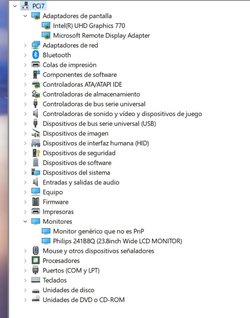
Also, can you post an image of your Device Manager?

Thanks.
 

My Computers My Computers

  • At a glance

    Windows 11 Pro 24H2 (Build 26100.4770)Intel Core 9 Ultra 285K64G (4x16) DDR5 Corsair RGB Dominator Platinu...Radeon (XFX Mercury) RX 9070XT OC (with Magne...
    OS
    Windows 11 Pro 24H2 (Build 26100.4770)
    Computer type
    PC/Desktop
    Manufacturer/Model
    Custom built
    CPU
    Intel Core 9 Ultra 285K
    Motherboard
    Gigabyte Aorus Z890 Xtreme AI Top
    Memory
    64G (4x16) DDR5 Corsair RGB Dominator Platinum (6400Mhz)
    Graphics Card(s)
    Radeon (XFX Mercury) RX 9070XT OC (with Magnetic Fans)
    Sound Card
    Onboard (DTS:X® Ultra Audio: ESS ES9280A DAC)
    Monitor(s) Displays
    27-inch Eizo Color Edge - CG2700X
    Screen Resolution
    3840 x 2160
    Hard Drives
    4 Samsung NVM 990 Pro drives: 1TB (OS), 2TB, 2 X 4TB.
    PSU
    Seasonic TX-1300 (1300 Watts)
    Case
    Cooler Master H500M
    Cooling
    Corsair Link Titan 280 RX RGB
    Keyboard
    Logitech Craft
    Mouse
    Logitech MX Master 3S
    Internet Speed
    1TB Download. 512mb Upload
    Browser
    Microsoft Edge Chromium
    Antivirus
    Windows Security
    Other Info
    System used for gaming, photography, music, school.
  • At a glance

    Windows 11 Pro 24H2 (Build 26100.4061)Intel Core i9-9900K32gig (4 x 8) Corsair Dominator Platinum DDR4...Radeon XFX Merc 7900XT (20gig)
    Operating System
    Windows 11 Pro 24H2 (Build 26100.4061)
    Computer type
    PC/Desktop
    Manufacturer/Model
    Custom built
    CPU
    Intel Core i9-9900K
    Motherboard
    Gigabyte Z390 Aorus Xtreme
    Memory
    32gig (4 x 8) Corsair Dominator Platinum DDR4 3600Mhz (B-Die)
    Graphics card(s)
    Radeon XFX Merc 7900XT (20gig)
    Sound Card
    Onboard
    Monitor(s) Displays
    24-Inch NEC PA242W
    Screen Resolution
    2880 x 1800
    Hard Drives
    2 X NVME, 1 X SATA SSD
    PSU
    EVGA Super Nova 1000 P2 (1000 Watt)
    Case
    Phantek Enthoo Luxe
    Cooling
    Corsair H115i Elite AIO Cooler
    Keyboard
    Logitech Keys
    Mouse
    Logitech MX Master 3
    Internet Speed
    1TB Download. 512mb Upload
    Browser
    Microsoft Edge Chromium
    Antivirus
    Windows Security
    Other Info
    Backup System
Yes, something weird is going on. My Samsung - UR55 Series 28" IPS 4K UHD Monitor, has 2 HDMI ports and 1 DP and I have 3 pcs plugged into it, but I have to push the joystick to the left to select source at some point, or it will just stay in the black screen mode. It took me a while to figure this out, now I don't have to use 3 different monitors.
 

My Computer My Computer

At a glance

Windows XP (Stable, iconic) 7/8.1/10/ Tiny11 ...Intel i7 4790K32GB DDR3 1600 MHzATI Radeon HD 7770 2GB GDDR5
OS
Windows XP (Stable, iconic) 7/8.1/10/ Tiny11 25H2
Computer type
PC/Desktop
Manufacturer/Model
Alienware PC
CPU
Intel i7 4790K
Motherboard
ASROCK Z97 EXTREME4
Memory
32GB DDR3 1600 MHz
Graphics Card(s)
ATI Radeon HD 7770 2GB GDDR5
Sound Card
Onboard
Monitor(s) Displays
SAMSUNG UE57 Series 28-Inch 4K UHD
Hard Drives
SAMSUNG 860 EVO 250 gigabyte SSD
PSU
EVGA 850 watt
Case
Alienware Area 51 Black Tower Case
Keyboard
HyperX - Alloy Elite 2 Mechanical Gaming Keyboard.
Mouse
Microsoft Wireless
Internet Speed
1.2 GHz
Browser
Chrome..Edge..Firefox
OK. We'll leave that for now.

BTW, am I correct in assuming you're just using the CPU's built in GPU, and don't have any dedicated video cards installed? If so, I assume you're using the motherboard's DisplayPort?


Hmmm... could be anything from board to monitor issue. That said, you've not answered my question about the drivers??? I asked if you looked for updated intel GPU drivers.

Also, can you post an image of your Device Manager?

Thanks.
Yes, using CPU built in GPU (I've not dedicated graphic card). And using Asus motherboard display port connector.
And yes, I've downloaded latest Intel gpu drivers (from Intel) and installed it.

A screenshot with device manager is attached... think that I've right now the computer with HDMI cable (but accessing to it from the living room couch :-) )... regards.
 

Attachments

  • Device.jpg
    Device.jpg
    57.6 KB · Views: 4

My Computer My Computer

At a glance

Windows 11 ProIntel I7 12700k2x16Gb Corsair Vengeance LPX DDR4 3600 MHzIntegrated Intel 770 UHD
OS
Windows 11 Pro
Computer type
PC/Desktop
Manufacturer/Model
Own
CPU
Intel I7 12700k
Motherboard
Asus Prime Z690-P Wifi D4
Memory
2x16Gb Corsair Vengeance LPX DDR4 3600 MHz
Graphics Card(s)
Integrated Intel 770 UHD
Sound Card
Integrated
Monitor(s) Displays
Philips 241b8q
Screen Resolution
1920x1080
Hard Drives
WD_BLACK SN850 500 GB
Corsair MP600 Pro SSD 1TB
PSU
be quiet! Pure Power 11 cm ATX PC 600W 80Plus Gold
Case
be quiet! Pure Base 600
Cooling
Noctua NH-D15S
Keyboard
Logi
Mouse
Logi
Hi,
Yeah 12 series is a newbie so bugs are likely

I almost did the same thing using onboard graphic's option instead of a very expensive hard to find graphic's card except with the z690 hero with 12900k
Glad I didn't the hero was/ is messed up and nearly catching fire so yeah a complete defective board from asus lord I'm lucky lol :lmao:
 

My Computer My Computer

At a glance

Win-7-10-11Pro's10900k & 9940x & 5930kTrident-Z Royal 4000c16 2x16gb & Trident-Z 36...Titan Xp & 1080ti FTW3 & evga 980ti gaming
OS
Win-7-10-11Pro's
Computer type
PC/Desktop
Manufacturer/Model
Acer 17" Nitro 7840sn/ 2x16gb 5600c40/ 4060/ stock 1tb-os/ 4tb sn850x
CPU
10900k & 9940x & 5930k
Motherboard
z490-Apex & x299-Apex & x99-Sabertooth
Memory
Trident-Z Royal 4000c16 2x16gb & Trident-Z 3600c16 4x8gb & 3200c14 4x8gb
Graphics Card(s)
Titan Xp & 1080ti FTW3 & evga 980ti gaming
Sound Card
Onboard Realtek x3
Monitor(s) Displays
1-AOC G2460PG 24"G-Sync 144Hz/ 2nd 1-ASUS VG248QE 24"/ 3rd LG 43" series
Screen Resolution
1920-1080 not sure what the t.v is besides 43" class scales from 1920-1080 perfectly
Hard Drives
2-WD-sn850x 4tb/ 970evo+500gb/ 980 pro 2tb.
PSU
1000p2 & 1200p2 & 850p2
Case
D450 x2 & 1 Test bench in cherry Entertainment center
Cooling
Custom water loops x3 with 2x mora 360mm rads only 980ti gaming air cooled
Keyboard
G710+x3
Mouse
Redragon x3
Internet Speed
xfinity gigabyte
Browser
Firefox
Antivirus
mbam pro
Someone correct me if I'm wrong here, but the OP said he sees display when in bios using DP and also sees display through the windows install up to the point of entering user name when it loses display. Isn't the OS installing drivers in the background at this time even though they may be windows default driver? Couldn't this whole problem just be a case of a windows install gone wrong?
 

My Computers My Computers

  • At a glance

    Windows 11 Pro 25H2 26200.8655i9-10900 10 core 20 threads32 gbnone-Intel UHD Graphics 630
    OS
    Windows 11 Pro 25H2 26200.8655
    Computer type
    PC/Desktop
    Manufacturer/Model
    Dell Optiplex 7080
    CPU
    i9-10900 10 core 20 threads
    Motherboard
    DELL 0J37VM
    Memory
    32 gb
    Graphics Card(s)
    none-Intel UHD Graphics 630
    Sound Card
    Integrated Realtek
    Monitor(s) Displays
    Benq 27
    Screen Resolution
    2560x1440
    Hard Drives
    2x1tb Solidigm m.2 nvme /External drives 512gb Samsung m.2 sata+2tb Kingston m2.nvme
    PSU
    500w
    Case
    MT
    Cooling
    Dell Premium
    Keyboard
    Logitech wired
    Mouse
    Logitech wireless
    Internet Speed
    so slow I'm too embarrassed to tell
    Browser
    #1 Edge #2 Firefox
    Antivirus
    Defender+MWB Premium
  • At a glance

    Windows 11 Pro 24H2 26200.8457AMD Ryzen 7 6800U32 gbintegrated
    Operating System
    Windows 11 Pro 24H2 26200.8457
    Computer type
    PC/Desktop
    Manufacturer/Model
    Beelink Mini PC SER5
    CPU
    AMD Ryzen 7 6800U
    Memory
    32 gb
    Graphics card(s)
    integrated
    Sound Card
    integrated
    Monitor(s) Displays
    Benq 27
    Screen Resolution
    2560x1440
    Hard Drives
    1TB Crucial nvme
    Keyboard
    Logitech wired
    Mouse
    Logitech wireless
    Internet Speed
    still too embarrassed to tell
    Browser
    Firefox
    Antivirus
    Defender
    Other Info
    System 3 is non compliant Dell 9020 i7-4770/24gb ram Win11 PRO 26200.8457
Someone correct me if I'm wrong here, but the OP said he sees display when in bios using DP and also sees display through the windows install up to the point of entering user name when it loses display. Isn't the OS installing drivers in the background at this time even though they may be windows default driver? Couldn't this whole problem just be a case of a windows install gone wrong?
I also bet on this! I think it's something wrong with windows 11 / intel uhd 770 drivers / asus prime motherboard DP connection...

But not something installed wrong... it's something windows 11 installs always for that graphic adaptor... I use to have the computer with HDMI running very well (seing it on the monitor), but if I change to DP cable, nothing appears (no connection...), but reboot and I see Bios / post messages... ¿?

I've tried with latest Intel UHD 770 drivers, with same result. Also reverted to previous graphics drivers, same result. Default windows 11 driver for that graphics controller, the same...
 

My Computer My Computer

At a glance

Windows 11 ProIntel I7 12700k2x16Gb Corsair Vengeance LPX DDR4 3600 MHzIntegrated Intel 770 UHD
OS
Windows 11 Pro
Computer type
PC/Desktop
Manufacturer/Model
Own
CPU
Intel I7 12700k
Motherboard
Asus Prime Z690-P Wifi D4
Memory
2x16Gb Corsair Vengeance LPX DDR4 3600 MHz
Graphics Card(s)
Integrated Intel 770 UHD
Sound Card
Integrated
Monitor(s) Displays
Philips 241b8q
Screen Resolution
1920x1080
Hard Drives
WD_BLACK SN850 500 GB
Corsair MP600 Pro SSD 1TB
PSU
be quiet! Pure Power 11 cm ATX PC 600W 80Plus Gold
Case
be quiet! Pure Base 600
Cooling
Noctua NH-D15S
Keyboard
Logi
Mouse
Logi
I have intel 10900 CPU (Cometlake) with Intel UHD 630 UHD onboard graphics with the latest Intel 30.0.101.1340 2/7/22 driver. I run both DP and HDMI. It also worked fine when using MS default driver. However I have a Dell mobo.

I totally agree with you. Scream to high heaven to Asus. They're the only ones who can get it resolved.
 

My Computers My Computers

  • At a glance

    Windows 11 Pro 25H2 26200.8655i9-10900 10 core 20 threads32 gbnone-Intel UHD Graphics 630
    OS
    Windows 11 Pro 25H2 26200.8655
    Computer type
    PC/Desktop
    Manufacturer/Model
    Dell Optiplex 7080
    CPU
    i9-10900 10 core 20 threads
    Motherboard
    DELL 0J37VM
    Memory
    32 gb
    Graphics Card(s)
    none-Intel UHD Graphics 630
    Sound Card
    Integrated Realtek
    Monitor(s) Displays
    Benq 27
    Screen Resolution
    2560x1440
    Hard Drives
    2x1tb Solidigm m.2 nvme /External drives 512gb Samsung m.2 sata+2tb Kingston m2.nvme
    PSU
    500w
    Case
    MT
    Cooling
    Dell Premium
    Keyboard
    Logitech wired
    Mouse
    Logitech wireless
    Internet Speed
    so slow I'm too embarrassed to tell
    Browser
    #1 Edge #2 Firefox
    Antivirus
    Defender+MWB Premium
  • At a glance

    Windows 11 Pro 24H2 26200.8457AMD Ryzen 7 6800U32 gbintegrated
    Operating System
    Windows 11 Pro 24H2 26200.8457
    Computer type
    PC/Desktop
    Manufacturer/Model
    Beelink Mini PC SER5
    CPU
    AMD Ryzen 7 6800U
    Memory
    32 gb
    Graphics card(s)
    integrated
    Sound Card
    integrated
    Monitor(s) Displays
    Benq 27
    Screen Resolution
    2560x1440
    Hard Drives
    1TB Crucial nvme
    Keyboard
    Logitech wired
    Mouse
    Logitech wireless
    Internet Speed
    still too embarrassed to tell
    Browser
    Firefox
    Antivirus
    Defender
    Other Info
    System 3 is non compliant Dell 9020 i7-4770/24gb ram Win11 PRO 26200.8457
Back
Top Bottom