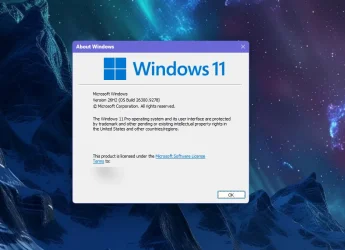
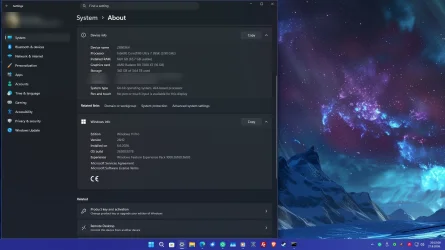
UPDATE 9/10:

 www.elevenforum.com
Hello Windows Insiders!
Today, we are making this year’s annual feature update, Windows 11, version 26H2 (Build 26300.9278), available in the Release Preview Channel for customers to preview ahead of general availability later this calendar year.
Windows 11, version 26H2 will be delivered as an enablement package (eKB). This means that Windows 11, versions 24H2, 25H2, and 26H2 use a shared servicing branch. It also means that they share the same new features and enhancements delivered through our continuous innovation efforts. As a result, many of the features and improvements available in Windows 11, version 26H2 might already be familiar, as they have been gradually introduced through monthly updates.
For commercial customers, Windows 11, version 26H2 enables several experiences that were introduced in earlier releases but not previously enabled by default for commercial devices. This includes Windows settings backup, app-specific actions from the taskbar, and some File Explorer enhancements. For guidance on how to prepare for Windows 11, version 26H2 in your organization, see Get ready for Windows 11, version 26H2.
Windows Insiders in the Release Preview Channel can install Windows 11, version 26H2 via our “seeker” experience in Windows Update. This means if you are an Insider currently in the Release Preview Channel on a PC that meets the Windows 11 hardware requirements, you can go to Settings and Windows Update and choose to download and install Windows 11, version 26H2. Once you update your PC to Windows 11, version 26H2, you will continue to automatically receive new servicing updates through Windows Update (the typical monthly update process). For instructions on how to join the Windows Insider Program and enroll your PC in the Release Preview Channel, click here.
 www.elevenforum.com
If you are a commercial customer enrolled in the Windows Insider Program for Business, you can deploy and begin validating Windows 11, version 26H2 on PCs in your organization using Windows Update client policies and Windows Server Update Services (WSUS). Azure Marketplace will be available later today. Should any issues arise, IT admins in organizations deploying Release Preview updates can request Microsoft Support.
And finally, ISOs are available for download for Windows 11, version 26H2 via the Windows Insider ISO download page.
 www.elevenforum.com
Thanks,
Windows Insider Program Team

 blogs.windows.com

Check Windows Updates
UUP Dump:
64-bit ISO download:

ARM64 ISO download:
 www.elevenforum.com
KB5124010 Windows 11 Insider RP build 26100.9539 (24H2), 26200.9539 (25H2), and 26300.9539 (26H2) - Sept. 10
Windows Insider Blog: Hello Windows Insiders, These release notes are for Windows 11 Builds 26100.9539, 26200.9539 and 26300.9539 (KB5124010) in the Release Preview Channel on Windows 11, versions 24H2 (Build 26100), 25H2 (Build 26200) and 26H2 (Build 26300). This update is available through...
www.elevenforum.com
Windows Insider Blog:
Hello Windows Insiders!
Today, we are making this year’s annual feature update, Windows 11, version 26H2 (Build 26300.9278), available in the Release Preview Channel for customers to preview ahead of general availability later this calendar year.
Windows 11, version 26H2 will be delivered as an enablement package (eKB). This means that Windows 11, versions 24H2, 25H2, and 26H2 use a shared servicing branch. It also means that they share the same new features and enhancements delivered through our continuous innovation efforts. As a result, many of the features and improvements available in Windows 11, version 26H2 might already be familiar, as they have been gradually introduced through monthly updates.
To use the correct enablement package based on your currently installed build:
KB5122776 is the enablement package for the Insider Experimental Preview Build 26340. In the installed updates list, it shows up as “Feature Enablement for Windows (Ge) 26H2 Insider Refresh - KB5122776 - 2026.08 A - BuildNumber Update.”
KB5121794 is the enablement package for the retail 26H2 release, listed as “Feature Enablement for Windows (Ge) 26H2 - KB5121794 - 2026.07 D.”
KB5122776 Enablement Package for 64-bit Windows 11 26H2
Windows11.0-KB5122776-x64.msu (173 KB)
Download
OR
KB5122776 Enablement Package for ARM64 Windows 11 26H2
Windows11.0-KB5122776-arm64.msu (172 KB)
Download
KB5121794 Enablement Package for 64-bit Windows 11 26H2
Windows11.0-KB5121794-x64.msu (174 KB)
Download
OR
KB5121794 Enablement Package for ARM64 Windows 11 26H2
Windows11.0-KB5121794-arm64.msu (174 KB)
Download
For commercial customers, Windows 11, version 26H2 enables several experiences that were introduced in earlier releases but not previously enabled by default for commercial devices. This includes Windows settings backup, app-specific actions from the taskbar, and some File Explorer enhancements. For guidance on how to prepare for Windows 11, version 26H2 in your organization, see Get ready for Windows 11, version 26H2.
Windows Insiders in the Release Preview Channel can install Windows 11, version 26H2 via our “seeker” experience in Windows Update. This means if you are an Insider currently in the Release Preview Channel on a PC that meets the Windows 11 hardware requirements, you can go to Settings and Windows Update and choose to download and install Windows 11, version 26H2. Once you update your PC to Windows 11, version 26H2, you will continue to automatically receive new servicing updates through Windows Update (the typical monthly update process). For instructions on how to join the Windows Insider Program and enroll your PC in the Release Preview Channel, click here.
Start Getting Insider Preview Builds on Windows 11 PC
This tutorial will show you how to get and install Insider preview builds of Windows 11 on your Windows 11 PC. Flighting is the process of running Windows Insider Preview Builds on your device. When you run these early versions of Windows and give Microsoft feedback, you can help Microsoft...
www.elevenforum.com
If you are a commercial customer enrolled in the Windows Insider Program for Business, you can deploy and begin validating Windows 11, version 26H2 on PCs in your organization using Windows Update client policies and Windows Server Update Services (WSUS). Azure Marketplace will be available later today. Should any issues arise, IT admins in organizations deploying Release Preview updates can request Microsoft Support.
And finally, ISOs are available for download for Windows 11, version 26H2 via the Windows Insider ISO download page.
Download Official Windows 11 ISO file from Microsoft
This tutorial will show you how to download an official Windows Server or Windows 11 64-bit or ARM64 ISO file from Microsoft. Microsoft provides ISO files for Windows Server and Windows 11 to download. You can use these ISO files to clean install or in-place upgrade Windows 11. The Flight Hub...
www.elevenforum.com
Thanks,
Windows Insider Program Team
Source:
Releasing Windows 11, version 26H2 to the Release Preview Channel
[Update 31 August 2026: ISOs are now available] Hello Windows Insiders! Today, we are making this year’s annual feature update, Windows 11, version 26H2 (Build 26300.9278), available in the Release Preview Ch
blogs.windows.com
Release Preview Build 26300.9278 - Windows Insider Program
Release notes for Release Preview Build 26300.9278.
learn.microsoft.com
Check Windows Updates
UUP Dump:
64-bit ISO download:
Select language for Windows 11, version 26H2 (26300.9278) amd64
Select language for Windows 11, version 26H2 (26300.9278) amd64 on UUP dump. UUP dump lets you download Unified Update Platform files, like Windows Insider updates, directly from Windows Update.
uupdump.net
ARM64 ISO download:
Select language for Windows 11, version 26H2 (26300.9278) arm64
Select language for Windows 11, version 26H2 (26300.9278) arm64 on UUP dump. UUP dump lets you download Unified Update Platform files, like Windows Insider updates, directly from Windows Update.
uupdump.net
UUP Dump - Download Windows Insider ISO
UUP Dump is the most practical and easy way to get ISO images of any Insider Windows 10 or Windows 11 version, as soon as Microsoft has released a new build. UUP Dump creates a download configuration file according to your choices, downloads necessary files directly from Microsoft servers, and...
www.elevenforum.com
Attachments
Last edited: