Windows 11 is significantly slowing down some NVMe SSDs


My Computers My Computers

  • At a glance

    Win 11 ProAMD Ryzen™ 7 7730U24GB Dual-Channel DDR4 @ 1596MHz (22-22-22-52)512MB ATI AMD Radeon Graphics (ASUStek Comput...
    OS
    Win 11 Pro
    Computer type
    Laptop
    Manufacturer/Model
    ASUS Vivobook
    CPU
    AMD Ryzen™ 7 7730U
    Motherboard
    M1605YA
    Memory
    24GB Dual-Channel DDR4 @ 1596MHz (22-22-22-52)
    Graphics Card(s)
    512MB ATI AMD Radeon Graphics (ASUStek Computer Inc)
    Monitor(s) Displays
    Generic PnP Monitor (1920x1200@60Hz) - P1 PLUS (1920x1080@59Hz)
    Screen Resolution
    1920 X 1200
    Hard Drives
    953GB Western Digital WD
    PSU
    45 Watts
    Mouse
    Lenovo Bluetooth.
    Internet Speed
    500 Mbps
    Browser
    Edge
    Antivirus
    Defender
  • At a glance

    Windows 11AMD Ryzen 7 5800H / 3.2 GHz32 GB DDR4 SDRAM 3200 MHzNVIDIA GeForce RTX 3060 6 GB GDDR6 SDRAM
    Operating System
    Windows 11
    Computer type
    Laptop
    Manufacturer/Model
    ACER NITRO
    CPU
    AMD Ryzen 7 5800H / 3.2 GHz
    Motherboard
    CZ Scala_CAS (FP6)
    Memory
    32 GB DDR4 SDRAM 3200 MHz
    Graphics card(s)
    NVIDIA GeForce RTX 3060 6 GB GDDR6 SDRAM
    Sound Card
    Realtek Audio. NVIDIA High Definition Audio
    Monitor(s) Displays
    15.6" LED backlight 1920 x 1080 (Full HD) 144 Hz
    Screen Resolution
    1920 x 1080 (Full HD)
    Hard Drives
    Samsung 970 Evo Plus 2TB NVMe M.2
    PSU
    180 Watt, 19.5 V
    Mouse
    Lenovo Bluetooth
    Internet Speed
    500 Mbps
    Browser
    Edge
    Antivirus
    Defender
This has been all over the web yesterday and today. I haven't done any bench marking but have noticed no difference other than my internet loads a tad slower and that may be nothing to do with it
 

My Computers My Computers

  • At a glance

    Windows 11 Pro13th Gen Core i9 13900HX32GB DDR5 @4800MHz 2x16GBGeforce RTX 4090HX 16GB
    OS
    Windows 11 Pro
    Computer type
    Laptop
    Manufacturer/Model
    Alienware M18 R1
    CPU
    13th Gen Core i9 13900HX
    Memory
    32GB DDR5 @4800MHz 2x16GB
    Graphics Card(s)
    Geforce RTX 4090HX 16GB
    Sound Card
    Nvidia HD / Realtek ALC3254
    Monitor(s) Displays
    18" QHD+
    Screen Resolution
    25660 X 1600
    Hard Drives
    C: KIOXIA (Toshiba) 2TB KXG80ZNV2T04 NVMe PCIe M.2 SSD
    D: KIOXIA (Toshiba) 2TB KXG80ZNV2T04 NVMe PCIe M.2 SSD
    Case
    Dark Metallic Moon
    Keyboard
    Alienware M Series per-key AlienFX RGB
    Mouse
    Alienware AW610M
    Browser
    Chrome and Firefox
    Antivirus
    Norton
    Other Info
    Killer E3000 Ethernet Controller
    Killer Killer AX1690 Wi-Fi Network Adaptor Wi-Fi 6E
    Bluetooth 5.2
    Alienware Z01G Graphic Amplifier
  • At a glance

    Windows 11 Pro10th Gen i-9 10900 K32Gb Dual Channel DDR4 @ 8843MHzNvidia RTX 2080 Super
    Operating System
    Windows 11 Pro
    Computer type
    Laptop
    Manufacturer/Model
    Alienware Area 51m R2
    CPU
    10th Gen i-9 10900 K
    Memory
    32Gb Dual Channel DDR4 @ 8843MHz
    Graphics card(s)
    Nvidia RTX 2080 Super
    Sound Card
    Nvidia
    Screen Resolution
    1920 x 1080
    Hard Drives
    Hard Drive C: Samsung 2TB SSD PM981a NVMe
    Hard Drive D:Samsung 2TB SSD 970 EVO Plus
    Mouse
    Alienware 610M
    Browser
    Chrome
    Antivirus
    Norton
Not exactly on the Samsung page Samsung_NVM_Express_Driver_3.3 to download that driver and it works perfectly for me because I have two windows 11 one on samsung m2 970 EVOPlus and 960 EVO, WIN11 excellent fast 3500 read and 3200 write on 970 EVOPlus
 

My Computer My Computer

At a glance

Win11 PRORyzen Threadripper 1920xHyperx 32GB 3600MhzAsus GeForce TURBO RTX 2080Ti 11GB
OS
Win11 PRO
Computer type
PC/Desktop
Manufacturer/Model
AsRock
CPU
Ryzen Threadripper 1920x
Motherboard
AsRock Fatal1ty
Memory
Hyperx 32GB 3600Mhz
Graphics Card(s)
Asus GeForce TURBO RTX 2080Ti 11GB
Sound Card
matheboard and Logitech G933 Gaming Headset
Monitor(s) Displays
ASUS 28"
Screen Resolution
3840 x 2160
Hard Drives
ssd m2 970, 960, ssd 840 EVO 1TB, 4 x 4TB HDD
PSU
corsair 1200W
Case
big tower
Cooling
corsair H150IPro
Keyboard
logitech k800
Mouse
logitech G603
Internet Speed
download 200 Mbps upload 100 Mbps
Browser
Maxthon
Antivirus
avira
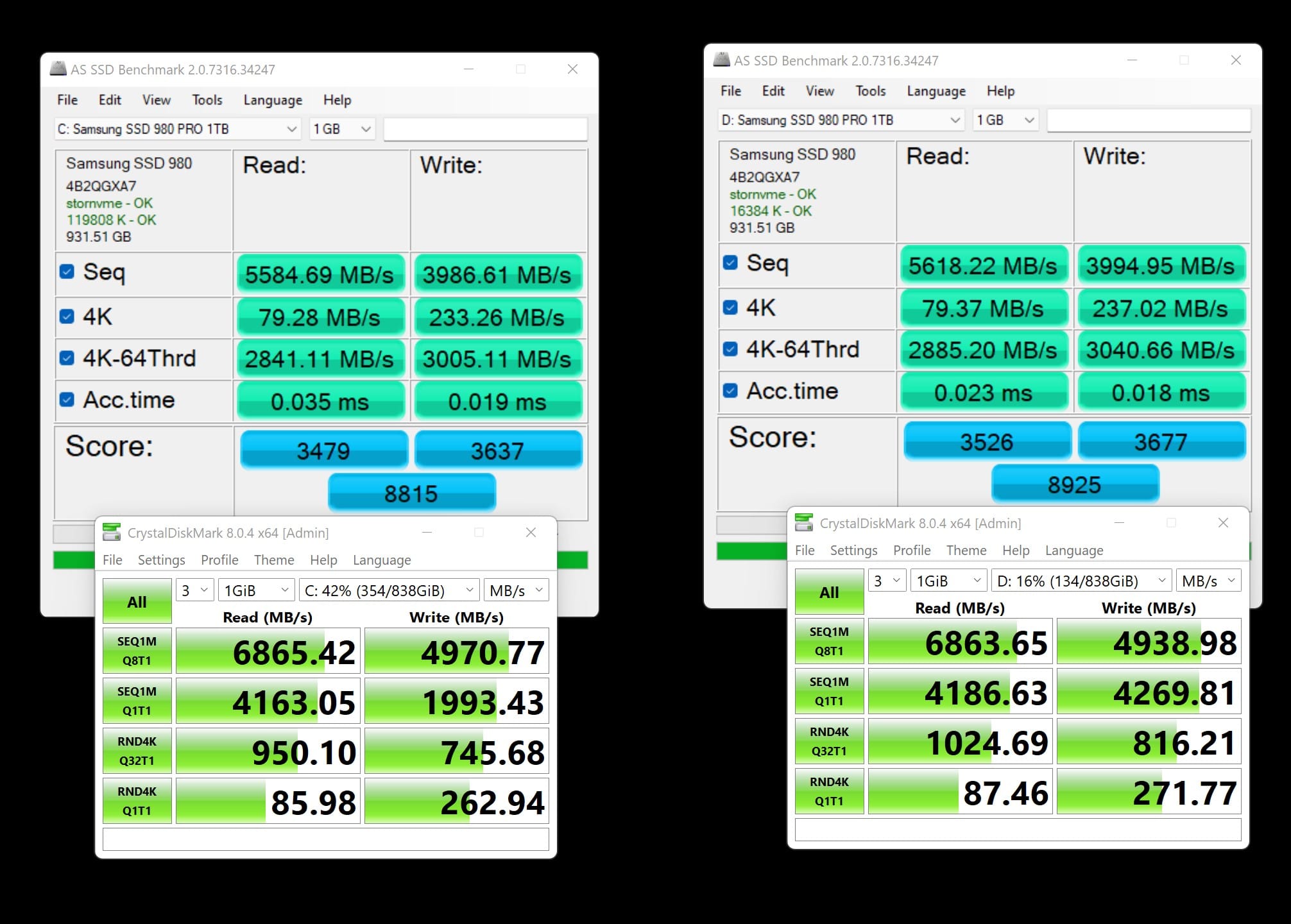
I have a 980 Pro nvme for both C drive and D drive, just ran a test on both, the writes are slower in one metric in Crystal Disk Mark but virtually identical in the AS SSD benchmark. Not anything that I would ever notice in day to day use really. Both drives are at pcie4, windows driver, and high performance plan for the drives.

1eLhUgz.jpg
 
Last edited:

My Computer My Computer

At a glance

W11I9- 13900KGSkill 6000Asus Strix OC 4090
OS
W11
Computer type
PC/Desktop
CPU
I9- 13900K
Motherboard
Asus Rog Maximus Hero 790
Memory
GSkill 6000
Graphics Card(s)
Asus Strix OC 4090
Monitor(s) Displays
LG 48" CX OLED
Screen Resolution
3840 x 2160 120Hz HDR
Hard Drives
Samsung 980 Pro C drive, 980 Pro for data drive
PSU
EVGA 1600 Watt
Case
open case
Cooling
chip and cpu liquid
Keyboard
Razer Cynosa
Mouse
Razer Deathadder
Internet Speed
950 Mb down, 450 Mb upload
Browser
Chrome
This has been all over the web yesterday and today. I haven't done any bench marking but have noticed no difference other than my internet loads a tad slower and that may be nothing to do with it

Hmm, I have a 960 Pro with two partitions, one for the OS and the other for data. The OS portion gets consistently lower sequential (not that it matters that much for OS). I hadn't measured my write speeds for a long time, but they seem low - should be up in the 3500. Left is c: right e: partition.

The performance doesn't matter a lot to me as I have a large block level cache in front of them. For this test the cache is paused and I did a drive TRIM sometime prior to the test. Using the Samsung NVME driver. Completely reproducible.

Screenshot 2021-12-08 144608.png
 

My Computers My Computers

  • At a glance

    Windows 11 ProIntel Core i9 14900K 5800/4500 P/E all core96GB (2x48) G.skill Ripjaws 6800 MT/s DDR5Asus ROG Strix 4070 Ti OC
    OS
    Windows 11 Pro
    Computer type
    PC/Desktop
    Manufacturer/Model
    DIY Photoshop/Audio/Game/tinker
    CPU
    Intel Core i9 14900K 5800/4500 P/E all core
    Motherboard
    Asus ROG Maximus Z790 Dark Hero
    Memory
    96GB (2x48) G.skill Ripjaws 6800 MT/s DDR5
    Graphics Card(s)
    Asus ROG Strix 4070 Ti OC
    Sound Card
    Bowers & Wilkins 606 S3 speakers; Audiolabs 7000a integrated amp; RSL 10S Mk2 sub; Creative Pebble Pro Minimilist
    Monitor(s) Displays
    Eizo CG2730 ColorEdge, ViewSonic VP2768, i1 Display Pro calibration puck
    Screen Resolution
    2560 x 1440p x 2
    Hard Drives
    WDC SN850X 4TB nvme, SN850 1TB nvme, SK-Hynix 2 TB P41 nvme,. Sabrent USB-C DS-SC5B 5-bay docking station: 6TB WDC Black, 6TB Ironwolf Pro; 2x 2TB WDC Black HDD
    PSU
    850W Seasonic Vertex PX-850 ATX 3.0/PCI-E 5.0
    Case
    Fractal Design North XL Mesh, Black Walnut
    Cooling
    EK Nucleus black 360 AIO w/Phanteks T30-120 fans, 2 Noctua NF-A14 Chromax case fan, 1 T30-120 fan cooling memory
    Keyboard
    Keychron Q3 Max TKL with custom GMK Redsuns Red Samuri keycaps, TX Stabs
    Mouse
    Logitech G305 wireless gaming
    Internet Speed
    575 Mb/s down | 25 Mb/s up
    Browser
    Firefox
    Antivirus
    Defender, Macrium Reflect X
    Other Info
    Phangkey Amaterasu V2 Desk Mat
  • At a glance

    Apple M1
    Computer type
    Laptop
    Manufacturer/Model
    💻 Apple 13" Macbook Pro 2020 (m1)
    CPU
    Apple M1
    Screen Resolution
    2560x1600
    Browser
    Firefox
Actually going back to some results I had done some time ago, I had captured some C: and E: benchmarks, but only for SEQ Q32T1. These were on Windows 10, and I see the same difference: ~ 3400 for E: and 3000 for C: reads and around 2000 for writes.

So I think there WAS NO CHANGE for me between Windows 11 and Windows 10 - there was always this difference between C: and E:. Why? I haven't a clue.


1638993619612.png1638993669206.png

EDIT: I think the differences in the 4k Q1T1 randoms between the Windows 11 and these older are all attributable to the patches and microcode changes for the Spectre and other Intel processor security vulnerabilities.
 
Last edited:

My Computers My Computers

  • At a glance

    Windows 11 ProIntel Core i9 14900K 5800/4500 P/E all core96GB (2x48) G.skill Ripjaws 6800 MT/s DDR5Asus ROG Strix 4070 Ti OC
    OS
    Windows 11 Pro
    Computer type
    PC/Desktop
    Manufacturer/Model
    DIY Photoshop/Audio/Game/tinker
    CPU
    Intel Core i9 14900K 5800/4500 P/E all core
    Motherboard
    Asus ROG Maximus Z790 Dark Hero
    Memory
    96GB (2x48) G.skill Ripjaws 6800 MT/s DDR5
    Graphics Card(s)
    Asus ROG Strix 4070 Ti OC
    Sound Card
    Bowers & Wilkins 606 S3 speakers; Audiolabs 7000a integrated amp; RSL 10S Mk2 sub; Creative Pebble Pro Minimilist
    Monitor(s) Displays
    Eizo CG2730 ColorEdge, ViewSonic VP2768, i1 Display Pro calibration puck
    Screen Resolution
    2560 x 1440p x 2
    Hard Drives
    WDC SN850X 4TB nvme, SN850 1TB nvme, SK-Hynix 2 TB P41 nvme,. Sabrent USB-C DS-SC5B 5-bay docking station: 6TB WDC Black, 6TB Ironwolf Pro; 2x 2TB WDC Black HDD
    PSU
    850W Seasonic Vertex PX-850 ATX 3.0/PCI-E 5.0
    Case
    Fractal Design North XL Mesh, Black Walnut
    Cooling
    EK Nucleus black 360 AIO w/Phanteks T30-120 fans, 2 Noctua NF-A14 Chromax case fan, 1 T30-120 fan cooling memory
    Keyboard
    Keychron Q3 Max TKL with custom GMK Redsuns Red Samuri keycaps, TX Stabs
    Mouse
    Logitech G305 wireless gaming
    Internet Speed
    575 Mb/s down | 25 Mb/s up
    Browser
    Firefox
    Antivirus
    Defender, Macrium Reflect X
    Other Info
    Phangkey Amaterasu V2 Desk Mat
  • At a glance

    Apple M1
    Computer type
    Laptop
    Manufacturer/Model
    💻 Apple 13" Macbook Pro 2020 (m1)
    CPU
    Apple M1
    Screen Resolution
    2560x1600
    Browser
    Firefox
No slow downs on my 2 X Samsung 980 NVME's, but have noticed a slowdown for restarts & shutdowns up to 3 mins on a freshly installed Win11 (1 O.S. on each drive).

NVME speeds.jpg
 

My Computers My Computers

  • At a glance

    Windows 11 ProRyzen 7 5900X with Thermalrite Assasin X (2 x...2 X 16GB 3200Mhz Ram Patriot Viper Steel - PV...Gigabyte Radeon RX 7800 XT GAMING OC 16GB Gra...
    OS
    Windows 11 Pro
    Computer type
    PC/Desktop
    Manufacturer/Model
    Custom Build
    CPU
    Ryzen 7 5900X with Thermalrite Assasin X (2 x120mm fans
    Motherboard
    Gigabyte Aorus Elite X570 & the X570 Heatsink is modded.
    Memory
    2 X 16GB 3200Mhz Ram Patriot Viper Steel - PVS432G320C6K
    Graphics Card(s)
    Gigabyte Radeon RX 7800 XT GAMING OC 16GB Graphics Card
    Sound Card
    Mobo optical output used
    Monitor(s) Displays
    Samsung 4k 32"
    Screen Resolution
    HD/2K/4K
    Hard Drives
    Aorus GP-AG70S1TB X1 Gen 4 - 3 X Win 11 Pro O.S
    Sabrent SB Rocket 1TB NVME Gen 3 - Game Storage
    PSU
    Aerocool Predator 1,000W Semi Modular (slightly modified)
    Case
    DIY - MDF lined with aluminium (super quiet)
    Cooling
    1 X 230mm & 1 X 80mm (Main Case)
    Keyboard
    Logi MK540
    Mouse
    Logi MK540
    Internet Speed
    Fast
    Browser
    Chrome
    Antivirus
    Yes
  • Computer type
    PC/Desktop
When PCIEX16_3 run at x4 mode, SATA6G_12 and SATA6G_34 are disabled. on the motherboard Asus ROG Maximus XIII Hero Z590 this that means you have to buy a pciex 16 adapter for m2 nvme disk and in the bios you set 4 x 4 it to then you get a speed of 7200 MB / s
best AXAGON ultra compact internal PCIe adapter for NVMe M.2 SSD
 

My Computer My Computer

At a glance

Win11 PRORyzen Threadripper 1920xHyperx 32GB 3600MhzAsus GeForce TURBO RTX 2080Ti 11GB
OS
Win11 PRO
Computer type
PC/Desktop
Manufacturer/Model
AsRock
CPU
Ryzen Threadripper 1920x
Motherboard
AsRock Fatal1ty
Memory
Hyperx 32GB 3600Mhz
Graphics Card(s)
Asus GeForce TURBO RTX 2080Ti 11GB
Sound Card
matheboard and Logitech G933 Gaming Headset
Monitor(s) Displays
ASUS 28"
Screen Resolution
3840 x 2160
Hard Drives
ssd m2 970, 960, ssd 840 EVO 1TB, 4 x 4TB HDD
PSU
corsair 1200W
Case
big tower
Cooling
corsair H150IPro
Keyboard
logitech k800
Mouse
logitech G603
Internet Speed
download 200 Mbps upload 100 Mbps
Browser
Maxthon
Antivirus
avira
@geneo As I said I haven't done any tests but everything seems fine other than web pages load fractionally slower but hardly noticeable. See my system one specs
 

My Computers My Computers

  • At a glance

    Windows 11 Pro13th Gen Core i9 13900HX32GB DDR5 @4800MHz 2x16GBGeforce RTX 4090HX 16GB
    OS
    Windows 11 Pro
    Computer type
    Laptop
    Manufacturer/Model
    Alienware M18 R1
    CPU
    13th Gen Core i9 13900HX
    Memory
    32GB DDR5 @4800MHz 2x16GB
    Graphics Card(s)
    Geforce RTX 4090HX 16GB
    Sound Card
    Nvidia HD / Realtek ALC3254
    Monitor(s) Displays
    18" QHD+
    Screen Resolution
    25660 X 1600
    Hard Drives
    C: KIOXIA (Toshiba) 2TB KXG80ZNV2T04 NVMe PCIe M.2 SSD
    D: KIOXIA (Toshiba) 2TB KXG80ZNV2T04 NVMe PCIe M.2 SSD
    Case
    Dark Metallic Moon
    Keyboard
    Alienware M Series per-key AlienFX RGB
    Mouse
    Alienware AW610M
    Browser
    Chrome and Firefox
    Antivirus
    Norton
    Other Info
    Killer E3000 Ethernet Controller
    Killer Killer AX1690 Wi-Fi Network Adaptor Wi-Fi 6E
    Bluetooth 5.2
    Alienware Z01G Graphic Amplifier
  • At a glance

    Windows 11 Pro10th Gen i-9 10900 K32Gb Dual Channel DDR4 @ 8843MHzNvidia RTX 2080 Super
    Operating System
    Windows 11 Pro
    Computer type
    Laptop
    Manufacturer/Model
    Alienware Area 51m R2
    CPU
    10th Gen i-9 10900 K
    Memory
    32Gb Dual Channel DDR4 @ 8843MHz
    Graphics card(s)
    Nvidia RTX 2080 Super
    Sound Card
    Nvidia
    Screen Resolution
    1920 x 1080
    Hard Drives
    Hard Drive C: Samsung 2TB SSD PM981a NVMe
    Hard Drive D:Samsung 2TB SSD 970 EVO Plus
    Mouse
    Alienware 610M
    Browser
    Chrome
    Antivirus
    Norton

Microsoft to fix Windows 11 performance issues​

In a support document published on November 22, Microsoft has also acknowledged the issue, first identified in August, and has started testing a fix as part of the optional update (KB5007262) for the operating system.

In a separate statement, Microsoft officials confirmed Windows 11 affects the performance of all disks (NVMe, SSD, hardisk). This happens when the OS performs unnecessary actions in response to write operations. However, it’s important to understand that the bug won’t affect all partitions or drives.

Windows 11 performance issue occurs when a feature called “NTFS USN journal” is enabled. Thankfully, this feature is enabled only on the C: disk by default and the rest of the partitions or drives do not have NTFS USN journal.

which means that people with 22000.348 and KB5007262 installed won't see the problem.


My Computer My Computer

At a glance

WindowsXP/7/8/8.1/10/11,Linux,Android,FreeBSD...Intel® Core™ i7-8750H 8th Gen 2.2Ghz up to 4....64GB using 2x32GB CL16 Mushkin redLine modulesIntel UHD 630 & NVIDIA GeForce GTX 1050 Ti wi...
OS
WindowsXP/7/8/8.1/10/11,Linux,Android,FreeBSD Unix
Computer type
Laptop
Manufacturer/Model
Dell XPS 15 9570
CPU
Intel® Core™ i7-8750H 8th Gen 2.2Ghz up to 4.1Ghz
Motherboard
Dell XPS 15 9570
Memory
64GB using 2x32GB CL16 Mushkin redLine modules
Graphics Card(s)
Intel UHD 630 & NVIDIA GeForce GTX 1050 Ti with 4GB DDR5
Sound Card
Realtek ALC3266-CG
Monitor(s) Displays
15.6" 4K Touch UltraHD 3840x2160 made by Sharp
Screen Resolution
3840x2160 4K UltraHD
Hard Drives
Samsung MZ-V9P4T0B/AM 990 PRO 4TB PCIe®4.0 NVMe™ M.2 SSD was Toshiba KXG60ZNV1T02 NVMe 1TB SSD
PSU
Dell XPS 15 9570
Case
Dell XPS 15 9570
Cooling
Stock
Keyboard
Stock
Mouse
SwitftPoint ProPoint
Internet Speed
Comcast/XFinity 1.44Gbps/42.5Mbps
Browser
Microsoft EDGE (Chromium based) & Google Chrome
Antivirus
Windows Defender that came with Windows

Microsoft to fix Windows 11 performance issues​

In a support document published on November 22, Microsoft has also acknowledged the issue, first identified in August, and has started testing a fix as part of the optional update (KB5007262) for the operating system.

In a separate statement, Microsoft officials confirmed Windows 11 affects the performance of all disks (NVMe, SSD, hardisk). This happens when the OS performs unnecessary actions in response to write operations. However, it’s important to understand that the bug won’t affect all partitions or drives.

Windows 11 performance issue occurs when a feature called “NTFS USN journal” is enabled. Thankfully, this feature is enabled only on the C: disk by default and the rest of the partitions or drives do not have NTFS USN journal.

which means that people with 22000.348 and KB5007262 installed won't see the problem.


Another good reason to keep your data and games off of the C: drive!
 

My Computers My Computers

  • At a glance

    Windows 11 ProIntel Core i9 14900K 5800/4500 P/E all core96GB (2x48) G.skill Ripjaws 6800 MT/s DDR5Asus ROG Strix 4070 Ti OC
    OS
    Windows 11 Pro
    Computer type
    PC/Desktop
    Manufacturer/Model
    DIY Photoshop/Audio/Game/tinker
    CPU
    Intel Core i9 14900K 5800/4500 P/E all core
    Motherboard
    Asus ROG Maximus Z790 Dark Hero
    Memory
    96GB (2x48) G.skill Ripjaws 6800 MT/s DDR5
    Graphics Card(s)
    Asus ROG Strix 4070 Ti OC
    Sound Card
    Bowers & Wilkins 606 S3 speakers; Audiolabs 7000a integrated amp; RSL 10S Mk2 sub; Creative Pebble Pro Minimilist
    Monitor(s) Displays
    Eizo CG2730 ColorEdge, ViewSonic VP2768, i1 Display Pro calibration puck
    Screen Resolution
    2560 x 1440p x 2
    Hard Drives
    WDC SN850X 4TB nvme, SN850 1TB nvme, SK-Hynix 2 TB P41 nvme,. Sabrent USB-C DS-SC5B 5-bay docking station: 6TB WDC Black, 6TB Ironwolf Pro; 2x 2TB WDC Black HDD
    PSU
    850W Seasonic Vertex PX-850 ATX 3.0/PCI-E 5.0
    Case
    Fractal Design North XL Mesh, Black Walnut
    Cooling
    EK Nucleus black 360 AIO w/Phanteks T30-120 fans, 2 Noctua NF-A14 Chromax case fan, 1 T30-120 fan cooling memory
    Keyboard
    Keychron Q3 Max TKL with custom GMK Redsuns Red Samuri keycaps, TX Stabs
    Mouse
    Logitech G305 wireless gaming
    Internet Speed
    575 Mb/s down | 25 Mb/s up
    Browser
    Firefox
    Antivirus
    Defender, Macrium Reflect X
    Other Info
    Phangkey Amaterasu V2 Desk Mat
  • At a glance

    Apple M1
    Computer type
    Laptop
    Manufacturer/Model
    💻 Apple 13" Macbook Pro 2020 (m1)
    CPU
    Apple M1
    Screen Resolution
    2560x1600
    Browser
    Firefox
I've been having this same problem with my Samsung SSD 970 EVO 1TB. I got the latest update and still accruing.
 

My Computer My Computer

At a glance

MS Windows 11 Professional 64-bitIntel Core i7-10700K32GB Corsair Vengeance LPX DDR4 3200MHzGigabyte GeForce RTX 4090 Gaming OC 24GB
OS
MS Windows 11 Professional 64-bit
Computer type
PC/Desktop
Manufacturer/Model
Myself
CPU
Intel Core i7-10700K
Motherboard
ASUS ROG Strix Z490-G Gaming (WiFi 6)
Memory
32GB Corsair Vengeance LPX DDR4 3200MHz
Graphics Card(s)
Gigabyte GeForce RTX 4090 Gaming OC 24GB
Sound Card
Realtek High Definition Audio
Monitor(s) Displays
LG 34GN850-B 34 Inch 21:9 UltraGear
Screen Resolution
3440x1440
Hard Drives
Samsung 970 EVO Plus SSD 2TB \ Samsung SSD 970 EVO 1TB \ WD 2TB My Passport SSD External Portable
PSU
CORSAIR RMX RM850x, 850 Watt, 80+ Gold Certified
Case
NZXT H5 Flow
Cooling
Fractal Design Celsius S24 240mm
Keyboard
Corsair K100 RGB Optical-Mechanical Gaming Keyboard
Mouse
Corsair Harpoon RGB Gaming Mouse
Browser
Edge
I've been having this same problem with my Samsung SSD 970 EVO 1TB. I got the latest update and still accruing.
Well if it is your c: drive, it is not clear to me from the release notes whether anything has changed for it:

"Addresses an issue that affects the performance of all disks (NVMe, SSD, hardisk) on Windows 11 by performing unnecessary actions each time a write operation occurs. This issue occurs only when the NTFS USN journal is enabled. Note, the USN journal is always enabled on the C: disk."
 

My Computers My Computers

  • At a glance

    Windows 11 ProIntel Core i9 14900K 5800/4500 P/E all core96GB (2x48) G.skill Ripjaws 6800 MT/s DDR5Asus ROG Strix 4070 Ti OC
    OS
    Windows 11 Pro
    Computer type
    PC/Desktop
    Manufacturer/Model
    DIY Photoshop/Audio/Game/tinker
    CPU
    Intel Core i9 14900K 5800/4500 P/E all core
    Motherboard
    Asus ROG Maximus Z790 Dark Hero
    Memory
    96GB (2x48) G.skill Ripjaws 6800 MT/s DDR5
    Graphics Card(s)
    Asus ROG Strix 4070 Ti OC
    Sound Card
    Bowers & Wilkins 606 S3 speakers; Audiolabs 7000a integrated amp; RSL 10S Mk2 sub; Creative Pebble Pro Minimilist
    Monitor(s) Displays
    Eizo CG2730 ColorEdge, ViewSonic VP2768, i1 Display Pro calibration puck
    Screen Resolution
    2560 x 1440p x 2
    Hard Drives
    WDC SN850X 4TB nvme, SN850 1TB nvme, SK-Hynix 2 TB P41 nvme,. Sabrent USB-C DS-SC5B 5-bay docking station: 6TB WDC Black, 6TB Ironwolf Pro; 2x 2TB WDC Black HDD
    PSU
    850W Seasonic Vertex PX-850 ATX 3.0/PCI-E 5.0
    Case
    Fractal Design North XL Mesh, Black Walnut
    Cooling
    EK Nucleus black 360 AIO w/Phanteks T30-120 fans, 2 Noctua NF-A14 Chromax case fan, 1 T30-120 fan cooling memory
    Keyboard
    Keychron Q3 Max TKL with custom GMK Redsuns Red Samuri keycaps, TX Stabs
    Mouse
    Logitech G305 wireless gaming
    Internet Speed
    575 Mb/s down | 25 Mb/s up
    Browser
    Firefox
    Antivirus
    Defender, Macrium Reflect X
    Other Info
    Phangkey Amaterasu V2 Desk Mat
  • At a glance

    Apple M1
    Computer type
    Laptop
    Manufacturer/Model
    💻 Apple 13" Macbook Pro 2020 (m1)
    CPU
    Apple M1
    Screen Resolution
    2560x1600
    Browser
    Firefox
Well if it is your c: drive, it is not clear to me from the release notes whether anything has changed for it:

"Addresses an issue that affects the performance of all disks (NVMe, SSD, hardisk) on Windows 11 by performing unnecessary actions each time a write operation occurs. This issue occurs only when the NTFS USN journal is enabled. Note, the USN journal is always enabled on the C: disk."
Is there a way to disable the NTFS USN journal on my C:\ ?
 

My Computer My Computer

At a glance

MS Windows 11 Professional 64-bitIntel Core i7-10700K32GB Corsair Vengeance LPX DDR4 3200MHzGigabyte GeForce RTX 4090 Gaming OC 24GB
OS
MS Windows 11 Professional 64-bit
Computer type
PC/Desktop
Manufacturer/Model
Myself
CPU
Intel Core i7-10700K
Motherboard
ASUS ROG Strix Z490-G Gaming (WiFi 6)
Memory
32GB Corsair Vengeance LPX DDR4 3200MHz
Graphics Card(s)
Gigabyte GeForce RTX 4090 Gaming OC 24GB
Sound Card
Realtek High Definition Audio
Monitor(s) Displays
LG 34GN850-B 34 Inch 21:9 UltraGear
Screen Resolution
3440x1440
Hard Drives
Samsung 970 EVO Plus SSD 2TB \ Samsung SSD 970 EVO 1TB \ WD 2TB My Passport SSD External Portable
PSU
CORSAIR RMX RM850x, 850 Watt, 80+ Gold Certified
Case
NZXT H5 Flow
Cooling
Fractal Design Celsius S24 240mm
Keyboard
Corsair K100 RGB Optical-Mechanical Gaming Keyboard
Mouse
Corsair Harpoon RGB Gaming Mouse
Browser
Edge
Another good reason to keep your data and games off of the C: drive!

I have to live with it since I am on a laptop and I prefer physical drives to have only one partition excluding the hidden partitions.
 

My Computer My Computer

At a glance

WindowsXP/7/8/8.1/10/11,Linux,Android,FreeBSD...Intel® Core™ i7-8750H 8th Gen 2.2Ghz up to 4....64GB using 2x32GB CL16 Mushkin redLine modulesIntel UHD 630 & NVIDIA GeForce GTX 1050 Ti wi...
OS
WindowsXP/7/8/8.1/10/11,Linux,Android,FreeBSD Unix
Computer type
Laptop
Manufacturer/Model
Dell XPS 15 9570
CPU
Intel® Core™ i7-8750H 8th Gen 2.2Ghz up to 4.1Ghz
Motherboard
Dell XPS 15 9570
Memory
64GB using 2x32GB CL16 Mushkin redLine modules
Graphics Card(s)
Intel UHD 630 & NVIDIA GeForce GTX 1050 Ti with 4GB DDR5
Sound Card
Realtek ALC3266-CG
Monitor(s) Displays
15.6" 4K Touch UltraHD 3840x2160 made by Sharp
Screen Resolution
3840x2160 4K UltraHD
Hard Drives
Samsung MZ-V9P4T0B/AM 990 PRO 4TB PCIe®4.0 NVMe™ M.2 SSD was Toshiba KXG60ZNV1T02 NVMe 1TB SSD
PSU
Dell XPS 15 9570
Case
Dell XPS 15 9570
Cooling
Stock
Keyboard
Stock
Mouse
SwitftPoint ProPoint
Internet Speed
Comcast/XFinity 1.44Gbps/42.5Mbps
Browser
Microsoft EDGE (Chromium based) & Google Chrome
Antivirus
Windows Defender that came with Windows
Is there a way to disable the NTFS USN journal on my C:\ ?
Yes but read this thread which tells you the bad parts about it:
 

My Computer My Computer

At a glance

WindowsXP/7/8/8.1/10/11,Linux,Android,FreeBSD...Intel® Core™ i7-8750H 8th Gen 2.2Ghz up to 4....64GB using 2x32GB CL16 Mushkin redLine modulesIntel UHD 630 & NVIDIA GeForce GTX 1050 Ti wi...
OS
WindowsXP/7/8/8.1/10/11,Linux,Android,FreeBSD Unix
Computer type
Laptop
Manufacturer/Model
Dell XPS 15 9570
CPU
Intel® Core™ i7-8750H 8th Gen 2.2Ghz up to 4.1Ghz
Motherboard
Dell XPS 15 9570
Memory
64GB using 2x32GB CL16 Mushkin redLine modules
Graphics Card(s)
Intel UHD 630 & NVIDIA GeForce GTX 1050 Ti with 4GB DDR5
Sound Card
Realtek ALC3266-CG
Monitor(s) Displays
15.6" 4K Touch UltraHD 3840x2160 made by Sharp
Screen Resolution
3840x2160 4K UltraHD
Hard Drives
Samsung MZ-V9P4T0B/AM 990 PRO 4TB PCIe®4.0 NVMe™ M.2 SSD was Toshiba KXG60ZNV1T02 NVMe 1TB SSD
PSU
Dell XPS 15 9570
Case
Dell XPS 15 9570
Cooling
Stock
Keyboard
Stock
Mouse
SwitftPoint ProPoint
Internet Speed
Comcast/XFinity 1.44Gbps/42.5Mbps
Browser
Microsoft EDGE (Chromium based) & Google Chrome
Antivirus
Windows Defender that came with Windows
^ Those people in that thread appear to be confusing NTFS USN (change) journaling and NTFS file system journaling, the latter being the transaction log that assures that the file system is in a consistent state, and is an inseparable part of the NTFS file system. The former USN journaling logs NTFS operations for management purposes and apps may use it. I believe the USN journaling should be left enabled for the system drive (if you can even actually disable it) as the OS may use it.
 
Last edited:

My Computers My Computers

  • At a glance

    Windows 11 ProIntel Core i9 14900K 5800/4500 P/E all core96GB (2x48) G.skill Ripjaws 6800 MT/s DDR5Asus ROG Strix 4070 Ti OC
    OS
    Windows 11 Pro
    Computer type
    PC/Desktop
    Manufacturer/Model
    DIY Photoshop/Audio/Game/tinker
    CPU
    Intel Core i9 14900K 5800/4500 P/E all core
    Motherboard
    Asus ROG Maximus Z790 Dark Hero
    Memory
    96GB (2x48) G.skill Ripjaws 6800 MT/s DDR5
    Graphics Card(s)
    Asus ROG Strix 4070 Ti OC
    Sound Card
    Bowers & Wilkins 606 S3 speakers; Audiolabs 7000a integrated amp; RSL 10S Mk2 sub; Creative Pebble Pro Minimilist
    Monitor(s) Displays
    Eizo CG2730 ColorEdge, ViewSonic VP2768, i1 Display Pro calibration puck
    Screen Resolution
    2560 x 1440p x 2
    Hard Drives
    WDC SN850X 4TB nvme, SN850 1TB nvme, SK-Hynix 2 TB P41 nvme,. Sabrent USB-C DS-SC5B 5-bay docking station: 6TB WDC Black, 6TB Ironwolf Pro; 2x 2TB WDC Black HDD
    PSU
    850W Seasonic Vertex PX-850 ATX 3.0/PCI-E 5.0
    Case
    Fractal Design North XL Mesh, Black Walnut
    Cooling
    EK Nucleus black 360 AIO w/Phanteks T30-120 fans, 2 Noctua NF-A14 Chromax case fan, 1 T30-120 fan cooling memory
    Keyboard
    Keychron Q3 Max TKL with custom GMK Redsuns Red Samuri keycaps, TX Stabs
    Mouse
    Logitech G305 wireless gaming
    Internet Speed
    575 Mb/s down | 25 Mb/s up
    Browser
    Firefox
    Antivirus
    Defender, Macrium Reflect X
    Other Info
    Phangkey Amaterasu V2 Desk Mat
  • At a glance

    Apple M1
    Computer type
    Laptop
    Manufacturer/Model
    💻 Apple 13" Macbook Pro 2020 (m1)
    CPU
    Apple M1
    Screen Resolution
    2560x1600
    Browser
    Firefox
My systems are both low end compared to some, but there are some differences between even them which show that there are more factors than W11 affecting drive speed. Both of my systems have WD Black SN750 500Gb C drives and I also tried a Samsung 850 PRO 256Gb 2.5" in both.
The 850 Pro was 25% faster in system 2. The WD was twice as fast as the 850 PRO in system 1 and three times as fast in system 2.
This is likely to be something to do with the motherboard chipsets A320M and B450M, and maybe the amount of ram and the processor.
I would think that the best way to tell would be to boot with W10 and then W11 in the same hardware.
 

My Computers My Computers

  • At a glance

    W11 pro betaAthlon 3000G16Gb Crucial DDR4 2400onboard cpu
    OS
    W11 pro beta
    Computer type
    PC/Desktop
    Manufacturer/Model
    home built
    CPU
    Athlon 3000G
    Motherboard
    Asrock A320M-HDV r4.0
    Memory
    16Gb Crucial DDR4 2400
    Graphics Card(s)
    onboard cpu
    Sound Card
    onboard
    Monitor(s) Displays
    LG 22EA53
    Screen Resolution
    1920 x 1080
    Hard Drives
    WD black SN750 M2 500Gb
    PSU
    500W Seasonic core 80+gold non modular
    Case
    Fractal Design Define R2
    Cooling
    front 2 x 120mm rear 100mm stock psu
    Internet Speed
    135/20
    Browser
    Firefox and edge
    Antivirus
    Windows Security and free Malwarebytes
  • At a glance

    W11 pro 64 beta (from W10 pro system builder ...Ryzen 7 5700G4 x 8Gb Corsair Vengeance LPX 3000 DDR4onboard cpu
    Operating System
    W11 pro 64 beta (from W10 pro system builder pack)
    Computer type
    PC/Desktop
    Manufacturer/Model
    homebuilt
    CPU
    Ryzen 7 5700G
    Motherboard
    MSI B450 tomahawk max II
    Memory
    4 x 8Gb Corsair Vengeance LPX 3000 DDR4
    Graphics card(s)
    onboard cpu
    Sound Card
    motherboard
    Monitor(s) Displays
    AOC 27
    Screen Resolution
    2560 x 1440
    Hard Drives
    WD 1Tb Black M2 SN850X on Asus hyper M2 X16 max V2 card
    PSU
    Be Quiet 400 semi modular 80+gold
    Case
    Coolermaster Silencio 650
    Cooling
    140mm front, 120 rear Akasa Vegas Chroma AM
    Internet Speed
    135/20
    Browser
    edge/Firefox
    Antivirus
    WD plus Malwarebytes free
This has been all over the web yesterday and today. I haven't done any bench marking but have noticed no difference other than my internet loads a tad slower and that may be nothing to do with it
Rod I have noticed my Internet loading slower also
 

My Computers My Computers

  • At a glance

    windows Eleven HomeINTEL (R) CORE(TM) i3-8100 CPU @3.60GHz 3.60GHz8.00GB (7.86 GB usable)Integrated Intel UHD Graphics
    OS
    windows Eleven Home
    Computer type
    PC/Desktop
    Manufacturer/Model
    HP PAVILION DESKTOP 590-pOxxx
    CPU
    INTEL (R) CORE(TM) i3-8100 CPU @3.60GHz 3.60GHz
    Motherboard
    HP 843B (U3E1)
    Memory
    8.00GB (7.86 GB usable)
    Graphics Card(s)
    Integrated Intel UHD Graphics
    Sound Card
    (Realtec High Definition Audio) Intel Display Audio
    Monitor(s) Displays
    24W
    Screen Resolution
    1280x720 pixels work 1280x672 pixels
    Hard Drives
    WINDOWS(C:)BASIC NTFS 913.42 GB /WINDOWS (C) (G) BASIC-2794.52
    RECOVERY (D:) 16.85 GB?DISK PARTITION 1) ( E 260 MB0)DISK (4) R0980MB
    Cooling
    42-Celious
    Keyboard
    HP
    Mouse
    LOGITECH (M705
    Internet Speed
    5940 RPM
    Browser
    FIRE FOX 106.0.4
    Antivirus
    WINDOWS SECURITY
    Other Info
    desktop pc #2 PROCESSOR AMD A8-7410 APU WITH AMD RADEON R5 GRAPHICS 2.20 GHZ INSTALLED RAM 4.00 GB(3.45 GB USABLE) DEVICE ID 5c27474D-FCBA-4D)D-89E8-89E8-071DCOAB36AC PRODUCT ID 00325-80450-35140-AAOEM SYSTEM TYPE 64-BIT OPERATING SYSTEM,X64-BASED PROCESSOR PEN AND TOUCH WITH 10 TOUCH POINTS everything else as pc above

    #3 desktop Dell windows 10 home ver 21h1 Intel(R) Pention(R)cpu G2020@ 2.90 GHZ 2.90 GHZ 64 BIT operating System,x 64based Processor Everything else as the 2 pc's above
    Toshiba External Hard Drive--3TB:oin HDWC 130XK3J1
  • At a glance

    WindowsAMD A8-74104.00 GBAMD RADEON R5 GRAPHICS
    Operating System
    Windows
    Computer type
    PC/Desktop
    CPU
    AMD A8-7410
    Memory
    4.00 GB
    Graphics card(s)
    AMD RADEON R5 GRAPHICS

Latest Support Threads

Back
Top Bottom