Windows 11 LTSC - How many people here are using it?


However, no one on a Windows 11 Forum, will be dictating to me, which version of OS, I choose to use, on personal, business, or client machines.
Yes! this should never happen, but I do see it here at times, I certainly don't understand why, after all it called Windows Eleven Forum. :-)
 

My Computer

System One

  • OS
    Windows XP (Stable, iconic) 7/8.1/10/11
    Computer type
    PC/Desktop
    Manufacturer/Model
    Alienware PC
    CPU
    Intel i7 4790K
    Motherboard
    ASROCK Z97 EXTREME4
    Memory
    32GB DDR3 1600 MHz
    Graphics Card(s)
    ATI Radeon HD 7770 2GB GDDR5
    Sound Card
    Onboard
    Monitor(s) Displays
    SAMSUNG UE57 Series 28-Inch 4K UHD
    Hard Drives
    SAMSUNG 970 EVO PLUS M.2
    PSU
    EVGA 850 watt
    Case
    Alienware Area 51 Black Tower Case
    Keyboard
    HyperX - Alloy Elite 2 Mechanical Gaming Keyboard.
    Mouse
    Microsoft Wireless
    Internet Speed
    1.2 GHz
    Browser
    Chrome..Edge..Firefox

My current "Windows 11 2024 IOT LTSC" machine, has Xeon 2680 V4, with 64gb DDR4, and I'm quite shocked how smooth it is to use, faster than fresh install of Win 1123H2 Pro.

Also, fresh install from genuine MS ISO, required no regedit hacks, (My machine does have TPM 2.0).

A Xeon processor is really meant to run on Pro For Workstations which unlocks additional features for it. Not really meant for ultraportables that won't benefit from that edition.
 

My Computers

System One System Two

  • OS
    Windows 11 Education For 25H2
    Computer type
    Laptop
    Manufacturer/Model
    HP ZBook G2
    CPU
    Intel® Core i7 5500u
    Motherboard
    HP
    Memory
    8 GB
    Graphics Card(s)
    Intel HD Family Graphics 5500 AMD Firepro 4150M
    Sound Card
    Realtek High Audio
    Hard Drives
    1 TB SSD
    Mouse
    HP USB Mouse
    Antivirus
    Windows Defender
  • Operating System
    Windows 11 Pro For Workstations 25H2
    Computer type
    Laptop
    Manufacturer/Model
    HP Zbook G4
    CPU
    Xeon 1535m v6
    Motherboard
    HP
    Memory
    32 GB
    Graphics card(s)
    AMD Quadro Pro 4100
    Sound Card
    Bang and Olufson Audio
    Hard Drives
    1TB SSD
    Mouse
    HP USB Mouse
    Antivirus
    Windows Defender
A Xeon processor is really meant to run on Pro For Workstations which unlocks additional features for it. Not really meant for ultraportables that won't benefit from that edition.
What's the old saying, better to have it and not need it, than to need it and not have it. :lmao:
 

My Computer

System One

  • OS
    Windows XP (Stable, iconic) 7/8.1/10/11
    Computer type
    PC/Desktop
    Manufacturer/Model
    Alienware PC
    CPU
    Intel i7 4790K
    Motherboard
    ASROCK Z97 EXTREME4
    Memory
    32GB DDR3 1600 MHz
    Graphics Card(s)
    ATI Radeon HD 7770 2GB GDDR5
    Sound Card
    Onboard
    Monitor(s) Displays
    SAMSUNG UE57 Series 28-Inch 4K UHD
    Hard Drives
    SAMSUNG 970 EVO PLUS M.2
    PSU
    EVGA 850 watt
    Case
    Alienware Area 51 Black Tower Case
    Keyboard
    HyperX - Alloy Elite 2 Mechanical Gaming Keyboard.
    Mouse
    Microsoft Wireless
    Internet Speed
    1.2 GHz
    Browser
    Chrome..Edge..Firefox

Got Windows 11 IoT LTSC 24H2(licenced). Runs smooth as butter and very fast. Been running it for about a year.
Co-Pilot and AI I had to disable under Group-policies as it's in there ! Components = 1 "Windows Security" / AI components = none.
Used several [Remove-AppxPackage] to clean it up more without breaking the "Image" so SFC and Dism /Online /Cleanup-Image /CheckHealth etc.
show no errors. Size = 21.9 GB vs 25H2 Pro = 26.6 GB on my other system. A licence is easy to get. Google is your friend.
 

My Computer

System One

  • OS
    Win11 24H2 IOT LTSC / Win11 Pro 25H2
    Computer type
    PC/Desktop
    Manufacturer/Model
    Gigabyte / Asus Home build
    CPU
    AMD Ryzen 7 8700G / AMD Ryzen 7 8700G
    Motherboard
    Gigabyte B650 AORUS ELITE AX V2 / ASUS TUF GAMING B650-PLUS
    Memory
    F5-6000J3636F16GX2-FX5 32GB / Lexar Ares RGB LD5BU016G-R6000GDLA 32GB
    Graphics Card(s)
    internal
    Sound Card
    Realtec
    Monitor(s) Displays
    BenQ 27 L EW2780
    Screen Resolution
    1920x1080
    Hard Drives
    Many M.2's
    Internet Speed
    400 mbs
    Browser
    Vivaldi
    Antivirus
    Eset
For a long time, getting a volume licence was impossible. Now they can be had at reasonable cost.
 

My Computers

System One System Two

  • OS
    Windows 11 Education For 25H2
    Computer type
    Laptop
    Manufacturer/Model
    HP ZBook G2
    CPU
    Intel® Core i7 5500u
    Motherboard
    HP
    Memory
    8 GB
    Graphics Card(s)
    Intel HD Family Graphics 5500 AMD Firepro 4150M
    Sound Card
    Realtek High Audio
    Hard Drives
    1 TB SSD
    Mouse
    HP USB Mouse
    Antivirus
    Windows Defender
  • Operating System
    Windows 11 Pro For Workstations 25H2
    Computer type
    Laptop
    Manufacturer/Model
    HP Zbook G4
    CPU
    Xeon 1535m v6
    Motherboard
    HP
    Memory
    32 GB
    Graphics card(s)
    AMD Quadro Pro 4100
    Sound Card
    Bang and Olufson Audio
    Hard Drives
    1TB SSD
    Mouse
    HP USB Mouse
    Antivirus
    Windows Defender
Cannot think of any use cases now or in the future why ever I'd need to use any SKU of Windows LTSC as my main OS. That includes technical reasons, or because I think I need it when I clearly don't.
 

My Computers

System One System Two

  • OS
    Windows 11 Pro 25H2
    Computer type
    PC/Desktop
    Manufacturer/Model
    Homebuilt
    CPU
    Intel Core i9 13900K
    Motherboard
    Asus ProArt Z790 Creator WiFi - Bios 3107
    Memory
    Corsair Dominator Platinum 64gb 5600MT/s DDR5 Dual Channel
    Graphics Card(s)
    Sapphire NITRO+ AMD Radeon RX 7900 XTX Vapor-X 24GB
    Sound Card
    External DAC: Cambridge Audio DACMagic200M - Headphone Amp: Topping L50
    Monitor(s) Displays
    Panasonic MX950 Mini LED 55" TV 120hz
    Screen Resolution
    3840 x 2160 120hz
    Hard Drives
    Samsung 980 Pro 2TB (OS)
    Samsung 980 Pro 1TB (Files)
    Lexar NZ790 4TB
    LaCie d2 Professional 6TB external - USB 3.1
    Seagate Expansion 16TB external - USB 3.2
    Seagate One Touch 18TB external HD - USB 3.0
    PSU
    Corsair RM1200x Shift
    Case
    Corsair RGB Smart Case 5000x (white)
    Cooling
    Corsair iCue H150i Elite Capellix XT
    Keyboard
    Incase Ergonomic USB (Microsoft clone)
    Mouse
    Logitech MX Master 3S
    Internet Speed
    Fibre 900/500 Mbps
    Browser
    Microsoft Edge Chromium
    Antivirus
    Bitdefender Total Security
    Other Info
    AMD Radeon Software & Drivers 26.1.1
    Hasleo Backup Suite
    Dashlane password manager
    Kensington Verimark fingerprint reader
    Logitech Brio 4K webcam
    Orico 10-port powered USB 3.0 hub
  • Operating System
    Windows 11 Pro 25H2
    Computer type
    Laptop
    Manufacturer/Model
    Asus Vivobook X1605VA
    CPU
    Intel® Core™ i9-13900H
    Motherboard
    Asus X1605VA bios 309
    Memory
    32GB DDR4-3200 Dual channel
    Graphics card(s)
    *Intel Iris Xᵉ Graphics G7
    Sound Card
    Realtek | Intel SST Bluetooth & USB
    Monitor(s) Displays
    16.0-inch, WUXGA 16:10 aspect ratio, IPS-level Panel
    Screen Resolution
    1920 x 1200 60hz
    Hard Drives
    512GB M.2 NVMe™ PCIe® 3.0 SSD
    Mouse
    Logitech MX Ergo Trackball
    Antivirus
    Bitdefender Total Security
    Other Info
    720p Webcam
    WiFi & USB to ethernet
If the annual feature updates aren't important to you, there is a best use case for LTSC. You can always manually install them if you're missing out.
 

My Computers

System One System Two

  • OS
    Windows 11 Education For 25H2
    Computer type
    Laptop
    Manufacturer/Model
    HP ZBook G2
    CPU
    Intel® Core i7 5500u
    Motherboard
    HP
    Memory
    8 GB
    Graphics Card(s)
    Intel HD Family Graphics 5500 AMD Firepro 4150M
    Sound Card
    Realtek High Audio
    Hard Drives
    1 TB SSD
    Mouse
    HP USB Mouse
    Antivirus
    Windows Defender
  • Operating System
    Windows 11 Pro For Workstations 25H2
    Computer type
    Laptop
    Manufacturer/Model
    HP Zbook G4
    CPU
    Xeon 1535m v6
    Motherboard
    HP
    Memory
    32 GB
    Graphics card(s)
    AMD Quadro Pro 4100
    Sound Card
    Bang and Olufson Audio
    Hard Drives
    1TB SSD
    Mouse
    HP USB Mouse
    Antivirus
    Windows Defender
A Xeon processor is really meant to run on Pro For Workstations which unlocks additional features for it. Not really meant for ultraportables that won't benefit from that edition.

My "Win 11 2024 IOT LTSC Enterprise" machine, dual boots with RHEL 10.1.

RHEL install is my home lab, where I mess with Docker, Podman, Splunk, etc, using containers, so Zeon V4 is bang per buck champion.

As regards, to Windows 11, it's just for running Office and WFH, so I've moved to a stance of almost zero tolerance, regarding Ai components, unwanted feature updates causing disruption to workflow.
 
Last edited:

My Computers

System One System Two

  • OS
    Fedora/KDE Plasma F43
    Computer type
    PC/Desktop
    Manufacturer/Model
    HP Z640
    CPU
    Xeon 2667 v4
    Motherboard
    Xeon V4 Motherboard
    Memory
    48GB ECC DDR4
    Graphics Card(s)
    nVidia GTX 1650
    Monitor(s) Displays
    LG 27"
    Screen Resolution
    1920x1080@144hz
    Hard Drives
    NVME, SSD
    PSU
    850W
  • Operating System
    Windows 11 IOT Enterprise LTSC/RHEL 10.1 KDE Plasma
    Computer type
    PC/Desktop
    Manufacturer/Model
    HP Z440
    CPU
    Intel Xeom 2680 V4
    Motherboard
    HP Z440
    Memory
    64gb DDR4 ECC
    Graphics card(s)
    AMD RX560
    Monitor(s) Displays
    LG Gsync 27" 144hz
    Screen Resolution
    1920x1080@144hz
    Hard Drives
    SSD/nVme/HDD
    PSU
    standard 700W
    Case
    standard
    Cooling
    Standard
    Browser
    MS Edge
    Antivirus
    BitDefender
Got Windows 11 IoT LTSC 24H2(licenced). Runs smooth as butter and very fast. Been running it for about a year.
Co-Pilot and AI I had to disable under Group-policies as it's in there ! Components = 1 "Windows Security" / AI components = none.
Used several [Remove-AppxPackage] to clean it up more without breaking the "Image" so SFC and Dism /Online /Cleanup-Image /CheckHealth etc.
show no errors. Size = 21.9 GB vs 25H2 Pro = 26.6 GB on my other system. A licence is easy to get. Google is your friend.
(y)
 
Last edited:

My Computers

System One System Two

  • OS
    Fedora/KDE Plasma F43
    Computer type
    PC/Desktop
    Manufacturer/Model
    HP Z640
    CPU
    Xeon 2667 v4
    Motherboard
    Xeon V4 Motherboard
    Memory
    48GB ECC DDR4
    Graphics Card(s)
    nVidia GTX 1650
    Monitor(s) Displays
    LG 27"
    Screen Resolution
    1920x1080@144hz
    Hard Drives
    NVME, SSD
    PSU
    850W
  • Operating System
    Windows 11 IOT Enterprise LTSC/RHEL 10.1 KDE Plasma
    Computer type
    PC/Desktop
    Manufacturer/Model
    HP Z440
    CPU
    Intel Xeom 2680 V4
    Motherboard
    HP Z440
    Memory
    64gb DDR4 ECC
    Graphics card(s)
    AMD RX560
    Monitor(s) Displays
    LG Gsync 27" 144hz
    Screen Resolution
    1920x1080@144hz
    Hard Drives
    SSD/nVme/HDD
    PSU
    standard 700W
    Case
    standard
    Cooling
    Standard
    Browser
    MS Edge
    Antivirus
    BitDefender
Got Windows 11 IoT LTSC 24H2(licenced). Runs smooth as butter and very fast. Been running it for about a year.
Co-Pilot and AI I had to disable under Group-policies as it's in there ! Components = 1 "Windows Security" / AI components = none.
Used several [Remove-AppxPackage] to clean it up more without breaking the "Image" so SFC and Dism /Online /Cleanup-Image /CheckHealth etc.
show no errors. Size = 21.9 GB vs 25H2 Pro = 26.6 GB on my other system. A licence is easy to get. Google is your friend.

Win 11 2024 IOT LTSC Enterprise has AI/Copilot settings in Registry/Policies, but they are all unused, which apparently means disabled.
 
Last edited:

My Computers

System One System Two

  • OS
    Fedora/KDE Plasma F43
    Computer type
    PC/Desktop
    Manufacturer/Model
    HP Z640
    CPU
    Xeon 2667 v4
    Motherboard
    Xeon V4 Motherboard
    Memory
    48GB ECC DDR4
    Graphics Card(s)
    nVidia GTX 1650
    Monitor(s) Displays
    LG 27"
    Screen Resolution
    1920x1080@144hz
    Hard Drives
    NVME, SSD
    PSU
    850W
  • Operating System
    Windows 11 IOT Enterprise LTSC/RHEL 10.1 KDE Plasma
    Computer type
    PC/Desktop
    Manufacturer/Model
    HP Z440
    CPU
    Intel Xeom 2680 V4
    Motherboard
    HP Z440
    Memory
    64gb DDR4 ECC
    Graphics card(s)
    AMD RX560
    Monitor(s) Displays
    LG Gsync 27" 144hz
    Screen Resolution
    1920x1080@144hz
    Hard Drives
    SSD/nVme/HDD
    PSU
    standard 700W
    Case
    standard
    Cooling
    Standard
    Browser
    MS Edge
    Antivirus
    BitDefender
Agreed.

If you download the evaluation version, it lasts 90 days.

You can then "re-arm" this, another 2x times.

After this, re-install required, all very "legal".

You can download the official licensable version from Internet Archive. Upgrade, put in your k
My "Win 11 2024 IOT LTSC Enterprise" machine, dual boots with RHEL 10.1.

RHEL install is my home lab, where I mess with Docker, Podman, Splunk, etc, using containers, so Zeon V4 is bang per buck champion.

As regards, to Windows 11, it's just for running Office and WFH, so I've moved from a stance of running "non ai" registry scripts, on Win 11 Pro, to almost zero tolerance, regarding Ai components, and unwanted feature updates.

Pro For Workstations exists to unlock features for high end workstations: Windows 11 Pro for Workstations is an extension of Windows 11 Pro, offering enhanced performance for extreme workloads, server-grade resilience, and expanded hardware support, including support for up to four CPUs and 6TB of RAM. If you have a Intel Xeon or AMD EPPYC processor, that's why you would want it.
 

My Computers

System One System Two

  • OS
    Windows 11 Education For 25H2
    Computer type
    Laptop
    Manufacturer/Model
    HP ZBook G2
    CPU
    Intel® Core i7 5500u
    Motherboard
    HP
    Memory
    8 GB
    Graphics Card(s)
    Intel HD Family Graphics 5500 AMD Firepro 4150M
    Sound Card
    Realtek High Audio
    Hard Drives
    1 TB SSD
    Mouse
    HP USB Mouse
    Antivirus
    Windows Defender
  • Operating System
    Windows 11 Pro For Workstations 25H2
    Computer type
    Laptop
    Manufacturer/Model
    HP Zbook G4
    CPU
    Xeon 1535m v6
    Motherboard
    HP
    Memory
    32 GB
    Graphics card(s)
    AMD Quadro Pro 4100
    Sound Card
    Bang and Olufson Audio
    Hard Drives
    1TB SSD
    Mouse
    HP USB Mouse
    Antivirus
    Windows Defender
You can download the official licensable version from Internet Archive. Upgrade, put in your k


Pro For Workstations exists to unlock features for high end workstations: Windows 11 Pro for Workstations is an extension of Windows 11 Pro, offering enhanced performance for extreme workloads, server-grade resilience, and expanded hardware support, including support for up to four CPUs and 6TB of RAM. If you have a Intel Xeon or AMD EPPYC processor, that's why you would want it.
And 2 years of support is rubbish, the good thing is enterprise which has 4 years and LTSC then 10 years is even better.
 

My Computer

System One

  • OS
    Windows 11 Iot Enterprise 21h2 22000.3260
    Computer type
    PC/Desktop
    Manufacturer/Model
    Asus
    CPU
    xeon E5-2697v2
    Motherboard
    rampage iv extreme
    Memory
    32gb 8x4gb ddr3 1333 mhz
    Graphics Card(s)
    gtx 570 poit of view
    Sound Card
    realtek HD (ALC898)
    Monitor(s) Displays
    samsung b2030
    Screen Resolution
    1600x900
    Hard Drives
    2tb hd 5400 rpm
    3tb hd 5400 rpm
    1tb nvme pcie 3.0
    PSU
    hx850w
    Keyboard
    mtek
    Internet Speed
    500/250 gpon
    Browser
    r3dfox 146.0
    Antivirus
    none
And 2 years of support is rubbish, the good thing is enterprise which has 4 years and LTSC then 10 years is even better.

I would really like five years of support for Enterprise/Education. Microsoft offers 36 months support, which is one year longer than you get with Pro.
 

My Computers

System One System Two

  • OS
    Windows 11 Education For 25H2
    Computer type
    Laptop
    Manufacturer/Model
    HP ZBook G2
    CPU
    Intel® Core i7 5500u
    Motherboard
    HP
    Memory
    8 GB
    Graphics Card(s)
    Intel HD Family Graphics 5500 AMD Firepro 4150M
    Sound Card
    Realtek High Audio
    Hard Drives
    1 TB SSD
    Mouse
    HP USB Mouse
    Antivirus
    Windows Defender
  • Operating System
    Windows 11 Pro For Workstations 25H2
    Computer type
    Laptop
    Manufacturer/Model
    HP Zbook G4
    CPU
    Xeon 1535m v6
    Motherboard
    HP
    Memory
    32 GB
    Graphics card(s)
    AMD Quadro Pro 4100
    Sound Card
    Bang and Olufson Audio
    Hard Drives
    1TB SSD
    Mouse
    HP USB Mouse
    Antivirus
    Windows Defender
Pro For Workstations exists to unlock features for high end workstations: Windows 11 Pro for Workstations is an extension of Windows 11 Pro, offering enhanced performance for extreme workloads, server-grade resilience, and expanded hardware support, including support for up to four CPUs and 6TB of RAM. If you have a Intel Xeon or AMD EPPYC processor, that's why you would want it.
RHEL 10.1, is where I do all of my heavy lifting, at Home.

Does "Win 11 Pro For Workstations", install as default, with AI slop enabled ?
 

My Computers

System One System Two

  • OS
    Fedora/KDE Plasma F43
    Computer type
    PC/Desktop
    Manufacturer/Model
    HP Z640
    CPU
    Xeon 2667 v4
    Motherboard
    Xeon V4 Motherboard
    Memory
    48GB ECC DDR4
    Graphics Card(s)
    nVidia GTX 1650
    Monitor(s) Displays
    LG 27"
    Screen Resolution
    1920x1080@144hz
    Hard Drives
    NVME, SSD
    PSU
    850W
  • Operating System
    Windows 11 IOT Enterprise LTSC/RHEL 10.1 KDE Plasma
    Computer type
    PC/Desktop
    Manufacturer/Model
    HP Z440
    CPU
    Intel Xeom 2680 V4
    Motherboard
    HP Z440
    Memory
    64gb DDR4 ECC
    Graphics card(s)
    AMD RX560
    Monitor(s) Displays
    LG Gsync 27" 144hz
    Screen Resolution
    1920x1080@144hz
    Hard Drives
    SSD/nVme/HDD
    PSU
    standard 700W
    Case
    standard
    Cooling
    Standard
    Browser
    MS Edge
    Antivirus
    BitDefender
RHEL 10.1, is where I do all of my heavy lifting, at Home.

Does "Win 11 Pro For Workstations", install as default, with AI slop enabled ?

No. Since you're buying a higher tier of Pro. Extremely fast on my Xeon 1535m v6 workstation. With Enterprise/Education, no bloatware gets installed. Education is the version of Pro Microsoft should've shipped by default.
 

My Computers

System One System Two

  • OS
    Windows 11 Education For 25H2
    Computer type
    Laptop
    Manufacturer/Model
    HP ZBook G2
    CPU
    Intel® Core i7 5500u
    Motherboard
    HP
    Memory
    8 GB
    Graphics Card(s)
    Intel HD Family Graphics 5500 AMD Firepro 4150M
    Sound Card
    Realtek High Audio
    Hard Drives
    1 TB SSD
    Mouse
    HP USB Mouse
    Antivirus
    Windows Defender
  • Operating System
    Windows 11 Pro For Workstations 25H2
    Computer type
    Laptop
    Manufacturer/Model
    HP Zbook G4
    CPU
    Xeon 1535m v6
    Motherboard
    HP
    Memory
    32 GB
    Graphics card(s)
    AMD Quadro Pro 4100
    Sound Card
    Bang and Olufson Audio
    Hard Drives
    1TB SSD
    Mouse
    HP USB Mouse
    Antivirus
    Windows Defender
No. Since you're buying a higher tier of Pro. Extremely fast on my Xeon 1535m v6 workstation. With Enterprise/Education, no bloatware gets installed. Education is the version of Pro Microsoft should've shipped by default.
Currently, Win 11 2024 IOT LTSC Enterprise, is suffice, for my Win 11 needs.
 
Last edited:

My Computers

System One System Two

  • OS
    Fedora/KDE Plasma F43
    Computer type
    PC/Desktop
    Manufacturer/Model
    HP Z640
    CPU
    Xeon 2667 v4
    Motherboard
    Xeon V4 Motherboard
    Memory
    48GB ECC DDR4
    Graphics Card(s)
    nVidia GTX 1650
    Monitor(s) Displays
    LG 27"
    Screen Resolution
    1920x1080@144hz
    Hard Drives
    NVME, SSD
    PSU
    850W
  • Operating System
    Windows 11 IOT Enterprise LTSC/RHEL 10.1 KDE Plasma
    Computer type
    PC/Desktop
    Manufacturer/Model
    HP Z440
    CPU
    Intel Xeom 2680 V4
    Motherboard
    HP Z440
    Memory
    64gb DDR4 ECC
    Graphics card(s)
    AMD RX560
    Monitor(s) Displays
    LG Gsync 27" 144hz
    Screen Resolution
    1920x1080@144hz
    Hard Drives
    SSD/nVme/HDD
    PSU
    standard 700W
    Case
    standard
    Cooling
    Standard
    Browser
    MS Edge
    Antivirus
    BitDefender
1778751007400.webp
 

My Computers

System One System Two

  • OS
    Fedora/KDE Plasma F43
    Computer type
    PC/Desktop
    Manufacturer/Model
    HP Z640
    CPU
    Xeon 2667 v4
    Motherboard
    Xeon V4 Motherboard
    Memory
    48GB ECC DDR4
    Graphics Card(s)
    nVidia GTX 1650
    Monitor(s) Displays
    LG 27"
    Screen Resolution
    1920x1080@144hz
    Hard Drives
    NVME, SSD
    PSU
    850W
  • Operating System
    Windows 11 IOT Enterprise LTSC/RHEL 10.1 KDE Plasma
    Computer type
    PC/Desktop
    Manufacturer/Model
    HP Z440
    CPU
    Intel Xeom 2680 V4
    Motherboard
    HP Z440
    Memory
    64gb DDR4 ECC
    Graphics card(s)
    AMD RX560
    Monitor(s) Displays
    LG Gsync 27" 144hz
    Screen Resolution
    1920x1080@144hz
    Hard Drives
    SSD/nVme/HDD
    PSU
    standard 700W
    Case
    standard
    Cooling
    Standard
    Browser
    MS Edge
    Antivirus
    BitDefender
Cannot think of any use cases now or in the future why ever I'd need to use any SKU of Windows LTSC as my main OS. That includes technical reasons, or because I think I need it when I clearly don't.

1778755957465.webp

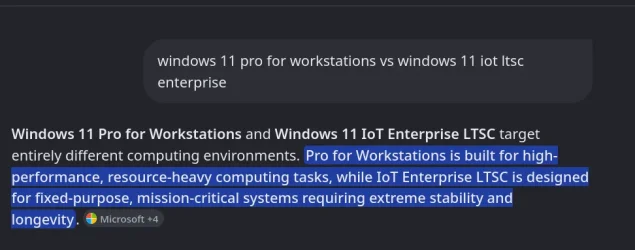
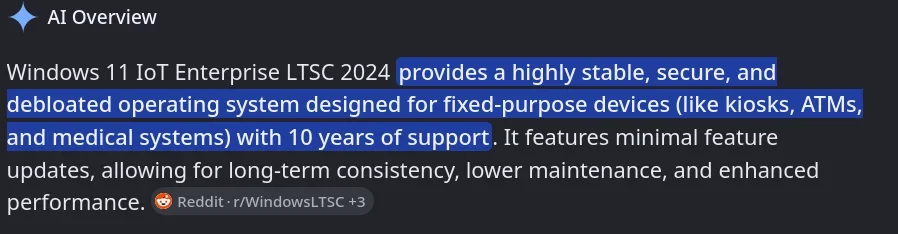
I guess a "highly stable, secure, debloated operating system", with "enhanced performance", is just not for some.

funny.gif
 

My Computers

System One System Two

  • OS
    Fedora/KDE Plasma F43
    Computer type
    PC/Desktop
    Manufacturer/Model
    HP Z640
    CPU
    Xeon 2667 v4
    Motherboard
    Xeon V4 Motherboard
    Memory
    48GB ECC DDR4
    Graphics Card(s)
    nVidia GTX 1650
    Monitor(s) Displays
    LG 27"
    Screen Resolution
    1920x1080@144hz
    Hard Drives
    NVME, SSD
    PSU
    850W
  • Operating System
    Windows 11 IOT Enterprise LTSC/RHEL 10.1 KDE Plasma
    Computer type
    PC/Desktop
    Manufacturer/Model
    HP Z440
    CPU
    Intel Xeom 2680 V4
    Motherboard
    HP Z440
    Memory
    64gb DDR4 ECC
    Graphics card(s)
    AMD RX560
    Monitor(s) Displays
    LG Gsync 27" 144hz
    Screen Resolution
    1920x1080@144hz
    Hard Drives
    SSD/nVme/HDD
    PSU
    standard 700W
    Case
    standard
    Cooling
    Standard
    Browser
    MS Edge
    Antivirus
    BitDefender

My Computers

System One System Two

  • OS
    Windows 11 Pro 25H2
    Computer type
    PC/Desktop
    Manufacturer/Model
    Homebuilt
    CPU
    Intel Core i9 13900K
    Motherboard
    Asus ProArt Z790 Creator WiFi - Bios 3107
    Memory
    Corsair Dominator Platinum 64gb 5600MT/s DDR5 Dual Channel
    Graphics Card(s)
    Sapphire NITRO+ AMD Radeon RX 7900 XTX Vapor-X 24GB
    Sound Card
    External DAC: Cambridge Audio DACMagic200M - Headphone Amp: Topping L50
    Monitor(s) Displays
    Panasonic MX950 Mini LED 55" TV 120hz
    Screen Resolution
    3840 x 2160 120hz
    Hard Drives
    Samsung 980 Pro 2TB (OS)
    Samsung 980 Pro 1TB (Files)
    Lexar NZ790 4TB
    LaCie d2 Professional 6TB external - USB 3.1
    Seagate Expansion 16TB external - USB 3.2
    Seagate One Touch 18TB external HD - USB 3.0
    PSU
    Corsair RM1200x Shift
    Case
    Corsair RGB Smart Case 5000x (white)
    Cooling
    Corsair iCue H150i Elite Capellix XT
    Keyboard
    Incase Ergonomic USB (Microsoft clone)
    Mouse
    Logitech MX Master 3S
    Internet Speed
    Fibre 900/500 Mbps
    Browser
    Microsoft Edge Chromium
    Antivirus
    Bitdefender Total Security
    Other Info
    AMD Radeon Software & Drivers 26.1.1
    Hasleo Backup Suite
    Dashlane password manager
    Kensington Verimark fingerprint reader
    Logitech Brio 4K webcam
    Orico 10-port powered USB 3.0 hub
  • Operating System
    Windows 11 Pro 25H2
    Computer type
    Laptop
    Manufacturer/Model
    Asus Vivobook X1605VA
    CPU
    Intel® Core™ i9-13900H
    Motherboard
    Asus X1605VA bios 309
    Memory
    32GB DDR4-3200 Dual channel
    Graphics card(s)
    *Intel Iris Xᵉ Graphics G7
    Sound Card
    Realtek | Intel SST Bluetooth & USB
    Monitor(s) Displays
    16.0-inch, WUXGA 16:10 aspect ratio, IPS-level Panel
    Screen Resolution
    1920 x 1200 60hz
    Hard Drives
    512GB M.2 NVMe™ PCIe® 3.0 SSD
    Mouse
    Logitech MX Ergo Trackball
    Antivirus
    Bitdefender Total Security
    Other Info
    720p Webcam
    WiFi & USB to ethernet

Latest Support Threads

Back
Top Bottom