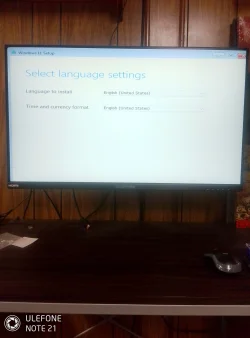
Solved Windows 11 Pro setup over fills the screen


Stoneystevenson

New member
Local time
11:37 AM
Posts
3
OS
Windows 11 Pro
I had to change out the C drive on my Asus Prime Z390-A motherboard. I can't install Windows as setup over fills the screen. I can't get to the buttons at the bottom because of this.
Two weeks ago I was able to install Windows just fine.
Thanks.
 
Windows Build/Version
24H2

Attachments

  • IMG_20260324_165053.webp
    IMG_20260324_165053.webp
    333.1 KB · Views: 1

My Computer My Computer

At a glance

Windows 11 ProIntel Core i5 9th Gen - Core i5-9600K Coffee ...CORSAIR Vengeance LPX 16GB (2 x 8GB) 288-Pin ...
OS
Windows 11 Pro
Computer type
PC/Desktop
Manufacturer/Model
Asus
CPU
Intel Core i5 9th Gen - Core i5-9600K Coffee Lake 6-Cor
Motherboard
Prime Z390-A
Memory
CORSAIR Vengeance LPX 16GB (2 x 8GB) 288-Pin PC RAM DDR4 2666
This may not help, but what monitor are you using? Which interface (HDMI, DisplayPort)?

Are you doing anything differently than two weeks ago?
 

My Computers My Computers

  • At a glance

    Windows 11 26200.8728Amd Threadripper 7970X128GB (4 X 32) G.Skill DDR5 6400 (RDIMM)Gigabyte RTX 4090 OC
    OS
    Windows 11 26200.8728
    Computer type
    PC/Desktop
    Manufacturer/Model
    homebuilt
    CPU
    Amd Threadripper 7970X
    Motherboard
    Gigabyte TRX50 Aero D Rev. 1.0
    Memory
    128GB (4 X 32) G.Skill DDR5 6400 (RDIMM)
    Graphics Card(s)
    Gigabyte RTX 4090 OC
    Sound Card
    none (USB to speakers), Realtek
    Monitor(s) Displays
    Innocn 32" OLED
    Screen Resolution
    3840 X 2160 @ 60Hz
    Hard Drives
    Crucial T700 2TB M.2 NVME SSD
    WD 4TB Blue SATA SSD
    Seagate 18TB IronWolf Pro
    PSU
    BeQuiet! Straight Power 12 1500W
    Case
    Lian Li 011 Dynamic Evo XL
    Cooling
    SilverStone Technology XE360-TR5, with 3 Phanteks T30 fans
    Keyboard
    Cherry KC 500 MX LP (mechanical)
    Mouse
    Logitech M500s (wired)
    Internet Speed
    2000/250 Mbps (down/up)
    Other Info
    xFinity gateway
  • At a glance

    windows 11 26200.8728Intel I9-13900K64GB G.Skill DDR5-6000Gigabyte RTX 3090 ti
    Operating System
    windows 11 26200.8728
    Computer type
    PC/Desktop
    Manufacturer/Model
    homebuilt
    CPU
    Intel I9-13900K
    Motherboard
    Asus RoG Strix Z690-E
    Memory
    64GB G.Skill DDR5-6000
    Graphics card(s)
    Gigabyte RTX 3090 ti
    Sound Card
    built in Realtek
    Monitor(s) Displays
    Philips 27E1N8900 27" OLED
    Screen Resolution
    3840 X 2160 @60Hz
    Hard Drives
    WDC SN850 1TB
    8TB Seagate Ironwolf
    4TB Seagate Ironwolf
    PSU
    eVGA SuperNOVA 1300 GT
    Case
    Lian Li 011 Dynamic Evo
    Cooling
    Corsair iCUE H150i ELITE CAPELLIX Liquid CPU Cooler
    Keyboard
    Cherry Streaming (wired)
    Mouse
    Logitech M500s (wired)
Can you move the window?
Can you Maximize the window then Restore it down?
Maybe press Enter, Next is most likely highlighted anyway.
 

My Computers My Computers

  • At a glance

    Windows 11 Pro
    OS
    Windows 11 Pro
    Computer type
    PC/Desktop
    Manufacturer/Model
    ASUS ROG Strix
  • At a glance

    Windows 11 Pro
    Operating System
    Windows 11 Pro
    Computer type
    Laptop
    Manufacturer/Model
    ASUS VivoBook
  • ASUS VivoBook 'Lite' ~ Windows 11 Home
Some old 720p display HDMI, 32 inch Sceptre 4K Display Port.
I changed out the C drive a 1TB NVMe to a 512 NVMe. I'll go back to using the 1TB NVMe see if that works.
I'm using a USB thumb drive and Rufus to make that bootable.

No can't move the window. I'll try maximize then restore. With enter I can get to part where you put in your product key.
Then it gets stuck on the next page with license info. and that's it no farther.
Bios UEFI displays OK and I was able to install Ubuntu Ok.
 

My Computer My Computer

At a glance

Windows 11 ProIntel Core i5 9th Gen - Core i5-9600K Coffee ...CORSAIR Vengeance LPX 16GB (2 x 8GB) 288-Pin ...
OS
Windows 11 Pro
Computer type
PC/Desktop
Manufacturer/Model
Asus
CPU
Intel Core i5 9th Gen - Core i5-9600K Coffee Lake 6-Cor
Motherboard
Prime Z390-A
Memory
CORSAIR Vengeance LPX 16GB (2 x 8GB) 288-Pin PC RAM DDR4 2666
Hi everyone, well I found the fix. I disconnected the Ethernet cable. Now setup displays like it should.
Yesterday I was thinking as soon as you start setup MS gets a notice that 11 is being installed on an older computer
and sends out a signal to block older display drivers. Guess I was right. Cheers everyone!
 

My Computer My Computer

At a glance

Windows 11 ProIntel Core i5 9th Gen - Core i5-9600K Coffee ...CORSAIR Vengeance LPX 16GB (2 x 8GB) 288-Pin ...
OS
Windows 11 Pro
Computer type
PC/Desktop
Manufacturer/Model
Asus
CPU
Intel Core i5 9th Gen - Core i5-9600K Coffee Lake 6-Cor
Motherboard
Prime Z390-A
Memory
CORSAIR Vengeance LPX 16GB (2 x 8GB) 288-Pin PC RAM DDR4 2666
Thanks for the feedback
 

My Computers My Computers

  • At a glance

    Windows 11 Pro - Windows 7 HP 64 - Lubuntui5 6600K - 800MHz to 4400MHz4+4G GSkill DDR4 3000IG - Intel 530
    OS
    Windows 11 Pro - Windows 7 HP 64 - Lubuntu
    Computer type
    PC/Desktop
    Manufacturer/Model
    custom build
    CPU
    i5 6600K - 800MHz to 4400MHz
    Motherboard
    GA-Z170-HD3P
    Memory
    4+4G GSkill DDR4 3000
    Graphics Card(s)
    IG - Intel 530
    Monitor(s) Displays
    Samsung 226BW
    Screen Resolution
    1680x1050
    Hard Drives
    (1) -1 SM951 – 128GB M.2 AHCI PCIe SSD drive for Win 11
    (2) -1 WD SATA 3 - 1T for Data
    (3) -1 WD SATA 3 - 1T for backup
    (4) -1 BX500 SSD - 256G for Windows 7 and Lubuntu
    PSU
    Thermaltake 450W TR2 gold
    Keyboard
    Old and good Chicony mechanical keyboard
    Mouse
    Logitech mX performance - 9 buttons (had to disable some)
    Internet Speed
    500 Mb/s
    Browser
    Firefox 64
  • At a glance

    Windows 11 Proi7-4500U 800- 3000MHz(4+4)G DDR3 1600IG intel 4400 + NVIDIA GeForce GT 745M
    Operating System
    Windows 11 Pro
    Computer type
    Laptop
    Manufacturer/Model
    Asus Q550LF
    CPU
    i7-4500U 800- 3000MHz
    Motherboard
    Asus Q550LF
    Memory
    (4+4)G DDR3 1600
    Graphics card(s)
    IG intel 4400 + NVIDIA GeForce GT 745M
    Sound Card
    Realtek
    Monitor(s) Displays
    LG Display LP156WF4-SPH1
    Screen Resolution
    1920 x 1080
    Hard Drives
    BX500 120G SSD for Windows and programs
    & 1T HDD for data
    Internet Speed
    500 Mb/s
    Browser
    Firefox 64
Hi everyone, well I found the fix. I disconnected the Ethernet cable. Now setup displays like it should.
Yesterday I was thinking as soon as you start setup MS gets a notice that 11 is being installed on an older computer
and sends out a signal to block older display drivers. Guess I was right. Cheers everyone!
I guess that's a possibility. If they are I wonder what MS has to gain by doing it. The good thing is you found a way to fix your problem. (y)
 

My Computers My Computers

  • At a glance

    Windows 11 Pro 25H2Intel Core i7-10700K16GB (8GB PC4-19200 DDR4 SDRAM x2)NVIDIA GeForce GTX 1050 TI
    OS
    Windows 11 Pro 25H2
    Computer type
    PC/Desktop
    Manufacturer/Model
    PowerSpec B746
    CPU
    Intel Core i7-10700K
    Motherboard
    ASRock Z490 Phantom Gaming 4/ax
    Memory
    16GB (8GB PC4-19200 DDR4 SDRAM x2)
    Graphics Card(s)
    NVIDIA GeForce GTX 1050 TI
    Sound Card
    Realtek Audio
    Monitor(s) Displays
    #1. LG ULTRAWIDE 34" #2. AOC Q32G2WG3 32"
    Screen Resolution
    #1. 3440 X 1440 #2. 1920 x 1080
    Hard Drives
    NVMe WDC WDS100T2B0C-00PXH0 1TB
    Samsung SSD 860 EVO 1TB
    PSU
    750 Watts (62.5A)
    Case
    PowerSpec/Lian Li ATX 205
    Keyboard
    Logitech K270
    Mouse
    Logitech M185
    Browser
    Microsoft Edge and Firefox
    Antivirus
    Webroot SecureAnywhere CE 26.1
  • At a glance

    Windows 11 Canary ChannelIntel Core i5-8400 CPU @ 2.80GHz16 MB DDR 4-2666
    Operating System
    Windows 11 Canary Channel
    Computer type
    PC/Desktop
    Manufacturer/Model
    PowerSpec G156
    CPU
    Intel Core i5-8400 CPU @ 2.80GHz
    Motherboard
    AsusTeK Prime B360M-A
    Memory
    16 MB DDR 4-2666
    Monitor(s) Displays
    23" Speptre HDMI 75Hz
    Screen Resolution
    1920x1080
    Hard Drives
    Samsung 970 EVO 500GB NVMe
    Keyboard
    Logitek K270
    Mouse
    Logitek M185
    Browser
    Firefox, Edge and Edge Canary
    Antivirus
    Windows Defender

Latest Support Threads

Back
Top Bottom