Windows 11 Pro: Windows Update Fails at 98% and Repair Install Fails at 88%


Guys, I am considering doing a clean install of Windows 11, opinions for the best way to do it, tks.

  • 1. Windows Reset.

    Votes: 0 0.0%
  • 2. Clean Install from within Windows.

    Votes: 0 0.0%

  • Total voters
    2
Some of these ran earlier.

Please post new results separated from prior results.


1) Administrative PS: > post share links (Gofile - Cloud Storage Made Simple)

dism /online /cleanup-image /analyzecomponentstore

fltmc

dism /online /get-drivers /format:table >c:\drivers.txt

Get-WindowsUpdateLog

wevtutil epl Application "%userprofile%\Desktop\application.evtx"

wevtutil epl System "%userprofile%\Desktop\system.evtx"


2) V2 log collector > post a share link



3) Upgrade_failure_info.bat > post a share link


4) Tuneup plus > post a share link

https://www.tenforums.com/attachmen...-files-use-bsod-debugging-tuneup_plus_log.bat

Batch files for use in BSOD debugging - Windows 10 Help Forums


5) Post share links:

C:\Windows\Logs\CBS\CBS.log

C:\Windows\Logs\CBS\CbsPersist
Tune-up ran, said it was doing some repairs and then the windows closed. How do I find the results of the tune-up please?

Here are the links:
CBS
Upgrade_failure_logs_2026-07-08_17-29-09.zip
DESKTOP-(2026-07-08_17-33-03).zip
drivers.txt
system.evtx
application.evtx
Others.txt
 
Last edited:

My Computer My Computer

At a glance

Windows 11 25H2AMD Ryzen 5 1600 - 6 Core32GBNvidia 1030GT
OS
Windows 11 25H2
Computer type
PC/Desktop
Manufacturer/Model
Custom Build
CPU
AMD Ryzen 5 1600 - 6 Core
Motherboard
Asus
Memory
32GB
Graphics Card(s)
Nvidia 1030GT
Monitor(s) Displays
Iiyama24
Unfortunately the repair install with the ISO also hung, at 88%.

So it looks like I will have to clean install Windows 11 or get a new PC.

My PC is about 12 years old (Windows 11 25H2, AMD Ryzen 5 1600 - 6 Core, Nvidia 1030GT
Custom Build, Motherboard Asus Prime B350M, Memory 32GB DDR4, Monitor Iiyama 24").

Some advice please - Get a new PC or just a clean install on this rig (and if so, do I just wait for 26H2 for the clean install)?
A well that's too bad.... It was worth a try to see if this could resolve the issue. There is no option left anymore than a new install....

If you should buy a new system?
As I look at your system; it's a lot like my 11 year old system. Also Windows 11 25H2, Intel i7-6700K 4-core (6th gen), no TPM, Asus Maximus VIII Ranger, NVIDIA GTX1080, 32Gb memory DDR4. Used Rufus to install 25H2 because my CPU is to old according to MS and it lacks TPM2.0. BUT... It still runs fine!
But at some 4 years ago I decided that my old system was to old. Bought a RTX3060Ti to replace my older NVIDIA GTX1080 card... It should not be a problem according to YT. But all I got were blue screens. That was the point that I decided to buy new components for my PC. I am also a custom builder.

Bought an ASUS Prime Z690A with no WiFi, 32Gb DDR5, i7-12700KF 20-core (12th gen) and a new 850W Gold PSU (because the RTX card draws more power than my old GTX card. My old PSU was only 600W) Had in my old system only one NVMe disk but now I could place 4 NVMe cards onto my new motherboard. All Samsung stuff with formidable speeds.

I am a very heavy user on my new and old system. I like to play the latest games with a Full HD resolution (unfortunately no 4K or HDR) on my LG 34" (21:9) monitor. Downloading movies and changing them. Speed matters. My new system is considerably much faster than my old system.

So you have to look at your usage of your system. If you are also a heavy user then a new system might be in order. Just browsing, emailing en watching movies etc. No. At this moment it's a bad time to start with a new system. The prices are now (If I look what I paid for my 32Gb 2-stick Corsair Vengeance DDR5-5600-36 kit) high. I bought mine for €187 in 2022. Now the same but DDR5-5600-40 kit: €389. A rise of €200 all because the AI industry is buying DDR5's like mad. And with a new motherboard you have to upgrade other stuff too. You can't buy an 5 year old board anymore. At least a new motherboard, DDR5, CPU and maybe a new more powerful PSU. That old NVIDIA GT1030 card will run without any problems although it shows it age. My old GTX1080 runs also fine on my old system with an 27" LG monitor. (I don't have to try to run newest games on that thing. It will run but everything on low and than maybe see a FPS less than 50. Not playable...) I am looking for an RTX5060Ti as a possible upgrade in my new system. But all I see are good prices for 8Gb VRAM. Games become more demanding. A RTX5060Ti with 16Gb VRAM? Wow.... I'll wait a couple of year(s)..... Its €399 v.s. €529. Those GDDR7 RAM (or VRAM) is also in demand because of that AI industry.

If you are happy with the current speeds; Just start a new install after saving all your data.
If you think "I want a new system" keep in mind the ridiculous high prices of DDR5 memory. (Also NVMe prices are very high. also caused by the AI industry) If you want to reuse that DDR4 memory? It is maybe possible. You have to take a good look of the motherboard of your choosing if it will accept it. And always; keep a budget in mind.

You decide....
 

My Computers My Computers

  • At a glance

    Win 11 Pro 25H2 Build 26200.8737, Zorin OS ProIntel® Core™ i7-12700KF 12th Gen. (S1700)32GB DDR5 5600-36 Vengeance (2x16)PCIe4.0 Asus NVIDIA RTX3060Ti
    OS
    Win 11 Pro 25H2 Build 26200.8737, Zorin OS Pro
    Computer type
    PC/Desktop
    Manufacturer/Model
    Self built
    CPU
    Intel® Core™ i7-12700KF 12th Gen. (S1700)
    Motherboard
    ASUS Prime Z690-A, BIOS v4505 (Z690 Intel Chipset)
    Memory
    32GB DDR5 5600-36 Vengeance (2x16)
    Graphics Card(s)
    PCIe4.0 Asus NVIDIA RTX3060Ti
    Sound Card
    Onboard; Realtek
    Monitor(s) Displays
    34" LG 34UC79G-B Curved 21:9 144Hz
    Screen Resolution
    2560x1080 (No HDR)
    Hard Drives
    250Gb Samsung 870PRO NVMe (Win 11 Pro)
    1Tb Samsung 980PRO NVMe
    1Tb Samsung 970EVO NVMe
    2Tb Samsung 990PRO NVMe with heatsink.
    4Tb WDC WD40EZRZ Blue SATA (Int.)
    4Tb WDC WD40EZRZ Blue SATA (Int.)
    3Tb WDC WD30EFRZ Red SATA (Int.)
    256Gb Samsung 840PRO SSD (RHEL 9,5)
    256Gb Samsung 850PRO SSD (Zorin OS Pro 18)
    PSU
    Coolermaster 850W V2 Gold with internal 12cm exaust fan
    Case
    Be-Quiet Pure Base 600.
    Cooling
    3x Be-Quiet! 12/14cm "Silent Wings 4" casefans, 1x Arctic Freezer i35 CPU towerblock with fan.
    Keyboard
    Steelseries APEX 7 keyboard.
    Mouse
    Logitech G-502 Hero
    Internet Speed
    1Gb
    Browser
    Brave
    Antivirus
    F-Secure
    Other Info
    No Noise system.
    256Gb Kingston Travler USB 3.0 drive.
    64Gb Sandisk USB 3.2 drive. (Ventoy)
    8Gb Philips USB 3.0 drive. (Win. Inst.)
    8Gb Philips USB 3.0 drive. (Rescue disk)
    2Tb WD USB 3.0 Passport drive.
    USB Ext. 500Gb WD SATA drive.
    External USB 3.0 C.A. CD/DVD* burner.
  • At a glance

    Windows 11 Pro 25H2Intel® Core™ i7-6700K 6th Gen. (S1151)32Gb DDR4 2400 Corsair Vengeance (4x8)ASUS GeForce GTX1080
    Operating System
    Windows 11 Pro 25H2
    Computer type
    PC/Desktop
    Manufacturer/Model
    Selfbuild
    CPU
    Intel® Core™ i7-6700K 6th Gen. (S1151)
    Motherboard
    ASUS Maximus VIII Ranger (Intel Chipset Z170)
    Memory
    32Gb DDR4 2400 Corsair Vengeance (4x8)
    Graphics card(s)
    ASUS GeForce GTX1080
    Sound Card
    Onboard; Realtek
    Monitor(s) Displays
    LG IPS277L 27" WideLED, IPS
    Screen Resolution
    1920x1080
    Hard Drives
    Samsung 850 Pro SSD
    PSU
    Zalman ZM600-HP with internal exhaust fan. Heatpipes & Modular cables.
    Case
    Cooler Master Aero
    Cooling
    Scythe Mugen 4 dual fan towerblock.
    Keyboard
    Red Dragon
    Mouse
    Red Dragon
    Internet Speed
    1Gb
    Browser
    Chrome
    Antivirus
    F-Secure
A well that's too bad.... It was worth a try to see if this could resolve the issue. There is no option left anymore than a new install....

If you should buy a new system?
As I look at your system; it's a lot like my 11 year old system. Also Windows 11 25H2, Intel i7-6700K 4-core (6th gen), no TPM, Asus Maximus VIII Ranger, NVIDIA GTX1080, 32Gb memory DDR4. Used Rufus to install 25H2 because my CPU is to old according to MS and it lacks TPM2.0. BUT... It still runs fine!
But at some 4 years ago I decided that my old system was to old. Bought a RTX3060Ti to replace my older NVIDIA GTX1080 card... It should not be a problem according to YT. But all I got were blue screens. That was the point that I decided to buy new components for my PC. I am also a custom builder.

Bought an ASUS Prime Z690A with no WiFi, 32Gb DDR5, i7-12700KF 20-core (12th gen) and a new 850W Gold PSU (because the RTX card draws more power than my old GTX card. My old PSU was only 600W) Had in my old system only one NVMe disk but now I could place 4 NVMe cards onto my new motherboard. All Samsung stuff with formidable speeds.

I am a very heavy user on my new and old system. I like to play the latest games with a Full HD resolution (unfortunately no 4K or HDR) on my LG 34" (21:9) monitor. Downloading movies and changing them. Speed matters. My new system is considerably much faster than my old system.

So you have to look at your usage of your system. If you are also a heavy user then a new system might be in order. Just browsing, emailing en watching movies etc. No. At this moment it's a bad time to start with a new system. The prices are now (If I look what I paid for my 32Gb 2-stick Corsair Vengeance DDR5-5600-36 kit) high. I bought mine for €187 in 2022. Now the same but DDR5-5600-40 kit: €389. A rise of €200 all because the AI industry is buying DDR5's like mad. And with a new motherboard you have to upgrade other stuff too. You can't buy an 5 year old board anymore. At least a new motherboard, DDR5, CPU and maybe a new more powerful PSU. That old NVIDIA GT1030 card will run without any problems although it shows it age. My old GTX1080 runs also fine on my old system with an 27" LG monitor. (I don't have to try to run newest games on that thing. It will run but everything on low and than maybe see a FPS less than 50. Not playable...) I am looking for an RTX5060Ti as a possible upgrade in my new system. But all I see are good prices for 8Gb VRAM. Games become more demanding. A RTX5060Ti with 16Gb VRAM? Wow.... I'll wait a couple of year(s)..... Its €399 v.s. €529. Those DDR7 RAM (or VRAM) is also in demand because of that AI industry.

If you are happy with the current speeds; Just start a new install after saving all your data.
If you think "I want a new system" keep in mind the ridiculous high prices of DDR5 memory. (Also NVMe prices are very high. also caused by the AI industry) If you want to reuse that DDR4 memory? It is maybe possible. You have to take a good look of the motherboard of your choosing if it will accept it. And always; keep a budget in mind.

You decide....
Would a Windows Reset work?
 

My Computer My Computer

At a glance

Windows 11 25H2AMD Ryzen 5 1600 - 6 Core32GBNvidia 1030GT
OS
Windows 11 25H2
Computer type
PC/Desktop
Manufacturer/Model
Custom Build
CPU
AMD Ryzen 5 1600 - 6 Core
Motherboard
Asus
Memory
32GB
Graphics Card(s)
Nvidia 1030GT
Monitor(s) Displays
Iiyama24
Another workaround that worked for me was to run an in-place update of an older build like the 24H2 or even the 21H2 first, then upgrading later with the 25H2 iso. For my older CPU i7 7700HQ i did the 21H2 first, then 24H2 and then 25H2.
 

My Computer My Computer

At a glance

Windows 11
OS
Windows 11
Computer type
Laptop
Manufacturer/Model
HP and Acer
Tune-up ran, said it was doing some repairs and then the windows closed. How do I find the results of the tune-up please?

Here are the links:
CBS
Upgrade_failure_logs_2026-07-08_17-29-09.zip
DESKTOP-(2026-07-08_17-33-03).zip
drivers.txt
system.evtx
application.evtx
Others.txt
Looked at the CBS.log. Is litterly full with STATUS_SXS_FILE_HASH_MISMATCH error messages.

"The error STATUS_SXS_FILE_HASH_MISMATCH (Code 0xC015001B) indicates that a program's actual file contents do not match the hash recorded in its installation manifest [1, 2]. This is typically caused by a corrupted component store, a bad Windows update, or a modified system file."

An other error points to the real reason: gle=0x80004005

"The Windows error gle=0x80004005 typically indicates a Boot Code update failure during major Windows updates or OS upgrades [1, 2]. This is often caused by a corrupted EFI partition, damaged Boot Configuration Data (BCD), or complex multi-boot/multi-OS partition layouts."

The reason why your In-place-Installment fails is because your EFI (Boot partition that point and boots into Windows) partition is corrupted. You can do this multiple times to no reveal because the initial cause is not addressed. It may try to replace files on your C-parttion but it does not fix the hidden EFI partition.

You must that repair this first!!!!

How to Fix the Update Boot Code Error

Users on Microsoft Learn generally suggest the following methods to resolve this BCD and EFI partition corruption:

1. Rebuild the BCD Store
Often, Windows fails to update the boot code because the BCD is corrupt or improperly referenced.
- Press Win + X and select Terminal (Admin) or Command Prompt (Admin).
- Type the following commands, pressing Enter after each one
- Start CMD as admin


bcdedit /export C:\BCD_Backup
attrib c:\boot\bcd -h -r -s
ren c:\boot\bcd bcd.old
bootrec /rebuildbcd

Restart your computer and try running the Windows Update again.

2. Clean up "Resume Object" Duplicates
Users on Microsoft Learn note that duplicate or dead GUIDs inside your Boot Manager can trigger the 0x80004005 error.
- Open Command Prompt as Administrator and run

bcdedit /enum all
- Locate the resumeobject entry under the Windows Boot Manager section.
- Note the GUID associated with it and delete it using:

bcdedit /delete {GUID}

3. Re-create or Resize the EFI Partition
For stubborn errors during OS upgrades, the EFI System Partition may be too small or corrupted to handle new boot files.
- Boot using a Windows Installation Media USB.
- At the install screen, press Shift + F10 to open the Command Prompt.
- Use diskpart to assign a drive letter to your EFI partition and recreate the BCD files using

Detailed step-by-step partition assignment instructions are available on the Windows 11 Forum.
(Unable To Upgrade 23H2 To 24H2 - 0x80004005 - 0x50016 Error)

4. Run DISM and SFC
Corrupt system files might be blocking boot code updates. Open an Administrator Command Prompt and run the following commands sequentially:
- cmd

DISM.exe /Online /Cleanup-image /Restorehealth
sfc /scannow
Hope that it fixes the corrupted EFI partition. Thanks for sharing that CBS.log made things more clearer.....

A new install overwrites the EFI, C and WinRE partitions. So that would fix everything at once.
 

My Computers My Computers

  • At a glance

    Win 11 Pro 25H2 Build 26200.8737, Zorin OS ProIntel® Core™ i7-12700KF 12th Gen. (S1700)32GB DDR5 5600-36 Vengeance (2x16)PCIe4.0 Asus NVIDIA RTX3060Ti
    OS
    Win 11 Pro 25H2 Build 26200.8737, Zorin OS Pro
    Computer type
    PC/Desktop
    Manufacturer/Model
    Self built
    CPU
    Intel® Core™ i7-12700KF 12th Gen. (S1700)
    Motherboard
    ASUS Prime Z690-A, BIOS v4505 (Z690 Intel Chipset)
    Memory
    32GB DDR5 5600-36 Vengeance (2x16)
    Graphics Card(s)
    PCIe4.0 Asus NVIDIA RTX3060Ti
    Sound Card
    Onboard; Realtek
    Monitor(s) Displays
    34" LG 34UC79G-B Curved 21:9 144Hz
    Screen Resolution
    2560x1080 (No HDR)
    Hard Drives
    250Gb Samsung 870PRO NVMe (Win 11 Pro)
    1Tb Samsung 980PRO NVMe
    1Tb Samsung 970EVO NVMe
    2Tb Samsung 990PRO NVMe with heatsink.
    4Tb WDC WD40EZRZ Blue SATA (Int.)
    4Tb WDC WD40EZRZ Blue SATA (Int.)
    3Tb WDC WD30EFRZ Red SATA (Int.)
    256Gb Samsung 840PRO SSD (RHEL 9,5)
    256Gb Samsung 850PRO SSD (Zorin OS Pro 18)
    PSU
    Coolermaster 850W V2 Gold with internal 12cm exaust fan
    Case
    Be-Quiet Pure Base 600.
    Cooling
    3x Be-Quiet! 12/14cm "Silent Wings 4" casefans, 1x Arctic Freezer i35 CPU towerblock with fan.
    Keyboard
    Steelseries APEX 7 keyboard.
    Mouse
    Logitech G-502 Hero
    Internet Speed
    1Gb
    Browser
    Brave
    Antivirus
    F-Secure
    Other Info
    No Noise system.
    256Gb Kingston Travler USB 3.0 drive.
    64Gb Sandisk USB 3.2 drive. (Ventoy)
    8Gb Philips USB 3.0 drive. (Win. Inst.)
    8Gb Philips USB 3.0 drive. (Rescue disk)
    2Tb WD USB 3.0 Passport drive.
    USB Ext. 500Gb WD SATA drive.
    External USB 3.0 C.A. CD/DVD* burner.
  • At a glance

    Windows 11 Pro 25H2Intel® Core™ i7-6700K 6th Gen. (S1151)32Gb DDR4 2400 Corsair Vengeance (4x8)ASUS GeForce GTX1080
    Operating System
    Windows 11 Pro 25H2
    Computer type
    PC/Desktop
    Manufacturer/Model
    Selfbuild
    CPU
    Intel® Core™ i7-6700K 6th Gen. (S1151)
    Motherboard
    ASUS Maximus VIII Ranger (Intel Chipset Z170)
    Memory
    32Gb DDR4 2400 Corsair Vengeance (4x8)
    Graphics card(s)
    ASUS GeForce GTX1080
    Sound Card
    Onboard; Realtek
    Monitor(s) Displays
    LG IPS277L 27" WideLED, IPS
    Screen Resolution
    1920x1080
    Hard Drives
    Samsung 850 Pro SSD
    PSU
    Zalman ZM600-HP with internal exhaust fan. Heatpipes & Modular cables.
    Case
    Cooler Master Aero
    Cooling
    Scythe Mugen 4 dual fan towerblock.
    Keyboard
    Red Dragon
    Mouse
    Red Dragon
    Internet Speed
    1Gb
    Browser
    Chrome
    Antivirus
    F-Secure
How to Fix the Update Boot Code Error
Users on Microsoft Learn generally suggest the following methods to resolve this BCD and EFI partition corruption:

1. Rebuild the BCD Store
Often, Windows fails to update the boot code because the BCD is corrupt or improperly referenced.
- Press Win + X and select Terminal (Admin) or Command Prompt (Admin).
- Type the following commands, pressing Enter after each one
- Start CMD as admin

bcdedit /export C:\BCD_Backup
attrib c:\boot\bcd -h -r -s
ren c:\boot\bcd bcd.old
bootrec /rebuildbcd
Restart your computer and try running the Windows Update again.
Here is the first problem, I suspect. After running attrib c:\boot\bcd -h -r -s, I get:
Path not found - C:\boot
 

My Computer My Computer

At a glance

Windows 11 25H2AMD Ryzen 5 1600 - 6 Core32GBNvidia 1030GT
OS
Windows 11 25H2
Computer type
PC/Desktop
Manufacturer/Model
Custom Build
CPU
AMD Ryzen 5 1600 - 6 Core
Motherboard
Asus
Memory
32GB
Graphics Card(s)
Nvidia 1030GT
Monitor(s) Displays
Iiyama24

My Computer My Computer

At a glance

Windows 11 25H2AMD Ryzen 5 1600 - 6 Core32GBNvidia 1030GT
OS
Windows 11 25H2
Computer type
PC/Desktop
Manufacturer/Model
Custom Build
CPU
AMD Ryzen 5 1600 - 6 Core
Motherboard
Asus
Memory
32GB
Graphics Card(s)
Nvidia 1030GT
Monitor(s) Displays
Iiyama24
On a EFI - GPT drive there is no c:\boot\bcd. I think it is on a Legacy - MBR drive.

Is your Windows drive Legacy - MBR drive or EFI - GPT?

If it is EFI - GPT you can erase and then recreate a entire EFI partition.

Boot from a Win 10 or Win 11 installation drive and at the Windows Setup screen, press Shift+F10 simultaneously to open a command line prompt and type:

diskpart
list vol <- note which drive letter your Windows partition is assigned
list disk <- note the disk number of the drive containing your EFI system partition
select disk # <- replace # with the drive identified above
list par <- note which partition is the EFI System partition
select part # <- replace # with the partition number identified above
del part override
create part EFI size=100
format fs=FAT32 quick
assign letter=s
exit
bcdboot C:\Windows /s S: /f UEFI <- note may need to change C: to the drive letter identified above
diskpart
select vol S
remove letter=S
exit
 
Last edited:

My Computers My Computers

  • At a glance

    Windows 11 Pro - Windows 7 HP 64 - Lubuntui5 6600K - 800MHz to 4400MHz4+4G GSkill DDR4 3000IG - Intel 530
    OS
    Windows 11 Pro - Windows 7 HP 64 - Lubuntu
    Computer type
    PC/Desktop
    Manufacturer/Model
    custom build
    CPU
    i5 6600K - 800MHz to 4400MHz
    Motherboard
    GA-Z170-HD3P
    Memory
    4+4G GSkill DDR4 3000
    Graphics Card(s)
    IG - Intel 530
    Monitor(s) Displays
    Samsung 226BW
    Screen Resolution
    1680x1050
    Hard Drives
    (1) -1 SM951 – 128GB M.2 AHCI PCIe SSD drive for Win 11
    (2) -1 WD SATA 3 - 1T for Data
    (3) -1 WD SATA 3 - 1T for backup
    (4) -1 BX500 SSD - 256G for Windows 7 and Lubuntu
    PSU
    Thermaltake 450W TR2 gold
    Keyboard
    Old and good Chicony mechanical keyboard
    Mouse
    Logitech mX performance - 9 buttons (had to disable some)
    Internet Speed
    500 Mb/s
    Browser
    Firefox 64
  • At a glance

    Windows 11 Proi7-4500U 800- 3000MHz(4+4)G DDR3 1600IG intel 4400 + NVIDIA GeForce GT 745M
    Operating System
    Windows 11 Pro
    Computer type
    Laptop
    Manufacturer/Model
    Asus Q550LF
    CPU
    i7-4500U 800- 3000MHz
    Motherboard
    Asus Q550LF
    Memory
    (4+4)G DDR3 1600
    Graphics card(s)
    IG intel 4400 + NVIDIA GeForce GT 745M
    Sound Card
    Realtek
    Monitor(s) Displays
    LG Display LP156WF4-SPH1
    Screen Resolution
    1920 x 1080
    Hard Drives
    BX500 120G SSD for Windows and programs
    & 1T HDD for data
    Internet Speed
    500 Mb/s
    Browser
    Firefox 64
Here is the first problem, I suspect. After running attrib c:\boot\bcd -h -r -s, I get:
Path not found - C:\boot
I think this because that directory does not exist. You have to make one. or there is one extra step for it; let Windows know on what disk Windows is installed with issuing

bcdboot c:\windows /s c

SO..... AI had it wrong.
Now if I looking into this; this can not be done in normal Windows mode.
You have to bootup into recovery mode (WinRE) Startup your system, restart and press Shift continuesly until you see "Wait a moment" and the blue WinRE environment appears. Choose Troubleshoot - Advanced options - Command prompt.

From this moment follow these steps described here (make notes of the commands or have a laptop nearby)

Those first 3 lines assume that there is a C:\boot directory with a file called bcd.
Those 3 lines were intended to make a backup of your bcd.
attrib c:\boot\bcd -h -r -s does the following with the original file:

-h = removes the hidden file attribute.
-r = removes the read-only attribute.
-s = removes the systemfile attribute.
It must do this otherwise you can't rename the original bcd file into bcd.old file.

Now comes the fun part..... I don't have a C:\boot directory either. I vaguely recall this directory existing at some point, but knowing Microsoft, they’ve probably moved it. Let me have a quick look... I can't find this "bcd" file either. (assuming it's still named that way on the C: drive).
I suspect they moved it to the EFI partition. What's new?........... MS and changes....... So forget what I have said earlier. MS has changed this whole booting proces.......

I guess we skip the backup for now, then. Then real part that is making a new bcd is:

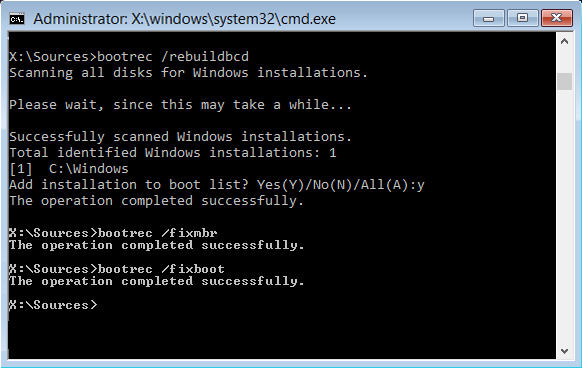
bootrec /rebuildbcd
So lets advance and make not a backup of this file. Before you do anything from now on: MAKE A BACKUP of your complete C-drive as mentioned before.
The next steps are changing your system in such a way there is no turning back.
According to the site these are the new steps: REMEBER ONLY AT THE CMD PROMPT CALLED BY THE WINRE ENVIRONMENT!


bcdboot c:\windows /s c:
bootsect /nt60 sys /force
bootrec /fixmbr
bootrec /fixboot
bootrec /rebuildbcd

Check if with bcdedit if it respond with something like this;

Code:
C:\Windows\System32>bcdedit

Windows Boot Manager
--------------------
identifier              {bootmgr}
device                  partition=\Device\HarddiskVolume1
path                    \EFI\MICROSOFT\BOOT\BOOTMGFW.EFI
description             Windows Boot Manager
locale                  nl-NL
inherit                 {globalsettings}
default                 {current}
resumeobject            {ef8ff468-6721-11f1-9f01-005056c00008}
displayorder            {current}
toolsdisplayorder       {memdiag}
timeout                 30

Windows Boot Loader
-------------------
identifier              {current}
device                  partition=C:
path                    \WINDOWS\system32\winload.efi
description             Windows 11
locale                  nl-NL
inherit                 {bootloadersettings}
recoverysequence        {ef8ff46b-6721-11f1-9f01-005056c00008}
displaymessageoverride  Recovery
recoveryenabled         Yes
isolatedcontext         Yes
allowedinmemorysettings 0x15000075
osdevice                partition=C:
systemroot              \WINDOWS
resumeobject            {ef8ff468-6721-11f1-9f01-005056c00008}
nx                      OptIn
bootmenupolicy          Standard

(Of course in your case you will see at locale: fr-FR.)
As you can see the bcd functionality has been taken over by the C:\WIndows\system32\winload.efi file and at the EFI-partition by the\EFI\MICROSOFT\BOOT\BOOTMGFW.EFI file.

You can make this hidden EFI partition visible by using diskpart.

Again CMD as admin

diskpart
list volume
Search for the partition which has "boot" as info. This is volume x.
select volume x
assign letter=Z
list volume <- Check if a drive letter is assigned.
You now see the the boot volume (or the EFI partition) has a drive letter assigned to it: Z.
With exit you can now view that partition. (do not change anything!!!!)
If your done inspecting this volume remove the drive letter with

diskpart
list volume
remove letter=Z
list volume <- Check if the drive letter is removed.
exit
I hope you now will succeed.......
 

My Computers My Computers

  • At a glance

    Win 11 Pro 25H2 Build 26200.8737, Zorin OS ProIntel® Core™ i7-12700KF 12th Gen. (S1700)32GB DDR5 5600-36 Vengeance (2x16)PCIe4.0 Asus NVIDIA RTX3060Ti
    OS
    Win 11 Pro 25H2 Build 26200.8737, Zorin OS Pro
    Computer type
    PC/Desktop
    Manufacturer/Model
    Self built
    CPU
    Intel® Core™ i7-12700KF 12th Gen. (S1700)
    Motherboard
    ASUS Prime Z690-A, BIOS v4505 (Z690 Intel Chipset)
    Memory
    32GB DDR5 5600-36 Vengeance (2x16)
    Graphics Card(s)
    PCIe4.0 Asus NVIDIA RTX3060Ti
    Sound Card
    Onboard; Realtek
    Monitor(s) Displays
    34" LG 34UC79G-B Curved 21:9 144Hz
    Screen Resolution
    2560x1080 (No HDR)
    Hard Drives
    250Gb Samsung 870PRO NVMe (Win 11 Pro)
    1Tb Samsung 980PRO NVMe
    1Tb Samsung 970EVO NVMe
    2Tb Samsung 990PRO NVMe with heatsink.
    4Tb WDC WD40EZRZ Blue SATA (Int.)
    4Tb WDC WD40EZRZ Blue SATA (Int.)
    3Tb WDC WD30EFRZ Red SATA (Int.)
    256Gb Samsung 840PRO SSD (RHEL 9,5)
    256Gb Samsung 850PRO SSD (Zorin OS Pro 18)
    PSU
    Coolermaster 850W V2 Gold with internal 12cm exaust fan
    Case
    Be-Quiet Pure Base 600.
    Cooling
    3x Be-Quiet! 12/14cm "Silent Wings 4" casefans, 1x Arctic Freezer i35 CPU towerblock with fan.
    Keyboard
    Steelseries APEX 7 keyboard.
    Mouse
    Logitech G-502 Hero
    Internet Speed
    1Gb
    Browser
    Brave
    Antivirus
    F-Secure
    Other Info
    No Noise system.
    256Gb Kingston Travler USB 3.0 drive.
    64Gb Sandisk USB 3.2 drive. (Ventoy)
    8Gb Philips USB 3.0 drive. (Win. Inst.)
    8Gb Philips USB 3.0 drive. (Rescue disk)
    2Tb WD USB 3.0 Passport drive.
    USB Ext. 500Gb WD SATA drive.
    External USB 3.0 C.A. CD/DVD* burner.
  • At a glance

    Windows 11 Pro 25H2Intel® Core™ i7-6700K 6th Gen. (S1151)32Gb DDR4 2400 Corsair Vengeance (4x8)ASUS GeForce GTX1080
    Operating System
    Windows 11 Pro 25H2
    Computer type
    PC/Desktop
    Manufacturer/Model
    Selfbuild
    CPU
    Intel® Core™ i7-6700K 6th Gen. (S1151)
    Motherboard
    ASUS Maximus VIII Ranger (Intel Chipset Z170)
    Memory
    32Gb DDR4 2400 Corsair Vengeance (4x8)
    Graphics card(s)
    ASUS GeForce GTX1080
    Sound Card
    Onboard; Realtek
    Monitor(s) Displays
    LG IPS277L 27" WideLED, IPS
    Screen Resolution
    1920x1080
    Hard Drives
    Samsung 850 Pro SSD
    PSU
    Zalman ZM600-HP with internal exhaust fan. Heatpipes & Modular cables.
    Case
    Cooler Master Aero
    Cooling
    Scythe Mugen 4 dual fan towerblock.
    Keyboard
    Red Dragon
    Mouse
    Red Dragon
    Internet Speed
    1Gb
    Browser
    Chrome
    Antivirus
    F-Secure
It appears that it is Windows insiders.

Operating System: Windows 11 Pro 64-bit (10.0, Build 26200) (26100.ge_release.240331-1435)


1) Run:

reg query "HKLM\SOFTWARE\Microsoft\Windows NT\CurrentVersion" /v DisplayVersion
reg query "HKLM\SOFTWARE\Microsoft\WindowsSelfHost\UI\Selection"
reg query "HKLM\SOFTWARE\Microsoft\WindowsSelfHost\Applicability"

Post a share link


2) Search for:

C:\ProgramData\Microsoft\Windows\WER\ReportQueue

Post a share link


New Tuneup plus results were missing.

3) Please run tuneup plus then run:

a) https://www.tenforums.com/attachmen...-files-use-bsod-debugging-tuneup_plus_log.zip

b) DISM /Online /Cleanup-Image /StartComponentCleanup

c) Rerun Tuneup plus

Post a share link


4) Run > post share links:

vssadmin list writers
vssadmin list shadows
sc query swprv
sc query vss
dism /online /get-packages | findstr /i "pending failed"
DISM /Online /Get-Packages | findstr /i "Package_for_RollupFix"
Get-ComputerInfo | Select WindowsVersion, OsBuildNumber
Get-HotFix | Sort-Object InstalledOn
wmic diskdrive get model,serialnumber,size
Get-Disk | Format-Table Number,FriendlyName,SerialNumber,BusType,HealthStatus
Get-Volume | Sort DriveLetter | Format-Table DriveLetter,FileSystemLabel,FileSystem,DriveType,Size,HealthStatus


5) Download to a new desktop folder:


6) Detach all non-window drives:

Code:
------------------------
Disk & DVD/CD-ROM Drives
------------------------
      Drive: C:
 Free Space: 154.9 GB
Total Space: 228.1 GB
File System: NTFS
      Model: KINGSTON SHSS37A240G

      Drive: D:
 Free Space: 172.9 GB
Total Space: 228.9 GB
File System: NTFS
      Model: KINGSTON SHSS37A240G

      Drive: E:
 Free Space: 864.0 GB
Total Space: 1717.2 GB
File System: NTFS
      Model: Samsung SSD 870 EVO 4TB

      Drive: F:
 Free Space: 710.9 GB
Total Space: 915.7 GB
File System: NTFS
      Model: KINGSTON SUV400S37960G

      Drive: G:
 Free Space: 453.7 GB
Total Space: 476.9 GB
File System: NTFS
      Model: Samsung SSD 850 EVO 500GB

      Drive: H:
 Free Space: 252.3 GB
Total Space: 2098.2 GB
File System: NTFS
      Model: Samsung SSD 870 EVO 4TB

      Drive: I:
 Free Space: 704.1 GB
Total Space: 1907.7 GB
File System: NTFS
      Model: CT2000BX500SSD1


6) Place the computer into clean boot:


7) Perform an in place upgrade repair: (using the applicable iso)


Please keep these share links separate from all prior share links.


Code:
Event[1912]
  Log Name: System
  Source: Microsoft-Windows-Ntfs
  Date: 2026-07-06T18:04:20.1210000Z
  Event ID: 140
  Task: N/A
  Level: Warning
  Opcode: Info
  Keyword: N/A
  User: S-1-5-18
  User Name: NT AUTHORITY\SYSTEM
  Computer: DESKTOP
  Description:
The system failed to flush data to the transaction log. Corruption may occur in VolumeId: J:, DeviceName: \Device\HarddiskVolume10.

           Failure status: The I/O device reported an I/O error.

           Device GUID: {18ff065e-13c3-bd20-704d-b8a42a833d30}
           Device manufacturer: USB3.0
           Device model: Super Speed
           Device revision: 0214
           Device serial number: DD564198838A3
           Bus type: USB

           Adapter serial number:


Code:
Event[1910]
  Log Name: System
  Source: disk
  Date: 2026-07-06T18:04:16.0870000Z
  Event ID: 51
  Task: None
  Level: Warning
  Opcode: N/A
  Keyword: Classic,
  User: N/A
  User Name: N/A
  Computer: DESKTOP
  Description:
An error was detected on device \Device\Harddisk6\DR6 during a paging operation.

Event[1911]
  Log Name: System
  Source: disk
  Date: 2026-07-06T18:04:16.0870000Z
  Event ID: 51
  Task: None
  Level: Warning
  Opcode: N/A
  Keyword: Classic,
  User: N/A
  User Name: N/A
  Computer: DESKTOP
  Description:
An error was detected on device \Device\Harddisk6\DR6 during a paging operation.


Code:
Event[1909]
  Log Name: System
  Source: disk
  Date: 2026-07-06T18:04:16.0870000Z
  Event ID: 153
  Task: None
  Level: Warning
  Opcode: N/A
  Keyword: Classic,
  User: N/A
  User Name: N/A
  Computer: DESKTOP
  Description:
The IO operation at logical block address 0x5dec80 for Disk 6 (PDO name: \Device\00000085) was retried.


Code:
Event[1903]
  Log Name: System
  Source: UASPStor
  Date: 2026-07-06T18:02:51.5430000Z
  Event ID: 129
  Task: None
  Level: Warning
  Opcode: N/A
  Keyword: Classic,
  User: N/A
  User Name: N/A
  Computer: DESKTOP
  Description:
Reset to device, \Device\RaidPort3, was issued.

Event[1904]
  Log Name: System
  Source: UASPStor
  Date: 2026-07-06T18:03:07.5370000Z
  Event ID: 129
  Task: None
  Level: Warning
  Opcode: N/A
  Keyword: Classic,
  User: N/A
  User Name: N/A
  Computer: DESKTOP
  Description:
Reset to device, \Device\RaidPort3, was issued.

Event[1905]
  Log Name: System
  Source: UASPStor
  Date: 2026-07-06T18:03:23.5370000Z
  Event ID: 129
  Task: None
  Level: Warning
  Opcode: N/A
  Keyword: Classic,
  User: N/A
  User Name: N/A
  Computer: DESKTOP
  Description:
Reset to device, \Device\RaidPort3, was issued.

Event[1906]
  Log Name: System
  Source: UASPStor
  Date: 2026-07-06T18:03:39.5480000Z
  Event ID: 129
  Task: None
  Level: Warning
  Opcode: N/A
  Keyword: Classic,
  User: N/A
  User Name: N/A
  Computer: DESKTOP
  Description:
Reset to device, \Device\RaidPort3, was issued.

Event[1907]
  Log Name: System
  Source: UASPStor
  Date: 2026-07-06T18:03:55.5400000Z
  Event ID: 129
  Task: None
  Level: Warning
  Opcode: N/A
  Keyword: Classic,
  User: N/A
  User Name: N/A
  Computer: DESKTOP
  Description:
Reset to device, \Device\RaidPort3, was issued.

Event[1908]
  Log Name: System
  Source: UASPStor
  Date: 2026-07-06T18:04:11.5480000Z
  Event ID: 129
  Task: None
  Level: Warning
  Opcode: N/A
  Keyword: Classic,
  User: N/A
  User Name: N/A
  Computer: DESKTOP
  Description:
Reset to device, \Device\RaidPort3, was issued.


Code:
Event[1900]
  Log Name: System
  Source: disk
  Date: 2026-07-06T18:02:35.5390000Z
  Event ID: 153
  Task: None
  Level: Warning
  Opcode: N/A
  Keyword: Classic,
  User: N/A
  User Name: N/A
  Computer: DESKTOP
  Description:
The IO operation at logical block address 0x953c68 for Disk 6 (PDO name: \Device\00000085) was retried.

Event[1901]
  Log Name: System
  Source: disk
  Date: 2026-07-06T18:02:35.5390000Z
  Event ID: 153
  Task: None
  Level: Warning
  Opcode: N/A
  Keyword: Classic,
  User: N/A
  User Name: N/A
  Computer: DESKTOP
  Description:
The IO operation at logical block address 0x954068 for Disk 6 (PDO name: \Device\00000085) was retried.

Event[1902]
  Log Name: System
  Source: disk
  Date: 2026-07-06T18:02:35.5390000Z
  Event ID: 153
  Task: None
  Level: Warning
  Opcode: N/A
  Keyword: Classic,
  User: N/A
  User Name: N/A
  Computer: DESKTOP
  Description:
The IO operation at logical block address 0x5dec80 for Disk 6 (PDO name: \Device\00000085) was retried.


Code:
Event[1899]
  Log Name: System
  Source: UASPStor
  Date: 2026-07-06T18:02:35.5390000Z
  Event ID: 129
  Task: None
  Level: Warning
  Opcode: N/A
  Keyword: Classic,
  User: N/A
  User Name: N/A
  Computer: DESKTOP
  Description:
Reset to device, \Device\RaidPort3, was issued.


Code:
Event[5494]
  Log Name: Application
  Source: Windows Error Reporting
  Date: 2026-07-08T17:14:05.3770000Z
  Event ID: 1001
  Task: N/A
  Level: Information
  Opcode: Info
  Keyword: N/A
  User: S-1-5-18
  User Name: NT AUTHORITY\SYSTEM
  Computer: DESKTOP
  Description:
Fault bucket , type 0
Event Name: BlueScreen
Response: Not available
Cab Id: 0

Problem signature:
P1: 7e
P2: ffffffffc0000005
P3: fffff80074a5de1c
P4: ffff928e7b637678
P5: ffff928e7b636e80
P6: 10_0_26200
P7: 0_0
P8: 256_1
P9:
P10:

Attached files:
\\?\C:\WINDOWS\Minidump\022526-7109-01.dmp
\\?\C:\WINDOWS\SystemTemp\WER-8000-0.sysdata.xml
\\?\C:\ProgramData\Microsoft\Windows\WER\Temp\WER.e8aaeb8c-5180-43a0-874e-04dc35bf5491.tmp.WERInternalMetadata.xml
\\?\C:\ProgramData\Microsoft\Windows\WER\Temp\WER.e1fe3410-51de-49e6-98a0-1bf971da550b.tmp.csv
\\?\C:\ProgramData\Microsoft\Windows\WER\Temp\WER.f493d87e-ffd4-40ca-a680-94dfce67f31e.tmp.txt
\\?\C:\ProgramData\Microsoft\Windows\WER\Temp\WER.c51b95bd-0126-46f7-afdf-aec8de3fd35f.tmp.xml

These files may be available here:
\\?\C:\ProgramData\Microsoft\Windows\WER\ReportQueue\Kernel_7e_1af9cd11c73efdb218c76567cd273da8b5f9d99_00000000_83352c7e-ef1c-4540-a3aa-2f56d6232a24

Analysis symbol:
Rechecking for solution: 0
Report Id: 518d05d0-11cb-4feb-abc1-53cda163e31a
Report Status: 2051
Hashed bucket:
Cab Guid: 0
 
Last edited:

My Computer My Computer

At a glance

Windows 10Intel(R) Core(TM) i7-4800MQ CPU @ 2.70GHz16 GB Total: Manufacturer : Samsung MemoryTyp...NVIDIA Quadro K3100M; Intel(R) HD Graphics 4600
OS
Windows 10
Computer type
Laptop
Manufacturer/Model
HP
CPU
Intel(R) Core(TM) i7-4800MQ CPU @ 2.70GHz
Motherboard
Product : 190A Version : KBC Version 94.56
Memory
16 GB Total: Manufacturer : Samsung MemoryType : DDR3 FormFactor : SODIMM Capacity : 8GB Speed : 1600
Graphics Card(s)
NVIDIA Quadro K3100M; Intel(R) HD Graphics 4600
Sound Card
IDT High Definition Audio CODEC; PNP Device ID HDAUDIO\FUNC_01&VEN_111D&DEV_76E0
Hard Drives
Model Hitachi HTS727575A9E364
Antivirus
Microsoft Defender
Other Info
Mobile Workstation

My Computer My Computer

At a glance

Windows 11 25H2AMD Ryzen 5 1600 - 6 Core32GBNvidia 1030GT
OS
Windows 11 25H2
Computer type
PC/Desktop
Manufacturer/Model
Custom Build
CPU
AMD Ryzen 5 1600 - 6 Core
Motherboard
Asus
Memory
32GB
Graphics Card(s)
Nvidia 1030GT
Monitor(s) Displays
Iiyama24
reg query "HKLM\SOFTWARE\Microsoft\Windows NT\CurrentVersion" /v DisplayVersion
reg query "HKLM\SOFTWARE\Microsoft\WindowsSelfHost\UI\Selection"
reg query "HKLM\SOFTWARE\Microsoft\WindowsSelfHost\Applicability"
reg query "HKLM\SOFTWARE\Microsoft\Windows NT\CurrentVersion" /v DisplayVersion

HKEY_LOCAL_MACHINE\SOFTWARE\Microsoft\Windows NT\CurrentVersion
DisplayVersion REG_SZ 25H2

C:\Windows\System32>reg query "HKLM\SOFTWARE\Microsoft\WindowsSelfHost\UI\Selection"

HKEY_LOCAL_MACHINE\SOFTWARE\Microsoft\WindowsSelfHost\UI\Selection
RegistrationFlow REG_SZ {"InfoPage":{"Title":"Join the Windows Insider Programme","PrimaryButtonText":"Sign Up","SecondaryButtonText":"Close","ParagraphText":"Be the first to access upcoming Windows features by becoming a Windows Insider. Once you are an Insider, you'll be able to install Windows Insider Previews and start giving feedback directly to Windows engineers. You'll receive a Welcome email and periodic newsletters with updates on the latest preview features, as well as occasional surveys and invites to special events. ","IsPrimaryButtonEnabled":true,"IsSecondaryButtonEnabled":true},"LegalAgreement":{"PrivacyPolicyLinkText":"Read the Microsoft Insider Privacy Statement","InsiderAgreementLinkText":"Read the Windows Insider Programme Agreement","CheckBoxTextKey":"I've read and accept the terms of this agreement","Title":"You are almost there","PrimaryButtonText":"Submit","SecondaryButtonText":"Close","ParagraphText":"All you need to do is read the programme agreement and the privacy statement, click that you accept the terms of the programme agreement and hit the Submit button ","IsPrimaryButtonEnabled":true,"IsSecondaryButtonEnabled":true},"FinishedPage":{"Title":"You're good to go","PrimaryButtonText":"Close","SecondaryButtonText":"","ParagraphText":"Thank you for registering for the Windows Insider Programme. Now let's get your device set up.","IsPrimaryButtonEnabled":true,"IsSecondaryButtonEnabled":false},"ErrorUnknownPage":{"ShouldShowErrorCode":true,"Title":"We encountered an error","PrimaryButtonText":"Close","SecondaryButtonText":"","ParagraphText":"Something has gone wrong and we are unable to continue. Try again later.","IsPrimaryButtonEnabled":true,"IsSecondaryButtonEnabled":false},"ErrorRegistrationCallFailedPage":{"ShouldShowErrorCode":true,"Title":"Error","PrimaryButtonText":"Close","SecondaryButtonText":"","ParagraphText":"Something unexpected has gone wrong","IsPrimaryButtonEnabled":true,"IsSecondaryButtonEnabled":false},"RegisterServiceCallLoadingPage":{"LoadingText":"Registering..."}}

C:\Windows\System32>reg query "HKLM\SOFTWARE\Microsoft\WindowsSelfHost\Applicability"

HKEY_LOCAL_MACHINE\SOFTWARE\Microsoft\WindowsSelfHost\Applicability
WNSUriRegName REG_BINARY 55F80CA4F36F3D9751E9A414DA66A55DD5B71CC5F95A67D22085EDF96288FF53A319CB5EF787A003D186A8DDA73B451D522CD526A3FCC228F4ED40C584765B9049CC226E51EF4A94253C76C2EC35A44E522B8045F577065E87363A13C51F45E338EBBF55650532EFB85C365B9DED1CE8902211E6167B9A6E90917D6AD5962D566817F9CBA4592E79DC1A8B1D50978F27004AA1151442E4A196A05CA7D69FDCF7E0E29FF85BC52E00AACFA08B9638BC1D09CFAA35BA114BBEDA33A6CC577D0E2147B5377BB34D08F0C0CC502966B63F0E207F83FFDD35CC6F6E17A7E97C8F0EA76CB33B0D5C42C0698423CD8AAA5346A881890085AFC0EE4F9FFBB2436F4E94E250A4097811A9E296EA722A37FA644D78DF3FCBB45987679E15B99ED0E204CE86A34BF3303C06892D69B817EFD8783D206E2B711EEFF80EF6778A38FE2387F8A501AB2963A0744DA097A364A9289D25A06767AD924D51428A902355EBE2FA754B6235A188C490C8DA66075991A73015798548BF82A299F51CCAAE75CE940B0D23522A11AC53F9
WNSServiceUriRegName REG_BINARY 55F80CA4F36F3D9751E9A414DA66A55DD5B71CC5F95A67D22085F9F96188B853E319D75EE987E103CB86AEDDB53B551D1A2CDB26E4FCDB28F9ED41C59776479010CC326E10EF4494653C24C2B735F44E4D2B8A45F0775E5EA8367013DD1F73E320EBBF55650512EFAA5C6F5BECED39E8C4221FE6317BBA6EB1913A6AD7963D567D17E2CBB0596579CC1A941D6697DF27474A94154042A0A1B2A01AA7F09FF1F7C7E2C8F858C52300E0CFFA8B8438B31D05CFEC358D1148BEAE33AFCC747D3E2160B5347B9F4D1DF0D7CC042972B6580E0A7F8CFF8E35D06F3B179FE9018F77A719B35A0D6A42C169D723CD8ADD537BA8AC891D85BDC09B4FA9FB9543494EF3E272A4717804A9DA96B472593785646E78D43FAEB45F877B9E1BB9DED0DF04F986824BFF3067068D2D56B87DEFD2780020222B3A1EFBF81AF6788A18FE0C87D7A503AB2163B6746FA0B7A336A9299D1CA04167F9920151388A9A2324EBA2FA334B4A358E88CA90BBDA2907319180300F79C248B982F999BF1CA0AE44CEA40B
UseSettingsExperience REG_DWORD 0x0
 

My Computer My Computer

At a glance

Windows 11 25H2AMD Ryzen 5 1600 - 6 Core32GBNvidia 1030GT
OS
Windows 11 25H2
Computer type
PC/Desktop
Manufacturer/Model
Custom Build
CPU
AMD Ryzen 5 1600 - 6 Core
Motherboard
Asus
Memory
32GB
Graphics Card(s)
Nvidia 1030GT
Monitor(s) Displays
Iiyama24

My Computer My Computer

At a glance

Windows 11 25H2AMD Ryzen 5 1600 - 6 Core32GBNvidia 1030GT
OS
Windows 11 25H2
Computer type
PC/Desktop
Manufacturer/Model
Custom Build
CPU
AMD Ryzen 5 1600 - 6 Core
Motherboard
Asus
Memory
32GB
Graphics Card(s)
Nvidia 1030GT
Monitor(s) Displays
Iiyama24
Please run tuneup plus then run:

DISM /Online /Cleanup-Image /StartComponentCleanup

Rerun Tuneup plus
2 Tuneup files attached.

C:\Windows\System32>DISM /Online /Cleanup-Image /StartComponentCleanup

Deployment Image Servicing and Management tool
Version: 10.0.26100.5074

Image Version: 10.0.26200.8117

[==========================100.0%==========================]
The operation completed successfully.
 

Attachments

My Computer My Computer

At a glance

Windows 11 25H2AMD Ryzen 5 1600 - 6 Core32GBNvidia 1030GT
OS
Windows 11 25H2
Computer type
PC/Desktop
Manufacturer/Model
Custom Build
CPU
AMD Ryzen 5 1600 - 6 Core
Motherboard
Asus
Memory
32GB
Graphics Card(s)
Nvidia 1030GT
Monitor(s) Displays
Iiyama24

My Computer My Computer

At a glance

Windows 11 25H2AMD Ryzen 5 1600 - 6 Core32GBNvidia 1030GT
OS
Windows 11 25H2
Computer type
PC/Desktop
Manufacturer/Model
Custom Build
CPU
AMD Ryzen 5 1600 - 6 Core
Motherboard
Asus
Memory
32GB
Graphics Card(s)
Nvidia 1030GT
Monitor(s) Displays
Iiyama24
The computer is not using a retail version.

It is an Insider Preview branch build.

An iso is needed from the same branch:

Windows 11 Insider Preview 25H2 Build 26200.x or newer


Code:
    Started on 09/07/2026 at 17:04:04.07

        [DISM /online /cleanup-image /RestoreHealth]

Deployment Image Servicing and Management tool
Version: 10.0.26100.5074

Image Version: 10.0.26200.8117
 
Error: 0x800f0915
The repair content could not be found anywhere.
Check the internet connectivity or use the "Source" option to specify the location of the files that are required to restore the image. For more information on specifying a source location, see https://go.microsoft.com/fwlink/?LinkId=243077.
The DISM log file can be found at C:\WINDOWS\Logs\DISM\dism.log
 

My Computer My Computer

At a glance

Windows 10Intel(R) Core(TM) i7-4800MQ CPU @ 2.70GHz16 GB Total: Manufacturer : Samsung MemoryTyp...NVIDIA Quadro K3100M; Intel(R) HD Graphics 4600
OS
Windows 10
Computer type
Laptop
Manufacturer/Model
HP
CPU
Intel(R) Core(TM) i7-4800MQ CPU @ 2.70GHz
Motherboard
Product : 190A Version : KBC Version 94.56
Memory
16 GB Total: Manufacturer : Samsung MemoryType : DDR3 FormFactor : SODIMM Capacity : 8GB Speed : 1600
Graphics Card(s)
NVIDIA Quadro K3100M; Intel(R) HD Graphics 4600
Sound Card
IDT High Definition Audio CODEC; PNP Device ID HDAUDIO\FUNC_01&VEN_111D&DEV_76E0
Hard Drives
Model Hitachi HTS727575A9E364
Antivirus
Microsoft Defender
Other Info
Mobile Workstation
The computer is not using a retail version.

It is an Insider Preview branch build.

An iso is needed from the same branch:

Windows 11 Insider Preview 25H2 Build 26200.x or newer


Code:
    Started on 09/07/2026 at 17:04:04.07

        [DISM /online /cleanup-image /RestoreHealth]

Deployment Image Servicing and Management tool
Version: 10.0.26100.5074

Image Version: 10.0.26200.8117
 
Error: 0x800f0915
The repair content could not be found anywhere.
Check the internet connectivity or use the "Source" option to specify the location of the files that are required to restore the image. For more information on specifying a source location, see https://go.microsoft.com/fwlink/?LinkId=243077.
The DISM log file can be found at C:\WINDOWS\Logs\DISM\dism.log
When I go to the link to get the ISO it says I have to be a member of the Insider Program (which I am not) and to log in.

The version I am on was downloaded from Windows Update, it was (not sure what it is called) the release preview towards the end of March, I think.

How do I get back to the normal version please?
 

My Computer My Computer

At a glance

Windows 11 25H2AMD Ryzen 5 1600 - 6 Core32GBNvidia 1030GT
OS
Windows 11 25H2
Computer type
PC/Desktop
Manufacturer/Model
Custom Build
CPU
AMD Ryzen 5 1600 - 6 Core
Motherboard
Asus
Memory
32GB
Graphics Card(s)
Nvidia 1030GT
Monitor(s) Displays
Iiyama24
vssadmin list writers
vssadmin list shadows
sc query swprv
sc query vss
dism /online /get-packages | findstr /i "pending failed"
DISM /Online /Get-Packages | findstr /i "Package_for_RollupFix"
Get-ComputerInfo | Select WindowsVersion, OsBuildNumber
Get-HotFix | Sort-Object InstalledOn
wmic diskdrive get model,serialnumber,size
Get-Disk | Format-Table Number,FriendlyName,SerialNumber,BusType,HealthStatus
Get-Volume | Sort DriveLetter | Format-Table DriveLetter,FileSystemLabel,FileSystem,DriveType,Size,HealthStatus
C:\Windows\System32>vssadmin list writers
vssadmin 1.1 - Volume Shadow Copy Service administrative command-line tool
(C) Copyright 2001-2013 Microsoft Corp.

Writer name: 'Task Scheduler Writer'
Writer Id: {d61d61c8-d73a-4eee-8cdd-f6f9786b7124}
Writer Instance Id: {1bddd48e-5052-49db-9b07-b96f96727e6b}
State: [1] Stable
Last error: No error

Writer name: 'VSS Metadata Store Writer'
Writer Id: {75dfb225-e2e4-4d39-9ac9-ffaff65ddf06}
Writer Instance Id: {088e7a7d-09a8-4cc6-a609-ad90e75ddc93}
State: [1] Stable
Last error: No error

Writer name: 'Performance Counters Writer'
Writer Id: {0bada1de-01a9-4625-8278-69e735f39dd2}
Writer Instance Id: {f0086dda-9efc-47c5-8eb6-a944c3d09381}
State: [1] Stable
Last error: No error

Writer name: 'System Writer'
Writer Id: {e8132975-6f93-4464-a53e-1050253ae220}
Writer Instance Id: {8b31b909-8b1e-4c36-9e2d-fb44844d4a8f}
State: [1] Stable
Last error: No error

Writer name: 'ASR Writer'
Writer Id: {be000cbe-11fe-4426-9c58-531aa6355fc4}
Writer Instance Id: {f6ec07cb-f980-4f62-806e-e775dfa85d17}
State: [1] Stable
Last error: No error

Writer name: 'IIS Config Writer'
Writer Id: {2a40fd15-dfca-4aa8-a654-1f8c654603f6}
Writer Instance Id: {a82df81c-3a1f-447c-ab02-2b571933b14d}
State: [1] Stable
Last error: No error

Writer name: 'Shadow Copy Optimization Writer'
Writer Id: {4dc3bdd4-ab48-4d07-adb0-3bee2926fd7f}
Writer Instance Id: {20e9586e-f3df-46d2-8698-f07da0fccbfc}
State: [1] Stable
Last error: No error

Writer name: 'Registry Writer'
Writer Id: {afbab4a2-367d-4d15-a586-71dbb18f8485}
Writer Instance Id: {95ac7a9f-1255-43f6-99d5-ee9741b7d252}
State: [1] Stable
Last error: No error

Writer name: 'COM+ REGDB Writer'
Writer Id: {542da469-d3e1-473c-9f4f-7847f01fc64f}
Writer Instance Id: {1114df8a-42f1-4e28-b378-4e83f9d61462}
State: [1] Stable
Last error: No error

Writer name: 'MSMQ Writer (MSMQ)'
Writer Id: {7e47b561-971a-46e6-96b9-696eeaa53b2a}
Writer Instance Id: {29d077ad-4543-4c3e-baf0-6b7fe3e7246d}
State: [1] Stable
Last error: No error

Writer name: 'WMI Writer'
Writer Id: {a6ad56c2-b509-4e6c-bb19-49d8f43532f0}
Writer Instance Id: {45ed2d3b-1a35-4125-8df9-95b84da90a97}
State: [1] Stable
Last error: No error

vssadmin 1.1 - Volume Shadow Copy Service administrative command-line tool
(C) Copyright 2001-2013 Microsoft Corp.

Contents of shadow copy set ID: {fcdcce42-c257-4a98-a48a-85c0ab9c6e2e}
Contained 2 shadow copies at creation time: 08/07/2026 16:33:06
Shadow Copy ID: {b237ce4e-3bc4-4683-a8a7-7c276b0a3175}
Original Volume: (D:)\\?\Volume{8254e86a-3979-11ee-9f8f-88d7f67a53a0}\
Shadow Copy Volume: \\?\GLOBALROOT\Device\HarddiskVolumeShadowCopy1
Originating Machine: DESKTOP
Service Machine: DESKTOP
Provider: 'Microsoft Software Shadow Copy provider 1.0'
Type: ClientAccessibleWriters
Attributes: Persistent, Client-accessible, No auto release, Differential, Auto recovered

C:\Windows\System32>sc query swprv

SERVICE_NAME: swprv
TYPE : 10 WIN32_OWN_PROCESS
STATE : 4 RUNNING
(STOPPABLE, NOT_PAUSABLE, ACCEPTS_SHUTDOWN)
WIN32_EXIT_CODE : 0 (0x0)
SERVICE_EXIT_CODE : 0 (0x0)
CHECKPOINT : 0x0
WAIT_HINT : 0x0

C:\Windows\System32>sc query vss

SERVICE_NAME: vss
TYPE : 10 WIN32_OWN_PROCESS
STATE : 4 RUNNING
(STOPPABLE, NOT_PAUSABLE, ACCEPTS_SHUTDOWN)
WIN32_EXIT_CODE : 0 (0x0)
SERVICE_EXIT_CODE : 0 (0x0)
CHECKPOINT : 0x0
WAIT_HINT : 0x0

dism /online /get-packages | findstr /i "pending failed" ---- Nothing returned

C:\Windows\System32>DISM /Online /Get-Packages | findstr /i "Package_for_RollupFix"
Package Identity : Package_for_RollupFix~31bf3856ad364e35~amd64~~26100.1742.1.10
Package Identity : Package_for_RollupFix~31bf3856ad364e35~amd64~~26100.8117.1.4

C:\Windows\System32>Get-ComputerInfo | Select WindowsVersion, OsBuildNumber
'Get-ComputerInfo' is not recognized as an internal or external command,
operable program or batch file.

C:\Windows\System32>Get-HotFix | Sort-Object InstalledOn
'Get-HotFix' is not recognized as an internal or external command,
operable program or batch file.

C:\Windows\System32>wmic diskdrive get model,serialnumber,size
Model SerialNumber Size
Samsung SSD 850 EVO 500GB S2RBNX0J524784Y 500105249280
CT2000BX500SSD1 2237E6668699 2000396321280
KINGSTON SUV400S37960G 50026B726B04F2CD 960194511360
KINGSTON SHSS37A240G 50026B725C07A933 240054796800
Samsung SSD 870 EVO 4TB S758NX0W300344F 4000784417280
KINGSTON SHSS37A240G 50026B725C04C018 240054796800

C:\Windows\System32>Get-Disk | Format-Table Number,FriendlyName,SerialNumber,BusType,HealthStatus
'Get-Disk' is not recognized as an internal or external command,
operable program or batch file.

C:\Windows\System32>Get-Volume | Sort DriveLetter | Format-Table DriveLetter,FileSystemLabel,FileSystem,DriveType,Size,HealthStatus
'Get-Volume' is not recognized as an internal or external command,
operable program or batch file.
 

My Computer My Computer

At a glance

Windows 11 25H2AMD Ryzen 5 1600 - 6 Core32GBNvidia 1030GT
OS
Windows 11 25H2
Computer type
PC/Desktop
Manufacturer/Model
Custom Build
CPU
AMD Ryzen 5 1600 - 6 Core
Motherboard
Asus
Memory
32GB
Graphics Card(s)
Nvidia 1030GT
Monitor(s) Displays
Iiyama24
When I go to the link to get the ISO it says I have to be a member of the Insider Program (which I am not) and to log in.

The version I am on was downloaded from Windows Update, it was (not sure what it is called) the release preview towards the end of March, I think.

How do I get back to the normal version please?

Maybe another member has ideas?

@Bree
 

My Computer My Computer

At a glance

Windows 10Intel(R) Core(TM) i7-4800MQ CPU @ 2.70GHz16 GB Total: Manufacturer : Samsung MemoryTyp...NVIDIA Quadro K3100M; Intel(R) HD Graphics 4600
OS
Windows 10
Computer type
Laptop
Manufacturer/Model
HP
CPU
Intel(R) Core(TM) i7-4800MQ CPU @ 2.70GHz
Motherboard
Product : 190A Version : KBC Version 94.56
Memory
16 GB Total: Manufacturer : Samsung MemoryType : DDR3 FormFactor : SODIMM Capacity : 8GB Speed : 1600
Graphics Card(s)
NVIDIA Quadro K3100M; Intel(R) HD Graphics 4600
Sound Card
IDT High Definition Audio CODEC; PNP Device ID HDAUDIO\FUNC_01&VEN_111D&DEV_76E0
Hard Drives
Model Hitachi HTS727575A9E364
Antivirus
Microsoft Defender
Other Info
Mobile Workstation

My Computer My Computer

At a glance

Windows 11 25H2AMD Ryzen 5 1600 - 6 Core32GBNvidia 1030GT
OS
Windows 11 25H2
Computer type
PC/Desktop
Manufacturer/Model
Custom Build
CPU
AMD Ryzen 5 1600 - 6 Core
Motherboard
Asus
Memory
32GB
Graphics Card(s)
Nvidia 1030GT
Monitor(s) Displays
Iiyama24

Latest Support Threads

Back
Top Bottom