- Local time
- 12:29 AM
- Posts
- 694
- Location
- Zuid-Holland, NL
- OS
- Win 11 Pro 26H2 Build 26300.9550, Zorin OS Pro
I can't imagine that you unknowingly using a insider version. You must make a conscious decision to take part of this program. It's not intended for normal users. Running "winver" will show you the version of your installation. If it was an insider version it would show up there. If you are using the normal release it will show: "Version 25H2 (operating system build 26200.8655 or 8737 or 8037)"
Further more If Settings - Windows Update - Windows Insider-program shows at the top: "Let's get started" it clearly shows you are not taking part of the insider program.
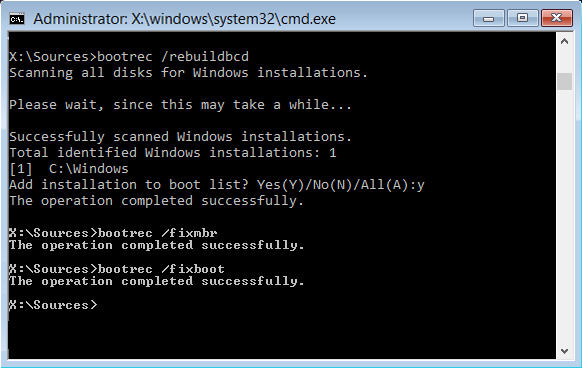
As I stated before; your ESP partition is damaged. You need to fix this first. (ESP = EFI System Partition]
There are 2 options;
1 - The one I showed you earlier.
2 - A new install.
If you are using .ISO's and am not sure which version it is;
- Mount the .ISO (let assume it's now located on drive Z)
- look inside the directory of the mounted .ISO in sources and check what extention install contains.
From the official complete Win11_25H2_v2 .ISO it is called install.wim
If it is an .ISO obtained from the Media Creation Tool, it is called install.esd
- Open CMD as admin and issue the command: "Dism /Get-WimInfo /WimFile:Z:\Sources\install.wim or esd /index:5"
The index points to the Windows type. index=1 : Home Version. index=5 Pro Version.
You should then see something like this;
I also found that BCD file that needs rebuilding. It's located on the hidden ESP partition.
Using Diskpart you can see it for yourself;
You notice that inside explorer the X-drives appears. But you can not access it because explorer was not started in administrator mode.
You can access it inside that CMD box because it was started in the administrator mode.
In an earlier post I mentioned some commands to make a copy of the BCD file. It was assuming that it was on the C-drive. MS changed it location.
It's located now in X:\EFI\Microsoft\Boot for security reasons. (On a hidden partition and protected against tampering with NTFS rights. That "attrib" command changes those rights in order to make a copy. Later on with rebuildbcd a new BCD will be created)
Let me know if you have any questions or want to proceed.
Further more If Settings - Windows Update - Windows Insider-program shows at the top: "Let's get started" it clearly shows you are not taking part of the insider program.
As I stated before; your ESP partition is damaged. You need to fix this first. (ESP = EFI System Partition]
There are 2 options;
1 - The one I showed you earlier.
2 - A new install.
If you are using .ISO's and am not sure which version it is;
- Mount the .ISO (let assume it's now located on drive Z)
- look inside the directory of the mounted .ISO in sources and check what extention install contains.
From the official complete Win11_25H2_v2 .ISO it is called install.wim
If it is an .ISO obtained from the Media Creation Tool, it is called install.esd
- Open CMD as admin and issue the command: "Dism /Get-WimInfo /WimFile:Z:\Sources\install.wim or esd /index:5"
The index points to the Windows type. index=1 : Home Version. index=5 Pro Version.
You should then see something like this;
This was the official .ISO of 25H2 called "Win11_25H2_<Lang>_x64_v2.iso"C:\Windows\System32>Dism /Get-WimInfo /WimFile:g:\Sources\install.wim /index:5
Deployment Image Servicing and Management tool
Version: 10.0.26100.8737
Details for image : g:\Sources\install.wim
Index : 5
Name : Windows 11 Pro <=== Windows Version
Description : Windows 11 Pro
Size : 24.647.449.160 bytes
WIM Bootable : No
Architecture : x64
Hal : <undefined>
Version : 10.0.26200 <=== Version 26200 = 25H2
ServicePack Build : 8037 <=== Build version = 8037
ServicePack Level : 0
Edition : Professional
Installation : Client
ProductType : WinNT
ProductSuite : Terminal Server
System Root : WINDOWS
Directories : 33202
Files : 145194
Created : 7-3-2026 - 02:07:49
Modified : 7-3-2026 - 02:42:27
Languages :
nl-NL (Default)
The operation completed successfully.
I also found that BCD file that needs rebuilding. It's located on the hidden ESP partition.
Using Diskpart you can see it for yourself;
Code:
  C:\Windows\system32\Diskpart

  DISKPART> list volumes

  Volume ###  Ltr  Label        Fs     Type        Size     Status     Info
  ----------  ---  -----------  -----  ----------  -------  ---------  --------
  Volume 1     C   Win11 25H2   NTFS   Partition    231 GB  Healthy    Boot <=== C-disk partition
  Volume 2                      FAT32  Partition    200 MB  Healthy    System  <== ESP partition (hidden)
  Volume 3                      NTFS   Partition    876 MB  Healthy    Hidden <== WinRE partition (hidden)

  #To make Volume 2 visible
  DISKPART> select volume 2

  Volume 2 is the selected volume.

  DISKPART> assign letter=X

  Diskpart successfully assigned the drive letter or mount point.

  DISKPART> list volume

  Volume ###  Ltr  Label        Fs     Type        Size     Status     Info
  ----------  ---  -----------  -----  ----------  -------  ---------  --------
  Volume 1     C   Win11 25H2   NTFS   Partition    231 GB  Healthy    Boot
  Volume 2     X                FAT32  Partition    200 MB  Healthy    System
  Volume 3                      NTFS   Partition    876 MB  Healthy    Hidden

DISKPART> exit
C:\Windows\system32>X:
X:\>cd \EFI\Microsoft\Boot
X:\EFI\Microsoft\Boot> dir BCD
 Volume in drive X has no label.
 Volume Serial Number is B65A-85DD

 Directory of X:\EFI\Microsoft\Boot

10-07-2026  11:35            53.248 BCD     <== This is the file that needs rebuilding.
               1 File(s)         53.248 bytes
               0 Dir(s)     168.163.328 bytes free
You notice that inside explorer the X-drives appears. But you can not access it because explorer was not started in administrator mode.
You can access it inside that CMD box because it was started in the administrator mode.
In an earlier post I mentioned some commands to make a copy of the BCD file. It was assuming that it was on the C-drive. MS changed it location.
It's located now in X:\EFI\Microsoft\Boot for security reasons. (On a hidden partition and protected against tampering with NTFS rights. That "attrib" command changes those rights in order to make a copy. Later on with rebuildbcd a new BCD will be created)
Let me know if you have any questions or want to proceed.
My Computers
-
At a glance
Win 11 Pro 26H2 Build 26300.9550, Zorin OS ProIntel® Core™ i7-12700KF 12th Gen. (S1700)32GB DDR5 5600-36 Vengeance (2x16)PCIe4.0 Asus NVIDIA RTX3060Ti- OS
- Win 11 Pro 26H2 Build 26300.9550, Zorin OS Pro
- Computer type
- PC/Desktop
- Manufacturer/Model
- Self built
- CPU
- Intel® Core™ i7-12700KF 12th Gen. (S1700)
- Motherboard
- ASUS Prime Z690-A, BIOS v4505 (Z690 Intel Chipset)
- Memory
- 32GB DDR5 5600-36 Vengeance (2x16)
- Graphics Card(s)
- PCIe4.0 Asus NVIDIA RTX3060Ti
- Sound Card
- Onboard; Realtek
- Monitor(s) Displays
- 34" LG 34UC79G-B Curved 21:9 144Hz
- Screen Resolution
- 2560x1080 (No HDR)
- Hard Drives
- 250Gb Samsung 870PRO NVMe (Win 11 Pro)
1Tb Samsung 980PRO NVMe
1Tb Samsung 970EVO NVMe
2Tb Samsung 990PRO NVMe with heatsink.
4Tb WDC WD40EZRZ Blue SATA (Int.)
4Tb WDC WD40EZRZ Blue SATA (Int.)
3Tb WDC WD30EFRZ Red SATA (Int.)
256Gb Samsung 840PRO SSD (RHEL 9,5)
256Gb Samsung 850PRO SSD (Zorin OS Pro 18)
- PSU
- Coolermaster 850W V2 Gold with internal 12cm exaust fan
- Case
- Be-Quiet Pure Base 600.
- Cooling
- 3x Be-Quiet! 12/14cm "Silent Wings 4" casefans, 1x Arctic Freezer i35 CPU towerblock with fan.
- Keyboard
- Steelseries APEX 7 keyboard.
- Mouse
- Logitech G-502 Hero
- Internet Speed
- 1Gb
- Browser
- Brave
- Antivirus
- F-Secure
- Other Info
- No Noise system.
256Gb Kingston Travler USB 3.0 drive.
64Gb Sandisk USB 3.2 drive. (Ventoy)
8Gb Philips USB 3.0 drive. (Win. Inst.)
8Gb Philips USB 3.0 drive. (Rescue disk)
2Tb WD USB 3.0 Passport drive.
USB Ext. 500Gb WD SATA drive.
External USB 3.0 C.A. CD/DVD* burner.
-
At a glance
Windows 11 Pro 26H2Intel® Core™ i7-6700K 6th Gen. (S1151)32Gb DDR4 2400 Corsair Vengeance (4x8)ASUS GeForce GTX1080- Operating System
- Windows 11 Pro 26H2
- Computer type
- PC/Desktop
- Manufacturer/Model
- Selfbuild
- CPU
- Intel® Core™ i7-6700K 6th Gen. (S1151)
- Motherboard
- ASUS Maximus VIII Ranger (Intel Chipset Z170)
- Memory
- 32Gb DDR4 2400 Corsair Vengeance (4x8)
- Graphics card(s)
- ASUS GeForce GTX1080
- Sound Card
- Onboard; Realtek
- Monitor(s) Displays
- LG IPS277L 27" WideLED, IPS
- Screen Resolution
- 1920x1080
- Hard Drives
- Samsung 850 Pro SSD
- PSU
- Zalman ZM600-HP with internal exhaust fan. Heatpipes & Modular cables.
- Case
- Cooler Master Aero
- Cooling
- Scythe Mugen 4 dual fan towerblock.
- Keyboard
- Red Dragon
- Mouse
- Red Dragon
- Internet Speed
- 1Gb
- Browser
- Brave
- Antivirus
- F-Secure