Windows 11 Pro: Windows Update Fails at 98% and Repair Install Fails at 88%


Guys, I am considering doing a clean install of Windows 11, opinions for the best way to do it, tks.

  • 1. Windows Reset.

    Votes: 0 0.0%
  • 2. Clean Install from within Windows.

    Votes: 0 0.0%

  • Total voters
    1
I can't imagine that you unknowingly using a insider version. You must make a conscious decision to take part of this program. It's not intended for normal users. Running "winver" will show you the version of your installation. If it was an insider version it would show up there. If you are using the normal release it will show: "Version 25H2 (operating system build 26200.8655 or 8737 or 8037)"
Further more If Settings - Windows Update - Windows Insider-program shows at the top: "Let's get started" it clearly shows you are not taking part of the insider program.

As I stated before; your ESP partition is damaged. You need to fix this first. (ESP = EFI System Partition]
There are 2 options;
1 - The one I showed you earlier.
2 - A new install.

If you are using .ISO's and am not sure which version it is;
- Mount the .ISO (let assume it's now located on drive Z)
- look inside the directory of the mounted .ISO in sources and check what extention install contains.
From the official complete Win11_25H2_v2 .ISO it is called install.wim
If it is an .ISO obtained from the Media Creation Tool, it is called install.esd
- Open CMD as admin and issue the command: "Dism /Get-WimInfo /WimFile:Z:\Sources\install.wim or esd /index:5"
The index points to the Windows type. index=1 : Home Version. index=5 Pro Version.

You should then see something like this;

C:\Windows\System32>Dism /Get-WimInfo /WimFile:g:\Sources\install.wim /index:5

Deployment Image Servicing and Management tool
Version: 10.0.26100.8737

Details for image : g:\Sources\install.wim

Index : 5
Name : Windows 11 Pro <=== Windows Version
Description : Windows 11 Pro
Size : 24.647.449.160 bytes
WIM Bootable : No
Architecture : x64
Hal : <undefined>
Version : 10.0.26200 <=== Version 26200 = 25H2
ServicePack Build : 8037 <=== Build version = 8037
ServicePack Level : 0
Edition : Professional
Installation : Client
ProductType : WinNT
ProductSuite : Terminal Server
System Root : WINDOWS
Directories : 33202
Files : 145194
Created : 7-3-2026 - 02:07:49
Modified : 7-3-2026 - 02:42:27
Languages :
nl-NL (Default)

The operation completed successfully.
This was the official .ISO of 25H2 called "Win11_25H2_<Lang>_x64_v2.iso"

I also found that BCD file that needs rebuilding. It's located on the hidden ESP partition.
Using Diskpart you can see it for yourself;
Code:
  C:\Windows\system32\Diskpart
 
  DISKPART> list volumes
   
  Volume ###  Ltr  Label        Fs     Type        Size     Status     Info
  ----------  ---  -----------  -----  ----------  -------  ---------  --------
  Volume 1     C   Win11 25H2   NTFS   Partition    231 GB  Healthy    Boot <=== C-disk partition
  Volume 2                      FAT32  Partition    200 MB  Healthy    System  <== ESP partition (hidden)
  Volume 3                      NTFS   Partition    876 MB  Healthy    Hidden <== WinRE partition (hidden)
 
  #To make Volume 2 visible
  DISKPART> select volume 2
 
  Volume 2 is the selected volume.
 
  DISKPART> assign letter=X
 
  Diskpart successfully assigned the drive letter or mount point.
 
  DISKPART> list volume
 
  Volume ###  Ltr  Label        Fs     Type        Size     Status     Info
  ----------  ---  -----------  -----  ----------  -------  ---------  --------
  Volume 1     C   Win11 25H2   NTFS   Partition    231 GB  Healthy    Boot
  Volume 2     X                FAT32  Partition    200 MB  Healthy    System
  Volume 3                      NTFS   Partition    876 MB  Healthy    Hidden
 
DISKPART> exit
C:\Windows\system32>X:
X:\>cd \EFI\Microsoft\Boot
X:\EFI\Microsoft\Boot> dir BCD
 Volume in drive X has no label.
 Volume Serial Number is B65A-85DD

 Directory of X:\EFI\Microsoft\Boot

10-07-2026  11:35            53.248 BCD     <== This is the file that needs rebuilding.
               1 File(s)         53.248 bytes
               0 Dir(s)     168.163.328 bytes free

You notice that inside explorer the X-drives appears. But you can not access it because explorer was not started in administrator mode.
You can access it inside that CMD box because it was started in the administrator mode.

In an earlier post I mentioned some commands to make a copy of the BCD file. It was assuming that it was on the C-drive. MS changed it location.
It's located now in X:\EFI\Microsoft\Boot for security reasons. (On a hidden partition and protected against tampering with NTFS rights. That "attrib" command changes those rights in order to make a copy. Later on with rebuildbcd a new BCD will be created)

Let me know if you have any questions or want to proceed.
 

My Computers My Computers

  • At a glance

    Win 11 Pro 25H2 Build 26200.8737, Zorin OS ProIntel® Core™ i7-12700KF 12th Gen. (S1700)32GB DDR5 5600-36 Vengeance (2x16)PCIe4.0 Asus NVIDIA RTX3060Ti
    OS
    Win 11 Pro 25H2 Build 26200.8737, Zorin OS Pro
    Computer type
    PC/Desktop
    Manufacturer/Model
    Self built
    CPU
    Intel® Core™ i7-12700KF 12th Gen. (S1700)
    Motherboard
    ASUS Prime Z690-A, BIOS v4505 (Z690 Intel Chipset)
    Memory
    32GB DDR5 5600-36 Vengeance (2x16)
    Graphics Card(s)
    PCIe4.0 Asus NVIDIA RTX3060Ti
    Sound Card
    Onboard; Realtek
    Monitor(s) Displays
    34" LG 34UC79G-B Curved 21:9 144Hz
    Screen Resolution
    2560x1080 (No HDR)
    Hard Drives
    250Gb Samsung 870PRO NVMe (Win 11 Pro)
    1Tb Samsung 980PRO NVMe
    1Tb Samsung 970EVO NVMe
    2Tb Samsung 990PRO NVMe with heatsink.
    4Tb WDC WD40EZRZ Blue SATA (Int.)
    4Tb WDC WD40EZRZ Blue SATA (Int.)
    3Tb WDC WD30EFRZ Red SATA (Int.)
    256Gb Samsung 840PRO SSD (RHEL 9,5)
    256Gb Samsung 850PRO SSD (Zorin OS Pro 18)
    PSU
    Coolermaster 850W V2 Gold with internal 12cm exaust fan
    Case
    Be-Quiet Pure Base 600.
    Cooling
    3x Be-Quiet! 12/14cm "Silent Wings 4" casefans, 1x Arctic Freezer i35 CPU towerblock with fan.
    Keyboard
    Steelseries APEX 7 keyboard.
    Mouse
    Logitech G-502 Hero
    Internet Speed
    1Gb
    Browser
    Brave
    Antivirus
    F-Secure
    Other Info
    No Noise system.
    256Gb Kingston Travler USB 3.0 drive.
    64Gb Sandisk USB 3.2 drive. (Ventoy)
    8Gb Philips USB 3.0 drive. (Win. Inst.)
    8Gb Philips USB 3.0 drive. (Rescue disk)
    2Tb WD USB 3.0 Passport drive.
    USB Ext. 500Gb WD SATA drive.
    External USB 3.0 C.A. CD/DVD* burner.
  • At a glance

    Windows 11 Pro 25H2Intel® Core™ i7-6700K 6th Gen. (S1151)32Gb DDR4 2400 Corsair Vengeance (4x8)ASUS GeForce GTX1080
    Operating System
    Windows 11 Pro 25H2
    Computer type
    PC/Desktop
    Manufacturer/Model
    Selfbuild
    CPU
    Intel® Core™ i7-6700K 6th Gen. (S1151)
    Motherboard
    ASUS Maximus VIII Ranger (Intel Chipset Z170)
    Memory
    32Gb DDR4 2400 Corsair Vengeance (4x8)
    Graphics card(s)
    ASUS GeForce GTX1080
    Sound Card
    Onboard; Realtek
    Monitor(s) Displays
    LG IPS277L 27" WideLED, IPS
    Screen Resolution
    1920x1080
    Hard Drives
    Samsung 850 Pro SSD
    PSU
    Zalman ZM600-HP with internal exhaust fan. Heatpipes & Modular cables.
    Case
    Cooler Master Aero
    Cooling
    Scythe Mugen 4 dual fan towerblock.
    Keyboard
    Red Dragon
    Mouse
    Red Dragon
    Internet Speed
    1Gb
    Browser
    Chrome
    Antivirus
    F-Secure
Winver
Capture.webp
 

My Computer My Computer

At a glance

Windows 11 25H2AMD Ryzen 5 1600 - 6 Core32GBNvidia 1030GT
OS
Windows 11 25H2
Computer type
PC/Desktop
Manufacturer/Model
Custom Build
CPU
AMD Ryzen 5 1600 - 6 Core
Motherboard
Asus
Memory
32GB
Graphics Card(s)
Nvidia 1030GT
Monitor(s) Displays
Iiyama24
As I stated before; your ESP partition is damaged. You need to fix this first. (ESP = EFI System Partition]
May I ask please, what shows that the partition is damaged?
 

My Computer My Computer

At a glance

Windows 11 25H2AMD Ryzen 5 1600 - 6 Core32GBNvidia 1030GT
OS
Windows 11 25H2
Computer type
PC/Desktop
Manufacturer/Model
Custom Build
CPU
AMD Ryzen 5 1600 - 6 Core
Motherboard
Asus
Memory
32GB
Graphics Card(s)
Nvidia 1030GT
Monitor(s) Displays
Iiyama24
May I ask please, what shows that the partition is damaged?
Look back. You showed error of your CBS.log file. (Thread: #53) That CBS.log file certain errors are to be seen. I mentioned that earlier:

Looking at the errors that occur the most;

Code:
0xd000003a - NTSTATUS Error       = Windows cannot locate a specific file, service, or driver required to complete an action. It is frequently caused by missing system components, corrupted drivers, or broken registry paths.
0x80070490 - ERROR_NOT_FOUND      = System file corruption or a missing component is blocking update installation
0x8007012f - ERROR_DELETE_PENDING = It occurs when update packages, downloaded files, or app components are corrupted or blocked by system processes and cannot be uninstalled or updated
0x80070013 - ERROR_WRITE_PROTECT  = It means the operating system lacks the necessary permissions to write to system files, the registry, or your backup drive

I showed these errors to AI; and it responded with "This specific combination of errors in your CBS.log means the Windows Servicing Engine cannot modify the boot configuration files because the destination partition is locked or corrupted."

What do you see when you enter:
- CMD as Admin:
Code:
bcdedit
You can check if there are corrupted things on your C-drive with:
- CMD as Admin:
Code:
chkdsk C: /f /r /x
If this checks OK. Do the same with the hidden ESP partition:
- CMD as Admin
Code:
diskpart
list vol
select vol <number_of_your_FAT32_EFI_volume. Tagged: system>
assign letter=Z
exit
chkdsk Z: /f
Check if there data corruption is found on that temporary Z-drive. (/f = It tries to fix corrupted things)
To remove this driveletter again:
Code:
diskpart
list vol
select vol <number_of_your_FAT32_EFI_volume. Tagged: system>
remove letter=Z
exit

First check these things. If everything turns out OK then we can take the next step.
 

My Computers My Computers

  • At a glance

    Win 11 Pro 25H2 Build 26200.8737, Zorin OS ProIntel® Core™ i7-12700KF 12th Gen. (S1700)32GB DDR5 5600-36 Vengeance (2x16)PCIe4.0 Asus NVIDIA RTX3060Ti
    OS
    Win 11 Pro 25H2 Build 26200.8737, Zorin OS Pro
    Computer type
    PC/Desktop
    Manufacturer/Model
    Self built
    CPU
    Intel® Core™ i7-12700KF 12th Gen. (S1700)
    Motherboard
    ASUS Prime Z690-A, BIOS v4505 (Z690 Intel Chipset)
    Memory
    32GB DDR5 5600-36 Vengeance (2x16)
    Graphics Card(s)
    PCIe4.0 Asus NVIDIA RTX3060Ti
    Sound Card
    Onboard; Realtek
    Monitor(s) Displays
    34" LG 34UC79G-B Curved 21:9 144Hz
    Screen Resolution
    2560x1080 (No HDR)
    Hard Drives
    250Gb Samsung 870PRO NVMe (Win 11 Pro)
    1Tb Samsung 980PRO NVMe
    1Tb Samsung 970EVO NVMe
    2Tb Samsung 990PRO NVMe with heatsink.
    4Tb WDC WD40EZRZ Blue SATA (Int.)
    4Tb WDC WD40EZRZ Blue SATA (Int.)
    3Tb WDC WD30EFRZ Red SATA (Int.)
    256Gb Samsung 840PRO SSD (RHEL 9,5)
    256Gb Samsung 850PRO SSD (Zorin OS Pro 18)
    PSU
    Coolermaster 850W V2 Gold with internal 12cm exaust fan
    Case
    Be-Quiet Pure Base 600.
    Cooling
    3x Be-Quiet! 12/14cm "Silent Wings 4" casefans, 1x Arctic Freezer i35 CPU towerblock with fan.
    Keyboard
    Steelseries APEX 7 keyboard.
    Mouse
    Logitech G-502 Hero
    Internet Speed
    1Gb
    Browser
    Brave
    Antivirus
    F-Secure
    Other Info
    No Noise system.
    256Gb Kingston Travler USB 3.0 drive.
    64Gb Sandisk USB 3.2 drive. (Ventoy)
    8Gb Philips USB 3.0 drive. (Win. Inst.)
    8Gb Philips USB 3.0 drive. (Rescue disk)
    2Tb WD USB 3.0 Passport drive.
    USB Ext. 500Gb WD SATA drive.
    External USB 3.0 C.A. CD/DVD* burner.
  • At a glance

    Windows 11 Pro 25H2Intel® Core™ i7-6700K 6th Gen. (S1151)32Gb DDR4 2400 Corsair Vengeance (4x8)ASUS GeForce GTX1080
    Operating System
    Windows 11 Pro 25H2
    Computer type
    PC/Desktop
    Manufacturer/Model
    Selfbuild
    CPU
    Intel® Core™ i7-6700K 6th Gen. (S1151)
    Motherboard
    ASUS Maximus VIII Ranger (Intel Chipset Z170)
    Memory
    32Gb DDR4 2400 Corsair Vengeance (4x8)
    Graphics card(s)
    ASUS GeForce GTX1080
    Sound Card
    Onboard; Realtek
    Monitor(s) Displays
    LG IPS277L 27" WideLED, IPS
    Screen Resolution
    1920x1080
    Hard Drives
    Samsung 850 Pro SSD
    PSU
    Zalman ZM600-HP with internal exhaust fan. Heatpipes & Modular cables.
    Case
    Cooler Master Aero
    Cooling
    Scythe Mugen 4 dual fan towerblock.
    Keyboard
    Red Dragon
    Mouse
    Red Dragon
    Internet Speed
    1Gb
    Browser
    Chrome
    Antivirus
    F-Secure
If this checks OK. Do the same with the hidden ESP partition:
- CMD as Admin
diskpart list vol select vol <number_of_your_FAT32_EFI_volume. Tagged: system> assign letter=Z exit chkdsk Z: /f
Chkdsk cannot run because the volume is in use by another
process. Chkdsk may run if this volume is dismounted first.
ALL OPENED HANDLES TO THIS VOLUME WOULD THEN BE INVALID.
Would you like to force a dismount on this volume? (Y/N)
 

My Computer My Computer

At a glance

Windows 11 25H2AMD Ryzen 5 1600 - 6 Core32GBNvidia 1030GT
OS
Windows 11 25H2
Computer type
PC/Desktop
Manufacturer/Model
Custom Build
CPU
AMD Ryzen 5 1600 - 6 Core
Motherboard
Asus
Memory
32GB
Graphics Card(s)
Nvidia 1030GT
Monitor(s) Displays
Iiyama24
Open a CMD window as administrator and type:
chkdsk c: /f
It will say your disk is in use and ask if you want to force a dismount on this volume = no
and ask if you want to schedule to next start = yes
Restart

Back to Windows, open a CMD window as administrator and type:
sfc /scannow

If it finds any corrupted files, fixing or not, reboot and run again

Then run
Dism /Online /Cleanup-Image /ScanHealth
and
Dism /Online /Cleanup-Image /RestoreHealth
 

My Computers My Computers

  • At a glance

    Windows 11 Pro - Windows 7 HP 64 - Lubuntui5 6600K - 800MHz to 4400MHz4+4G GSkill DDR4 3000IG - Intel 530
    OS
    Windows 11 Pro - Windows 7 HP 64 - Lubuntu
    Computer type
    PC/Desktop
    Manufacturer/Model
    custom build
    CPU
    i5 6600K - 800MHz to 4400MHz
    Motherboard
    GA-Z170-HD3P
    Memory
    4+4G GSkill DDR4 3000
    Graphics Card(s)
    IG - Intel 530
    Monitor(s) Displays
    Samsung 226BW
    Screen Resolution
    1680x1050
    Hard Drives
    (1) -1 SM951 – 128GB M.2 AHCI PCIe SSD drive for Win 11
    (2) -1 WD SATA 3 - 1T for Data
    (3) -1 WD SATA 3 - 1T for backup
    (4) -1 BX500 SSD - 256G for Windows 7 and Lubuntu
    PSU
    Thermaltake 450W TR2 gold
    Keyboard
    Old and good Chicony mechanical keyboard
    Mouse
    Logitech mX performance - 9 buttons (had to disable some)
    Internet Speed
    500 Mb/s
    Browser
    Firefox 64
  • At a glance

    Windows 11 Proi7-4500U 800- 3000MHz(4+4)G DDR3 1600IG intel 4400 + NVIDIA GeForce GT 745M
    Operating System
    Windows 11 Pro
    Computer type
    Laptop
    Manufacturer/Model
    Asus Q550LF
    CPU
    i7-4500U 800- 3000MHz
    Motherboard
    Asus Q550LF
    Memory
    (4+4)G DDR3 1600
    Graphics card(s)
    IG intel 4400 + NVIDIA GeForce GT 745M
    Sound Card
    Realtek
    Monitor(s) Displays
    LG Display LP156WF4-SPH1
    Screen Resolution
    1920 x 1080
    Hard Drives
    BX500 120G SSD for Windows and programs
    & 1T HDD for data
    Internet Speed
    500 Mb/s
    Browser
    Firefox 64
Chkdsk cannot run because the volume is in use by another
process. Chkdsk may run if this volume is dismounted first.
ALL OPENED HANDLES TO THIS VOLUME WOULD THEN BE INVALID.
Would you like to force a dismount on this volume? (Y/N)
You can answer with Y. This because Windows has active processes that have access to certain files on that disk. Chkdsk can't do it job if an other proces is changing stuff. When done. You may reboot to let have windows access to this disk again.

Did the C-drive checked out OK? (chkdsk. did it repair things? I reports that it did.)
 

My Computers My Computers

  • At a glance

    Win 11 Pro 25H2 Build 26200.8737, Zorin OS ProIntel® Core™ i7-12700KF 12th Gen. (S1700)32GB DDR5 5600-36 Vengeance (2x16)PCIe4.0 Asus NVIDIA RTX3060Ti
    OS
    Win 11 Pro 25H2 Build 26200.8737, Zorin OS Pro
    Computer type
    PC/Desktop
    Manufacturer/Model
    Self built
    CPU
    Intel® Core™ i7-12700KF 12th Gen. (S1700)
    Motherboard
    ASUS Prime Z690-A, BIOS v4505 (Z690 Intel Chipset)
    Memory
    32GB DDR5 5600-36 Vengeance (2x16)
    Graphics Card(s)
    PCIe4.0 Asus NVIDIA RTX3060Ti
    Sound Card
    Onboard; Realtek
    Monitor(s) Displays
    34" LG 34UC79G-B Curved 21:9 144Hz
    Screen Resolution
    2560x1080 (No HDR)
    Hard Drives
    250Gb Samsung 870PRO NVMe (Win 11 Pro)
    1Tb Samsung 980PRO NVMe
    1Tb Samsung 970EVO NVMe
    2Tb Samsung 990PRO NVMe with heatsink.
    4Tb WDC WD40EZRZ Blue SATA (Int.)
    4Tb WDC WD40EZRZ Blue SATA (Int.)
    3Tb WDC WD30EFRZ Red SATA (Int.)
    256Gb Samsung 840PRO SSD (RHEL 9,5)
    256Gb Samsung 850PRO SSD (Zorin OS Pro 18)
    PSU
    Coolermaster 850W V2 Gold with internal 12cm exaust fan
    Case
    Be-Quiet Pure Base 600.
    Cooling
    3x Be-Quiet! 12/14cm "Silent Wings 4" casefans, 1x Arctic Freezer i35 CPU towerblock with fan.
    Keyboard
    Steelseries APEX 7 keyboard.
    Mouse
    Logitech G-502 Hero
    Internet Speed
    1Gb
    Browser
    Brave
    Antivirus
    F-Secure
    Other Info
    No Noise system.
    256Gb Kingston Travler USB 3.0 drive.
    64Gb Sandisk USB 3.2 drive. (Ventoy)
    8Gb Philips USB 3.0 drive. (Win. Inst.)
    8Gb Philips USB 3.0 drive. (Rescue disk)
    2Tb WD USB 3.0 Passport drive.
    USB Ext. 500Gb WD SATA drive.
    External USB 3.0 C.A. CD/DVD* burner.
  • At a glance

    Windows 11 Pro 25H2Intel® Core™ i7-6700K 6th Gen. (S1151)32Gb DDR4 2400 Corsair Vengeance (4x8)ASUS GeForce GTX1080
    Operating System
    Windows 11 Pro 25H2
    Computer type
    PC/Desktop
    Manufacturer/Model
    Selfbuild
    CPU
    Intel® Core™ i7-6700K 6th Gen. (S1151)
    Motherboard
    ASUS Maximus VIII Ranger (Intel Chipset Z170)
    Memory
    32Gb DDR4 2400 Corsair Vengeance (4x8)
    Graphics card(s)
    ASUS GeForce GTX1080
    Sound Card
    Onboard; Realtek
    Monitor(s) Displays
    LG IPS277L 27" WideLED, IPS
    Screen Resolution
    1920x1080
    Hard Drives
    Samsung 850 Pro SSD
    PSU
    Zalman ZM600-HP with internal exhaust fan. Heatpipes & Modular cables.
    Case
    Cooler Master Aero
    Cooling
    Scythe Mugen 4 dual fan towerblock.
    Keyboard
    Red Dragon
    Mouse
    Red Dragon
    Internet Speed
    1Gb
    Browser
    Chrome
    Antivirus
    F-Secure
Did the C-drive checked out OK? (chkdsk. did it repair things? I reports that it did.)


Checking file system on C:
The type of the file system is NTFS.
Volume label is Main Disk.

A disk check has been scheduled.
Windows will now check the disk.

Stage 1: Examining basic file system structure ...
1196288 file records processed.
File verification completed.
Phase duration (File record verification): 8.87 seconds.
54489 large file records processed.
Phase duration (Orphan file record recovery): 18.82 milliseconds.
0 bad file records processed.
Phase duration (Bad file record checking): 2.21 milliseconds.

Stage 2: Examining file name linkage ...
335 reparse records processed.
1653136 index entries processed.
Index verification completed.
Phase duration (Index verification): 19.25 seconds.
0 unindexed files scanned.
Phase duration (Orphan reconnection): 4.68 seconds.
0 unindexed files recovered to lost and found.
Phase duration (Orphan recovery to lost and found): 2.20 seconds.
335 reparse records processed.
Phase duration (Reparse point and Object ID verification): 9.21 milliseconds.

Stage 3: Examining security descriptors ...
Cleaning up 365 unused index entries from index $SII of file 0x9.
Cleaning up 365 unused index entries from index $SDH of file 0x9.
Cleaning up 365 unused security descriptors.
Security descriptor verification completed.
Phase duration (Security descriptor verification): 30.80 milliseconds.
228425 data files processed.
Phase duration (Data attribute verification): 2.44 milliseconds.
CHKDSK is verifying Usn Journal...
298273024 USN bytes processed.
Usn Journal verification completed.
Phase duration (USN journal verification): 815.98 milliseconds.

Stage 4: Looking for bad clusters in user file data ...
1196272 files processed.
File data verification completed.
Phase duration (User file recovery): 8.28 minutes.

Stage 5: Looking for bad, free clusters ...
40691029 free clusters processed.
Free space verification is complete.
Phase duration (Free space recovery): 7.71 minutes.

Windows has scanned the file system and found no problems.
No further action is required.

233581243 KB total disk space.
68754416 KB in 308335 files.
478796 KB in 228426 indexes.
0 KB in bad sectors.
1583915 KB in use by the system.
65536 KB occupied by the log file.
162764116 KB available on disk.

4096 bytes in each allocation unit.
58395310 total allocation units on disk.
40691029 allocation units available on disk.
Total duration: 16.59 minutes (995688 ms).

Internal Info:
00 41 12 00 c3 30 08 00 00 7f 0e 00 00 00 00 00 .A...0..........
42 00 00 00 0d 01 00 00 00 00 00 00 00 00 00 00 B...............
 

My Computer My Computer

At a glance

Windows 11 25H2AMD Ryzen 5 1600 - 6 Core32GBNvidia 1030GT
OS
Windows 11 25H2
Computer type
PC/Desktop
Manufacturer/Model
Custom Build
CPU
AMD Ryzen 5 1600 - 6 Core
Motherboard
Asus
Memory
32GB
Graphics Card(s)
Nvidia 1030GT
Monitor(s) Displays
Iiyama24
Code:
Code:
diskpart
list vol
select vol <number_of_your_FAT32_EFI_volume. Tagged: system>
assign letter=Z
exit
chkdsk Z: /f
C:\Windows\System32>chkdsk z: /f
The type of the file system is FAT32.

Chkdsk cannot run because the volume is in use by another
process. Chkdsk may run if this volume is dismounted first.
ALL OPENED HANDLES TO THIS VOLUME WOULD THEN BE INVALID.
Would you like to force a dismount on this volume? (Y/N) y
Volume dismounted. All opened handles to this volume are now invalid.
Volume Serial Number is D2D2-09AD
Windows is verifying files and folders...
File and folder verification is complete.

Windows has scanned the file system and found no problems.
No further action is required.

100,663,296 bytes total disk space.
1,360,896 bytes in 11 hidden files.
55,296 bytes in 47 folders.
35,952,640 bytes in 142 files.
63,293,440 bytes available on disk.

1,024 bytes in each allocation unit.
98,304 total allocation units on disk.
61,810 allocation units available on disk.
 

My Computer My Computer

At a glance

Windows 11 25H2AMD Ryzen 5 1600 - 6 Core32GBNvidia 1030GT
OS
Windows 11 25H2
Computer type
PC/Desktop
Manufacturer/Model
Custom Build
CPU
AMD Ryzen 5 1600 - 6 Core
Motherboard
Asus
Memory
32GB
Graphics Card(s)
Nvidia 1030GT
Monitor(s) Displays
Iiyama24
Guys, I have to go out for the evening now.

I will catch up again tomorrow.

Thanks for helping so far.
 

My Computer My Computer

At a glance

Windows 11 25H2AMD Ryzen 5 1600 - 6 Core32GBNvidia 1030GT
OS
Windows 11 25H2
Computer type
PC/Desktop
Manufacturer/Model
Custom Build
CPU
AMD Ryzen 5 1600 - 6 Core
Motherboard
Asus
Memory
32GB
Graphics Card(s)
Nvidia 1030GT
Monitor(s) Displays
Iiyama24

bcdboot c:\windows /s c:

/s <volume letter>
- Optional volume letter for the target system partition where the boot files will be copied.
- On a GPT disk, the system partition is the EFI system partition.
- On an MBR disk, the system partition is the active partition on the primary disk, either the System Reserved partition or the Windows partition.

The bcdboot C:\Windows /s C: command mentioned in the article is not correct for UEFI systems.

Here are some examples of bcdboot commands for UEFI systems:

bcdboot C:\Windows
bcdboot C:\Windows /s S:
bcdboot C:\Windows /s S: /f UEFI


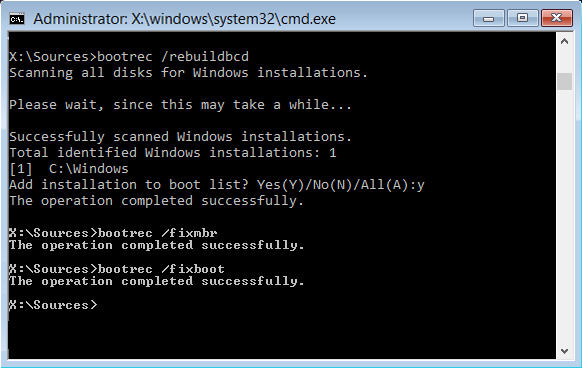
bootrec /rebuildbcd

While bootrec /rebuildbcd only rebuilds the BCD store, bcdboot recreates the BCD and copies the required boot files to the EFI system partition, which makes bcdboot more reliable in many cases.

bootsect /nt60 sys /force
bootrec /fixmbr
bootrec /fixboot

These commands are intended for legacy BIOS/MBR-based systems. They are not compatible with boot repairs on UEFI/GPT configurations, where the UEFI firmware loads EFI executables (.efi) directly from the FAT32-formatted EFI system partition, bypassing traditional MBR/VBR boot sector chaining.

bootsect, for example, bootsect /nt60 sys
  • BIOS/MBR: Updates the Volume Boot Record (VBR) with bootmgr-compatible boot code.
  • UEFI/GPT: This command is obsolete, because UEFI firmware bypasses the VBR boot code and the legacy real-mode bootmgr file entirely, executing the UEFI application (bootmgfw.efi) instead.
bootrec /FixMbr
  • BIOS/MBR: Writes a Windows-compatible Master Boot Record (MBR) to sector 0 of the system disk. This operation overwrites the existing master boot code without modifying the existing partition table.
  • UEFI/GPT: Updates only the Protective MBR. Modifying sector 0 has no effect on how Windows boots in UEFI mode.
bootrec /FixBoot
  • BIOS/MBR: Writes new Windows-compatible boot code to the Volume Boot Record (VBR) of the active system partition.
  • UEFI/GPT: This command is obsolete, because UEFI firmware boots directly via .efi files in the EFI system partition, bypassing the legacy VBR boot code. While the Volume Boot Record (VBR) data structure still exists at the beginning of a GPT partition, its executable boot code is entirely ignored by UEFI.
 

My Computers My Computers

  • At a glance

    Windows 11 ProAMD Ryzen 9 9950X3DKingston FURY Beast 64GB (2x32GB) DDR5 6000MT/sASUS TUF Gaming Radeon RX 9070 OC Edition 16G...
    OS
    Windows 11 Pro
    Computer type
    PC/Desktop
    CPU
    AMD Ryzen 9 9950X3D
    Motherboard
    ASRock B650E Taichi Lite
    Memory
    Kingston FURY Beast 64GB (2x32GB) DDR5 6000MT/s
    Graphics Card(s)
    ASUS TUF Gaming Radeon RX 9070 OC Edition 16GB GDDR6
    Hard Drives
    Solidigm P44 Pro 2TB M.2 NVMe SSD
  • At a glance

    Windows 11 HomeIntel Core Ultra 9 275HX64GB (2x 32GB) DDR5-6400NVIDIA GeForce RTX 5080 16GB GDDR7 Laptop GPU
    Operating System
    Windows 11 Home
    Computer type
    Laptop
    Manufacturer/Model
    Lenovo Legion Pro 7i Gen 10 16"
    CPU
    Intel Core Ultra 9 275HX
    Memory
    64GB (2x 32GB) DDR5-6400
    Graphics card(s)
    NVIDIA GeForce RTX 5080 16GB GDDR7 Laptop GPU
    Hard Drives
    2x 1TB M.2 NVMe SSD (SK Hynix)
/s <volume letter>
- Optional volume letter for the target system partition where the boot files will be copied.
- On a GPT disk, the system partition is the EFI system partition.
- On an MBR disk, the system partition is the active partition on the primary disk, either the System Reserved partition or the Windows partition.

The bcdboot C:\Windows /s C: command mentioned in the article is not correct for UEFI systems.

Here are some examples of bcdboot commands for UEFI systems:

bcdboot C:\Windows
bcdboot C:\Windows /s S:
bcdboot C:\Windows /s S: /f UEFI


While bootrec /rebuildbcd only rebuilds the BCD store, bcdboot recreates the BCD and copies the required boot files to the EFI system partition, which makes bcdboot more reliable in many cases.


These commands are intended for legacy BIOS/MBR-based systems. They are not compatible with boot repairs on UEFI/GPT configurations, where the UEFI firmware loads EFI executables (.efi) directly from the FAT32-formatted EFI system partition, bypassing traditional MBR/VBR boot sector chaining.

bootsect, for example, bootsect /nt60 sys
  • BIOS/MBR: Updates the Volume Boot Record (VBR) with bootmgr-compatible boot code.
  • UEFI/GPT: This command is obsolete, because UEFI firmware bypasses the VBR boot code and the legacy real-mode bootmgr file entirely, executing the UEFI application (bootmgfw.efi) instead.
bootrec /FixMbr
  • BIOS/MBR: Writes a Windows-compatible Master Boot Record (MBR) to sector 0 of the system disk. This operation overwrites the existing master boot code without modifying the existing partition table.
  • UEFI/GPT: Updates only the Protective MBR. Modifying sector 0 has no effect on how Windows boots in UEFI mode.
bootrec /FixBoot
  • BIOS/MBR: Writes new Windows-compatible boot code to the Volume Boot Record (VBR) of the active system partition.
  • UEFI/GPT: This command is obsolete, because UEFI firmware boots directly via .efi files in the EFI system partition, bypassing the legacy VBR boot code. While the Volume Boot Record (VBR) data structure still exists at the beginning of a GPT partition, its executable boot code is entirely ignored by UEFI.
Please help me with the commands to repair my UEFI/GPT boot partition.
 

My Computer My Computer

At a glance

Windows 11 25H2AMD Ryzen 5 1600 - 6 Core32GBNvidia 1030GT
OS
Windows 11 25H2
Computer type
PC/Desktop
Manufacturer/Model
Custom Build
CPU
AMD Ryzen 5 1600 - 6 Core
Motherboard
Asus
Memory
32GB
Graphics Card(s)
Nvidia 1030GT
Monitor(s) Displays
Iiyama24
These commands are intended for legacy BIOS/MBR-based systems. They are not compatible with boot repairs on UEFI/GPT configurations, where the UEFI firmware loads EFI executables (.efi) directly from the FAT32-formatted EFI system partition, bypassing traditional MBR/VBR boot sector chaining.
With that "bcdboot C:\Windows /s Z: /f UEFI" command you are right.
Have to be said that Z: is the drive that by using Diskpart is pointing to the made visible ESP partition.
So first:
Code:
diskpart
list vol
select vol <number_of_your_FAT32_EFI_volume. Tagged: system>
assign letter=Z
exit
For the rest; the disk where Windows is installed is already a GPT disk. (User @lafargeotte already showed in this thread that his Windows disk is also using GPT)
To verify:

Code:
diskpart
list disk
  Disk ###  Status         Size     Free     Dyn  Gpt
  --------  -------------  -------  -------  ---  ---
* Disk 0    Online          232 GB      0 B        *
etc.

The ESP partition is formatted with FAT32.
The C-Drive and WinRE partition with NTFS.

It seems indeed that "bootsect /nt60 sys /force", "bootrec /fixmbr" and "bootrec /fixboot" commands are obsolete if the disk is partitioned with GPT. If not (MBR) then these commands are still valid.
That is the first thing to check...... In this case user @lafargeotte he already has a GPT partitioned disk.

The internet is riddled full with Windows 10 mainly style ESP repairs. Each site says some different. Even MS shows us not a procedure how to fix a ESP partition on a UEFI system. After a targeted search MS says just execute these commands:
(Make a backup of your complete C-disk!!!!)

1 - Boot from a Windows 11 media and start CMD as admin. (I would use the WinRE environment - Solve Problems - Advanced Options - Command prompt. Initiated by reboot and holding the shift-key until "One moment, please." appears.)
2 - Run these commands
Code:
diskpart
list vol
select vol <number_of_your_FAT32_EFI_volume. Tagged: system>
assign letter=Z
exit
3 - Format the EFI partition:
Code:
format Z: /fs:FAT32 /q
4 - Recreate the boot files using the updated signed components:
Code:
bcdboot C:\Windows /s Z: /f UEFI
5 - Restart the PC and verify Secure Boot completes without signature errors.
If Secure Boot still fails, clear and re-enroll platform keys (PK/KEK/DB) in the firmware, then repeat step 4.
For reference: Updating Windows bootable media to use the PCA2023 signed boot manager - Microsoft Support
After this step The BCD is created.

In order to remove drive letter Z:
Code:
diskpart
list vol
select vol <number_of_your_FAT32_EFI_volume. Tagged: system>
remove letter=Z
list vol
exit

You were correct to point out these changes. MS has moved the whole boot stuff to the ESP partition and introduced booting through that bootmgfw.efi file.
 

My Computers My Computers

  • At a glance

    Win 11 Pro 25H2 Build 26200.8737, Zorin OS ProIntel® Core™ i7-12700KF 12th Gen. (S1700)32GB DDR5 5600-36 Vengeance (2x16)PCIe4.0 Asus NVIDIA RTX3060Ti
    OS
    Win 11 Pro 25H2 Build 26200.8737, Zorin OS Pro
    Computer type
    PC/Desktop
    Manufacturer/Model
    Self built
    CPU
    Intel® Core™ i7-12700KF 12th Gen. (S1700)
    Motherboard
    ASUS Prime Z690-A, BIOS v4505 (Z690 Intel Chipset)
    Memory
    32GB DDR5 5600-36 Vengeance (2x16)
    Graphics Card(s)
    PCIe4.0 Asus NVIDIA RTX3060Ti
    Sound Card
    Onboard; Realtek
    Monitor(s) Displays
    34" LG 34UC79G-B Curved 21:9 144Hz
    Screen Resolution
    2560x1080 (No HDR)
    Hard Drives
    250Gb Samsung 870PRO NVMe (Win 11 Pro)
    1Tb Samsung 980PRO NVMe
    1Tb Samsung 970EVO NVMe
    2Tb Samsung 990PRO NVMe with heatsink.
    4Tb WDC WD40EZRZ Blue SATA (Int.)
    4Tb WDC WD40EZRZ Blue SATA (Int.)
    3Tb WDC WD30EFRZ Red SATA (Int.)
    256Gb Samsung 840PRO SSD (RHEL 9,5)
    256Gb Samsung 850PRO SSD (Zorin OS Pro 18)
    PSU
    Coolermaster 850W V2 Gold with internal 12cm exaust fan
    Case
    Be-Quiet Pure Base 600.
    Cooling
    3x Be-Quiet! 12/14cm "Silent Wings 4" casefans, 1x Arctic Freezer i35 CPU towerblock with fan.
    Keyboard
    Steelseries APEX 7 keyboard.
    Mouse
    Logitech G-502 Hero
    Internet Speed
    1Gb
    Browser
    Brave
    Antivirus
    F-Secure
    Other Info
    No Noise system.
    256Gb Kingston Travler USB 3.0 drive.
    64Gb Sandisk USB 3.2 drive. (Ventoy)
    8Gb Philips USB 3.0 drive. (Win. Inst.)
    8Gb Philips USB 3.0 drive. (Rescue disk)
    2Tb WD USB 3.0 Passport drive.
    USB Ext. 500Gb WD SATA drive.
    External USB 3.0 C.A. CD/DVD* burner.
  • At a glance

    Windows 11 Pro 25H2Intel® Core™ i7-6700K 6th Gen. (S1151)32Gb DDR4 2400 Corsair Vengeance (4x8)ASUS GeForce GTX1080
    Operating System
    Windows 11 Pro 25H2
    Computer type
    PC/Desktop
    Manufacturer/Model
    Selfbuild
    CPU
    Intel® Core™ i7-6700K 6th Gen. (S1151)
    Motherboard
    ASUS Maximus VIII Ranger (Intel Chipset Z170)
    Memory
    32Gb DDR4 2400 Corsair Vengeance (4x8)
    Graphics card(s)
    ASUS GeForce GTX1080
    Sound Card
    Onboard; Realtek
    Monitor(s) Displays
    LG IPS277L 27" WideLED, IPS
    Screen Resolution
    1920x1080
    Hard Drives
    Samsung 850 Pro SSD
    PSU
    Zalman ZM600-HP with internal exhaust fan. Heatpipes & Modular cables.
    Case
    Cooler Master Aero
    Cooling
    Scythe Mugen 4 dual fan towerblock.
    Keyboard
    Red Dragon
    Mouse
    Red Dragon
    Internet Speed
    1Gb
    Browser
    Chrome
    Antivirus
    F-Secure
I have rebuilt my EFI partition.
 

My Computer My Computer

At a glance

Windows 11 25H2AMD Ryzen 5 1600 - 6 Core32GBNvidia 1030GT
OS
Windows 11 25H2
Computer type
PC/Desktop
Manufacturer/Model
Custom Build
CPU
AMD Ryzen 5 1600 - 6 Core
Motherboard
Asus
Memory
32GB
Graphics Card(s)
Nvidia 1030GT
Monitor(s) Displays
Iiyama24

My Computers My Computers

  • At a glance

    Windows 11 Pro - Windows 7 HP 64 - Lubuntui5 6600K - 800MHz to 4400MHz4+4G GSkill DDR4 3000IG - Intel 530
    OS
    Windows 11 Pro - Windows 7 HP 64 - Lubuntu
    Computer type
    PC/Desktop
    Manufacturer/Model
    custom build
    CPU
    i5 6600K - 800MHz to 4400MHz
    Motherboard
    GA-Z170-HD3P
    Memory
    4+4G GSkill DDR4 3000
    Graphics Card(s)
    IG - Intel 530
    Monitor(s) Displays
    Samsung 226BW
    Screen Resolution
    1680x1050
    Hard Drives
    (1) -1 SM951 – 128GB M.2 AHCI PCIe SSD drive for Win 11
    (2) -1 WD SATA 3 - 1T for Data
    (3) -1 WD SATA 3 - 1T for backup
    (4) -1 BX500 SSD - 256G for Windows 7 and Lubuntu
    PSU
    Thermaltake 450W TR2 gold
    Keyboard
    Old and good Chicony mechanical keyboard
    Mouse
    Logitech mX performance - 9 buttons (had to disable some)
    Internet Speed
    500 Mb/s
    Browser
    Firefox 64
  • At a glance

    Windows 11 Proi7-4500U 800- 3000MHz(4+4)G DDR3 1600IG intel 4400 + NVIDIA GeForce GT 745M
    Operating System
    Windows 11 Pro
    Computer type
    Laptop
    Manufacturer/Model
    Asus Q550LF
    CPU
    i7-4500U 800- 3000MHz
    Motherboard
    Asus Q550LF
    Memory
    (4+4)G DDR3 1600
    Graphics card(s)
    IG intel 4400 + NVIDIA GeForce GT 745M
    Sound Card
    Realtek
    Monitor(s) Displays
    LG Display LP156WF4-SPH1
    Screen Resolution
    1920 x 1080
    Hard Drives
    BX500 120G SSD for Windows and programs
    & 1T HDD for data
    Internet Speed
    500 Mb/s
    Browser
    Firefox 64
The linked article addresses the following error:

Last Operation: Finalize Error: 0x80004005 - 0x50016
LogEntry: 2023-02-15 14:36:51, Error SP Operation failed: Update Boot Code. Error: 0x80004005[gle=0x000000b7]

The problem was resolved by formatting the EFI partition and rebuilding the boot files.


However, if I understand correctly, you have not encountered the 0x80004005 - 0x50016 error.

If you want to format the EFI partition:

Start the Windows Recovery Environment (WinRE). For example, click Start, click the Power button, hold down the Shift key, and select Restart.

Edit: You can also launch WinRE from a Windows 11 installation USB flash drive. If the USB appears twice in the boot menu, select the entry with the "UEFI" prefix.

Open Command Prompt in WinRE and run:

diskpart
list volume (find the EFI partition number)
select volume # (use the EFI partition number)
format quick fs=fat32
list volume (find the Windows partition letter)
exit

bcdboot x:\windows (replace "x" with the Windows partition letter)

The bcdboot command automatically identifies the FAT32-formatted EFI partition, copies the required UEFI boot files from the Windows partition to it, and creates a new Boot Configuration Data (BCD) store on that partition.

The /s <volume letter> option is unnecessary when the computer has only one EFI system partition. Likewise, the /f <firmware type> option is unnecessary when WinRE has been booted in UEFI mode because bcdboot automatically detects the firmware type.
 
Last edited:

My Computers My Computers

  • At a glance

    Windows 11 ProAMD Ryzen 9 9950X3DKingston FURY Beast 64GB (2x32GB) DDR5 6000MT/sASUS TUF Gaming Radeon RX 9070 OC Edition 16G...
    OS
    Windows 11 Pro
    Computer type
    PC/Desktop
    CPU
    AMD Ryzen 9 9950X3D
    Motherboard
    ASRock B650E Taichi Lite
    Memory
    Kingston FURY Beast 64GB (2x32GB) DDR5 6000MT/s
    Graphics Card(s)
    ASUS TUF Gaming Radeon RX 9070 OC Edition 16GB GDDR6
    Hard Drives
    Solidigm P44 Pro 2TB M.2 NVMe SSD
  • At a glance

    Windows 11 HomeIntel Core Ultra 9 275HX64GB (2x 32GB) DDR5-6400NVIDIA GeForce RTX 5080 16GB GDDR7 Laptop GPU
    Operating System
    Windows 11 Home
    Computer type
    Laptop
    Manufacturer/Model
    Lenovo Legion Pro 7i Gen 10 16"
    CPU
    Intel Core Ultra 9 275HX
    Memory
    64GB (2x 32GB) DDR5-6400
    Graphics card(s)
    NVIDIA GeForce RTX 5080 16GB GDDR7 Laptop GPU
    Hard Drives
    2x 1TB M.2 NVMe SSD (SK Hynix)

My Computer My Computer

At a glance

Windows 11 25H2AMD Ryzen 5 1600 - 6 Core32GBNvidia 1030GT
OS
Windows 11 25H2
Computer type
PC/Desktop
Manufacturer/Model
Custom Build
CPU
AMD Ryzen 5 1600 - 6 Core
Motherboard
Asus
Memory
32GB
Graphics Card(s)
Nvidia 1030GT
Monitor(s) Displays
Iiyama24
Windows has scanned the file system and found no problems.
No further action is required.
Good to hear that the ESP partition has been erased and rebuild with succes. (y)

Remember SFC and DISM only checks the integrity of the Windows files on the C-drive. It does not check the ESP-partition. bcdedit shows if there is something wrong.
At what build are you sitting now? 26200.8737? Or below this build.
As I recall that there was an update attempted but it rolled back at 88%. Other attempts like In-Place-Installment also failed.
If you are not sitting on 8737. Can you attempt to update now?
Now the ESP partition is corrected it must be fine now and does not need to roll back again at 88%.

That DISM /RestoreHealth is taking longer because by a bug in the CBS-engine (introduced with 8655) it make the wrong decision and download each time 252Mb and does nothing with it because there is nothing broken or corrupted. I gave all the information to MS and they are investigating this issue.
On my fast system and Internet it takes 14 min instead of the normal 4 min. For others with a slower machine it can take an hour or more.
 

My Computers My Computers

  • At a glance

    Win 11 Pro 25H2 Build 26200.8737, Zorin OS ProIntel® Core™ i7-12700KF 12th Gen. (S1700)32GB DDR5 5600-36 Vengeance (2x16)PCIe4.0 Asus NVIDIA RTX3060Ti
    OS
    Win 11 Pro 25H2 Build 26200.8737, Zorin OS Pro
    Computer type
    PC/Desktop
    Manufacturer/Model
    Self built
    CPU
    Intel® Core™ i7-12700KF 12th Gen. (S1700)
    Motherboard
    ASUS Prime Z690-A, BIOS v4505 (Z690 Intel Chipset)
    Memory
    32GB DDR5 5600-36 Vengeance (2x16)
    Graphics Card(s)
    PCIe4.0 Asus NVIDIA RTX3060Ti
    Sound Card
    Onboard; Realtek
    Monitor(s) Displays
    34" LG 34UC79G-B Curved 21:9 144Hz
    Screen Resolution
    2560x1080 (No HDR)
    Hard Drives
    250Gb Samsung 870PRO NVMe (Win 11 Pro)
    1Tb Samsung 980PRO NVMe
    1Tb Samsung 970EVO NVMe
    2Tb Samsung 990PRO NVMe with heatsink.
    4Tb WDC WD40EZRZ Blue SATA (Int.)
    4Tb WDC WD40EZRZ Blue SATA (Int.)
    3Tb WDC WD30EFRZ Red SATA (Int.)
    256Gb Samsung 840PRO SSD (RHEL 9,5)
    256Gb Samsung 850PRO SSD (Zorin OS Pro 18)
    PSU
    Coolermaster 850W V2 Gold with internal 12cm exaust fan
    Case
    Be-Quiet Pure Base 600.
    Cooling
    3x Be-Quiet! 12/14cm "Silent Wings 4" casefans, 1x Arctic Freezer i35 CPU towerblock with fan.
    Keyboard
    Steelseries APEX 7 keyboard.
    Mouse
    Logitech G-502 Hero
    Internet Speed
    1Gb
    Browser
    Brave
    Antivirus
    F-Secure
    Other Info
    No Noise system.
    256Gb Kingston Travler USB 3.0 drive.
    64Gb Sandisk USB 3.2 drive. (Ventoy)
    8Gb Philips USB 3.0 drive. (Win. Inst.)
    8Gb Philips USB 3.0 drive. (Rescue disk)
    2Tb WD USB 3.0 Passport drive.
    USB Ext. 500Gb WD SATA drive.
    External USB 3.0 C.A. CD/DVD* burner.
  • At a glance

    Windows 11 Pro 25H2Intel® Core™ i7-6700K 6th Gen. (S1151)32Gb DDR4 2400 Corsair Vengeance (4x8)ASUS GeForce GTX1080
    Operating System
    Windows 11 Pro 25H2
    Computer type
    PC/Desktop
    Manufacturer/Model
    Selfbuild
    CPU
    Intel® Core™ i7-6700K 6th Gen. (S1151)
    Motherboard
    ASUS Maximus VIII Ranger (Intel Chipset Z170)
    Memory
    32Gb DDR4 2400 Corsair Vengeance (4x8)
    Graphics card(s)
    ASUS GeForce GTX1080
    Sound Card
    Onboard; Realtek
    Monitor(s) Displays
    LG IPS277L 27" WideLED, IPS
    Screen Resolution
    1920x1080
    Hard Drives
    Samsung 850 Pro SSD
    PSU
    Zalman ZM600-HP with internal exhaust fan. Heatpipes & Modular cables.
    Case
    Cooler Master Aero
    Cooling
    Scythe Mugen 4 dual fan towerblock.
    Keyboard
    Red Dragon
    Mouse
    Red Dragon
    Internet Speed
    1Gb
    Browser
    Chrome
    Antivirus
    F-Secure
Back
Top Bottom