Windows 11 REALLY sucks in performance compared with Window 10


tashev2078

New member
Local time
12:58 PM
Posts
16
OS
Windows 11
OS and laptop specs:
OS Name Microsoft Windows 11 Enterprise
Version 10.0.26100 Build 26100
System Model HP ZBook Firefly 14 inch G8 Mobile Workstation PC
System Type x64-based PC
Processor 11th Gen Intel(R) Core(TM) i7-1185G7 @ 3.00GHz, 2995 Mhz, 4 Core(s), 8 Logical Processor(s)
Installed Physical Memory (RAM) 32.0 GB
BIOS Version/Date HP T39 Ver. 01.21.00, 09/04/2025

All OS updates are performed regularly as this is a working PC managed by my employer (I have no choice).

Putting aside all the things around the visuals of Win 11 - changes nobody asked for.

Speaking only from the perspective of performance - it is a disaster. The time and effort required for the PC to perform the same operations that it did until recently (before the upgrade from Win 10) are significantly more. It feels like the HW has got 10 years older overnight because of the change of the OS version.

Here is a summary of the things that I am noticing:
1/ CPU is much more active than before - hardly ever goes below 12% in idle state, while with Win 10 it was going as low as 3-4%.
2/ CPU is often going up to 80-90% for simple tasks.
3/ The Fan has an increased speeds in response to the workload to of the CPU.
4/ Windows Explorer (a very basic function) is taking much more time on every click to respond - feels sluggish and irresponsive.
5/ SW like Teams, Outlook, Slack, OneNote, Chrome are noticeably slower and heavier than with Win 10 to the point that the PC becomes unusable for periods of time when loading.

The overall feeling is like trying to run in a swimming pool. Everything is harder and takes up more time and energy to accomplish. It is really frustrating and I think it's a crime to degrade a decent piece of HW in such a way without a good justification.

I am well-aware that my rant is not going to change anything as Microsoft couldn't care less about my experience, yet I am sharing this here, so others who struggle as well, know that they are not the only one going through this.
 
Windows Build/Version
Microsoft Windows 11 Enterprise Version 10.0.26100 Build 26100

My Computer My Computer

At a glance

Windows 11
OS
Windows 11
Computer type
Laptop
Manufacturer/Model
HP
Sounds like something you should take up with your IT department. I say that, because 1) even my 8th-gen NUCs don't act like that. The CPU regularly sits at 0% when I'm doing nothing. I don't have issues, even on those older NUCs, like you describe with apps. And 2) I've been a part of large, like multi-thousand-seat, Windows deployments, including 10 and 11, and this isn't normal.
 

My Computer My Computer

At a glance

Windows 11 Enterprise 25H2 [rev. 8893]
OS
Windows 11 Enterprise 25H2 [rev. 8893]
I agree that this sounds like something specific to your particular configuration. For me, I have a very wide array of array including machines wel over a decade old and on every one of those machines Windows 11 seems to run better than 10.

NOTE: My newest machines that shipped with Win 11 already on them have not been tested with Win 10, but my older machines all run better on Win 11 than they did in Win 10.

I'm not doubting you, but I have to wonder if there are not specific config issues or possibly driver issues at play here.
 

My Computers My Computers

  • At a glance

    Win11 Pro 25H2 (RTM+)Intel i7-14650HX32 GBNo GPU - Built-in Intel Graphics
    OS
    Win11 Pro 25H2 (RTM+)
    Computer type
    PC/Desktop
    Manufacturer/Model
    Acemagic
    CPU
    Intel i7-14650HX
    Memory
    32 GB
    Graphics Card(s)
    No GPU - Built-in Intel Graphics
    Sound Card
    Integrated
    Monitor(s) Displays
    Varies as machine will often be moved to locations with different monitors
    Screen Resolution
    Varies
    Hard Drives
    1 x 1TB Gen 4 NVMe SSD
    PSU
    120W Power Brick
    Keyboard
    Corsair K70 Max RGB Magnetic Keyboard
    Mouse
    Logitech MX Master 3
    Internet Speed
    1Gb Up / 1 Gb Down
    Browser
    Edge
    Antivirus
    Windows Defender
  • At a glance

    Win11 Pro 25H2 (RTM+)Intel i7-1255U16 GBIntel Iris Xe Graphics
    Operating System
    Win11 Pro 25H2 (RTM+)
    Computer type
    Laptop
    Manufacturer/Model
    Lenovo ThinkBook 13x Gen 2
    CPU
    Intel i7-1255U
    Memory
    16 GB
    Graphics card(s)
    Intel Iris Xe Graphics
    Sound Card
    Realtek® ALC3306-CG codec
    Monitor(s) Displays
    13.3-inch IPS Display
    Screen Resolution
    WQXGA (2560 x 1600)
    Hard Drives
    2 TB 4 x 4 NVMe SSD
    PSU
    USB-C / Thunderbolt 4 Power / Charging
    Keyboard
    Backlit, spill resistant keyboard
    Mouse
    Buttonless Glass Precision Touchpad
    Internet Speed
    1Gb Up / 1Gb Down
    Browser
    Edge
    Antivirus
    Windows Defender
    Other Info
    WiFi 6e / Bluetooth 5.1 / Facial Recognition / Fingerprint Sensor / ToF (Time of Flight) Human Presence Sensor
The computer in question is NOT a Personal Computer [PC] .It is a Company controlled Computer ,by your admission.
Get your own PC and see how it "Sucks" with you controlling it.
This forum cannot interfere with Company instructions without their explicit consent.
 

My Computer My Computer

At a glance

win 10amd ryzen 5-2600ng skill sniper x 16gbnvidea gtx 1050
OS
win 10
Computer type
PC/Desktop
Manufacturer/Model
home built
CPU
amd ryzen 5-2600
Motherboard
gigabyte b450m-ds3h
Memory
ng skill sniper x 16gb
Graphics Card(s)
nvidea gtx 1050
Monitor(s) Displays
benq fp 92
Hard Drives
samsung 860 evo 500gb m2 ssd
PSU
antec ea550g
Case
nzxt noctis 450
Browser
edge
Putting aside all the things around the visuals of Win 11 - changes nobody asked for.
Just disabling transparency and effects can dramatically improve performance (dwm.exe).
I work at PC, I do not have to wait 2-3 secs for each window to open, plus it hurts my eyes.
 

My Computer My Computer

At a glance

Home26H2CanAMD Ryzen 5 8600G (07/24)2x32GB Kingston FURY DDR5 5600 MHz CL36 @5200...ASROCK Radeon RX 6600 Challenger D 8G @48FPS ...
OS
Home26H2Can
Computer type
PC/Desktop
CPU
AMD Ryzen 5 8600G (07/24)
Motherboard
ASROCK B650M-HDV/M.2 (07/24) BIOS 4.43 AGESA ComboAM5 1.3.0.1b Patch A (07/26)
Memory
2x32GB Kingston FURY DDR5 5600 MHz CL36 @5200 CL36 (07/24)
Graphics Card(s)
ASROCK Radeon RX 6600 Challenger D 8G @48FPS (08/24)
Sound Card
Creative Sound BlasterX AE-5 Plus (05/24)
Monitor(s) Displays
24" Philips 24M1N3200ZS/00 (05/24)
Screen Resolution
1920×1080@165Hz via DP1.4
Hard Drives
Kingston KC3000 NVMe 2TB (05/24)
ADATA XPG GAMMIX S11 Pro 512GB (07/19)
PSU
Seasonic Core GM 550 Gold (04/24)
Case
Fractal Design Define 7 Mini with 3x Noctua NF-P14s/12@555rpm (04/24)
Cooling
Noctua NH-U12S with Noctua NF-P12 (04/24)
Keyboard
HP Pavilion Wired Keyboard 300 (07/24) + Rabalux 76017 Parker (01/24)
Mouse
Logitech M330 Silent Plus (07/26)
Internet Speed
500/100 Mbps via RouterOS (05/21) & TCP Optimizer
Browser
Edge, Brave for YouTube, LibreWolf for FB
Antivirus
NextDNS blocking 1/3 Traffic
Other Info
Phone: Motorola Moto G86 (02/26)
Backup: Hasleo Backup Suite (PreOS)
Headphones: Sennheiser RS170 (09/10)
Chair: Huzaro Force 4.4 Grey Mesh (05/24)
Notifier: Xiaomi Mi Band 9 Milanese (10/24)
FlexCore USB-C 3.2 Gen 1 (M) to LAN (F) (08/25)
Just disabling transparency and effects can dramatically improve performance (dwm.exe).
I work at PC, I do not have to wait 2-3 secs for each window to open, plus it hurts my eyes.
Already disabled right after the upgrade to Win 11 more than one month ago. It does improve the performance, but it does not come anywhere close to Win 10 performance.

The computer in question is NOT a Personal Computer [PC] .It is a Company controlled Computer ,by your admission.
Get your own PC and see how it "Sucks" with you controlling it.
This forum cannot interfere with Company instructions without their explicit consent.
Challenge accepted! I will make a comprehensive test with both Win 10 and Win 11 on the same PC (rightfully noted by you that it means Personal Computer) and publish the results.

Your comment made me wonder what could the IT of my organization be doing so that the Win 11 would feel so terrible in practical use. I did not acknowledge the fact that it is possible that there are processes added by the IT admins that could contribute to that, but my own tests will help me determine whether I see the same behavior on my own PC with W10 and W11.

I agree that this sounds like something specific to your particular configuration. For me, I have a very wide array of array including machines wel over a decade old and on every one of those machines Windows 11 seems to run better than 10.

NOTE: My newest machines that shipped with Win 11 already on them have not been tested with Win 10, but my older machines all run better on Win 11 than they did in Win 10.

I'm not doubting you, but I have to wonder if there are not specific config issues or possibly driver issues at play here.

My observations with other laptop with Win 11 have shown the contrary + the laptop couldn't sleep well, would wake up intermittently and/or would blow the fan even when put in sleep mode which is ridiculous. I have grown to detest Win 11, but my opinion about the performance on my working laptop is irregardless of my feelings.

Sounds like something you should take up with your IT department. I say that, because 1) even my 8th-gen NUCs don't act like that. The CPU regularly sits at 0% when I'm doing nothing. I don't have issues, even on those older NUCs, like you describe with apps. And 2) I've been a part of large, like multi-thousand-seat, Windows deployments, including 10 and 11, and this isn't normal.
Anyone in the organization I have discussed this with is complaining from Win 11 after the upgrade from Win 100, specifically slowness, lagginess and higher fan speeds.
 

My Computer My Computer

At a glance

Windows 11
OS
Windows 11
Computer type
Laptop
Manufacturer/Model
HP
Alright, tests have been performed.
Conclusions have been drawn.
End result is clear: I have proven to myself and I have collected evidence that Win 11 is slower, laggier and less responsive than Win 10, while it consumes more power, more CPU, more RAM, keeps the fan running at higher RPMs, as well as makes the PC noticeably warmer to the touch.

To me Win 11 has received the final "NO-GO" decision/ban for my PCs ever again. By the way, I had already moved to Linux prior to opening this thread. The tests that I performed were only for the laptop I am using for work, where the OS is non-negotiable.

So, in short: I captured 2 hours 26 min. / 10.5 GB of video clips of installing, configuring and testing both OS versions:
Windows10_22H2_x64.iso
Windows11_23H2_x64.iso
I have analyzed and reevaluated the materials, as well as put timestamps for the basic operations. These are my observations:

Win10

Installation
0-2 min - initial installation screen​
3-10 min - installation in progress (copy files, prep files, install components, install updates, finish). Rebooted and ready to use.​
(In only 10 min. I had Windows 10 fully accessible and usable!)

Booting time ~ 10 seconds​

Windows Explorer - opening and navigation - feels snappy, instant, no delay, no hesitation. You can't notice any effort from the system to expand, go back or open menu boxes at all. Smooth like a butter.​


Win11

Installation
0-1 min - initial installation screen​
1-3 min - installation in progress (copy files, prep files, install components, install updates, finish)​
3-6 min reboot, starting services, preparation, one moment please,​
6-9 min region, keyboard, internet connection, checking updates, "sit back and relax while the magic is happening"​
10-13 min additional question, accounts, email verification, pin, a thousand more questions​
13-32 min checking for updates; updating and preparing for use​
32-36 min reboot and additional updates​
38 min -> saw the logging screen for the first time

Booting time ~ 10 seconds​

Windows Explorer - feels sluggish, there is a delay that you can notice if you pay attention. The icons are reloading each time you go to a folder with icons in it - you can literally see them loading up from top to bottom - extremely annoying. Right click opens the menu with a delay - what a shame.​

--------------------------------------------
Deal-breakers
1/ You can't install Win11 without Internet access
2/ You can't install Win11 without Microsoft account
3/ Win11 feels sluggish and less responsive in general use.
4/ Uses more system resources and produce more heat.

====================================================
Disclaimer: I do understand that my observations may not be perceived by others as an issue and may not be noticeable to the degree they are for me. If you are not triggered by the behavior of Win 11, you are a lucky guy/gal. I am and I am mad.
 

My Computer My Computer

At a glance

Windows 11
OS
Windows 11
Computer type
Laptop
Manufacturer/Model
HP
Pretty unbiased and scientific testing. I’m removing Windows from all of my PCs too!!
 

My Computer My Computer

At a glance

Windows 11 Enterprise 25H2 [rev. 8893]
OS
Windows 11 Enterprise 25H2 [rev. 8893]
It depends on what hardware you are using.
 

My Computers My Computers

  • At a glance

    Windows11 Pro 26200.8894Intel Core i9 14900F (24 -Core, 68 MB Total C...32GB DDR5RTX 4080 Super w/610.74
    OS
    Windows11 Pro 26200.8894
    Computer type
    PC/Desktop
    Manufacturer/Model
    Dell Alienware Aurora R16
    CPU
    Intel Core i9 14900F (24 -Core, 68 MB Total Cache)
    Motherboard
    Dell Alienware
    Memory
    32GB DDR5
    Graphics Card(s)
    RTX 4080 Super w/610.74
    Sound Card
    Realtec
    Monitor(s) Displays
    Corsair XENEON 32QHD165
    Screen Resolution
    2560 X 1440
    Hard Drives
    1-2TB Samsung 990 Pro PCIe NVMe M2 SSD
    1-4TB Samsung 990 Pro PCIe NVMe M2 SSD
    PSU
    1000 Watt Platinum Dell
    Case
    Alienware
    Cooling
    Liquid Closed Loop
    Keyboard
    Corsair Strafe RGB
    Mouse
    Logitech MK270 Wireless
    Internet Speed
    100Gb's Down-20 Up
    Browser
    Firefox 152.0.6
    Antivirus
    Defender
    Other Info
    Very Quiet And Fast
    CyberPower UPS CP1500PFCLCD
  • At a glance

    PClinuxOS Mate (2025.7)13th Gen Inter(R) Core(TM) i3-1315U64 GB DDR4 @3200 MHz.Internal
    Operating System
    PClinuxOS Mate (2025.7)
    Computer type
    PC/Desktop
    Manufacturer/Model
    Intel
    CPU
    13th Gen Inter(R) Core(TM) i3-1315U
    Motherboard
    Intel
    Memory
    64 GB DDR4 @3200 MHz.
    Graphics card(s)
    Internal
    Sound Card
    None
    Monitor(s) Displays
    Dell 2419HGCF
    Screen Resolution
    1920 X 1080
    Hard Drives
    SAMSUNG 980 PRO SSD 2TB, PCIe 4.0 M.2 2280
    PSU
    Chicony 30 Watt
    Case
    Small
    Keyboard
    Dell
    Mouse
    Razor
    Internet Speed
    1GB
    Browser
    Slimjet

My Computers My Computers

  • At a glance

    W11 Home 25H2 OS 26200.8875Intel(R) Core(TM) Ultra 5 processor 225F LGA ...Crucial 32Gb 2 x 16 6000MHzNvidia Geforce RTX 3050VENTUS 2 x 6G OC
    OS
    W11 Home 25H2 OS 26200.8875
    Computer type
    PC/Desktop
    Manufacturer/Model
    Self built
    CPU
    Intel(R) Core(TM) Ultra 5 processor 225F LGA 1851 20M
    Motherboard
    Gigabyte B860M DS3H WIFI6E 1.0 4 x DDR5
    Memory
    Crucial 32Gb 2 x 16 6000MHz
    Graphics Card(s)
    Nvidia Geforce RTX 3050VENTUS 2 x 6G OC
    Sound Card
    Nvidia HD audio + Realtek HD audio
    Monitor(s) Displays
    LG 32" HD TV as monitor
    Screen Resolution
    1920 X 1080
    Hard Drives
    Acer FA100 512Gb M2 NVMe Gen 3 3300MB/s
    Crucial SSD 1Tb
    WD 4Tb external HDD
    PSU
    MSI MAG A650BN 650W
    Case
    Antec NX200M
    Cooling
    3 onboard fans + Zalman CNPS9X Optima 2 120mm air cooler
    Keyboard
    Microsoft wireless 850
    Mouse
    Microsoft wireless 1000
    Internet Speed
    Fair to middlin'
    Browser
    Firefox
    Antivirus
    Microsoft defender
    Other Info
    MBAM
    Adware
    Glary utilities
    Open shell
    Revo uninstaller
    Macrium reflect
    Libre office suite
    VLC video player
  • At a glance

    Windows 10 Home 22H2 19045.5854Intel Haswell. BX80646174790 Core i7-4790 3.6...G.Skill Sniper 16Gb (8gbx2) DDR3 1600Gainward Nvidia GTX770 PCI-E VGA
    Operating System
    Windows 10 Home 22H2 19045.5854
    Computer type
    PC/Desktop
    Manufacturer/Model
    self built
    CPU
    Intel Haswell. BX80646174790 Core i7-4790 3.6 GHz 8mb LGA 1150
    Motherboard
    Gigabyte Model H97-D3H Intel H97 S1150
    Memory
    G.Skill Sniper 16Gb (8gbx2) DDR3 1600
    Graphics card(s)
    Gainward Nvidia GTX770 PCI-E VGA
    Sound Card
    Realtek
    Monitor(s) Displays
    Samsung 27" monitor
    Screen Resolution
    HD
    Hard Drives
    SSD: Samsung 840 PRO series. 256Gb SATA 3 winw + 1Tb WD black HDD
    PSU
    Antec HCG-620w High Current Gamer
    Case
    Thermaltake A41 USB3 Mid Tower
    Cooling
    Standard Intel with added heat sink
    Keyboard
    Microsoft
    Mouse
    Microsoft optical
    Internet Speed
    reasonable
    Browser
    Firefox
    Antivirus
    MSE
Pretty unbiased and scientific testing. I’m removing Windows from all of my PCs too!!
You don't have to be an ass, although I see you can.

Where is the bias?

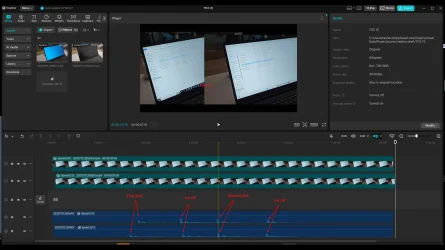
We can get pretty scientific if you wish - watch the video and you tell me which OS is faster. I've added a screenshot of how the comparison is made and to me it is pretty fair and as comprehensive as the software allows me to be.

It is so obvious that Win11 is lagging behind Win10 and even though it is a fraction of a second, you can feel it when you perform multiple operations. That was the whole point of this thread.

Where is your test? What have you done to prove that Win11 is faster? Or are we just going to throw stuff like that?
 

Attachments

  • Win10vsWin11.mp4
    Win10vsWin11.mp4
    2.2 MB
  • Screenshot_2025-11-12_07.57.18.webp
    Screenshot_2025-11-12_07.57.18.webp
    233.4 KB · Views: 6

My Computer My Computer

At a glance

Windows 11
OS
Windows 11
Computer type
Laptop
Manufacturer/Model
HP
OS and laptop specs:
OS Name Microsoft Windows 11 Enterprise
Version 10.0.26100 Build 26100
System Model HP ZBook Firefly 14 inch G8 Mobile Workstation PC
System Type x64-based PC
Processor 11th Gen Intel(R) Core(TM) i7-1185G7 @ 3.00GHz, 2995 Mhz, 4 Core(s), 8 Logical Processor(s)
Installed Physical Memory (RAM) 32.0 GB
BIOS Version/Date HP T39 Ver. 01.21.00, 09/04/2025

All OS updates are performed regularly as this is a working PC managed by my employer (I have no choice).

Putting aside all the things around the visuals of Win 11 - changes nobody asked for.

Speaking only from the perspective of performance - it is a disaster. The time and effort required for the PC to perform the same operations that it did until recently (before the upgrade from Win 10) are significantly more. It feels like the HW has got 10 years older overnight because of the change of the OS version.

Here is a summary of the things that I am noticing:
1/ CPU is much more active than before - hardly ever goes below 12% in idle state, while with Win 10 it was going as low as 3-4%.
2/ CPU is often going up to 80-90% for simple tasks.
3/ The Fan has an increased speeds in response to the workload to of the CPU.
4/ Windows Explorer (a very basic function) is taking much more time on every click to respond - feels sluggish and irresponsive.
5/ SW like Teams, Outlook, Slack, OneNote, Chrome are noticeably slower and heavier than with Win 10 to the point that the PC becomes unusable for periods of time when loading.

The overall feeling is like trying to run in a swimming pool. Everything is harder and takes up more time and energy to accomplish. It is really frustrating and I think it's a crime to degrade a decent piece of HW in such a way without a good justification.

I am well-aware that my rant is not going to change anything as Microsoft couldn't care less about my experience, yet I am sharing this here, so others who struggle as well, know that they are not the only one going through this.
@tashev2078 WHAT?! My experience with Windows 11 has been the opposite. MUCH BETTER performance than Windows 10 (which I never liked).
Even on OLD systems, Windows 11 performance has been quite decent. Maybe your systems don't have the correct or updated drivers? Or are not configured properly?
 

My Computers My Computers

  • At a glance

    Windows 11 Pro 25H2 (OS Build 26200.8246)Intel(R) Xeon(R) CPU E3-1535M v5 @ 2.90 Max T...64GB DDR4 ECC (Error-Correcting Code memory)NVIDIA Quadro M2000M 4GB GDDR5 & Intel(R) HD ...
    OS
    Windows 11 Pro 25H2 (OS Build 26200.8246)
    Computer type
    Laptop
    Manufacturer/Model
    Dell Precision Mobile Workstation
    CPU
    Intel(R) Xeon(R) CPU E3-1535M v5 @ 2.90 Max Turbo 3.80
    Motherboard
    00V5FJ
    Memory
    64GB DDR4 ECC (Error-Correcting Code memory)
    Graphics Card(s)
    NVIDIA Quadro M2000M 4GB GDDR5 & Intel(R) HD Graphics P530
    Sound Card
    Realtek Audio
    Monitor(s) Displays
    15.6" 4K UltraHD
    Screen Resolution
    4K UHD 3840x2160
    Hard Drives
    2TB Crucial NVMe & 2TB Seagate SATA
    PSU
    Dell 180W 19.5V-9.23A
    Keyboard
    Backlit
    Mouse
    Logitech G703 & Logitech G305
    Internet Speed
    WIFI: Intel(R) Wi-Fi 6E AX210NGW(Gig+) 160MHz Bands 2.4GHz(574Mbps), 5GHz 2.4Gbps, 6 GHz (160MHz) 2.4Gbps
    Browser
    Mozilla Firefox
    Antivirus
    Windows Defender/Microsoft Security + additional Anti Spyware, Anti Malware, etc.
    Other Info
    Thunderbolt 3
  • At a glance

    Windows 11 Pro 24H2 (OS Build 26100.6725)Dual (X2) Intel(R) Xeon(R) CPU E5-2690 0 @ 2....64GB DDR3 ECC (Error-Correcting Code memory)NVIDIA GeForce GTX 970 4GB of GDDR5
    Operating System
    Windows 11 Pro 24H2 (OS Build 26100.6725)
    Computer type
    PC/Desktop
    Manufacturer/Model
    Dell Precision Workstation T5610
    CPU
    Dual (X2) Intel(R) Xeon(R) CPU E5-2690 0 @ 2.90GHz Max Turbo 3.80
    Motherboard
    0WN7Y6
    Memory
    64GB DDR3 ECC (Error-Correcting Code memory)
    Graphics card(s)
    NVIDIA GeForce GTX 970 4GB of GDDR5
    Sound Card
    Realtek Audio & NVIDIA High Definition Audio
    Monitor(s) Displays
    3 Acer Monitors
    Screen Resolution
    1920x1080
    Hard Drives
    2 Seagate Barracuda ST2000DM008-2UB102 (RAID)
    Mouse
    Logitech G305
Sounds like something you should take up with your IT department. I say that, because 1) even my 8th-gen NUCs don't act like that. The CPU regularly sits at 0% when I'm doing nothing. I don't have issues, even on those older NUCs, like you describe with apps. And 2) I've been a part of large, like multi-thousand-seat, Windows deployments, including 10 and 11, and this isn't normal.
@pseymour I wholeheartedly agree with you on this. My experience has been quite different, with Windows 10 being the dog by comparison on a variety of systems.
 

My Computers My Computers

  • At a glance

    Windows 11 Pro 25H2 (OS Build 26200.8246)Intel(R) Xeon(R) CPU E3-1535M v5 @ 2.90 Max T...64GB DDR4 ECC (Error-Correcting Code memory)NVIDIA Quadro M2000M 4GB GDDR5 & Intel(R) HD ...
    OS
    Windows 11 Pro 25H2 (OS Build 26200.8246)
    Computer type
    Laptop
    Manufacturer/Model
    Dell Precision Mobile Workstation
    CPU
    Intel(R) Xeon(R) CPU E3-1535M v5 @ 2.90 Max Turbo 3.80
    Motherboard
    00V5FJ
    Memory
    64GB DDR4 ECC (Error-Correcting Code memory)
    Graphics Card(s)
    NVIDIA Quadro M2000M 4GB GDDR5 & Intel(R) HD Graphics P530
    Sound Card
    Realtek Audio
    Monitor(s) Displays
    15.6" 4K UltraHD
    Screen Resolution
    4K UHD 3840x2160
    Hard Drives
    2TB Crucial NVMe & 2TB Seagate SATA
    PSU
    Dell 180W 19.5V-9.23A
    Keyboard
    Backlit
    Mouse
    Logitech G703 & Logitech G305
    Internet Speed
    WIFI: Intel(R) Wi-Fi 6E AX210NGW(Gig+) 160MHz Bands 2.4GHz(574Mbps), 5GHz 2.4Gbps, 6 GHz (160MHz) 2.4Gbps
    Browser
    Mozilla Firefox
    Antivirus
    Windows Defender/Microsoft Security + additional Anti Spyware, Anti Malware, etc.
    Other Info
    Thunderbolt 3
  • At a glance

    Windows 11 Pro 24H2 (OS Build 26100.6725)Dual (X2) Intel(R) Xeon(R) CPU E5-2690 0 @ 2....64GB DDR3 ECC (Error-Correcting Code memory)NVIDIA GeForce GTX 970 4GB of GDDR5
    Operating System
    Windows 11 Pro 24H2 (OS Build 26100.6725)
    Computer type
    PC/Desktop
    Manufacturer/Model
    Dell Precision Workstation T5610
    CPU
    Dual (X2) Intel(R) Xeon(R) CPU E5-2690 0 @ 2.90GHz Max Turbo 3.80
    Motherboard
    0WN7Y6
    Memory
    64GB DDR3 ECC (Error-Correcting Code memory)
    Graphics card(s)
    NVIDIA GeForce GTX 970 4GB of GDDR5
    Sound Card
    Realtek Audio & NVIDIA High Definition Audio
    Monitor(s) Displays
    3 Acer Monitors
    Screen Resolution
    1920x1080
    Hard Drives
    2 Seagate Barracuda ST2000DM008-2UB102 (RAID)
    Mouse
    Logitech G305
I agree that this sounds like something specific to your particular configuration. For me, I have a very wide array of array including machines wel over a decade old and on every one of those machines Windows 11 seems to run better than 10.

NOTE: My newest machines that shipped with Win 11 already on them have not been tested with Win 10, but my older machines all run better on Win 11 than they did in Win 10.

I'm not doubting you, but I have to wonder if there are not specific config issues or possibly driver issues at play here.
@hsehestedt Absolutely without question, 100% true. re: "older machines all run better on Win 11 than they did in Win 10."
 

My Computers My Computers

  • At a glance

    Windows 11 Pro 25H2 (OS Build 26200.8246)Intel(R) Xeon(R) CPU E3-1535M v5 @ 2.90 Max T...64GB DDR4 ECC (Error-Correcting Code memory)NVIDIA Quadro M2000M 4GB GDDR5 & Intel(R) HD ...
    OS
    Windows 11 Pro 25H2 (OS Build 26200.8246)
    Computer type
    Laptop
    Manufacturer/Model
    Dell Precision Mobile Workstation
    CPU
    Intel(R) Xeon(R) CPU E3-1535M v5 @ 2.90 Max Turbo 3.80
    Motherboard
    00V5FJ
    Memory
    64GB DDR4 ECC (Error-Correcting Code memory)
    Graphics Card(s)
    NVIDIA Quadro M2000M 4GB GDDR5 & Intel(R) HD Graphics P530
    Sound Card
    Realtek Audio
    Monitor(s) Displays
    15.6" 4K UltraHD
    Screen Resolution
    4K UHD 3840x2160
    Hard Drives
    2TB Crucial NVMe & 2TB Seagate SATA
    PSU
    Dell 180W 19.5V-9.23A
    Keyboard
    Backlit
    Mouse
    Logitech G703 & Logitech G305
    Internet Speed
    WIFI: Intel(R) Wi-Fi 6E AX210NGW(Gig+) 160MHz Bands 2.4GHz(574Mbps), 5GHz 2.4Gbps, 6 GHz (160MHz) 2.4Gbps
    Browser
    Mozilla Firefox
    Antivirus
    Windows Defender/Microsoft Security + additional Anti Spyware, Anti Malware, etc.
    Other Info
    Thunderbolt 3
  • At a glance

    Windows 11 Pro 24H2 (OS Build 26100.6725)Dual (X2) Intel(R) Xeon(R) CPU E5-2690 0 @ 2....64GB DDR3 ECC (Error-Correcting Code memory)NVIDIA GeForce GTX 970 4GB of GDDR5
    Operating System
    Windows 11 Pro 24H2 (OS Build 26100.6725)
    Computer type
    PC/Desktop
    Manufacturer/Model
    Dell Precision Workstation T5610
    CPU
    Dual (X2) Intel(R) Xeon(R) CPU E5-2690 0 @ 2.90GHz Max Turbo 3.80
    Motherboard
    0WN7Y6
    Memory
    64GB DDR3 ECC (Error-Correcting Code memory)
    Graphics card(s)
    NVIDIA GeForce GTX 970 4GB of GDDR5
    Sound Card
    Realtek Audio & NVIDIA High Definition Audio
    Monitor(s) Displays
    3 Acer Monitors
    Screen Resolution
    1920x1080
    Hard Drives
    2 Seagate Barracuda ST2000DM008-2UB102 (RAID)
    Mouse
    Logitech G305
I think it's unfair to compare a corporate setup managed by your employer to a privately own version. You can modify windows 11 to remove a lot of the telemetry (spying) by MS. I use OOSU10.exe to remove all unnecessary telemetry O&O ShutUp10++: Free antispy tool for Windows 10 and 11 you can't do that on a corporate owned laptop (administrator locked) so I think you need to rethink your rant. My Windows 11 is running fantastically on my current system which is high end.
 

My Computers My Computers

  • At a glance

    Windows 11 Pro 25H2 26200.7627Ryzen 7 9800X3DG.Skill Trident Z5 RGB DDR5-6000 32GB (2×16GB...RTX 5080 Palit Gaming Pro
    OS
    Windows 11 Pro 25H2 26200.7627
    Computer type
    PC/Desktop
    Manufacturer/Model
    Gigababyte X870E Aorus Pro Rev 1.1
    CPU
    Ryzen 7 9800X3D
    Motherboard
    Gigababyte X870E Aorus Pro Rev 1.1
    Memory
    G.Skill Trident Z5 RGB DDR5-6000 32GB (2×16GB) CL30 2 x 16gb
    Graphics Card(s)
    RTX 5080 Palit Gaming Pro
    Sound Card
    Steel Series Arctis 1 Gaming Head phones
    Monitor(s) Displays
    Asus ROG Strix 27″ QHD OLED XG27AQDMG & Phillips 272V8
    Screen Resolution
    2560 X1440 27 Inch 240 HZ Asus
    PSU
    Corsair RM1000X
    Case
    Corsair CC750D (CC-9011078) Obsidian 750D Airflow Edition Black Full Tower ATX Case
    Cooling
    Corsair iCUE LINK TITAN 360 RX RGB
    Keyboard
    Razer BlackWidow V4 X Razer™ Yellow Mechanical Switches
    Mouse
    Logitech G502X Plus
    Internet Speed
    HFC 2000/100
    Browser
    Opera GX
    Antivirus
    Kaspersky Plus
  • At a glance

    Windows 11 23H2 22631.2715Intel i5-1135G78 GBIntel Iris Xe Graphics
    Operating System
    Windows 11 23H2 22631.2715
    Computer type
    Laptop
    Manufacturer/Model
    Dell XPS EVO 13.3" RNX9305C01AUSB
    CPU
    Intel i5-1135G7
    Motherboard
    Dell
    Memory
    8 GB
    Graphics card(s)
    Intel Iris Xe Graphics
    Monitor(s) Displays
    LED
    Screen Resolution
    1920 x 1080
    Hard Drives
    256GB SSD
    Other Info
    https://www.thegoodguys.com.au/dell-xps-evo-133-inches-win-11-laptop-rnx9305c01ausb
I think it's unfair to compare a corporate setup managed by your employer to a privately own version. You can modify windows 11 to remove a lot of the telemetry (spying) by MS. I use OOSU10.exe to remove all unnecessary telemetry O&O ShutUp10++: Free antispy tool for Windows 10 and 11 you can't do that on a corporate owned laptop (administrator locked) so I think you need to rethink your rant. My Windows 11 is running fantastically on my current system which is high end.
@PvtJohnTowle Agreed, and also Spybot Anti-Beacon
 

My Computers My Computers

  • At a glance

    Windows 11 Pro 25H2 (OS Build 26200.8246)Intel(R) Xeon(R) CPU E3-1535M v5 @ 2.90 Max T...64GB DDR4 ECC (Error-Correcting Code memory)NVIDIA Quadro M2000M 4GB GDDR5 & Intel(R) HD ...
    OS
    Windows 11 Pro 25H2 (OS Build 26200.8246)
    Computer type
    Laptop
    Manufacturer/Model
    Dell Precision Mobile Workstation
    CPU
    Intel(R) Xeon(R) CPU E3-1535M v5 @ 2.90 Max Turbo 3.80
    Motherboard
    00V5FJ
    Memory
    64GB DDR4 ECC (Error-Correcting Code memory)
    Graphics Card(s)
    NVIDIA Quadro M2000M 4GB GDDR5 & Intel(R) HD Graphics P530
    Sound Card
    Realtek Audio
    Monitor(s) Displays
    15.6" 4K UltraHD
    Screen Resolution
    4K UHD 3840x2160
    Hard Drives
    2TB Crucial NVMe & 2TB Seagate SATA
    PSU
    Dell 180W 19.5V-9.23A
    Keyboard
    Backlit
    Mouse
    Logitech G703 & Logitech G305
    Internet Speed
    WIFI: Intel(R) Wi-Fi 6E AX210NGW(Gig+) 160MHz Bands 2.4GHz(574Mbps), 5GHz 2.4Gbps, 6 GHz (160MHz) 2.4Gbps
    Browser
    Mozilla Firefox
    Antivirus
    Windows Defender/Microsoft Security + additional Anti Spyware, Anti Malware, etc.
    Other Info
    Thunderbolt 3
  • At a glance

    Windows 11 Pro 24H2 (OS Build 26100.6725)Dual (X2) Intel(R) Xeon(R) CPU E5-2690 0 @ 2....64GB DDR3 ECC (Error-Correcting Code memory)NVIDIA GeForce GTX 970 4GB of GDDR5
    Operating System
    Windows 11 Pro 24H2 (OS Build 26100.6725)
    Computer type
    PC/Desktop
    Manufacturer/Model
    Dell Precision Workstation T5610
    CPU
    Dual (X2) Intel(R) Xeon(R) CPU E5-2690 0 @ 2.90GHz Max Turbo 3.80
    Motherboard
    0WN7Y6
    Memory
    64GB DDR3 ECC (Error-Correcting Code memory)
    Graphics card(s)
    NVIDIA GeForce GTX 970 4GB of GDDR5
    Sound Card
    Realtek Audio & NVIDIA High Definition Audio
    Monitor(s) Displays
    3 Acer Monitors
    Screen Resolution
    1920x1080
    Hard Drives
    2 Seagate Barracuda ST2000DM008-2UB102 (RAID)
    Mouse
    Logitech G305
I think it's unfair to compare a corporate setup managed by your employer to a privately own version. You can modify windows 11 to remove a lot of the telemetry (spying) by MS. I use OOSU10.exe to remove all unnecessary telemetry O&O ShutUp10++: Free antispy tool for Windows 10 and 11 you can't do that on a corporate owned laptop (administrator locked) so I think you need to rethink your rant. My Windows 11 is running fantastically on my current system which is high end.
But you haven't read the whole thread, otherwise you would know about the tests that I did on my own PC and what conclusions I came to, including an unbiased video comparison between W10 and W11 in a very basic function like opening a folder in Windows Explorer.
 

My Computer My Computer

At a glance

Windows 11
OS
Windows 11
Computer type
Laptop
Manufacturer/Model
HP
To anyone who claims that Win11 is behaving snappier than Win10: I challenge you to do your own testing and compare like I did.
Would you go to the length I did? Would you reimage the same PC with both OS versions and record a video of their behavior while working with Windows Explorer? If you are not, then we have nothing to discuss.

I captured video material and I am ready to share the raw files to whoever wants to do their own analysis.

But again, as I wrote previously, not everyone will pick up the subtle difference between the two OS, especially if you are not focused on the stuff I am talking about.
 

My Computer My Computer

At a glance

Windows 11
OS
Windows 11
Computer type
Laptop
Manufacturer/Model
HP
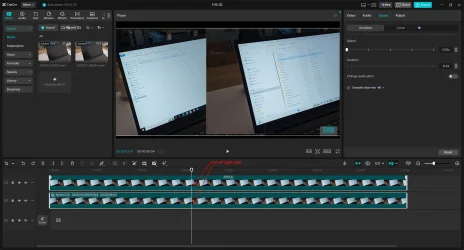
Here is another one. You be the judge.
Video slowed down to 0.1x.
 

Attachments

My Computer My Computer

At a glance

Windows 11
OS
Windows 11
Computer type
Laptop
Manufacturer/Model
HP
Back
Top Bottom