Windows 11 Turns Off HDR Instantly


avrona

Member
Local time
10:08 AM
Posts
6
OS
Windows 11 Pro
All of a sudden I can't enable HDR in Windows. The second I click "Use HDR", the button just goes from being on to instantly off. Seems to be a Windows-side issue as on the monitor everything is set up correctly to allow for HDR. Even before if HDR was turned off on the monitor it still allowed me to at least turn it on in Windows, even if made the screen not look quite right. I have tried different video cables as well but still nothing. I have done nothing to the PC that should've caused this changed or made any Windows changes when it started to occur out of nowhere.
 
Windows Build/Version
21H2

My Computer My Computer

At a glance

Windows 11 ProRyzen 7 3700X4x8GB Corsair Vengeance LPX @3000MHzAorus GTX 1080 Ti
OS
Windows 11 Pro
Computer type
PC/Desktop
CPU
Ryzen 7 3700X
Motherboard
Gigabyte X570 Aorus Elite
Memory
4x8GB Corsair Vengeance LPX @3000MHz
Graphics Card(s)
Aorus GTX 1080 Ti
Sound Card
Creative Sound Blaster Z
Monitor(s) Displays
Aorus FV43U
Screen Resolution
3840x2160
Hard Drives
1TB Aorus PCIe 4.0 NVMe SSD
1TB Sabrent Rocket PCIe 4.0 NVMe SSD
2x1TB Seagate Barracuda HDD
PSU
be quiet! System Power 9 600W
Case
Corsair 110R
Cooling
EK AIO 120 D-RGB
Keyboard
Logitech G915 Clicky
Mouse
Logitech G502 Lightspeed
Internet Speed
1Gbps
Browser
Google Chrome

My Computers My Computers

  • At a glance

    Windows 11 Pro 25H2 26200.8655i9-10900 10 core 20 threads32 gbnone-Intel UHD Graphics 630
    OS
    Windows 11 Pro 25H2 26200.8655
    Computer type
    PC/Desktop
    Manufacturer/Model
    Dell Optiplex 7080
    CPU
    i9-10900 10 core 20 threads
    Motherboard
    DELL 0J37VM
    Memory
    32 gb
    Graphics Card(s)
    none-Intel UHD Graphics 630
    Sound Card
    Integrated Realtek
    Monitor(s) Displays
    Benq 27
    Screen Resolution
    2560x1440
    Hard Drives
    2x1tb Solidigm m.2 nvme /External drives 512gb Samsung m.2 sata+2tb Kingston m2.nvme
    PSU
    500w
    Case
    MT
    Cooling
    Dell Premium
    Keyboard
    Logitech wired
    Mouse
    Logitech wireless
    Internet Speed
    so slow I'm too embarrassed to tell
    Browser
    #1 Edge #2 Firefox
    Antivirus
    Defender+MWB Premium
  • At a glance

    Windows 11 Pro 24H2 26200.8457AMD Ryzen 7 6800U32 gbintegrated
    Operating System
    Windows 11 Pro 24H2 26200.8457
    Computer type
    PC/Desktop
    Manufacturer/Model
    Beelink Mini PC SER5
    CPU
    AMD Ryzen 7 6800U
    Memory
    32 gb
    Graphics card(s)
    integrated
    Sound Card
    integrated
    Monitor(s) Displays
    Benq 27
    Screen Resolution
    2560x1440
    Hard Drives
    1TB Crucial nvme
    Keyboard
    Logitech wired
    Mouse
    Logitech wireless
    Internet Speed
    still too embarrassed to tell
    Browser
    Firefox
    Antivirus
    Defender
    Other Info
    System 3 is non compliant Dell 9020 i7-4770/24gb ram Win11 PRO 26200.8457
Are you using a hdmi adapter of any kind? Adapters can cause this issue.

If not, have you verified that you are using the latest graphics driver? New ones were released this past week. Latest NVIDIA GeForce Graphics Drivers for Windows 11
No, I'm not using any adpters and yes drivers are up-to-date. It's been happening for over a month now so I've gone through several graphical drivers that haven't fixed the issue.
 

My Computer My Computer

At a glance

Windows 11 ProRyzen 7 3700X4x8GB Corsair Vengeance LPX @3000MHzAorus GTX 1080 Ti
OS
Windows 11 Pro
Computer type
PC/Desktop
CPU
Ryzen 7 3700X
Motherboard
Gigabyte X570 Aorus Elite
Memory
4x8GB Corsair Vengeance LPX @3000MHz
Graphics Card(s)
Aorus GTX 1080 Ti
Sound Card
Creative Sound Blaster Z
Monitor(s) Displays
Aorus FV43U
Screen Resolution
3840x2160
Hard Drives
1TB Aorus PCIe 4.0 NVMe SSD
1TB Sabrent Rocket PCIe 4.0 NVMe SSD
2x1TB Seagate Barracuda HDD
PSU
be quiet! System Power 9 600W
Case
Corsair 110R
Cooling
EK AIO 120 D-RGB
Keyboard
Logitech G915 Clicky
Mouse
Logitech G502 Lightspeed
Internet Speed
1Gbps
Browser
Google Chrome
Try this out. Now I am outputting 4K HDR at 120Hz. Here's the video that shows exactly how everything should be set up!
 

My Computer My Computer

At a glance

Windows 11intel i9-12950HX32 GB3080 Ti
OS
Windows 11
Computer type
Laptop
Manufacturer/Model
Asus ROG Strix SCAR 17 SE
CPU
intel i9-12950HX
Memory
32 GB
Graphics Card(s)
3080 Ti
Screen Resolution
Laptop: 2560x1440, 4K UHD LG C1: 2840x2160
Hard Drives
2 TB raid
Mouse
Razer Deathadder Pro v2
Internet Speed
FiOS GIG
Browser
Microsoft Edge
Try this out. Now I am outputting 4K HDR at 120Hz. Here's the video that shows exactly how everything should be set up!
Again, the issue is I just can't turn HDR on in the first place Windows-side. Windows just won't let me for some reason.
 

My Computer My Computer

At a glance

Windows 11 ProRyzen 7 3700X4x8GB Corsair Vengeance LPX @3000MHzAorus GTX 1080 Ti
OS
Windows 11 Pro
Computer type
PC/Desktop
CPU
Ryzen 7 3700X
Motherboard
Gigabyte X570 Aorus Elite
Memory
4x8GB Corsair Vengeance LPX @3000MHz
Graphics Card(s)
Aorus GTX 1080 Ti
Sound Card
Creative Sound Blaster Z
Monitor(s) Displays
Aorus FV43U
Screen Resolution
3840x2160
Hard Drives
1TB Aorus PCIe 4.0 NVMe SSD
1TB Sabrent Rocket PCIe 4.0 NVMe SSD
2x1TB Seagate Barracuda HDD
PSU
be quiet! System Power 9 600W
Case
Corsair 110R
Cooling
EK AIO 120 D-RGB
Keyboard
Logitech G915 Clicky
Mouse
Logitech G502 Lightspeed
Internet Speed
1Gbps
Browser
Google Chrome
So after a lot of trial and error, I found a way to force HDR on, though it pretty much defies all logic.
First, I have to connect a second, non-HDR monitor up to my PC. Then I set them up as one extended desktop. When I apply that setting, when the image comes back, it's displaying in HDR. As far as I can tell, duplication or PC screen only don't work, only extending the desktop to the other monitor works. Another way I found is to force it on by first turning on an HDR-enabled game, enabling HDR via the Xbox game bar, then restarting the game. I have no idea what's going on anymore...
 

My Computer My Computer

At a glance

Windows 11 ProRyzen 7 3700X4x8GB Corsair Vengeance LPX @3000MHzAorus GTX 1080 Ti
OS
Windows 11 Pro
Computer type
PC/Desktop
CPU
Ryzen 7 3700X
Motherboard
Gigabyte X570 Aorus Elite
Memory
4x8GB Corsair Vengeance LPX @3000MHz
Graphics Card(s)
Aorus GTX 1080 Ti
Sound Card
Creative Sound Blaster Z
Monitor(s) Displays
Aorus FV43U
Screen Resolution
3840x2160
Hard Drives
1TB Aorus PCIe 4.0 NVMe SSD
1TB Sabrent Rocket PCIe 4.0 NVMe SSD
2x1TB Seagate Barracuda HDD
PSU
be quiet! System Power 9 600W
Case
Corsair 110R
Cooling
EK AIO 120 D-RGB
Keyboard
Logitech G915 Clicky
Mouse
Logitech G502 Lightspeed
Internet Speed
1Gbps
Browser
Google Chrome
I have no idea what's going on anymore..
A lot of the time, neither do I. Much defies logic these days. Glad to hear you found a work-around. Thank you for posting your solution.
 

My Computers My Computers

  • At a glance

    Windows 11 Pro 25H2 26200.8655i9-10900 10 core 20 threads32 gbnone-Intel UHD Graphics 630
    OS
    Windows 11 Pro 25H2 26200.8655
    Computer type
    PC/Desktop
    Manufacturer/Model
    Dell Optiplex 7080
    CPU
    i9-10900 10 core 20 threads
    Motherboard
    DELL 0J37VM
    Memory
    32 gb
    Graphics Card(s)
    none-Intel UHD Graphics 630
    Sound Card
    Integrated Realtek
    Monitor(s) Displays
    Benq 27
    Screen Resolution
    2560x1440
    Hard Drives
    2x1tb Solidigm m.2 nvme /External drives 512gb Samsung m.2 sata+2tb Kingston m2.nvme
    PSU
    500w
    Case
    MT
    Cooling
    Dell Premium
    Keyboard
    Logitech wired
    Mouse
    Logitech wireless
    Internet Speed
    so slow I'm too embarrassed to tell
    Browser
    #1 Edge #2 Firefox
    Antivirus
    Defender+MWB Premium
  • At a glance

    Windows 11 Pro 24H2 26200.8457AMD Ryzen 7 6800U32 gbintegrated
    Operating System
    Windows 11 Pro 24H2 26200.8457
    Computer type
    PC/Desktop
    Manufacturer/Model
    Beelink Mini PC SER5
    CPU
    AMD Ryzen 7 6800U
    Memory
    32 gb
    Graphics card(s)
    integrated
    Sound Card
    integrated
    Monitor(s) Displays
    Benq 27
    Screen Resolution
    2560x1440
    Hard Drives
    1TB Crucial nvme
    Keyboard
    Logitech wired
    Mouse
    Logitech wireless
    Internet Speed
    still too embarrassed to tell
    Browser
    Firefox
    Antivirus
    Defender
    Other Info
    System 3 is non compliant Dell 9020 i7-4770/24gb ram Win11 PRO 26200.8457
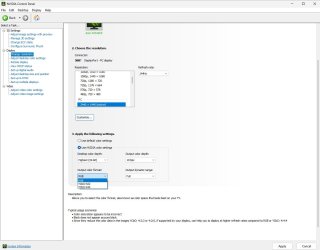
Somewhere along the way a setting was changed in the Nvidia Control Panel that caused this issue for me. I chased it for months and just solved it the other day, so I wanted to post in case this helps someone else.

In the Nvidia Control Panel under "Display" select "Change resolution" and then under "Output color format" set to either "RGB" or "YCbCr444". Mine was set to "YcBCr422" which apparently doesn't jive with HDR. From there, I enabled HDR in Windows (the toggle worked) and everything has been good since. I've attached a screenshot to make it easy to find.

Hopefully this helps some other poor soul fighting HDR settings!
 

Attachments

  • Nvidia CPL Settings.jpg
    Nvidia CPL Settings.jpg
    70.3 KB · Views: 11

My Computer My Computer

At a glance

Win11AMD Ryzen 7 5800X3DCorsair Vengeance 64GB DDR4EVGA Nvidia 3090ti FTW
OS
Win11
Computer type
PC/Desktop
Manufacturer/Model
Self Built
CPU
AMD Ryzen 7 5800X3D
Motherboard
MSI X470
Memory
Corsair Vengeance 64GB DDR4
Graphics Card(s)
EVGA Nvidia 3090ti FTW
Sound Card
On board
Monitor(s) Displays
Acer 34" Curved w/ HDR
Screen Resolution
3440x1440
Hard Drives
2x Samsung 970 EVO
PSU
ASUS ROG STRIX 1000W
Case
Corsair 4000D
Cooling
Corsair
Internet Speed
Fiber
To add to this, sometimes monitors have a certain driver that needs to be downloaded to enable hdr.

You might need to go to your monitors support page and download the latest firmware and drivers. For example, here is mine for my monitor.

Once HDR is enabled, it is important to download the hdr calibration tool from the microsoft store from Microsoft to get a proper picture and color profile.
 

My Computers My Computers

  • At a glance

    Windows 11 ProRyzen 7 5700 X3D64 GB DDR4 3600mhz Gskill Ripjaws VRTX 4070 Super , 12GB VRAM Asus EVO Overclock
    OS
    Windows 11 Pro
    Computer type
    PC/Desktop
    Manufacturer/Model
    Custom Built
    CPU
    Ryzen 7 5700 X3D
    Motherboard
    MSI MPG B550 GAMING PLUS
    Memory
    64 GB DDR4 3600mhz Gskill Ripjaws V
    Graphics Card(s)
    RTX 4070 Super , 12GB VRAM Asus EVO Overclock
    Monitor(s) Displays
    Gigabyte M27Q (rev. 2.0) 2560 x 1440 @ 170hz HDR
    Hard Drives
    2TB Samsung nvme ssd
    4TB Western Digital nvme ssd
    PSU
    CORSAIR RMx SHIFT Series™ RM750x 80 PLUS Gold Fully Modular ATX Power Supply
    Case
    CORSAIR 3500X ARGB Mid-Tower ATX PC Case – Black
    Cooling
    ID-COOLING FROSTFLOW X 240 CPU Water Cooler
    Keyboard
    Logitech G213
    Mouse
    Logitech G203
    Internet Speed
    1.2gbps Fiber 😎
  • At a glance

    Chrome OSIntel Pentium Quad Core4GB LPDDR4
    Operating System
    Chrome OS
    Computer type
    Laptop
    Manufacturer/Model
    HP Chromebook
    CPU
    Intel Pentium Quad Core
    Memory
    4GB LPDDR4
    Monitor(s) Displays
    14 Inch HD SVA anti glare micro edge display
    Hard Drives
    64 GB emmc
Also, not monitors are HDR capable. Example my2014 NEC PA 241W thus in this case Windows HDR can NOT be enabled. If a monitor isn't HDR capable then you can't enable Windows HDR setting. Period.

If you want HDR, make sure you get an HDR capable monitor. Period.
 

My Computers My Computers

  • At a glance

    Windows 11 Pro 24H2 (Build 26100.4770)Intel Core 9 Ultra 285K64G (4x16) DDR5 Corsair RGB Dominator Platinu...Radeon (XFX Mercury) RX 9070XT OC (with Magne...
    OS
    Windows 11 Pro 24H2 (Build 26100.4770)
    Computer type
    PC/Desktop
    Manufacturer/Model
    Custom built
    CPU
    Intel Core 9 Ultra 285K
    Motherboard
    Gigabyte Aorus Z890 Xtreme AI Top
    Memory
    64G (4x16) DDR5 Corsair RGB Dominator Platinum (6400Mhz)
    Graphics Card(s)
    Radeon (XFX Mercury) RX 9070XT OC (with Magnetic Fans)
    Sound Card
    Onboard (DTS:X® Ultra Audio: ESS ES9280A DAC)
    Monitor(s) Displays
    27-inch Eizo Color Edge - CG2700X
    Screen Resolution
    3840 x 2160
    Hard Drives
    4 Samsung NVM 990 Pro drives: 1TB (OS), 2TB, 2 X 4TB.
    PSU
    Seasonic TX-1300 (1300 Watts)
    Case
    Cooler Master H500M
    Cooling
    Corsair Link Titan 280 RX RGB
    Keyboard
    Logitech Craft
    Mouse
    Logitech MX Master 3S
    Internet Speed
    1TB Download. 512mb Upload
    Browser
    Microsoft Edge Chromium
    Antivirus
    Windows Security
    Other Info
    System used for gaming, photography, music, school.
  • At a glance

    Windows 11 Pro 24H2 (Build 26100.4061)Intel Core i9-9900K32gig (4 x 8) Corsair Dominator Platinum DDR4...Radeon XFX Merc 7900XT (20gig)
    Operating System
    Windows 11 Pro 24H2 (Build 26100.4061)
    Computer type
    PC/Desktop
    Manufacturer/Model
    Custom built
    CPU
    Intel Core i9-9900K
    Motherboard
    Gigabyte Z390 Aorus Xtreme
    Memory
    32gig (4 x 8) Corsair Dominator Platinum DDR4 3600Mhz (B-Die)
    Graphics card(s)
    Radeon XFX Merc 7900XT (20gig)
    Sound Card
    Onboard
    Monitor(s) Displays
    24-Inch NEC PA242W
    Screen Resolution
    2880 x 1800
    Hard Drives
    2 X NVME, 1 X SATA SSD
    PSU
    EVGA Super Nova 1000 P2 (1000 Watt)
    Case
    Phantek Enthoo Luxe
    Cooling
    Corsair H115i Elite AIO Cooler
    Keyboard
    Logitech Keys
    Mouse
    Logitech MX Master 3
    Internet Speed
    1TB Download. 512mb Upload
    Browser
    Microsoft Edge Chromium
    Antivirus
    Windows Security
    Other Info
    Backup System
Also, not monitors are HDR capable. Example my2014 NEC PA 241W thus in this case Windows HDR can NOT be enabled. If a monitor isn't HDR capable then you can't enable Windows HDR setting. Period.

If you want HDR, make sure you get an HDR capable monitor. Period.

As can be read from his Computer specs, his AORUS FV43U Monitor is fully HDR compatible. See AORUS FV43U Gaming Monitor Specification | Monitor - GIGABYTE Global which read
HDR VESA Display HDR1000. Period.
 

My Computers My Computers

  • At a glance

    Windows 11 ProIntel® Core™ i9-10940X - 14 CoresKingston HyperX Fury RGB 64GB DDR4-3200NVIDIA RTX 3060 Ti 8GB
    OS
    Windows 11 Pro
    Computer type
    PC/Desktop
    Manufacturer/Model
    Sharkoon SGC1 - RGB
    CPU
    Intel® Core™ i9-10940X - 14 Cores
    Motherboard
    Asus Prime X299-A II
    Memory
    Kingston HyperX Fury RGB 64GB DDR4-3200
    Graphics Card(s)
    NVIDIA RTX 3060 Ti 8GB
    Monitor(s) Displays
    LG Ultra HD
    Screen Resolution
    3840 x 2160
    Hard Drives
    SSD 4000GB Samsung 870 QVO SSD 500GB Crucial MX500 PSSD 2T Samsung T7 SCSI
    PSU
    850W Cooler Master
    Case
    Sharkoon SGC1 - RGB
    Cooling
    Cooler Master H412R
    Keyboard
    Corsair Vengeance-K70-RGB
    Mouse
    CONTUS Gaming Mouse
    Internet Speed
    1000/1000 (Mbps)
    Browser
    Chrome
    Antivirus
    Windows Defender
    Other Info
    CPU: Intel Core i9-10940X (Cascade Lake-X, L1)
    3300 MHz (33.00x100.0) @ 1183 MHz (12.00x98.6)
    Motherboard: ASUS PRIME X299-A II
    BIOS: 2001, 11/06/2024
    Chipset: Intel X299 (Kaby Lake)
    Memory: 65536 MBytes @ 1190 MHz, 17-17-17-39
    - 16384 MB PC25600 DDR4 SDRAM - Kingston KHX3200C16D4/16GX
    - 16384 MB PC25600 DDR4 SDRAM - Kingston KHX3200C16D4/16GX
    - 16384 MB PC25600 DDR4 SDRAM - Kingston KHX3200C16D4/16GX
    - 16384 MB PC25600 DDR4 SDRAM - Kingston KHX3200C16D4/16GX
    Graphics: NVIDIA GeForce RTX 3060 Ti
    NVIDIA GeForce RTX 3060 Ti, 8192 MB GDDR6 SDRAM
    Drive: CT500MX500SSD1, 488.4 GB, Serial ATA 6Gb/s @ 6Gb/s
    Drive: Samsung SSD 870 QVO 4TB, 3907.0 GB, Serial ATA 6Gb/s @ 6Gb/s
    Drive: Samsung SSD 860 QVO 4TB, 3907.0 GB, Serial ATA 6Gb/s @ 6Gb/s <-> USB
    Drive: Samsung SSD 860 EVO 4TB, 3907.0 GB, Serial ATA 6Gb/s @ 6Gb/s <-> USB
    Drive: Samsung Portable SSD T7, 1953.5 GB, NVMe
    Drive: Samsung Portable SSD T9, 3907.0 GB, NVMe
    Sound: Intel Kaby Lake - High Definition Audio / cAVS (Audio, Voice, Speech) [A0]
    Sound: NVIDIA GA104 - High Definition Audio Controller
    Network: Intel Ethernet Connection I219-V
    OS: Microsoft Windows 11 Professional (x64) Build 26200.8655 (25H2)


    MY THIRD DESKTOP SYSTEM
    ===================
    Computer: PCSpecialist Amd Trx50
    CPU: AMD Ryzen Threadripper 9980X (Shimada Peak, SHP-C1)
    3200 MHz (32.00x100.0) @ 2481 MHz (24.86x99.8)
    Motherboard: ASUS Pro WS TRX50-SAGE WIFI
    BIOS: 1203, 07/18/2025
    Chipset: AMD TRX50 (Promontory PROM21L.1)
    Memory: 262144 MBytes @ 3200 MHz, 52-52-52-103
    - 65536 MB PC51200 DDR5 SDRAM - Kingston 9965844-002.A01G
    - 65536 MB PC51200 DDR5 SDRAM - Kingston 9965844-002.A01G
    - 65536 MB PC51200 DDR5 SDRAM - Kingston 9965844-002.A01G
    - 65536 MB PC51200 DDR5 SDRAM - Kingston 9965844-002.A01G
    Graphics: Palit GeForce RTX 5080
    NVIDIA GeForce RTX 5080, 16303 MB GDDR7 SDRAM
    Drive: Samsung SSD 9100 PRO 4TB, 3907.0 GB, NVMe
    Drive: Corsair MP600 PRO NH, 7814.0 GB, NVMe
    Drive: CT2000T705SSD3, 1953.5 GB, NVMe
    Sound: NVIDIA GB203 - High Definition Audio Controller
    Sound: AMD Stones/Breithorn - HD Audio Controller (AZ)
    Network: Aquantia/Marvell AQC113 FastLinQ Edge 10Gbit Network Adapter
    Network: Intel Ethernet Controller I226-LM
    OS: Microsoft Windows 11 Professional (x64) Build 26200.8655 (25H2)
  • At a glance

    Windows 11 ProIntel® Core™ i5-12600KF - 10 CoresRAIDER GAMING 64GB DDR4-3200MSI GeForce RTX 4060 Ventus 2X Black 8G OC
    Operating System
    Windows 11 Pro
    Computer type
    PC/Desktop
    Manufacturer/Model
    MSI Intel
    CPU
    Intel® Core™ i5-12600KF - 10 Cores
    Motherboard
    MSI Pro B660M-G DDR4
    Memory
    RAIDER GAMING 64GB DDR4-3200
    Graphics card(s)
    MSI GeForce RTX 4060 Ventus 2X Black 8G OC
    Monitor(s) Displays
    Odyssey G70NC
    Screen Resolution
    3840 x 2160, 120 Hz - (HDR)
    Hard Drives
    MSI Spatium M371 500GB + 7x SSD 4TB
    PSU
    550 Watt MSI
    Case
    MSI MAG Forge 112R
    Cooling
    Watercooling MSI MAG CoreLiquid 240R V2 Black
    Internet Speed
    1000/1000 (Mbps)
    Browser
    Brave
    Antivirus
    Windows Defender
    Other Info
    Computer: MSI MS-7D45
    CPU: Intel Core i5-12600KF (Alder Lake-S 640, C0)
    3700 MHz (37.00x100.0) @ 798 MHz (8.00x99.8)
    Motherboard: MSI PRO B660M-G DDR4 (MS-7D45)
    BIOS: 1.O0, 08/07/2025
    Chipset: Intel B660 (Alder Lake-S PCH)
    Memory: 65536 MBytes @ 1596 MHz, 22-22-22-52
    - 32768 MB PC25600 DDR4 SDRAM - Crucial Technology CT32G4DFD832A.C16FF
    - 32768 MB PC25600 DDR4 SDRAM - Crucial Technology CT32G4DFD832A.C16FF
    Graphics: MSI RTX 4060 Ventus 2X Black OC
    NVIDIA GeForce RTX 4060, 8188 MB GDDR6 SDRAM
    Drive: MSI M371 500GB, 488.4 GB, NVMe
    Drive: Samsung SSD 870 QVO 8TB, 7814.0 GB, Serial ATA 6Gb/s @ 6Gb/s <-> USB
    Drive: Samsung SSD 870 QVO 8TB, 7814.0 GB, Serial ATA 6Gb/s @ 6Gb/s <-> USB
    Drive: Samsung Portable SSD T9, 3907.0 GB, NVMe
    Drive: Samsung Portable SSD T9, 3907.0 GB, NVMe
    Sound: Intel Alder Lake-S PCH - cAVS (Audio, Voice, Speech)
    Sound: NVIDIA AD106 - High Definition Audio Controller
    Network: RealTek Semiconductor RTL8125 Gaming 2.5GbE Family Ethernet Controller
    OS: Microsoft Windows 11 Professional (x64) Build 26200.8655 (25H2)
As can be read from his Computer specs, his AORUS FV43U Monitor is fully HDR compatible.
My point is general, not specific to the OP back in May of 2022 ;-)
 

My Computers My Computers

  • At a glance

    Windows 11 Pro 24H2 (Build 26100.4770)Intel Core 9 Ultra 285K64G (4x16) DDR5 Corsair RGB Dominator Platinu...Radeon (XFX Mercury) RX 9070XT OC (with Magne...
    OS
    Windows 11 Pro 24H2 (Build 26100.4770)
    Computer type
    PC/Desktop
    Manufacturer/Model
    Custom built
    CPU
    Intel Core 9 Ultra 285K
    Motherboard
    Gigabyte Aorus Z890 Xtreme AI Top
    Memory
    64G (4x16) DDR5 Corsair RGB Dominator Platinum (6400Mhz)
    Graphics Card(s)
    Radeon (XFX Mercury) RX 9070XT OC (with Magnetic Fans)
    Sound Card
    Onboard (DTS:X® Ultra Audio: ESS ES9280A DAC)
    Monitor(s) Displays
    27-inch Eizo Color Edge - CG2700X
    Screen Resolution
    3840 x 2160
    Hard Drives
    4 Samsung NVM 990 Pro drives: 1TB (OS), 2TB, 2 X 4TB.
    PSU
    Seasonic TX-1300 (1300 Watts)
    Case
    Cooler Master H500M
    Cooling
    Corsair Link Titan 280 RX RGB
    Keyboard
    Logitech Craft
    Mouse
    Logitech MX Master 3S
    Internet Speed
    1TB Download. 512mb Upload
    Browser
    Microsoft Edge Chromium
    Antivirus
    Windows Security
    Other Info
    System used for gaming, photography, music, school.
  • At a glance

    Windows 11 Pro 24H2 (Build 26100.4061)Intel Core i9-9900K32gig (4 x 8) Corsair Dominator Platinum DDR4...Radeon XFX Merc 7900XT (20gig)
    Operating System
    Windows 11 Pro 24H2 (Build 26100.4061)
    Computer type
    PC/Desktop
    Manufacturer/Model
    Custom built
    CPU
    Intel Core i9-9900K
    Motherboard
    Gigabyte Z390 Aorus Xtreme
    Memory
    32gig (4 x 8) Corsair Dominator Platinum DDR4 3600Mhz (B-Die)
    Graphics card(s)
    Radeon XFX Merc 7900XT (20gig)
    Sound Card
    Onboard
    Monitor(s) Displays
    24-Inch NEC PA242W
    Screen Resolution
    2880 x 1800
    Hard Drives
    2 X NVME, 1 X SATA SSD
    PSU
    EVGA Super Nova 1000 P2 (1000 Watt)
    Case
    Phantek Enthoo Luxe
    Cooling
    Corsair H115i Elite AIO Cooler
    Keyboard
    Logitech Keys
    Mouse
    Logitech MX Master 3
    Internet Speed
    1TB Download. 512mb Upload
    Browser
    Microsoft Edge Chromium
    Antivirus
    Windows Security
    Other Info
    Backup System

Latest Support Threads

Back
Top Bottom