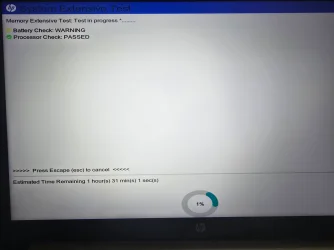
It's been a long day and at 10 hrs 30 min. it is still stuck at 1% with the hard drive light solid white.
Last night after I stopped the System Extensive Test after around 3 hours stuck at 1%, I ran the System Fast Test which completed successfully and passed all the following components:
Processor: PASSED
Hard Drive/SSD SMART Check: PASSED
Hard Drive Short DST: PASSED
Memory: PASSED
System Board: PASSED
All other components: PASSED
The SSD shows 79% remaining life with 21% wear.
Is there anything else I should do for now before trying to contact HP on Monday about a newer BIOS version than the one I have from 2018?
Method One Download cjee21's files, attached to the bottom of this post. 1. Save the file to your desktop. 2. Extract the contents to your desktop. 3. Open: Check-UEFISecureBootVariables-main 4. Right click: Check UEFI PK, KEK, DB and DBX.cmd ...and choose: Run as administrator. Your...
i have put this together as i had problems updating 2 desktops and 3 laptops. which have now all had their Secure Boot Certs updated to the new 2023 secure boot cert also the other post about this were getting very long and confusing. this is in two parts. part A and part B. edit by me. please...
www.elevenforum.com
4) When contacting HP for possible BIOS upgrade(s) also report problems with HP UEFI Hardware diagnostics (timer and indefinite run)
My Computer
At a glance
Windows 10Intel(R) Core(TM) i7-4800MQ CPU @ 2.70GHz16 GB Total: Manufacturer : Samsung MemoryTyp...NVIDIA Quadro K3100M; Intel(R) HD Graphics 4600
Thank you again for all your help! I checked and Secure Boot is already enabled on my system. Between the System Fast Test passing all components and my original issues being resolved (Memory Integrity now working, Windows fully updated), I'm confident moving forward. I really appreciate the time you took to help me troubleshoot. Happy holidays!
I appreciate the suggestion, but I've already invested significant time in diagnostics. The System Fast Test confirmed all hardware is healthy, and my original issues (Memory Integrity and Windows Update finally getting 25H2 are resolved.
If you recall, my initial reason for submitting a thread was the last security update that kept rolling back from the 23H2 that was installed.
With all due respect and gratitude, I'm going to proceed with backing up my system and close this out.
If I run into future issues on this dinosaur HP ENVY, I I'll be back.
This tutorial will show you how to enable automatic backup of the system registry to the RegBack folder when the computer restarts in Windows 10 and Windows 11. Starting with Windows 10, version 1803, Windows no longer automatically backs up the system registry to the RegBack folder when the...
www.elevenforum.com
This is a post from another thread displaying a HP UEFI Hardware diagnostic test result for comparison purposes: