Windows 11 update repeatedly fails


It's still at 18.5GB as it gets to the last of the downloads:


Yeah, that's pretty tight. As a rule of thumb, you should never have less than 20% free space.
In post #52 @gunrunnerjohn mentioned, getting a bigger drive for Windows.

I would seriously consider that.
I'm not even sure you have enough room to do an In-Place upgrade.
 

My Computers

System One System Two

  • OS
    Win 11 Home ♦♦♦26200.8457 ♦♦♦♦♦♦♦25H2
    Computer type
    PC/Desktop
    Manufacturer/Model
    Built by Ghot® [May 2020]
    CPU
    AMD Ryzen 7 3700X
    Motherboard
    Asus Pro WS X570-ACE (BIOS 5302)
    Memory
    G.Skill (F4-3200C14D-16GTZKW)
    Graphics Card(s)
    EVGA RTX 2070 (08G-P4-2171-KR)
    Sound Card
    Realtek ALC1220P / ALC S1220A
    Monitor(s) Displays
    Dell U3011 30"
    Screen Resolution
    2560 x 1600
    Hard Drives
    2x Samsung 860 EVO 500GB,
    WD 4TB Black FZBX - SATA III,
    WD 8TB Black FZBX - SATA III,
    DRW-24B1ST CD/DVD Burner
    PSU
    PC Power & Cooling 750W Quad EPS12V
    Case
    Cooler Master ATCS 840 Tower
    Cooling
    CM Hyper 212 EVO (push/pull)
    Keyboard
    Ducky DK9008 Shine II Blue LED
    Mouse
    Logitech Optical M-100
    Internet Speed
    300/300
    Browser
    Firefox (latest)
    Antivirus
    Bitdefender Total Security
    Other Info
    Speakers: Klipsch Pro Media 2.1
  • Operating System
    Windows XP Pro 32bit w/SP3
    Computer type
    PC/Desktop
    Manufacturer/Model
    Built by Ghot® (not in use)
    CPU
    AMD Athlon 64 X2 5000+ (OC'd @ 3.2Ghz)
    Motherboard
    ASUS M2N32-SLI Deluxe Wireless Edition
    Memory
    TWIN2X2048-6400C4DHX (2 x 1GB, DDR2 800)
    Graphics card(s)
    EVGA 256-P2-N758-TR GeForce 8600GT SSC
    Sound Card
    Onboard
    Monitor(s) Displays
    ViewSonic G90FB Black 19" Professional (CRT)
    Screen Resolution
    up to 2048 x 1536
    Hard Drives
    WD 36GB 10,000rpm Raptor SATA
    Seagate 80GB 7200rpm SATA
    Lite-On LTR-52246S CD/RW
    Lite-On LH-18A1P CD/DVD Burner
    PSU
    PC Power & Cooling Silencer 750 Quad EPS12V
    Case
    Generic Beige case, 80mm fans
    Cooling
    ZALMAN 9500A 92mm CPU Cooler
    Keyboard
    Logitech Classic Keybooard 200
    Mouse
    Logitech Optical M-BT96a
    Internet Speed
    300/300
    Browser
    Firefox 3.x ??
    Antivirus
    Symantec (Norton)
    Other Info
    Still assembled, still runs. Haven't turned it on for 15 years?
I have set the UUP process going again. I can see that it has got to the last big file download 3.2 GB. There is still 18GB available on the disk.

Are you saying that may not be enough?
Mathematically, it makes sense that it would be enough. Howbeit UUP could have different safe guards in place. For example, UUP could be seeing that nearly 90% of your drive is already full. At that point it may not function with a drive that small even though theoretically you would have enough room for the update to do it's thing. I have drives that will red line with 40 GB of space left on them. This is because the drives are huge capacity but they're approaching that full mark from a percentage stand point.
 

My Computer

System One

  • OS
    WIN 11, WIN 10, WIN 8.1, WIN 7 U, WIN 7 PRO, WIN 7 HOME (32 Bit), LINUX MINT
    Computer type
    PC/Desktop
    Manufacturer/Model
    DIY, ASUS, and DELL
    CPU
    Intel i7 6900K and i9-7960X / AMD 3800X (8 core)
    Motherboard
    ASUS X99E-WS USB 3.1 and ASUS X299 SAGE
    Memory
    128 GB CORSAIR DOMINATOR PLATINUM (B DIE)
    Graphics Card(s)
    NVIDIA 1070 and RTX 3070
    Sound Card
    Crystal Sound (onboard)
    Monitor(s) Displays
    single Samsung 30" 4K and 8" aux monitor
    Screen Resolution
    4K and something equally attrocious. I'll be working on this.
    Hard Drives
    A, B, C, D, E, F, G, H, I, J, K, L, M, N, O, P, Q, R, S, T, U, V, W

    Ports X, Y, and Z are reserved for USB access and removable drives.

    Drive types consist of the following: Various mechanical hard drives bearing the brand names, Seagate, Toshiba, and Western Digital. Various NVMe drives bearing the brand names Kingston, Intel, Silicon Power, Crucial, Western Digital, and Team Group. Various SATA SSDs bearing various different brand names.

    RAID arrays included:

    LSI RAID 10 (WD Velociraptors) 1115.72 GB
    LSI RAID 10 (WD SSDS) 463.80 GB

    INTEL RAID 0 (KINGSTON HYPER X) System 447.14 GB
    INTEL RAID 1 TOSHIBA ENTERPRIZE class Data 2794.52 GB
    INTEL RAID 1 SEAGATE HYBRID 931.51 GB
    PSU
    SEVERAL. I prefer my Corsair Platinum HX1000i but I also like EVGA power supplies
    Case
    ThermalTake Level 10 GT (among others)
    Cooling
    Noctua is my favorite and I use it in my main. I also own various other coolers.
    Keyboard
    all kinds.
    Mouse
    all kinds
    Internet Speed
    360 mbps - 1 gbps (depending)
    Browser
    FIREFOX
    Antivirus
    KASPERSKY (no apologies)
    Other Info
    Gave Dell touch screen with Windows 11 to daughter and got me an OTVOC. Being a PC builder I own many desktop PCs as well. I am a father of five providing PCs, laptops, and tablets for all my family, most of which I have modified, rebuilt, or simply built from scratch. I do not own a cell phone, never have, never will.
The download process is running a lot faster this time (I think there might have been an issue with my broadband fibre line at my provider end). I can let this process go and see whether I get the same result. My hard drive was definitely full last time.


Yeah a full drive will definitely mess things up.
As far as the fibre goes... it only takes me about 20 minutes to build the ISO from a UUP Dump download.
Then another 20 minutes to do the In-Place Upgrade.


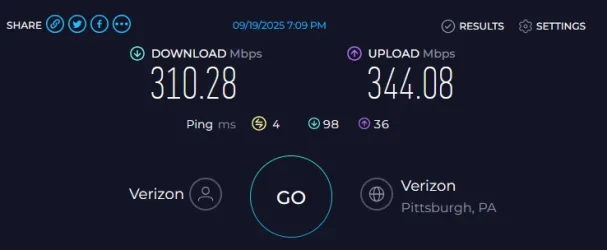
And my internet speed is only average...

Image1.webp
 

My Computers

System One System Two

  • OS
    Win 11 Home ♦♦♦26200.8457 ♦♦♦♦♦♦♦25H2
    Computer type
    PC/Desktop
    Manufacturer/Model
    Built by Ghot® [May 2020]
    CPU
    AMD Ryzen 7 3700X
    Motherboard
    Asus Pro WS X570-ACE (BIOS 5302)
    Memory
    G.Skill (F4-3200C14D-16GTZKW)
    Graphics Card(s)
    EVGA RTX 2070 (08G-P4-2171-KR)
    Sound Card
    Realtek ALC1220P / ALC S1220A
    Monitor(s) Displays
    Dell U3011 30"
    Screen Resolution
    2560 x 1600
    Hard Drives
    2x Samsung 860 EVO 500GB,
    WD 4TB Black FZBX - SATA III,
    WD 8TB Black FZBX - SATA III,
    DRW-24B1ST CD/DVD Burner
    PSU
    PC Power & Cooling 750W Quad EPS12V
    Case
    Cooler Master ATCS 840 Tower
    Cooling
    CM Hyper 212 EVO (push/pull)
    Keyboard
    Ducky DK9008 Shine II Blue LED
    Mouse
    Logitech Optical M-100
    Internet Speed
    300/300
    Browser
    Firefox (latest)
    Antivirus
    Bitdefender Total Security
    Other Info
    Speakers: Klipsch Pro Media 2.1
  • Operating System
    Windows XP Pro 32bit w/SP3
    Computer type
    PC/Desktop
    Manufacturer/Model
    Built by Ghot® (not in use)
    CPU
    AMD Athlon 64 X2 5000+ (OC'd @ 3.2Ghz)
    Motherboard
    ASUS M2N32-SLI Deluxe Wireless Edition
    Memory
    TWIN2X2048-6400C4DHX (2 x 1GB, DDR2 800)
    Graphics card(s)
    EVGA 256-P2-N758-TR GeForce 8600GT SSC
    Sound Card
    Onboard
    Monitor(s) Displays
    ViewSonic G90FB Black 19" Professional (CRT)
    Screen Resolution
    up to 2048 x 1536
    Hard Drives
    WD 36GB 10,000rpm Raptor SATA
    Seagate 80GB 7200rpm SATA
    Lite-On LTR-52246S CD/RW
    Lite-On LH-18A1P CD/DVD Burner
    PSU
    PC Power & Cooling Silencer 750 Quad EPS12V
    Case
    Generic Beige case, 80mm fans
    Cooling
    ZALMAN 9500A 92mm CPU Cooler
    Keyboard
    Logitech Classic Keybooard 200
    Mouse
    Logitech Optical M-BT96a
    Internet Speed
    300/300
    Browser
    Firefox 3.x ??
    Antivirus
    Symantec (Norton)
    Other Info
    Still assembled, still runs. Haven't turned it on for 15 years?
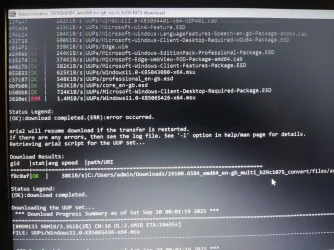
Looks like an error occured, but it seems to be downloading the file again...Error2.webp
 

My Computers

System One System Two

  • OS
    Windows 10 & 11
    Computer type
    Laptop
    Manufacturer/Model
    Dell Inspiron 15 series (5565)
    CPU
    AMD A10-9600P RADEON R5, 10 COMPUTE CORES 4C+6G 2.40
    Memory
    8.00 GB (7.46 GB usable)
    Graphics Card(s)
    AMD Radeon R5 Graphics (498 MB)
    Hard Drives
    932 GB HDD ST1000LM035-1RK172
  • Operating System
    Windows 11 Home
    Computer type
    Laptop
    Manufacturer/Model
    HP Laptop 15-bs1xx
    CPU
    Intel(R) Core(TM) i5-8250U CPU @ 1.60GHz, 1801 Mhz, 4 Core(s), 8 Logical Processor(s)
    Memory
    16GB RAM
    Hard Drives
    Samsung 120GB SSD, Toshiba 1TB HDD
Yeah a full drive will definitely mess things up.
As far as the fibre goes... it only takes me about 20 minutes to build the ISO from a UUP Dump download.
Then another 20 minutes to do the In-Place Upgrade.


And my internet speed is only average...

View attachment 145976
Hmmm... I'm out in a, let's say quieter part of Scotland, with fible only just arrived, so my maximum speed is hald your average...
 

My Computers

System One System Two

  • OS
    Windows 10 & 11
    Computer type
    Laptop
    Manufacturer/Model
    Dell Inspiron 15 series (5565)
    CPU
    AMD A10-9600P RADEON R5, 10 COMPUTE CORES 4C+6G 2.40
    Memory
    8.00 GB (7.46 GB usable)
    Graphics Card(s)
    AMD Radeon R5 Graphics (498 MB)
    Hard Drives
    932 GB HDD ST1000LM035-1RK172
  • Operating System
    Windows 11 Home
    Computer type
    Laptop
    Manufacturer/Model
    HP Laptop 15-bs1xx
    CPU
    Intel(R) Core(TM) i5-8250U CPU @ 1.60GHz, 1801 Mhz, 4 Core(s), 8 Logical Processor(s)
    Memory
    16GB RAM
    Hard Drives
    Samsung 120GB SSD, Toshiba 1TB HDD
Post #38 step:


#1 requires a TF logon


#2 there is non-logon script but #1 is needed and requires logon


#3 can run without logon
 

My Computer

System One

  • OS
    Windows 10
    Computer type
    Laptop
    Manufacturer/Model
    HP
    CPU
    Intel(R) Core(TM) i7-4800MQ CPU @ 2.70GHz
    Motherboard
    Product : 190A Version : KBC Version 94.56
    Memory
    16 GB Total: Manufacturer : Samsung MemoryType : DDR3 FormFactor : SODIMM Capacity : 8GB Speed : 1600
    Graphics Card(s)
    NVIDIA Quadro K3100M; Intel(R) HD Graphics 4600
    Sound Card
    IDT High Definition Audio CODEC; PNP Device ID HDAUDIO\FUNC_01&VEN_111D&DEV_76E0
    Hard Drives
    Model Hitachi HTS727575A9E364
    Antivirus
    Microsoft Defender
    Other Info
    Mobile Workstation
The UUP process completed successfully this time, BUT when I checked for updates, I get the same outcome and the same failed update.

It's 3am, I''ve now spent pretty much 3 days on this and I'm back where I started!
 

My Computers

System One System Two

  • OS
    Windows 10 & 11
    Computer type
    Laptop
    Manufacturer/Model
    Dell Inspiron 15 series (5565)
    CPU
    AMD A10-9600P RADEON R5, 10 COMPUTE CORES 4C+6G 2.40
    Memory
    8.00 GB (7.46 GB usable)
    Graphics Card(s)
    AMD Radeon R5 Graphics (498 MB)
    Hard Drives
    932 GB HDD ST1000LM035-1RK172
  • Operating System
    Windows 11 Home
    Computer type
    Laptop
    Manufacturer/Model
    HP Laptop 15-bs1xx
    CPU
    Intel(R) Core(TM) i5-8250U CPU @ 1.60GHz, 1801 Mhz, 4 Core(s), 8 Logical Processor(s)
    Memory
    16GB RAM
    Hard Drives
    Samsung 120GB SSD, Toshiba 1TB HDD
What difficulties are you having with the V2 or TF logon?

If there are any TF logon difficulties then our website administrator can fix or comment.
 

My Computer

System One

  • OS
    Windows 10
    Computer type
    Laptop
    Manufacturer/Model
    HP
    CPU
    Intel(R) Core(TM) i7-4800MQ CPU @ 2.70GHz
    Motherboard
    Product : 190A Version : KBC Version 94.56
    Memory
    16 GB Total: Manufacturer : Samsung MemoryType : DDR3 FormFactor : SODIMM Capacity : 8GB Speed : 1600
    Graphics Card(s)
    NVIDIA Quadro K3100M; Intel(R) HD Graphics 4600
    Sound Card
    IDT High Definition Audio CODEC; PNP Device ID HDAUDIO\FUNC_01&VEN_111D&DEV_76E0
    Hard Drives
    Model Hitachi HTS727575A9E364
    Antivirus
    Microsoft Defender
    Other Info
    Mobile Workstation
Please run > post share links using drop box or google drive


1) upgrade_failure_info


2) tuneup_plus


3) V2 log collector

Hi zbook,

Thanks for your help.

As you can see from my last post I have reached a brick wall with trying to get the most recent window update to work with any method.

I have tried to follow your instructions for the various error diagnosis tools. I will post the results here and also, as requested, to my newly set up WindowsTen Forum account

1. upgrade_failure_info - in the folder link below

2. tuneup_plus - in the folder link below and below text

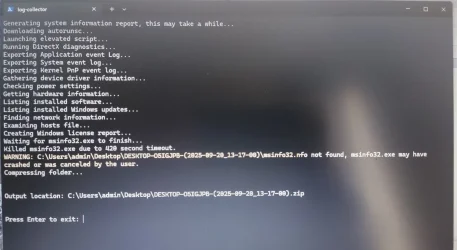
3.V2 Log Collector results - seems to have failed at the msinfo report (see image below), so I moved on to the DM Log Collector. Both hung for a very long time (30 minutes or more) at the "generating msinfo report stage". Both outputs are in the shared folder.
LC-Error.webp

Folder link: Comp_update_issues - Google Drive

------------
Results of tuneup_plus:
Microsoft Windows 11 Home Version 24H2 (OS Build 26100.6584)

==================================================================

Started on 20/09/2025 at 11:57:00.10

[SFC /ScanNow]

Beginning system scan. This process will take some time.

Results:

Windows Resource Protection did not find any integrity violations.

==================================================================

Started on 20/09/2025 at 12:00:00.73

[DISM /online /cleanup-image /ScanHealth]

Deployment Image Servicing and Management tool
Version: 10.0.26100.5074

Image Version: 10.0.26100.6584

No component store corruption detected.

The operation completed successfully.

==================================================================

Started on 20/09/2025 at 12:02:33.33

[DISM /online /cleanup-image /RestoreHealth]

Deployment Image Servicing and Management tool
Version: 10.0.26100.5074

Image Version: 10.0.26100.6584

The restore operation completed successfully.

The operation completed successfully.

==================================================================

The second "SFC /ScanNow" was skipped, as the first output the following:

Windows Resource Protection did not find any integrity violations.

==================================================================

Started on 20/09/2025 at 12:05:05.57

[ChkDsk /Scan]

The type of the file system is NTFS.

Stage 1: Examining basic file system structure ...
1784832 file records processed.
File verification completed.
Phase duration (File record verification): 21.01 seconds.
41397 large file records processed.
Phase duration (Orphan file record recovery): 21.16 milliseconds.
0 bad file records processed.
Phase duration (Bad file record checking): 0.05 milliseconds.

Stage 2: Examining file name linkage ...
71244 reparse records processed.
1995164 index entries processed.
Index verification completed.
Phase duration (Index verification): 21.85 seconds.
0 unindexed files scanned.
Phase duration (Orphan reconnection): 3.42 seconds.
0 unindexed files recovered to lost and found.
Phase duration (Orphan recovery to lost and found): 0.10 milliseconds.
71244 reparse records processed.
Phase duration (Reparse point and Object ID verification): 185.32 milliseconds.

Stage 3: Examining security descriptors ...
Security descriptor verification completed.
Phase duration (Security descriptor verification): 165.94 milliseconds.
105167 data files processed.
Phase duration (Data attribute verification): 0.06 milliseconds.
CHKDSK is verifying Usn Journal...
36578136 USN bytes processed.
Usn Journal verification completed.
Phase duration (USN journal verification): 287.39 milliseconds.

Windows has scanned the file system and found no problems.

No further action is required.

124158975 KB total disk space.
86987848 KB in 410492 files.
325540 KB in 105168 indexes.
0 KB in bad sectors.
1925603 KB in use by the system.
65536 KB occupied by the log file.
34919984 KB available on disk.

4096 bytes in each allocation unit.
31039743 total allocation units on disk.
8729996 allocation units available on disk.
Total duration: 46.95 seconds (46958 ms).

==================================================================

Started on 20/09/2025 at 12:06:02.89

AutoReboot

TRUE

==================================================================

[Set AutoReboot = False]

Updating property(s) of '\\DESKTOP-O5IGJPB\ROOT\CIMV2:Win32_OSRecoveryConfiguration.Name="Microsoft Windows 11 Home|C:\\WINDOWS|\\Device\\Harddisk1\\Partition3"'
Property(s) update successful.
==================================================================

AutoReboot

FALSE

==================================================================

DebugInfoType

3

==================================================================

[Set DebugInfoType = 7]

Updating property(s) of '\\DESKTOP-O5IGJPB\ROOT\CIMV2:Win32_OSRecoveryConfiguration.Name="Microsoft Windows 11 Home|C:\\WINDOWS|\\Device\\Harddisk1\\Partition3"'
Property(s) update successful.
==================================================================

DebugInfoType

7

==================================================================

[WMIC PageFile list]

AllocatedBaseSize=1024
CurrentUsage=22
Description=C:\pagefile.sys
InstallDate=20250919161503.851756+060
Name=C:\pagefile.sys
PeakUsage=22
Status=
TempPageFile=FALSE

==================================================================

AutomaticManagedPagefile

TRUE

==================================================================

[Set AutomaticManagedPagefile = True]

Updating property(s) of '\\DESKTOP-O5IGJPB\ROOT\CIMV2:Win32_ComputerSystem.Name="DESKTOP-O5IGJPB"'
Property(s) update successful.
==================================================================

AutomaticManagedPagefile

TRUE

==================================================================

[BcdEdit /enum {badmemory}]

RAM Defects
-----------
identifier {badmemory}

==================================================================

Finished on 20/09/2025 at 12:06:05.12
It took 9 minutes and 5 seconds to complete the operations.
-------------------------

 

My Computers

System One System Two

  • OS
    Windows 10 & 11
    Computer type
    Laptop
    Manufacturer/Model
    Dell Inspiron 15 series (5565)
    CPU
    AMD A10-9600P RADEON R5, 10 COMPUTE CORES 4C+6G 2.40
    Memory
    8.00 GB (7.46 GB usable)
    Graphics Card(s)
    AMD Radeon R5 Graphics (498 MB)
    Hard Drives
    932 GB HDD ST1000LM035-1RK172
  • Operating System
    Windows 11 Home
    Computer type
    Laptop
    Manufacturer/Model
    HP Laptop 15-bs1xx
    CPU
    Intel(R) Core(TM) i5-8250U CPU @ 1.60GHz, 1801 Mhz, 4 Core(s), 8 Logical Processor(s)
    Memory
    16GB RAM
    Hard Drives
    Samsung 120GB SSD, Toshiba 1TB HDD
Hi again zbook,

I think I misunderstood when I followed your links and had to register in the WindowsTen forum. I will not be posting this info there.

Just to clarify; my computer appears to be working fine (despite the many in-place upgrade install attempts) - it just seems to be that I now cannot update Windows 11!
 

My Computers

System One System Two

  • OS
    Windows 10 & 11
    Computer type
    Laptop
    Manufacturer/Model
    Dell Inspiron 15 series (5565)
    CPU
    AMD A10-9600P RADEON R5, 10 COMPUTE CORES 4C+6G 2.40
    Memory
    8.00 GB (7.46 GB usable)
    Graphics Card(s)
    AMD Radeon R5 Graphics (498 MB)
    Hard Drives
    932 GB HDD ST1000LM035-1RK172
  • Operating System
    Windows 11 Home
    Computer type
    Laptop
    Manufacturer/Model
    HP Laptop 15-bs1xx
    CPU
    Intel(R) Core(TM) i5-8250U CPU @ 1.60GHz, 1801 Mhz, 4 Core(s), 8 Logical Processor(s)
    Memory
    16GB RAM
    Hard Drives
    Samsung 120GB SSD, Toshiba 1TB HDD
Just to clarify; my computer appears to be working fine (despite the many in-place upgrade install attempts) - it just seems to be that I now cannot update Windows 11!
Just me, but unless you absolutely require the latest update now I think I would leave will enough alone for the time being and see if a future upcoming WU will install and get you pass the update error hump.
 

My Computers

System One System Two

  • OS
    Windows 11 25H2
    Computer type
    Laptop
    Manufacturer/Model
    Alienware 18 Area-51
    CPU
    Intel Core Ultra 9 275HX (24-Core)
    Motherboard
    Alienware
    Memory
    64GB DDR5 6400MT/s
    Graphics Card(s)
    NVIDIA GeForce RTX 5080 and Intel UHD Graphics
    Sound Card
    Onboard, Realtek high-performance Audio chips (ALC3329 & ALC1708))
    Monitor(s) Displays
    300HZ 18-inch QHD 500 nit Comfort View+
    Screen Resolution
    2560 x 1600
    Hard Drives
    2TB NVMe M.2 PCIe Gen 5 SSD
    Case
    Magnesium Alloy
    Cooling
    Advanced Cryo-Tech Quad-Fan Cooling system & large vapor chamber
    Keyboard
    Cherry MX ultra low profile mechanical keyboard with per key AlienFX RGB lighting
    Mouse
    Logitech MX Master 4
    Browser
    Vivaldi (main), Firefox, Chrome, Edge
    Antivirus
    MS Defender and Malwarebytes Free
  • Operating System
    Windows 11 25H2
    Computer type
    Laptop
    Manufacturer/Model
    Microsoft Surface Laptop 7
    CPU
    Qualcomm Snapdragon X Elite (12 Core) ARM based CPU
    Motherboard
    Microsoft Corp.
    Memory
    16GB LPDDR5
    Graphics card(s)
    Qualcomm Adreno X1-85
    Sound Card
    Omnisonic speakers with Dolby Atmos spatial sound
    Monitor(s) Displays
    120 Hz 13.8-inch 600 nit PixelSense Flow touchscreen
    Screen Resolution
    2304x1536
    Hard Drives
    1TB NVMe Gen 4 SSD
    Case
    Anodized Aluminum
    Cooling
    Traditional active cooling fan system
    Keyboard
    Mechanical QWERTY, backlit when in use
    Mouse
    Logitech MX Master 4 and Surface Arc Mouse
    Browser
    Vivaldi (main), Firefox, Chrome, Edge
    Antivirus
    MS Defender and Malwarebytes Free
Just me, but unless you absolutely require the latest update now I think I would leave will enough alone for the time being and see if a future upcoming WU will install and get you pass the update error hump.
Yeah... I've got to that conclusion too...

I'd really like to hear what zbook gleans from all the logging tool outputs, now that I have invested soooo much time!
 

My Computers

System One System Two

  • OS
    Windows 10 & 11
    Computer type
    Laptop
    Manufacturer/Model
    Dell Inspiron 15 series (5565)
    CPU
    AMD A10-9600P RADEON R5, 10 COMPUTE CORES 4C+6G 2.40
    Memory
    8.00 GB (7.46 GB usable)
    Graphics Card(s)
    AMD Radeon R5 Graphics (498 MB)
    Hard Drives
    932 GB HDD ST1000LM035-1RK172
  • Operating System
    Windows 11 Home
    Computer type
    Laptop
    Manufacturer/Model
    HP Laptop 15-bs1xx
    CPU
    Intel(R) Core(TM) i5-8250U CPU @ 1.60GHz, 1801 Mhz, 4 Core(s), 8 Logical Processor(s)
    Memory
    16GB RAM
    Hard Drives
    Samsung 120GB SSD, Toshiba 1TB HDD
I'm having an issue with a clients computer, Sept Cumulative update KB 5065426 Error 0x800F081f.

Did the Windows update reset script that Shawn put together.

As this is the home edition I can only pause updates 7 days.

Have not tried the repair install process, what ever goes wrong with this update the network connect speed drops from 433Mbps to 87 Mbps. Right after the Update reset script it jumps back to 433.
 

My Computer

System One

  • OS
    Windows 11 Pro x64 Version V23H2
    Computer type
    PC/Desktop
    Manufacturer/Model
    Custom
    CPU
    i7-8700K
    Motherboard
    Asus Maximus X Code - Z370
    Memory
    G.Skill Trident Z 3200MHz F4-3200C16D-16GTZ (2) 32GB
    Graphics Card(s)
    Intel UHD Graphics 630
    Sound Card
    Integrated ROG SupremeFX
    Monitor(s) Displays
    Asus VP279 27", Samsung BX2431 24"
    Screen Resolution
    1920 x 1080
    Hard Drives
    Samsung M.2 NVMe 960 EVO 500GB Boot,
    Samsung 840 EVO 250GB (System Copy Drive),
    Samsung 860 EVO 1TB (Primary Data Drive),
    WD Black 500GB (Data Copy Drive)
    ICY Dock 5.25 2.5/3.5 Bays MB971SP-B
    PSU
    Corsair RM 650i +Gold
    Case
    Phanteks Enthroo Primo
    Cooling
    Corsair Hydro H150i, 360mm Rad & Five Corsair 140mm Pro ML Case Fans
    Keyboard
    das Keyboard MX Brown Mechanical Switches Model DASKMKPROSIL-3G7-r1.0
    Mouse
    Logitech MX Master 3 Wireless & Bluetooth
    Internet Speed
    500Mb +
    Browser
    Chrome (Pri), Firefox (Sec)
    Antivirus
    Malwarebytes Premium, SuperAntiSpyware Pro (Licensed)
    Other Info
    Microsoft LifeCam HD,
    APC Back-UPS Pro 1500,
    Macrium (Licensed),
    Microsoft 365,
    Wise Disk Cleaner,
    Crystal Disk Info,
    Screenpresso (Licensed),
    AnyDesk (Licensed),
I'm having an issue with a clients computer, Sept Cumulative update KB 5065426 Error 0x800F081f.

Did the Windows update reset script that Shawn put together.

As this is the home edition I can only pause updates 7 days.

Have not tried the repair install process, what ever goes wrong with this update the network connect speed drops from 433Mbps to 87 Mbps. Right after the Update reset script it jumps back to 433.
I just experienced this exact error yesterday. Mine was corrected by running DISM to repair the component store and then SFC to repair the running image. After that the update went smoothly. That error code specifically states that the component store is corrupted.
 

My Computers

System One System Two

  • OS
    Win 11 Pro 25H2, Build 26200.8524
    Computer type
    PC/Desktop
    Manufacturer/Model
    Home Brew
    CPU
    Intel Core i5 14500
    Motherboard
    Gigabyte B760M G P WIFI
    Memory
    64GB DDR4
    Graphics Card(s)
    GeForce RTX 4060
    Sound Card
    Chipset Realtek
    Monitor(s) Displays
    LG 45" Ultragear, Acer 24" 1080p
    Screen Resolution
    5120x1440, 1920x1080
    Hard Drives
    Crucial P310 2TB 2280 PCIe Gen4 3D NAND NVMe M.2 SSD (O/S)
    Silicon Power 2TB US75 NVMe PCIe Gen4 M.2 2280 SSD (backup)
    Crucial BX500 2TB 3D NAND (2nd backup)
    Seagate 4TB Ironwolf, rotating HDD archive files
    External off-line backup Drives: 2 NVMe 4TB drives in external enclosures
    PSU
    Thermaltake Toughpower GF3 750W
    Case
    LIAN LI LANCOOL 216 E-ATX PC Case
    Cooling
    Lots of fans!
    Keyboard
    Microsoft Comfort Curve 2000
    Mouse
    Logitech G305
    Internet Speed
    Verizon FiOS 1GB
    Browser
    Firefox
    Antivirus
    Malware Bytes & Windows Defender Security
  • Operating System
    Win 11 Pro 25H2, Build 26200.8524
    Computer type
    PC/Desktop
    Manufacturer/Model
    Home Brew
    CPU
    Intel Core i5 14400
    Motherboard
    Gigabyte B760M DS3H AX
    Memory
    32GB DDR5
    Graphics card(s)
    Intel 700 Embedded GPU
    Sound Card
    Realtek Embedded
    Monitor(s) Displays
    27" HP 1080p
    Screen Resolution
    1920x1080
    Hard Drives
    Crucial P310 2TB 2280 PCIe Gen4 eD NAND PCIe SSD
    Samsung EVO 990 2TB NVMe Gen4 SSD
    Samsung 2TB SATA SSD
    PSU
    Thermaltake Smart BM3 650W
    Case
    Okinos Micro ATX Case
    Cooling
    Fans
    Keyboard
    Microsoft Comfort Curve 2000
    Mouse
    Logitech G305
    Internet Speed
    Verizon FiOS 1GB
    Browser
    Firefox
    Antivirus
    Malware Bytes & Windows Defender Security
Thanks. Running the dism restore health option.
 

My Computer

System One

  • OS
    Windows 11 Pro x64 Version V23H2
    Computer type
    PC/Desktop
    Manufacturer/Model
    Custom
    CPU
    i7-8700K
    Motherboard
    Asus Maximus X Code - Z370
    Memory
    G.Skill Trident Z 3200MHz F4-3200C16D-16GTZ (2) 32GB
    Graphics Card(s)
    Intel UHD Graphics 630
    Sound Card
    Integrated ROG SupremeFX
    Monitor(s) Displays
    Asus VP279 27", Samsung BX2431 24"
    Screen Resolution
    1920 x 1080
    Hard Drives
    Samsung M.2 NVMe 960 EVO 500GB Boot,
    Samsung 840 EVO 250GB (System Copy Drive),
    Samsung 860 EVO 1TB (Primary Data Drive),
    WD Black 500GB (Data Copy Drive)
    ICY Dock 5.25 2.5/3.5 Bays MB971SP-B
    PSU
    Corsair RM 650i +Gold
    Case
    Phanteks Enthroo Primo
    Cooling
    Corsair Hydro H150i, 360mm Rad & Five Corsair 140mm Pro ML Case Fans
    Keyboard
    das Keyboard MX Brown Mechanical Switches Model DASKMKPROSIL-3G7-r1.0
    Mouse
    Logitech MX Master 3 Wireless & Bluetooth
    Internet Speed
    500Mb +
    Browser
    Chrome (Pri), Firefox (Sec)
    Antivirus
    Malwarebytes Premium, SuperAntiSpyware Pro (Licensed)
    Other Info
    Microsoft LifeCam HD,
    APC Back-UPS Pro 1500,
    Macrium (Licensed),
    Microsoft 365,
    Wise Disk Cleaner,
    Crystal Disk Info,
    Screenpresso (Licensed),
    AnyDesk (Licensed),

My Computers

System One System Two

  • OS
    Win 11 Pro 25H2, Build 26200.8524
    Computer type
    PC/Desktop
    Manufacturer/Model
    Home Brew
    CPU
    Intel Core i5 14500
    Motherboard
    Gigabyte B760M G P WIFI
    Memory
    64GB DDR4
    Graphics Card(s)
    GeForce RTX 4060
    Sound Card
    Chipset Realtek
    Monitor(s) Displays
    LG 45" Ultragear, Acer 24" 1080p
    Screen Resolution
    5120x1440, 1920x1080
    Hard Drives
    Crucial P310 2TB 2280 PCIe Gen4 3D NAND NVMe M.2 SSD (O/S)
    Silicon Power 2TB US75 NVMe PCIe Gen4 M.2 2280 SSD (backup)
    Crucial BX500 2TB 3D NAND (2nd backup)
    Seagate 4TB Ironwolf, rotating HDD archive files
    External off-line backup Drives: 2 NVMe 4TB drives in external enclosures
    PSU
    Thermaltake Toughpower GF3 750W
    Case
    LIAN LI LANCOOL 216 E-ATX PC Case
    Cooling
    Lots of fans!
    Keyboard
    Microsoft Comfort Curve 2000
    Mouse
    Logitech G305
    Internet Speed
    Verizon FiOS 1GB
    Browser
    Firefox
    Antivirus
    Malware Bytes & Windows Defender Security
  • Operating System
    Win 11 Pro 25H2, Build 26200.8524
    Computer type
    PC/Desktop
    Manufacturer/Model
    Home Brew
    CPU
    Intel Core i5 14400
    Motherboard
    Gigabyte B760M DS3H AX
    Memory
    32GB DDR5
    Graphics card(s)
    Intel 700 Embedded GPU
    Sound Card
    Realtek Embedded
    Monitor(s) Displays
    27" HP 1080p
    Screen Resolution
    1920x1080
    Hard Drives
    Crucial P310 2TB 2280 PCIe Gen4 eD NAND PCIe SSD
    Samsung EVO 990 2TB NVMe Gen4 SSD
    Samsung 2TB SATA SSD
    PSU
    Thermaltake Smart BM3 650W
    Case
    Okinos Micro ATX Case
    Cooling
    Fans
    Keyboard
    Microsoft Comfort Curve 2000
    Mouse
    Logitech G305
    Internet Speed
    Verizon FiOS 1GB
    Browser
    Firefox
    Antivirus
    Malware Bytes & Windows Defender Security
I just experienced this exact error yesterday. Mine was corrected by running DISM to repair the component store and then SFC to repair the running image. After that the update went smoothly. That error code specifically states that the component store is corrupted.
The DISM restore health option definitely didn't fix it for me...

I seem to remember that immediately after the process had completed, Windows Update was showing as up-to-date, but if I then initiated a check for updates it began downloading and installing the KB 5065426 again ...which failed ...again.
 

My Computers

System One System Two

  • OS
    Windows 10 & 11
    Computer type
    Laptop
    Manufacturer/Model
    Dell Inspiron 15 series (5565)
    CPU
    AMD A10-9600P RADEON R5, 10 COMPUTE CORES 4C+6G 2.40
    Memory
    8.00 GB (7.46 GB usable)
    Graphics Card(s)
    AMD Radeon R5 Graphics (498 MB)
    Hard Drives
    932 GB HDD ST1000LM035-1RK172
  • Operating System
    Windows 11 Home
    Computer type
    Laptop
    Manufacturer/Model
    HP Laptop 15-bs1xx
    CPU
    Intel(R) Core(TM) i5-8250U CPU @ 1.60GHz, 1801 Mhz, 4 Core(s), 8 Logical Processor(s)
    Memory
    16GB RAM
    Hard Drives
    Samsung 120GB SSD, Toshiba 1TB HDD
Did you check if the restore when properly with a ScanHealth run? Did you reboot after the DISM and SFC runs?
 

My Computers

System One System Two

  • OS
    Win 11 Pro 25H2, Build 26200.8524
    Computer type
    PC/Desktop
    Manufacturer/Model
    Home Brew
    CPU
    Intel Core i5 14500
    Motherboard
    Gigabyte B760M G P WIFI
    Memory
    64GB DDR4
    Graphics Card(s)
    GeForce RTX 4060
    Sound Card
    Chipset Realtek
    Monitor(s) Displays
    LG 45" Ultragear, Acer 24" 1080p
    Screen Resolution
    5120x1440, 1920x1080
    Hard Drives
    Crucial P310 2TB 2280 PCIe Gen4 3D NAND NVMe M.2 SSD (O/S)
    Silicon Power 2TB US75 NVMe PCIe Gen4 M.2 2280 SSD (backup)
    Crucial BX500 2TB 3D NAND (2nd backup)
    Seagate 4TB Ironwolf, rotating HDD archive files
    External off-line backup Drives: 2 NVMe 4TB drives in external enclosures
    PSU
    Thermaltake Toughpower GF3 750W
    Case
    LIAN LI LANCOOL 216 E-ATX PC Case
    Cooling
    Lots of fans!
    Keyboard
    Microsoft Comfort Curve 2000
    Mouse
    Logitech G305
    Internet Speed
    Verizon FiOS 1GB
    Browser
    Firefox
    Antivirus
    Malware Bytes & Windows Defender Security
  • Operating System
    Win 11 Pro 25H2, Build 26200.8524
    Computer type
    PC/Desktop
    Manufacturer/Model
    Home Brew
    CPU
    Intel Core i5 14400
    Motherboard
    Gigabyte B760M DS3H AX
    Memory
    32GB DDR5
    Graphics card(s)
    Intel 700 Embedded GPU
    Sound Card
    Realtek Embedded
    Monitor(s) Displays
    27" HP 1080p
    Screen Resolution
    1920x1080
    Hard Drives
    Crucial P310 2TB 2280 PCIe Gen4 eD NAND PCIe SSD
    Samsung EVO 990 2TB NVMe Gen4 SSD
    Samsung 2TB SATA SSD
    PSU
    Thermaltake Smart BM3 650W
    Case
    Okinos Micro ATX Case
    Cooling
    Fans
    Keyboard
    Microsoft Comfort Curve 2000
    Mouse
    Logitech G305
    Internet Speed
    Verizon FiOS 1GB
    Browser
    Firefox
    Antivirus
    Malware Bytes & Windows Defender Security
Did you check if the restore when properly with a ScanHealth run? Did you reboot after the DISM and SFC runs?
Just ran ScanHealth and CheckHealth again. I get "No component store corruption detected", but still getting "Updates failed", though...

Install error - 0x800f081f
 

My Computers

System One System Two

  • OS
    Windows 10 & 11
    Computer type
    Laptop
    Manufacturer/Model
    Dell Inspiron 15 series (5565)
    CPU
    AMD A10-9600P RADEON R5, 10 COMPUTE CORES 4C+6G 2.40
    Memory
    8.00 GB (7.46 GB usable)
    Graphics Card(s)
    AMD Radeon R5 Graphics (498 MB)
    Hard Drives
    932 GB HDD ST1000LM035-1RK172
  • Operating System
    Windows 11 Home
    Computer type
    Laptop
    Manufacturer/Model
    HP Laptop 15-bs1xx
    CPU
    Intel(R) Core(TM) i5-8250U CPU @ 1.60GHz, 1801 Mhz, 4 Core(s), 8 Logical Processor(s)
    Memory
    16GB RAM
    Hard Drives
    Samsung 120GB SSD, Toshiba 1TB HDD
The other way to get around this is an in-place upgrade. I had to resort that to bypass a different update error a couple months ago.
 

My Computers

System One System Two

  • OS
    Win 11 Pro 25H2, Build 26200.8524
    Computer type
    PC/Desktop
    Manufacturer/Model
    Home Brew
    CPU
    Intel Core i5 14500
    Motherboard
    Gigabyte B760M G P WIFI
    Memory
    64GB DDR4
    Graphics Card(s)
    GeForce RTX 4060
    Sound Card
    Chipset Realtek
    Monitor(s) Displays
    LG 45" Ultragear, Acer 24" 1080p
    Screen Resolution
    5120x1440, 1920x1080
    Hard Drives
    Crucial P310 2TB 2280 PCIe Gen4 3D NAND NVMe M.2 SSD (O/S)
    Silicon Power 2TB US75 NVMe PCIe Gen4 M.2 2280 SSD (backup)
    Crucial BX500 2TB 3D NAND (2nd backup)
    Seagate 4TB Ironwolf, rotating HDD archive files
    External off-line backup Drives: 2 NVMe 4TB drives in external enclosures
    PSU
    Thermaltake Toughpower GF3 750W
    Case
    LIAN LI LANCOOL 216 E-ATX PC Case
    Cooling
    Lots of fans!
    Keyboard
    Microsoft Comfort Curve 2000
    Mouse
    Logitech G305
    Internet Speed
    Verizon FiOS 1GB
    Browser
    Firefox
    Antivirus
    Malware Bytes & Windows Defender Security
  • Operating System
    Win 11 Pro 25H2, Build 26200.8524
    Computer type
    PC/Desktop
    Manufacturer/Model
    Home Brew
    CPU
    Intel Core i5 14400
    Motherboard
    Gigabyte B760M DS3H AX
    Memory
    32GB DDR5
    Graphics card(s)
    Intel 700 Embedded GPU
    Sound Card
    Realtek Embedded
    Monitor(s) Displays
    27" HP 1080p
    Screen Resolution
    1920x1080
    Hard Drives
    Crucial P310 2TB 2280 PCIe Gen4 eD NAND PCIe SSD
    Samsung EVO 990 2TB NVMe Gen4 SSD
    Samsung 2TB SATA SSD
    PSU
    Thermaltake Smart BM3 650W
    Case
    Okinos Micro ATX Case
    Cooling
    Fans
    Keyboard
    Microsoft Comfort Curve 2000
    Mouse
    Logitech G305
    Internet Speed
    Verizon FiOS 1GB
    Browser
    Firefox
    Antivirus
    Malware Bytes & Windows Defender Security
Back
Top Bottom