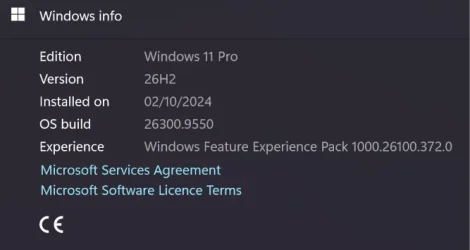
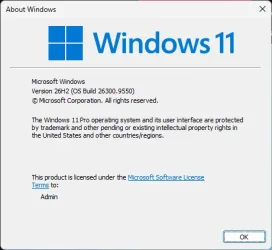
Windows 11 version 26H2 build 26300.9550 now generally available


 Windows IT Pro Blog:

Windows 11, version 26H2 is now generally available, delivering the next annual feature update for Windows 11. Built on the same servicing foundation as Windows 11, versions 25H2 or 24H2, version 26H2 continues Microsoft focus on providing a predictable, low-disruption update experience for organizations while delivering the latest Windows innovations, security improvements, and management enhancements.

Windows 11, version 26H2 is delivered as an enablement package for eligible devices running Windows 11, versions 25H2 or 24H2. This means you can move to the latest release with minimal deployment overhead and a streamlined installation experience.


What is Windows 11, version 26H2?​

Windows 11, version 26H2 is the latest annual feature update for Windows 11 and continues Microsoft annual release cadence for commercial customers.

Like version 25H2, version 26H2 shares the same servicing branch and underlying code base as previous releases. New features and capabilities have been delivered to supported devices through monthly cumulative updates, with some functionality remaining dormant until activated by the version 26H2 enablement package. This approach reduces disruption while simplifying validation and deployment planning.

Why an enablement package?​

Traditional Windows feature updates often required a full operating system upgrade. For eligible devices running Windows 11, versions 25H2 or 24H2, version 26H2 is activated through a lightweight enablement package.

An enablement package:
  • Activates features already present on the device.
  • Installs similarly to a monthly quality update.
  • Requires a small download.
  • Typically results in faster installation times.
  • Allows your organization to use existing servicing and deployment processes.
Because versions 26H2, 25H2, and 24H2 share a common servicing branch, many organizations might find that validating version 26H2 requires less effort than a traditional feature update.

KB5121794 Enablement Package for 64-bit Windows 11 26H2​
Windows11.0-KB5121794-x64.msu (174 KB)​


OR​

KB5121794 Enablement Package for ARM64 Windows 11 26H2​
Windows11.0-KB5121794-arm64.msu (174 KB)​


What's new in Windows 11, version 26H2​

Windows 11, version 26H2 bundles features and enhancements gradually rolled out over the last year to versions 25H2 and 24H2 in the areas of security, management, accessibility, and productivity.

Security improvements​

Windows continues to build on Microsoft commitment to security by default and security by design.
  • Administrator protection provides just-in-time administrative privileges and profile separation to help harden Windows against elevation-of-privilege attacks. You can enable it through Microsoft Intune or Group Policy.

  • Built-in Sysmon functionality in Windows enables you to capture system events that security tools can use for threat detection. Sysmon is off by default. You can configure it to capture the events your organization needs.
  • Smart App Control can now be turned on or off without requiring a clean installation of Windows, making it easier to block untrusted or potentially harmful apps.

  • Windows Hello Enhanced Sign-in Security expands support to compatible peripheral fingerprint sensors. As such, enhanced biometric sign-in protection is available on more Windows 11 PCs.

  • Post-quantum cryptography improvements include API support for NIST-standardized ML-KEM and ML-DSA algorithms. They include support for key exchange, signing, and decryption through CNG and .NET.
  • Driver security enhancements change how the Windows kernel trusts third-party drivers. They remove default trust for cross-signed drivers while maintaining support for WHCP and designated trusted legacy drivers.

Management and deployment enhancements​

Windows 11, version 26H2 introduces improvements designed to help IT administrators deploy, manage, and secure devices at scale.
  • Windows Autopilot device preparation supports device association. It helps organizations identify trusted devices before enrollment and enabling device-targeted policies, automatic corporate device enrollment, and additional OOBE customization.
  • Windows settings backup and restore expands first sign-in restore to Microsoft Entra hybrid joined devices, Cloud PCs, and multi-user environments. Use it to restore user settings and Microsoft Store apps during device refreshes, upgrades, and migrations.
  • Point-in-time restore for Windows provides another recovery option. Roll back a PC, including apps, settings, and personal files, to a recent automatic restore point.

  • Policy-based app removal gives organizations more flexibility to remove preinstalled Microsoft apps on Enterprise and Education devices. Just specify additional MSIX and APPX packages through Group Policy.
  • RSAT on Arm64 enables IT administrators to use tools including Server Manager, Group Policy Management Tools, DNS Server Tools, DHCP Server Tools, and Active Directory management tools on Windows 11 Arm64 devices.
  • App update orchestration allows participating applications to coordinate updates with Windows Update for improved scheduling and a more streamlined update experience

User experience and accessibility enhancements​

Windows 11, version 26H2 continues to improve everyday productivity with enhancements across Windows experiences.
  • File Explorer adds productivity enhancements including AI actions for working with supported images and summarizing OneDrive and SharePoint documents. Also included are quick actions for work and school accounts, support for additional archive formats, and performance improvements.

  • Windows Search makes results easier to find and understand with previews. It better handles typos and partial app names, identifies result types clearer, and automatically indexes frequently used folders.
  • Start and taskbar enhancements provide additional ways to customize the Windows workspace. Begin with new Start menu views and sizing options, additional taskbar positions, and a smaller taskbar option.
  • Task Manager provides greater visibility into NPU usage, including NPU utilization and memory information. You can also identify applications running in an AppContainer.

  • Magnifier adds clearer screen reader announcements, more precise zoom controls, and screen tint options to improve readability.

  • Narrator adds Braille Viewer, improves reading and navigation in Microsoft Word, and provides more control over how information about on-screen controls is announced.

  • Voice access adds natural language commanding on supported Copilot+ PCs, additional language support, and Voice Isolation to help improve recognition in environments with other speakers or background noise.

Now enabled by default​

Some features that were behind temporary commercial control in Windows 11, version 25H2 are now enabled by default in version 26H2. These include:
  • Windows settings backup, which helps preserve supported Windows settings and Microsoft Store app lists for recovery and device replacement scenarios. Existing administrator-configured policies are still honored.
  • App-specific taskbar actions that help users access common actions directly from taskbar experiences.
  • File Explorer improvements focused on improving navigation and usability within File Explorer.
Some of these features have eligibility requirements. Please see related technical documentation for more details.

For a closer look at new features and enhancements added to Windows 11 since version 25H2, please see What's new in Windows 11, version 26H2.

Servicing and support lifecycle​

Windows 11, version 26H2 continues Microsoft annual Windows feature update cadence. Installing Windows 11, version 26H2 resets the support lifecycle for supported editions, as noted here:

Edition​
Support duration​
Home24 months
Pro24 months
Enterprise36 months
Education36 months

Deployment considerations​

For devices currently running Windows 11, version 25H2 or version 24H2, you can use existing deployment frameworks and update rings to validate and deploy version 26H2.

As with any release, we recommend that you:
  • Validate version 26H2 in pilot environments.
  • Test business-critical applications, representative hardware, and workflows.
  • Expand deployment through existing update rings.
  • Monitor deployment health and known issues.
It is also a good time to review security and compliance requirements and educate support personnel on any new functionality.

Because this release uses servicing technology like that used for monthly cumulative updates, many organizations should experience a streamlined deployment process.

Tools and resources​

Deployment, security, and management tools have been refreshed for this update. These include:
We've also updated key references and documentation:
Monthly release notes for Windows 11, version 26H2 will be added to the update history page beginning with the first monthly security update for version 26H2, slated for October 13, 2026.

And, if you're looking for an easy way to keep up on what's new in the world of Windows management, tune in to my new podcast, Ctrl + Manage. The first episode debuts this Thursday, October 1, here on the Tech Community. Click here to save the date and tune in live.

Start planning for Windows 11, version 26H2​

Windows 11, version 26H2 is designed to make moving to the latest version of Windows familiar and straightforward. If you're managing eligible devices on Windows 11, version 25H2 or 24H2, start by validating the update with a targeted set of devices, applications, and workflows. Then expand your deployment using the tools and processes you already have in place.

As always, we want to hear from you. Drop a comment below and let us know what's working, what questions you have, and what we can do to make managing Windows easier for your organization.


 Source:

See also:


Check Windows Updates


UUP Dump:

64-bit ISO download:

ARM64 ISO download:


Attachments

Last edited:
Wow - OK. I stand corrected. And yes - I also do not understand what a feature update means anymore either.

Question: Would a new 26H2 ISO contain the full feature set right out of the box? Or is that still going to have stuff seeded to it for months and months?

S
The bits and bytes would be on the ISO and get installed, but that doesn’t guarantee a given feature will be enabled.
 

My Computer My Computer

At a glance

Windows 11 Enterprise 25H2
OS
Windows 11 Enterprise 25H2
The bits and bytes would be on the ISO and get installed, but that doesn’t guarantee a given feature will be enabled.

Well - that confirms what I said earlier.

Now that 26H2 is in actual production release to the masses - I do not believe that "Patch Tuesday" on say - December 8, 2026 - is still going to be "sending" new 26H2 features to everyone out there - regardless of whether we are on 24H2, 25H2 or now 26H2.

These "features" were "sent" long ago (in any/all Patch Tuesdays in the past back to when 25H2 debuted) - and are already present ON all our machines - it is only down to MS "allowing" those features to burst out of a dormant state that determines "when" they actually show up in the UI.

I had always thought these "enablement packages" were designed to do that - but it appears that is not the case and thus makes no sense to worry about this right now.

S
 

My Computer My Computer

At a glance

Windows 11 PRO 25H2Intel i5-10600KCorsair Vengeance LPX 64GB (2x32GB) (CMK64GX5...Intel UHD Graphics 630
OS
Windows 11 PRO 25H2
Computer type
PC/Desktop
Manufacturer/Model
ASUS
CPU
Intel i5-10600K
Motherboard
ProArt z490-Creator 10G
Memory
Corsair Vengeance LPX 64GB (2x32GB) (CMK64GX5M2B5600C40)
Graphics Card(s)
Intel UHD Graphics 630
Sound Card
RME ADI-2 FS DAC
Monitor(s) Displays
Dell U2415
Screen Resolution
1920x1080
Hard Drives
Samsung NMVE (990 Pro, 970 EVO)
PSU
Seasonic GX750
Case
Coolermaster CM-690II
Cooling
Noctua
Keyboard
Logitech MX Keys
Mouse
Logitech M510
Internet Speed
1 GBPS+
Browser
MS Edge
Antivirus
Windows Defender
Probably a gazillion hits on the WU servers.
Don't think that was it. I got it on all the machines that are "windows compatible", but the one that I bypassed the Win11 requirements for simple never showed it.
 

My Computers My Computers

  • At a glance

    Win 11 Pro 26H2, Build 26300.9550Intel Core i5 14500, 14th Generation64GB DDR4GeForce RTX 4060
    OS
    Win 11 Pro 26H2, Build 26300.9550
    Computer type
    PC/Desktop
    Manufacturer/Model
    Home Brew
    CPU
    Intel Core i5 14500, 14th Generation
    Motherboard
    Gigabyte B760M G P WIFI
    Memory
    64GB DDR4
    Graphics Card(s)
    GeForce RTX 4060
    Sound Card
    Chipset Realtek
    Monitor(s) Displays
    LG 45" Ultragear & Acer 24" 1080p
    Screen Resolution
    5120x1440 & 1920x1080
    Hard Drives
    Crucial P310 2TB 2280 PCIe Gen4 3D NAND NVMe M.2 SSD (O/S)
    Silicon Power 2TB US75 NVMe PCIe Gen4 M.2 2280 SSD (backup)
    Crucial BX500 2TB 3D NAND (2nd backup)
    Seagate 4TB Ironwolf, rotating HDD secondary backup
    External off-line backup Drives: 2 NVMe 4TB drives in external enclosures
    PSU
    Thermaltake Toughpower GF3 750W
    Case
    LIAN LI LANCOOL 216 E-ATX PC Case
    Cooling
    Lots of fans!
    Keyboard
    Microsoft Comfort Curve 2000
    Mouse
    Logitech G305
    Internet Speed
    Verizon FiOS 1GB
    Browser
    Firefox
    Antivirus
    Malware Bytes & Windows Defender Security
  • At a glance

    Win 11 Pro 25H2, Build 26300.9550Intel Core i5 1440032GB DDR5Intel 700 Embedded GPU
    Operating System
    Win 11 Pro 25H2, Build 26300.9550
    Computer type
    PC/Desktop
    Manufacturer/Model
    Home Brew
    CPU
    Intel Core i5 14400
    Motherboard
    Gigabyte B760M DS3H AX
    Memory
    32GB DDR5
    Graphics card(s)
    Intel 700 Embedded GPU
    Sound Card
    Realtek Embedded
    Monitor(s) Displays
    27" HP 1080p
    Screen Resolution
    1920x1080
    Hard Drives
    Crucial P310 2TB NVMe Gen4 SSD
    Samsung EVO 990 2TB NVMe Gen4 SSD
    Samsung 2TB SATA SSD
    Seagate 4TB Ironwolf, rotating HDD secondary backup
    PSU
    Thermaltake Smart BM3 650W
    Case
    Okinos Micro ATX Case
    Cooling
    Fans
    Keyboard
    Microsoft Comfort Curve 2000
    Mouse
    Logitech G305
    Internet Speed
    Verizon FiOS 1GB
    Browser
    Firefox
    Antivirus
    Malware Bytes & Windows Defender Security
  • Nimo N171 17" Laptop, (Intel i3-1215U, 16GB RAM, 2TB NVMe, Win11 Pro)
    Acemagic Vista Mini PC V1 (Intel N150, 16GB RAM, 1TB NVMe, Win11 Pro)
    HP ENVY h8-1540t, (24GB RAM, 2TB SSD, 2TB HDD, Win11 Pro)
I just noticed the v26H2 update..
installed fine..
 

My Computers My Computers

  • At a glance

    Windows 11 Pro (x64)(v26H2)(26300.9550)AMD Ryzen 9 3900X 12-Core/24-threads64GB, 2x G.Skill 32GB (PC3200)(DDR4-2137)ASUS PRIME GeForce RTX 5070 12GB OC Edition, ...
    OS
    Windows 11 Pro (x64)(v26H2)(26300.9550)
    Computer type
    PC/Desktop
    Manufacturer/Model
    (custom-build)[Self-built](June 2020)
    CPU
    AMD Ryzen 9 3900X 12-Core/24-threads
    Motherboard
    Asus PRIME X570-PRO (BIOS_r5044 [01/04/2026])
    Memory
    64GB, 2x G.Skill 32GB (PC3200)(DDR4-2137)
    Graphics Card(s)
    ASUS PRIME GeForce RTX 5070 12GB OC Edition, GPU by NVIDIA.
    Sound Card
    Realtek® ALC1220A 8-Channel High Definition Audio CODEC
    Monitor(s) Displays
    24" DELL Gaming Monitor - G2422HS - DisplayPort used
    Screen Resolution
    1920x1080p at 165Hz (16:9 Aspect Ratio)
    Hard Drives
    2TB Samsung 980 Pro (NVMe)(SSD)
    4TB Samsung 990 Pro (NVMe)(SSD)
    2TB Samsung 870 EVO (SSD)

    NVMe 2TB
    -- OS(Win11 Pro x64),
    -- programs,
    -- programming(MS Visual Studios 2022 Community Ed.),
    -- music

    NVMe 4TB
    video game installs.

    #3 FILE Server!
    PSU
    Thermaltake TOUGHPOWER DPS G RGB Titanium Certified 1250Watt
    Case
    Corsair Graphite Series 780T Full Tower PC Case
    Cooling
    AMD Wraith cooler (stock) & 3x Corsair case fans
    Keyboard
    Redragon K580 VATA RGB LED Backlit Mechanical Gaming Keyboard (brown switches).
    Mouse
    Redragon M602 RGB Wired USB Gaming mouse
    Internet Speed
    2,100Mbps Download, 300Mbps Upload
    Browser
    Firefox & Google Chrome
    Antivirus
    n/a aka "ABOVE TOP SECRET!" lol ;)
    Other Info
    My System is the ULTIMATE GAMING RIG ^_^
    TP-Link BE9300 Tri-Band Wi-Fi 7 Wireless 2.5Gigabit Router
    Model Archer BE550 (v1.0)
    Arris S34 Cable Modem

    printer/scanner/copier: Brother DCP-7065DN

    Nvidia GFX Drivers: (v617.14)
    Realtek UAD Drivers: (v6.0.10034.1)
    Realtek LAN Drivers:(v1125.31.50.603)(2026-06-03)
    Intel LAN Drivers: (v14.01.24.00)(2025-10-03)
  • At a glance

    Windows 11 Pro x64AMD Ryzen 7 5800H32GB GSkill DDR4 2x 16GB sticksRyzen 7 5800H integrated AMD Radeon Graphics ...
    Operating System
    Windows 11 Pro x64
    Computer type
    Laptop
    Manufacturer/Model
    DELL G15 Ryzen edition, model 5515
    CPU
    AMD Ryzen 7 5800H
    Motherboard
    DELL G15 Ryzen edition
    Memory
    32GB GSkill DDR4 2x 16GB sticks
    Graphics card(s)
    Ryzen 7 5800H integrated AMD Radeon Graphics and Nvidia GeForce 3060 6GB
    Sound Card
    Realtek ALC3254 with Nahimic 3D Audio for Gamers
    Monitor(s) Displays
    built-in
    Screen Resolution
    1920x1080
    Hard Drives
    512GB NVMe SSD, 1TB Samsung 970 EVO NVMe SSD
    PSU
    unknown
    Case
    laptop
    Keyboard
    built-in
    Mouse
    Logitech B100 USB
    Internet Speed
    2,100Mbps download, 300Mbps upload
    Browser
    Firefox & Google Chrome

My Computers My Computers

  • At a glance

    Windows 11 (25H2)Core(TM) i5-12400T12.0 GB (11.7 GB usable)Intel(R) UHD Graphics 730
    OS
    Windows 11 (25H2)
    Computer type
    PC/Desktop
    Manufacturer/Model
    HP Pavilion 577B5AA#ABA
    CPU
    Core(TM) i5-12400T
    Motherboard
    HP 89E9
    Memory
    12.0 GB (11.7 GB usable)
    Graphics Card(s)
    Intel(R) UHD Graphics 730
    Sound Card
    DFX Audio
    Monitor(s) Displays
    HO Generic PnP Monitor
    Screen Resolution
    1920 x 1080
    Hard Drives
    SAMSUNG MZVLQ10HBLB00BH1 SSD 1TB
    PSU
    HP Std. for this product
    Case
    All-in-One
    Cooling
    Fan
    Keyboard
    HP Wireless / Bluetooth
    Mouse
    HP Wireless / Bluetooth
    Internet Speed
    Link speed (Receive/Transmit): 1000/1000 (Mbps)
    Browser
    Firefox
    Antivirus
    Malwarebytes Pro / Windows Security
    Other Info
    Retired IT professional.
  • At a glance

    Windows 11 (25H2)Intel I-7-1165G78 GB DDR4-3200 SDRAMIntel Iris Xe Graphics
    Operating System
    Windows 11 (25H2)
    Computer type
    Laptop
    Manufacturer/Model
    HP 15tegooo [HP Pavilion Laptop Intel I-7]
    CPU
    Intel I-7-1165G7
    Motherboard
    HP
    Memory
    8 GB DDR4-3200 SDRAM
    Graphics card(s)
    Intel Iris Xe Graphics
    Sound Card
    Realtek
    Monitor(s) Displays
    HP HD micro edge, Bright View, 250 nits
    Screen Resolution
    1366 x768
    Hard Drives
    256 GB DD4-3200 SDRAM
    PSU
    HP
    Case
    Std HP Laptop
    Cooling
    Fan
    Keyboard
    std
    Mouse
    Logi M585
    Browser
    Edge
    Antivirus
    Windows Security
Updated. Very fast.
 

My Computer My Computer

At a glance

windows 11
OS
windows 11
The OS on my 'main machine' has been upgraded every time since it started life in 2011 as an OEM Windows 7 Home Premium install on an old laptop. It was migrated to my System One then, when that laptop's hinges started to fall apart, to its third home, my System Seven. I honestly cannot find any difference between this serially upgraded OS and others of my machines that have had clean installs.


see its full upgrade history here

Same here. Across many PCs. :-)
 

My Computers My Computers

  • At a glance

    Windows 11 ProIntel Core i9 14900K 5800/4500 P/E96GB (2x48) G.skill Ripjaws 6800Asus ROG Strix 4070 Ti OC
    OS
    Windows 11 Pro
    Computer type
    PC/Desktop
    Manufacturer/Model
    DIY Photoshop/Audio/Game/tinker
    CPU
    Intel Core i9 14900K 5800/4500 P/E
    Motherboard
    Asus ROG Maximus Z790 Dark Hero
    Memory
    96GB (2x48) G.skill Ripjaws 6800
    Graphics Card(s)
    Asus ROG Strix 4070 Ti OC
    Sound Card
    B&W 606 S3 speakers; Audiolabs 7000a integrated amp; RSL 10S Mk2 sub
    Monitor(s) Displays
    Eizo CG2730 ColorEdge, ViewSonic VP2768
    Screen Resolution
    2560 x 1440 x 2
    Hard Drives
    nvme: 4TB WDC SN850X, 1TB SN850, 2TB SK-Hynix P41
    Spinners: Sabrent USB-C DS-SC5B 5-bay docking station, 6TB WDC Black, 6TB Ironwolf Pro 2x 2TB WDC Black
    PSU
    850W Seasonic Vertex PX-850
    Case
    FD North XL Mesh, Black Walnut
    Cooling
    EK Nucleus black 360 AIO w/Phanteks T30 fans; 2 Noctua NF-A14 Chromax ; T30 for memory
    Keyboard
    Keychron Q3 Max TKL w/GMK Redsuns Red Samuri keycaps
    Mouse
    Logitech G305 wireless gaming
    Internet Speed
    575 Mb/s down | 25 Mb/s up
    Browser
    Firefox
    Antivirus
    Defender, Macrium Reflect X
    Other Info
    Phangkey Amaterasu V2 Desk Mat
  • At a glance

    Apple M1
    Computer type
    Laptop
    Manufacturer/Model
    💻 Apple 13" Macbook Pro 2020 (m1)
    CPU
    Apple M1
    Screen Resolution
    2560x1600
    Browser
    Firefox
Very faaaaast ..........did not encounter any difference , compared with 25H2 .......! 🛠️
 

My Computers My Computers

  • At a glance

    Windows11 Pro 25H2i732GBnVidia
    OS
    Windows11 Pro 25H2
    Computer type
    PC/Desktop
    Manufacturer/Model
    Asus
    CPU
    i7
    Motherboard
    z97k
    Memory
    32GB
    Graphics Card(s)
    nVidia
    Sound Card
    Realtek
    Hard Drives
    3
    Cooling
    air
    Browser
    Edge
    Antivirus
    ESET
  • At a glance

    Windows11 ProIntel i516GBIntel
    Operating System
    Windows11 Pro
    Computer type
    PC/Desktop
    Manufacturer/Model
    ASUS
    CPU
    Intel i5
    Motherboard
    ASUS Basic
    Memory
    16GB
    Graphics card(s)
    Intel
    Sound Card
    Realtek
    Monitor(s) Displays
    Samsung
    Hard Drives
    one intern , 0ne extern, OS on SSD
    Cooling
    air
    Keyboard
    wireless Logitech
    Mouse
    wireless Logitech
    Internet Speed
    1GB
    Browser
    Edge
    Antivirus
    ESET
When I was younger, I used to get all excited when a new version of Windows came out, even if it was just an updated Service Pack. Now, they just give it a new date related number and roll out the same old software with a number that will be itself out of date in just a few months :look:

Screenshot 2026-09-30 171726.webp
 

My Computer My Computer

At a glance

Windows 11 Pro 25H2 26200.7922Intel Core i9 13900F2 x Kingston Fury 32gb DDR5 5600 BeastGigabyte Eagle (Nvidia) RTX 3060
OS
Windows 11 Pro 25H2 26200.7922
Computer type
PC/Desktop
Manufacturer/Model
Local shop built (KC Computers Ltd)
CPU
Intel Core i9 13900F
Motherboard
Gigabyte Z690 Gaming X (rev. 1.0/1.1) - (BIOS: F32 09 18 2025)
Memory
2 x Kingston Fury 32gb DDR5 5600 Beast
Graphics Card(s)
Gigabyte Eagle (Nvidia) RTX 3060
Sound Card
Chord Async USB 44.1kHz - 384kHz 2Qute DAC
Monitor(s) Displays
Gigabyte AORUS FO32U2 32” OLED Flat Gaming Monitor, 0.03ms, KVM, 250 cd/m2, FreeSync Premium Pro, HDR True Black 400
Screen Resolution
3840 x 2160 (UHD), 240Hz
Hard Drives
1 x KINGSTON NVMe M.2 SSDSKC3000D2048G 2TB
1 x Samsung SSD 870 EVO 250GB
2 x Crucial CT4000MX500SSD1 4TB
2 x Crucial CT2000MX500SSD1 2TB
1 x Crucial CT250MX500SSD1 250.0 GB
PSU
Gigabyte 750w
Case
Fractal Torrent
Cooling
Stock Intel CPU, 2 x Fractal 180mm PWM (front), 3 x Fractal 140mm PWM (bottom)
Keyboard
Logitech MX Mechanical Wireless Illuminated Performance Keyboard
Mouse
Logitech MX Master 3S Wireless Performance Mouse
Internet Speed
900 Mbps/900 Mbps Trooli FTTP
Browser
Firefox
Antivirus
Eset Nod32
*****NOTE*****

After successfully installing 26H2 this morning on my Lenovo T490, I tested 3 USB boot drives I have to see if they still work.

1. Windows recovery drive still boots fine.
2. Macrium X rescue drive still boots fine.
3. Rufus 4.15 boot drive with Mosby 3.4 which I just created yesterday under 25H2 no longer boots. I found out that the Rufus drive will boot if I disable Secure Boot in the BIOS/UEFI.
 

My Computers My Computers

  • At a glance

    Windows 11 Pro 26H2i7-8565U16GBIntel UHD Graphics 620
    OS
    Windows 11 Pro 26H2
    Computer type
    Laptop
    Manufacturer/Model
    Lenovo T490 (2020 Hardware)
    CPU
    i7-8565U
    Motherboard
    20N20028US
    Memory
    16GB
    Graphics Card(s)
    Intel UHD Graphics 620
    Sound Card
    Realtec Audio
    Monitor(s) Displays
    ASUS VE248
    Screen Resolution
    1920 X 1080
    Hard Drives
    Samsung SSD 970 PRO 512GB NVMe
    Internet Speed
    Frontier fiber 1GB
    Browser
    Chrome, Firefox, Edge
    Antivirus
    Norton 360 Deluxe Plus
    Other Info
    Supported hardware, upgraded from Windows 10 Pro to Windows 11 Pro version 24H2 on 06/01/2025 using the Windows 11 ISO file. Used the enablement package to upgrade to version 25H2 on 10/07/2025. Secure boot enabled. Secure Boot CA 2023 updated.
  • At a glance

    Windows 11 Pro 25H2i7-4770 (with SSE4.2, and POPCNT)16GBIntel HD Graphics 4600
    Operating System
    Windows 11 Pro 25H2
    Computer type
    PC/Desktop
    Manufacturer/Model
    Lenovo ThinkCentre M83 (2014 Hardware)
    CPU
    i7-4770 (with SSE4.2, and POPCNT)
    Motherboard
    10AL000GUS
    Memory
    16GB
    Graphics card(s)
    Intel HD Graphics 4600
    Sound Card
    Realtec High Definition Audio
    Monitor(s) Displays
    ASUS VE248
    Screen Resolution
    1920 X 1080
    Hard Drives
    Samsung SSD 860 PRO 1TB SATA
    Internet Speed
    Frontier fiber 1GB
    Browser
    Chrome, Firefox, Edge
    Antivirus
    Norton 360 Deluxe Plus
    Other Info
    Unsupported hardware, upgraded from Windows 10 Pro (TPM 1.2 & unsupported CPU, but does have SSE4.2, and POPCNT) to Windows 11 Pro version 24H2 on 06/15/2025. Added Registry Key HKEY_LOCAL_MACHINE\SYSTEM\Setup\MoSetup – AllowUpgradesWithUnsupportedTPMOrCPU=1 to allow installation using the Windows 11 ISO file. Used the enablement package to upgrade to version 25H2 on 10/08/2025. Secure boot enabled. Secure Boot CA 2023 updated.
It has to do with the new bootloader certificates
 

My Computer My Computer

At a glance

Windows 11 ProIntel Core Ultra 9 285K64GB DDR5NVIDIA Geforce RTX 5070 Ti
OS
Windows 11 Pro
Computer type
PC/Desktop
Manufacturer/Model
MSI Vision Elite RS AI 2NVR9-1292US
CPU
Intel Core Ultra 9 285K
Motherboard
MSI PRO Z890-P WIFI
Memory
64GB DDR5
Graphics Card(s)
NVIDIA Geforce RTX 5070 Ti
Sound Card
Realtek
Monitor(s) Displays
Samsung QN90D 43"
Screen Resolution
3840 x 2160
Hard Drives
2TB M.2 NVMe Gen 4 SSD
PSU
750W 80+ Gold
Case
MSI
Cooling
360mm Liquid Cooler
Keyboard
Logitech G515
Mouse
Logitech G403
Internet Speed
1 Gigabit
Browser
Firefox
Antivirus
MS Defender

My Computers My Computers

  • At a glance

    Windows 11 Pro 26H2i7-8565U16GBIntel UHD Graphics 620
    OS
    Windows 11 Pro 26H2
    Computer type
    Laptop
    Manufacturer/Model
    Lenovo T490 (2020 Hardware)
    CPU
    i7-8565U
    Motherboard
    20N20028US
    Memory
    16GB
    Graphics Card(s)
    Intel UHD Graphics 620
    Sound Card
    Realtec Audio
    Monitor(s) Displays
    ASUS VE248
    Screen Resolution
    1920 X 1080
    Hard Drives
    Samsung SSD 970 PRO 512GB NVMe
    Internet Speed
    Frontier fiber 1GB
    Browser
    Chrome, Firefox, Edge
    Antivirus
    Norton 360 Deluxe Plus
    Other Info
    Supported hardware, upgraded from Windows 10 Pro to Windows 11 Pro version 24H2 on 06/01/2025 using the Windows 11 ISO file. Used the enablement package to upgrade to version 25H2 on 10/07/2025. Secure boot enabled. Secure Boot CA 2023 updated.
  • At a glance

    Windows 11 Pro 25H2i7-4770 (with SSE4.2, and POPCNT)16GBIntel HD Graphics 4600
    Operating System
    Windows 11 Pro 25H2
    Computer type
    PC/Desktop
    Manufacturer/Model
    Lenovo ThinkCentre M83 (2014 Hardware)
    CPU
    i7-4770 (with SSE4.2, and POPCNT)
    Motherboard
    10AL000GUS
    Memory
    16GB
    Graphics card(s)
    Intel HD Graphics 4600
    Sound Card
    Realtec High Definition Audio
    Monitor(s) Displays
    ASUS VE248
    Screen Resolution
    1920 X 1080
    Hard Drives
    Samsung SSD 860 PRO 1TB SATA
    Internet Speed
    Frontier fiber 1GB
    Browser
    Chrome, Firefox, Edge
    Antivirus
    Norton 360 Deluxe Plus
    Other Info
    Unsupported hardware, upgraded from Windows 10 Pro (TPM 1.2 & unsupported CPU, but does have SSE4.2, and POPCNT) to Windows 11 Pro version 24H2 on 06/15/2025. Added Registry Key HKEY_LOCAL_MACHINE\SYSTEM\Setup\MoSetup – AllowUpgradesWithUnsupportedTPMOrCPU=1 to allow installation using the Windows 11 ISO file. Used the enablement package to upgrade to version 25H2 on 10/08/2025. Secure boot enabled. Secure Boot CA 2023 updated.
Installed here without any problems
 

My Computer My Computer

At a glance

Windows 11Intel i5 940016GB tforceASUS Geforce 2060 Phoenix version
OS
Windows 11
Computer type
PC/Desktop
Manufacturer/Model
Home built
CPU
Intel i5 9400
Motherboard
Gigabyte B365M D3SH WIFI
Memory
16GB tforce
Graphics Card(s)
ASUS Geforce 2060 Phoenix version
Monitor(s) Displays
View Sonic VX 3216 32" curved screen
Screen Resolution
1920 x 1080
Hard Drives
Crucial 250GB, Western Digital 6TB
PSU
MSI MAG A1000GL PCIE5
Cooling
standard Intel fan
Keyboard
Microsoft 3000 version 2
Mouse
Microsoft 3000
Internet Speed
symmetrical 50Mb fiber feed
Browser
Edge and Chrome
Antivirus
using Windows Defender
Bit the bullet , and did the update, now on 2h2, followed by download 26300.9550 < same darn build that messed me up before and it did it again, even thought this time my winRE seems to be intact.

system->storage - kicks ton of errors event ID 4
ApiSet Function: OpenStateExplicit:statespace.cpp,249,80070057;[PackageNameAndPublisherIdFromFamilyName 17];statespace.cpp,308,80070057;[Package windows_ie_ac_001 S-1-5-21-2715409280-2528646669-709566990-1001];statespace.cpp,148,80070057;[Create windows_ie_ac_001 userSid S-1-5-21-2715409280-2528646669-709566990-1001];statemanager.cpp,117,80070057;[Create windows_ie_ac_001]; returned with Result: -2147024809

If no one is seeing this, or can't repo - what / how to fix. I hate to roll back again, but I did do a full backup before starting.

UPDATE: With help from Google IE pointed out the windows_ie_ac_001 file. Checking that folder it was empty and dated from 2020. Deleted the folder, emptied Recycle bin to make sure its gone. Doing this cleared the event ID 4 error above when opening 'Storage' or Disk Cleanup
 
Last edited:

My Computer My Computer

At a glance

Windows 11 Intel i5 10400 HD630 graphics chipi5-1040012 gbHD630 chipset
OS
Windows 11 Intel i5 10400 HD630 graphics chip
Computer type
PC/Desktop
Manufacturer/Model
HP
CPU
i5-10400
Memory
12 gb
Graphics Card(s)
HD630 chipset
Monitor(s) Displays
LG 24inch
Hard Drives
SSD, external usb drive 1tb for files/backups
Keyboard
wireless Logi
Mouse
ms 4000 wireless mouse
Internet Speed
10meg
Browser
Firefox
Antivirus
Defender
Other Info
Win11 Home 26h2 26300.9550 09/30/2026
Installed 26H2 on both desktop & laptop systems (and updated System Specs on this forum). Both updates smooth and essentially problem free.

On both PCs when, using Chrome, went to either my energy supplier (Octopus) account or the PV system account I'd been logged out and had to login in again. No problem but presumably something happened to the cookies, just struck me as odd.
 

My Computers My Computers

  • At a glance

    Win 11 Home 26H2 (OS Build 26300.9550)Intel Core i7 1470032GB Corsair VengeanceBuilt in
    OS
    Win 11 Home 26H2 (OS Build 26300.9550)
    Computer type
    PC/Desktop
    Manufacturer/Model
    Custom build
    CPU
    Intel Core i7 14700
    Motherboard
    ASUS PRIME B760M-K D4 (LGA1700)
    Memory
    32GB Corsair Vengeance
    Graphics Card(s)
    Built in
    Sound Card
    Built in
    Monitor(s) Displays
    Benq G2222HDL 21.5"
    Screen Resolution
    1920 x 1080
    Hard Drives
    512Gb SSD
    1Tb SSD
    PSU
    Vida
    Case
    Fractal Pop Air
    Keyboard
    Standard PS/2 wired keyboard
    Mouse
    Microsoft USB wired wheel mouse
    Internet Speed
    500Mbps
    Browser
    Chrome
    Antivirus
    Defender
  • At a glance

    Win 11 Home 26H2 (OS Build 26300.9550)12th Gen Intel Core i5-1150H16GbBuilt in
    Operating System
    Win 11 Home 26H2 (OS Build 26300.9550)
    Computer type
    Laptop
    Manufacturer/Model
    HP Zbook Fury
    CPU
    12th Gen Intel Core i5-1150H
    Motherboard
    HP 8AA1 KBC
    Memory
    16Gb
    Graphics card(s)
    Built in
    Sound Card
    Built in
    Hard Drives
    1Tb SSD
    Internet Speed
    500Mbps
    Browser
    Chrome
    Antivirus
    Defender
bandicam 2026-10-01 06-55-51-802.webp

Did the Dism and scannow and all is good with the update no issues. seemed to go pretty quick one reboot.
 

My Computers My Computers

  • At a glance

    Windows 11 Pro 26H2 26300.9550Ryzen 7 9800X3DG.Skill Trident Z5 RGB DDR5-6000 32GB (2×16GB...RTX 5080 Palit Gaming Pro
    OS
    Windows 11 Pro 26H2 26300.9550
    Computer type
    PC/Desktop
    Manufacturer/Model
    Gigababyte X870E Aorus Pro Rev 1.1
    CPU
    Ryzen 7 9800X3D
    Motherboard
    Gigababyte X870E Aorus Pro Rev 1.1
    Memory
    G.Skill Trident Z5 RGB DDR5-6000 32GB (2×16GB) CL30 2 x 16gb
    Graphics Card(s)
    RTX 5080 Palit Gaming Pro
    Sound Card
    Steel Series Arctis 1 Gaming Head phones
    Monitor(s) Displays
    Asus ROG Strix 27″ QHD OLED XG27AQDMG & Phillips 272V8
    Screen Resolution
    2560 X1440 27 Inch 240 HZ Asus
    Hard Drives
    Drive Model Capacity Type / current use
    Samsung SSD 990 PRO NVMe SSD 2 TB Main drive C: Windows (~497 GB) + E: Games (~1.36 TB)
    Samsung SSD 840 EVO SATA SSD 500 GB K: (~463 GB)
    Samsung SSD 960 EVO NVMe SSD 500 GB Secondary SSD; previously F:
    Crucial P2 – CT1000P2SSD8 NVMe SSD 1 TB Secondary storage; previously G:
    Crucial MX500 – CT1000MX500SSD1 SATA SSD 1 TB Secondary storage; D:
    Samsung T7 Shield External USB SSD 2 TB External storage; H:
    PSU
    Corsair RM1000X
    Case
    Corsair CC750D (CC-9011078) Obsidian 750D Airflow Edition Black Full Tower ATX Case
    Cooling
    Corsair iCUE LINK TITAN 360 RX RGB
    Keyboard
    Razer BlackWidow V4 X Razer™ Yellow Mechanical Switches
    Mouse
    Logitech G502X Plus
    Internet Speed
    HFC 2000/100
    Browser
    Opera GX
    Antivirus
    Kaspersky Plus
  • At a glance

    Windows 11 23H2 22631.2715Intel i5-1135G78 GBIntel Iris Xe Graphics
    Operating System
    Windows 11 23H2 22631.2715
    Computer type
    Laptop
    Manufacturer/Model
    Dell XPS EVO 13.3" RNX9305C01AUSB
    CPU
    Intel i5-1135G7
    Motherboard
    Dell
    Memory
    8 GB
    Graphics card(s)
    Intel Iris Xe Graphics
    Monitor(s) Displays
    LED
    Screen Resolution
    1920 x 1080
    Hard Drives
    256GB SSD
    Other Info
    https://www.thegoodguys.com.au/dell-xps-evo-133-inches-win-11-laptop-rnx9305c01ausb
File History is working after KB512010.
26H2 is an enablement package for features, not bug fixing.
File history no longer shows an error when selecting a backup drive, but it does not do any backups. My point being 26H2 should not be released with known bugs that have been left unfixed. A backup system is like anti virus, you don't know its not working until the sh!t hits the fan then its too late.
 

My Computers My Computers

  • At a glance

    Windows 11 26H2Intel i9 14900KF64GB Corsair Vengeance RGBMSI 4090 Suprim X
    OS
    Windows 11 26H2
    Computer type
    PC/Desktop
    Manufacturer/Model
    Custom Built
    CPU
    Intel i9 14900KF
    Motherboard
    ASUS Z790 ProArt Creator WiFi
    Memory
    64GB Corsair Vengeance RGB
    Graphics Card(s)
    MSI 4090 Suprim X
    Sound Card
    Onboard
    Monitor(s) Displays
    1 x Asus 24". 1 x Asus 32"
    Screen Resolution
    1920 x 1080 & 2560 x 1440 (4K DSR)
    Hard Drives
    Multiple
    PSU
    Corsair 1200HX
    Case
    Corsair 7000D RGB
    Cooling
    Corsair H150I Capellix XT
    Keyboard
    Corsair K70 RGB PRO
    Mouse
    Corsair M55 RGB Pro
    Internet Speed
    1000Mbps
    Browser
    Edge
    Antivirus
    Windows Default
  • At a glance

    Windows 11 25H2Intel i7 6800K32GB DDR4 (Corsair)ASUS GTX 1080ti
    Operating System
    Windows 11 25H2
    Computer type
    PC/Desktop
    Manufacturer/Model
    Custom Built
    CPU
    Intel i7 6800K
    Motherboard
    ASUS Z99 Deluxe
    Memory
    32GB DDR4 (Corsair)
    Graphics card(s)
    ASUS GTX 1080ti
    Sound Card
    Onboard
    Monitor(s) Displays
    1x Viewsonic 24" 1x LG 19"
    Screen Resolution
    1920 x 1080 & 1600 x 900
    Hard Drives
    3 x SATA SSD
    PSU
    650W Gigabyte Bronze
    Case
    Coolermaster HAF-X
    Cooling
    Noctua NH-15 Chroma black
    Keyboard
    Generic RGB
    Mouse
    Microsoft Basic
    Internet Speed
    1000Mbps
    Browser
    Edge
    Antivirus
    Windows Default
Two options as I see it...

Wait for a fix from MS, or find another method to save files that change frequently.

You could use a cloud-based solution, or dedicated third-party sofware.

Some search results...

• Macrium Reflect: Widely considered the gold standard for Windows backups. The paid tier offers continuous backup features that track precise file alterations.

• Bvckup 2: A lightweight, hyper-fast data replication tool designed specifically to watch folders and mirror file changes to another drive the exact second they happen.

• FreeFileSync / RealTimeSync: A free, open-source alternative. You can use the included RealTimeSync utility to monitor your active folders and trigger a silent backup every time a file is modified.

We moved on from File History a long time ago, and have never looked back.
 

My Computer My Computer

At a glance

Windows 11 Pro 26H2
OS
Windows 11 Pro 26H2
Computer type
Laptop
Manufacturer/Model
Toshiba
Antivirus
Defender
My point being 26H2 should not be released with known bugs that have been left unfixed.
The two are not related. File History is broken independent of the Windows version, and it can be fixed independently. That’s how software development with branches and merging works.
 

My Computer My Computer

At a glance

Windows 11 Enterprise 25H2
OS
Windows 11 Enterprise 25H2
After two weeks of testing in the RP, I just made a clean install of the 26H2, very fast process and no problems at all.
 

My Computers My Computers

  • At a glance

    W11 26H2, always updated with latest buildsAMD Ryzen 9 9900XG.Skill Trident Z5 Neo RGB 32GB Kit DDR5-6000...ASUS Dual GeForce RTX™ 3060 V2 OC Edition 12G...
    OS
    W11 26H2, always updated with latest builds
    Computer type
    PC/Desktop
    Manufacturer/Model
    Self-made
    CPU
    AMD Ryzen 9 9900X
    Motherboard
    ASUS TUF Gaming B850-Plus WiFi
    Memory
    G.Skill Trident Z5 Neo RGB 32GB Kit DDR5-6000 CL30 (F5-6000J3038F16GX2-TZ5NR)
    Graphics Card(s)
    ASUS Dual GeForce RTX™ 3060 V2 OC Edition 12GB GDDR6
    Monitor(s) Displays
    Eizo CS240, Calibrated with Datacolr SpyderX
    Screen Resolution
    1920X1200
    Hard Drives
    Crucial T705 SSD 1TB PCIe Gen5 NVMe M.2- SO+Archive
    Lexar EQ790 1TB SSD M.2 2280 PCIe Gen4x4 NVMe 1.4- LR& PS Workspace
    PHIXERO SSD P5000-512GB M.2 2280 PCIe Gen4- Backups
    Seagate ST8000DM04- Photo Archive, SATA HD
    Western Digital WD2002FAEX- Generic archive, SATA HD
    PSU
    Be Quiet 850W Pure Power 12M per Pc ATX
    Case
    Phanteks XT Pro
    Cooling
    Be quiet Pure loop 2 360mm
    Keyboard
    Logitech
    Mouse
    Logitech
    Internet Speed
    D/L-700/800 Mbps; U/L 250/300 Mbps WiFi 7 from motherboard
    Browser
    Edge
    Antivirus
    Avast
    Other Info
    Mostly used for photo retouching software & some video slideshows.
  • At a glance

    W11, always updated with latest buildsAMD Ryzen 9 9900XG.Skill Trident Z5 Neo RGB 32GB Kit DDR5-6000...ASUS Dual GeForce RTX™ 3060 V2 OC Edition 12G...
    Operating System
    W11, always updated with latest builds
    Computer type
    PC/Desktop
    Manufacturer/Model
    Self built
    CPU
    AMD Ryzen 9 9900X
    Motherboard
    ASUS TUF Gaming B850-Plus WiFi
    Memory
    G.Skill Trident Z5 Neo RGB 32GB Kit DDR5-6000 CL30 (F5-6000J3038F16GX2-TZ5NR)
    Graphics card(s)
    ASUS Dual GeForce RTX™ 3060 V2 OC Edition 12GB GDDR6- From System 1
    Monitor(s) Displays
    Eizo CS240, Calibrated with Datacolr SpyderX
    Screen Resolution
    1920X1200
    Hard Drives
    Crucial T705 SSD 1TB PCIe Gen5 NVMe M.2- SO+Archive
    Lexar EQ790 1TB SSD M.2 2280 PCIe Gen4x4 NVMe 1.4- LR& PS Workspace
    PHIXERO SSD P5000-512GB M.2 2280 PCIe Gen4- Backups
    Seagate ST8000DM04- Photo Archive, SATA HD - From System 1
    Western Digital WD2002FAEX- Generic archive, SATA HD - From System 1
    PSU
    Be Quiet 850W Pure Power 12M per Pc ATX
    Case
    Phanteks XT Pro
    Cooling
    Be quiet Pure loop 2 360mm
    Keyboard
    Logitech
    Mouse
    Logitech
    Internet Speed
    D/L-700/800 Mbps; U/L 250/300 Mbps WiFi 7 from motherboard
    Browser
    Edge
    Antivirus
    Avast
    Other Info
    Mostly used for photo retouching software, some video slideshows.
Back
Top Bottom