Solved Windows Search and Input fields issue


Cabal

Member
Local time
11:10 PM
Posts
4
OS
Windows 11
Hello, since the moment I've updated my Windows 10 into Windows 11 I am facing the same issue in regards to typing into Windows 11 input fields.
For example into "Search" of the Start Menu.

1642736347881-png.19339


However the same applies for any similar field that has to do with Windows 11. I have tried pretty much everything there is on the net in regards to how I can fix the issue but unfortunately nothing worked so far.

Here are the steps I have followed and nothing worked:
1. I did reset the Windows Search service and set it to Automatic.
2. I did set to Automatic the Touch Keyboard and Handwriting Panel service as well as setting to 0 days the Reset fail counter.
3. I did use sfc/scannow command and windows returned no file issues whatsoever.
4. I did use the Troubleshooter -> Other troubleshooters -> Search and Indexing and returned no issues.
5. I did run the ResetWindowsSearch.zip but nothing changed.
6. I did run C:\windows\system32\ctfmon.exe

I really don't know what more can be done, but this issue is very frustrating. However if I will copy something to clipboard and paste it into the field (with right click) it works fine.

I am running Windows 11 Version 21H2 (Build 22000.434)
Laptop Dell Inspiron 3593 fully updated.

Thank you in advance for any ideas / suggestions.
 

Attachments

  • 1642736347881.png
    1642736347881.png
    10.1 KB · Views: 11

My Computer My Computer

At a glance

Windows 11Intel(R) Core(TM) i5-1035G1 CPU @ 3.60GHzKingston DDR4 8GB KHYXPX-HYJ 2666MHzIntel UHD Graphics
OS
Windows 11
Computer type
Laptop
Manufacturer/Model
Dell Inspiron 3593
CPU
Intel(R) Core(TM) i5-1035G1 CPU @ 3.60GHz
Motherboard
Dell 04N9HV
Memory
Kingston DDR4 8GB KHYXPX-HYJ 2666MHz
Graphics Card(s)
Intel UHD Graphics
Sound Card
Realtek ALC3204
Screen Resolution
1920 x 1080 (FHD)
Hard Drives
KBG40ZNS256G NVMe KIOXIA 256GB
Antivirus
ESET Endpoint Security
Hello @Cabal welcome to ElevenForum.

Are you saying you can't "manually type" into the search box?
 

My Computers My Computers

  • At a glance

    Win 11 Home ♦♦♦26200.9168 ♦♦♦♦♦♦♦25H2AMD Ryzen 7 3700XG.Skill (F4-3200C14D-16GTZKW)EVGA RTX 2070 (08G-P4-2171-KR)
    OS
    Win 11 Home ♦♦♦26200.9168 ♦♦♦♦♦♦♦25H2
    Computer type
    PC/Desktop
    Manufacturer/Model
    Built by Ghot® [May 2020]
    CPU
    AMD Ryzen 7 3700X
    Motherboard
    Asus Pro WS X570-ACE (BIOS 5302)
    Memory
    G.Skill (F4-3200C14D-16GTZKW)
    Graphics Card(s)
    EVGA RTX 2070 (08G-P4-2171-KR)
    Sound Card
    Realtek ALC1220P / ALC S1220A
    Monitor(s) Displays
    Dell U3011 30"
    Screen Resolution
    2560 x 1600
    Hard Drives
    2x Samsung 860 EVO 500GB,
    WD 4TB Black FZBX - SATA III,
    WD 8TB Black FZBX - SATA III,
    DRW-24B1ST CD/DVD Burner
    PSU
    PC Power & Cooling 750W Quad EPS12V
    Case
    Cooler Master ATCS 840 Tower
    Cooling
    CM Hyper 212 EVO (push/pull)
    Keyboard
    Ducky DK9008 Shine II Blue LED
    Mouse
    Logitech Optical M-100
    Internet Speed
    300/300
    Browser
    Firefox (latest)
    Antivirus
    Bitdefender Total Security
    Other Info
    Speakers: Klipsch Pro Media 2.1
  • At a glance

    Windows XP Pro 32bit w/SP3AMD Athlon 64 X2 5000+ (OC'd @ 3.2Ghz)TWIN2X2048-6400C4DHX (2 x 1GB, DDR2 800)EVGA 256-P2-N758-TR GeForce 8600GT SSC
    Operating System
    Windows XP Pro 32bit w/SP3
    Computer type
    PC/Desktop
    Manufacturer/Model
    Built by Ghot® (not in use)
    CPU
    AMD Athlon 64 X2 5000+ (OC'd @ 3.2Ghz)
    Motherboard
    ASUS M2N32-SLI Deluxe Wireless Edition
    Memory
    TWIN2X2048-6400C4DHX (2 x 1GB, DDR2 800)
    Graphics card(s)
    EVGA 256-P2-N758-TR GeForce 8600GT SSC
    Sound Card
    Onboard
    Monitor(s) Displays
    ViewSonic G90FB Black 19" Professional (CRT)
    Screen Resolution
    up to 2048 x 1536
    Hard Drives
    WD 36GB 10,000rpm Raptor SATA
    Seagate 80GB 7200rpm SATA
    Lite-On LTR-52246S CD/RW
    Lite-On LH-18A1P CD/DVD Burner
    PSU
    PC Power & Cooling Silencer 750 Quad EPS12V
    Case
    Generic Beige case, 80mm fans
    Cooling
    ZALMAN 9500A 92mm CPU Cooler
    Keyboard
    Logitech Classic Keybooard 200
    Mouse
    Logitech Optical M-BT96a
    Internet Speed
    300/300
    Browser
    Firefox 3.x ??
    Antivirus
    Symantec (Norton)
    Other Info
    Still assembled, still runs. Haven't turned it on for 15 years?
@Ghot Thank you for the welcome.

Yes that's correct. I cannot manually type anything into the search box.

As I've mentioned I've really tried everything. But still nothing works.
 

My Computer My Computer

At a glance

Windows 11Intel(R) Core(TM) i5-1035G1 CPU @ 3.60GHzKingston DDR4 8GB KHYXPX-HYJ 2666MHzIntel UHD Graphics
OS
Windows 11
Computer type
Laptop
Manufacturer/Model
Dell Inspiron 3593
CPU
Intel(R) Core(TM) i5-1035G1 CPU @ 3.60GHz
Motherboard
Dell 04N9HV
Memory
Kingston DDR4 8GB KHYXPX-HYJ 2666MHz
Graphics Card(s)
Intel UHD Graphics
Sound Card
Realtek ALC3204
Screen Resolution
1920 x 1080 (FHD)
Hard Drives
KBG40ZNS256G NVMe KIOXIA 256GB
Antivirus
ESET Endpoint Security
Hello @Cabal welcome to ElevenForum.

Are you saying you can't "manually type" into the search box?
Thats what im wondering. I know for me what trips me, is when i open the start menu and click into the search box to type, mine switches to a second window and then i can type into it. I do not understand still why it does this but I thought maybe thats what he was referring to but lets wait to see his reply.
 

My Computer My Computer

At a glance

Windows 11 Pro Version 23H2(OS Build 22631.4890)12-Core AMD Ryzen 9 5900X, 4950 MHz (49.5 x 100)4 - G Skill Trident Z Neo F4-3600C16-16GTZNCPCI Express 4.0 x16: PowerColor RX 6800
OS
Windows 11 Pro Version 23H2(OS Build 22631.4890)
Computer type
PC/Desktop
Manufacturer/Model
AMD
CPU
12-Core AMD Ryzen 9 5900X, 4950 MHz (49.5 x 100)
Motherboard
Gigabyte X570 Aorus Master
Memory
4 - G Skill Trident Z Neo F4-3600C16-16GTZNC
Graphics Card(s)
PCI Express 4.0 x16: PowerColor RX 6800
Sound Card
Realtek ALC1220 @ AMD K19.2 - High Definition Audio Controller
Monitor(s) Displays
2 - 27 inch Westinghouse
Screen Resolution
1920 x 1080
Hard Drives
2 SSD - 2 TB each
1 SSD - 4TB
1 HDD - 2TB
Keyboard
logitech
Mouse
logitech
Internet Speed
1 GB
Browser
Firefox
Antivirus
Eset Endpoint Security
@Ghot Thank you for the welcome.

Yes that's correct. I cannot manually type anything into the search box.

As I've mentioned I've really tried everything. But still nothing works.


Are you using any 3rd party tweaks? Like those for the START menu or the Taskbar?
 

My Computers My Computers

  • At a glance

    Win 11 Home ♦♦♦26200.9168 ♦♦♦♦♦♦♦25H2AMD Ryzen 7 3700XG.Skill (F4-3200C14D-16GTZKW)EVGA RTX 2070 (08G-P4-2171-KR)
    OS
    Win 11 Home ♦♦♦26200.9168 ♦♦♦♦♦♦♦25H2
    Computer type
    PC/Desktop
    Manufacturer/Model
    Built by Ghot® [May 2020]
    CPU
    AMD Ryzen 7 3700X
    Motherboard
    Asus Pro WS X570-ACE (BIOS 5302)
    Memory
    G.Skill (F4-3200C14D-16GTZKW)
    Graphics Card(s)
    EVGA RTX 2070 (08G-P4-2171-KR)
    Sound Card
    Realtek ALC1220P / ALC S1220A
    Monitor(s) Displays
    Dell U3011 30"
    Screen Resolution
    2560 x 1600
    Hard Drives
    2x Samsung 860 EVO 500GB,
    WD 4TB Black FZBX - SATA III,
    WD 8TB Black FZBX - SATA III,
    DRW-24B1ST CD/DVD Burner
    PSU
    PC Power & Cooling 750W Quad EPS12V
    Case
    Cooler Master ATCS 840 Tower
    Cooling
    CM Hyper 212 EVO (push/pull)
    Keyboard
    Ducky DK9008 Shine II Blue LED
    Mouse
    Logitech Optical M-100
    Internet Speed
    300/300
    Browser
    Firefox (latest)
    Antivirus
    Bitdefender Total Security
    Other Info
    Speakers: Klipsch Pro Media 2.1
  • At a glance

    Windows XP Pro 32bit w/SP3AMD Athlon 64 X2 5000+ (OC'd @ 3.2Ghz)TWIN2X2048-6400C4DHX (2 x 1GB, DDR2 800)EVGA 256-P2-N758-TR GeForce 8600GT SSC
    Operating System
    Windows XP Pro 32bit w/SP3
    Computer type
    PC/Desktop
    Manufacturer/Model
    Built by Ghot® (not in use)
    CPU
    AMD Athlon 64 X2 5000+ (OC'd @ 3.2Ghz)
    Motherboard
    ASUS M2N32-SLI Deluxe Wireless Edition
    Memory
    TWIN2X2048-6400C4DHX (2 x 1GB, DDR2 800)
    Graphics card(s)
    EVGA 256-P2-N758-TR GeForce 8600GT SSC
    Sound Card
    Onboard
    Monitor(s) Displays
    ViewSonic G90FB Black 19" Professional (CRT)
    Screen Resolution
    up to 2048 x 1536
    Hard Drives
    WD 36GB 10,000rpm Raptor SATA
    Seagate 80GB 7200rpm SATA
    Lite-On LTR-52246S CD/RW
    Lite-On LH-18A1P CD/DVD Burner
    PSU
    PC Power & Cooling Silencer 750 Quad EPS12V
    Case
    Generic Beige case, 80mm fans
    Cooling
    ZALMAN 9500A 92mm CPU Cooler
    Keyboard
    Logitech Classic Keybooard 200
    Mouse
    Logitech Optical M-BT96a
    Internet Speed
    300/300
    Browser
    Firefox 3.x ??
    Antivirus
    Symantec (Norton)
    Other Info
    Still assembled, still runs. Haven't turned it on for 15 years?
Nope nothing at all. That's the laptop I am using for work so I have nothing out of the ordinary installed.
 

My Computer My Computer

At a glance

Windows 11Intel(R) Core(TM) i5-1035G1 CPU @ 3.60GHzKingston DDR4 8GB KHYXPX-HYJ 2666MHzIntel UHD Graphics
OS
Windows 11
Computer type
Laptop
Manufacturer/Model
Dell Inspiron 3593
CPU
Intel(R) Core(TM) i5-1035G1 CPU @ 3.60GHz
Motherboard
Dell 04N9HV
Memory
Kingston DDR4 8GB KHYXPX-HYJ 2666MHz
Graphics Card(s)
Intel UHD Graphics
Sound Card
Realtek ALC3204
Screen Resolution
1920 x 1080 (FHD)
Hard Drives
KBG40ZNS256G NVMe KIOXIA 256GB
Antivirus
ESET Endpoint Security

My Computer My Computer

At a glance

Windows 11 Pro Version 23H2(OS Build 22631.4890)12-Core AMD Ryzen 9 5900X, 4950 MHz (49.5 x 100)4 - G Skill Trident Z Neo F4-3600C16-16GTZNCPCI Express 4.0 x16: PowerColor RX 6800
OS
Windows 11 Pro Version 23H2(OS Build 22631.4890)
Computer type
PC/Desktop
Manufacturer/Model
AMD
CPU
12-Core AMD Ryzen 9 5900X, 4950 MHz (49.5 x 100)
Motherboard
Gigabyte X570 Aorus Master
Memory
4 - G Skill Trident Z Neo F4-3600C16-16GTZNC
Graphics Card(s)
PCI Express 4.0 x16: PowerColor RX 6800
Sound Card
Realtek ALC1220 @ AMD K19.2 - High Definition Audio Controller
Monitor(s) Displays
2 - 27 inch Westinghouse
Screen Resolution
1920 x 1080
Hard Drives
2 SSD - 2 TB each
1 SSD - 4TB
1 HDD - 2TB
Keyboard
logitech
Mouse
logitech
Internet Speed
1 GB
Browser
Firefox
Antivirus
Eset Endpoint Security
Well, you could try repairing Windows 11 with an In-Place upgrade.
Someone else may have an alternate solution, but I can't think of anything else...

Now if this is a "work" computer that was given to you... I would probably wait for other suggestions.
The company, may have altered something which is causing this.

Lastly, I'm not really a laptop person. It could possibly be some laptop "setting" that I am not familiar with.

An In-Place upgrade just "fixes" things in Windows that are broken, while leaving all non-Windows things untouched.
It's actually a pretty decent tool. On my computer it takes about 40 mins to run.


Here is the short version of the In-place upgrade tutorial...

DISABLE non-Microsoft:
a) antivirus software
b) firewall software
c) drive encryption software

Make a full OS backup with a program like Macrium Reflect (free)
Macrium Software | Macrium Reflect Free

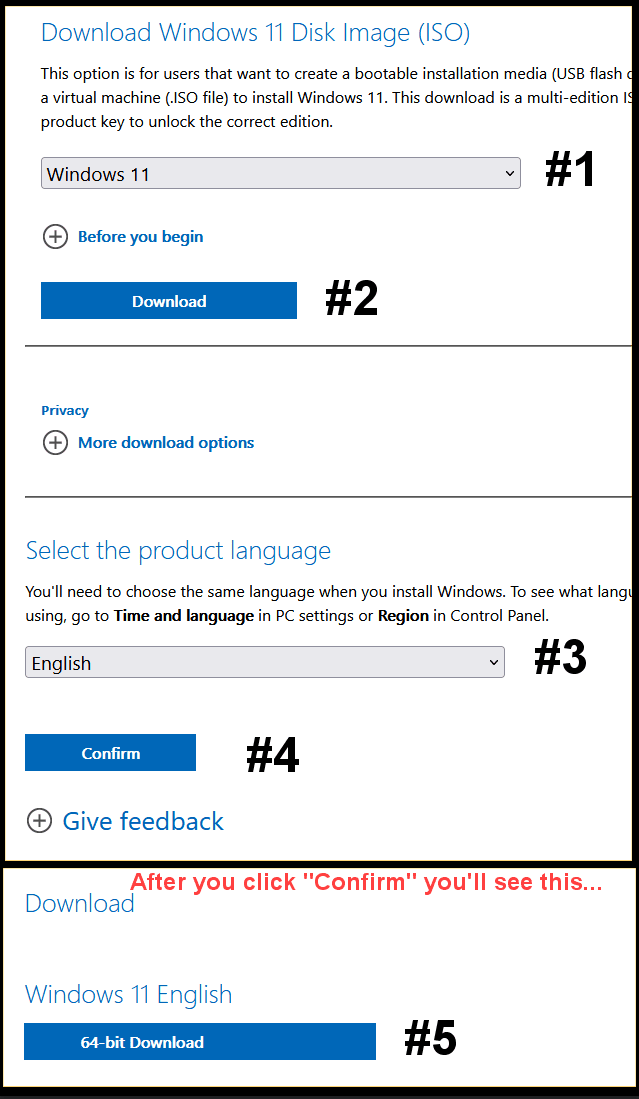
Go here and get the Windows 11 ISO (use the 3rd option), and save the ISO to your desktop.
Download Windows 11


znXu1Km.png


Right click the ISO image and choose: MOUNT
Open File Explorer and you will see a new drive letter. It will "look" like a DVD optical drive.
Double click the new drive letter to open it.
Find setup.exe and double click it to start the in-place upgrade.

Choose the Keep personal files and apps option.

After it's all done... to UNmount the ISO image, right click the new drive letter and choose: EJECT.


The ONLY thing you will lose is some of your personalizations. Your programs and data will be intact.


Let's try to summon a laptop person... @Fabler2
 
Last edited:

My Computers My Computers

  • At a glance

    Win 11 Home ♦♦♦26200.9168 ♦♦♦♦♦♦♦25H2AMD Ryzen 7 3700XG.Skill (F4-3200C14D-16GTZKW)EVGA RTX 2070 (08G-P4-2171-KR)
    OS
    Win 11 Home ♦♦♦26200.9168 ♦♦♦♦♦♦♦25H2
    Computer type
    PC/Desktop
    Manufacturer/Model
    Built by Ghot® [May 2020]
    CPU
    AMD Ryzen 7 3700X
    Motherboard
    Asus Pro WS X570-ACE (BIOS 5302)
    Memory
    G.Skill (F4-3200C14D-16GTZKW)
    Graphics Card(s)
    EVGA RTX 2070 (08G-P4-2171-KR)
    Sound Card
    Realtek ALC1220P / ALC S1220A
    Monitor(s) Displays
    Dell U3011 30"
    Screen Resolution
    2560 x 1600
    Hard Drives
    2x Samsung 860 EVO 500GB,
    WD 4TB Black FZBX - SATA III,
    WD 8TB Black FZBX - SATA III,
    DRW-24B1ST CD/DVD Burner
    PSU
    PC Power & Cooling 750W Quad EPS12V
    Case
    Cooler Master ATCS 840 Tower
    Cooling
    CM Hyper 212 EVO (push/pull)
    Keyboard
    Ducky DK9008 Shine II Blue LED
    Mouse
    Logitech Optical M-100
    Internet Speed
    300/300
    Browser
    Firefox (latest)
    Antivirus
    Bitdefender Total Security
    Other Info
    Speakers: Klipsch Pro Media 2.1
  • At a glance

    Windows XP Pro 32bit w/SP3AMD Athlon 64 X2 5000+ (OC'd @ 3.2Ghz)TWIN2X2048-6400C4DHX (2 x 1GB, DDR2 800)EVGA 256-P2-N758-TR GeForce 8600GT SSC
    Operating System
    Windows XP Pro 32bit w/SP3
    Computer type
    PC/Desktop
    Manufacturer/Model
    Built by Ghot® (not in use)
    CPU
    AMD Athlon 64 X2 5000+ (OC'd @ 3.2Ghz)
    Motherboard
    ASUS M2N32-SLI Deluxe Wireless Edition
    Memory
    TWIN2X2048-6400C4DHX (2 x 1GB, DDR2 800)
    Graphics card(s)
    EVGA 256-P2-N758-TR GeForce 8600GT SSC
    Sound Card
    Onboard
    Monitor(s) Displays
    ViewSonic G90FB Black 19" Professional (CRT)
    Screen Resolution
    up to 2048 x 1536
    Hard Drives
    WD 36GB 10,000rpm Raptor SATA
    Seagate 80GB 7200rpm SATA
    Lite-On LTR-52246S CD/RW
    Lite-On LH-18A1P CD/DVD Burner
    PSU
    PC Power & Cooling Silencer 750 Quad EPS12V
    Case
    Generic Beige case, 80mm fans
    Cooling
    ZALMAN 9500A 92mm CPU Cooler
    Keyboard
    Logitech Classic Keybooard 200
    Mouse
    Logitech Optical M-BT96a
    Internet Speed
    300/300
    Browser
    Firefox 3.x ??
    Antivirus
    Symantec (Norton)
    Other Info
    Still assembled, still runs. Haven't turned it on for 15 years?
try these fixes once.
Windows 11 Start menu/ Search not working etc

I would also ask, are you up to date for Updates?
I have the latest updates installed indeed. I have already tried most of the solutions provided in the article. I will do a quick skim in order to see if I missed any and try that.

Well, you could try repairing Windows 11 with an In-Place upgrade.
Someone else may have an alternate solution, but I can't think of anything else...

Now if this is a "work" computer that was given to you... I would probably wait for other suggestions.
The company, may have altered something which is causing this.

Lastly, I'm not really a laptop person. It could possibly be some laptop "setting" that I am not familiar with.

An In-Place upgrade just "fixes" things in Windows that are broken, while leaving all non-Windows things untouched.
It's actually a pretty decent tool. On my computer it takes about 40 mins to run.
The laptop was store bought by me, I just had to install everything related with the company. So there was no alteration whatsoever.
I will keep the In-Place upgrade as a last resort, in case nothing else will work.

Thank you both guys for your input. When I will have any update I will post it here.

UPDATE: Just for the shake of it. It seems that there was a new update from Dell today (BIOS and chipset), and now search works perfectly fine again. Not entirely sure if that was the case, or any of the other troubleshooting I've tried. But it seems a weird coincidence if it wasn't. All good now regardless.
 
Last edited:

My Computer My Computer

At a glance

Windows 11Intel(R) Core(TM) i5-1035G1 CPU @ 3.60GHzKingston DDR4 8GB KHYXPX-HYJ 2666MHzIntel UHD Graphics
OS
Windows 11
Computer type
Laptop
Manufacturer/Model
Dell Inspiron 3593
CPU
Intel(R) Core(TM) i5-1035G1 CPU @ 3.60GHz
Motherboard
Dell 04N9HV
Memory
Kingston DDR4 8GB KHYXPX-HYJ 2666MHz
Graphics Card(s)
Intel UHD Graphics
Sound Card
Realtek ALC3204
Screen Resolution
1920 x 1080 (FHD)
Hard Drives
KBG40ZNS256G NVMe KIOXIA 256GB
Antivirus
ESET Endpoint Security
I overcame my frozen text/data input box problem by running the SFC /SCANNOW command, which found and corrected corrupted Windows 11 module(s).
Unfortunately, SFC didn't fix the same problem on my Windows 10 PC. I then tried the DISM command but was not techie enough to get that done right. Maybe you can.
The PC is too old to be upgraded to Windows 11. Re-installing Win 10 with the Media Tool approach was my next attempt.
Unfortunately, that didn't solve the problem.
HOWEVER, I then did a RESET and reinstalled Windows 10 without saving files, settings and programs. That worked!
So, a non-destructive Windows reinstall is not a panacea after all. It just becomes one thing to try before throwing in the towel and resetting the PC completely! Surprising.
 
Last edited:

My Computer My Computer

At a glance

buystuff01I712gb
OS
buystuff01
Computer type
PC/Desktop
Manufacturer/Model
DELL
CPU
I7
Memory
12gb
Browser
chrome, edge, Firefox
Antivirus
Malwarebytes

Latest Support Threads

Back
Top Bottom