Windows Store Apps Installs Failing


pwcrickman

Well-known member
Member
Local time
8:18 AM
Posts
23
Location
Marriottsville, MD
OS
Windows 11 Home 25H2
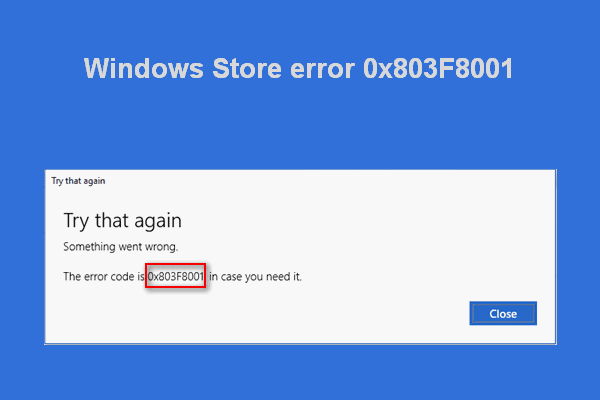
I downloaded a number of free Windows Store Apps on a Windows 8.1 system years ago. When I try to install these same apps on my Windows 11 system from the Windows Store Library the download starts, I see an acquiring license message and then it errors out with a 0x803F8001 code. I do not have any trouble with installing new apps that I did not previously own so I assume that the Windows Store in operating satisfactorily. I have tried the WSReset command and used the Repair and Restore Windows Store app links in the Settings app without resolving the problem.

Is there any method to disestablish the original license from these apps and start fresh with these apps?
 
Windows Build/Version
Windows 11 Build 21H2

My Computer My Computer

At a glance

Windows 11 Home 25H211th Gen Intel(R) Core(TM) i7-11390H @ 3.40GHz16 GB
OS
Windows 11 Home 25H2
Computer type
Laptop
Manufacturer/Model
Dell Inspiron 15 5510
CPU
11th Gen Intel(R) Core(TM) i7-11390H @ 3.40GHz
Memory
16 GB
Screen Resolution
1920 x 1080
Hard Drives
512 GB SSD
Browser
Chrome (latest)
Sometimes re-registering (reinstalling) Microsoft Store solves many problems. Try this and see if it works.


My Computer My Computer

At a glance

Windows 11 26H2 Pro (RP 26300.9445)
OS
Windows 11 26H2 Pro (RP 26300.9445)
Computer type
PC/Desktop
Manufacturer/Model
Alienware
See clearing the Microsoft Store cache will help execute: wsreset command.

All the cache files in Windows Store will be cleared if you perform a reset or the cache files of Windows Store. It will permanently delete the app's data on your device including your sign-in details. Go to Settings> System> Apps & features> Click Store> Advanced options> Reset.
 

My Computer My Computer

At a glance

Windows 11AMD Ryzen 7 5700GMicron Technology DDR4-3200 16GBNVIDIA GeForce RTX 3060
OS
Windows 11
Computer type
PC/Desktop
Manufacturer/Model
HP Pavilion
CPU
AMD Ryzen 7 5700G
Motherboard
Erica6
Memory
Micron Technology DDR4-3200 16GB
Graphics Card(s)
NVIDIA GeForce RTX 3060
Sound Card
Realtek ALC671
Monitor(s) Displays
Samsung SyncMaster U28E590
Screen Resolution
3840 x 2160
Hard Drives
SAMSUNG MZVLQ1T0HALB-000H1
Most probably incompatible with Win 11.
 

My Computers My Computers

  • At a glance

    Win 11 ProAMD Ryzen™ 7 7730U24GB Dual-Channel DDR4 @ 1596MHz (22-22-22-52)512MB ATI AMD Radeon Graphics (ASUStek Comput...
    OS
    Win 11 Pro
    Computer type
    Laptop
    Manufacturer/Model
    ASUS Vivobook
    CPU
    AMD Ryzen™ 7 7730U
    Motherboard
    M1605YA
    Memory
    24GB Dual-Channel DDR4 @ 1596MHz (22-22-22-52)
    Graphics Card(s)
    512MB ATI AMD Radeon Graphics (ASUStek Computer Inc)
    Monitor(s) Displays
    Generic PnP Monitor (1920x1200@60Hz) - P1 PLUS (1920x1080@59Hz)
    Screen Resolution
    1920 X 1200
    Hard Drives
    953GB Western Digital WD
    PSU
    45 Watts
    Mouse
    Lenovo Bluetooth.
    Internet Speed
    500 Mbps
    Browser
    Edge
    Antivirus
    Defender
  • At a glance

    Windows 11AMD Ryzen 7 5800H / 3.2 GHz32 GB DDR4 SDRAM 3200 MHzNVIDIA GeForce RTX 3060 6 GB GDDR6 SDRAM
    Operating System
    Windows 11
    Computer type
    Laptop
    Manufacturer/Model
    ACER NITRO
    CPU
    AMD Ryzen 7 5800H / 3.2 GHz
    Motherboard
    CZ Scala_CAS (FP6)
    Memory
    32 GB DDR4 SDRAM 3200 MHz
    Graphics card(s)
    NVIDIA GeForce RTX 3060 6 GB GDDR6 SDRAM
    Sound Card
    Realtek Audio. NVIDIA High Definition Audio
    Monitor(s) Displays
    15.6" LED backlight 1920 x 1080 (Full HD) 144 Hz
    Screen Resolution
    1920 x 1080 (Full HD)
    Hard Drives
    Samsung 970 Evo Plus 2TB NVMe M.2
    PSU
    180 Watt, 19.5 V
    Mouse
    Lenovo Bluetooth
    Internet Speed
    500 Mbps
    Browser
    Edge
    Antivirus
    Defender
Defo agree with Fabler2, it is worth Googling them to check compatibility first . Maybe this will help


My Computers My Computers

  • At a glance

    Windows 11 Pro13th Gen Core i9 13900HX32GB DDR5 @4800MHz 2x16GBGeforce RTX 4090HX 16GB
    OS
    Windows 11 Pro
    Computer type
    Laptop
    Manufacturer/Model
    Alienware M18 R1
    CPU
    13th Gen Core i9 13900HX
    Memory
    32GB DDR5 @4800MHz 2x16GB
    Graphics Card(s)
    Geforce RTX 4090HX 16GB
    Sound Card
    Nvidia HD / Realtek ALC3254
    Monitor(s) Displays
    18" QHD+
    Screen Resolution
    25660 X 1600
    Hard Drives
    C: KIOXIA (Toshiba) 2TB KXG80ZNV2T04 NVMe PCIe M.2 SSD
    D: KIOXIA (Toshiba) 2TB KXG80ZNV2T04 NVMe PCIe M.2 SSD
    Case
    Dark Metallic Moon
    Keyboard
    Alienware M Series per-key AlienFX RGB
    Mouse
    Alienware AW610M
    Browser
    Chrome and Firefox
    Antivirus
    Norton
    Other Info
    Killer E3000 Ethernet Controller
    Killer Killer AX1690 Wi-Fi Network Adaptor Wi-Fi 6E
    Bluetooth 5.2
    Alienware Z01G Graphic Amplifier
  • At a glance

    Windows 11 Pro10th Gen i-9 10900 K32Gb Dual Channel DDR4 @ 8843MHzNvidia RTX 2080 Super
    Operating System
    Windows 11 Pro
    Computer type
    Laptop
    Manufacturer/Model
    Alienware Area 51m R2
    CPU
    10th Gen i-9 10900 K
    Memory
    32Gb Dual Channel DDR4 @ 8843MHz
    Graphics card(s)
    Nvidia RTX 2080 Super
    Sound Card
    Nvidia
    Screen Resolution
    1920 x 1080
    Hard Drives
    Hard Drive C: Samsung 2TB SSD PM981a NVMe
    Hard Drive D:Samsung 2TB SSD 970 EVO Plus
    Mouse
    Alienware 610M
    Browser
    Chrome
    Antivirus
    Norton
It's also worth a shot if you have removed any devices from your MS account recently that you have also removed the device association from the MS Store, just thinking out loud as I think the limit is 10. I got caught out recently when I was messing about with different VM installs and suddenly the store wouldn't install any apps until I removed whatever was above the ceiling
 

My Computer My Computer

At a glance

Windows 11 Pro Beta, 11 Dev, W11 CanaryAMD Ryzen™ 9 5900HX32GBNVIDIA® GeForce RTX™ 3070 8GB GDDR6
OS
Windows 11 Pro Beta, 11 Dev, W11 Canary
Computer type
Laptop
Manufacturer/Model
Dell Alienware M15 Ryzen Edition R6
CPU
AMD Ryzen™ 9 5900HX
Memory
32GB
Graphics Card(s)
NVIDIA® GeForce RTX™ 3070 8GB GDDR6
Hard Drives
1 x Samsung 980 Pro 1TB
1 x Samsung 970 Evo Plus 1TB
I have not removed any devices from my MS account. How do you go about removing a device association from the MS Store?
 

My Computer My Computer

At a glance

Windows 11 Home 25H211th Gen Intel(R) Core(TM) i7-11390H @ 3.40GHz16 GB
OS
Windows 11 Home 25H2
Computer type
Laptop
Manufacturer/Model
Dell Inspiron 15 5510
CPU
11th Gen Intel(R) Core(TM) i7-11390H @ 3.40GHz
Memory
16 GB
Screen Resolution
1920 x 1080
Hard Drives
512 GB SSD
Browser
Chrome (latest)
Back
Top Bottom