Windows Update fails with 0x800F0922


Here is the XDM_LOG__COLLECTOR link.
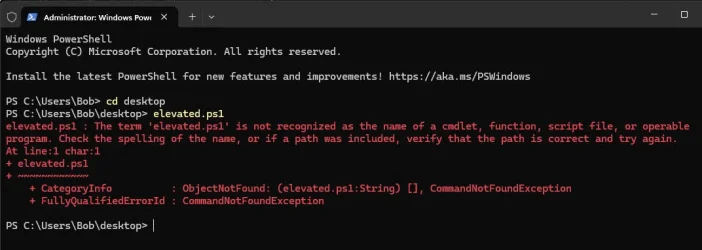
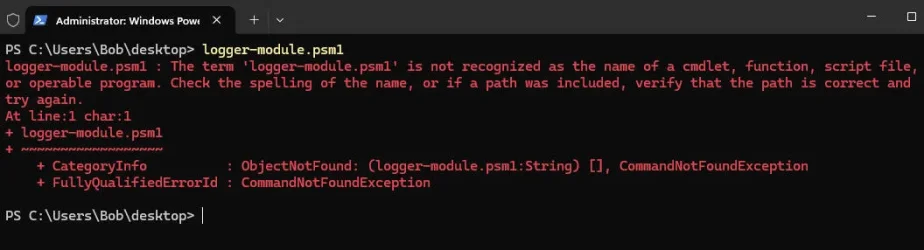
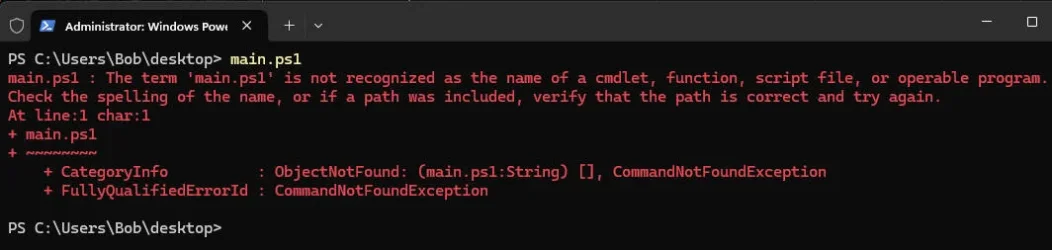
I still cannot get the .ps1 and .psm1 to run in power shell. Am I doing something wrong?


Please post images or share links displaying post #5 steps #3 - #5.


3) Open the download viewing:
menu bar
resources
log-collector


4) In the menu bar > click > extract all > view the popup Extract Compressed (Zipped) Folders > in the right lower corner > click > Extract


5) click log-collector > Do you want to open this file > click > open
 

My Computer My Computer

At a glance

Windows 10Intel(R) Core(TM) i7-4800MQ CPU @ 2.70GHz16 GB Total: Manufacturer : Samsung MemoryTyp...NVIDIA Quadro K3100M; Intel(R) HD Graphics 4600
OS
Windows 10
Computer type
Laptop
Manufacturer/Model
HP
CPU
Intel(R) Core(TM) i7-4800MQ CPU @ 2.70GHz
Motherboard
Product : 190A Version : KBC Version 94.56
Memory
16 GB Total: Manufacturer : Samsung MemoryType : DDR3 FormFactor : SODIMM Capacity : 8GB Speed : 1600
Graphics Card(s)
NVIDIA Quadro K3100M; Intel(R) HD Graphics 4600
Sound Card
IDT High Definition Audio CODEC; PNP Device ID HDAUDIO\FUNC_01&VEN_111D&DEV_76E0
Hard Drives
Model Hitachi HTS727575A9E364
Antivirus
Microsoft Defender
Other Info
Mobile Workstation
Any ideas? Thanks!
 

My Computer My Computer

At a glance

W11Ryzen 7 8-core32gbNVidia
OS
W11
Computer type
PC/Desktop
CPU
Ryzen 7 8-core
Motherboard
ASUS Gaming
Memory
32gb
Graphics Card(s)
NVidia
Monitor(s) Displays
Samsung 24"
Screen Resolution
1920x1080
Hard Drives
SSD 1tb
Cooling
Fans!
Keyboard
HyperX
Mouse
Kensington TB
Internet Speed
400mbps
Browser
Edge
Antivirus
defender
Please post images or share links displaying all steps for launching V2.
 

My Computer My Computer

At a glance

Windows 10Intel(R) Core(TM) i7-4800MQ CPU @ 2.70GHz16 GB Total: Manufacturer : Samsung MemoryTyp...NVIDIA Quadro K3100M; Intel(R) HD Graphics 4600
OS
Windows 10
Computer type
Laptop
Manufacturer/Model
HP
CPU
Intel(R) Core(TM) i7-4800MQ CPU @ 2.70GHz
Motherboard
Product : 190A Version : KBC Version 94.56
Memory
16 GB Total: Manufacturer : Samsung MemoryType : DDR3 FormFactor : SODIMM Capacity : 8GB Speed : 1600
Graphics Card(s)
NVIDIA Quadro K3100M; Intel(R) HD Graphics 4600
Sound Card
IDT High Definition Audio CODEC; PNP Device ID HDAUDIO\FUNC_01&VEN_111D&DEV_76E0
Hard Drives
Model Hitachi HTS727575A9E364
Antivirus
Microsoft Defender
Other Info
Mobile Workstation
I think this is what you want.
 

Attachments

  • elevated.webp
    elevated.webp
    45.4 KB · Views: 2
  • logger-module.webp
    logger-module.webp
    35 KB · Views: 3
  • main.webp
    main.webp
    31.5 KB · Views: 2

My Computer My Computer

At a glance

W11Ryzen 7 8-core32gbNVidia
OS
W11
Computer type
PC/Desktop
CPU
Ryzen 7 8-core
Motherboard
ASUS Gaming
Memory
32gb
Graphics Card(s)
NVidia
Monitor(s) Displays
Samsung 24"
Screen Resolution
1920x1080
Hard Drives
SSD 1tb
Cooling
Fans!
Keyboard
HyperX
Mouse
Kensington TB
Internet Speed
400mbps
Browser
Edge
Antivirus
defender
Please post images or share links displaying each and every step after clicking: https://www.elevenforum.com/attachments/v2-log-collector1-11-zip.34993/

Show before and after clicking extract all.

Extracting (compressed) zip folder.

Files will be extracted to this folder:

Show extracted files when complete.

Show the extracted links.

Open file security warning.

Open


______ ______ _
/_ __/__ ____ / ____/___ _______ __________ ( )_____
/ / / _ \/ __ \ / /_ / __ \/ ___/ / / / __ __ \|// ___/
/ / / __/ / / / / __/ / /_/ / / / /_/ / / / / / / (__ )
/_/ \___/_/ /_/ /_/ \____/_/ \__,_/_/ /_/ /_/ /____/
__ ______ ____ __
/ / ____ ______ / ____/___ / / /__ _____/ /_____ _____
/ / / __ \/ __ / / / / __ \/ / / _ \/ ___/ __/ __ \/ ___/
/ /___/ /_/ / /_/ / / /___/ /_/ / / / __/ /__/ /_/ /_/ / /
/_____/\____/\__, / \____/\____/_/_/\___/\___/\__/\____/_/
/____/


V2 Log Collector 1.11 - 12/4/20


Script written by Spectrum


Press Enter to continue:
 

My Computer My Computer

At a glance

Windows 10Intel(R) Core(TM) i7-4800MQ CPU @ 2.70GHz16 GB Total: Manufacturer : Samsung MemoryTyp...NVIDIA Quadro K3100M; Intel(R) HD Graphics 4600
OS
Windows 10
Computer type
Laptop
Manufacturer/Model
HP
CPU
Intel(R) Core(TM) i7-4800MQ CPU @ 2.70GHz
Motherboard
Product : 190A Version : KBC Version 94.56
Memory
16 GB Total: Manufacturer : Samsung MemoryType : DDR3 FormFactor : SODIMM Capacity : 8GB Speed : 1600
Graphics Card(s)
NVIDIA Quadro K3100M; Intel(R) HD Graphics 4600
Sound Card
IDT High Definition Audio CODEC; PNP Device ID HDAUDIO\FUNC_01&VEN_111D&DEV_76E0
Hard Drives
Model Hitachi HTS727575A9E364
Antivirus
Microsoft Defender
Other Info
Mobile Workstation
Hello. During all this, I ran sfc /scannow and dism /online /cleanup-image /restore health, and it didnt fix anything. I also ran msdt.exe -id WindowsUpdateDiagnostic and it detected some things, so I checked updates and it showed a repair version and wanted a reboot. After a bit and a few reboots, it worked. Windows Update says I'm up to date (after rechecking) Apparently, it reinstalled W11.

Here's my system > about (is this up to date?)
Edition Windows 11 Pro
Version 23H2
Installed on ‎11/‎27/‎25
OS build 22631.6199
Experience Windows Feature Experience Pack 1000.22700.1108.0
 

My Computer My Computer

At a glance

W11Ryzen 7 8-core32gbNVidia
OS
W11
Computer type
PC/Desktop
CPU
Ryzen 7 8-core
Motherboard
ASUS Gaming
Memory
32gb
Graphics Card(s)
NVidia
Monitor(s) Displays
Samsung 24"
Screen Resolution
1920x1080
Hard Drives
SSD 1tb
Cooling
Fans!
Keyboard
HyperX
Mouse
Kensington TB
Internet Speed
400mbps
Browser
Edge
Antivirus
defender
You've been dealing with this for 6 weeks now. It would be more prudent to not waste any more of your time. Bite the bullet. Back up your data, and do a clean install. Just my opinion.
 

My Computers My Computers

  • At a glance

    Windows 11 Pro 25H2 26200.8655i9-10900 10 core 20 threads32 gbnone-Intel UHD Graphics 630
    OS
    Windows 11 Pro 25H2 26200.8655
    Computer type
    PC/Desktop
    Manufacturer/Model
    Dell Optiplex 7080
    CPU
    i9-10900 10 core 20 threads
    Motherboard
    DELL 0J37VM
    Memory
    32 gb
    Graphics Card(s)
    none-Intel UHD Graphics 630
    Sound Card
    Integrated Realtek
    Monitor(s) Displays
    Benq 27
    Screen Resolution
    2560x1440
    Hard Drives
    2x1tb Solidigm m.2 nvme /External drives 512gb Samsung m.2 sata+2tb Kingston m2.nvme
    PSU
    500w
    Case
    MT
    Cooling
    Dell Premium
    Keyboard
    Logitech wired
    Mouse
    Logitech wireless
    Internet Speed
    so slow I'm too embarrassed to tell
    Browser
    #1 Edge #2 Firefox
    Antivirus
    Defender+MWB Premium
  • At a glance

    Windows 11 Pro 24H2 26200.8457AMD Ryzen 7 6800U32 gbintegrated
    Operating System
    Windows 11 Pro 24H2 26200.8457
    Computer type
    PC/Desktop
    Manufacturer/Model
    Beelink Mini PC SER5
    CPU
    AMD Ryzen 7 6800U
    Memory
    32 gb
    Graphics card(s)
    integrated
    Sound Card
    integrated
    Monitor(s) Displays
    Benq 27
    Screen Resolution
    2560x1440
    Hard Drives
    1TB Crucial nvme
    Keyboard
    Logitech wired
    Mouse
    Logitech wireless
    Internet Speed
    still too embarrassed to tell
    Browser
    Firefox
    Antivirus
    Defender
    Other Info
    System 3 is non compliant Dell 9020 i7-4770/24gb ram Win11 PRO 26200.8457
I havent been trying things steadily for 6 weeks. Does my system > about, look up to date?
 

My Computer My Computer

At a glance

W11Ryzen 7 8-core32gbNVidia
OS
W11
Computer type
PC/Desktop
CPU
Ryzen 7 8-core
Motherboard
ASUS Gaming
Memory
32gb
Graphics Card(s)
NVidia
Monitor(s) Displays
Samsung 24"
Screen Resolution
1920x1080
Hard Drives
SSD 1tb
Cooling
Fans!
Keyboard
HyperX
Mouse
Kensington TB
Internet Speed
400mbps
Browser
Edge
Antivirus
defender
Computers that had failed to run V2 were either due to:

a) third party AV software

b) failure to click extract all


Once you post images or share links displaying each step these may be able to be checked.

Alternatively you can clean install as per glasskuter in post #27.
 

My Computer My Computer

At a glance

Windows 10Intel(R) Core(TM) i7-4800MQ CPU @ 2.70GHz16 GB Total: Manufacturer : Samsung MemoryTyp...NVIDIA Quadro K3100M; Intel(R) HD Graphics 4600
OS
Windows 10
Computer type
Laptop
Manufacturer/Model
HP
CPU
Intel(R) Core(TM) i7-4800MQ CPU @ 2.70GHz
Motherboard
Product : 190A Version : KBC Version 94.56
Memory
16 GB Total: Manufacturer : Samsung MemoryType : DDR3 FormFactor : SODIMM Capacity : 8GB Speed : 1600
Graphics Card(s)
NVIDIA Quadro K3100M; Intel(R) HD Graphics 4600
Sound Card
IDT High Definition Audio CODEC; PNP Device ID HDAUDIO\FUNC_01&VEN_111D&DEV_76E0
Hard Drives
Model Hitachi HTS727575A9E364
Antivirus
Microsoft Defender
Other Info
Mobile Workstation
a) third party AV software - I only use what came with W11, no 3rd party.

b) failure to click extract all - I clicked extract all, as far as I know, I'll recheck that.
 

My Computer My Computer

At a glance

W11Ryzen 7 8-core32gbNVidia
OS
W11
Computer type
PC/Desktop
CPU
Ryzen 7 8-core
Motherboard
ASUS Gaming
Memory
32gb
Graphics Card(s)
NVidia
Monitor(s) Displays
Samsung 24"
Screen Resolution
1920x1080
Hard Drives
SSD 1tb
Cooling
Fans!
Keyboard
HyperX
Mouse
Kensington TB
Internet Speed
400mbps
Browser
Edge
Antivirus
defender
Please post images or share links displaying each and every step after clicking: https://www.elevenforum.com/attachments/v2-log-collector1-11-zip.34993/

Show before and after clicking extract all.

Extracting (compressed) zip folder.

Files will be extracted to this folder:

Show extracted files when complete.

Show the extracted links.

Open file security warning.

Open


______ ______ _
/_ __/__ ____ / ____/___ _______ __________ ( )_____
/ / / _ \/ __ \ / /_ / __ \/ ___/ / / / __ __ \|// ___/
/ / / __/ / / / / __/ / /_/ / / / /_/ / / / / / / (__ )
/_/ \___/_/ /_/ /_/ \____/_/ \__,_/_/ /_/ /_/ /____/
__ ______ ____ __
/ / ____ ______ / ____/___ / / /__ _____/ /_____ _____
/ / / __ \/ __ / / / / __ \/ / / _ \/ ___/ __/ __ \/ ___/
/ /___/ /_/ / /_/ / / /___/ /_/ / / / __/ /__/ /_/ /_/ / /
/_____/\____/\__, / \____/\____/_/_/\___/\___/\__/\____/_/
/____/


V2 Log Collector 1.11 - 12/4/20


Script written by Spectrum


Press Enter to continue:
See attached. I hope this is what you requested.
 

Attachments

My Computer My Computer

At a glance

W11Ryzen 7 8-core32gbNVidia
OS
W11
Computer type
PC/Desktop
CPU
Ryzen 7 8-core
Motherboard
ASUS Gaming
Memory
32gb
Graphics Card(s)
NVidia
Monitor(s) Displays
Samsung 24"
Screen Resolution
1920x1080
Hard Drives
SSD 1tb
Cooling
Fans!
Keyboard
HyperX
Mouse
Kensington TB
Internet Speed
400mbps
Browser
Edge
Antivirus
defender

My Computer My Computer

At a glance

Windows 10Intel(R) Core(TM) i7-4800MQ CPU @ 2.70GHz16 GB Total: Manufacturer : Samsung MemoryTyp...NVIDIA Quadro K3100M; Intel(R) HD Graphics 4600
OS
Windows 10
Computer type
Laptop
Manufacturer/Model
HP
CPU
Intel(R) Core(TM) i7-4800MQ CPU @ 2.70GHz
Motherboard
Product : 190A Version : KBC Version 94.56
Memory
16 GB Total: Manufacturer : Samsung MemoryType : DDR3 FormFactor : SODIMM Capacity : 8GB Speed : 1600
Graphics Card(s)
NVIDIA Quadro K3100M; Intel(R) HD Graphics 4600
Sound Card
IDT High Definition Audio CODEC; PNP Device ID HDAUDIO\FUNC_01&VEN_111D&DEV_76E0
Hard Drives
Model Hitachi HTS727575A9E364
Antivirus
Microsoft Defender
Other Info
Mobile Workstation
see attached. thx
 

Attachments

My Computer My Computer

At a glance

W11Ryzen 7 8-core32gbNVidia
OS
W11
Computer type
PC/Desktop
CPU
Ryzen 7 8-core
Motherboard
ASUS Gaming
Memory
32gb
Graphics Card(s)
NVidia
Monitor(s) Displays
Samsung 24"
Screen Resolution
1920x1080
Hard Drives
SSD 1tb
Cooling
Fans!
Keyboard
HyperX
Mouse
Kensington TB
Internet Speed
400mbps
Browser
Edge
Antivirus
defender
Microsoft Windows 11 Pro Version: 10.0.22631

Install date: 11/27/25

Secure Boot State Off


1) The BIOS Version/Date American Megatrends Inc. 2806, 10/27/22

Upgrade the BIOS: 2806 > 3621


2) Run Tuneup plus > post a share link


3) Run diskparinfo > post a share link


4) Run upgrade_failure_info > post a share link


5) Download Memory integrity system readiness scan tool from Official Microsoft Download Center


AMD

hvciscan_amd64.exe


6) Open administrative command prompt and copy and paste:

cd /users /Bob /downloads

hvciscan_amd64.exe

Post a share link.


7) Download to a new desktop folder:


8) After completing all of the above steps post a new V2 share link into the newest post


Code:
Event[1097]
  Log Name: System
  Source: Microsoft-Windows-TPM-WMI
  Date: 2025-12-02T16:04:43.6970000Z
  Event ID: 1801
  Task: N/A
  Level: Error
  Opcode: Info

  Keyword: N/A
  User: S-1-5-18
  User Name: NT AUTHORITY\SYSTEM
  Computer: RackMount
  Description:
Secure Boot CA/keys need to be updated. This device signature information is included here.
DeviceAttributes: BaseBoardManufacturer:ASUSTeK COMPUTER INC.;FirmwareManufacturer:American Megatrends Inc.;FirmwareVersion:2806;OEMModelBaseBoard:TUF GAMING B550-PLUS;OEMManufacturerName:ASUS;OSArchitecture:amd64;
BucketId: 15e317bfc9e9c3707324301e0a4464f1627ec80ef491dab2c5a01078b044ec3b
BucketConfidenceLevel:
UpdateType: 0
HResult: The operation completed successfully.


Code:
Event[1157]
  Log Name: System
  Source: Microsoft-Windows-TPM-WMI
  Date: 2025-12-03T16:04:43.6730000Z
  Event ID: 1796
  Task: N/A
  Level: Error
  Opcode: Info

  Keyword: N/A
  User: S-1-5-18
  User Name: NT AUTHORITY\SYSTEM
  Computer: RackMount
  Description:
The Secure Boot update failed to update a Secure Boot variable with error Secure Boot is not enabled on this machine.. For more information, please see https://go.microsoft.com/fwlink/?linkid=2169931
 

My Computer My Computer

At a glance

Windows 10Intel(R) Core(TM) i7-4800MQ CPU @ 2.70GHz16 GB Total: Manufacturer : Samsung MemoryTyp...NVIDIA Quadro K3100M; Intel(R) HD Graphics 4600
OS
Windows 10
Computer type
Laptop
Manufacturer/Model
HP
CPU
Intel(R) Core(TM) i7-4800MQ CPU @ 2.70GHz
Motherboard
Product : 190A Version : KBC Version 94.56
Memory
16 GB Total: Manufacturer : Samsung MemoryType : DDR3 FormFactor : SODIMM Capacity : 8GB Speed : 1600
Graphics Card(s)
NVIDIA Quadro K3100M; Intel(R) HD Graphics 4600
Sound Card
IDT High Definition Audio CODEC; PNP Device ID HDAUDIO\FUNC_01&VEN_111D&DEV_76E0
Hard Drives
Model Hitachi HTS727575A9E364
Antivirus
Microsoft Defender
Other Info
Mobile Workstation

My Computer My Computer

At a glance

W11Ryzen 7 8-core32gbNVidia
OS
W11
Computer type
PC/Desktop
CPU
Ryzen 7 8-core
Motherboard
ASUS Gaming
Memory
32gb
Graphics Card(s)
NVidia
Monitor(s) Displays
Samsung 24"
Screen Resolution
1920x1080
Hard Drives
SSD 1tb
Cooling
Fans!
Keyboard
HyperX
Mouse
Kensington TB
Internet Speed
400mbps
Browser
Edge
Antivirus
defender
Please perform the following steps: (in sequence)


1) Uninstall Avast using the applicable uninstall tool


2) Make sure that defender is on and updated


3) Make sure that disk cleanup, Ccleaner, Glary utilities, Wise cleaner and other cleaning software are not used during the troubleshooting


4) Open administrative command prompt and copy and paste:

dism /online /get-drivers /format:table >c:\drivers.txt

Find the new file on the desktop > post a share link


5) Open administrative command prompt and copy and paste:

chkdsk /b /v

Run these chkdsk switches on all drives using the syntax: chkdsk /b /v C: or chkdsk /b /v D: or chkdsk /b /v E: etc.

Make sure that the windows drive runs overnight while sleeping.

C:\WINDOWS\system32>chkdsk /b /v
The type of the file system is NTFS.
Cannot lock current drive.
Chkdsk cannot run because the volume is in use by another
process. Would you like to schedule this volume to be
checked the next time the system restarts? (Y/N)

Type: Y

Reboot as needed.


6) After completing all chkdsk /b /v run:

https://www.tenforums.com/attachmen...-files-use-bsod-debugging-chkdskfromevent.bat

Batch files for use in BSOD debugging - Windows 10 Help Forums

Batch files for use in BSOD debugging - Windows 10 Help Forums


7) Download and install: https://live.sysinternals.com/autoruns.exe

(this may be used later in the thread)


8) Download to a new desktop folder: (if not already completed)


9) Open administrative command prompt and copy and paste:

reagentc /info
reagentc /disable
reagentc /info
diskpart
sel dis 1
sel par 5
det par
delete partition override
lis par
lis vol


Post a share link.


10) Open device manager > click view > click show hidden devices > manually expand all rows > post images or share links


11) Uninstall:

SAMSUNG USB Driver for Mobile Phones 1.5.45.0 SAMSUNG Electronics Co., Ltd.


12) Using Everything search > search for each:

ssdudfu.sys

ssuddmgr.sys

ssudobex.sys

ssudserd.sys

Confirm that these drivers were not found.


13) Open administrative command prompt and copy and paste:

rundll32.exe pnpclean.dll,RunDLL_PnpClean /DRIVERS /MAXCLEAN

Post a share link


14) After the above results are checked plan to uninstall all incompatible drivers > recheck hvciscan


Code:
Windows 11 Pro

Version: 10.0.22631

23H2


BIOS 3621


Code:
ssdudfu.sys" failed with compliance failure mask 00000202

ssuddmgr.sys" failed with compliance failure mask 00000202

ssudobex.sys" failed with compliance failure mask 00000202

ssudserd.sys" failed with compliance failure mask 00000202

mbtusbser.sys" failed with compliance failure mask 00000202

PxHlpa64.sys" failed with compliance failure mask 00000202


Code:
pxhlpa64    PxHlpa64    c:\windows\system32\drivers\pxhlpa64.sys


Code:
  Partition 5    Recovery           528 MB   237 GB


Code:
Event[1758]
  Log Name: System
  Source: Microsoft-Windows-TPM-WMI
  Date: 2025-12-07T20:10:54.6590000Z
  Event ID: 1796
  Task: N/A
  Level: Error
  Opcode: Info

  Keyword: N/A
  User: S-1-5-18
  User Name: NT AUTHORITY\SYSTEM
  Computer: RackMount
  Description:
The Secure Boot update failed to update a Secure Boot variable with error Secure Boot is not enabled on this machine.. For more information, please see https://go.microsoft.com/fwlink/?linkid=2169931


Code:
Event[1756]
  Log Name: System
  Source: Microsoft-Windows-TPM-WMI
  Date: 2025-12-07T20:10:54.6580000Z
  Event ID: 1801
  Task: N/A
  Level: Error
  Opcode: Info

  Keyword: N/A
  User: S-1-5-18
  User Name: NT AUTHORITY\SYSTEM
  Computer: RackMount
  Description:
Secure Boot CA/keys need to be updated. This device signature information is included here.
DeviceAttributes: BaseBoardManufacturer:ASUSTeK COMPUTER INC.;FirmwareManufacturer:American Megatrends Inc.;FirmwareVersion:3621;OEMModelBaseBoard:TUF GAMING B550-PLUS;OEMManufacturerName:ASUS;OSArchitecture:amd64;
BucketId: 9e0cca494862a2dec441819e67d80b17e91ccc62839566296ffb1502b0474db5
BucketConfidenceLevel:
UpdateType: 0
HResult: The operation completed successfully.


Code:
Event[5170]
  Log Name: Application
  Source: Chkdsk
  Date: 2025-12-07T20:16:02.4640000Z
  Event ID: 26226
  Task: N/A
  Level: Information
  Opcode: Info  a
  Keyword: Classic,
  User: N/A
  User Name: N/A
  Computer: RackMount
  Description:
Chkdsk was executed in scan mode on a volume snapshot.

Checking file system on C:
The type of the file system is NTFS.
The shadow copy provider had an error. Check the System and Application event logs for more information.

A snapshot error occured while scanning this drive. You can try again, but if this problem persists, run an offline scan and fix.

 

My Computer My Computer

At a glance

Windows 10Intel(R) Core(TM) i7-4800MQ CPU @ 2.70GHz16 GB Total: Manufacturer : Samsung MemoryTyp...NVIDIA Quadro K3100M; Intel(R) HD Graphics 4600
OS
Windows 10
Computer type
Laptop
Manufacturer/Model
HP
CPU
Intel(R) Core(TM) i7-4800MQ CPU @ 2.70GHz
Motherboard
Product : 190A Version : KBC Version 94.56
Memory
16 GB Total: Manufacturer : Samsung MemoryType : DDR3 FormFactor : SODIMM Capacity : 8GB Speed : 1600
Graphics Card(s)
NVIDIA Quadro K3100M; Intel(R) HD Graphics 4600
Sound Card
IDT High Definition Audio CODEC; PNP Device ID HDAUDIO\FUNC_01&VEN_111D&DEV_76E0
Hard Drives
Model Hitachi HTS727575A9E364
Antivirus
Microsoft Defender
Other Info
Mobile Workstation

Attachments

My Computer My Computer

At a glance

W11Ryzen 7 8-core32gbNVidia
OS
W11
Computer type
PC/Desktop
CPU
Ryzen 7 8-core
Motherboard
ASUS Gaming
Memory
32gb
Graphics Card(s)
NVidia
Monitor(s) Displays
Samsung 24"
Screen Resolution
1920x1080
Hard Drives
SSD 1tb
Cooling
Fans!
Keyboard
HyperX
Mouse
Kensington TB
Internet Speed
400mbps
Browser
Edge
Antivirus
defender
Don't you think - you wasted to much time locking for the needle in the haystack (troubleshooting Windows Updates errors)? There's no need for a clean install (reset ALL apps and settings). An in-place upgrade repair/install - takes less than an hour (vs months you wasted so far) and preserves your apps and most of your settings.


Beyond that, you'll need another 15 minutes - to disable unnecessary Bloatware from Windows settings menu (no need to uninstall it with apps like O&OScrewUp). Tho if you want to remove apps - stick to apps which are safe to be removed - like Microsoft Teams, OneDrive (if you don't use it), Xbox apps, Clipchamp, People, News and other stuff like that. Don't touch core apps like Microsoft Store (used by Windows for updates this days) - since that's one way to get errors like above - while trying to install some Windows Update.
 

My Computer My Computer

At a glance

WinDOS 25H2Intel & AMDSO-DIMM SK Hynix 15.8 GB Dual-Channel DDR4-26...nVidia RTX 2060 6GB Mobile GPU (TU106M)
OS
WinDOS 25H2
Computer type
Laptop
CPU
Intel & AMD
Memory
SO-DIMM SK Hynix 15.8 GB Dual-Channel DDR4-2666 (2 x 8 GB) 1329MHz (19-19-19-43)
Graphics Card(s)
nVidia RTX 2060 6GB Mobile GPU (TU106M)
Sound Card
Onbord Realtek ALC1220
Screen Resolution
1920 x 1080
Hard Drives
1x Samsung PM981 NVMe PCIe M.2 512GB / 1x Seagate Expansion ST1000LM035 1TB
Don't you think - you wasted to much time locking for the needle in the haystack (troubleshooting Windows Updates errors)? There's no need for a clean install (reset ALL apps and settings). An in-place upgrade repair/install
AMEN!!!
 

My Computers My Computers

  • At a glance

    Windows 11 Pro 25H2 26200.8655i9-10900 10 core 20 threads32 gbnone-Intel UHD Graphics 630
    OS
    Windows 11 Pro 25H2 26200.8655
    Computer type
    PC/Desktop
    Manufacturer/Model
    Dell Optiplex 7080
    CPU
    i9-10900 10 core 20 threads
    Motherboard
    DELL 0J37VM
    Memory
    32 gb
    Graphics Card(s)
    none-Intel UHD Graphics 630
    Sound Card
    Integrated Realtek
    Monitor(s) Displays
    Benq 27
    Screen Resolution
    2560x1440
    Hard Drives
    2x1tb Solidigm m.2 nvme /External drives 512gb Samsung m.2 sata+2tb Kingston m2.nvme
    PSU
    500w
    Case
    MT
    Cooling
    Dell Premium
    Keyboard
    Logitech wired
    Mouse
    Logitech wireless
    Internet Speed
    so slow I'm too embarrassed to tell
    Browser
    #1 Edge #2 Firefox
    Antivirus
    Defender+MWB Premium
  • At a glance

    Windows 11 Pro 24H2 26200.8457AMD Ryzen 7 6800U32 gbintegrated
    Operating System
    Windows 11 Pro 24H2 26200.8457
    Computer type
    PC/Desktop
    Manufacturer/Model
    Beelink Mini PC SER5
    CPU
    AMD Ryzen 7 6800U
    Memory
    32 gb
    Graphics card(s)
    integrated
    Sound Card
    integrated
    Monitor(s) Displays
    Benq 27
    Screen Resolution
    2560x1440
    Hard Drives
    1TB Crucial nvme
    Keyboard
    Logitech wired
    Mouse
    Logitech wireless
    Internet Speed
    still too embarrassed to tell
    Browser
    Firefox
    Antivirus
    Defender
    Other Info
    System 3 is non compliant Dell 9020 i7-4770/24gb ram Win11 PRO 26200.8457
I ran everything and attached results txt and docx. www.microsvc.com/w11/deviceManager.docx
The link did not open.


1) Open administrative command prompt and copy and paste:

md C:\Drivers

pnputil /export-driver * C:\Drivers

dism /online /export-driver /destination:"C:\users\Bob\desktop\My Drivers"

pnputil /delete-driver oem2.inf /uninstall /force

pnputil /delete-driver oem3.inf /uninstall /force

pnputil /delete-driver oem22.inf /uninstall /force

pnputil /delete-driver oem30.inf /uninstall /force

Post a share link.


2) See post #36 step #7: Download and run Autoruns from here: https://live.sysinternals.com/autoruns.exe

Click File > run as administrator > allow it to close and reopen

Click the Driver tab

Locate these drivers if they remain installed > right click > delete > confirm as necessary

Code:
ssdudfu.sys
ssuddmgr.sys
ssudobex.sys
ssudserd.sys
mbtusbser.sys
PxHlpa64.sys

Exit autoruns > reboot


3) Open administrative command prompt and copy and paste:

cd /users /Bob /downloads

hvciscan_amd64.exe

Post a share link.


4) Steps will be posted for any remaining problematic drivers


Code:
12/09/25 4:13:38 PM
C:
Correcting errors in the Volume Bitmap.
Windows has made corrections to the file system.
 
Last edited:

My Computer My Computer

At a glance

Windows 10Intel(R) Core(TM) i7-4800MQ CPU @ 2.70GHz16 GB Total: Manufacturer : Samsung MemoryTyp...NVIDIA Quadro K3100M; Intel(R) HD Graphics 4600
OS
Windows 10
Computer type
Laptop
Manufacturer/Model
HP
CPU
Intel(R) Core(TM) i7-4800MQ CPU @ 2.70GHz
Motherboard
Product : 190A Version : KBC Version 94.56
Memory
16 GB Total: Manufacturer : Samsung MemoryType : DDR3 FormFactor : SODIMM Capacity : 8GB Speed : 1600
Graphics Card(s)
NVIDIA Quadro K3100M; Intel(R) HD Graphics 4600
Sound Card
IDT High Definition Audio CODEC; PNP Device ID HDAUDIO\FUNC_01&VEN_111D&DEV_76E0
Hard Drives
Model Hitachi HTS727575A9E364
Antivirus
Microsoft Defender
Other Info
Mobile Workstation

Latest Support Threads

Back
Top Bottom