Windows VM on Linux faster than on Native machine !!!! (same hardware)


jimbo45

Well-known member
Pro User
VIP
Local time
10:22 PM
Posts
5,784
Location
Hafnarfjörður IS
OS
Windows XP,11 Linux Fedora Rawhide pre-release 45
Hi folks
There must be something in the way NTFS works compared with Linux file systems as I'm getting better performance out of a Windows VM running under KVM/QEMU than the same version running on native Windows. Same applications on each - the Windows VM and the physical machine.

The only difference I can see is by using the virtio drivers for running the Windows disks as virtio and the NIC as virtio improves performance quite a bit -- plus I haven't even done the extra bit which really gives the thing a boost is to pass thru a graphics card directly to the VM.

I suspect its the efficiency of the Linux I/O drivers - particularly with Nvme type ssd's rather than the windows NTFS file system which is now donkeys years old.

I haven't done any actual measurements but just using the system seems to work "snappier" -- I'm not a gamer so obviously can't "stress test" a system that way - but things like photoshop and ripping CD's / DVD's work just fine. Even running VLC on a VM with 4k UKD HEVC files works without issue.

I know there's a Windows file system (new) called something like Refs or similar -- not tried that yet --- anybody have experience of that?.

Cheers
jimbo
 

My Computer

System One

  • OS
    Windows XP,11 Linux Fedora Rawhide pre-release 45
    Computer type
    PC/Desktop
    CPU
    2 X Intel i7
    Screen Resolution
    4KUHD X 2
It's only natural. If you pass through a GPU (VFIO), you’re basically running near-native Windows - only with a better I/O stack.

Disk I/O Stack under native Windows = NTFS + Windows storage drivers (older design, lots of legacy layers)

vs

Disk I/O under Linux Host (the distribution in question can also have a saying) + KVM Guest = ext4/XFS/btrfs on Linux + virtio-blk/SCSI/NVMe (very lite, paravirtualized)

Not to mention, Native Windows I/O scheduler tends to be rather conservative (adheres to the philosophy: since SSDs are incredibly fast, the best I/O scheduler is no scheduler at all - or one that does minimal work) - while Linux I/O scheduler aggressively reorders and merges requests. And that works rather well for SSDs - which are highly parallel devices that perform best when they have a deep queue of requests to work on simultaneously.

Last but not least... NTFS is heavily metadata-centric, meaning... it keeps almost everything in structured records inside its Master File Table (MFT). Even tiny files can be fully stored inside metadata entries instead of separate disk blocks. On paper probbaly seemed like a great ideea - but it's quite expensive in terms of lookups and write amplification.
 

My Computer

System One

  • OS
    WinDOS 25H2
    Computer type
    Laptop
    CPU
    Intel & AMD
    Memory
    SO-DIMM SK Hynix 15.8 GB Dual-Channel DDR4-2666 (2 x 8 GB) 1329MHz (19-19-19-43)
    Graphics Card(s)
    nVidia RTX 2060 6GB Mobile GPU (TU106M)
    Sound Card
    Onbord Realtek ALC1220
    Screen Resolution
    1920 x 1080
    Hard Drives
    1x Samsung PM981 NVMe PCIe M.2 512GB / 1x Seagate Expansion ST1000LM035 1TB
It's only natural. If you pass through a GPU (VFIO), you’re basically running near-native Windows - only with a better I/O stack.

Disk I/O Stack under native Windows = NTFS + Windows storage drivers (older design, lots of legacy layers)

vs

Disk I/O under Linux Host (the distribution in question can also have a saying) + KVM Guest = ext4/XFS/btrfs on Linux + virtio-blk/SCSI/NVMe (very lite, paravirtualized)

Not to mention, Native Windows I/O scheduler tends to be rather conservative (adheres to the philosophy: since SSDs are incredibly fast, the best I/O scheduler is no scheduler at all - or one that does minimal work) - while Linux I/O scheduler aggressively reorders and merges requests. And that works rather well for SSDs - which are highly parallel devices that perform best when they have a deep queue of requests to work on simultaneously.

Last but not least... NTFS is heavily metadata-centric, meaning... it keeps almost everything in structured records inside its Master File Table (MFT). Even tiny files can be fully stored inside metadata entries instead of separate disk blocks. On paper probbaly seemed like a great ideea - but it's quite expensive in terms of lookups and write amplification.
Thanks for the info -- I'm never to old to learn this stuff !!!.

Note though to pass through things like GPU cards etc you need to set things lile IOMMAX or equivalent on either in BIOS or in the Linux kernel start up stuff.

HYPER-V on Windows native machines is also pretty good too but much (IMHO) too inflexible. Without Dynamic USB re-direct (means USB devices need to be defined at boot) or being able to add things like non USB disks / pcie devices etc makes the whole thing a lot more not "user friendly or perhaps more "User aggressive".

Also I do like the fact that one can log out of Linux while leaving a Windows (or other) VM available to other users while if you log off from Windows the VM is inacessible to other users -- this is especially true for vm software like vmware workstation or oracle's virtual box which run in the users work space and aren't type 1 Hypervisors.

But again @neves thanks for the info. !!!

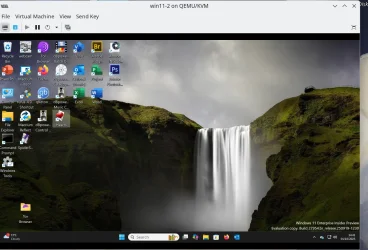
Here's the VM I'm running : All working 100% perfectly.

Screenshot_20251001_144153.webp

Cheers
jimbo
 
Last edited:

My Computer

System One

  • OS
    Windows XP,11 Linux Fedora Rawhide pre-release 45
    Computer type
    PC/Desktop
    CPU
    2 X Intel i7
    Screen Resolution
    4KUHD X 2
Back
Top Bottom