- Local time
- 1:53 AM
- Posts
- 481
- OS
- Windows 11 Pro 25H2
I installed WineDVM to run and antique 16 bit program I still like to use about a year ago when I first moved to Win11 (new machine).
It worked well... with very slight delays for initial startup vs. when it last ran in native mode (Win 7). Otherwise it seemed like performance was fairly normal. As of a month or three ago, performance dropped. It appears directly related to interacting with files in the parent OS.
If I just start the program bare it comes right up. Full speed ahead. But if I run it the normal way for me i.e. opening it's data files as it starts - it's very slow. 30 seconds to load the trivially small config & data files. It used to take just a few seconds.
If I start bare and open a single data file, it's 25 seconds to open it. It used to be instantaneous.
If I choose Open > File after starting bare, the File dialog comes right up. I can pop through the directories at normal system speed. But even if I Cancel that Open box, it's 15 seconds before I can resume normal program operation. It's "hung" during that time.
File > Save is equally slow as Open.
All other program operations are normally fast. Printing is fast.
I have another 16 bit program that uses WineDVM. It still operates at normal speeds. It's a more trivial program, but it seems unchanged.
I haven't upgraded WineDVM yet (Installed April 2025). I don't see any updates to the 2023 release I installed in April 2025.
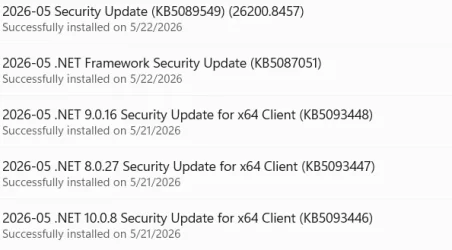
Thoughts? Some windows update that inhibited WineDVM?
It worked well... with very slight delays for initial startup vs. when it last ran in native mode (Win 7). Otherwise it seemed like performance was fairly normal. As of a month or three ago, performance dropped. It appears directly related to interacting with files in the parent OS.
If I just start the program bare it comes right up. Full speed ahead. But if I run it the normal way for me i.e. opening it's data files as it starts - it's very slow. 30 seconds to load the trivially small config & data files. It used to take just a few seconds.
If I start bare and open a single data file, it's 25 seconds to open it. It used to be instantaneous.
If I choose Open > File after starting bare, the File dialog comes right up. I can pop through the directories at normal system speed. But even if I Cancel that Open box, it's 15 seconds before I can resume normal program operation. It's "hung" during that time.
File > Save is equally slow as Open.
All other program operations are normally fast. Printing is fast.
I have another 16 bit program that uses WineDVM. It still operates at normal speeds. It's a more trivial program, but it seems unchanged.
I haven't upgraded WineDVM yet (Installed April 2025). I don't see any updates to the 2023 release I installed in April 2025.
Thoughts? Some windows update that inhibited WineDVM?
My Computer
At a glance
Windows 11 Pro 25H2Intel Ultra 7 155H16gbIntel Arc integrated
- OS
- Windows 11 Pro 25H2
- Computer type
- Laptop
- Manufacturer/Model
- HP
- CPU
- Intel Ultra 7 155H
- Memory
- 16gb
- Graphics Card(s)
- Intel Arc integrated
- Hard Drives
- SSD