Wont boot to BIOS


Good, then we can rule out a bad Microsoft firmware update.
If your motherboard have beep/LED/display error codes, do you get any?
And when you hit the power button, does it sound as the PC is powering up? (this was easier to hear with floppy drive or mechanical disks)
Does the Power supply give you the right voltage?
When you open the computer to switch CMOS battery, did you smell anything like reminds you of burned electronics?
When you removed and put back all the power connectors to the motherboard, did it felt like resistant or did it slide a bit "to easy"?
Also have a look inside the connectors if it look like some pins are darker then the others.. That can be bad contact so it dont get the power.
If you have a PCIe graphic card and you also internal graphic on the board.. test to remove the Nvida card and see if the computer start.

That is the first few things that pops up in my mind. :-)
I didn’t remove Graphics card so will try that,will check connectors for darkness burn marks but from memory they were ok,will keep an eye on POST lights etc but there wasnt any beeps ,everything else you mentioned seemed ok
Will try all suggestions tomorrow as my patience was dropping so better to have a break
 

My Computer My Computer

At a glance

Windows 11 Professional (x64) Version 24H2 (b...3.40 gigahertz Intel Core i7-6700 256 kilobyt...16GBDisplay Intel(R) HD Graphics 530 [Display ada...
OS
Windows 11 Professional (x64) Version 24H2 (build 26100.4061)
Computer type
PC/Desktop
CPU
3.40 gigahertz Intel Core i7-6700 256 kilobyte primary
Motherboard
Board: ASUSTeK COMPUTER INC. H110M-A/DP Rev X.0x
Memory
16GB
Graphics Card(s)
Display Intel(R) HD Graphics 530 [Display adapter] NVIDIA GeForce RTX 3060 [Display adapter]
Sound Card
High Definition Audio Device Intel(R) Display Audio NVIDIA High Definition Audio
Monitor(s) Displays
Intel(R) HD Graphics 530 [Display adapter] NVIDIA GeForce RTX 3060 [Display adapter] LG 42LC46 [Monitor] (31.5"vis, February 2007)
Screen Resolution
1920x1080
Hard Drives
(NTFS on drive 0) * 2.00 TB 1.66 TB free
d: (NTFS on drive 2) 1.00 TB 926.90 GB free
f: (NTFS on drive 1) 497.94 GB 379.74 GB free
@McGoo


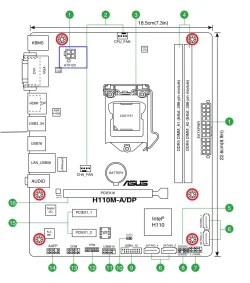
Did you plug in the connector shown in the BLUE box (top left) ?

Image1.webp


Image1.webp
 
Last edited:

My Computers My Computers

  • At a glance

    Win 11 Home 26H2 26300.9818AMD Ryzen 7 3700XG.Skill (F4-3200C14D-16GTZKW)EVGA RTX 2070 (08G-P4-2171-KR)
    OS
    Win 11 Home 26H2 26300.9818
    Computer type
    PC/Desktop
    Manufacturer/Model
    Built by Ghot® [May 2020]
    CPU
    AMD Ryzen 7 3700X
    Motherboard
    Asus Pro WS X570-ACE (BIOS 5302)
    Memory
    G.Skill (F4-3200C14D-16GTZKW)
    Graphics Card(s)
    EVGA RTX 2070 (08G-P4-2171-KR)
    Sound Card
    Realtek ALC1220P / ALC S1220A
    Monitor(s) Displays
    Dell U3011 30"
    Screen Resolution
    2560 x 1600
    Hard Drives
    2x Samsung 860 EVO 500GB,
    WD 4TB Black FZBX - SATA III,
    WD 8TB Black FZBX - SATA III,
    DRW-24B1ST CD/DVD Burner
    PSU
    PC Power & Cooling 750W Quad EPS12V
    Case
    Cooler Master ATCS 840 Tower
    Cooling
    CM Hyper 212 EVO (push/pull)
    Keyboard
    Ducky DK9008 Shine II Blue LED
    Mouse
    Logitech Optical M-100
    Internet Speed
    300/300
    Browser
    Firefox (latest)
    Antivirus
    Bitdefender Total Security
    Other Info
    Speakers: Klipsch Pro Media 2.1
  • At a glance

    Windows XP Pro 32bit w/SP3AMD Athlon 64 X2 5000+ (OC'd @ 3.2Ghz)TWIN2X2048-6400C4DHX (2 x 1GB, DDR2 800)EVGA 256-P2-N758-TR GeForce 8600GT SSC
    Operating System
    Windows XP Pro 32bit w/SP3
    Computer type
    PC/Desktop
    Manufacturer/Model
    Built by Ghot® (not in use)
    CPU
    AMD Athlon 64 X2 5000+ (OC'd @ 3.2Ghz)
    Motherboard
    ASUS M2N32-SLI Deluxe Wireless Edition
    Memory
    TWIN2X2048-6400C4DHX (2 x 1GB, DDR2 800)
    Graphics card(s)
    EVGA 256-P2-N758-TR GeForce 8600GT SSC
    Sound Card
    Onboard
    Monitor(s) Displays
    ViewSonic G90FB Black 19" Professional (CRT)
    Screen Resolution
    up to 2048 x 1536
    Hard Drives
    WD 36GB 10,000rpm Raptor SATA
    Seagate 80GB 7200rpm SATA
    Lite-On LTR-52246S CD/RW
    Lite-On LH-18A1P CD/DVD Burner
    PSU
    PC Power & Cooling Silencer 750 Quad EPS12V
    Case
    Generic Beige case, 80mm fans
    Cooling
    ZALMAN 9500A 92mm CPU Cooler
    Keyboard
    Logitech Classic Keybooard 200
    Mouse
    Logitech Optical M-BT96a
    Internet Speed
    300/300
    Browser
    Firefox 3.x ??
    Antivirus
    Symantec (Norton)
    Other Info
    Still assembled, still runs. Haven't turned it on for 15 years?
Is your installation UIFI not legacy bios. It is rare for windows 11 to be old style mbr legacy bios pcs

For Uefi / gpt drive pcs, you do not need to use old methods such as pressing f2 etc.

If UEFI, simply got to settings, system, recovery and select advanced start-up.

You will boot to pre-OS windows.

Select troubleshoot, advanced options, UEFI firmware settings and you will enter the bios.

Note the term bios is somewhat used interchangeably for legacy bios or UEFI firmware but strictly uefi does not use bios but uefi firmware but they do similar functions,
 

My Computer My Computer

At a glance

Windows 11 Pro + Win11 Canary VM.I9 13th gen i9-13900H 2.60 GHZ16 GB solderedIntegrated Intel Iris XE
OS
Windows 11 Pro + Win11 Canary VM.
Computer type
Laptop
Manufacturer/Model
ASUS Zenbook 14
CPU
I9 13th gen i9-13900H 2.60 GHZ
Motherboard
Yep, Laptop has one.
Memory
16 GB soldered
Graphics Card(s)
Integrated Intel Iris XE
Sound Card
Realtek built in
Monitor(s) Displays
laptop OLED screen
Screen Resolution
2880x1800 touchscreen
Hard Drives
1 TB NVME SSD (only weakness is only one slot)
PSU
Internal + 65W thunderbolt USB4 charger
Case
Yep, got one
Cooling
Stella Artois (UK pint cans - 568 ml) - extra cost.
Keyboard
Built in UK keybd
Mouse
Bluetooth , wireless dongled, wired
Internet Speed
900 mbs (ethernet), wifi 6 typical 350-450 mb/s both up and down
Browser
Edge
Antivirus
Defender
Other Info
TPM 2.0, 2xUSB4 thunderbolt, 1xUsb3 (usb a), 1xUsb-c, hdmi out, 3.5 mm audio out/in combo, ASUS backlit trackpad (inc. switchable number pad)

Macrium Reflect Home V8
Office 365 Family (6 users each 1TB onedrive space)
Hyper-V (a vm runs almost as fast as my older laptop)
NO 1 ,its connected to power supply unit, removed it and reinserted it,just in case it wasn’t getting power but it was fine.
I'm unaware of any 10 pin connector off the PSU. I checked the MB manual. The only power connectors that I see are the standard 24 pin ATX one, plus a 4 pin auxiliary one for the CPU.

The H110M-A/DP apparently has a BIOS recovery mode. Too bad that the user guide doesn't provide the details.

The basic method is to download the BIOS file, and rename it. (If Google AI si to be believed. to H110MADP.CAP.) Copy it to the root of a FAT32 USB drive. With the power off, insert the USB drive into one of the rear ports. Power up the PC.

Pray to whatever deity you recognize. ;-)
 

My Computers My Computers

  • At a glance

    Windows 11 26300.9278Amd Threadripper 7970X128GB (4 X 32) G.Skill DDR5 6400 (RDIMM)Gigabyte RTX 4090 OC
    OS
    Windows 11 26300.9278
    Computer type
    PC/Desktop
    Manufacturer/Model
    homebuilt
    CPU
    Amd Threadripper 7970X
    Motherboard
    Gigabyte TRX50 Aero D Rev. 1.0
    Memory
    128GB (4 X 32) G.Skill DDR5 6400 (RDIMM)
    Graphics Card(s)
    Gigabyte RTX 4090 OC
    Sound Card
    none (USB to speakers), Realtek
    Monitor(s) Displays
    Innocn 32" OLED
    Screen Resolution
    3840 X 2160 @ 60Hz
    Hard Drives
    Crucial T700 2TB M.2 NVME SSD
    WD 4TB Blue SATA SSD
    Seagate 18TB IronWolf Pro
    PSU
    BeQuiet! Straight Power 12 1500W
    Case
    Lian Li 011 Dynamic Evo XL
    Cooling
    SilverStone Technology XE360-TR5, with 3 Phanteks T30 fans
    Keyboard
    Cherry KC 500 MX LP (mechanical)
    Mouse
    Logitech M500s (wired)
    Internet Speed
    2000/250 Mbps (down/up)
    Other Info
    xFinity gateway
  • At a glance

    windows 11 26300.9278Intel I9-13900K64GB G.Skill DDR5-6000Gigabyte RTX 3090 ti
    Operating System
    windows 11 26300.9278
    Computer type
    PC/Desktop
    Manufacturer/Model
    homebuilt
    CPU
    Intel I9-13900K
    Motherboard
    Asus RoG Strix Z690-E
    Memory
    64GB G.Skill DDR5-6000
    Graphics card(s)
    Gigabyte RTX 3090 ti
    Sound Card
    built in Realtek
    Monitor(s) Displays
    Philips 27E1N8900 27" OLED
    Screen Resolution
    3840 X 2160 @60Hz
    Hard Drives
    WDC SN850 1TB
    8TB Seagate Ironwolf
    4TB Seagate Ironwolf
    PSU
    eVGA SuperNOVA 1300 GT
    Case
    Lian Li 011 Dynamic Evo
    Cooling
    Corsair iCUE H150i ELITE CAPELLIX Liquid CPU Cooler
    Keyboard
    Cherry Streaming (wired)
    Mouse
    Logitech M500s (wired)

Latest Support Threads

Back
Top Bottom