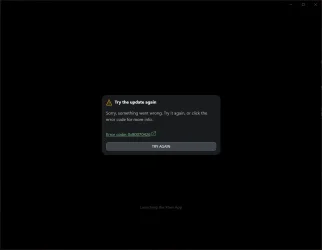
Xbox PC app new update broken?


Thiefyo

Member
Local time
12:06 PM
Posts
8
OS
Windows 11 Pro
any ideas i already have tried troubleshooting and no results... why.webpwhy.webp
 
Windows Build/Version
23H2 22631.4541

My Computer My Computer

At a glance

Windows 11 ProRyzen 7 7800X3DCorsair 32GB DDR5 @6000Gigabyte RTX 3080
OS
Windows 11 Pro
Computer type
PC/Desktop
Manufacturer/Model
Custom
CPU
Ryzen 7 7800X3D
Motherboard
Gigabyte X670E Aorus Master
Memory
Corsair 32GB DDR5 @6000
Graphics Card(s)
Gigabyte RTX 3080
Sound Card
Creative AE-7
Monitor(s) Displays
Samsung G7 32"
Screen Resolution
2K
Hard Drives
Samsung 980 1TB + extra
PSU
FSP 850W
Case
Fractal Design R6 BlackTG
Cooling
Artic Cooling AIO 420MM
Keyboard
Corsair K100
Mouse
Logitech G502X
Internet Speed
1Gb/s
Browser
Opera
Antivirus
Eset Smart Security

My Computer My Computer

At a glance

Windows 11 Pro 25H2 build 26200.8875Intel i7 8750H @ 2.2 GHz16 GB (all Samsung) DDR4-3200 SODIMM (non-ECC...Intel UHD Graphics 630 & NVIDIA Quadro P600
OS
Windows 11 Pro 25H2 build 26200.8875
Computer type
Laptop
Manufacturer/Model
Lenovo ThinkPad Workstation P72
CPU
Intel i7 8750H @ 2.2 GHz
Motherboard
Lenovo 01YU291
Memory
16 GB (all Samsung) DDR4-3200 SODIMM (non-ECC) PCIe 3
Graphics Card(s)
Intel UHD Graphics 630 & NVIDIA Quadro P600
Sound Card
Realtek ALC3286 & Focusrite Saffire 24 Pro DSP
Monitor(s) Displays
17.3"
Screen Resolution
3840x2160
Hard Drives
1TB SSD Samsung 860 EVO SATA 3
1TB SSD Samsung 970 EVO M.2 NVMe PCIe 3 x 4
2TB SSD Samsung 990 PRO M.2 NVMe PCIe 3 x 4
PSU
230W
Cooling
fan
Keyboard
UltraNav
Mouse
Kensington wireless Orbit
Internet Speed
640Mbps
Browser
DuckDuckGo and Firefox
Antivirus
Defender
Other Info
CM246 Chipset

My Computer My Computer

At a glance

Windows 11 ProRyzen 7 7800X3DCorsair 32GB DDR5 @6000Gigabyte RTX 3080
OS
Windows 11 Pro
Computer type
PC/Desktop
Manufacturer/Model
Custom
CPU
Ryzen 7 7800X3D
Motherboard
Gigabyte X670E Aorus Master
Memory
Corsair 32GB DDR5 @6000
Graphics Card(s)
Gigabyte RTX 3080
Sound Card
Creative AE-7
Monitor(s) Displays
Samsung G7 32"
Screen Resolution
2K
Hard Drives
Samsung 980 1TB + extra
PSU
FSP 850W
Case
Fractal Design R6 BlackTG
Cooling
Artic Cooling AIO 420MM
Keyboard
Corsair K100
Mouse
Logitech G502X
Internet Speed
1Gb/s
Browser
Opera
Antivirus
Eset Smart Security

Hi @Thiefyo

There is this webpage about the error your PC is showing. You've probably tried some of these 'fixes'?


Have you tried uninstalling the Xbox app and then reinstalling? Or repairing it from inside Windows Settings >> Apps >> Installed Apps >> Xbox?
 

My Computers My Computers

  • At a glance

    Windows 11 Pro 25H2Intel Core i9 13900KCorsair Dominator Platinum 64gb 5600MT/s DDR5...Sapphire NITRO+ AMD Radeon RX 7900 XTX Vapor-...
    OS
    Windows 11 Pro 25H2
    Computer type
    PC/Desktop
    Manufacturer/Model
    Homebuilt
    CPU
    Intel Core i9 13900K
    Motherboard
    Asus ProArt Z790 Creator WiFi - Bios 3107
    Memory
    Corsair Dominator Platinum 64gb 5600MT/s DDR5 Dual Channel
    Graphics Card(s)
    Sapphire NITRO+ AMD Radeon RX 7900 XTX Vapor-X 24GB
    Sound Card
    External DAC: Cambridge Audio DACMagic200M - Headphone Amp: Topping L50
    Monitor(s) Displays
    Panasonic MX950 Mini LED 55" TV 120hz
    Screen Resolution
    3840 x 2160 120hz
    Hard Drives
    Samsung 980 Pro 2TB (OS)
    Samsung 980 Pro 1TB (Files)
    Lexar NZ790 4TB
    LaCie d2 Professional 6TB external - USB 3.1
    Seagate Expansion 16TB external - USB 3.2
    Seagate One Touch 18TB external HD - USB 3.0
    PSU
    Corsair RM1200x Shift
    Case
    Corsair RGB Smart Case 5000x (white)
    Cooling
    Corsair iCue H150i Elite Capellix XT
    Keyboard
    Incase Ergonomic USB (Microsoft clone)
    Mouse
    Logitech MX Master 3S
    Internet Speed
    Fibre 900/500 Mbps
    Browser
    Microsoft Edge Chromium
    Antivirus
    Bitdefender Total Security
    Other Info
    AMD Radeon Software & Drivers 26.1.1
    Hasleo Backup Suite
    Dashlane password manager
    Kensington Verimark fingerprint reader
    Logitech Brio 4K webcam
    Orico 10-port powered USB 3.0 hub
  • At a glance

    Windows 11 Pro 25H2Intel® Core™ i9-13900H32GB DDR4-3200 Dual channel*Intel Iris Xᵉ Graphics G7
    Operating System
    Windows 11 Pro 25H2
    Computer type
    Laptop
    Manufacturer/Model
    Asus Vivobook X1605VA
    CPU
    Intel® Core™ i9-13900H
    Motherboard
    Asus X1605VA bios 309
    Memory
    32GB DDR4-3200 Dual channel
    Graphics card(s)
    *Intel Iris Xᵉ Graphics G7
    Sound Card
    Realtek | Intel SST Bluetooth & USB
    Monitor(s) Displays
    16.0-inch, WUXGA 16:10 aspect ratio, IPS-level Panel
    Screen Resolution
    1920 x 1200 60hz
    Hard Drives
    512GB M.2 NVMe™ PCIe® 3.0 SSD
    Mouse
    Logitech MX Ergo Trackball
    Antivirus
    Bitdefender Total Security
    Other Info
    720p Webcam
    WiFi & USB to ethernet
Hi @Thiefyo

There is this webpage about the error your PC is showing. You've probably tried some of these 'fixes'?


Have you tried uninstalling the Xbox app and then reinstalling? Or repairing it from inside Windows Settings >> Apps >> Installed Apps >> Xbox?
Yes.. :( i did all that yesterday took me a while. except in place upgrade or windows reinstall because is a work pc and that is not an option... and it's the only app that stopped working after update....
 

My Computer My Computer

At a glance

Windows 11 ProRyzen 7 7800X3DCorsair 32GB DDR5 @6000Gigabyte RTX 3080
OS
Windows 11 Pro
Computer type
PC/Desktop
Manufacturer/Model
Custom
CPU
Ryzen 7 7800X3D
Motherboard
Gigabyte X670E Aorus Master
Memory
Corsair 32GB DDR5 @6000
Graphics Card(s)
Gigabyte RTX 3080
Sound Card
Creative AE-7
Monitor(s) Displays
Samsung G7 32"
Screen Resolution
2K
Hard Drives
Samsung 980 1TB + extra
PSU
FSP 850W
Case
Fractal Design R6 BlackTG
Cooling
Artic Cooling AIO 420MM
Keyboard
Corsair K100
Mouse
Logitech G502X
Internet Speed
1Gb/s
Browser
Opera
Antivirus
Eset Smart Security
Is there anything in the Event Viewer that sheds more light on the issue?
Bit of a knotty one. 🤔

I assume you've tried stuff like sfc /scannow from the command prompt?
 

My Computers My Computers

  • At a glance

    Windows 11 Pro 25H2Intel Core i9 13900KCorsair Dominator Platinum 64gb 5600MT/s DDR5...Sapphire NITRO+ AMD Radeon RX 7900 XTX Vapor-...
    OS
    Windows 11 Pro 25H2
    Computer type
    PC/Desktop
    Manufacturer/Model
    Homebuilt
    CPU
    Intel Core i9 13900K
    Motherboard
    Asus ProArt Z790 Creator WiFi - Bios 3107
    Memory
    Corsair Dominator Platinum 64gb 5600MT/s DDR5 Dual Channel
    Graphics Card(s)
    Sapphire NITRO+ AMD Radeon RX 7900 XTX Vapor-X 24GB
    Sound Card
    External DAC: Cambridge Audio DACMagic200M - Headphone Amp: Topping L50
    Monitor(s) Displays
    Panasonic MX950 Mini LED 55" TV 120hz
    Screen Resolution
    3840 x 2160 120hz
    Hard Drives
    Samsung 980 Pro 2TB (OS)
    Samsung 980 Pro 1TB (Files)
    Lexar NZ790 4TB
    LaCie d2 Professional 6TB external - USB 3.1
    Seagate Expansion 16TB external - USB 3.2
    Seagate One Touch 18TB external HD - USB 3.0
    PSU
    Corsair RM1200x Shift
    Case
    Corsair RGB Smart Case 5000x (white)
    Cooling
    Corsair iCue H150i Elite Capellix XT
    Keyboard
    Incase Ergonomic USB (Microsoft clone)
    Mouse
    Logitech MX Master 3S
    Internet Speed
    Fibre 900/500 Mbps
    Browser
    Microsoft Edge Chromium
    Antivirus
    Bitdefender Total Security
    Other Info
    AMD Radeon Software & Drivers 26.1.1
    Hasleo Backup Suite
    Dashlane password manager
    Kensington Verimark fingerprint reader
    Logitech Brio 4K webcam
    Orico 10-port powered USB 3.0 hub
  • At a glance

    Windows 11 Pro 25H2Intel® Core™ i9-13900H32GB DDR4-3200 Dual channel*Intel Iris Xᵉ Graphics G7
    Operating System
    Windows 11 Pro 25H2
    Computer type
    Laptop
    Manufacturer/Model
    Asus Vivobook X1605VA
    CPU
    Intel® Core™ i9-13900H
    Motherboard
    Asus X1605VA bios 309
    Memory
    32GB DDR4-3200 Dual channel
    Graphics card(s)
    *Intel Iris Xᵉ Graphics G7
    Sound Card
    Realtek | Intel SST Bluetooth & USB
    Monitor(s) Displays
    16.0-inch, WUXGA 16:10 aspect ratio, IPS-level Panel
    Screen Resolution
    1920 x 1200 60hz
    Hard Drives
    512GB M.2 NVMe™ PCIe® 3.0 SSD
    Mouse
    Logitech MX Ergo Trackball
    Antivirus
    Bitdefender Total Security
    Other Info
    720p Webcam
    WiFi & USB to ethernet
Is there anything in the Event Viewer that sheds more light on the issue?
Bit of a knotty one. 🤔

I assume you've tried stuff like sfc /scannow from the command prompt?
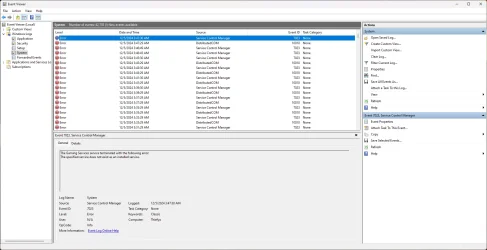
Yes i tried sfc everything is fine did restore health no luck. i added screenshots of the thing you asked.
Since game services are freshly installed and services in windows are set correctly, i am connected via wire no reason to timeout also, i tried running this in select boot mutliple configs and no luck same result since the update.
 

Attachments

  • gaming.services.webp
    gaming.services.webp
    106 KB · Views: 1
  • timeout.webp
    timeout.webp
    77.2 KB · Views: 0

My Computer My Computer

At a glance

Windows 11 ProRyzen 7 7800X3DCorsair 32GB DDR5 @6000Gigabyte RTX 3080
OS
Windows 11 Pro
Computer type
PC/Desktop
Manufacturer/Model
Custom
CPU
Ryzen 7 7800X3D
Motherboard
Gigabyte X670E Aorus Master
Memory
Corsair 32GB DDR5 @6000
Graphics Card(s)
Gigabyte RTX 3080
Sound Card
Creative AE-7
Monitor(s) Displays
Samsung G7 32"
Screen Resolution
2K
Hard Drives
Samsung 980 1TB + extra
PSU
FSP 850W
Case
Fractal Design R6 BlackTG
Cooling
Artic Cooling AIO 420MM
Keyboard
Corsair K100
Mouse
Logitech G502X
Internet Speed
1Gb/s
Browser
Opera
Antivirus
Eset Smart Security
Back
Top Bottom