2 x Samsung 980 pro ssd suddenly not being reconized by Windows


DdubbleR

Member
Local time
10:46 PM
Posts
2
OS
Windows 11 64 bit
Yesterday morning I played a game which was installed on a Samsung 980 Pro, with no problems. Later that day tried to play same game and it said "missing shortcut". So I went into My PC to find it and discovered that the M.2 drive (and another 980 Pro) were simply not there. I checked in diskmgmt, both drives missing. I checked in Device manager, same result. I checked in Samsung Magician and MiniTools partition manager with the same result. I rebooted system and went into UEFI and low and behold it listed BOTH drives????? Went back into system and no such drives found???? I am very confused. I have 4 nvme M.2 slots on my mobo and tried putting the drives in all of the slots with no change.

Nothing changed on the system from yesterday morning when they worked until they didn't?? So I checked windows update and installed the latest update of 23H2 which changed nothing.

Windows 11 version 23H2 (OS build 22631.2715)

Thanks and any help will be greately appreciated.
 

My Computer My Computer

At a glance

Windows 11 64 bitRyzen 7 5800XG.SKILL Ripjaws V Series 32GB DDR4 4000XFX RX 7800 XT
OS
Windows 11 64 bit
Computer type
PC/Desktop
Manufacturer/Model
DIY
CPU
Ryzen 7 5800X
Motherboard
MSI MPG X570S CARBON MAX WIFI (MS-7D52)
Memory
G.SKILL Ripjaws V Series 32GB DDR4 4000
Graphics Card(s)
XFX RX 7800 XT
Sound Card
onboard
Monitor(s) Displays
2X DELL S3222DGM
Screen Resolution
2560 x 1440
PSU
EVGA SuperNOVA 650 GT
Case
MainGear Vybe - Red
Cooling
Scythe Fuma 2 Cpu cooler 5 120mm case fans
Keyboard
ROCCAT Vulcan Pro USB Keyboard
Mouse
Razer DeathAdder Elite
Internet Speed
350 mbps
Browser
chrome
Welcome to the forum. Sorry it had to be under such extreme circumstances.
I'm not one of the hardware gurus here but I'm sure one will step in shortly.
In the meantime, here are some things to check. If it were me, I would troubleshoot with only one of the undetected drives installed in the proper slot as per your manual.
Screenshot 2023-11-27 230605.png

Check Windows update to see if any driver updates have been installed.
(settings>windows update>update history>scroll to the bottom and look under 'other updates' or it may show 'driver updates')
Specifically look for any bios, chipset, or storage controller updates. This issue is usually related to which storage controller driver windows is trying to use.

Check device manager>storage controller. If your bios is optioned for AMD raid, you should have the AMD raid storage driver installed.
If your bios is NOT optioned for raid see this solution
Microsoft forum

Make sure your UEFI bios version is updated. Latest version is 7D52V18 dated 10/27/23

Try system restore.

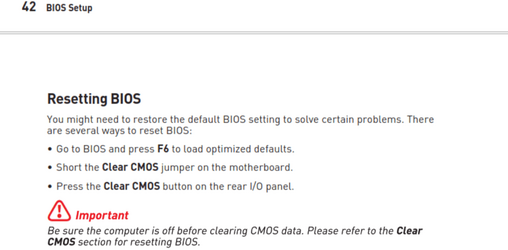
As last resort Make note of any custom settings you have made to bios , Then Reset bios to default. This is from your mobo manual.
Screenshot 2023-11-27 224321.png
 

Attachments

  • Screenshot 2023-11-27 224321.png
    Screenshot 2023-11-27 224321.png
    50 KB · Views: 0
Last edited:

My Computers My Computers

  • At a glance

    Windows 11 Pro 25H2 26200.9168i9-10900 10 core 20 threads32 gbnone-Intel UHD Graphics 630
    OS
    Windows 11 Pro 25H2 26200.9168
    Computer type
    PC/Desktop
    Manufacturer/Model
    Dell Optiplex 7080
    CPU
    i9-10900 10 core 20 threads
    Motherboard
    DELL 0J37VM
    Memory
    32 gb
    Graphics Card(s)
    none-Intel UHD Graphics 630
    Sound Card
    Integrated Realtek
    Monitor(s) Displays
    Benq 27
    Screen Resolution
    2560x1440
    Hard Drives
    2x1tb Solidigm m.2 nvme /External drives 512gb Samsung m.2 sata+2tb Kingston m2.nvme
    PSU
    500w
    Case
    MT
    Cooling
    Dell Premium
    Keyboard
    Logitech wired
    Mouse
    Logitech wireless
    Internet Speed
    so slow I'm too embarrassed to tell
    Browser
    #1 Edge #2 Firefox
    Antivirus
    Defender+MWB Premium
  • At a glance

    Windows 11 Pro 24H2 26200.9168AMD Ryzen 7 6800U32 gbintegrated
    Operating System
    Windows 11 Pro 24H2 26200.9168
    Computer type
    PC/Desktop
    Manufacturer/Model
    Beelink Mini PC SER5
    CPU
    AMD Ryzen 7 6800U
    Memory
    32 gb
    Graphics card(s)
    integrated
    Sound Card
    integrated
    Monitor(s) Displays
    Benq 27
    Screen Resolution
    2560x1440
    Hard Drives
    1TB Crucial nvme
    Keyboard
    Logitech wired
    Mouse
    Logitech wireless
    Internet Speed
    still too embarrassed to tell
    Browser
    Firefox
    Antivirus
    Defender
  • System 3 is non compliant Dell 9020 i7-4770/24gb ram Win11 PRO 26200.9168
it was the AMD raid storage driver, updated it to correct one and is all working good now. Thanks for the assist!
 

My Computer My Computer

At a glance

Windows 11 64 bitRyzen 7 5800XG.SKILL Ripjaws V Series 32GB DDR4 4000XFX RX 7800 XT
OS
Windows 11 64 bit
Computer type
PC/Desktop
Manufacturer/Model
DIY
CPU
Ryzen 7 5800X
Motherboard
MSI MPG X570S CARBON MAX WIFI (MS-7D52)
Memory
G.SKILL Ripjaws V Series 32GB DDR4 4000
Graphics Card(s)
XFX RX 7800 XT
Sound Card
onboard
Monitor(s) Displays
2X DELL S3222DGM
Screen Resolution
2560 x 1440
PSU
EVGA SuperNOVA 650 GT
Case
MainGear Vybe - Red
Cooling
Scythe Fuma 2 Cpu cooler 5 120mm case fans
Keyboard
ROCCAT Vulcan Pro USB Keyboard
Mouse
Razer DeathAdder Elite
Internet Speed
350 mbps
Browser
chrome

Latest Support Threads

Back
Top Bottom