23H2 226.313235


Maranna

Well-known member
Member
VIP
Local time
5:56 PM
Posts
305
OS
Windows 11 pro
I think when you clear the cache etc. in Chrome that it is a matter of preference as to how long and which boxes to check, however, I don't really know which to select.
I'm sure there is a way to do this better than just guessing.
Could you please tell me what you consider to be a good, functional way to select both time and also which boxes?
Thank you
 

My Computers My Computers

  • At a glance

    Windows 11 proIntel Core i9- 12900K Alder Lake 3.2 GHz LGA1700G-Skill Ripjaws S5 32GBNVIDIA GEForce GTX1616 Super dual fan
    OS
    Windows 11 pro
    Computer type
    PC/Desktop
    Manufacturer/Model
    ASUS built by Micro center
    CPU
    Intel Core i9- 12900K Alder Lake 3.2 GHz LGA1700
    Motherboard
    Asus prime Z790-v WI FI Intel LGA1700 ATX
    Memory
    G-Skill Ripjaws S5 32GB
    Graphics Card(s)
    NVIDIA GEForce GTX1616 Super dual fan
    Hard Drives
    Samsung 500GB 860 EVO
    PSU
    Thermalake 500 Watt
    Case
    V 100ATX
    Antivirus
    Defender primary with MBAM free secondary
  • At a glance

    Windows 11 Pro 21H2 22000.438
    Operating System
    Windows 11 Pro 21H2 22000.438
    Computer type
    PC/Desktop
    Manufacturer/Model
    ASUS board built
    Motherboard
    Asus Tuf Z390 - Tuf Plus Gaming WI = FI
The cache size is self limiting and so even if you clear it all it will soon be back up to where it was in terms of size.

As to what to clear, well in Edge which is similar I clear everything except passwords and 'for all time'. That logs you out of all sites but does not delete your login details, as soon as you click on a sites login screen Edge auto fills the details back in.

In terms of size around 340MB get deleted on my system and that is about as large as the cache gets for me.
 

My Computer My Computer

At a glance

W11 Pro x64 ongoing Canary 29500 latest buildsIntel i58GbIntel HD Graphics
OS
W11 Pro x64 ongoing Canary 29500 latest builds
Computer type
Laptop
Manufacturer/Model
Dell 7760 Mobile Precision 17"
CPU
Intel i5
Motherboard
Unknown
Memory
8Gb
Graphics Card(s)
Intel HD Graphics
Sound Card
Realtek
Monitor(s) Displays
Internal
Hard Drives
2 x 256Gb SSD
PSU
Dell 240 watt
Mouse
Dell Premier Bluetooth
Internet Speed
50Mbps
Browser
Edge
Antivirus
Default Microsoft Security
I think the default is 'all time' and the first four boxes checked. I am unsure of that.
Thanks and maybe someone else will join with an opinion about Chrome.
 

My Computers My Computers

  • At a glance

    Windows 11 proIntel Core i9- 12900K Alder Lake 3.2 GHz LGA1700G-Skill Ripjaws S5 32GBNVIDIA GEForce GTX1616 Super dual fan
    OS
    Windows 11 pro
    Computer type
    PC/Desktop
    Manufacturer/Model
    ASUS built by Micro center
    CPU
    Intel Core i9- 12900K Alder Lake 3.2 GHz LGA1700
    Motherboard
    Asus prime Z790-v WI FI Intel LGA1700 ATX
    Memory
    G-Skill Ripjaws S5 32GB
    Graphics Card(s)
    NVIDIA GEForce GTX1616 Super dual fan
    Hard Drives
    Samsung 500GB 860 EVO
    PSU
    Thermalake 500 Watt
    Case
    V 100ATX
    Antivirus
    Defender primary with MBAM free secondary
  • At a glance

    Windows 11 Pro 21H2 22000.438
    Operating System
    Windows 11 Pro 21H2 22000.438
    Computer type
    PC/Desktop
    Manufacturer/Model
    ASUS board built
    Motherboard
    Asus Tuf Z390 - Tuf Plus Gaming WI = FI
A browser cache stores elements like the HTML file that describe the site, images on the site, CSS style sheets, Javascripts, and cookies. Over time this builds up and slows your browsing experience. It doesn't take long for it to use up a lot of disk space with all these temporary files either. I do not use Chrome, but ,in both Edge and Firefox settings,if I want to clear their cache, I can control what data is cleared using settings under both Privacy, Search, and Services and Cookies and Site permissions. I am sure Chrome's settings are similar.
 

My Computers My Computers

  • At a glance

    Windows 11 Pro 25H2 26200.8655i9-10900 10 core 20 threads32 gbnone-Intel UHD Graphics 630
    OS
    Windows 11 Pro 25H2 26200.8655
    Computer type
    PC/Desktop
    Manufacturer/Model
    Dell Optiplex 7080
    CPU
    i9-10900 10 core 20 threads
    Motherboard
    DELL 0J37VM
    Memory
    32 gb
    Graphics Card(s)
    none-Intel UHD Graphics 630
    Sound Card
    Integrated Realtek
    Monitor(s) Displays
    Benq 27
    Screen Resolution
    2560x1440
    Hard Drives
    2x1tb Solidigm m.2 nvme /External drives 512gb Samsung m.2 sata+2tb Kingston m2.nvme
    PSU
    500w
    Case
    MT
    Cooling
    Dell Premium
    Keyboard
    Logitech wired
    Mouse
    Logitech wireless
    Internet Speed
    so slow I'm too embarrassed to tell
    Browser
    #1 Edge #2 Firefox
    Antivirus
    Defender+MWB Premium
  • At a glance

    Windows 11 Pro 24H2 26200.8457AMD Ryzen 7 6800U32 gbintegrated
    Operating System
    Windows 11 Pro 24H2 26200.8457
    Computer type
    PC/Desktop
    Manufacturer/Model
    Beelink Mini PC SER5
    CPU
    AMD Ryzen 7 6800U
    Memory
    32 gb
    Graphics card(s)
    integrated
    Sound Card
    integrated
    Monitor(s) Displays
    Benq 27
    Screen Resolution
    2560x1440
    Hard Drives
    1TB Crucial nvme
    Keyboard
    Logitech wired
    Mouse
    Logitech wireless
    Internet Speed
    still too embarrassed to tell
    Browser
    Firefox
    Antivirus
    Defender
    Other Info
    System 3 is non compliant Dell 9020 i7-4770/24gb ram Win11 PRO 26200.8457
I have now checked the first 4 boxes and set it for all time. Thanks for your information.
 

My Computers My Computers

  • At a glance

    Windows 11 proIntel Core i9- 12900K Alder Lake 3.2 GHz LGA1700G-Skill Ripjaws S5 32GBNVIDIA GEForce GTX1616 Super dual fan
    OS
    Windows 11 pro
    Computer type
    PC/Desktop
    Manufacturer/Model
    ASUS built by Micro center
    CPU
    Intel Core i9- 12900K Alder Lake 3.2 GHz LGA1700
    Motherboard
    Asus prime Z790-v WI FI Intel LGA1700 ATX
    Memory
    G-Skill Ripjaws S5 32GB
    Graphics Card(s)
    NVIDIA GEForce GTX1616 Super dual fan
    Hard Drives
    Samsung 500GB 860 EVO
    PSU
    Thermalake 500 Watt
    Case
    V 100ATX
    Antivirus
    Defender primary with MBAM free secondary
  • At a glance

    Windows 11 Pro 21H2 22000.438
    Operating System
    Windows 11 Pro 21H2 22000.438
    Computer type
    PC/Desktop
    Manufacturer/Model
    ASUS board built
    Motherboard
    Asus Tuf Z390 - Tuf Plus Gaming WI = FI
It is always my recommendation that for best performance all browser cache should be cleared every once in a while, amount of time dependent on how much one uses his computer and what sites one visits. Sites like shopping sites build up temporary data fast and a lot of it. For me, about once a week seem to be a good average. I do both my browsers in one fell swoop using Ccleaner which also gets rid of other junk. Ccleaner settings can be set to preserve certain site cookies that will apply to all browsers it cleans if one wants. I think I've saved 2 site cookies, this forum and my email. I want everything else gone every time I run CCleaner. Stored passwords are not affected if you save passwords in your browser. I don't. I use a password manager.
 

My Computers My Computers

  • At a glance

    Windows 11 Pro 25H2 26200.8655i9-10900 10 core 20 threads32 gbnone-Intel UHD Graphics 630
    OS
    Windows 11 Pro 25H2 26200.8655
    Computer type
    PC/Desktop
    Manufacturer/Model
    Dell Optiplex 7080
    CPU
    i9-10900 10 core 20 threads
    Motherboard
    DELL 0J37VM
    Memory
    32 gb
    Graphics Card(s)
    none-Intel UHD Graphics 630
    Sound Card
    Integrated Realtek
    Monitor(s) Displays
    Benq 27
    Screen Resolution
    2560x1440
    Hard Drives
    2x1tb Solidigm m.2 nvme /External drives 512gb Samsung m.2 sata+2tb Kingston m2.nvme
    PSU
    500w
    Case
    MT
    Cooling
    Dell Premium
    Keyboard
    Logitech wired
    Mouse
    Logitech wireless
    Internet Speed
    so slow I'm too embarrassed to tell
    Browser
    #1 Edge #2 Firefox
    Antivirus
    Defender+MWB Premium
  • At a glance

    Windows 11 Pro 24H2 26200.8457AMD Ryzen 7 6800U32 gbintegrated
    Operating System
    Windows 11 Pro 24H2 26200.8457
    Computer type
    PC/Desktop
    Manufacturer/Model
    Beelink Mini PC SER5
    CPU
    AMD Ryzen 7 6800U
    Memory
    32 gb
    Graphics card(s)
    integrated
    Sound Card
    integrated
    Monitor(s) Displays
    Benq 27
    Screen Resolution
    2560x1440
    Hard Drives
    1TB Crucial nvme
    Keyboard
    Logitech wired
    Mouse
    Logitech wireless
    Internet Speed
    still too embarrassed to tell
    Browser
    Firefox
    Antivirus
    Defender
    Other Info
    System 3 is non compliant Dell 9020 i7-4770/24gb ram Win11 PRO 26200.8457
Things have become so sophisticated.
So I should clear all every week?
 

My Computers My Computers

  • At a glance

    Windows 11 proIntel Core i9- 12900K Alder Lake 3.2 GHz LGA1700G-Skill Ripjaws S5 32GBNVIDIA GEForce GTX1616 Super dual fan
    OS
    Windows 11 pro
    Computer type
    PC/Desktop
    Manufacturer/Model
    ASUS built by Micro center
    CPU
    Intel Core i9- 12900K Alder Lake 3.2 GHz LGA1700
    Motherboard
    Asus prime Z790-v WI FI Intel LGA1700 ATX
    Memory
    G-Skill Ripjaws S5 32GB
    Graphics Card(s)
    NVIDIA GEForce GTX1616 Super dual fan
    Hard Drives
    Samsung 500GB 860 EVO
    PSU
    Thermalake 500 Watt
    Case
    V 100ATX
    Antivirus
    Defender primary with MBAM free secondary
  • At a glance

    Windows 11 Pro 21H2 22000.438
    Operating System
    Windows 11 Pro 21H2 22000.438
    Computer type
    PC/Desktop
    Manufacturer/Model
    ASUS board built
    Motherboard
    Asus Tuf Z390 - Tuf Plus Gaming WI = FI
Things have become so sophisticated.
So I should clear all every week?


It's really just best guess. Everyone will choose different options that suit them.
Different needs = different choices.
You have to figure out which options work for you.

You can take your time with this... just Google each option for an explanation, they decide which ones YOU need. :-)
 

My Computers My Computers

  • At a glance

    Win 11 Home ♦♦♦26200.8737 ♦♦♦♦♦♦♦25H2AMD Ryzen 7 3700XG.Skill (F4-3200C14D-16GTZKW)EVGA RTX 2070 (08G-P4-2171-KR)
    OS
    Win 11 Home ♦♦♦26200.8737 ♦♦♦♦♦♦♦25H2
    Computer type
    PC/Desktop
    Manufacturer/Model
    Built by Ghot® [May 2020]
    CPU
    AMD Ryzen 7 3700X
    Motherboard
    Asus Pro WS X570-ACE (BIOS 5302)
    Memory
    G.Skill (F4-3200C14D-16GTZKW)
    Graphics Card(s)
    EVGA RTX 2070 (08G-P4-2171-KR)
    Sound Card
    Realtek ALC1220P / ALC S1220A
    Monitor(s) Displays
    Dell U3011 30"
    Screen Resolution
    2560 x 1600
    Hard Drives
    2x Samsung 860 EVO 500GB,
    WD 4TB Black FZBX - SATA III,
    WD 8TB Black FZBX - SATA III,
    DRW-24B1ST CD/DVD Burner
    PSU
    PC Power & Cooling 750W Quad EPS12V
    Case
    Cooler Master ATCS 840 Tower
    Cooling
    CM Hyper 212 EVO (push/pull)
    Keyboard
    Ducky DK9008 Shine II Blue LED
    Mouse
    Logitech Optical M-100
    Internet Speed
    300/300
    Browser
    Firefox (latest)
    Antivirus
    Bitdefender Total Security
    Other Info
    Speakers: Klipsch Pro Media 2.1
  • At a glance

    Windows XP Pro 32bit w/SP3AMD Athlon 64 X2 5000+ (OC'd @ 3.2Ghz)TWIN2X2048-6400C4DHX (2 x 1GB, DDR2 800)EVGA 256-P2-N758-TR GeForce 8600GT SSC
    Operating System
    Windows XP Pro 32bit w/SP3
    Computer type
    PC/Desktop
    Manufacturer/Model
    Built by Ghot® (not in use)
    CPU
    AMD Athlon 64 X2 5000+ (OC'd @ 3.2Ghz)
    Motherboard
    ASUS M2N32-SLI Deluxe Wireless Edition
    Memory
    TWIN2X2048-6400C4DHX (2 x 1GB, DDR2 800)
    Graphics card(s)
    EVGA 256-P2-N758-TR GeForce 8600GT SSC
    Sound Card
    Onboard
    Monitor(s) Displays
    ViewSonic G90FB Black 19" Professional (CRT)
    Screen Resolution
    up to 2048 x 1536
    Hard Drives
    WD 36GB 10,000rpm Raptor SATA
    Seagate 80GB 7200rpm SATA
    Lite-On LTR-52246S CD/RW
    Lite-On LH-18A1P CD/DVD Burner
    PSU
    PC Power & Cooling Silencer 750 Quad EPS12V
    Case
    Generic Beige case, 80mm fans
    Cooling
    ZALMAN 9500A 92mm CPU Cooler
    Keyboard
    Logitech Classic Keybooard 200
    Mouse
    Logitech Optical M-BT96a
    Internet Speed
    300/300
    Browser
    Firefox 3.x ??
    Antivirus
    Symantec (Norton)
    Other Info
    Still assembled, still runs. Haven't turned it on for 15 years?
Thanks. All set.
 

My Computers My Computers

  • At a glance

    Windows 11 proIntel Core i9- 12900K Alder Lake 3.2 GHz LGA1700G-Skill Ripjaws S5 32GBNVIDIA GEForce GTX1616 Super dual fan
    OS
    Windows 11 pro
    Computer type
    PC/Desktop
    Manufacturer/Model
    ASUS built by Micro center
    CPU
    Intel Core i9- 12900K Alder Lake 3.2 GHz LGA1700
    Motherboard
    Asus prime Z790-v WI FI Intel LGA1700 ATX
    Memory
    G-Skill Ripjaws S5 32GB
    Graphics Card(s)
    NVIDIA GEForce GTX1616 Super dual fan
    Hard Drives
    Samsung 500GB 860 EVO
    PSU
    Thermalake 500 Watt
    Case
    V 100ATX
    Antivirus
    Defender primary with MBAM free secondary
  • At a glance

    Windows 11 Pro 21H2 22000.438
    Operating System
    Windows 11 Pro 21H2 22000.438
    Computer type
    PC/Desktop
    Manufacturer/Model
    ASUS board built
    Motherboard
    Asus Tuf Z390 - Tuf Plus Gaming WI = FI
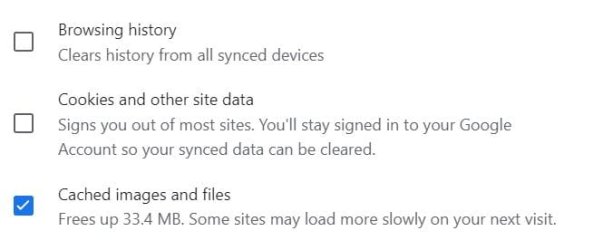
In the Basic section, this is the important stuff:

Clipboard_01.jpg

I keep the history, because I often want to go back and check a site I've visited earlier, and if I have it in my history, I don't have to hunt for the site again.

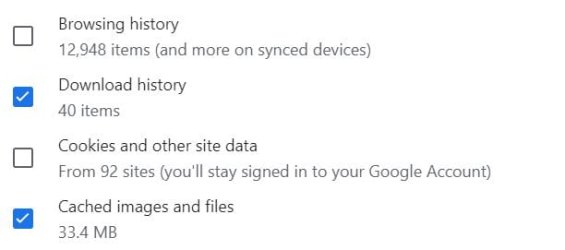
In the Advanced section. this is the important stuff:

Clipboard_02.jpg

I don't need the download history. I know what I've downloaded.

As Ghot said, just figure out what works for you.
 

My Computers My Computers

  • At a glance

    11 Pro 24H2 26100.2454i7-9700 @ 3.00GHz32GBDDR4 @ 2666MHzIntel HD 630 Graphics onboard
    OS
    11 Pro 24H2 26100.2454
    Computer type
    PC/Desktop
    Manufacturer/Model
    Lenovo ThinkCentre M920S SFF
    CPU
    i7-9700 @ 3.00GHz
    Motherboard
    Lenovo 3132
    Memory
    32GBDDR4 @ 2666MHz
    Graphics Card(s)
    Intel HD 630 Graphics onboard
    Sound Card
    Realtek HD Audio
    Monitor(s) Displays
    LG E2442
    Screen Resolution
    1920x1080
    Hard Drives
    1 x Samsung 970 EVO PLUS 500GB NVMe SSD, 1 x WD_BLACK SN770
    250GB NVMe SSD (OS and programs), 1 x WD_BLACK SN770
    500GB NVMe SSD (Data)
    Case
    Lenovo SFF
    Keyboard
    Cherry Stream TKL JK-8600US-2 Wired
    Mouse
    LogiTech M510 wireless
    Internet Speed
    Fast (for fixed wireless!)
    Browser
    Chrome, sometimes Firefox
    Antivirus
    Malwarebytes Premium & Defender (working together beautifully!)
  • At a glance

    11 Pro 24H2 26100.2454i5-8400 @ 2.80GHz32GB DDR4 @ 2600MHzIntel HD 630 Graphics onboard
    Operating System
    11 Pro 24H2 26100.2454
    Computer type
    PC/Desktop
    Manufacturer/Model
    Lenovo ThinkCentre M920S SFF
    CPU
    i5-8400 @ 2.80GHz
    Motherboard
    Lenovo 3132
    Memory
    32GB DDR4 @ 2600MHz
    Graphics card(s)
    Intel HD 630 Graphics onboard
    Sound Card
    Realtek High Definition Audio onboard
    Monitor(s) Displays
    LG FULL HD (1920x1080@59Hz)
    Screen Resolution
    1920 x 1080
    Hard Drives
    1 x Samsung 970 EVO PLUS NVMe; 1 x Samsung 980 NVMe SSD
    Case
    Lenovo Think Centre SFF
    Keyboard
    Cherry Stream TKL JK-8600US-2 Wired
    Mouse
    LogiTech M510 wireless
    Internet Speed
    Fast (for fixed wireless!)
    Browser
    Chrome
    Antivirus
    Malwarebytes Premium and MS Defender, beautiful together
So I should clear all every week?

Its a rolling effect, last in first out once the cache reaches its predetermined size and so unless you actually have an issue (such as a site misbehaving in some way) it can be left alone.

My experience is that although its nice to clear it all once in a while you don't gain anything because a couple of days later and its back to the same it was before.
 

My Computer My Computer

At a glance

W11 Pro x64 ongoing Canary 29500 latest buildsIntel i58GbIntel HD Graphics
OS
W11 Pro x64 ongoing Canary 29500 latest builds
Computer type
Laptop
Manufacturer/Model
Dell 7760 Mobile Precision 17"
CPU
Intel i5
Motherboard
Unknown
Memory
8Gb
Graphics Card(s)
Intel HD Graphics
Sound Card
Realtek
Monitor(s) Displays
Internal
Hard Drives
2 x 256Gb SSD
PSU
Dell 240 watt
Mouse
Dell Premier Bluetooth
Internet Speed
50Mbps
Browser
Edge
Antivirus
Default Microsoft Security

Latest Support Threads

Back
Top Bottom